Well, the thing is, you cannot say to me, “…these stencils look fantastic, but are currently unusable or worthless because…” my brain enters in a crazy mode, and I can only free myself when all the work is finished successfully and that these resources are handy :).
Jokes apart, I use these resources for a long time, I create these for myself, but I knew that they were not perfects. The major problem was that fixing that amount of icons was a time-consuming task. However, with the number of people using these stencils increasing and reporting those problems, I decided to resolve them once and for all.
Today I can announce that I close all the open issues reported on the git repository of this package.
What’s new in this version?
These are the list of changes and additions present in this major release:
Restructure of Visio Stencils files (.vssx) names: the package is now composed of 26 Visio Stencils files.
Some of them were renamed: PowerApps and Flow is now Power Platform; Files is now Files and Message Types Stencils, …
Some were merged: Power BI was merged in the new Power Platform Visio Stencil file; Azure Others was merged in the Azure Additional or Support Stencils, Office365 is now Office, Office 365 and Dynamics 365…
New Visio Stencils files: MIS Black and Cyan and MIS Azure Black and Gray;
New Organisational Stencils file add by Jacob Mansfield;
New shapes: New shapes were added on the majority of the Visio Stencils files (.vssx). Probably the one that was most affected was Azure Stencils and Office, Office 365 and Dynamics 365;
Text annotationsand connector points: The issues regarding text annotations (legend appear in the center of the icon instead of bellow) and connector points (lack of proper connect points) are now solved in all the Visio Stencils files (.vssx). This was a massive work!
Order of the icons: all the icons appear in alphabetic order inside the Visio Stencil file, with the exception in some cases of the first ones that in some case contains the main shape of the context, like in Microsoft Integration Stencils, the first icon is BizTalk Server Logo.
Automation: add 3 PowerShell script to this package for you to:
Standardize all SVG filenames available in all subfolders by:
Not using spaces. Some software will not recognize file names with spaces, and file names with spaces must be enclosed in quotes when using the command line. Having spaces in URL’s are also not a good experience and should be avoided. For all these reasons I decided to remove all spaces and replace it will ‘-‘ (dash);
Names are in Camel case, where the first letter of each section of text is capitalized (of course respecting the line above), e.g., File-Name.svg
Having extension in lowercase, e.g., *.svg
List all the detected duplicate files.
Automatically install (configure) all the Visio files (*.vssx), so that next time you open Visio, they will be there available;
And also the possibility to download the most recent version from GitHub and install it locally;
Standardize shape sizes: standardize the shapes sizes in all to be more or less all of the same sizes Visio Stencils files.
Fixed some minor stencils layouts;
SVG files: new SVG files added.
These changes were a massive job that stole all my free time apart from my work and family time, from the past three weeks! So I hope you appreciate it!
Microsoft Integration, Azure, Power Platform, Office 365 and much more Stencils Pack
Microsoft Integration, Azure, Power Platform, Office 365 and much more Stencils Pack it’s a Visio package that contains fully resizable Visio shapes (symbols/icons) that will help you to visually represent On-premise, Cloud or Hybrid Integration and Enterprise architectures scenarios (BizTalk Server, API Management, Logic Apps, Service Bus, Event Hub…), solutions diagrams and features or systems that use Microsoft Azure and related cloud and on-premises technologies in Visio 2016/2013:
BizTalk Server
Microsoft Azure
Integration
Integration Service Environments (ISE)
Logic Apps and Azure App Service in general (API Apps, Web Apps, and Mobile Apps)
Azure API Management
Messaging: Event Hubs, Event Grid, Service Bus, …
Azure IoT and Docker
AI, Machine Learning, Stream Analytics, Data Factory, Data Pipelines
SQL Server, DocumentDB, CosmosDB, MySQL, …
and so on
Microsoft Power Platform
Microsoft Flow
PowerApps
Power BI
Office365, SharePoint,…
DevOps and PowerShell
Security and Governance
And much more…
… and now non-related Microsoft technologies like:
SAP Stencils
The Microsoft Integration Stencils Pack is composed of 27 files:
Microsoft Integration Stencils
MIS Additional or Support Stencils
MIS AI and Machine Learning Stencils
MIS Apps and Systems Logo Stencils
MIS Azure Additional or Support Stencils
MIS Azure Black and Gray
MIS Azure Old Versions
MIS Azure Stencils
MIS Black and Cyan
MIS Buildings Stencils
MIS Databases and Analytics Stencils
MIS Deprecated Stencils
MIS Developer Stencils
MIS Devices Stencils
MIS Files and Message Types Stencils
MIS Generic Stencils
MIS Infrastructure and Networking Stencils
MIS Integration Fun
MIS Integration Patterns Stencils
MIS IoT Stencils
MIS Office, Office 365 and Dynamics 365
MIS Power BI Stencils
MIS Power Platform Stencils
MIS SAP Stencils
MIS Security and Governance
MIS Servers (Hexagonal) Stencils
MIS Users and Roles Stencils
Organisational Stencils
That you can use and resize without losing quality, in particular, the new shapes.
It came to my attention that there were some Azure icons missing on this package like Azure Synapse Analytics, so I decide to make a refresh on this package and add some missing and new icons available on the Azure Portal.
What’s new in this version?
32 new icons added on the following files:
Microsoft Azure (MIS Azure Stencils.vssx): This package contains stencils of Azure Services (original icons) that are available thru the Azure Portal.
Microsoft Azure: Others (MIS Azure Others Stencils.vssx): This package contains other less important (or secondary features) and related stencils.
MIS: Security and Governance (MIS Security and Governance.vssx): This package contains stencils that will represent Security and Governance.
Continuing the process of improving the user experience regarding text annotations and connector points.
Microsoft Integration, Azure, Power Platform, Office 365 and much more Stencils Pack
Microsoft Integration, Azure, Power Platform, Office 365 and much more Stencils Pack it’s a Visio package that contains fully resizable Visio shapes (symbols/icons) that will help you to visually represent On-premise, Cloud or Hybrid Integration and Enterprise architectures scenarios (BizTalk Server, API Management, Logic Apps, Service Bus, Event Hub…), solutions diagrams and features or systems that use Microsoft Azure and related cloud and on-premises technologies in Visio 2016/2013:
BizTalk Server
Microsoft Azure
Integration
Integration Service Environments (ISE)
Logic Apps and Azure App Service in general (API Apps, Web Apps, and Mobile Apps)
Azure API Management
Messaging: Event Hubs, Event Grid, Service Bus, …
Azure IoT and Docker
AI, Machine Learning, Stream Analytics, Data Factory, Data Pipelines
SQL Server, DocumentDB, CosmosDB, MySQL, …
and so on
Microsoft Power Platform
Microsoft Flow
PowerApps
Power BI
Office365, SharePoint,…
DevOps and PowerShell
Security and Governance
And much more…
… and now non-related Microsoft technologies like:
SAP Stencils
The Microsoft Integration Stencils Pack is composed of 27 files:
Microsoft Integration Stencils
MIS Additional or Support Stencils
MIS AI and Machine Learning Stencils
MIS Apps and Systems Logo Stencils
MIS Azure Additional or Support Stencils
MIS Azure Mono Color
MIS Azure Old Versions
MIS Azure Others Stencils
MIS Azure Stencils
MIS Buildings Stencils
MIS Databases and Analytics Stencils
MIS Deprecated Stencils
MIS Developer Stencils
MIS Devices Stencils
MIS Files Stencils
MIS Generic Stencils
MIS Infrastructure Stencils
MIS Integration Fun
MIS Integration Patterns Stencils
MIS IoT Devices Stencils
MIS Office365
MIS Power BI Stencils
MIS PowerApps and Flows Stencils
MIS SAP Stencils
MIS Security and Governance
MIS Servers (HEX) Stencils
MIS Users and Roles Stencils
That you can use and resize without losing quality, in particular, the new shapes.
Once again, it is time to get back to one of my favorite topics, error and warnings, cause, and solutions blog post. This time with a different error regarding one of the most critical components in BizTalk Server: Microsoft Distributed Transaction Coordinator (MSDTC).
Last week a client call me that their production environment was entirely down; nothing was working. I accessed the server and realized that all services were stopped, and we were not able to start them. Long story short, and after I made the common question: “Did someone made any changes on the environment?”, to which I received the usual response: “No, we didn’t”. They had made some changes on the network level blocking port communication between BizTalk Server and SQL Server that supports BizTalk Server.
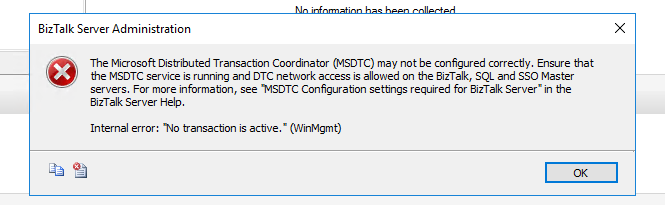
After I asked them to restore the previous settings and open all communication between BizTalk Server and SQL Server, I could start the BizTalk Services on the machine. However, when I open the BizTalk Server Administration Console to see if everything was working correctly, I got the following error while refreshing the BizTalk Group:
TITLE: BizTalk Server Administration —————————— The Microsoft Distributed Transaction Coordinator (MSDTC) may not be configured correctly. Ensure that the MSDTC service is running and DTC network access is allowed on the BizTalk, SQL and SSO Master servers. For more information, see “MSDTC Configuration settings required for BizTalk Server” in the BizTalk Server Help.
Internal error: “No transaction is active.” (WinMgmt) —————————— BUTTONS: OK ——————————
Cause
Without a doubt that this error is still related to communication restrictions between the BizTalk Server machine and the SQL Server machine that hosts BizTalk Server databases, and especially with MSDTC ports. So I ask them if they disable all restrictions between the machines: from BizTalk to SQL Server and also from SQL Server to BizTalk Server because, for example, RPC ports need to be bi-directional, so if you have firewalls or network port restrictions you need to allow inbound and outbound exclusions for these ports.
And the reason for this error was that they only had disabled network restrictions from BizTalk Server to SQL Server, not the other way.
Solution
Once they disabled all network restrictions from SQL Server to BizTalk Server, this problem was solved.
Note: if you want to implement communication port restrictions between BizTalk Server and SQL Server, be sure that you are following the right procedures and ensuring that the required ports are open on the firewalls so that the BizTalk Server components can communicate with each other.
It is a strange year, and for the first time since 2013, we didn’t have face to face INTEGRATE event. Instead, due to the COVID-19 pandemic, this year we had to go with an online event. Despite all of that, it was a great event. Nevertheless, I miss that social interaction we use to have and see friends that I usually only see once a year in this event.
The good part for me in being an online event was that I was able to attend (or view) the sessions at my on rhythmic. Having three small kids at home can be a challenge, and it was a little difficult to attend in real-time to all the sessions, so once they went to bed, I could see the sessions that I miss out during the day without having to wait two months for them to be available online.
About my session
Session Name: BizTalk Server 2020: Migration Path
Session Overview: The goal of this session to demystify and clarify the BizTalk Server migration process and help both implementation teams as decision-makers to be aware of all the considerations that need to be taken into account when planning your migration to BizTalk Server 2020 and hopefully helping you carry out these tasks.
Like previous years, the event was recorded, so if for any reason you could not be present at these events, or if you want to review it again, you can now do it here:
I am always paying attention to requests from members of the community, and whenever I can, I update this stencil pack with requested shapes or functionalities. And this is one of these cases. One of the most common complaints about this stencil pack was/is text annotations. When you try to add a legend on the stencil, the text is in the middle of the icon, instead of underneath. And sometimes the text is white, which doesn’t help also.
Another recent aspect that came to my attention was the fact that was missing proper connector points, which make it hard to properly connect shapes in a diagram.
Of course, all of these you can manually fix by move the text to the bottom of each shape, change the color of the text and add connector points. But some of these tasks required a more deep knowledge of working with Visio and they are time-consuming. Luckily this work is being made, it may take a while since this package has more than 2000 shapes!
What’s new in this version?
Today I can announce that the first phase is done and the first file, and probably the most important, of this package is fixed:
Microsoft Azure (MIS Azure Stencils.vssx): This package contains stencils of Azure Services (original icons) that are available thru the Azure Portal.
The main goal of this release was to solve or improve the user experience regarding text annotations and connector points. In this version, the changes and additions are:
Text annotationsissue solved: This issue was solved on the stencils present on the Microsoft Azure (MIS Azure Stencils.vssx) file;
Proper connector points added: This improved feature was added on stencils present on the Microsoft Azure (MIS Azure Stencils.vssx) file;
Fixed some minor stencils layouts;
New shapes: New shapes added on Microsoft Azure (MIS Azure Stencils.vssx) and Microsoft Azure: Others (MIS Azure Others Stencils.vssx);
Microsoft Integration, Azure, Power Platform, Office 365 and much more Stencils Pack
Microsoft Integration, Azure, Power Platform, Office 365 and much more Stencils Pack it’s a Visio package that contains fully resizable Visio shapes (symbols/icons) that will help you to visually represent On-premise, Cloud or Hybrid Integration and Enterprise architectures scenarios (BizTalk Server, API Management, Logic Apps, Service Bus, Event Hub…), solutions diagrams and features or systems that use Microsoft Azure and related cloud and on-premises technologies in Visio 2016/2013:
BizTalk Server
Microsoft Azure
Integration
Integration Service Environments (ISE)
Logic Apps and Azure App Service in general (API Apps, Web Apps, and Mobile Apps)
Azure API Management
Messaging: Event Hubs, Event Grid, Service Bus, …
Azure IoT and Docker
AI, Machine Learning, Stream Analytics, Data Factory, Data Pipelines
SQL Server, DocumentDB, CosmosDB, MySQL, …
and so on
Microsoft Power Platform
Microsoft Flow
PowerApps
Power BI
Office365, SharePoint,…
DevOps and PowerShell
Security and Governance
And much more…
… and now non-related Microsoft technologies like:
SAP Stencils
The Microsoft Integration Stencils Pack is composed of 27 files:
Microsoft Integration Stencils
MIS Additional or Support Stencils
MIS AI and Machine Learning Stencils
MIS Apps and Systems Logo Stencils
MIS Azure Additional or Support Stencils
MIS Azure Mono Color
MIS Azure Old Versions
MIS Azure Others Stencils
MIS Azure Stencils
MIS Buildings Stencils
MIS Databases and Analytics Stencils
MIS Deprecated Stencils
MIS Developer Stencils
MIS Devices Stencils
MIS Files Stencils
MIS Generic Stencils
MIS Infrastructure Stencils
MIS Integration Fun
MIS Integration Patterns Stencils
MIS IoT Devices Stencils
MIS Office365
MIS Power BI Stencils
MIS PowerApps and Flows Stencils
MIS SAP Stencils
MIS Security and Governance
MIS Servers (HEX) Stencils
MIS Users and Roles Stencils
That you can use and resize without losing quality, in particular, the new shapes.
And the most expected email arrived once again on 1st July, thank you Microsoft for this amazing award. Once again, I’m delighted to share that I was renewed as a Microsoft Azure MVP (Microsoft Most Valuable Professional). This is my 10th straight year on the MVP Program, an amazing journey, and experience that started in 2011 as BizTalk MVP, which gave me the opportunity, and still does, to travel the world for speaking engagement, share the knowledge, and to meet the most amazing and skilled people in our industry.
I would like to thank the MVP Team, my MVP Lead Cristina Herrero, all my fellow MVPs, my beautiful family, my coworkers at DevScope, and in special all my blog readers, friends, members of Microsoft Enterprise Integration Community for their support during these years.
It’s a big honor to be in the program and be one of this amazing worldwide group of technicians and community leaders who actively share their high quality and real-world expertise with other users and Microsoft. I’m looking forward to another great year!
The reason I end up creating a new version for BizTalk Server 2016 was that previous scripts only did 90% of the work, and they were intended to be used on “day zero” of your environment, i.e., after you finish installing your environment.
So, I update my previous script to add more functionalities, mainly:
Configure the Default Send Handler as the Send Handler for each existing static and Dynamic Send Ports
Configure Receive Handlers from all the existing Receive locations
With these missing functionalities added to the script, it will configure or reconfigure 100% of your environment. You can use it on “day zero” or in an already up and running environment. Of course, this was optimized to BizTalk Server 2016 (but it can be executed in all precious BizTalk Server previous versions).
Why a new version dedicated to BizTalk Server 2020?
There are two reasons why I decide to create this new script, specific only to BizTalk Server 2020:
The previous scripts don’t run properly in BizTalk Server 2020;
And BizTalk Server 2020 now has support to Group Managed Service Accounts;
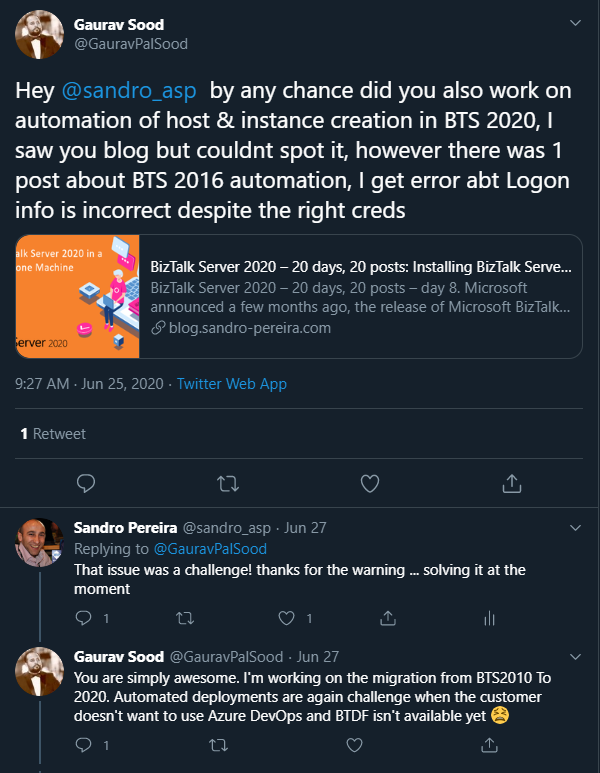
The first reason is very simple. The previous scripts will not work giving you an invalid credential error even though you are putting the correct credentials has Gaurav Sood kindly reported to me.
The reason why this error is happening was because one undocumented change that product group made on the MSBTS_HostInstance WMI Class and now the method Install has a new mandatory parameter:
IsGmsaAccount: a boolean that will define whether or not we will use Group Managed Service Accounts
Logon: String containing the logon information used by the host instance;
Password: String containing the password for the host.
GrantLogOnAsService: Boolean determining whether the ‘Log On As Service’ privilege should be automatically granted to the specified logon user or not. This flag only has effect when the HostType property is set to In-process.
IsGmsaAccount: a boolean that will define whether or not we will use Group Managed Service Accounts
If true, the password can be empty;
The second reason is related to the first one. Now BizTalk Server 2020 has support Group Managed Service Accounts (gMSA) and since I’m changing this script I also want to add support to this feature.
What is Host and a Host Instances?
The BizTalk Host is a logical process and security boundary within BizTalk Server that represents a logical set of zero or more run-time processes in which you can deploy BizTalk Server services and artifacts (such as adapter handlers, receive locations, and orchestrations). Each host has a security group assigned to it and may contain multiple host instances, each on an individual machine, that perform the work of the host.
In another hand, a host instance is the physical instance of a host on a computer running BizTalk Server. Each host instance belongs to exactly one host, and the service account of the host instance belongs to the security group of the host. The security group may be used to grant permissions to physical resources such as databases for use by any host instances in the host.
What is an Adapter Handler?
An adapter handler is an instance of a BizTalk host in which the adapter code runs. When you specify a send or receive handler for an adapter you are specifying which host instance the adapter code will run in the context of. An adapter handler is responsible for executing the adapter and contains properties for a specific instance of an adapter.
The default BizTalk Server configuration will only create one in-process host, “BizTalkServerApplication”, that will be associated as a receive and send adapter handler for all of the installed adapters, with the exception of HTTP, SOAP, WCF-BasicHttp, WCF-WSHttp, and WCF-CustomIsolated adapter receive handlers that can only be running in an isolated host.
How can I automate this task?
Windows PowerShell is a Windows command-line shell designed especially for system administrators and can be used by BizTalk administrators to help them in automating tasks.
This is a simple script that will configure the following components in your environment:
Create Host and Host Instance according to some of the best practices: two Receive host and host instances (one 32-bits and one 64-bits); two Send host and host instances (one 32-bits and one 64-bits); One Host and Host Instance to process Orchestrations and one Host and Host Instance for tracking;
Create Receive and Send Handlers for each adapter;
And finally, associate the correct Receive and Send Handlers to each existing receive and send ports present in your environment
Download
THIS POWERSHELL IS PROVIDED “AS IS”, WITHOUT WARRANTY OF ANY KIND.
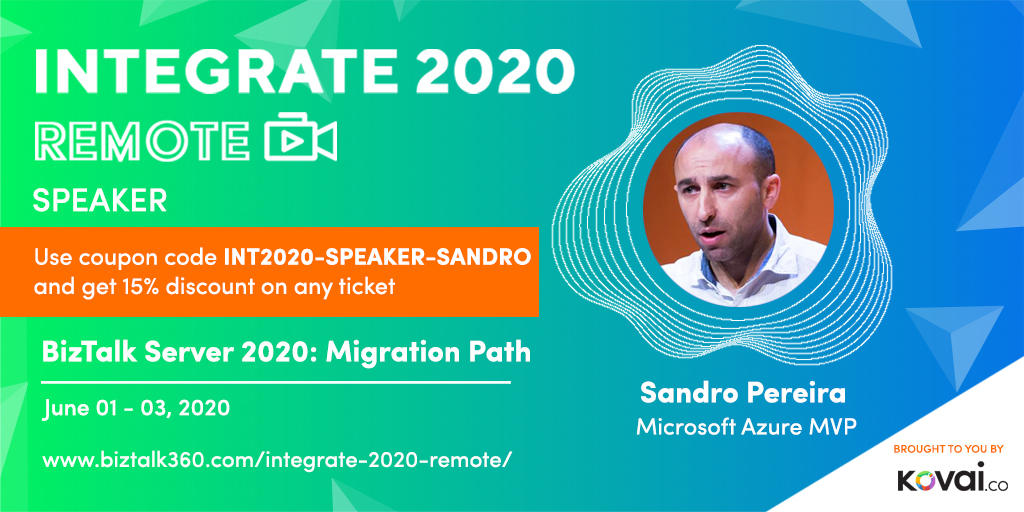
INTEGRATE (formerly known as BizTalk Summit) is the primary conference for professionals working in the Microsoft Integration space and once again is back this time REMOTE due to the COVID-19 issue around the word. It will be the first-ever INTEGRATE REMOTE conference that will happen from June 1 to 3, 28 speakers – 12 MVPs, 15 Microsoft PM and 1 former MVP – will address the entire Microsoft Integration Platform landscape on topics like BizTalk Server, Logic Apps, Service Bus, Event Grid, Event Hubs, Power Automate, API Management, Azure Functions and many more.
And once again I will be there delivering a session – since the first BizTalk Summit event, I’m a constant presence as a speaker at these events – about BizTalk Server! This time on a session about: Migration Path to BizTalk Server 2020.
About my session
Session Name: BizTalk Server 2020: Migration Path
The goal of this session to demystify and clarify the BizTalk Server migration process and help both implementation teams as decision-makers to be aware of all the considerations that need to be taken into account when planning your migration to BizTalk Server 2020 and hopefully helping you carry out these tasks.
INTEGRATE 2020 Remote Registration
You are still on time to register for the conference here. Use my coupon discount INT2020-SPEAKER-SANDRO to get 15% discount!
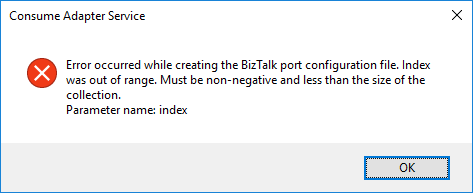
I have done these thousands of times and it is a very straightforward task once you know how to communicate with Oracle system but this time I got the following error:
Error occurred while creating the BizTalk port configuration file. Index was out of range. Must be non-negative and less than the size of the collection. Parameter name: index
A curiosity is that the Wizard was able to successfully generate the Oracle Schemas. The problem occurred while it was trying to generate the Binding file.
Cause
Unfortunately, I don’t know exactly the cause reason for this error. In my view, the same occurred due to some special character coming from the Oracle resources that are being consumed or incompatibilities between Oracle data types and .NET data types and that are used to generate the Binding file.
Nevertheless, this is not a stopping issue. You still have all the necessary BizTalk resources generated by the wizard: the Oracle schemas. The only thing that is not generated is the binding file, which is extremely useful to create the receive or send port in the BizTalk Server Administration Console. However, despite this constraint, you are still able to manually create the port without requiring the binding file.
Solution
Well, you know me, it is possible to manually create the ports without requiring the binding files, however, this is an accelerator that I prefer not to lose. So, I had to investigate and solve this problem, before it appears more often.
And in fact, the solution is quite easy:
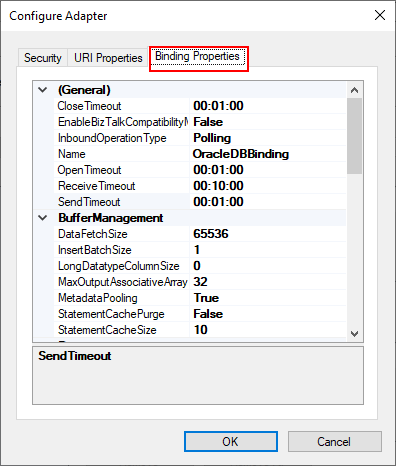
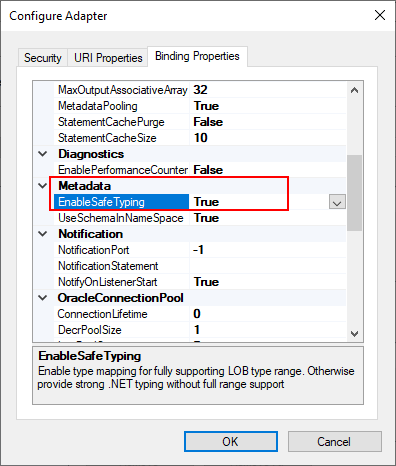
On the Consume Adapter Service Schema Generator Wizard, while you are configuring the connection string to Oracle, configure the URI, select the Binding Properties tab.
On the Binding Properties tab, scroll down to the Metadata section. There you will find a property called: EnableSafeTyping.
This feature controls how the adapter surfaces certain Oracle data types and by default this value is false.
To solve this issue you need to change the EnableSafeTyping value to true.
Since not all .NET and Oracle types are created equally, we occasionally need to set the value true for this property to handle some constraints around data types.
This is not a unique Oracle issue, this same error may happen when you are trying to generate schemas from SAP also.
Today we will address the last suite of functoids that are part of the BizTalk Mapper Extensions UtilityPack project available for BizTalk Server 2020: Math Functoids. And with this blog post, we finally arrive to the end of this project migration.
Math Functoids
This library includes a suite of functoids to perform a variety of basic mathematical operations that you can use this inside BizTalk mapper.
This project includes the following Custom Functoids:
Negate Number Functoid: Use Negate Functoif to return the input double as its negated form.
This functoid requires one input parameter:
A number (double or int) to be negated;
The output result will be the input value in his negative form. If it’s positive, it will return as negative and vice-versa.
Examples:
Input 1 >>> Output = -1
Input -23,09 >>> Output = 23,09
Input 0 >>> Output = 0
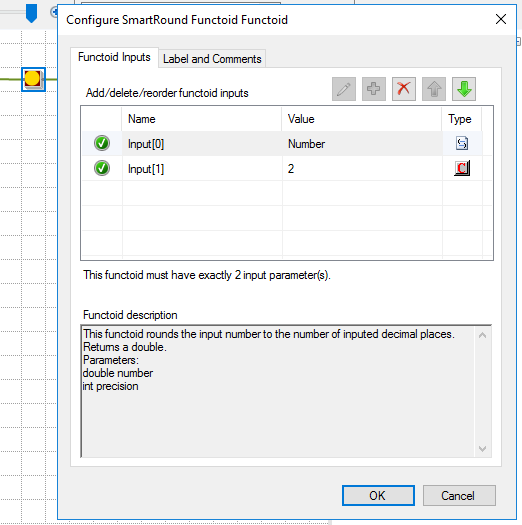
SmartRound Functoid: Use SmartRound to return the rounded double, by the second parameter input.
The functoid takes two mandatory input parameters:
Parameter 1: Number to be rounded (double or int)
Parameter 2: Number to decimals places
The output of the functoid will be the input number rounded up or down to the specified decimal places.
Examples:
Input 23 rounded to 2 >>> Output = 23,00
Input 24,005900 rounded to 3 >>> Output = 24,006
BizTalk Mapper Extensions UtilityPack
BizTalk Mapper Extensions UtilityPack is a set of libraries with several useful functoids to include and use it in a map, which will provide an extension of BizTalk Mapper capabilities.
Where to download?
You can download this functoid along with all the existing one on the BizTalk Mapper Extensions UtilityPack here:



 Microsoft Integration, Azure, Power Platform, Office 365 and much more Stencils Pack for Visio