by Sandro Pereira | Feb 2, 2017 | BizTalk Community Blogs via Syndication
This is a collection of 5 different image formats of the new Unofficial BizTalk Server 2016 logotype (check the official logo here), three of them are available in vector format that will allow you to use and resize without losing quality:
- BizTalkServer2016-linhas.ai
- BizTalkServer2016-linhas.eps
- BizTalkServer2016-linhas.pdf
- BizTalkServer2016-linhas-01.jpg
- BizTalkServer2016-linhas-01.png
that can be used to customize a banner for your blog, an article, making flyers, stickers, brochure or rollups for BizTalk events.
Again, this is not the official logo. In the official logo, Microsoft decided to drop the fancy Server icon from the logo and the version identification, now it is a simple generic logo with just Text that will be consistent in this and further versions of BizTalk Server. But people sometimes prefer to use the “old” format just because it is easier to visual specify the version of BizTalk Server… for that reason only there you have!
Thanks to António Lopes (UX/UI DESIGNER at DevScope) for helping me creating these resources.
 (Unofficial) BizTalk Server 2016 logo in vector format (2.4 MB)
Microsoft | TechNet Gallery
Author: Sandro Pereira
Sandro Pereira lives in Portugal and works as a consultant at DevScope. In the past years, he has been working on implementing Integration scenarios both on-premises and cloud for various clients, each with different scenarios from a technical point of view, size, and criticality, using Microsoft Azure, Microsoft BizTalk Server and different technologies like AS2, EDI, RosettaNet, SAP, TIBCO etc. He is a regular blogger, international speaker, and technical reviewer of several BizTalk books all focused on Integration. He is also the author of the book “BizTalk Mapping Patterns & Best Practices”. He has been awarded MVP since 2011 for his contributions to the integration community. View all posts by Sandro Pereira
by Sandro Pereira | Jan 31, 2017 | BizTalk Community Blogs via Syndication
Time to update and improve a very old project of mine: Item Template for Visual Studio 2010: Custom BizTalk Functoid. I really like this one because I normally create a lot of custom functoids and this will help me streamline my work. Be fast, more productive and avoid repeating and annoying task… that is my goal.
This template will allow you to easily create new Functoids for BizTalk Server 2016 – but I think it will also work for other versions of BizTalk/Visual Studio – without having to code the entire class and therefore allowing you to focus on what really matters, the functoid behavior. Just start a new Visual Studio C# library project, or open an existing one, and add a functoid class to start building your BizTalk Server custom Functoid.
This will create a class with the basics skeleton necessary for you to start building your custom functoid, including adding the necessary references (DLLs) to your project. Again, the aim here is to you to focus on the logic of your custom functoid and not in the need to remember all the structure that you need to implement, or in the properties you need to override from the extended BaseFunctoid.
How can I install the Item Template?
To use this item template in your C# library projects just download the project (Don´t unzip) and copy the compressed file to:
- C:UsersUserNameDocumentsVisual Studio 2015TemplatesItemTemplatesVisualC#.
You can download Custom BizTalk Functoid item template for Visual Studio 2015 from:
BizTalk Server: Custom BizTalk Functoid item template for Visual Studio 2015 (3 KB)
Microsoft Code Gallery
Author: Sandro Pereira
Sandro Pereira lives in Portugal and works as a consultant at DevScope. In the past years, he has been working on implementing Integration scenarios both on-premises and cloud for various clients, each with different scenarios from a technical point of view, size, and criticality, using Microsoft Azure, Microsoft BizTalk Server and different technologies like AS2, EDI, RosettaNet, SAP, TIBCO etc. He is a regular blogger, international speaker, and technical reviewer of several BizTalk books all focused on Integration. He is also the author of the book “BizTalk Mapping Patterns & Best Practices”. He has been awarded MVP since 2011 for his contributions to the integration community. View all posts by Sandro Pereira
by Sandro Pereira | Jan 24, 2017 | BizTalk Community Blogs via Syndication
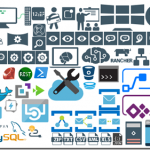
After some requests from the community, I decided to update my Microsoft Integration Stencils Pack with an additional of 183 new shapes and some reorganization. With these new additions, this package now contains an astounding total of ~1094 shapes (symbols/icons) that will help you visually represent Integration architectures (On-premise, Cloud or Hybrid scenarios) and solutions diagrams in Visio 2016/2013. It will provide symbols/icons to visually represent features, systems, processes and architectures that use BizTalk Server, API Management, Logic Apps, Microsoft Azure and related technologies.
- BizTalk Server
- Microsoft Azure
- BizTalk Services
- Azure App Service (API Apps, Web Apps, Mobile Apps and Logic Apps)
- Event Hubs
- Service Bus
- API Management, IoT and Docker
- Machine Learning, Stream Analytics, Data Factory, Data Pipelines
- and so on
- Microsoft Flow
- PowerApps
- PowerBI
- PowerShell
- And many more…
The Microsoft Integration Stencils Pack v2.4 is composed by 11 files:
- Microsoft Integration Stencils v2.4
- MIS Apps and Systems Logo Stencils v2.4
- MIS Azure Portal, Services and VSTS Stencils v2.4
- MIS Azure SDK and Tools Stencils v2.4
- MIS Azure Services Stencils v2.4
- MIS Deprecated Stencils v2.4
- MIS Devices Stencils v2.4
- MIS IoT Devices Stencils v2.4
- MIS Servers and Hardware Stencils v2.4
- MIS Support Stencils v2.4
- MIS Users and Roles Stencils v2.4
These are some of the new shapes you can find in this new version:
You can download Microsoft Integration Stencils Pack for Visio 2016/2013 from:
Microsoft Integration Stencils Pack for Visio 2016/2013 (9,1 MB)
Microsoft | TechNet Gallery
Author: Sandro Pereira
Sandro Pereira lives in Portugal and works as a consultant at DevScope. In the past years, he has been working on implementing Integration scenarios both on-premises and cloud for various clients, each with different scenarios from a technical point of view, size, and criticality, using Microsoft Azure, Microsoft BizTalk Server and different technologies like AS2, EDI, RosettaNet, SAP, TIBCO etc. He is a regular blogger, international speaker, and technical reviewer of several BizTalk books all focused on Integration. He is also the author of the book “BizTalk Mapping Patterns & Best Practices”. He has been awarded MVP since 2011 for his contributions to the integration community. View all posts by Sandro Pereira

by Sandro Pereira | Jan 17, 2017 | BizTalk Community Blogs via Syndication
While researching for my last post, Thinking outside the box (or not): How to create “Global C# function” to be reused inside a map?, in BizTalk360 blog, I encountered several errors while playing around with maps in order to find an approach that would allow me to create the concept of Global Function. And some of this errors were:
“Inline Script Error: must declare a body because it is not marked abstract, extern, or partial”
“Inline Script Error: ; expected”
or
“Inline Script Error: Type ‘BizTalkMapper.FunctoidInlineScripts’ already defines a member called ‘FunctionName’ with the same parameter types”
Causes
The cause of this problem is that you do not correctly declare the body of the Inline C# Function.
Or, if you are trying to reuse an existing Inline C# Function you are doing it properly.
To reuse Inline C# Functions these are the rules that you need to follow:
- If all of the Scripting Functoids are in the same grid page: In the first Scripting Functoid, linked from the source to the destination, we will have to specify the body function and in the following functoids, we only need the function declaration (no body).
- If the Scripting Functoids are in different grid pages: The Scripting Functoid that specifies the body function needs to be on the leftmost grid page and the remaining Scripting Functoids (with the function body declared) on the other grid pages to the right. In other words, counting the grid pages from left to right, if the Scripting Functoid that specifies the body function is on the second grid page, the remaining functoids with the function body declared, cannot be placed on the first grid page, they can only be placed from the second grid page (including the second).
Solution
The solution to solve this issue you have two options, you need to follow the rules described above (BizTalk Mapper tips and tricks: How to reuse Scripting Functoids with Inline C# inside the same map) or you need to implement the concept of global C# Function described in my post: Thinking outside the box (or not): How to create “Global C# function” to be reused inside a map?, in resume:
- Add a Grid page to your map and rename it to “GlobalFunctions”
- Set this grid as the first grid page of your map (important step)
- Drag-and-Drop a Scripting Functoid to the “GlobalFunctions” grid page and place the C# code
- Do not link any inputs and don’t map (link) this Scripting Functoids to any element in the destination Schema.
- Double click the earlier Scripting Functoids added to the “GlobalFunctions” grid page and set the expected input values as empty constant values, that by default doesn’t exist
- Now you can use these functions in other grid pages using only the function declaration
Author: Sandro Pereira
Sandro Pereira lives in Portugal and works as a consultant at DevScope. In the past years, he has been working on implementing Integration scenarios both on-premises and cloud for various clients, each with different scenarios from a technical point of view, size, and criticality, using Microsoft Azure, Microsoft BizTalk Server and different technologies like AS2, EDI, RosettaNet, SAP, TIBCO etc. He is a regular blogger, international speaker, and technical reviewer of several BizTalk books all focused on Integration. He is also the author of the book “BizTalk Mapping Patterns & Best Practices”. He has been awarded MVP since 2011 for his contributions to the integration community. View all posts by Sandro Pereira
by [email protected] Steef-Jan Wiggers | Dec 31, 2016 | BizTalk Community Blogs via Syndication
Last few hours before 2016 ends and what a year it has been as so many things happened. The year started off with finalizing and publishing an eBook on extensibility of BizTalk Server, which is available for free. My buddy Saravana made available through BizTalk360 website.
The publishing of the book marked the first major milestone in 2016. The collaboration of Eldert, Johann and myself as authors and three awesome reviewers in Mark, James and Sandro delivered a 150-page book on the power of .NET and BizTalk.
With the release of the book, Eldert and myself embarked on a speaking tour to promote the book, which we did in front of the BizTalk User Group in the Netherlands, online through integration Monday and in Sweden (Stockholm, Gothenburg). Thanks Mikael, Johan and Peter!!!
In the spring (May) I presented at Integrate 2016 on IoT end to end leveraging the Microsoft Azure Platform services. And this was in front of almost 400 people.
Who would have thought that integration is irrelevant? It’s not! Thanks for Saravana and the BizTalk360 team for making this three-day event happening. Integrate 2016 was a success and for me my second major milestone in 2016.
Before Integrate 2016 Kent, his wife Melissa travelled through the UK and Scotland enjoying various country sides. One of the best days was hanging out with Michael in Newcastle. A really nice place with some great bars and restaurants.
After Integrate I went to TUGA IT, a large two-day conference in Lisbon. Thanks to Sandro I got invited to speak together with Nino. The three of us did a full day workshop on integration on Friday and a few talks on Saturday.
We had a blast and I really enjoyed Lisbon together with Nino and Sandro. Thanks to Niko Neugebauer and other Portuguese involved! Before I left I spend a full day exploring Lisbon with Sandro.
After Integrate and TUGA IT I went to Sweden with Eldert to talk about BizTalk Extensibility and another topic Azure Web Jobs. Sweden and its user groups are awesome, great welcome, excellent hosting environments and crowd. In Stockholm, we had a great user group event with several speakers including Mikael, Johan, Eldert, Robin, Ashwin and myself. The next day Eldert and myself went to Gothenburg to speak on extensibility and Web Jobs.
The summer holidays I spent in Italy and started to seriously prepare for third major milestone in 2016, the NYC marathon. In 2013 I ran the Berlin marathon together with Kent and decided or at least I said I will do another, preferably New York. Once Kent and his brother Kurt decided they wanted to run it when they turned 40 I said I am in!
The race was brutal and the bridges were quite the experience and challenge. It was a psychical and mental test yet I managed to finish with 5 hours.
My Canadian buddies finished just a few minutes later and then we enjoyed our medals with some great food and beers.
Thanks Kent and Kurt for letting me join in this endeavor. Our next challenge might be in 2018.
The next stop after the Marathon was the MVP Summit, which started the day after NYC Marathon. And to start things of was a nice game of the Seahawks playing the Bills. Lots of MVP and some MS folks went to the game.
The MVP Summit was a great experience as there was lots to share and engagements with the product teams.
You always run into someone you know ☺
This summit took place during the elections, hence we spent an evening together at Dan and Ola, who organized a great barbeque.
The outcome was not what we thought it would be, however, we still had a great time.
One of the traditions during the Summit is visiting Joey’s in Bellevue, which of course we did.
And Moksha our favorite Indian Cuisine place.
Another thing we did was visiting Tord, PG BizTalk Server and his family in Redmond.
And the BizTalk Crew was reunited once again.
We know BizTalk Server is in good hands now!
I really enjoyed my stay in Seattle. I went to another football game with Kent. We watched the Washington Huskies.
Before I left Seattle, I spent some time with my great friend Tom and his wife JoAnn. We watched the Seahawks play the Patriots on Sunday in a bar. Yes, more American Football, I love it. And it was an epic game, with the Hawks winning the game and cheers in the bar!
It was quite a trip, New York, running the Marathon followed by the MVP Summit. Something to remember as long as I will live.
In November and December I spend time writing some quest blogs for Saravana, a LinkedIn article on today’s integration and presenting at our Local user group.
In 2017 I, will kick the tires with some speaking engagements in Australia. In February I, will spent two and a half week with Mick, Eldert, Rene, Dean, Bill, Dan and many others. This will be followed by the global integration boot camp in March, where I’ll be speaking at the location of motion10 together with Eldert, Rob, Gijs, and Tomasso. In April and May I will be on the road to probably to speak in Portugal, Sweden and some other countries or venues. It will be an interesting year 2017!
P.S. I lost some kind of bet I have to wear some jersey with a name of a soccer player I really like, NOT!!!
Cheers,
Steef-Jan
by Steef-Jan Wiggers | Oct 31, 2016 | BizTalk Community Blogs via Syndication
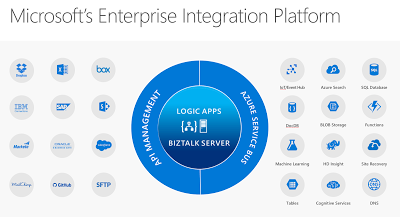
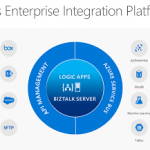
Just recently Microsoft has released its tenth version of BizTalk Server: BizTalkServer 2016. This latest version will bring the cloud closer to the enterprises with connectivity to Azure Service Logic Apps. The Logic App adapter will close the gap with regards to connectivity with SaaS solutions. The Logic Apps has a myriad of connectors of various SaaS solutions like Dropbox, GitHub, Marketo, Salesforce and with Azure Services like DocDb, Machine Learning and Functions.
SaaS connectors that will grow in numbers in the near future and connectors to Azure Services. Connectors that provide connectivity to anything, anywhere, which is basically the key driver for integration. Hence the centralizing Logic Apps and BizTalk Server at the heart of Microsoft’s Enterprise Integration Platform.
We have arrived in the digital age, where applications and data is everywhere. With all types of devices, we are connected 24/7 and surrounded by data we consume. And enterprises need to be connected and have access to data in- and outside their data center or cloud. Therefore, integration plays an essential role that it always had.
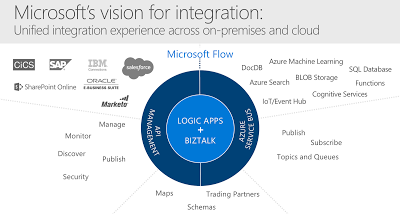
Microsoft technology has evolved over the years and matured into the tools we can use in this digital age to build integrations that fulfill current business needs. BizTalk Server, and Logic App each serve the need for enterprise requirements for integration and can work together nicely. And this Microsoft’s vision for integration i.e. the unified integration experience.
BizTalk Server can provide deep integration with divers line of business systems like SAP and Oracle and act as a gateway to the cloud. Logic Apps can make enterprises more agile to quickly deploy small integration solutions with minimal overhead and lead time. Both collaborate well with API Management and the Azure Service Bus, two other key Azure Services, forming Microsoft Integration Platform. A platform designed and built for the digital age!
Cheers,
Steef-Jan
Author: Steef-Jan Wiggers
Steef-Jan Wiggers is all in on Microsoft Azure, Integration, and Data Science. He has over 15 years’ experience in a wide variety of scenarios such as custom .NET solution development, overseeing large enterprise integrations, building web services, managing projects, designing web services, experimenting with data, SQL Server database administration, and consulting. Steef-Jan loves challenges in the Microsoft playing field combining it with his domain knowledge in energy, utility, banking, insurance, health care, agriculture, (local) government, bio-sciences, retail, travel and logistics. He is very active in the community as a blogger, TechNet Wiki author, book author, and global public speaker. For these efforts, Microsoft has recognized him a Microsoft MVP for the past 6 years. View all posts by Steef-Jan Wiggers

by Nick Hauenstein | May 22, 2016 | BizTalk Community Blogs via Syndication
In this post, I am going to try to capture in text the presentation that I gave at the Integrate 2016 conference over in London. Text is likely the worst medium in which to capture such a session, but, alas, I do realize that sometimes it is the best medium for proper digestion of such content. If you’d rather see it in video form, click here.
So with that, let’s pretend that you are sitting among fellow professionals in a beautiful room on the 3rd floor of ExCeL London – complete with bright colored lights to set the mood. A wild American then appears, flailing his arms and babbling about how it’s actually 3 AM, and we’ve all been deceived. Then he starts talking about food.
Getting Our Priorities Straight
The world of software development might be a better place if we approached our tasks in that world the way that we approach each meal. We don’t really start each meal by a trip to the racks or shelves that hold our appliances – thinking, “Well, I have a vegetable peeler, and a fondue pot, I guess that means we’re eating some melted Gruyère and Emmentaler mixed with white wine, and carrot strings for every meal.”
Usually, the way it actually works out is that I’m thinking about what I’m craving, the ingredients that I have on hand and their flavor/nutritional value relative to my needs. From there, I look to proven recipes that satisfy those things, and finally, reach for the specific tools needed to do the job. If I don’t have them, I acquire them, or fashion a workable approximation.
We have to be really careful that we, when approaching software development and integration, take the same approach as we would when crafting an excellent meal. An approach that looks first to the needs and constraints, then to proven patterns/recipes, and allows the tools used to flow from the rest – even to the point of crafting/buying new tools that we haven’t used before if necessary.
Business Challenges / Constraints
So, let’s imagine that we all work together now. We want to take the approach outlined above – one in which we have to consider the business need and the constraints that we may very well simply be stuck with. From there, we can consider proven patterns that might help us overcome, and then finally identify/acquire/create the tools required to get the job done.
Our company makes custom bobbleheads.
The way that it works is that a customer uploads a 3D model of their face, and then selects a pre-built body from the gallery. The 3D print of their face starts immediately so that the order can be shipped as soon as possible. The customer is permitted to take as long as they need to select the body from the gallery of pre-built bodies. Once they select a body, we attach the printed face to the chosen body and ship the assembled dolls to the customer.
So what happens behind the scenes that we can’t escape?
Well, sadly we don’t do greenfield development here. It’s not really brownfield development either. It’s more like a house haunted by ghost IT – shadow IT that has left.
Whenever a customer uploads their 3D face model, an XML notification message is created that contains the order id and a reference to their face model. At the time it was built, our developers emulated the BizTalk Server demos of the day and built distributed, fault-tolerant XML file copy operations whilst applying the wisdom of Chris Maden who has been quoted saying, “XML is like violence. If it doesn’t solve your problem, you’re not using enough of it.”
These same developers learned while attending conferences over the past few years that Dropbox is the next big thing in enterprise integration. They may have been wrong, but it’s now up to us to Make Dropbox Great Again™.
Once the customer selects a body for their doll, another XML message is created and dropped into the same folder in Dropbox with the same file naming conventions. Ultimately, we need to pair up the two components of the order – the head and body – in order to complete the processing.
Proven Patterns
It’s at this point that we would consult the great oracles of all wisdom and knowledge in the world of integration, Gregor Hohpe and Bobby Woolf. We will search through the patterns to find pieces that help solve each piece of the puzzle.
Which patterns might we find? Well, to handle the communication with Dropbox, we might utilize the adapter pattern in hopes that one day the data will be sourced from a different system. We could apply the pipes and filters pattern and build a reusable translation/transformation pipeline made up of reusable independent steps organized in the proper order to provide the required translation/transformation/message enrichment for each interface.
From there, we could apply the publish and subscribe pattern to enable loosely coupled communication between the source system and any number of downstream subscribers – maybe routing the message in a content-based fashion. We could also layer on top of this a process manager to enable content-based correlation.
Tools
How would we use these patterns in concert with the tools we have/don’t have? BizTalk Server might seem like a natural fit.
It already provides for us the concept of a port that begins with an adapter which delivers a byte stream to a pipes and filters style pipeline responsible for translation of the message and promotion of context properties used for routing, this is followed by a transform before publishing to the message box. From there, we have process managers in the form of BizTalk Orchestrations that understand the concept of content-based correlation of published messages, allowing them to be reunited by the messaging engine. You get adapters, pipelines, maps, orchestration out of the box – and publish subscribe whether you want it or not!
It’s already bringing to the table everything I need. Everything but a handy Dropbox adapter. Now, I know that we could always build our own, or use out of the box adapters with ungodly amounts of WCF extensions to make some magic happen, but maybe that won’t be our best bet here.
So, let’s set that aside for a moment, and consider what might become possible if we started using Logic Apps like this? It’s really the same question I posed before about MABS.
In this case, we’re marrying Logic Apps and Service Bus. We have some Logic Apps that act in a similar fashion as BizTalk Ports. They provide adaptation and message enrichment and transformation through the use of relevant API apps for those concerns. Others act more like BizTalk Server orchestrations, coordinating the sends and receives of messages and operating on the content.
The messages are routed to the “orchestration” style Logic Apps through Service Bus. Each flow is triggered by subscribing to messages that arrive on a given Service Bus topic subscription (pre-created). Correlation can then be enabled by subscriptions dynamically created mid-flow.
At this point, you may have the following thought (which I humbly share indeed):
Demo Walkthrough
This isn’t all just a pipe dream – it’s real. I’ve built it. So, let’s see how it can fit together. The flow kicks off with an XML message. For this message, I have created a BizTalk Server 2016 schema (i.e., a regular XML schema with special notations about properties that should be promoted to the message context for routing purposes). The message looks like this:
The message contains a promoted OrderId property that we should be able to correlate on. In other words, the second message that will show up in Dropbox for the order should also contain the same OrderId value – which allows us to determine that they are indeed related messages. The first message also contains a reference to the head for the bobblehead doll that we will be printing.
When this message is uploaded to Dropbox, it will be picked up by our “Port” style Logic App that looks like this:
The first API App after the Dropbox receive is a custom API app that essentially builds a context property bag when it is passed an XML payload. It does this by comparing the document to a BizTalk schema, and using the instructions in the schema to “promote” properties by extracting the relevant content. It takes two inputs to operate.
The first input is a URL to the root of an Azure Blob Storage container that contains BizTalk schemas. It will use these schemas to perform message type resolution and property promotion. The second input is a string containing the entirety of an XML message. Not exactly the screaming performance of a forward-only streaming pipeline component, but it gets the job done, considering we’re already taking on latency to get to the cloud in the first place.
The output of that API app looks like this (click to enlarge):
The next API app takes the payload, along with the property bag (which it treats as a set of brokered message properties) and publishes the message to an Azure Service Bus Topic. This is just the out of the box connector using the outputs of our custom API app. The call out to that app looks like this:
This published message is picked up by our Logic App that is acting like an Orchestration. That Logic App has a pre-defined subscription on the same service bus topic for any message with a Message Type of Print Job.
After the message is received, the Logic App must quickly setup a subscription for any related messages that come in for that order. Unfortunately, the out of the box connector for Service Bus doesn’t yet have a way to create a new subscription – only ways to subscribe for messages on an existing subscription.
Thus, we will have to use a custom API app to create a subscription unique to this running instance of the Logic App – one that is based on the OrderId property of the received message. To provide this capability, we have a custom API app called CreateInstanceSubscription.
It requires quite a few inputs to function since we don’t yet have the capability of reading details from a stored API connection in a custom API app.
The API takes in a Correlation Property property, which contains the name of the property that is shared in common between the message that triggered the Logic App instance and the message that will be correlated with this running instance.
It also takes in the Message Type (in the namespace + # + root node name format) of the next expected message. Both of these properties will be used to create a new subscription on the service bus topic referenced by the last two configuration properties (Service Bus Topic, and Service Bus Connection String).
After it executes, we might expected to see a subscription like the following (click to enlarge):
Now that we have the subscription created, we can take our time with the rest of the process until we absolutely require the second message. In this case, we’re calling another custom API which provides a visualization of the received messages. In order to read the content, we can either use the xpath() function of Logic Apps to read the XML directly, or we can covert it to JSON first using the json() function, and then simply dot into it. I decided to use the JSON function since I hadn’t attempted to use it in a situation like this yet. It was okay (it was pretty darn verbose). xpath() would have been a better choice here – and the more natural choice given an XML payload.
This yields the following visualization (a body-less bobblehead awaiting its correlated message containing information about which body to use):
And we would expect that there is both an instance subscription in service bus and a Logic App that is still actively processing – waiting for Service Bus to re-activate it with a new message.
At this point, the new message can arrive at any moment in time. It will land in the same Dropbox folder, and process through the same Logic App serving as a “Port” – with the same XML property promotion, and Service Bus publishing action. It will land in the same Service Bus topic as before, and with a matching order id to the originally submitted message.
This second message carries some new information, however. In this case, it contains the body that the customer selected for their custom bobblehead doll.
Once published to the topic, the instance subscription previously created by the second Logic App in the process will be matched by a listening Service Bus connector.
The connector uses the topic name and instance subscription name passed to it from the Create Instance Subscription API App. The name of the subscription will be a randomly generated id for that running instance of the Logic App.
Now that we have the message, it’s time to ensure that we don’t bring the problem of zombies into the world of Logic Apps. There is a step that follows which will clean up the instance subscription for the Logic App before continuing with the final bits of the process.
Again, since the OOTB Service Bus connector does not contain any operations for managing subscriptions, the custom API App is called to delete the instance subscription using the details returned from the original call to the API which created it.
After that, it’s back off to the bobblehead visualizer with the details from the correlated message received.
Call to Action
So that’s pretty cool. We can now stand with confidence and proclaim that content-based correlation is possible with Logic Apps! However, it was built out of necessity, and required custom crafted components – as is often the case with anything worth doing.
You may be wondering why this talk was titled API Apps 101 for BizTalk Developers. I didn’t really tell you how to create API apps. Instead, I showed that API apps behave in a fashion similar to different components within BizTalk Server (adapters, pipeline components, orchestration shapes, etc…). I don’t want to leave you hanging though, because we are at a point in time where there is a golden opportunity to make your mark in the foundations of this new world.
This is the ground floor of Logic Apps and API Apps. As BizTalk Server developers, we know the required ingredients of enterprise integrations. We know the recipes for success. It’s just a matter of crafting some additional tools for use in the world of Logic Apps, and for the first time we have a unified marketplace to share and even sell these components.
From working on BizTalk Server integrations, we know that we will need custom API apps that can serve as adapters, pipeline components, and pattern utility apps (e.g., content-based correlators). In fact, you may have built such things before. It’s honestly not that difficult to port those things over into this new world of integration (where it makes sense) and reap the rewards. If you need inspiration, check out the listings of such components that have already been created for BizTalk Server. Each component represents a solution to a specific integration challenge – many of which are timeless challenges.
We write BizTalk components and API Apps in the same languages, though with different techniques, and targeting a different runtime.
How do we make that all happen? Well, today we are providing the world with “the goods”. All of the slides from this talk, a sample module from the February 2016 version of our Cloud-based Integration Using Azure App Service course, and all of the code involved in the demo. With those combined resources, you should be set on the right track to start building custom API Apps for use in Logic Apps – leveraging skills and work you’ve already accomplished.
If you’re ready to get started, click the image below to download the resources:
Until Next Time
That’s all for now! Again, go forth and create API apps and come visit us in our Cloud-based Integration Using Azure App Service course if you’d like to learn more.
I’ll leave Simon Young with the final word – and dining tip!

by [email protected] Steef-Jan Wiggers | Feb 9, 2016 | BizTalk Community Blogs via Syndication
A new version of BizTalk360 has been released, version 8 which comes with a boatload of features and a complete overhaul of its user interface to provide an exceptional user experience. The product adopted a concept of widgets in the dashboard similar to the new Microsoft Azure portal. A BizTalk 360 user can now create and customize dashboards for different use cases.
The User Interface, Dashboards and Widgets.
In this post I will review a few of the new features and let’s kick off with the UI, which has improved dramatically. Intially BizTalk360 was a Silverlight application before it migrated to HTML 5. And in version 8.0 it has adjusted to what you experience on the Azure Portal and what you see with UI in devices. Below you see a customized dashboard with several widgets.
Figure 1. An example of my customized monitoring dashboard.
The end user has also the ability to create his own custom widgets via the settings page.
Picture 2. An example of creating a custom widget.
Furthermore the separation of monitoring and analytics is based upon audience targeting. An analyst or support engineer can interpret information of messaging and processes within a BizTalk Group from a different perspective as shown below demonstrating a customized dashboard.
Figure 3. An example of a customized analytics dashboard..
BizTalk360 API’s
Another incredible addition are the API’s, which offer a tremendous amount of value to enterprise customers. It brings extreme extensibility for its end users and enables the for instance to pull information from several environments. The API’s (REST web services) are the core of the BizTalk360 capabilities and the BizTalk360 front-end uses them. And as a BizTalk360 end user you can leverage all of these API’s to have access to your BizTalk environment. In the setting menu under API Documentation you can find the descriptions of each API and operation. For instance if you select BizTalkApplicationService you can observe a list of operations belonging to it. Subsequently select one of the operations, Services.REST/BizTalkApplicationService.svc/GetOrchestrations, specify the environmentId and applicationName and hit “Try it out!”.
Figure 4. BizTalk360 API’s document page..
You can call the API’s from different machines, by setting the appropriate authorization in the user access policy. Calling the API operation from SoapUI will result in the same response as from BizTalk360 API Documentation.
Figure 5. Calling BizTalk360 API from SoapUI.
The look-and-feel are similar when you publish an (Web) API configured with swagger documentation describing it.
Business Rules in a browser
Yet another new feature added to BizTalk360 is the rule engine capability of BizTalk Server i.e. the business rule and composer are accessible from a browser. You can view what type rules are deployed.
Figure 6. Deployed rules in a BizTalk Group.
And one of the capabilities is that you as end user can compose new rules, edit or test them. Below you see an example of testing a deployed rule, which you can do in a browser!
Figure 7. Test of a deployed business rule.
The version of the business rules composer in BizTalk360 only supports pre-created vocabularies. Therefore, to ensure a smooth user experience, you need to create all the vocabularies you will require to develop or edit your rules in the BizTalk Business Rules Composer. In a nutshell follow the instructions on the BizTalk360 portal with regards to rules.
Live feeds
In an enormous environment various operation people perform various actions in a production or UAT environment, and it can be valuable means of real-time tracking of what happens. This new version of BizTalk360 offers live feeds and you view on the right side after click the icon (indicated in red in the picture below).
Figure 8. Live feed in BizTalk Group.
Alarms and notifications
In BizTalk360 you can set alarms, which can result in an email being sent to you.
Figure 9. An example of email indicating a receive location is down.
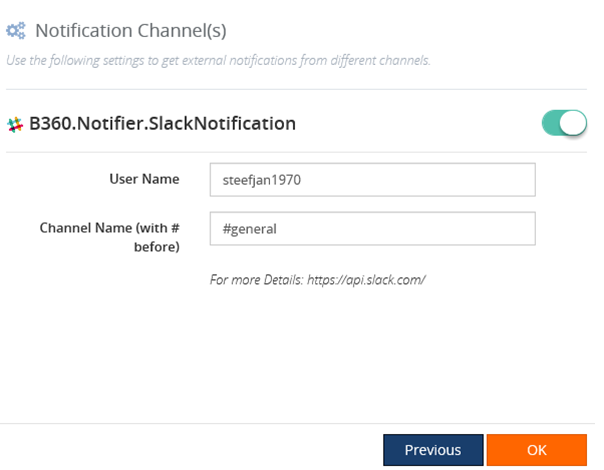
Or you can leverage one of the out of the box notification channels like Slack and configure an alarm using a notification channel.
Figure 10. Enable the SlackNotification on a custom alarm.
Once you have set up Slack following the instructions on BizTalk360 UI and the alarm you will receive notifications in Slack.
Figure 11. Notification in Slack.
Final words
The BizTalk360 team has worked intensely the last 12 months to bring this to the table. Not just the flexibility with widgets, yet also with the separation of monitoring and analytics, the 360 plus API’s on top of your BizTalk Group, live feeds, notifications and the rules engine. This product has definitely evolved to the next level. Expect the release of 8.0 to change the way BizTalk is being monitored!
Cheers,
Steef-Jan
by [email protected] Steef-Jan Wiggers | Jan 25, 2015 | BizTalk Community Blogs via Syndication
In previous post I described a way to consume a public Rest API using the BizTalk WCF-WebHttp adapter in combination with JSON-decoder, which is a new component with the BizTalk Server 2013 R2 edition. Now I like to mix things up a bit and consume a different API that is public. That is you can use this API from Last.fm. This is an online music discovery service that gives you personalised recommendations based on the music you listen to. To use the API of this service you need to registering yourself first. Because when you call of one of the methods of the API you need to stick in an api_key as one of the parameters of your request. This is not uncommon as various cloud API’s have this kind of mechanism.
Scenario
I have the following scenario, where I have built a client application (still one of those old fashioned guys that use window forms). The client application have the following functionality:
- Get information of an artist.
- Get the top albums from the artist.
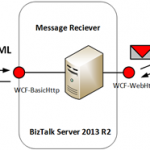
Information and top albums can be obtained through calling the Last.fm API artist methods. The client will via BizTalk call these API methods. Similar as in my previous post calling the Airport Service to retrieve its status. Below you find an overview of the scenario.
The communication with the internal endpoint in this scenario will be SOAP/XML. The endpoint is hosted in a two way receive port (request/response). It exposes schemas for two operations: GetArtistInfo and GetTopAlbums. The request message will subsequently be mapped to a REST call to the service indicating that the expected response format is Json or default xml. BizTalk will decode the response into XML, so that it is published as an XML message in the MessageBox in case the response message is Json (GetArtistInfo) otherwise it will be just received by the adapter (GetTopAlbums). The receive port will subscribe on that message so it will be routed back as response to the client that on his turn renders it in the UI (Form). This scenario shows that BizTalk acts as a broker and protocol mediator (SOAP/XML –> REST/JSON –> SOAP/XML or SOAP/XML –> REST/XML –> SOAP/XML) between internal client and the external Last.fm API.
The solution of the described scenario consists of the following parts that will be discussed in the subsequent paragraphs:
- Exposing schema’s for internal service exposing an operation to client application that will consume the service.
- Creating a custom receive pipeline to enable decoding of Json message to xml (see previous post).
- Configuration of a Send Port with the Web-Http adapter (or binding if you like), send and receive.
- Demonstrating the solution.
Exposing schema’s as service
To support both calls from the client to the Last.fm API the request schema’s are as follows:
Both request schemas look the same expect for the root name. These could be consolidated to one schema, nevertheless I choose to keep each method call isolated. Both schema contain promoted properties. The elements need to be promoted to variable mapping later when configuring the send port with WCF-WebHttp adapter to support dynamic URL mapping.
The response for the GetArtistInfo will be Json and therefore I will use the postman application in Google Chrome:
Here you can see that for calling the API you need a method parameter, artist name, api_key and format. However, the format is optional. By default XML will be returned when no format has been specified. The Json response can be used as instance for creating an XSD using the JSON Schema Wizard in Visual Studio BizTalk templates. The schema looks like:
Similar approach will be used to get an instance of the response to the GetTopAlbums call. This schema will be based on XML. Having the schemas enabled me to create an internal service that exposes two methods.
Once I have the internal service up and running the next part is to create a custom pipeline for receiving the Json response from the GetArtistInfo API method call. The Json decoder will be specified to serialize that response into XML. For the GetTopAlbums no specific custom pipeline is necessary. The schemas and custom pipeline will be deployed to BizTalk runtime.
Creating and configuring the Send Port with the Web-Http adapter
To be able to communicate with the Last.fm API and call both methods I will need to have two send ports configured with the WCF-WebHttp adapter. The Last.fm API doesn’t require authentication other than supplying the api_key as a parameter in call tp any of the API methods. In the general tab of the WCF-WebHttp Transport properties the address of the service can be specified (URI). Besides the address I need to specify here the HTTP Method (GET) and perform a URL mapping.
The URL mapping will be interesting as I need to add a few parameters to my REST call.
http://ws.audioscrobbler.com/2.0/?method=artist.getinfo&artist=Metallica&api_key=<your last fm api_key>&format=json
My HTTP Method and URL Mapping will look like:
<BtsHttpUrlMapping><Operation Method=”GET” Url=”/?method={method}&artist={artist}&api_key={api_key}&format=json”/></BtsHttpUrlMapping>
Interesting thing in this URL mapping is that & is and &. If you try to just use the & you will run into an error like depicted below:
Next I click Edit… to do the variable mapping i.e. map the parameters to promoted properties of my incoming request message.
Variable is mapped to the property namespace that defines the API_KEY, ARTIST and METHOD.
The general tab is important for specifying the address, method and URL mapping. The other tabs are:
- The Binding tab provides you the ability to configure the time-out and encoding-related properties.
- The Security tab provide you the ability to define the security capabilities of the WCF-WebHttp send port.
- The Behaviour tab provides you the ability to configure the endpoint behavior for the send port.
- The Proxy tab provides you the ability to configure the proxy setting for the WCF-WebHttp send port.
- The Messages tab provides you the ability to specify how the message is sent to the REST interface.
Note: In this scenario we only use GET operation of the Last.fm API service. Based on the verb you have to specify in the Suppress Body for Verbs the GET, because a payload is not required for this operation. Since BizTalk sends out messages with a payload this needs to suppress!
For further details on configuration settings for these tabs see MSDN article How to Configure a WCF-WebHttp Send Port.
Test the solution
Now building the client to call the Last.fm API methods indirectly via BizTalk was quite some work. I wanted to render the information nicely in a Windows Form. When I enter an artist name and click GetInfo then a request will be send to BizTalk routed to the send port that communicates with Lastfm API and request info of the band Metallica.
The response of the message is nicely rendered in the above form. When I click TopAlbums another request is sent to a different send port that send to a different Last.fm API method.
If we look at the traffic between BizTalk Server and Last.fm using Netmon I can examine what goes over the wire.
This blog has demonstrate how fairly easy it is to consume a Json message with BizTalk Server 2013 R2 after invoking a Rest API. And how I was able to leverage an API from Last.fm. The cool thing is that BizTalk Server 2013 R2 is capable to communicate with tons of REST API’s out there in the cloud with the WCF-WebHttp adapter. And with JSON support things get less complex. I haven’t tried communicating with an API that requires Basic- or OAuth authentication. I probably will have to do some custom coding using behavious like explained in the blog post from Quicklearn.
Cheers,
Steef-Jan

by [email protected] Steef-Jan Wiggers | Dec 28, 2014 | BizTalk Community Blogs via Syndication
Close to the end of the year 2014. It has again been quite a year from me, travelling to different places of our world. Some familiar and some new places. 2014 brought me to the following cities, area’s and countries:
- Italy Tuscany, Emilia Romagna and Lombardia (Pisa, Lucca, Viareggio, Florence, Piacenza, Poggi Bonsi, San Gimignano, Volterra, Sienna, Valconasso di Pontenure, Podenzano, and Val Trebia).
- United-States Washington State (Seattle, Bellevue, Redmond, Deception Pass, Whidbey Island, Fidalgo Island, Camano Island, and Bainbridge Island).
- Australia Victoria, New South Wales and Queensland (Melbourne, Brisbane and Sydney).
- Spain Basque Country, Spanish Pyrenees (Girona, L’estartit, Vielha).
- Sweden Stockholm.
- Belgium, Mechelen.
For one it has been a very busy year like last year 2013. To summarize all my activity bullet wise:
- I have had multiple speaking engagements in the Netherlands and abroad (UK, Norway, Sweden, Belgium and Australia).
- Attended the annual MVP Summit (November).
- Attended the BizTalk Summit (INTEGRATE2014) in Redmond (December).
- Technical reviewer for a number of books and white papers.
- Watched dutch soccer perform well during the WorldCup 2014.
- Written multiple TechNet wiki articles on BizTalk and ran two half Marathons, The Hague and Berlin, in March.
- Written dozen blog posts on this blog (especially liked the ones on service virtualization I created with the help of Andrew Slikver/Nevatech) and on the TechNet Wiki Blog.
For me personally I am happy to finally been to Australia and had a great time speaking at three cities. I really like to thank Saravana Kumar, Dean Robertson, BizTalk360 and Mexia to make this possible. Both companies made a huge commitment and made a tremendous investment in the community. Besides BizTalk360 and Mexia there are some other companies that have shown a lot of affection to our integration (BizTalk) community like: Codit, Quicklearn and Bouvet.
After the event I had a great time with my friends Mikael Hakansson and Mick Badran. Both showing me the Aussie way of live. Thanks guys!
I am also happy to see that both Richard Seroter and Stephen W. Thomas, two of my other friends, welcomed a healthy, lovely daughter in their family lives: Charlotte and Haydon.
To conclude I have had an amazing year spending working on several integration projects, travelling, seeing the Seahawks become SuperBowl champs, seeing my kids grow up, spending time with the family, friends and of course the BizTalk community. Thanks everyone for reading my blog and I will continue to share my knowledge through speaking and writing in 2015.
Cheers,
Steef-Jan