by Sandro Pereira | May 29, 2018 | BizTalk Community Blogs via Syndication
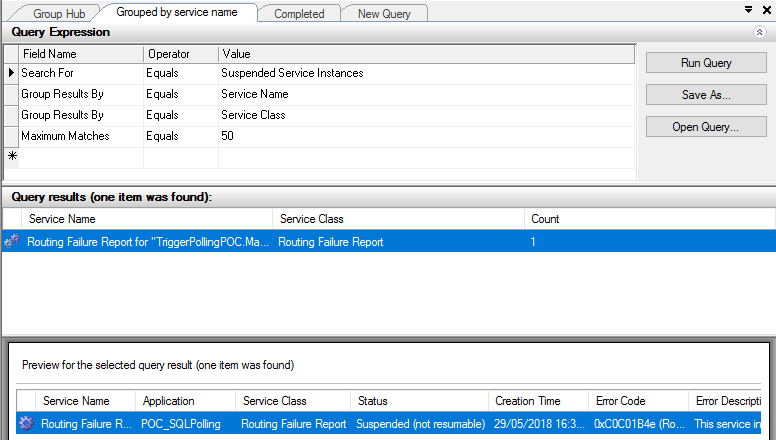
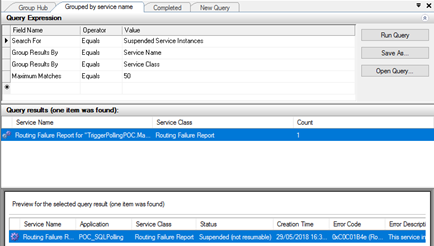
One of the annoying thing with working with Direct Bound Ports in Orchestrations, in especially, MessageBox direct bound ports that allow us to easily implement decouple publish-subscribe design patterns, is that you may get a situation in which you get a lot of Routing Failure Report Instances in the state Suspended (not resumable).
The error-handling properties facility allows us to automated handling of messaging failures as an alternative to the traditional (now default) behavior of placing failed messages in the Suspended queue. This automated handling routes an error message to any subscribing routing destination, such as a send port or orchestration. The error message is a clone of the original message with all previously promoted properties now demoted and with selected properties related to the specific messaging failure promoted to the message context.
Normally the easy way to implement this is to create a Send Port with the following filter:
- ErrorReport.ErrorType = “FailedMessage”
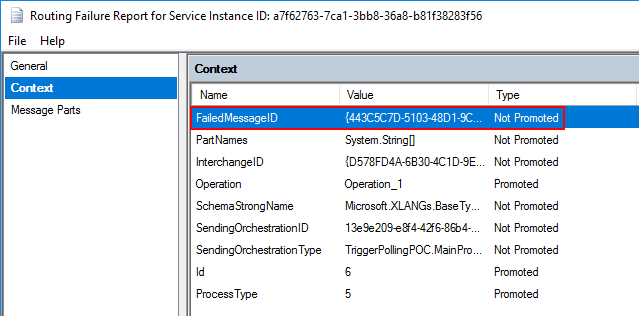
Nevertheless, because we are using an orchestration with Direct Bound Ports, the orchestration will receive a PersistenceException that you can handle inside our business flow, however, is also create a Routing Failure Report Instance in the state Suspended (not resumable) without any ErrorReport property promoted
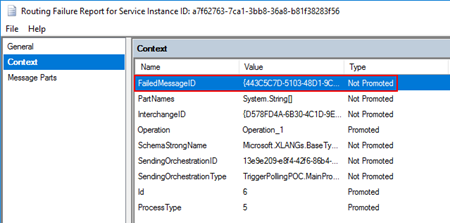
So, we cannot easily automate this kind of instances.
An alternative solution to automate this task is, inside the Error Handler, invoke a helper class library that deletes all these instances once they occur in controlled fashion way:
...
using (PowerShell PowerShellInstance = PowerShell.Create())
{
    StringBuilder pscript = new StringBuilder();
    pscript.AppendLine(@"[STRING]$SQLInstance = get-wmiobject MSBTS_GroupSetting -namespace rootMicrosoftBizTalkServer | select-object -expand MgmtDbServerName");
    pscript.AppendLine(@"[STRING]$BizTalkManagementDb = get-wmiobject MSBTS_GroupSetting -namespace rootMicrosoftBizTalkServer | select-object -expand MgmtDbName");
    pscript.AppendLine(@"[STRING]$BizTalkGroup = ""$SQLInstance"" + "":"" + ""$BizTalkManagementDb""");
    pscript.AppendLine(@"[ARRAY]$suspendedMessages = get-wmiobject MSBTS_ServiceInstance -namespace 'rootMicrosoftBizTalkServer' -filter '(ServiceStatus=32 and ServiceClass=64 and ServiceName like ""<name_of_our_orchestration>"")'");
    pscript.AppendLine(@"foreach ($msgSuspended in $suspendedMessages){");
    pscript.AppendLine(@"$msgSuspended.InvokeMethod(""Terminate"",$null)}");

    PowerShellInstance.AddScript(pscript.ToString());
    PowerShellInstance.Invoke();
}
...
How to check terminate Suspended (not resumable) Routing Failure Report Instances with PowerShell
Using PowerShell is a good option to delete all of this kind of messages, you can send a report and delete or just simply delete it. Windows PowerShell is a Windows command-line shell designed especially for system administrators and can be used by BizTalk administrators to help them in automating repetitive tasks or tasks that are time-consuming to perform manually.
Because was controlling the error inside the main orchestration I don’t have the need of additional report, so this is a simple script will allow you to delete all Routing Failure Report Instances suspended with the state Suspended (not resumable) from your BizTalk Server environment:
#Get all Suspended (not resumable) Routing Failure Report Instances
[ARRAY]$suspendedMessages = get-wmiobject MSBTS_ServiceInstance -namespace 'rootMicrosoftBizTalkServer' -filter '(ServiceStatus=32 and ServiceClass=64)'

foreach ($msgSuspended in $suspendedMessages)
{
    $msgSuspended.InvokeMethod("Terminate",$null)
}
THIS POWERSHELL SCRIPT IS PROVIDED “AS IS”, WITHOUT WARRANTY OF ANY KIND.
 Terminate Suspended (not resumable) Routing Failure Report Instances PowerShell (2 KB)
Microsoft | TechNet Gallery
Author: Sandro Pereira
Sandro Pereira lives in Portugal and works as a consultant at DevScope. In the past years, he has been working on implementing Integration scenarios both on-premises and cloud for various clients, each with different scenarios from a technical point of view, size, and criticality, using Microsoft Azure, Microsoft BizTalk Server and different technologies like AS2, EDI, RosettaNet, SAP, TIBCO etc. He is a regular blogger, international speaker, and technical reviewer of several BizTalk books all focused on Integration. He is also the author of the book “BizTalk Mapping Patterns & Best Practices”. He has been awarded MVP since 2011 for his contributions to the integration community. View all posts by Sandro Pereira

by Sandro Pereira | May 25, 2018 | BizTalk Community Blogs via Syndication
INTEGRATE (formerly known as BizTalk Summit) is the primary conference for professionals working in the Microsoft Integration Space and once again is back to London. From June 4 to 6, 25 speakers – 11 MVPs and 14 Microsoft PM – will address the entire Microsoft Integration Platform landscape on topics like BizTalk Server, Logic Apps, Service Bus, Event Grid, Event Hubs, Microsoft Flow, API Management, Azure Functions and many more.
And once again I will be there delivering a session – since the first BizTalk Summit event, I’m a constant presence as a speaker at these events – about BizTalk Server! And if you are wondering why I don’t speak about other integration topics the reasons are:
- The organization team specific ask me to talk about BizTalk Server…
- … and I really love to speak about BizTalk Server so I couldn’t refuse! I have plenty of other events to speak about other topics hehe

From June 4 to 6, and our MVP Sandro Pereira is one of the guest speakers for the sixth year in a row. Following the last event in Seattle, DevScope joins Integrate once again as a Silver Sponsor.
About my session
After receiving a huge amount of positive feedback regarding my previous talk last year: “BizTalk Server Fast & Loud” I fill a little pressure to continues to match the attendee expectations… almost! Because I’m confident that you will enjoy! Why wouldn’t you enjoy? In this session, I will address real cases that happen to all of us daily.
Session Name: BizTalk Server: Lessons from the Road

Abstract: The session will cover small pieces of stories with practical real examples from the field to address certain scenarios/requirements. See real techniques being used in some of the most important features of BizTalk Server, some of them are out-of-the-box capabilities others are custom extensions been made on the platform. Topics include BizTalk migration strategy, content-based routing techniques, Mapping, JSON support, BizTalk administration tips, extending BizTalk out-of-the-box capabilities and many more.
Content is not all you get from this event…
Content is hugely important, and as you read previously, this event will address the entire Microsoft Integration Platform landscape… but that’s not all!
This will also be an amazing opportunity to Network, Connect, and Reconnect with Colleagues. Meet some of the people you have been following on Twitter and blogs and network with them and others who are interested in the same things you are. To hang out with the smartest people you know – and I’m not talking about the speakers or Microsoft PM’s! I’m talking about you guys! – last year were 400 attendees from over 150 companies across 25+ countries attending the event, so imagine the experience that all of us have combined!

The knowledge and experience of all the attendees, speakers and product group members at these events is unreal!!! You will not find an opportunity like this every day.
So, this event is a huge opportunity for you to:
- Get insight and answers to your questions from these real-world experts: attendees, MVP’s and/or Microsoft PM’s;
- Know and became friends of people you are interested or that you follow for social media: again, maybe there are attendees, MVP’s and/or Microsoft PM’s
- I have to say that in this last 8 year I was able to meet and became good friends of several amazing people and all of that because of this type of events and all post-event activities like coffee breaks, dinner with speakers, …
- Build your personal Business Networking and it is also a good opportunity for Partnerships… and new opportunities
And finally: Refresh and recharge and have some fun!
DevScope is sponsoring INTEGRATE 2018 event
I’m extremely happy to announce that, for the second consecutive time, DevScope is also joining this event as a sponsor. The first time was in INTEGRATE 2017 USA and now it will be the first time in London event.
I’m extremely happy for that for several reasons:
- It is the only Portuguese company sponsoring the biggest Microsoft Integration focused event in the world.
- It shows the commitment that my company has in the Integration landscape.
- But we are also one of the unique partners that, not only can support you in the Integration landscape challenges but also in other Microsoft key areas like BI/Power BI, SharePoint, Dynamics and of course Azure.
- which show not only the diversity present in our team but also its quality that can be proven by the diverse certifications and distinctions attributed to our professionals
Fill free to contact DevScope at [email protected] if you want to know more about us, what we do and/or how can we help you and your business.
INTEGRATE 2018 Registration
You are still on time to register for the conference here.

Author: Sandro Pereira
Sandro Pereira lives in Portugal and works as a consultant at DevScope. In the past years, he has been working on implementing Integration scenarios both on-premises and cloud for various clients, each with different scenarios from a technical point of view, size, and criticality, using Microsoft Azure, Microsoft BizTalk Server and different technologies like AS2, EDI, RosettaNet, SAP, TIBCO etc. He is a regular blogger, international speaker, and technical reviewer of several BizTalk books all focused on Integration. He is also the author of the book “BizTalk Mapping Patterns & Best Practices”. He has been awarded MVP since 2011 for his contributions to the integration community. View all posts by Sandro Pereira
by Sandro Pereira | May 9, 2018 | BizTalk Community Blogs via Syndication
In my last post, I described how can you fix the issue regarding:
Executed as user: BIZDEMOsaspereira. Could not find server ‘BIZDEMO’ in sys.servers. Verify that the correct server name was specified. If necessary, execute the stored procedure sp_addlinkedserver to add the server to sys.servers. [SQLSTATE 42000] (Error 7202). The step failed.).
See more about this error here: https://blog.sandro-pereira.com/2018/05/08/backup-biztalk-server-job-failed-could-not-find-server-in-sys-servers/
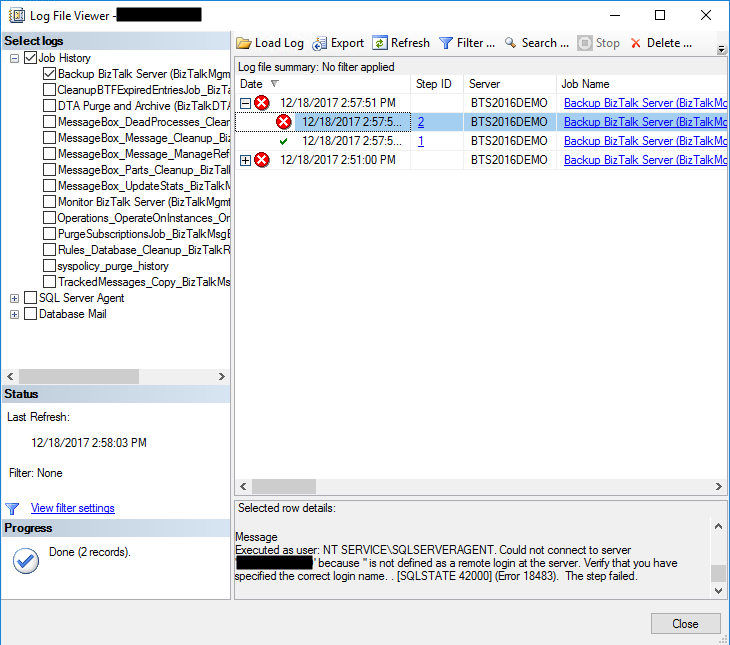
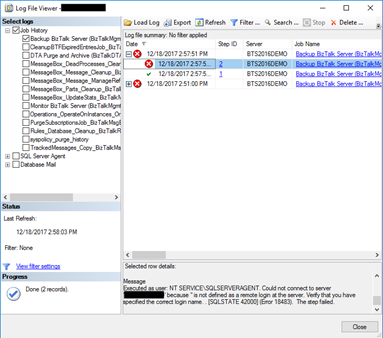
And I told that this was not the only issue that you will find. The truth is that if you try to execute the Backup BizTalk Server job after you fix this last problem, the job will fail again this time with the following error:
Executed as user: NT SERVICESQLSERVERAGENT. Could not connect to server ‘BIZDEMO’ because ” is not defined as a remote login at the server. Verify that you have specified the correct login name. . [SQLSTATE 42000] (Error 18483). The step failed.
Cause
This error can be related to several possible problems and a common solution you will find in SQL Server forums and post is that you should Drop and re-create the linked server will resolved this problem.
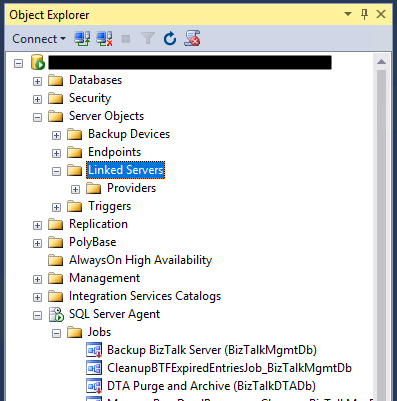
However, and forgive me in advance for my SQL ignorance, I don’t have any linked Server configured, my BizTalk Server Virtual Machine is a simple standalone machine with BizTalk and SQL installed… so, it couldn’t be that problem!
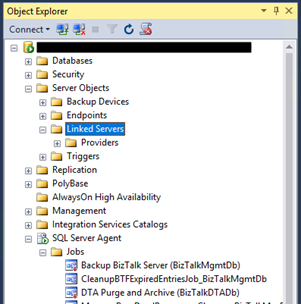
So, after several tests, I started to think as a truly genuine old-school technical guy:
- It doesn’t work? did you try to restart it?
Or as a true BizTalk developer guy:
- Did you restart the host after your solution deployment?
And I thought that it might be necessary to restart the SQL services so that all the settings of the previous command execution have the correct effect – execution of the commands: sp_dropserver and sp_addserver necessary to fix the issue reported in the previous post.
And it was!
Solution
To fix this issue, we need to restart the SQL services
After you restart the SQL Server Services you will be able to run the Backup BizTalk Server job successfully.
Author: Sandro Pereira
Sandro Pereira lives in Portugal and works as a consultant at DevScope. In the past years, he has been working on implementing Integration scenarios both on-premises and cloud for various clients, each with different scenarios from a technical point of view, size, and criticality, using Microsoft Azure, Microsoft BizTalk Server and different technologies like AS2, EDI, RosettaNet, SAP, TIBCO etc. He is a regular blogger, international speaker, and technical reviewer of several BizTalk books all focused on Integration. He is also the author of the book “BizTalk Mapping Patterns & Best Practices”. He has been awarded MVP since 2011 for his contributions to the integration community. View all posts by Sandro Pereira
by Gautam | Apr 29, 2018 | BizTalk Community Blogs via Syndication
Do you feel difficult to keep up to date on all the frequent updates and announcements in the Microsoft Integration platform?
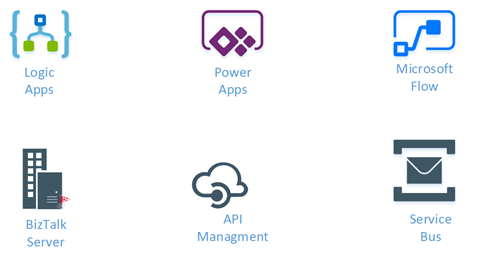
Integration weekly update can be your solution. It’s a weekly update on the topics related to Integration – enterprise integration, robust & scalable messaging capabilities and Citizen Integration capabilities empowered by Microsoft platform to deliver value to the business.
If you want to receive these updates weekly, then don’t forget to Subscribe!
Feedback
Hope this would be helpful. Please feel free to reach out and let me know your feedback on this Integration weekly series.

by Sandro Pereira | Apr 17, 2018 | BizTalk Community Blogs via Syndication
Microsoft Integration, Azure, BAPI, Office 365 and much more Stencils Pack it’s a Visio package that contains fully resizable Visio shapes (symbols/icons) that will help you to visually represent On-premise, Cloud or Hybrid Integration and Enterprise architectures scenarios (BizTalk Server, API Management, Logic Apps, Service Bus, Event Hub…), solutions diagrams and features or systems that use Microsoft Azure and related cloud and on-premises technologies in Visio 2016/2013:
- BizTalk Server
- Microsoft Azure
- Azure App Service (API Apps, Web Apps, Mobile Apps and Logic Apps)
- Event Hubs, Event Grid, Service Bus, …
- API Management, IoT, and Docker
- Machine Learning, Stream Analytics, Data Factory, Data Pipelines
- and so on
- Microsoft Flow
- PowerApps
- Power BI
- PowerShell
- Infrastructure, IaaS
- Office 365
- And many more…

What’s new in this version?
With the growing number of stencils in this package, it was becoming hard to find or look for the right shape/representation and based on some feedback I received from the community and some tips, I focused most of the work in this new version in providing search capacity to this package, but it wasn’t the only one:
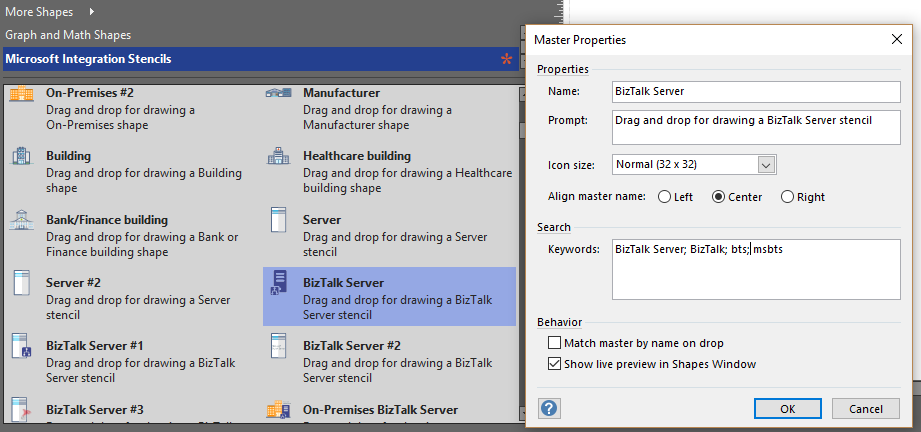
- Search Capabilities: Defining the correct metadata information and keywords for all the shapes for a better search functionality.
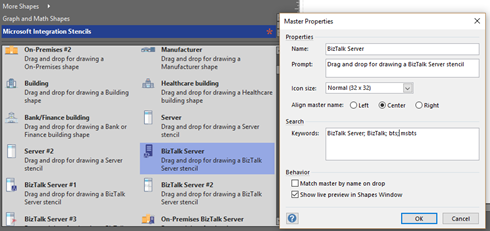
- New shapes: of course, that has happened in all other versions, new shapes were added, in particular: Generic, Microsoft Flow and PowerApps shapes


You can download Microsoft Integration, Azure, BAPI, Office 365 and much more Stencils Pack for Visio from:
Microsoft Integration, Azure, BAPI, Office 365 and much more Stencils Pack for Visio (18,6 MB)
GitHub
Or from:
Microsoft Integration and Azure Stencils Pack for Visio 2016/2013 v3.1.0 (18,6 MB)
Microsoft | TechNet Gallery
The post New version of Microsoft Integration, Azure, BAPI, Office 365 and much more Stencils Pack for Visio is now available on GitHub appeared first on SANDRO PEREIRA BIZTALK BLOG.
by Gautam | Apr 15, 2018 | BizTalk Community Blogs via Syndication
Do you feel difficult to keep up to date on all the frequent updates and announcements in the Microsoft Integration platform?
Integration weekly update can be your solution. It’s a weekly update on the topics related to Integration – enterprise integration, robust & scalable messaging capabilities and Citizen Integration capabilities empowered by Microsoft platform to deliver value to the business.
If you want to receive these updates weekly, then don’t forget to Subscribe!
Microsoft Announcements and Updates
Community Blog Posts
Videos
Podcasts
Feedback
Hope this would be helpful. Please feel free to reach out and let me know your feedback on this Integration weekly series.

by Lex Hegt | Mar 28, 2018 | BizTalk Community Blogs via Syndication
This blog is a part of the series of blog articles we are publishing on the topic “Why we built XYZ feature in BizTalk360”. Read the main article here.
Why do we need this feature?
Imagine the following scenario. It’s Monday morning, you arrive at the office and you do some extra health checks on your environment, as planned maintenance has been done over the weekend, also involving the BizTalk servers. You notice that the Host Instances are not started! This occurred because, after a reboot of the BizTalk servers, the Host Instances and other vital services like the Enterprise Single Sign On service did not start. Because of this, ever since that reboot no processing has been done by BizTalk, which results in an enormous backlog of processing for an already busy Monday morning.
There is one more very common scenario. Let’s assume you are using an FTP/SFTP receive location polling files (Purchase Orders, Invoices etc) from a remote server. There are various reasons we might encounter the problem in this setup, example network connectivity, the remote server is down, someone changed the password etc.
In these instances, the BizTalk FTP/SFTP receive location will attempt to connect few times and finally quietly shut down (without notifying anyone). This is a major problem, we need a solution where a system can notify the BizTalk Administrators and also try to recover the failure condition automatically.
Above scenario is just a couple of the example of possible outage conditions. Besides Host Ithe instances and other Windows NT services, not being in the expected state, think of Receive Locations being disabled because of network disruptions, Orchestrations being unenlisted, so no messages will be picked up by then or performance degradation because the wrong Windows NT services are being started (either manually or automatically).
All these kind of artifacts being in the wrong state, may lead to disruptions of your valuable business processes and put your business at stake.
What are the current challenges?
Off course you want to prevent your business processes from being disrupted by just a few Windows NT services, or other state-bound artifacts, being in the wrong state. Ideally, you want the expected state to be recovered as soon as the artifact hits the wrong state.
No auto-recovery support by BizTalk
Unfortunately, BizTalk Server itself provides no functionality to detect that artifacts are in the wrong state, let alone that these artifacts are brought back to the desired state. So what’s left is creating custom scripts to take care of that task. More on custom scripting, a little bit later in this article.
No auto-recovery support by SCOM
Your organization might already use SCOM for monitoring your server platform. Although SCOM has a so-called Management Pack for BizTalk server, it is quite challenging to setup SCOM for proper BizTalk monitoring and operating.
Check out below whitepaper, to find out the differences between BizTalk360 and SCOM when it comes to maintaining your BizTalk environment.
Auto-recovery is one of the reasons why SCOM is not the best fit for maintaining your BizTalk environment as SCOM offers very little support for auto-recovery of your BizTalk and other artifacts which are important for your integrations. SCOM provide event-handlers which can be used for executing custom scripts, you as an administrator, still have to create these scripts.
Custom scripting
So, whether you are using just BizTalk Server or use SCOM, in case you want to auto-recover your artifacts which are in the wrong state, you need to develop custom scripts to have something in place for auto-recovery of your state-bound artifacts. Developing such scripts can be time-consuming and often it is hard to properly maintain such scripts. Also, the visibility of such scripts is bad, as they are being run through Windows Scheduler, which is, in turn, another component you should be aware of, when you are considering the overall health of your BizTalk environment.
At BizTalk360, we have the philosophy that businesses should take care of their core businesses and not be developing scripts and tools to maintain their BizTalk environments. As we have many years of experience in the field of BizTalk Server and Microsoft integration, we understand the problems you might run into, as we have faced them ourselves as well.
The goal of BizTalk360 is to take away your challenges when it comes to operating and maintaining your BizTalk environment. Even though anything can be done using custom coding/scripts, that’s not the best use of your time + management overhead of maintaining that code base.
How BizTalk360 solves this problem?
For many releases now, BizTalk360 contains the Auto Healing feature for recovery of artifacts which have hit the wrong state. While in the beginning, mainly the BizTalk artifacts could be brought back to the expected state, the feature has evolved to support below artifacts:
- Send Ports
- Receive Location
- Orchestrations
- Host Instances
- Windows NT Services
- SQL Server Jobs
- Azure Logic Apps
The Auto Healing can be configured as part of the monitoring settings for the above-mentioned artifacts. Below picture shows a Receive Location for which monitoring has been set up. The Expected state of this Receive Location is Disabled. Besides that, also Auto Healing has been set up.
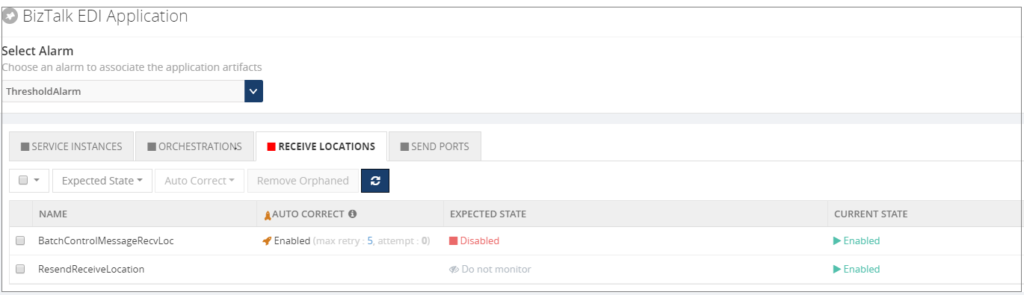 Once set up, the BizTalk360 Monitoring service will evaluate whether the Receive Location is still in the expected state. In case the Receive Location hits a state which is not the expected state, the Monitoring service will try to bring the Receive Location back to the expected state. Depending on the configured value for the Max Retry setting, this will be tried at most 10 times. If the Receive Location still is not in the expected state, the artifact will move to the Critical state.
Note: To the Auto Healing, it makes no difference whether the expected state is Enabled or Disabled, or Unenlisted or Started. Depending on what you have configured for the Expected state, BizTalk360 will always try to bring the artifact to that Expected state.
Conclusion
In this article, we have seen how valuable it can be to have your artifacts being brought back to the expected state without manual intervention. Auto Healing is easy to setup with BizTalk360 as, instead of having to develop custom scripts, it is just a matter of configuring Auto Healing on the required artifacts. This increases ease of use and minimizes downtime.
Do you want to read more about Auto Healing? Here you have few articles on this topic:
Introducing Auto Healing for BizTalk Environment
Automating BizTalk Administration Tasks via BizTalk360 Auto-Healing
Get started with a Free Trial today!
Why not give BizTalk360 a try. It takes about 10 minutes to install on your BizTalk environments and you can witness the benefits of auto-healing on your own BizTalk Environments. Get started with the free 30 days trial.
The post Why did we build Auto Healing capability in BizTalk Server Monitoring? appeared first on BizTalk360.
by Gautam | Mar 19, 2018 | BizTalk Community Blogs via Syndication
Do you feel difficult to keep up to date on all the frequent updates and announcements in the Microsoft Integration platform?
Integration weekly update can be your solution. It’s a weekly update on the topics related to Integration – enterprise integration, robust & scalable messaging capabilities and Citizen Integration capabilities empowered by Microsoft platform to deliver value to the business.
If you want to receive these updates weekly, then don’t forget to Subscribe!
Packt $10 Sale: Get your copy to start building Robust Cloud Integration solution in Azure Robust cloud Integration with Azure
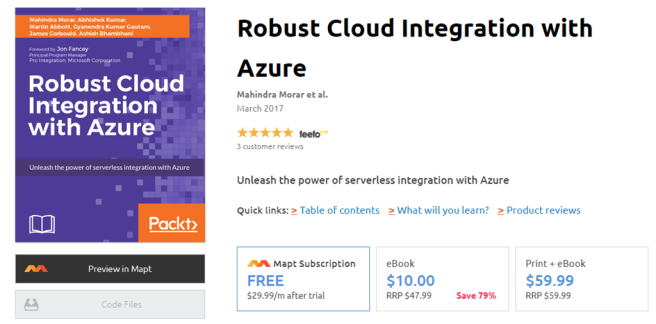
New Book: Stay tuned for our next book on cloud integration with Steef-Jan Wiggers, Abhishek Kumar, & Srinivasa Mahendrakar

Feedback
Hope this would be helpful. Please feel free to reach out and let me know your feedback on this Integration weekly series.
by Sandro Pereira | Mar 5, 2018 | BizTalk Community Blogs via Syndication
During the last years I developer and make it available several BizTalk projects like tools, components (functoids, adapters, …) or samples on several platforms like CodePlex, Microsoft MSDN Code Sample or Microsoft TechNet Gallery. And because CodePlex shut down last year, many people were asking me if I will make it available that existing CodePlex projects on GitHub.
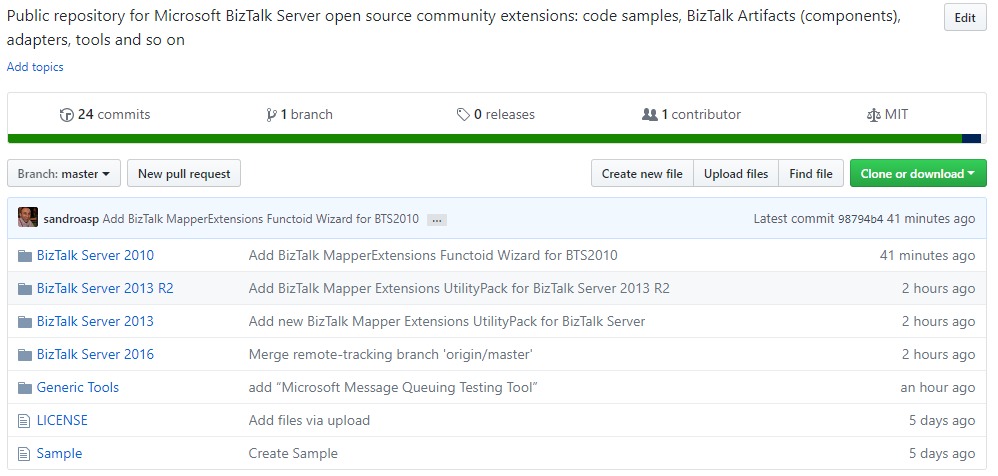
Well, I’m happy to announce the BizTalk Server Community Extensions Utility Packs GitHub Repository where I will make it available all my BizTalk Server related community projects or samples.
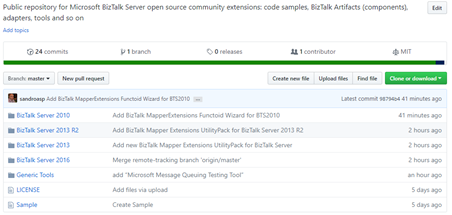
Initial, my intention was to start to contribute into the Microsoft Integration Repository on GitHub and put everything there but I found out they have several restrictions and that will not be practical or possible… so, I decided to create a repository where everyone can easily contribute and be a central community place for any kind of BizTalk Server Resources:
- Sample Projects
- Custom Adapters
- Custom Pipeline Components
- Custom Pipelines
- Schemas
- Custom Functoids
- Tools
- SQL and/or PowerShell Scripts
- PowerPoints
- and so on
The main goal is for this repository to be a central public repository for Microsoft BizTalk Server open source community resources.
For now, it has available:
- BizTalk Mapper Extensions UtilityPack for BizTalk Server 2010, 2013, 2013 R2 and 2016
- BizTalk Mapper Extensions Functoid Wizard for BizTalk Server 2010
- Microsoft Message Queuing Testing Tool
Soon, I will be adding more projects and samples and create some documentation regarding the projects available and credits to the authors.
JOIN ME IN THIS INITIATIVE! And add your projects to this common repository.
BizTalk Server Community Extensions Utility Packs GitHub Repository:
BizTalk Server Community Extensions Utility Packs GitHub Repository
GitHub
Author: Sandro Pereira
Sandro Pereira lives in Portugal and works as a consultant at DevScope. In the past years, he has been working on implementing Integration scenarios both on-premises and cloud for various clients, each with different scenarios from a technical point of view, size, and criticality, using Microsoft Azure, Microsoft BizTalk Server and different technologies like AS2, EDI, RosettaNet, SAP, TIBCO etc. He is a regular blogger, international speaker, and technical reviewer of several BizTalk books all focused on Integration. He is also the author of the book “BizTalk Mapping Patterns & Best Practices”. He has been awarded MVP since 2011 for his contributions to the integration community. View all posts by Sandro Pereira
by Gautam | Mar 4, 2018 | BizTalk Community Blogs via Syndication
Do you feel difficult to keep up to date on all the frequent updates and announcements in the Microsoft Integration platform?
Integration weekly update can be your solution. It’s a weekly update on the topics related to Integration – enterprise integration, robust & scalable messaging capabilities and Citizen Integration capabilities empowered by Microsoft platform to deliver value to the business.
If you want to receive these updates weekly, then don’t forget to Subscribe!
- Biztalk Developer Koger Technical Warren, New Jersey
- Biztalk Admin Shakti Chicago, IL, US
- Biztalk Developer InfiCare Technologies Nashville, TN, US
- Biztalk Developer _ Boston, MA Infogium Technologies, LLC Worcester, MA, US
- Biztalk Consultant NESS ENGINEERING LIMITED Georgetown, KY, US
Feedback
Hope this would be helpful. Please feel free to provide if you have any feedback on this Integration weekly series.