A message sent to adapter “WCF-Custom” on send port ” STAGING_SQL_WCF_SEND” with URI “mssql://SQL-SERVER-NAME//Database?” is suspended. Error details: Microsoft.ServiceModel.Channels.Common.MetadataException: Object [dbo].[IdRecord] of type StoredProcedure does not exist
Server stack trace: at System.Runtime.AsyncResult.End[TAsyncResult](IAsyncResult result) at System.ServiceModel.Channels.ServiceChannel.SendAsyncResult.End(SendAsyncResult result) at System.ServiceModel.Channels.ServiceChannel.EndCall(String action, Object[] outs, IAsyncResult result) at System.ServiceModel.Channels.ServiceChannel.EndRequest(IAsyncResult result)
Exception rethrown at [0]: at System.Runtime.Remoting.Proxies.RealProxy.HandleReturnMessage(IMessage reqMsg, IMessage retMsg) at System.Runtime.Remoting.Proxies.RealProxy.PrivateInvoke(MessageData& msgData, Int32 type) at System.ServiceModel.Channels.IRequestChannel.EndRequest(IAsyncResult result) at Microsoft.BizTalk.Adapter.Wcf.Runtime.WcfClient`2.RequestCallback(IAsyncResult result) MessageId: {0193EE6F-8DFF-4861-87FB-FC1C82ECF3AB} InstanceID: {59E3F39A-BF24-4583-BEA9-78CED5B621F7}
However, despite this error and despite the
fact that we were talking about the same server and same project of the previous
issue, one thing I was sure about: they were not related at all.
Cause
At a first glimpse, it seems that the stored
procedure does not include the column name: IdRecord, or that this field
was not passed to the stored procedure at all. So, this was my first point to validate,
however, quickly I realized that:
The
stored procedure had that field;
And
I was correctly passing that field to the stored procedure in the message;
Just to precaution, I double-check if that was
not related to security permission, and it was not also. So I went back to my some
conspiracy theories list that I described on my previous post:
You
should regenerate schemas: no, never
or
that may be a mismatch in the namespaces: I believe it could be a
possibility, but no, since I was using the same scheme and it was working fine
that
the “?” character that you normally find in the URI is causing this problem: also
impossible in my case.
And
my favorite is that you should give “sysadmin” rights to the service account
that is running the host instance: never.
But the last one put me thinking: the
operation is not properly set.
Because the last change I did was redesign the
solution that was performing composite operations with the SQL Adapter, in my
case I was sending multiple-rows to update in the same message.
And now I was doing a single operation.
And by doing that the WCF-SQL Adapter was throwing
this strange behavior.
Solution
The solution was quite simple. We just have to
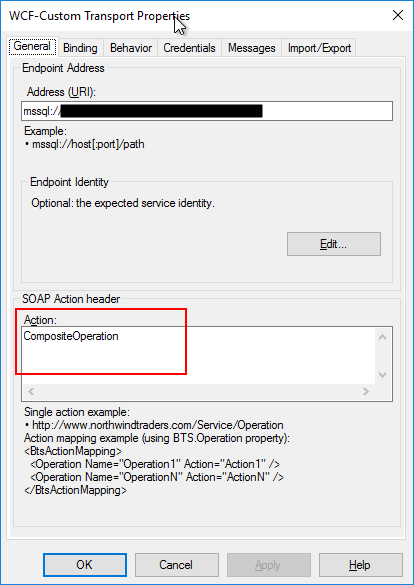
change the Action CompositeOperation with the correct operation action mapping
as show bellow as an example:
Recently a
friend of mine that is working with me in a project send me an email reporting
a quite curious issue that I found while accessing the BizTalk Server
Administration console in our development environment:
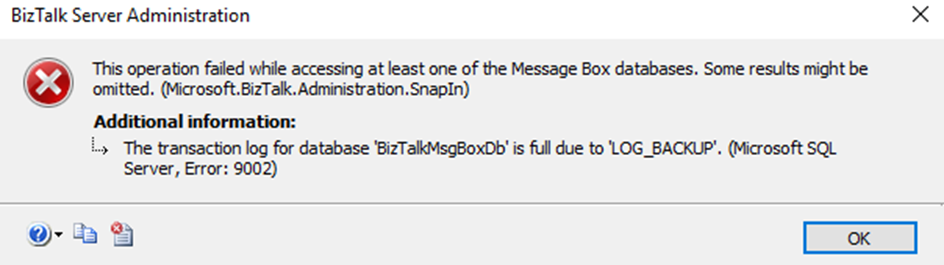
This operation failed while accessing at least one of the Message Bix databases. Some results might be omitted. (Microsoft.Biztalk.Administration.SnapIn)
Additional information:
The transaction log for database ‘BizTalkMsgBoxDb’ is full due to ‘LOG_BACKUP’. (Microsoft SQL Server, Error: 9002)
Immediately I point out to the team that this issue
was related to lack of disk space.
Cause
The official cause of
this issue is that when the transaction log becomes full, SQL Server Database
Engine issues a 9002 error. The log can fill when the database is online, or in
recovery. If the log fills while the database is online, the database remains
online but can only be read, not updated.
And for us to know the exact cause for what is
preventing log truncation, we can use the log_reuse_wait and log_reuse_wait_desc
columns of the sys.database catalog view.
In our case, it was indeed a problem with disk
space and what happened was that the disk to where we were doing backup went out
of disk space, because we cannot do the backups the transaction log grow until
the point that disk (that contain the log file) also went out of disk space.
Solution
When you know the issue, the solution is quite easy. In this case, freeing disk space from both hard drives immediately solves the problem. Nevertheless, because the log file got quite big you should think of stopping your BizTalk Server environment and do maintenance in your databases in special reduce the size of the transaction log.
For that you should:
Perform
a full back of your databases;
Stop
all BizTalk Server services (host instances and enterprise Single Sign-on)
And
run the following SQL Script
ALTER DATABASE BizTalkMsgBoxDb
SET RECOVERY SIMPLE;
GO

DBCC SHRINKFILE (BizTalkMsgBoxDb_log, 2048);
GO

ALTER DATABASE BiztalkMsgBoxDb
SET RECOVERY FULL
GO
Do
about the same steps for other databases whose transaction logs are also quite large.
It was only 3 days ago that I released the latest version of this package, but someone (aka Wagner Silveira) alerted me to the existence of new shiny icons in the Azure Portal… so I decided it would be a good time to launch a new major release and here it is! I hope you guys enjoy.
Microsoft Integration, Azure, Power Platform, Office 365 and much more Stencils Pack it’s a Visio package that contains fully resizable Visio shapes (symbols/icons) that will help you to visually represent On-premise, Cloud or Hybrid Integration and Enterprise architectures scenarios (BizTalk Server, API Management, Logic Apps, Service Bus, Event Hub…), solutions diagrams and features or systems that use Microsoft Azure and related cloud and on-premises technologies in Visio 2016/2013:
BizTalk Server
Microsoft Azure
Integration
Integration Service Environments (ISE)
Logic Apps and Azure App Service in general (API Apps, Web Apps, and Mobile Apps)
Azure API Management
Messaging: Event Hubs, Event Grid, Service Bus, …
Azure IoT and Docker
AI, Machine Learning, Stream Analytics, Data Factory, Data Pipelines
SQL Server, DocumentDB, CosmosDB, MySQL, …
and so on
Microsoft Power Platform
Microsoft Flow
PowerApps
Power BI
Office365, SharePoint,…
DevOps and PowerShell
Security and Governance
And much more…
… and now non-related Microsoft technologies like:
SAP Stencils
The Microsoft Integration Stencils Pack is composed of 27 files:
Microsoft Integration Stencils
MIS Additional or Support Stencils
MIS AI and Machine Learning Stencils
MIS Apps and Systems Logo Stencils
MIS Azure Additional or Support Stencils
MIS Azure Mono Color
MIS Azure Old Versions
MIS Azure Others Stencils
MIS Azure Stencils
MIS Buildings Stencils
MIS Databases and Analytics Stencils
MIS Deprecated Stencils
MIS Developer Stencils
MIS Devices Stencils
MIS Files Stencils
MIS Generic Stencils
MIS Infrastructure Stencils
MIS Integration Fun
MIS Integration Patterns Stencils
MIS IoT Devices Stencils
MIS Office365
MIS Power BI Stencils
MIS PowerApps and Flows Stencils
MIS SAP Stencils
MIS Security and Governance
MIS Servers (HEX) Stencils
MIS Users and Roles Stencils
That you can use and resize without losing quality, in particular, the new shapes.
What’s new in this version?
I still have many things to do in this project in terms of organization and cleaning some resources but I will leave that for another occasion. The main goal of this release was to provide the new icons present in Azure Portal. In this version the changes and additions are:
New shapes: I think almost all the new shapes layout present in Azure Portal are now added in this package.
New categories: MIS Azure Mono Color, MIS Azure Old Versions, MIS Azure Others, MIS Integration Fun;
Categories Renaming: MIS Databases and Analytics and MIS AI and Machine Learning
SVG Files: The SVG files, from all these new resources, are now available on GitHub
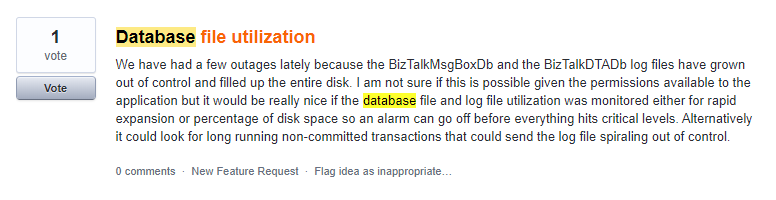
In any BizTalk environment, it is important to keep track of database growth and execute the data purging policies whenever necessary. When the database size grows, the SQL server needs more memory and CPU to read data from the tables, which slows down the database operation. Besides that, there is also the risk that, due to the growing database(s), you are running out of disk space. Database Administrators spend a lot of their time dealing with the problem of database processes consuming too much disk space. So, it’s very important to monitor the database size to ensure the database is not seizing the memory and CPU for smooth BizTalk server operation.
The ability of Database Size Monitoring is a feature request we picked up from our feedback portal. This feature will be available for production use from BizTalk360 version 9.0 phase 3 on.
What can be monitored with Database Size Monitoring?
With Database Size Monitoring, you can monitor the data file and log file sizes of below BizTalk Server and BizTalk360 databases, by simply configuring the error and warning threshold conditions for the data and log file sizes.
For example, if the size of the BizTalkDTADb is greater than a configured threshold value, then you will get notified.
Scenario
OutOfMemoryException in BizTalkDTADb
BizTalkDTADb contains the health monitoring data tracked by the BizTalk Server tracking engine. The size of the database can grow relatively quickly depending on the load of your server, which in turn results in OutOfMemory Exceptions.
This scenario can be overcome by proactively knowing the size of the database and acting against the exponential growth of the database by configuring the threshold limit in database size monitoring.
Monitor BizTalk360 database Growth
There might be a situation where the BizTalk360 database grows due to the amount and size of event log data and performance counter data. The BizTalk360 purging policy will take care of the data growth, but it is also important to monitor the size regularly to ensure BizTalk360 is working seamlessly.
Configuring Database for monitoring size
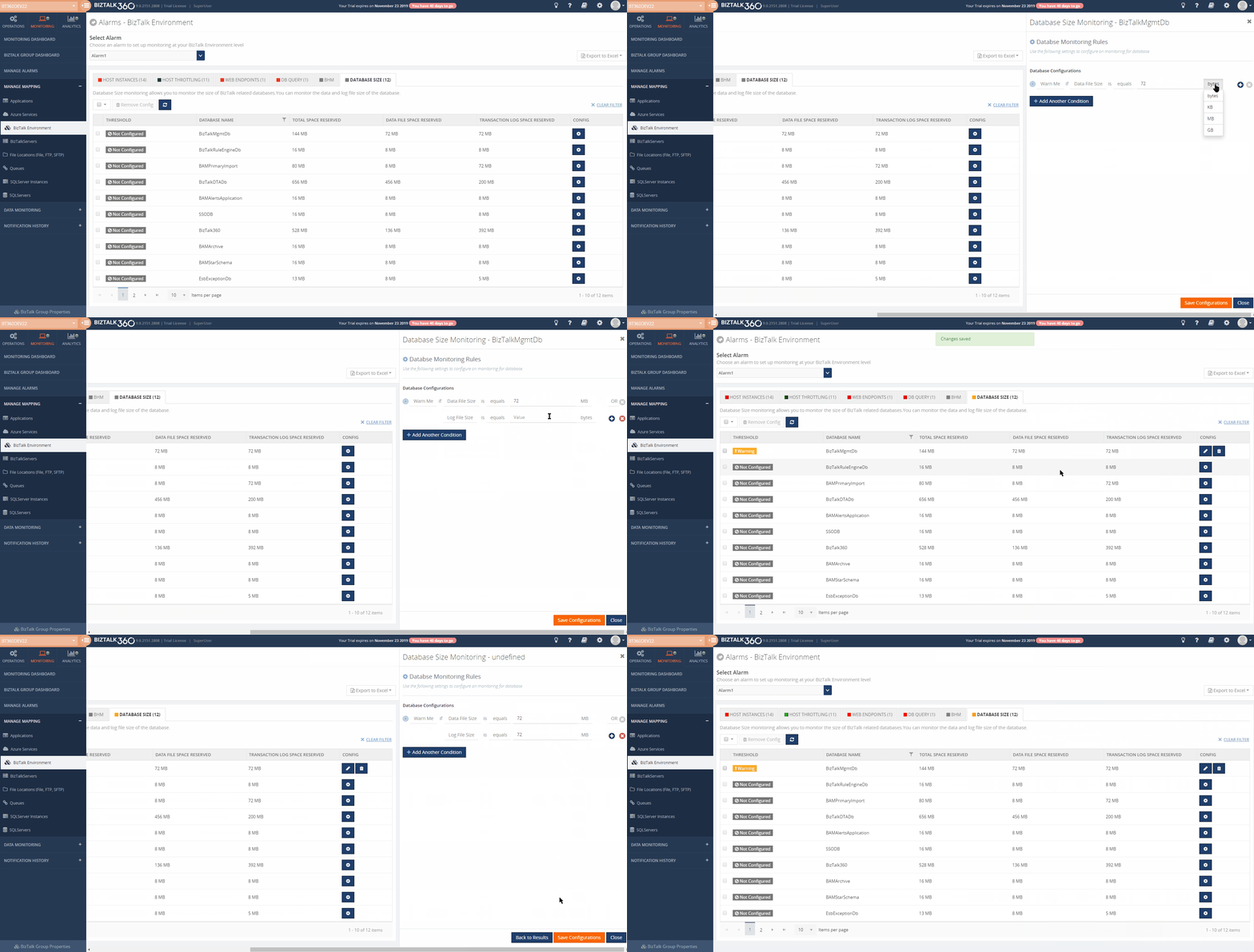
We wanted to simplify the process of configuring database size monitoring. To achieve this, we list all the BizTalk and BizTalk360 related databases. You can start monitoring by specifying the threshold details from the SQL instance.
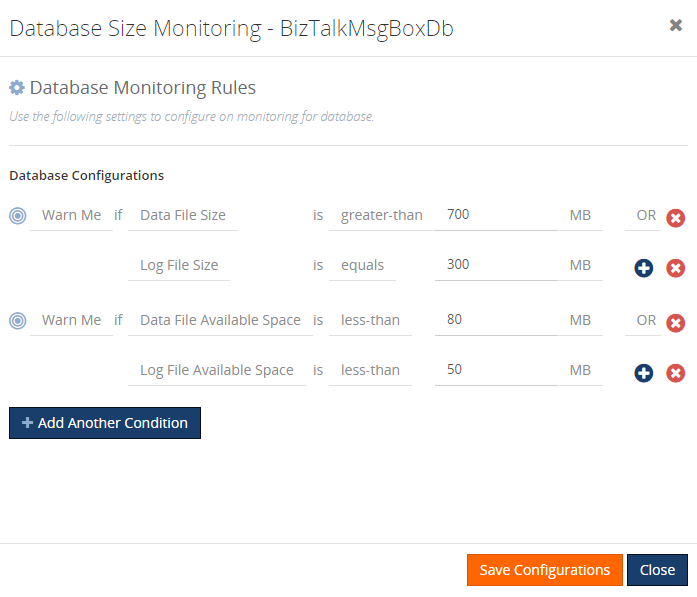
To configure a database for monitoring, navigate to Monitoring->BizTalk environment-> Database Size, which lists all the BizTalk and bizTalk360 databases under the respective SQL Instances. Click on the config gear icon, as shown in the above image, to configure the threshold values to monitor the size of the database. Based on the threshold configuration, the user will get notified if there is any threshold violation occurring.
The available Threshold types, logical condition, and unit prefixes are:
Threshold Type
Logical Condition
Unit Prefixes
Data File Size
Data File Used Space
Data File Available Space
Log File Size
Log File Used Space
Log File Available Space
Equals
Not-Equals
Greater-than
Greater-than-or-Equal
Less-than
Less-than-or-Equals
Bytes
Kilo-Bytes (KB)
Mega-Bytes (MB)
GigaBytes (GB)
Following are the threshold types on which you can monitor a database:
Threshold Type
Explanation
Data File Size
This threshold type represents the reserved space for the data file.
For e.g.:
Warn Me if Data File Size is Greater-than 200 GB
Error if Data File Size is Greater-than 250 GB
Data File Used Space
This threshold type represents the size used by the data file.
For e.g.:
Warn Me if Data file Used Spacenot-equals 250 GB
Error if Data file Used Space not-equals 250 GB
Data File Available Space
This threshold type represents the available space for the data file
For e.g.:
Warn Me if Data file Available space less-than-or-equals 99 GB
Error if Data file Available space less-than-or-equals 99 GB
Log File Size
This threshold type represents the size reserved for the transaction log file.
For e.g.:
Warn Me if Log File Size is Greater-than 200 GB
Error if Log File Size is Greater-than 200GB
Log File Used Space
This threshold type represents the space used by the log file.
For e.g.:
Warn Me if Log File Used Space not-equals 250 GB
Error if Log File Used Space not-equals 250 GB
Log File Available Space
This threshold type represents the available space for the log file.
For e.g.:
Warn Me if Log File Available Space Greater-than 250 GB
Error if Log File Available Space Greater-than 250 GB
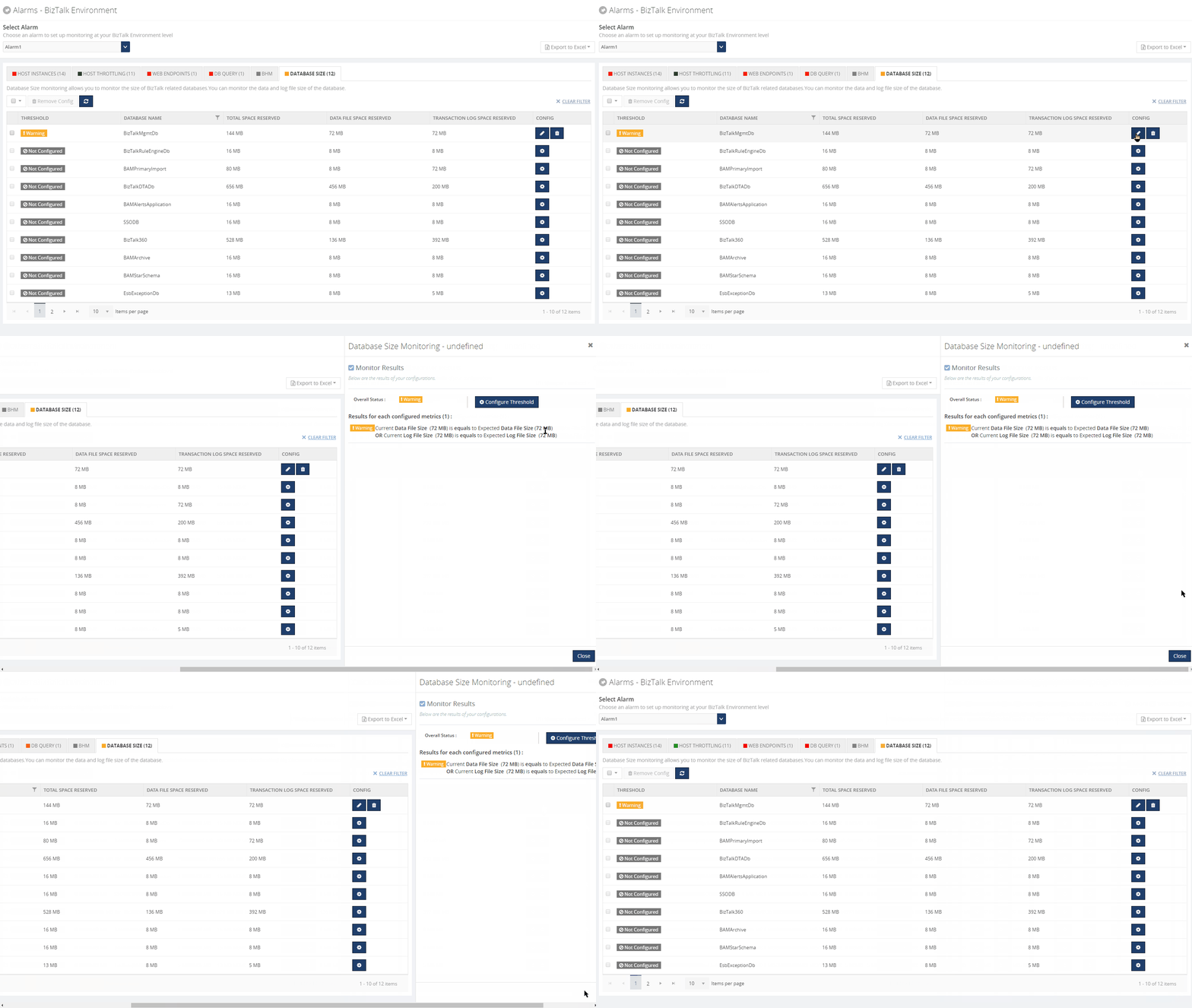
Once the threshold values are configured and saved, the monitoring conditions will be evaluated, and the status of the database size will be displayed in the grid.
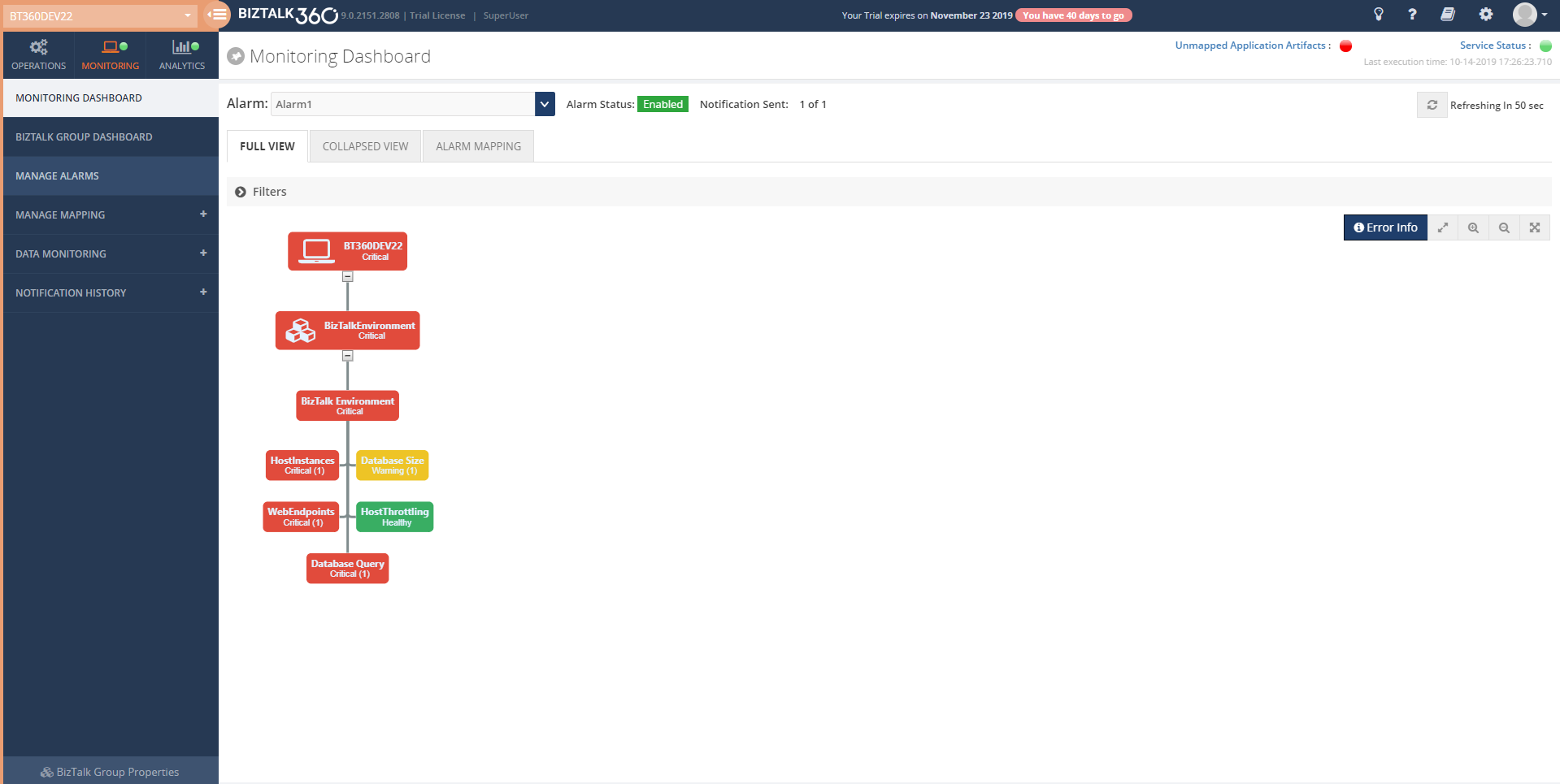
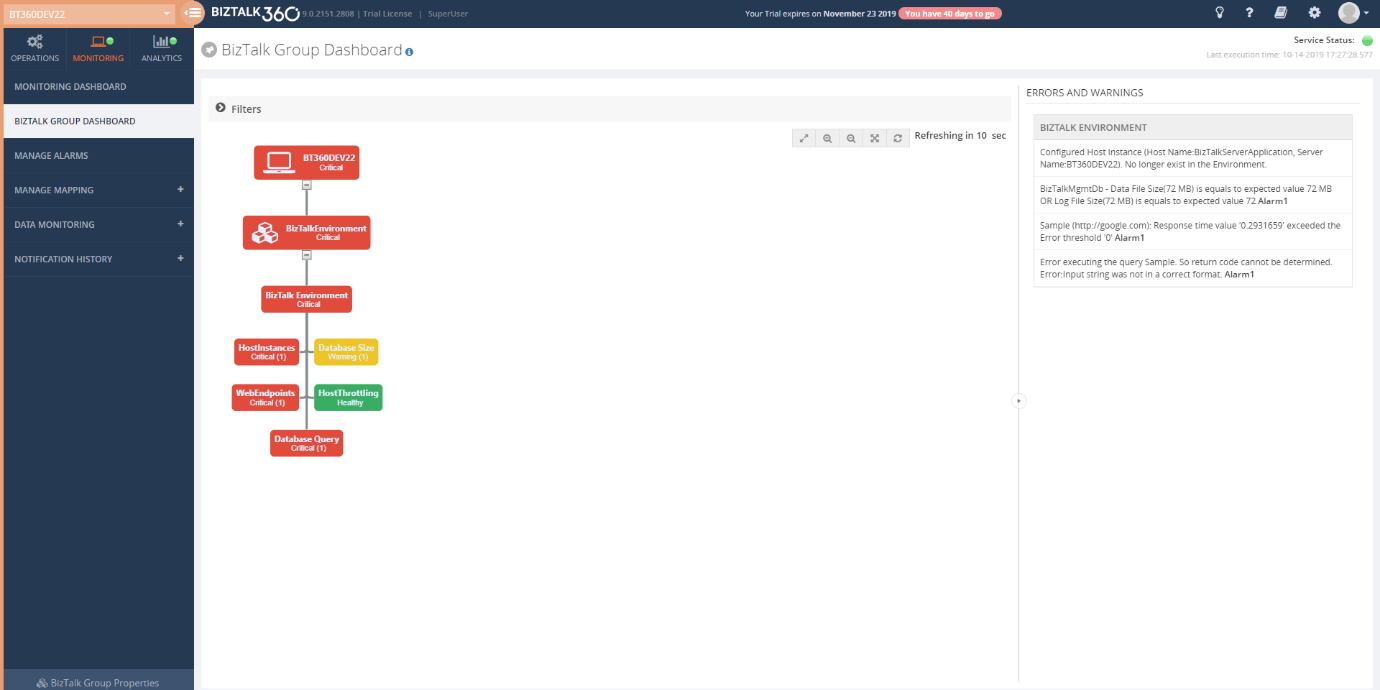
The Monitoring Dashboard and BizTalk Group Dashboard display the overall status of the alarm including the Database size shown in the picture below.
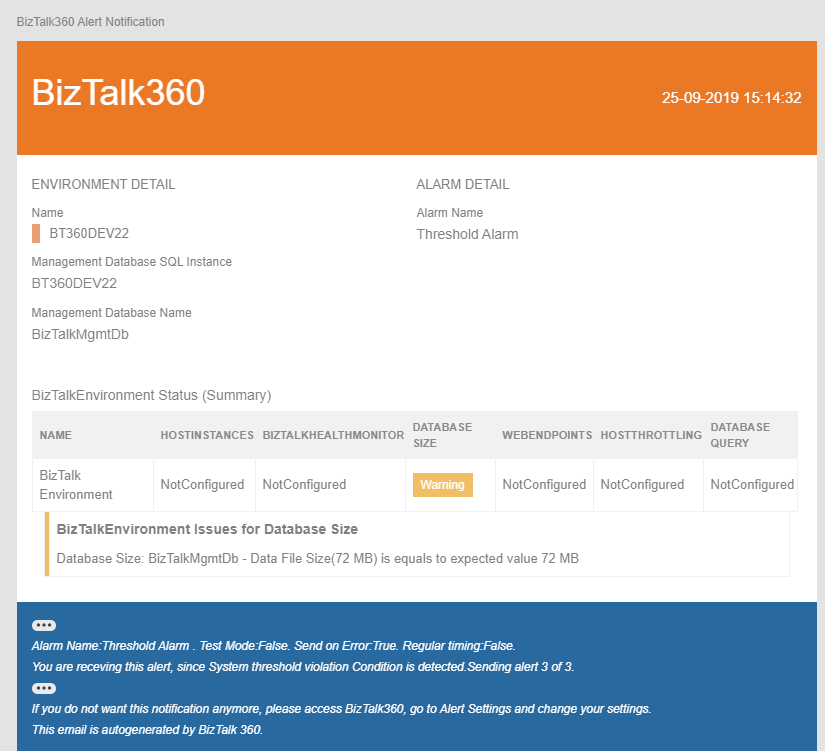
The user will get notified through mail or notification channel when any threshold violation happens.
Quick Alarm
You can also configure database size for monitoring simply by configuring Quick alarm. In this case, an alarm will be created and all the BizTalk and BizTalk360 databases will get configured for database size monitoring with default threshold conditions.
Conclusion
Considering the feedback provided by our customers, via the feedback portal, BizTalk360 will continue to provide more useful features every single release. In the upcoming release v9.0 phase 3, the ability to monitor Database Sizes is only one of the features we bring. If you have any suggestions for a =n upcoming version, please write to us at [email protected].
Microsoft Integration, Azure, Power Platform, Office 365 and much more Stencils Pack it’s a Visio package that contains fully resizable Visio shapes (symbols/icons) that will help you to visually represent On-premise, Cloud or Hybrid Integration and Enterprise architectures scenarios (BizTalk Server, API Management, Logic Apps, Service Bus, Event Hub…), solutions diagrams and features or systems that use Microsoft Azure and related cloud and on-premises technologies in Visio 2016/2013:
BizTalk Server
Microsoft Azure
Integration
Integration Service Environments (ISE)
Logic Apps and Azure App Service in general (API Apps, Web Apps, and Mobile Apps)
Azure API Management
Messaging: Event Hubs, Event Grid, Service Bus, …
Azure IoT and Docker
AI, Machine Learning, Stream Analytics, Data Factory, Data Pipelines
SQL Server, DocumentDB, CosmosDB, MySQL, …
and so on
Microsoft Power Platform
Microsoft Flow
PowerApps
Power BI
Office365, SharePoint,…
DevOps and PowerShell
Security and Governance
And much more…
… and now non-related Microsoft technologies like:
SAP Stencils
The Microsoft Integration Stencils Pack is composed of 23 files:
Microsoft Integration Stencils v4.0.2
MIS Additional or Support Stencils v4.0.0
MIS AI Stencils v4.0.0
MIS Apps and Systems Logo Stencils v4.0.0
MIS Azure Additional or Support Stencils v4.0.0
MIS Azure Others Stencils v4.0.0
MIS Azure Stencils v4.0.2
MIS Buildings Stencils v4.0.0
MIS Databases Stencils v4.0.0
MIS Deprecated Stencils v4.0.0
MIS Developer Stencils v4.0.0
MIS Devices Stencils v4.0.0
MIS Files Stencilsv4.0.0
MIS Generic Stencils v4.0.0
MIS Infrastructure Stencils v4.0.0
MIS Integration Patterns Stencils v4.0.0
MIS IoT Devices Stencils v4.0.0
MIS Office365 v4.1.0
MIS Power BI Stencils v4.0.0
MIS PowerApps and Flows Stencils v4.0.0
MIS SAP Stencils v4.0.0
MIS Security and Governance
MIS Servers (HEX) Stencils v4.0.0
MIS Users and Roles Stencils v4.0.0
That you can use and resize without losing quality, in particular, the new shapes.
What’s new in this version?
I’m doing some changes in the project in terms of organization and resources but instead of taking too much time doing it from top to bottom, I will be releasing small versions until the job is done. In this version the changes and additions are:
New shapes: near 50 new shapes have been added:
3 related to Microsoft Intune – a requested from a community member;
47 related to Security and Governance;
New category: I add a new file to the project called: Security and Governance with 47 shapes;
SVG Files: I’m starting to provide also the SVG files, from all these resources. At the moment these new shapes that were released in this version are now available in SVG Files on GitHub
Do you feel difficult to keep up to date on all the frequent updates and announcements in the Microsoft Integration platform and Azure iPaaS?
Integration weekly update can be your solution. It’s a weekly update on the topics related to Integration – enterprise integration, robust & scalable messaging capabilities and Citizen Integration capabilities empowered by Microsoft platform to deliver value to the business.
If you want to receive these updates weekly, then don’t forget to Subscribe!
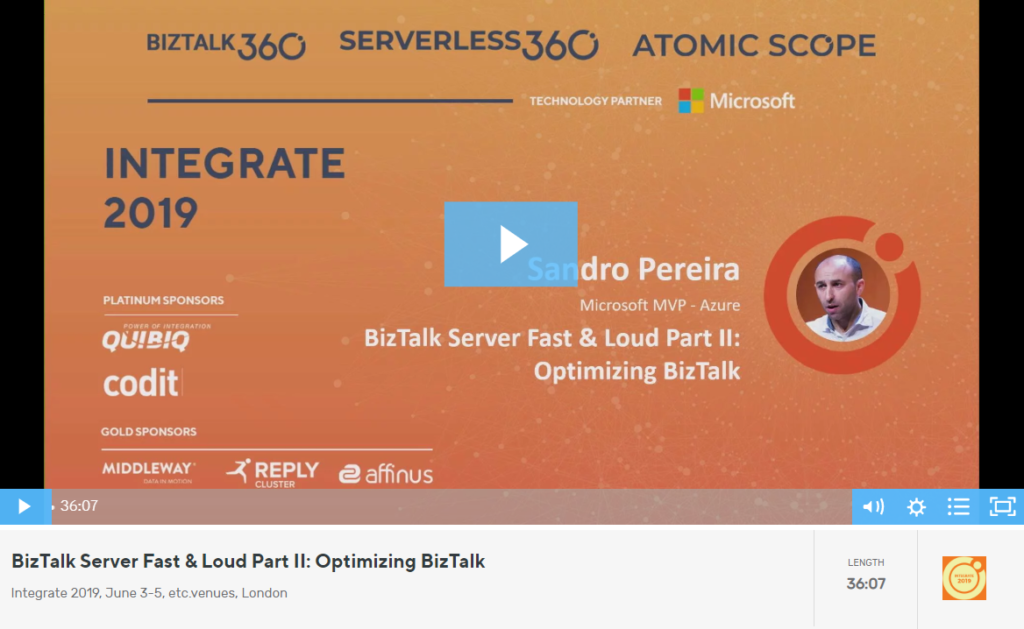
Last time I spoke both at Integrate UK and Integrate USA were in 2017, that in fact was the last time this event also happened in the USA, in which my session was on this same topic, part one of this topic: BizTalk Server Fast & Loud. And in reality, it was merely a happy coincidence, to do these two events again two years later and have decided to do the second part of this previous lecture, because by the time I chose the topic I didn’t know that I would return to the US… but it was a happy coincidence that fit very well!
And the reason I decide this second part was because I had received so much amazing feedback about my BizTalk Server Fast & Loud session two years ago. I can confess that in the beginning, I was a bit nervous to do this sequel, mainly because I want to keep the same good level of the previous one, avoiding what usually happens with the sequels in the movies, as a new part is released the quality goes down… but in the end I think I did a good job, that was confirmed by the awesome feedback provided by the attendees of both events. Personally, I love this session more than the previous one. But if you were not there two years ago, do not watch this talk without seeing the first part of this session here: BizTalk Server Fast & Loud.
About my session
Session Name: BizTalk Server Fast & Loud Part II: Optimizing BizTalk
Session Overview: Following the success of one of Sandro’s previous presentations at Integrate, Sandro decided to go deep on this hardcore BizTalk topic: Optimizing your BizTalk Server. This session will allow you to gain a better view on how to optimize BizTalk Server for better performance in all phases: your team’s proactivity, your code, your environment, and your goals. Once again, this is a very extensive and complex topic and there is no magic formula you can apply to solve all your problems. This presentation will aim to guide you through some of the most important steps, operations, tasks and best practices that you need to do or be aware of, in order to boost the performance of your BizTalk Server projects and that you can adjust or follow according to your needs.
Like previous years, the event in London is recorded, so if for any reason you could not be present at these events, or if you want to review it again, you can now do it here:
I am currently doing many hybrid integrations, leveraging the capabilities of BizTalk Server and Logic Apps to meet the needs/requirements of my clients/projects. Some of these projects began initially to be completely on-premises, but as the projects grew and new needs emerged, the need to use some cloud services appeared like Power BI, Office365 (Teams, Outlook) and so on, became a reality. And these features are much easier to implement and have more productivity on Azure Logic Apps instead of BizTalk Server as there are already native connectors there.
And you have known that in reality there are several ways to implement this two bidirectionality communication between Logic App and BizTalk Server :
Sending messages from BizTalk Server to Azure Logic Apps
and receiving messages from Azure Logic Apps to BizTalk Server
like using HTTP requests or Azure Service Bus, and by doing so you can create robust and smart hybrid integrations. You may have to use one of these alternative implementations if you are using older versions of BizTalk Server.
The good news is that BizTalk Server 2016 has a better and more user-friendly way to make these hybrid connections. Instead of using HTTP requests, with BizTalk Server 2016 you can use the Logic Apps adapter to receive messages from an Azure Logic App or send messages to an Azure Logic App.
This whitepaper will give you a detailed understanding of the following:
Requirements to install Logic App adapter
Microsoft BizTalk Server Adapter for Logic Apps
On-premises data gateway
How to install and configure the Logic App Adapter
Where I can download it
The whitepaper is completely free and you can download it here:
I would like to take this opportunity also to once again say thanks to Lex Hegt for helping me reviewing this whitepaper especially for the incredible work of him correcting my horrible English and in this way make the document and my thoughts being readable.
I hope you enjoy reading this paper and any comments or suggestions are welcome.
You can also find, download and enjoy several other free whitepapers of my own here:
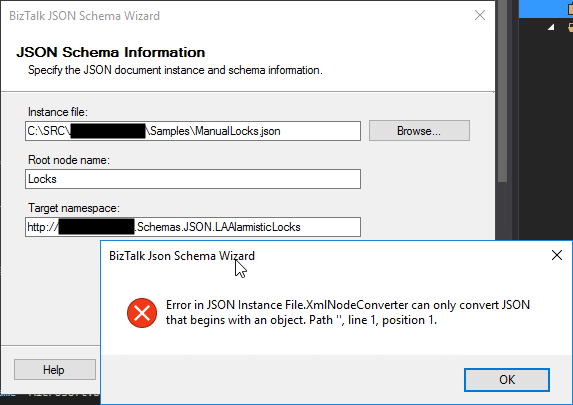
This week while trying to use the BizTalk Server 2016 JSON Schema Wizard to generate an XML schema from a specific JSON file to be sent to a Logic App I got the following error:
Error in JSON Instance File.XMLNodeConverter can only convert JSON that begins with an object. Path ‘’, line 1, position 1.
Basically, I’m trying to send a list of “objects” that in my case are Locks, to be processed.
Cause
The cause of this “problem” is that a JSON array of objects, it may not make sense in a BizTalk Server XML world as Morten la Cour very well written in this forum. At that sentence, I will add: “at it his being done today”. Because with a few improvements could be smarter and support this type of messages.
Why? The BizTalk
JSON Schema Wizard is a simple and “stupid” converter, it will ask only for you
to provide a root node and a namespace that it will add to the XML Schema and
the XML JSON representation because it will require that information to be able
to uniquely identify this type of message.
But it will not understand what is a “not identified” object array because it needs to give it a Record name in the XML equivalent.
So, that means
that it will not support JSON arrays?
No, it will support JSON arrays if you provide a field name to that array, i.e., instead of having:
[
…
]
You should have:
{
   "field name": [
   …
   ]
}
Solution
If you don’t have the control over that JSON message,
you may need to create a custom pipeline component to add or remove this field
name that will identify the array in the XML equivalent message.
If you have control over the structure of the JSON
message the simple way is to modify the structure of the message to include a
field name to identify the array. Lucky it was my case, so I modify the
original structure descrived above to be:
You may all remember Richard Seroter BizTalk SendPort Duplicator tool and how he descrived that frequently during development, and even in production, we have a need to create new BizTalk ports that are virtually identical to an existing one where we just need to change some small configurations like:
Address/URI;
Send Port Filter criteria;
Different pipelines or pipeline components configuration;
And so on.
And by default, the only options we have are:
Export the application binding files, manually clean the file and change the values; And then import the Binding file again;
Or manually recreate the entire port again;
Both options are time-consuming and need a lot of manually work.
And Richard Seroter was, and still is, an amazing lifesaving tool that allows you to duplicate send ports easily, so why a new tool?
“BizTalk Port Multiplier Tool” it has all Richard tool functionalities but is more than a Send Port Duplicator, and that is the reason I decided to create a new tool.
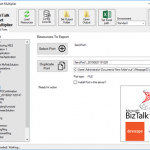
“BizTalk Port Multiplier Tool” is a simple tool that aims to simplify port “cloning” process by allowing you to easily “clone or duplicate” any existing port: Receive Port or Send Port.
Send Ports are easy, you only need to give a different name to the port, and you can clone it;
Receive Ports are tricky because they may contain several Receive Locations and the URI needs to be unique;
This tool will extend default BizTalk Server capabilities transforming the tedious and sometimes complicate port creation based on an existing one a little simple and easy allowing you to:
Create a new Receive Port based on an existing one;
It will also export the binding file from that new Receive Port;
Create a new Send Port based on an existing one;
It will also export the binding file from that new Send Port;
Generate different binding files for each environment
Why do I need to “clone” a Receive Port?
Sometimes you also need to create a receive port with similar configurations of an existing one, also changing only few configurations or simple the URI and instead of manually recreating you can have 90% of the process done automatically.
Sometimes is practical, sometimes or in some scenarios it may not work but in most of the cases it will. So it is basically a best-effort operation and not an exact clone because they may have several Receive Locations and the Address/URI needs to be unique. So, you then need to go to each receive location and reconfigure them.
Download
Credits also to my team member at DevScope, Pedro Almeida that collaborated in the development of this tool.

![BizTalk WCF-SQL Error: Microsoft.ServiceModel.Channels.Common.MetadataException: Object [dbo].[ColumnName] of type StoredProcedure does not exist.](https://www.biztalkgurus.com/wp-content/uploads/2019/11/biztalk-server-Object-dbo-ColumnName-of-type-StoredProcedure-does-not-exist-1024x445-1-150x150.png)
![Microsoft.ServiceModel.Channels.Common.MetadataException: Object [dbo].[ColumnName] of type StoredProcedure does not exist.](https://blog.sandro-pereira.com/wp-content/uploads/2019/11/biztalk-server-Object-dbo-ColumnName-of-type-StoredProcedure-does-not-exist.png)