BizTalk Server 2020 – 20 days, 20 posts – day 17. I have to confess I didn’t try yet the default JSON Encoder, but I trust this component is still useful in this new release, so today we are migrating the custom JSON Encoder component available in BizTalk Pipeline Components Extensions UtilityPack project: JSON Encoder Pipeline Component.
Carry SOAPHeader To WCF-BasicHttp Pipeline Component
This custom JSON Encoder Pipeline Component is a pipeline component for BizTalk Server which can be used in a Send Pipeline (Encode stage) to encode any XML message into a JSON equivalent in a simple and effective way. It is also 100% compatible with the default JSON Encoder component provided by Microsoft.
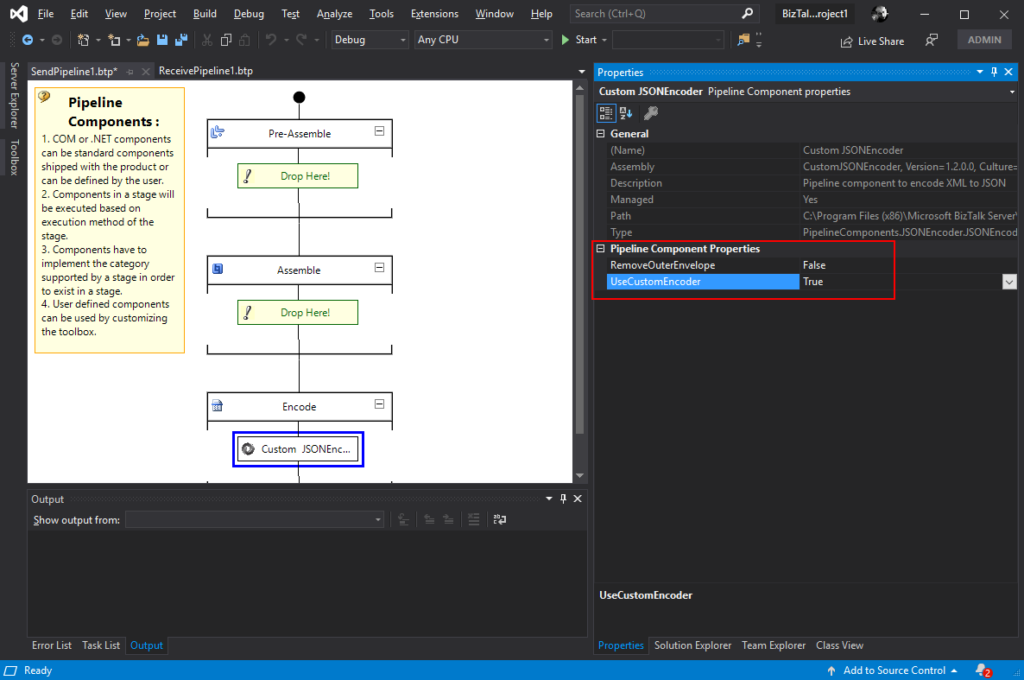
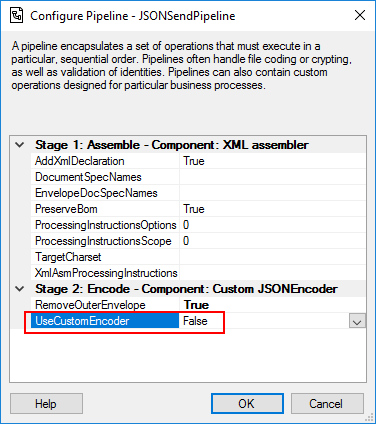
This component will allow you to choose between using the default pipeline component provide by Microsoft, at least the internal behavior because I build this pipeline component as an extension of the default JSON Encoder pipeline component, or use the custom behavior that I created. So, from the BizTalk Administration console you will be able to decide if:
You want to use
the behavior of the default JSON Encoder pipeline component provide by
Microsoft by setting the UseCustomEncoder property to False;
or use the custom
behavior to generate the JSON message by setting the UseCustomEncoder property
to True;
To use this pipeline component in your projects you just copy the CustomJSONEncoder.dll file into the Pipeline Components folder that exists in the BizTalk Server installation directory:
You do not need to add this custom pipeline component to be used by the BizTalk Runtime to the Global Assembly Cache (GAC).
What is BizTalk Pipeline Components Extensions Utility Pack?
BizTalk Pipeline Components Extensions Utility Pack is a set of custom pipeline components (libraries) with several custom pipeline components that can be used in received and sent pipelines, which will provide an extension of BizTalk out-of-the-box pipeline capabilities.
BizTalk Server 2020 – 20 days, 20 posts – day 16. We are almost finishing migrating all the BizTalk Pipeline Components Extensions UtilityPack project, today is the component: Carry SOAPHeader To WCF-BasicHttp Pipeline Component.
Carry SOAPHeader To WCF-BasicHttp Pipeline Component
The Carry SOAPHeader To WCF-BasicHttp Pipeline Component is a pipeline component for BizTalk Server which can be used in a send pipeline and is intended to carry forward the received custom SOAP Header to the outgoing message, in other words:
This component will read the Custom SOAPHeader from the Message Context Properties
The custom header name will be defined on the component configuration and we can read it from the target http://schemas.microsoft.com/BizTalk/2003/SOAPHeader
and will configure this custom header in the OutboundCustomHeaders property used by the WCF-BasicHTTP Adapter.
The OutboundCustomHeaders property is used if you want to specify the custom SOAP headers for outgoing messages. When this property is used, the property must have the <headers> element as the root element. All of the custom SOAP headers must be placed inside the <headers> element
If the custom SOAP header value is an empty string, you must assign <headers></headers> or <headers/> to this property.
This component is useful if you are implementing CBR operations on legacy service (SOAP – .asmx) using the new WCF-Adapters in BizTalk Server. Notice that the SOAP adapters, still present in BizTalk Server 2020, are obsolete and discontinued.
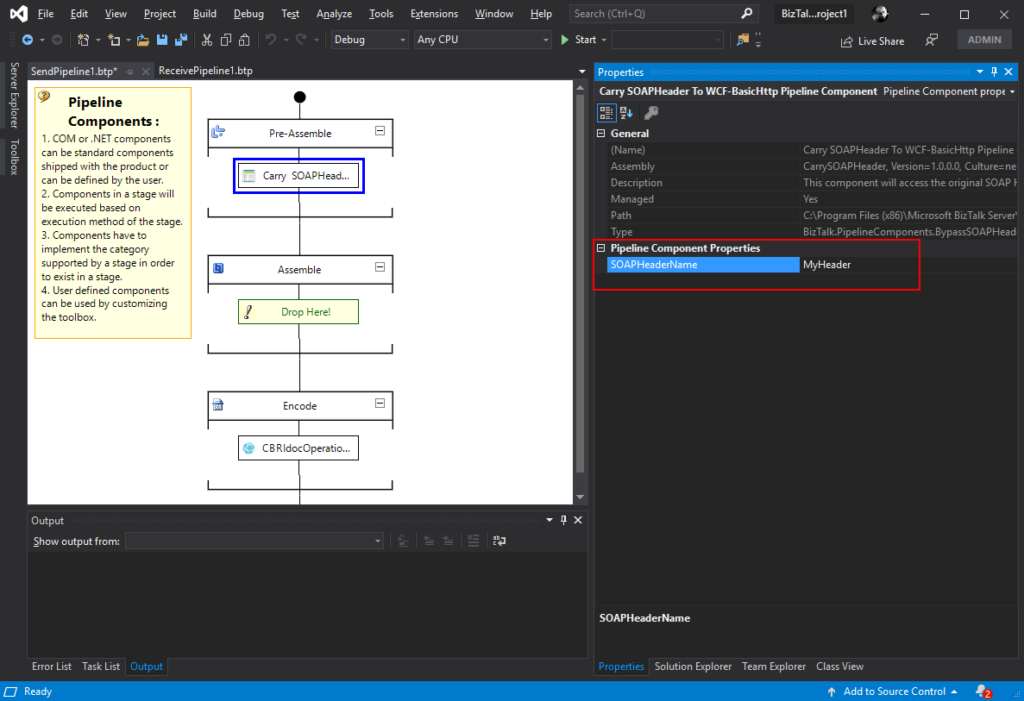
This component requires one configuration that is the SOAPHeaderName where you should specify the SOAP Header name present in the inbound message to be passed to the OutboundCustomHeaders in the outgoing message.
To use this pipeline component in your projects you just copy the CarrySOAPHeader.dll file into the Pipeline Components folder that exists in the BizTalk Server installation directory:
You do not need to add this custom pipeline component to be used by the BizTalk Runtime to the Global Assembly Cache (GAC).
What is BizTalk Pipeline Components Extensions Utility Pack?
BizTalk Pipeline Components Extensions Utility Pack is a set of custom pipeline components (libraries) with several custom pipeline components that can be used in received and sent pipelines, which will provide an extension of BizTalk out-of-the-box pipeline capabilities.
The CBR IDoc Operation Promotion Encode Pipeline Component is a pipeline component for BizTalk Server which can be used in send pipelines, Encode stage, to promote IDOC Operation property. This component is useful to implement a pure Content-Based Routing solution to integrate with SAP Server.
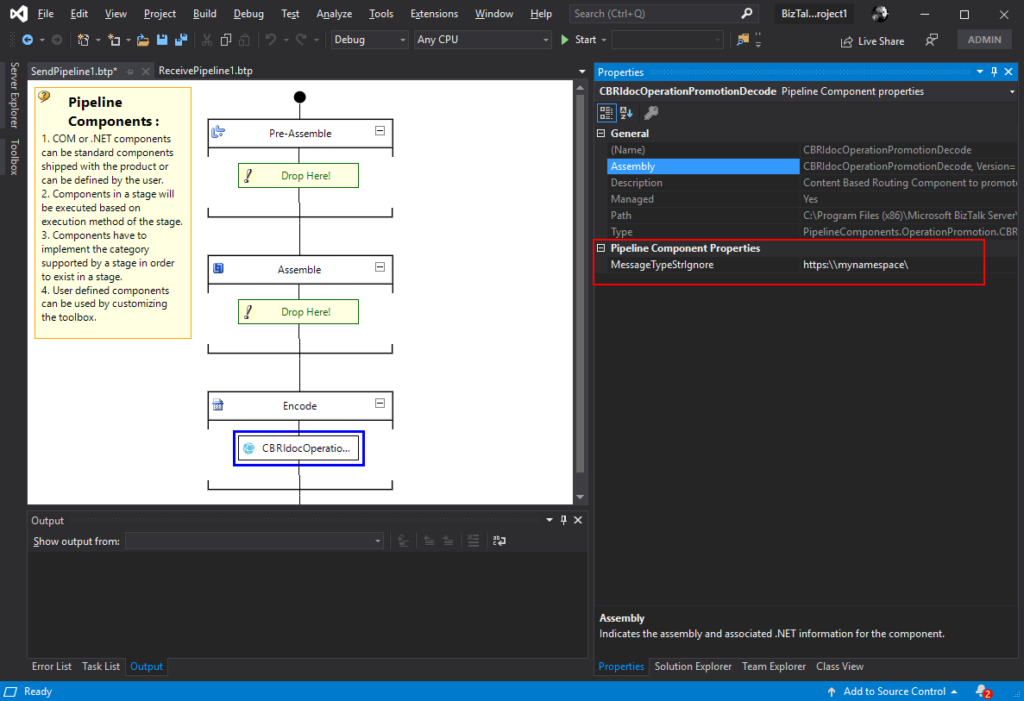
This component requires one configuration that is the MessageType string to be ignored. Then it will take the last string (word) from the MessageType Message Context Property and promote it to the Operation Message Context Property.
To use this pipeline component in your projects you just copy the CBRIdocOperationPromotionDecode.dll file into the Pipeline Components folder that exists in the BizTalk Server installation directory:
You do not need to add this custom pipeline component to be used by the BizTalk Runtime to the Global Assembly Cache (GAC).
What is BizTalk Pipeline Components Extensions Utility Pack?
BizTalk Pipeline Components Extensions Utility Pack is a set of custom pipeline components (libraries) with several custom pipeline components that can be used in received and sent pipelines, which will provide an extension of BizTalk out-of-the-box pipeline capabilities.
BizTalk Server 2020 – 20 days, 20 posts – day 14. Continuing the BizTalk Pipeline Components Extensions UtilityPack project topic, today I released the: CBR Operation Promotion Encode Pipeline Component.
CBR Operation Promotion Encode Pipeline Component
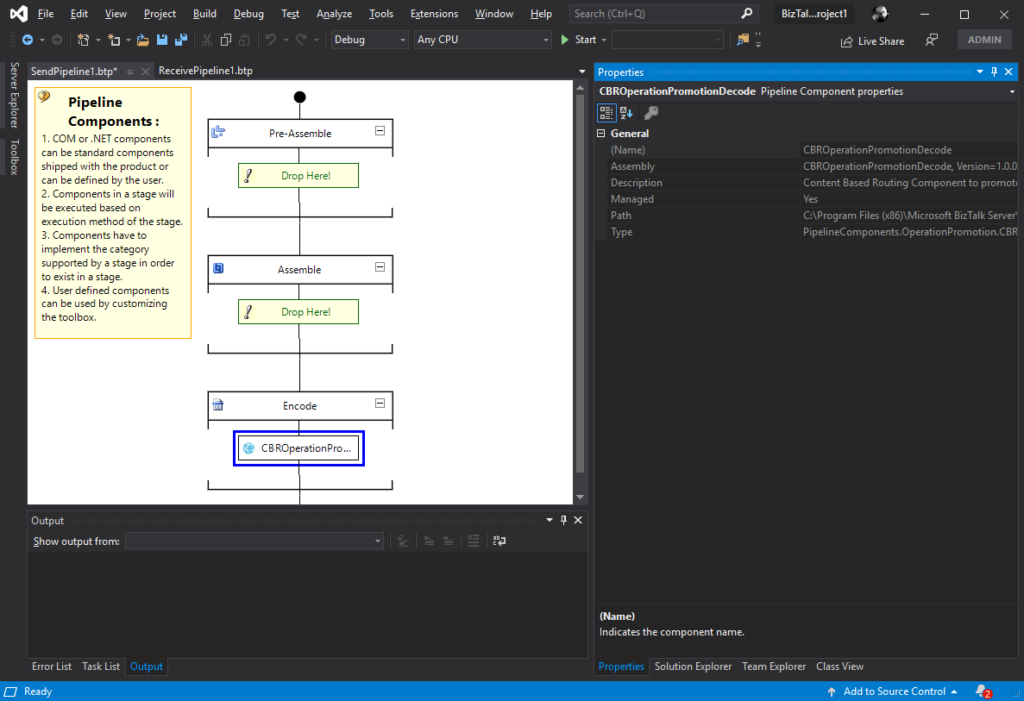
The CBR Operation Promotion Encode Pipeline Component is a pipeline component for BizTalk Server which can be used in send pipelines, Encode stage, to promote Operation property. This component is useful to implement a pure Content-Based Routing solution to integrate with SQL Server.
The component will promote Operation property by taking the value (word) which lies ahead of the cardinal (#) from the MessageType message context property and promote it to the Operation Message Context Property.
This component doesn’t require any configuration.
To use this pipeline component in your projects you just copy the CBROperationPromotionDecode.dll file into the Pipeline Components folder that exists in the BizTalk Server installation directory:
You do not need to add this custom pipeline component to be used by the BizTalk Runtime to the Global Assembly Cache (GAC).
What is BizTalk Pipeline Components Extensions Utility Pack?
BizTalk Pipeline Components Extensions Utility Pack is a set of custom pipeline components (libraries) with several custom pipeline components that can be used in received and sent pipelines, which will provide an extension of BizTalk out-of-the-box pipeline capabilities.
BizTalk Server 2020 – 20 days, 20 posts – day 13. Once again, here is another pipeline component migrate to BizTalk Server 2020 that makes part of my BizTalk Pipeline Components Extensions UtilityPack project: XML Namespace Remover Pipeline Component. This component was initially developed by Johan Hedberg.
XML Namespace Remover Pipeline Component
The XML Namespace Remover Pipeline Component is a pipeline component for BizTalk Server which can be used in any stage of both receive and send pipelines to remove XML namespaces from XML documents.
This component has the availability to transform the root of the message from this:
If you have the option, you shouldn’t remove the namespace from the messages. However, we don’t leave in a perfect world and we need to deal with legacy systems and sometimes they required, for unknown reasons for me, that we deliver messages without namespace.
To use this pipeline component in your projects you just copy the RemoveXmlNamespace.PipelineComponents.dll file into the Pipeline Components folder that exists in the BizTalk Server installation directory:
You do not need to add this custom pipeline component to be used by the BizTalk Runtime to the Global Assembly Cache (GAC).
What is BizTalk Pipeline Components Extensions Utility Pack?
BizTalk Pipeline Components Extensions Utility Pack is a set of custom pipeline components (libraries) with several custom pipeline components that can be used in received and sent pipelines, which will provide an extension of BizTalk out-of-the-box pipeline capabilities.
BizTalk Server 2020 – 20 days, 20 posts – day 12. Once again, following my recent blog posts here is another pipeline component migrate to BizTalk Server 2020 that makes part of my BizTalk Pipeline Components Extensions UtilityPack project: Multi-Part Message Attachments Zipper Pipeline Component.
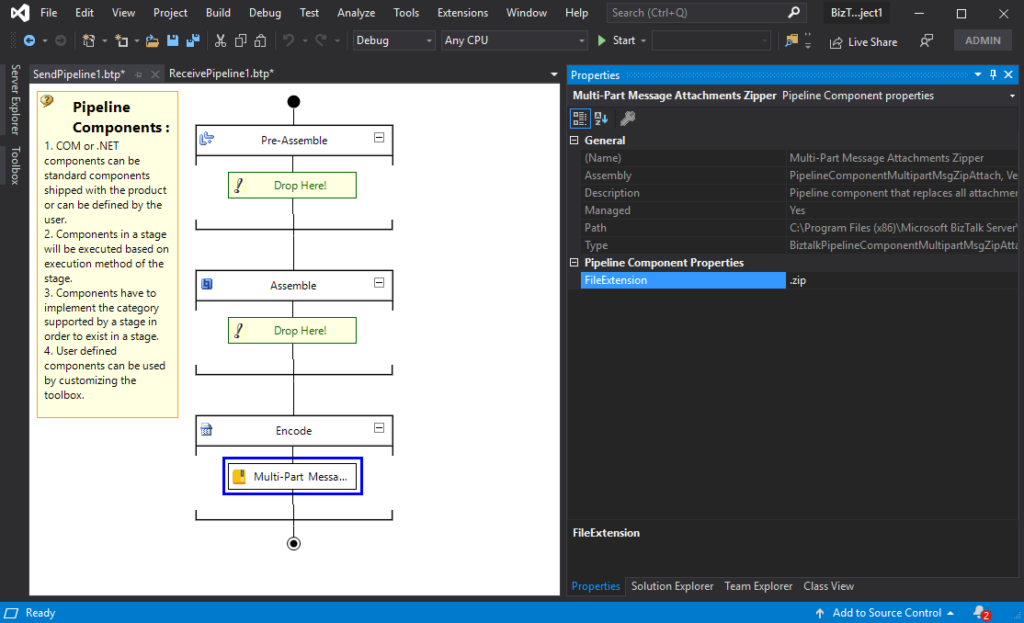
The Multi-Part Message Attachments Zipper is a pipeline component for BizTalk Server which can be used in a send pipeline and is intended to replace all attachments of a multi-part message for its zipped equivalent.
The capabilities are similar to those available in compression software such as WinZip or 7-zip:
Attachments Compression – Extracts, in a send pipeline, all message parts include in a multi-part message that is not included in the message body (Message Body Part = False), compresses it and attaches the compressed attachment back to the message.
No compression/decompression software needs to be installed in the BizTalk Server machines.
This component requires one configuration that is the FileExtension where you can specify if you want for example a .zip or .gz file.
To use this pipeline component in your projects you just copy the PipelineComponentMultipartMsgZipAttach.dll file into the Pipeline Components folder that exists in the BizTalk Server installation directory:
You do not need to add a custom pipeline component to be used by the BizTalk Runtime to the Global Assembly Cache (GAC).
What is BizTalk Pipeline Components Extensions Utility Pack?
BizTalk Pipeline Components Extensions Utility Pack is a set of custom pipeline components (libraries) with several custom pipeline components that can be used in received and sent pipelines, which will provide an extension of BizTalk out-of-the-box pipeline capabilities.
BizTalk Server 2020 – 20 days, 20 posts – day 11. Following my recent blog posts here is another pipeline component migrate to BizTalk Server 2020 that makes part of my BizTalk Pipeline Components Extensions UtilityPack project: Zip File Pipeline Component.
Zip File Pipeline Component
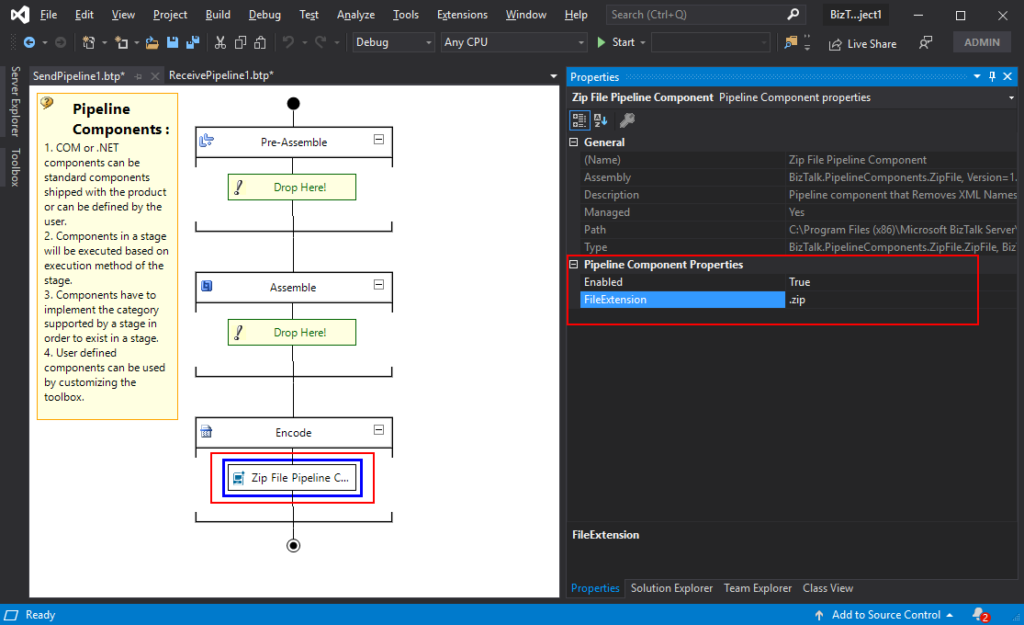
The Zip File Pipeline Component is a pipeline component for BizTalk Server which can be used in a send pipeline (encode stage) and is intended to compress (zip/gzip) outgoing messages.
The capabilities are similar to those available in compression software such as WinZip or 7-zip.
No compression/decompression software needs to be installed in the BizTalk Server machines.
To use this pipeline component in your projects you just copy the BizTalk.PipelineComponents.ZipFile.dll file into the Pipeline Components folder that exists in BizTalk Server Installation directory: “..Program Files (x86)Microsoft BizTalk ServerPipeline Components” on every server.
You do not need to add a custom pipeline component to be used by the BizTalk Runtime to the Global Assembly Cache (GAC).
This component requires two configurations that are:
the FileExtension: where you can specify if you want for example a .zip or .gz file.
and Enabled: that is a true or false value to activate the compression.
What is BizTalk Pipeline Components Extensions Utility Pack?
BizTalk Pipeline Components Extensions Utility Pack is a set of custom pipeline components (libraries) with several custom pipeline components that can be used in received and sent pipelines, which will provide an extension of BizTalk out-of-the-box pipeline capabilities.
BizTalk Server 2020 – 20 days, 20 posts – day 10. Following my last blog post here is another component migrate to BizTalk Server 2020 that makes part of my BizTalk Pipeline Components Extensions UtilityPack project: Unzip File Pipeline Component.
Unzip File Pipeline Component
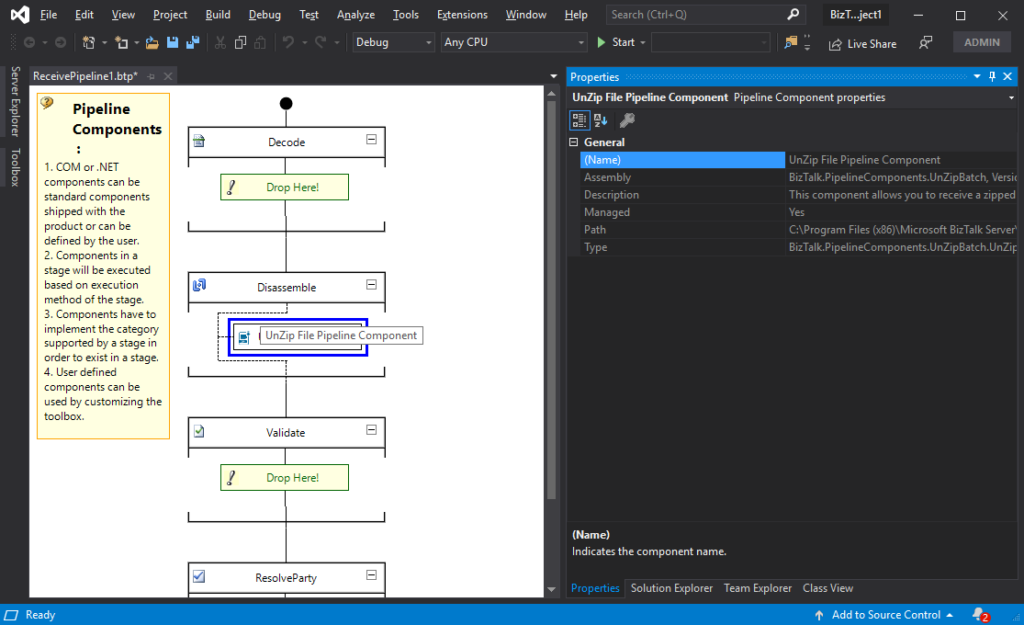
The Unzip File Pipeline Component for BizTalk Server can be used in a Received pipeline (Disassemble stage), and it allows you to receive a compress (zip/gzip) file and extract its contents into different XML messages.
The capabilities are like those available in any compression software such as WinZip or 7-zip:
This component doesn’t require any configurations.
You do not need to add a custom pipeline component to be used by the BizTalk Runtime to the Global Assembly Cache (GAC).
The component doesn’t require any configuration.
What is BizTalk Pipeline Components Extensions Utility Pack?
BizTalk Pipeline Components Extensions Utility Pack is a set of custom pipeline components (libraries) with several custom pipeline components that can be used in received and sent pipelines, which will provide an extension of BizTalk out-of-the-box pipeline capabilities.
BizTalk Server 2020 – 20 days, 20 posts – day 9. This week I decide to start migrating a project that I enjoy and use them in several of my clients: BizTalk Pipeline Components Extensions UtilityPack. And the first component that I choose was: Local Archive Pipeline Component.
Local Archive Pipeline
Component
BizTalk Server Local Archive pipeline component it’s a pipeline component that can be used for archiving incoming/outgoing message from any adapters. It will provide the following capabilities :
It can be used in any stage of a receive pipeline or send pipeline;
It can be used in multiple stages of a receive pipeline or send pipeline;
It provides an option for you to specify the location path for where you want to save the message: local folder, shared folder, network folder.
It can be used from any adapter:
If the adapter provides the ReceivedFileName property promoted like the File adapter or FTP adapter the component will take this value in consideration and save the message with the same name;
Otherwise, it will use the MessageID, saving the file with the MessageID has its name without extension.
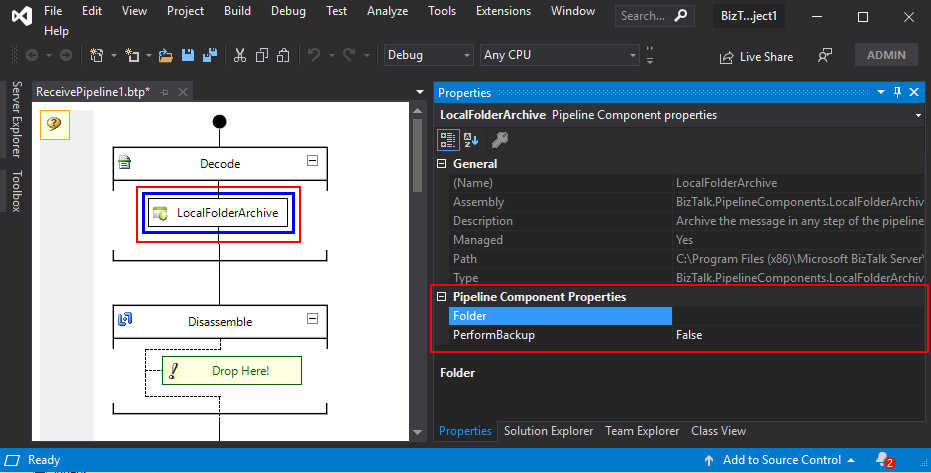
The component has two parameters:
PerformBackup: True/False value to enable or disable the archive functionality;
Folder: Local (or shared) folder for where you want to perform the archive of the message;
What is BizTalk Pipeline Components Extensions Utility Pack?
BizTalk Pipeline Components Extensions Utility Pack is a set of custom pipeline components (libraries) with several custom pipeline components that can be used in received and sent pipelines, which will provide an extension of BizTalk out-of-the-box pipeline capabilities.
BizTalk Server 2020 – 20 days, 20 posts – day 8. Microsoft announced a few months ago, the release of Microsoft BizTalk Server 2020 – the 11th major release of BizTalk Server –and, as usual with previous versions, I updated my installation and configuration manual for BizTalk Server 2020. This whitepaper will explain in detail – a step-by-step guideline – how to install and configure Microsoft BizTalk Server 2020 on a standalone environment running Windows Server 2019. This information will help you plan the installation and configuration of BizTalk Server 2020, applications and components on which it depends focused on creating a development environment (you can also follow this tutorial to help you create production environments, however, if this is the case you need to skip some steps).
Assumptions and out of scope
We will be assuming that the operating system: Windows Server 2019 and the latest critical Windows updates from Microsoft already have been installed.
In this scenario, we will be performing a full installation of Microsoft BizTalk Server 2020. The following components will be installed:
Enterprise Single Sign-On (SSO).
BizTalk Group.
BizTalk Runtime.
Business Rule Engine.
BAM Tools and Alerts.
BAM Portal.
BAM Portal it is deprecated, but we still can use it.
BizTalk EDI/AS2 Runtime.
REST APIs (Management data APIs)
Management data APIs are endpoints that let you remotely update, add, and query the status of different artifacts in your BizTalk Server environment. The endpoints are added using REST and come with a swagger definition.
BizTalk TMS.
BizTalk TMS is a service that refreshes authentication tokens used by BizTalk. It is a prerequisite for the Office 365 adapters.
Microsoft BizTalk Adapters for Enterprise Applications.
What’s in store for you?
This whitepaper will give you a detailed understanding of the following:
Preparing the Prerequisites and Installation for BizTalk Server 2020
I would like to take this opportunity also to say thanks to Tom Canter for being a reviewer of this installation guide and Lex for all the work to publish this resource.
I hope you enjoy reading this paper and any comments or suggestions are welcome.
You can also find, download and enjoy several other free whitepapers of my own here:


 BizTalk Pipeline Components Extensions Utility Pack