With security be every day more important, this also brings additional problems (good problems) to BizTalk Server Administrators during the deployment of new BizTalk Server Applications or even during the lifecycle of existing applications:
What a few years ago was anonymous, because they were internal services, they are now authenticated.
Nowadays, many organizations implement a combination of Minimum Password Age policy also enforcing a Password History policy that requires to reset the password, even for services accounts, from time to time and avoid reusing the same password.
These tasks lead to BizTalk Server Administrators to manually set the user credentials in a range of ports (send and receive). This is not always a quick and easy job.
Luckily for us, these tasks can be automated, leading them to become simpler, faster, and avoid fewer errors.
PowerShell script overview
With this PowerShell sample, we will be able to set or update the Authentication Credential on a list of BizTalk Server Receive Locations deployed in your BizTalk Server environment.
foreach($receivePort in $catalog.ReceivePorts)
{
# For each receive location in your environment
foreach($recLocation in $receivePort.ReceiveLocations)
{
# In this case ...
if($rcvLocations.Contains($recLocation.Name))
{
$bindingConfiguration = $recLocation.TransportTypeData
if($bindingConfiguration.CustomProps.Password.vt -eq "1")
{
$bindingConfiguration.CustomProps.Password.InnerText = "my_password"
$bindingConfiguration.CustomProps.Password.vt = "8"
}
else
{
$passwordElement = $bindingConfiguration.CreateElement("Password")
$passwordElement.SetAttribute("vt", "8")
$passwordElement.InnerText = "my_password"
$bindingConfiguration.CustomProps.InsertAfter($passwordElement, $bindingConfiguration.CustomProps.SuspendMessageOnFailure)
}
if($bindingConfiguration.CustomProps.UserName.vt -eq "8")
{
$bindingConfiguration.CustomProps.UserName.InnerText = "my_username"
}
$transportConfigData = $bindingConfiguration.InnerXml
$recLocation.TransportTypeData = $transportConfigData
}
}
}
This script was tested in BizTalk Server 2016.
Download
THIS POWERSHELL SCRIPT IS PROVIDED “AS IS”, WITHOUT WARRANTY OF ANY KIND.
It was only 3 days ago that I released a major version. Still, with all of this new stuff and announcements on Ignite 2020, I just decide to make a minor update to my stencil package, especially because all the logos of Power Platform components have changed.
What’s new in this version?
These are the list of changes and additions present in this major release:
New shapes: There are new shapes on the following Visio Stencils files (.vssx):
MIS Power Platform Stencils: the picture above is presenting the new logo icons of Power BI, Power Apps, Power Automate, and Power Virtual Agents.
MIS Azure Stencils and MIS Azure Additional or Support Stencils: there were a few new icons add to the stencils, most of them related to Azure Arc and Storage Account and some icon updates.
MIS Office, Office 365, and Dynamics 365: New shapes added to this stencil with more Office 365 products.
Automation: minor fixes on the automation scripts
SVG files: new SVG files added.
Microsoft Integration, Azure, Power Platform, Office 365 and much more Stencils Pack
Microsoft Integration, Azure, Power Platform, Office 365 and much more Stencils Pack it’s a Visio package that contains fully resizable Visio shapes (symbols/icons) that will help you to visually represent On-premise, Cloud or Hybrid Integration and Enterprise architectures scenarios (BizTalk Server, API Management, Logic Apps, Service Bus, Event Hub…), solutions diagrams and features or systems that use Microsoft Azure and related cloud and on-premises technologies in Visio 2016/2013:
BizTalk Server
Microsoft Azure
Integration
Integration Service Environments (ISE)
Logic Apps and Azure App Service in general (API Apps, Web Apps, and Mobile Apps)
Azure API Management
Messaging: Event Hubs, Event Grid, Service Bus, …
Azure IoT and Docker
AI, Machine Learning, Stream Analytics, Data Factory, Data Pipelines
SQL Server, DocumentDB, CosmosDB, MySQL, …
and so on
Microsoft Power Platform
Microsoft Flow
PowerApps
Power BI
Office365, SharePoint,…
DevOps and PowerShell
Security and Governance
And much more…
… and now non-related Microsoft technologies like:
SAP Stencils
The Microsoft Integration Stencils Pack is composed of 27 files:
Microsoft Integration Stencils
MIS Additional or Support Stencils
MIS AI and Machine Learning Stencils
MIS Apps and Systems Logo Stencils
MIS Azure Additional or Support Stencils
MIS Azure Black and Gray
MIS Azure Old Versions
MIS Azure Stencils
MIS Black and Cyan
MIS Buildings Stencils
MIS Databases and Analytics Stencils
MIS Deprecated Stencils
MIS Developer Stencils
MIS Devices Stencils
MIS Files and Message Types Stencils
MIS Generic Stencils
MIS Infrastructure and Networking Stencils
MIS Integration Fun
MIS Integration Patterns Stencils
MIS IoT Stencils
MIS Office, Office 365 and Dynamics 365
MIS Power BI Stencils
MIS Power Platform Stencils
MIS SAP Stencils
MIS Security and Governance
MIS Servers (Hexagonal) Stencils
MIS Users and Roles Stencils
Organisational Stencils
That you can use and resize without losing quality, in particular, the new shapes.
Well, the thing is, you cannot say to me, “…these stencils look fantastic, but are currently unusable or worthless because…” my brain enters in a crazy mode, and I can only free myself when all the work is finished successfully and that these resources are handy :).
Jokes apart, I use these resources for a long time, I create these for myself, but I knew that they were not perfects. The major problem was that fixing that amount of icons was a time-consuming task. However, with the number of people using these stencils increasing and reporting those problems, I decided to resolve them once and for all.
Today I can announce that I close all the open issues reported on the git repository of this package.
What’s new in this version?
These are the list of changes and additions present in this major release:
Restructure of Visio Stencils files (.vssx) names: the package is now composed of 26 Visio Stencils files.
Some of them were renamed: PowerApps and Flow is now Power Platform; Files is now Files and Message Types Stencils, …
Some were merged: Power BI was merged in the new Power Platform Visio Stencil file; Azure Others was merged in the Azure Additional or Support Stencils, Office365 is now Office, Office 365 and Dynamics 365…
New Visio Stencils files: MIS Black and Cyan and MIS Azure Black and Gray;
New Organisational Stencils file add by Jacob Mansfield;
New shapes: New shapes were added on the majority of the Visio Stencils files (.vssx). Probably the one that was most affected was Azure Stencils and Office, Office 365 and Dynamics 365;
Text annotationsand connector points: The issues regarding text annotations (legend appear in the center of the icon instead of bellow) and connector points (lack of proper connect points) are now solved in all the Visio Stencils files (.vssx). This was a massive work!
Order of the icons: all the icons appear in alphabetic order inside the Visio Stencil file, with the exception in some cases of the first ones that in some case contains the main shape of the context, like in Microsoft Integration Stencils, the first icon is BizTalk Server Logo.
Automation: add 3 PowerShell script to this package for you to:
Standardize all SVG filenames available in all subfolders by:
Not using spaces. Some software will not recognize file names with spaces, and file names with spaces must be enclosed in quotes when using the command line. Having spaces in URL’s are also not a good experience and should be avoided. For all these reasons I decided to remove all spaces and replace it will ‘-‘ (dash);
Names are in Camel case, where the first letter of each section of text is capitalized (of course respecting the line above), e.g., File-Name.svg
Having extension in lowercase, e.g., *.svg
List all the detected duplicate files.
Automatically install (configure) all the Visio files (*.vssx), so that next time you open Visio, they will be there available;
And also the possibility to download the most recent version from GitHub and install it locally;
Standardize shape sizes: standardize the shapes sizes in all to be more or less all of the same sizes Visio Stencils files.
Fixed some minor stencils layouts;
SVG files: new SVG files added.
These changes were a massive job that stole all my free time apart from my work and family time, from the past three weeks! So I hope you appreciate it!
Microsoft Integration, Azure, Power Platform, Office 365 and much more Stencils Pack
Microsoft Integration, Azure, Power Platform, Office 365 and much more Stencils Pack it’s a Visio package that contains fully resizable Visio shapes (symbols/icons) that will help you to visually represent On-premise, Cloud or Hybrid Integration and Enterprise architectures scenarios (BizTalk Server, API Management, Logic Apps, Service Bus, Event Hub…), solutions diagrams and features or systems that use Microsoft Azure and related cloud and on-premises technologies in Visio 2016/2013:
BizTalk Server
Microsoft Azure
Integration
Integration Service Environments (ISE)
Logic Apps and Azure App Service in general (API Apps, Web Apps, and Mobile Apps)
Azure API Management
Messaging: Event Hubs, Event Grid, Service Bus, …
Azure IoT and Docker
AI, Machine Learning, Stream Analytics, Data Factory, Data Pipelines
SQL Server, DocumentDB, CosmosDB, MySQL, …
and so on
Microsoft Power Platform
Microsoft Flow
PowerApps
Power BI
Office365, SharePoint,…
DevOps and PowerShell
Security and Governance
And much more…
… and now non-related Microsoft technologies like:
SAP Stencils
The Microsoft Integration Stencils Pack is composed of 27 files:
Microsoft Integration Stencils
MIS Additional or Support Stencils
MIS AI and Machine Learning Stencils
MIS Apps and Systems Logo Stencils
MIS Azure Additional or Support Stencils
MIS Azure Black and Gray
MIS Azure Old Versions
MIS Azure Stencils
MIS Black and Cyan
MIS Buildings Stencils
MIS Databases and Analytics Stencils
MIS Deprecated Stencils
MIS Developer Stencils
MIS Devices Stencils
MIS Files and Message Types Stencils
MIS Generic Stencils
MIS Infrastructure and Networking Stencils
MIS Integration Fun
MIS Integration Patterns Stencils
MIS IoT Stencils
MIS Office, Office 365 and Dynamics 365
MIS Power BI Stencils
MIS Power Platform Stencils
MIS SAP Stencils
MIS Security and Governance
MIS Servers (Hexagonal) Stencils
MIS Users and Roles Stencils
Organisational Stencils
That you can use and resize without losing quality, in particular, the new shapes.
It came to my attention that there were some Azure icons missing on this package like Azure Synapse Analytics, so I decide to make a refresh on this package and add some missing and new icons available on the Azure Portal.
What’s new in this version?
32 new icons added on the following files:
Microsoft Azure (MIS Azure Stencils.vssx): This package contains stencils of Azure Services (original icons) that are available thru the Azure Portal.
Microsoft Azure: Others (MIS Azure Others Stencils.vssx): This package contains other less important (or secondary features) and related stencils.
MIS: Security and Governance (MIS Security and Governance.vssx): This package contains stencils that will represent Security and Governance.
Continuing the process of improving the user experience regarding text annotations and connector points.
Microsoft Integration, Azure, Power Platform, Office 365 and much more Stencils Pack
Microsoft Integration, Azure, Power Platform, Office 365 and much more Stencils Pack it’s a Visio package that contains fully resizable Visio shapes (symbols/icons) that will help you to visually represent On-premise, Cloud or Hybrid Integration and Enterprise architectures scenarios (BizTalk Server, API Management, Logic Apps, Service Bus, Event Hub…), solutions diagrams and features or systems that use Microsoft Azure and related cloud and on-premises technologies in Visio 2016/2013:
BizTalk Server
Microsoft Azure
Integration
Integration Service Environments (ISE)
Logic Apps and Azure App Service in general (API Apps, Web Apps, and Mobile Apps)
Azure API Management
Messaging: Event Hubs, Event Grid, Service Bus, …
Azure IoT and Docker
AI, Machine Learning, Stream Analytics, Data Factory, Data Pipelines
SQL Server, DocumentDB, CosmosDB, MySQL, …
and so on
Microsoft Power Platform
Microsoft Flow
PowerApps
Power BI
Office365, SharePoint,…
DevOps and PowerShell
Security and Governance
And much more…
… and now non-related Microsoft technologies like:
SAP Stencils
The Microsoft Integration Stencils Pack is composed of 27 files:
Microsoft Integration Stencils
MIS Additional or Support Stencils
MIS AI and Machine Learning Stencils
MIS Apps and Systems Logo Stencils
MIS Azure Additional or Support Stencils
MIS Azure Mono Color
MIS Azure Old Versions
MIS Azure Others Stencils
MIS Azure Stencils
MIS Buildings Stencils
MIS Databases and Analytics Stencils
MIS Deprecated Stencils
MIS Developer Stencils
MIS Devices Stencils
MIS Files Stencils
MIS Generic Stencils
MIS Infrastructure Stencils
MIS Integration Fun
MIS Integration Patterns Stencils
MIS IoT Devices Stencils
MIS Office365
MIS Power BI Stencils
MIS PowerApps and Flows Stencils
MIS SAP Stencils
MIS Security and Governance
MIS Servers (HEX) Stencils
MIS Users and Roles Stencils
That you can use and resize without losing quality, in particular, the new shapes.
What are all the various authenticating methods in which a user can use to connect to an SFTP server (depending on how the server is set up), How shall I keep track on my SFTP Port’s Location for data pile up, What are all the possible way to monitor the File count and Directory size in SFTP port, How does BizTalk360 gives an extensive SFTP support, wanted to know the answer for these queries and more, let us get into the blog.
In the upcoming version of BizTalk360, BizTak360 extends its support in SFTP by supporting the Multi-Factor Authentication and /n software SFTP Keyboard Interactive Authentication. We BizTalk360 always gives importance to the customer’s feedback/request and keeps business improvement as its vital important thus provide the customer outbox support which will keep the users in ease and more productive. Some of our customers are using /n software sftp adapter, we got a request on the same for supporting the /n software SFTP
How does BizTalk360 Support SFTP Location
Keeping up the connection of the SFTP server is very much important to ensure that the data are transferred between the SFTP port. There are many possible reasons that the SFTP Server connection may not be reachable like,
SFTP server is down
Time out in reaching the SFTP Server
Incorrect password used
Providing the incorrect Server Address
SFTP port not reachable etc.
The major role of the BizTalk Administrator is to keep monitoring the Server connection, but it is not possible to keep tracking on the SFTP port’s location and SFTP server connection, thus with BizTalk360, you can monitor the SFTP File count and Directory size of a particular SFTP port by configuring the same to a BizTalk360 Threshold or Health Alarm with the preferred condition.BizTalk360 monitoring service will check for the configured SFTP location and will send an alert whenever the condition gets violated. It is also possible to monitor on a regular cycle to cross-check whether the SFTP location threshold condition is healthy.
SFTP Client Authentication Mode Support in BizTalk360
BizTalk Server provides the BizTalk SFTP adapter to get connected to the SFTP Server, additionally supports the /n Software SFTP adapter which holds different authentication modes. Authentication modes are,
BizTalk SFTP
/n software SFTP (Supports from V10.0)
BizTalk360 support in 9.1 and lower Version
BizTalk360 support in upcoming Version
Password
Public Key
Multi-Factor
Password
Public Key
GSSAPIWith Mic
None
Multi-Factor
Keyboard Interactive
Password
Public Key
Password
Public Key
Keyboard Interactive
Multi-Factor
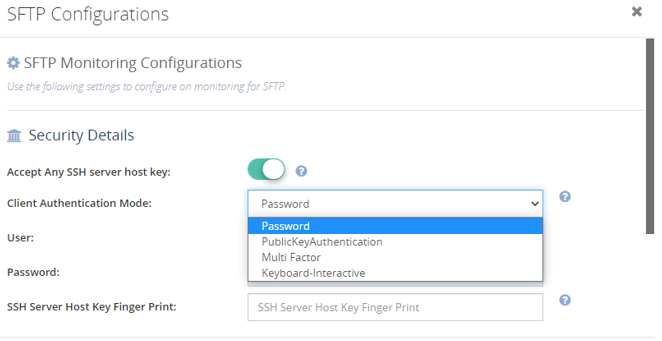
In the BizTalk360 configure the SFTP Location in Monitoring > Manage Mapping > -File Location > SFTP, which will help to monitor the health of the Port’s Location. On configuring the SFTP Location, BizTalk360 will automatically pick the Client Authentication Mode data which is configured in the BizTalk Admin console port.
Password Authentication
This is the simplest form of authentication using the traditional username/password method. A client logs in to SFTP using Username/Password. No user private/public keys are required. The “username” and “password” can be configured under: SFTP > Configure > Security > Client Authentication Mode
In BizTalk360 you can choose the Password by clicking on the Client Authentication Mode drop-down in the Security Details of BizTalk360 and will be allowing you to provide the username and password, it is also possible to switch the authentication to “PublicKeyAuthentication”.
Public key Authentication
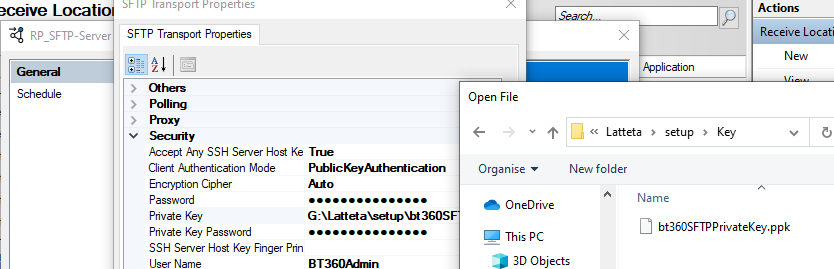
Public key authentication is a method where the SFTP client identifies itself to the server by using public/private key pairs. Prior to connection, the user’s public key must first be uploaded and registered on the SFTP server, SFTP > Configure > Security > Client Authentication Mode > Private Key
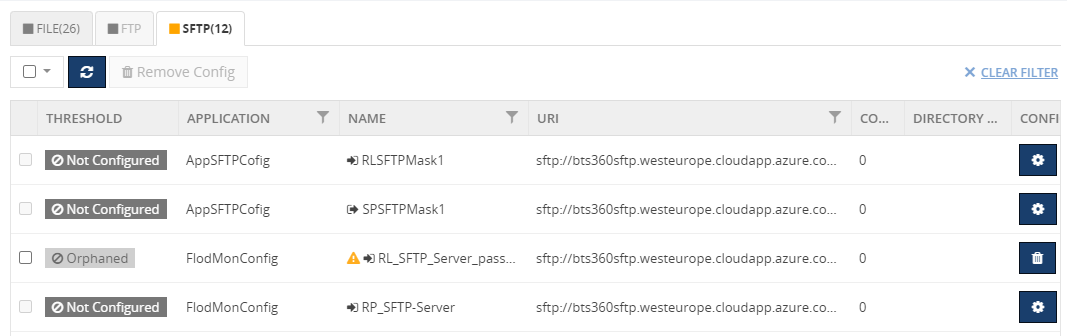
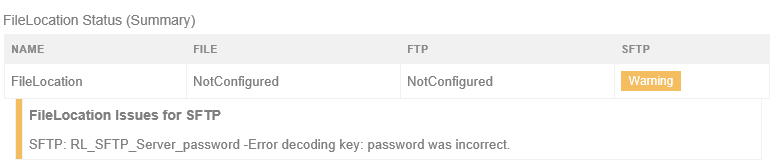
In BizTalk360 you can choose the “Public Key Authentication” by clicking on the Client Authentication Mode drop-down which will allow you to provide the Username, Private Key, and the Private Key password. The password here does not mean the username’s password, instead, you need to provide the password of the Public Key, if you provide the password of the username then the Port location which you have configured will be orphaned which means the location is not reachable using the Provide Public key and its password.
In case SFTP Location / Server is not reachable BizTalk360 will show the state of the port as Orphaned and will let you know the reason for the port being Orphaned by hover on the warning symbol and also in the alert notification via mail.
Multi-Factor Authentication
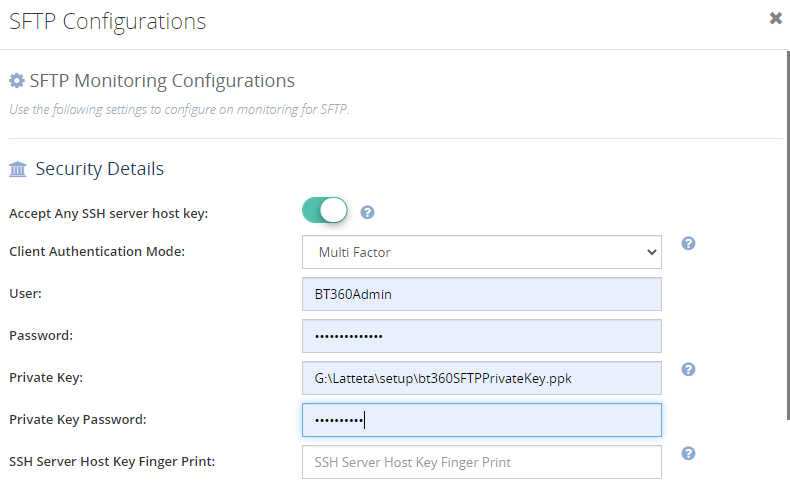
In the Multi-Factor Authentication we need to provide the Username & Password and the Public/Private key and password. Public/Private key and password configuration are like steps described in the latter section, except that it includes the private key’s password.
In the BizTalk360 Current version, the Multi-Factor Authentication support will not be available for you but very soon in the upcoming BizTalk360 V10 release, you will be facilitated with this feature. Thus, you could choose the Multifactor Authentication in BizTalk360 in the Client Authentication Mode list under the security details blade by allowing you to provide the Username, Password, Private Key, and the Private Key password.
Keyboard Interactive Authentication
Keyboard-interactive (KBI) authentication is the most recently introduced form of authentication for SSH. It involves the server sending prompts to the client, which the client must respond to correctly authenticated connection. Its purpose is permitting the client to support a variety of authentication mechanisms without knowing anything about them. In edtFTPj/PRO, when the server sends its list of prompts that require responses, the client searches the list of loaded SSHAuthPrompts for each prompt. It then sends the set responses back to the server. If the expected responses are supplied, the authentication succeeds.
If the prompt is for a user’s password, it will typically be something like “Password:”. The SSHPasswordPrompt class is supplied to make it easier to set up a password prompt.
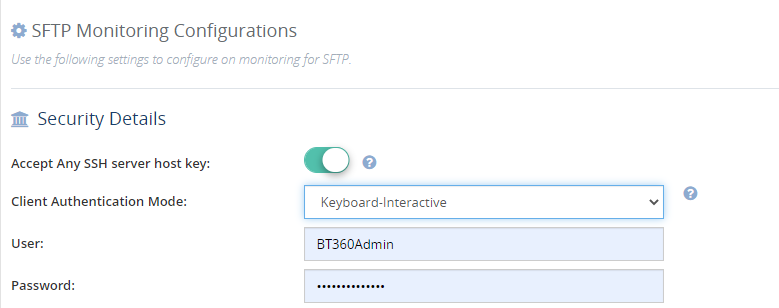
In the upcoming BizTalk360 release, you could able to choose the Keyboard Interactive Authentication in the Client Authentication Mode list under the security details blade by allowing you to provide the Username and password.
Extensive SFTP Support in BizTalk360
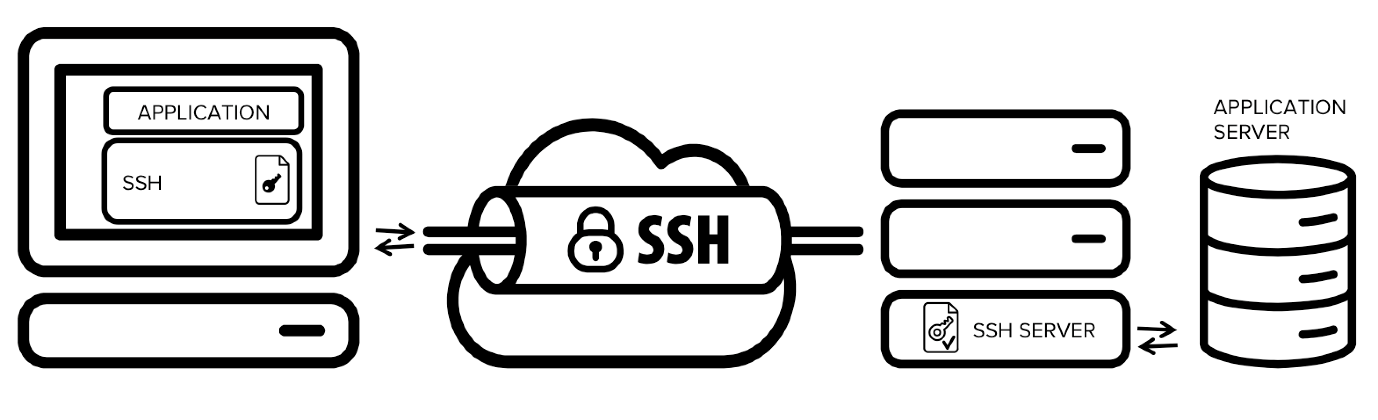
SSH Tunnel
SSH is a standard for secure remote logins and file transfers over untrusted networks. It also provides a way to secure the data traffic of any given application using port forwarding, basically tunnelling any TCP/IP port over SSH. This means that the application data traffic is directed to flow inside an encrypted SSH connection so that it cannot be eavesdropped or intercepted while it is in transit. SSH tunnelling enables adding network security to legacy applications that do not natively support encryption.
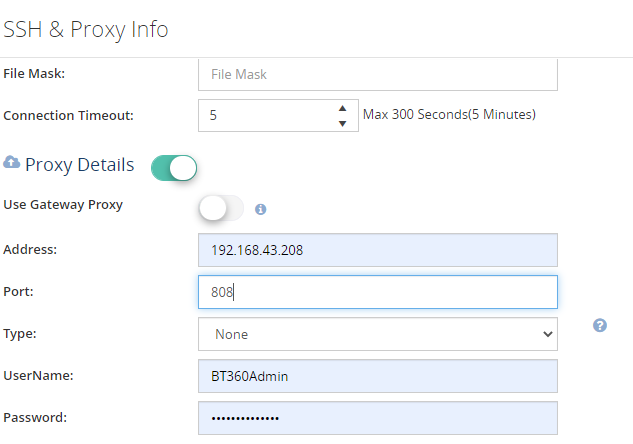
Considering the importance of SSH Tunnel and its business impact, BizTalk360 supports the proxy SSH tunnel to connect the SFTP or another server by not keeping the username and password as mandatory.
To get connected to the SFTP server with a normal proxy connection in the current BizTalk360 provide the Address, Port, Type, Username, and Password, it will reach the SFTP location using the credentials and check for the connection and its location details of the SFTP port.
Remote path location pattern support
In the BizTalk server while configuring the remote location, the user may provide different types of patterns. As we BizTalk360 comforts the BizTalk user at every point to the core level.
Say for instance: Remote path can be configuring with the following combination, C:/Users/BT360Admin/nS_SFTP_in1
C:/Users/BT360Admin/nS_SFTP_in1/*.*
/C:/Users/BT360Admin/nS_SFTP_in1
/C:/Users/BT360Admin/nS_SFTP_in1/*.*
/C:/Users/BT360Admin/nS_SFTP_in1/
C:/Users/BT360Admin/nS_SFTP_in1
BizTalk360 is capable enough to monitor the File count and Directory size of the Receive Location or Sendport with all those remote path configurations
Extensive File Mask Support
In the BizTalk Server the file mask is a string that specifies the type of file that the File receive handler will pick up from the receive location. The file name is a string that specifies the name of the file where the File send handler will write the message. The key point to remember in configuring the file mask is that the file mask and file name are not case-sensitive.
To keep up its immense support, we are supporting all the combinations of file masks. BizTalk360 will fetch the File count base on the file mask configured, in spite of its case sensitiveness.
You can use a predefined set of macros to dynamically create the files in which the File send handler writes messages. Before creating a file on the file system, the File send handler replaces all the macros in the file name with their individual values. You can use several different macros in one file name.
You can use the file name macros while configuring the File send handler in BizTalk Explorer, or by using the BizTalk Explorer object model.
The File send handler does not replace the macros with a value if any of the following are true:
The corresponding system property is not set.
The macro is misspelled.
The value for the macro contains symbols that are not valid in the file name.
In BizTalk360, you can able to monitor the file count and Directory size of the Send ports with macros by keeping the BizTalk File mask configuration configurable.
Conclusion
Hopefully, this blog helps you in understanding the basics of SFTP client authentication, as well as the types of SFTP Client Authentication Mode, its importance, and BizTalk360’s extensive support in handling and monitoring variant authentication Mode. We are happy to announce that the /n software SFTP and Macros support will be available for your service soon in the forthcoming BizTalk360 Version 10.0 release. To explore further give a try on BizTalk360 will take only a minute to place over BizTalk environment
Once again, it is time to get back to one of my favorite topics, error and warnings, cause, and solutions blog post. This time with a different error regarding one of the most critical components in BizTalk Server: Microsoft Distributed Transaction Coordinator (MSDTC).
Last week a client call me that their production environment was entirely down; nothing was working. I accessed the server and realized that all services were stopped, and we were not able to start them. Long story short, and after I made the common question: “Did someone made any changes on the environment?”, to which I received the usual response: “No, we didn’t”. They had made some changes on the network level blocking port communication between BizTalk Server and SQL Server that supports BizTalk Server.
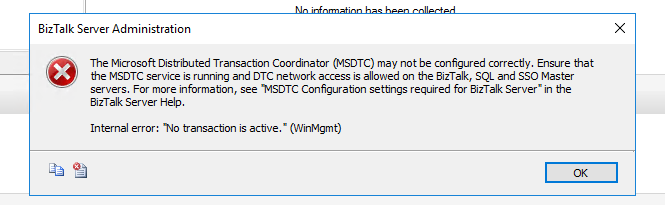
After I asked them to restore the previous settings and open all communication between BizTalk Server and SQL Server, I could start the BizTalk Services on the machine. However, when I open the BizTalk Server Administration Console to see if everything was working correctly, I got the following error while refreshing the BizTalk Group:
TITLE: BizTalk Server Administration —————————— The Microsoft Distributed Transaction Coordinator (MSDTC) may not be configured correctly. Ensure that the MSDTC service is running and DTC network access is allowed on the BizTalk, SQL and SSO Master servers. For more information, see “MSDTC Configuration settings required for BizTalk Server” in the BizTalk Server Help.
Internal error: “No transaction is active.” (WinMgmt) —————————— BUTTONS: OK ——————————
Cause
Without a doubt that this error is still related to communication restrictions between the BizTalk Server machine and the SQL Server machine that hosts BizTalk Server databases, and especially with MSDTC ports. So I ask them if they disable all restrictions between the machines: from BizTalk to SQL Server and also from SQL Server to BizTalk Server because, for example, RPC ports need to be bi-directional, so if you have firewalls or network port restrictions you need to allow inbound and outbound exclusions for these ports.
And the reason for this error was that they only had disabled network restrictions from BizTalk Server to SQL Server, not the other way.
Solution
Once they disabled all network restrictions from SQL Server to BizTalk Server, this problem was solved.
Note: if you want to implement communication port restrictions between BizTalk Server and SQL Server, be sure that you are following the right procedures and ensuring that the required ports are open on the firewalls so that the BizTalk Server components can communicate with each other.
It is a strange year, and for the first time since 2013, we didn’t have face to face INTEGRATE event. Instead, due to the COVID-19 pandemic, this year we had to go with an online event. Despite all of that, it was a great event. Nevertheless, I miss that social interaction we use to have and see friends that I usually only see once a year in this event.
The good part for me in being an online event was that I was able to attend (or view) the sessions at my on rhythmic. Having three small kids at home can be a challenge, and it was a little difficult to attend in real-time to all the sessions, so once they went to bed, I could see the sessions that I miss out during the day without having to wait two months for them to be available online.
About my session
Session Name: BizTalk Server 2020: Migration Path
Session Overview: The goal of this session to demystify and clarify the BizTalk Server migration process and help both implementation teams as decision-makers to be aware of all the considerations that need to be taken into account when planning your migration to BizTalk Server 2020 and hopefully helping you carry out these tasks.
Like previous years, the event was recorded, so if for any reason you could not be present at these events, or if you want to review it again, you can now do it here:
BizTalk360 exists for more than 9 years. In these 9 years, we have constantly brought new features and for every year, we have around 3 to 4 releases. We have always believed that listening to the requests of our customers and partners is the right way to evolve the product. So, for this webinar, we decided to explain 3 different phases you might go through when implementing BizTalk360. This will help in bringing structure in choosing which features to use in which phase of the implementation of the product.
Overview of the Webinar
During the webinar, we will identify these 3 different phases and will explain the purpose of each phase. For each phase, we will show different features you could use. Additionally, we will provide links to useful resources to ease the implementation on your side. This way, we intend to make the webinar as useful and practical as possible.
Date: 30 July 2020
Time: 10 – 11 AM BST
Join us at the Webinar
The webinar will be hosted by two of our product consultants, who have years of experience in the area of the BizTalk server and BizTalk360. They would be more than happy to share their real-world expertise, discuss your challenges, and come up with solutions for the same.
Do you want to join us at the webinar on July 30th? Why wait! Registration is simple, just click here to register your details.
Also, if you think you cannot attend the webinar at the specified time, no worries! Go ahead and register, our team will make sure to send you the webinar recording.
We are looking forward to welcoming you during the webinar!
I am always paying attention to requests from members of the community, and whenever I can, I update this stencil pack with requested shapes or functionalities. And this is one of these cases. One of the most common complaints about this stencil pack was/is text annotations. When you try to add a legend on the stencil, the text is in the middle of the icon, instead of underneath. And sometimes the text is white, which doesn’t help also.
Another recent aspect that came to my attention was the fact that was missing proper connector points, which make it hard to properly connect shapes in a diagram.
Of course, all of these you can manually fix by move the text to the bottom of each shape, change the color of the text and add connector points. But some of these tasks required a more deep knowledge of working with Visio and they are time-consuming. Luckily this work is being made, it may take a while since this package has more than 2000 shapes!
What’s new in this version?
Today I can announce that the first phase is done and the first file, and probably the most important, of this package is fixed:
Microsoft Azure (MIS Azure Stencils.vssx): This package contains stencils of Azure Services (original icons) that are available thru the Azure Portal.
The main goal of this release was to solve or improve the user experience regarding text annotations and connector points. In this version, the changes and additions are:
Text annotationsissue solved: This issue was solved on the stencils present on the Microsoft Azure (MIS Azure Stencils.vssx) file;
Proper connector points added: This improved feature was added on stencils present on the Microsoft Azure (MIS Azure Stencils.vssx) file;
Fixed some minor stencils layouts;
New shapes: New shapes added on Microsoft Azure (MIS Azure Stencils.vssx) and Microsoft Azure: Others (MIS Azure Others Stencils.vssx);
Microsoft Integration, Azure, Power Platform, Office 365 and much more Stencils Pack
Microsoft Integration, Azure, Power Platform, Office 365 and much more Stencils Pack it’s a Visio package that contains fully resizable Visio shapes (symbols/icons) that will help you to visually represent On-premise, Cloud or Hybrid Integration and Enterprise architectures scenarios (BizTalk Server, API Management, Logic Apps, Service Bus, Event Hub…), solutions diagrams and features or systems that use Microsoft Azure and related cloud and on-premises technologies in Visio 2016/2013:
BizTalk Server
Microsoft Azure
Integration
Integration Service Environments (ISE)
Logic Apps and Azure App Service in general (API Apps, Web Apps, and Mobile Apps)
Azure API Management
Messaging: Event Hubs, Event Grid, Service Bus, …
Azure IoT and Docker
AI, Machine Learning, Stream Analytics, Data Factory, Data Pipelines
SQL Server, DocumentDB, CosmosDB, MySQL, …
and so on
Microsoft Power Platform
Microsoft Flow
PowerApps
Power BI
Office365, SharePoint,…
DevOps and PowerShell
Security and Governance
And much more…
… and now non-related Microsoft technologies like:
SAP Stencils
The Microsoft Integration Stencils Pack is composed of 27 files:
Microsoft Integration Stencils
MIS Additional or Support Stencils
MIS AI and Machine Learning Stencils
MIS Apps and Systems Logo Stencils
MIS Azure Additional or Support Stencils
MIS Azure Mono Color
MIS Azure Old Versions
MIS Azure Others Stencils
MIS Azure Stencils
MIS Buildings Stencils
MIS Databases and Analytics Stencils
MIS Deprecated Stencils
MIS Developer Stencils
MIS Devices Stencils
MIS Files Stencils
MIS Generic Stencils
MIS Infrastructure Stencils
MIS Integration Fun
MIS Integration Patterns Stencils
MIS IoT Devices Stencils
MIS Office365
MIS Power BI Stencils
MIS PowerApps and Flows Stencils
MIS SAP Stencils
MIS Security and Governance
MIS Servers (HEX) Stencils
MIS Users and Roles Stencils
That you can use and resize without losing quality, in particular, the new shapes.
And the most expected email arrived once again on 1st July, thank you Microsoft for this amazing award. Once again, I’m delighted to share that I was renewed as a Microsoft Azure MVP (Microsoft Most Valuable Professional). This is my 10th straight year on the MVP Program, an amazing journey, and experience that started in 2011 as BizTalk MVP, which gave me the opportunity, and still does, to travel the world for speaking engagement, share the knowledge, and to meet the most amazing and skilled people in our industry.
I would like to thank the MVP Team, my MVP Lead Cristina Herrero, all my fellow MVPs, my beautiful family, my coworkers at DevScope, and in special all my blog readers, friends, members of Microsoft Enterprise Integration Community for their support during these years.
It’s a big honor to be in the program and be one of this amazing worldwide group of technicians and community leaders who actively share their high quality and real-world expertise with other users and Microsoft. I’m looking forward to another great year!


Set Authentication Credential on BizTalk Server Receive Locations with PowerShell