by Steef-Jan Wiggers | Jul 7, 2017 | BizTalk Community Blogs via Syndication
Integrate 2017, a well-organized Microsoft Integration focused event, took place from 26 to 28 of June at Kings Place in London. It attracted 380 plus attendees from 50 different countries and had 28 speakers from around the globe including the Microsoft Product Group. I did a session around Logic Apps from the consumer, end user, and business perspective and used sentiment analysis as for my demo.
Context
To provide you some context. Logic App service was the most prominent technology during the three-day event. This Azure Service became general available a year ago and is starting to build momentum as premier cloud integration capability. Most of all, the service fits rather well in the complete Azure Platform with its connectors to a wide variety of other Azure services and in addition, it connects with SaaS solutions such as Twitter, Zendesk, Salesforce, ServiceNow, PagerDuty, and Slack.
During Integrate 2017 I talked about empowering business with Logic Apps. And my goal was to show the audience the value of Logic Apps for the business. The service is a true iPaaS service according to the definition Wikipedia provides online. And it is a part of Azure, which is multi-tenant, has a subscription model or in the case of Logic Apps it’s consumption based (micro-billing), provides pre-built ready available connectors, deployment/manage/monitoring through the platform.
iPaaS
If you look at how for instance Gartner describes iPaaS then again Logic Apps are a true cloud-native integration platform. Consumers of Logic Apps in Azure can implement data, application, API and process integration projects spanning cloud-resident and on-premises endpoints. I will quote the Gartner report here:
“This is achieved by developing, deploying, executing, managing and monitoring “integration flows” (aka “integration interfaces”) — that is, integration applications bridging between multiple endpoints so that they can work together.”
And the iPaaS capabilities typically include according to Gartner:
• Communication protocol connectors (FTP, HTTP, AMQP, MQTT, Kafka, AS1/2/3/4, etc.)
• Application connectors/adapters for SaaS and on-premises packaged applications
• Several data formats (XML, JSON, ASN.1, etc.)
• Data standards (EDIFACT, HL7, SWIFT, etc.)
• Mapping and transformation of data
• Quality of data
• Routing and Orchestration
• Integration flow development and lifecycle management tools
• Integration flow operational monitoring and management
• Full lifecycle API management
Looking at the above capabilities than Logic Apps in combination with Integration Account and API Management provide those capabilities.
Gartner Quadrant
Logic Apps are positioned in Gartner Quadrant in the Visionaries box, which means that the vendor of the service is able to execute lower than the leaders (in the Quadrant vendors like Dell Boomi and Informatica), have a smaller install base, certain immaturity, timid marketing, reactive sales operation and lack of strategic commit to the market.
My take on that is that Logic Apps is relatively new in the iPaaS market.
- A year ago it became general available. And it is maturing at a fast pace with new feature releases every two weeks with an expanding set of connectors.
- Sales representation from Microsoft at Integrate 2017.
- And finally, the commitment is strong with the Pro Integration Product Group presence at various conferences throughout 2017. This year they have or will attend Ignite, Build, Integrate2017 Europe, Inspire (former WPC), Integrate 2017 US, Integration Bootcamp, Global Integration Bootcamp, Global Azure Bootcamp, and smaller User Group meetings worldwide.
Hence I struggle a bit with the classification of the current state of Logic Apps. I strongly feel the service is close to the border of visionary and leader. It has promised to become a true iPaaS leader.
Benefits
Business can reap the benefits from this service as the attention is towards solving the problem(s) it is facing. Logic Apps is a part of a large Platform. And it can deliver solutions fast as there’s no need for procuring servers, or other infrastructure related capabilities. This accounts for the business that has transformed their business to the cloud and requires cloud-native solutions. That’s what fit for purpose with Logic Apps. And the costs are less and time to market of your solutions is fast.
Use Cases
The connectors provided by Logic App can help you build solutions for various enterprise scenarios. For instance, you leverage cognitive services to identify a person to subsequently grant him access to resources, start an onboarding process, or provide access to a facility. An example of leveraging Cognitive Services is to perform text analysis on tweets, which I will explain in further detail later in this post.
The text analysis can be useful to detect sentiment in a tweet. Particularly on a #hashtag, for instance, a person like Trump, product or service. I mention President Trump here as the current US President uses this social media service quite extensively. And the tweets he produces are evaluated intensively for stock trading.
Dynamics 365
Other thinkable use cases evolve around the Dynamics 365 CRM Online connector. This connector provides connectivity to Dynamics CRM that provides various features like customer service automation, marketing campaigns, and social engagements.
Dynamics 365 has several capabilities or flavors; one is Dynamics for Field Service, which provides a complete Field Service management solution, including service locations, customer assets, preventative maintenance, work order management, resource management, product inventory, scheduling and dispatch, mobility, collaboration, customer billing, and analytics. Therefore, during integrate I talked about leveraging this solution in combination with IoT devices. The picture below shows the data flow from device to the Dynamic Field Service features.
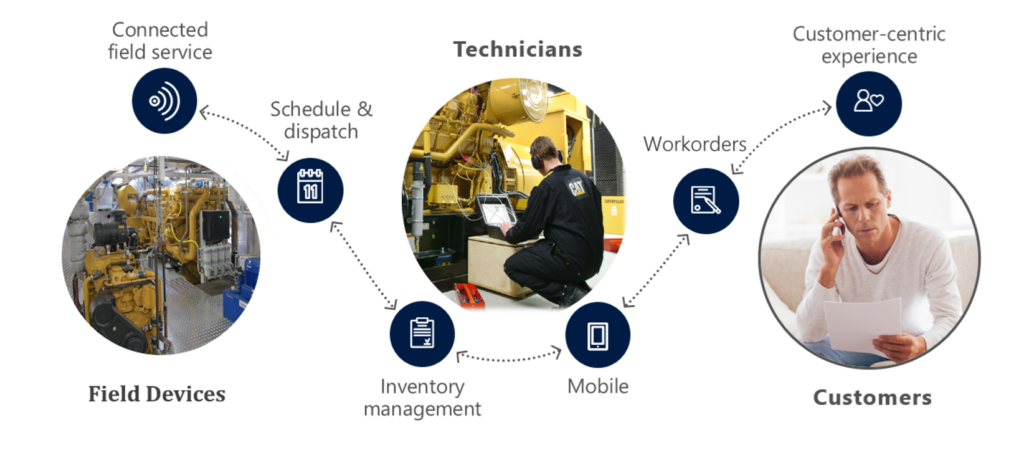
Data from a device can be consumed by IoT Hub service in Azure and pushed to the service bus queue, which can be read by Logic App. The Logi App forwards the data into Dynamics Field Service through the CRM connector. In conclusion, a Logic App or number of them can be part of an end-to-end solution for various field services.
The previous paragraph discussed one of the many use cases possible including Logic Apps. Moreover, there are many other scenarios thinkable since Logic Apps are a part of a bigger platform, which means you leverage them with other Azure Services or create flows to move data around. With sentiment analysis, you can detect sentiment within a text using one of the Cognitive Services API’s. The way sentiment analysis API functions are that it returns a numeric score between 0 and 1 on a given text. Scores close to 1 indicate positive sentiment and scores close to 0 indicate negative sentiment. A score of 0.5 is neutral. With Logic Apps, you can receive tweets within a certain interval (occurrence) based on filter i.e. hashtag and feed the body into Detect Sentiment action.
Sentiment Analysis Solution
To build a solution leveraging the capabilities Cognitive Services deliver with a Logic App, Azure Storage Account, Azure Function and Power BI you need to set up these services up.
Cognitive Service
The setup of the first is basically provisioning of a Cognitive Service instance i.e. API. In the Azure Portal, you find the Cognitive Service in the marketplace. Subsequently, you click on the service you specify a name, choose a subscription, and subsequently which API you like to use.
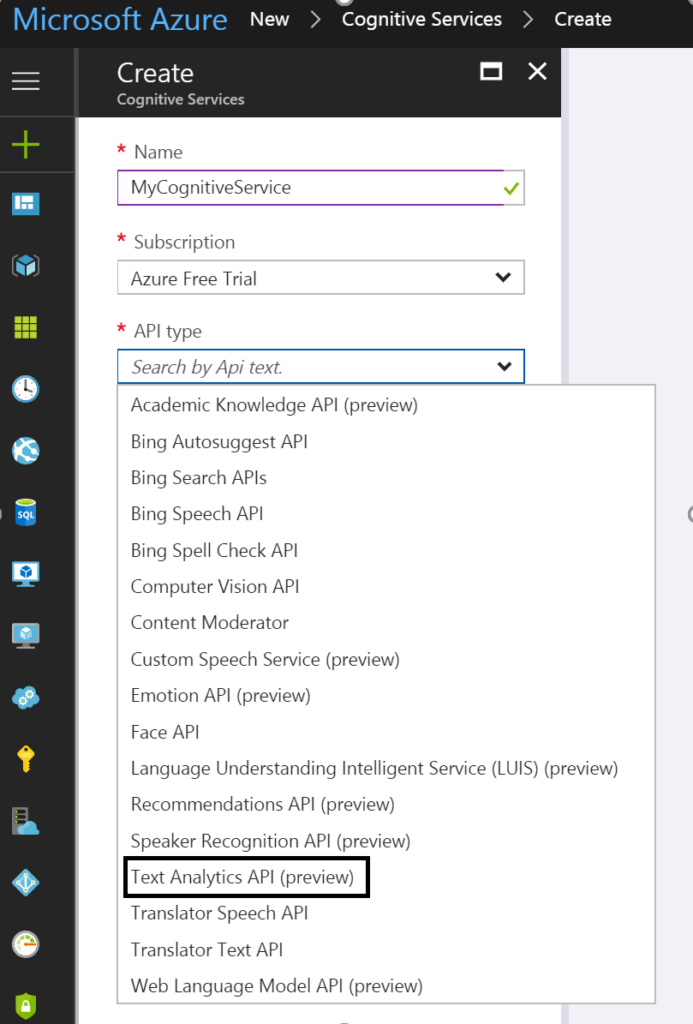
To detect sentiment analysis in a text you need to choose Text Analytics API, which as the time of writing is still in preview. The Text Analytics API is only available in region West US, and pricing of service varies depending on the tier you require. Below you can see the different pricing options.
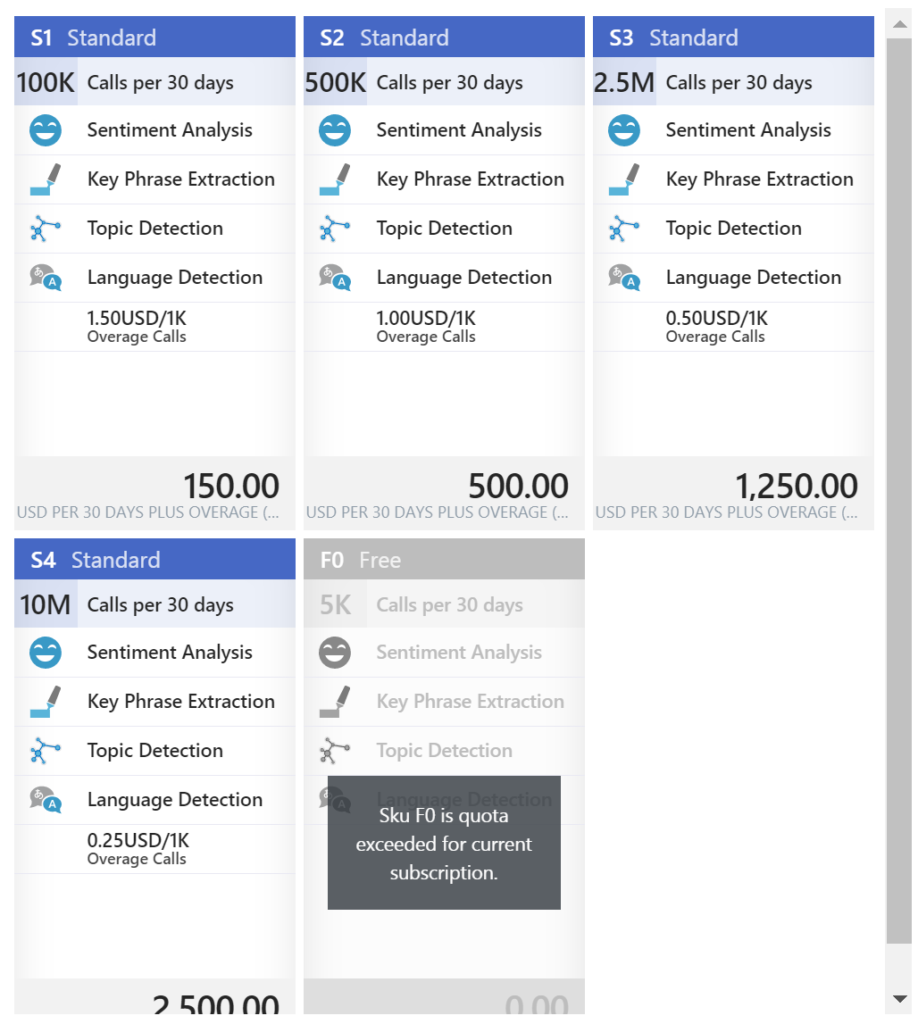
As you can see in the picture above the Cognitive Service provides four features:
• Sentiment Analysis
• Key Phrase Extraction
• Topic Detection
• Language Detection
Once you have chosen the required tier you can create this service.
Power BI
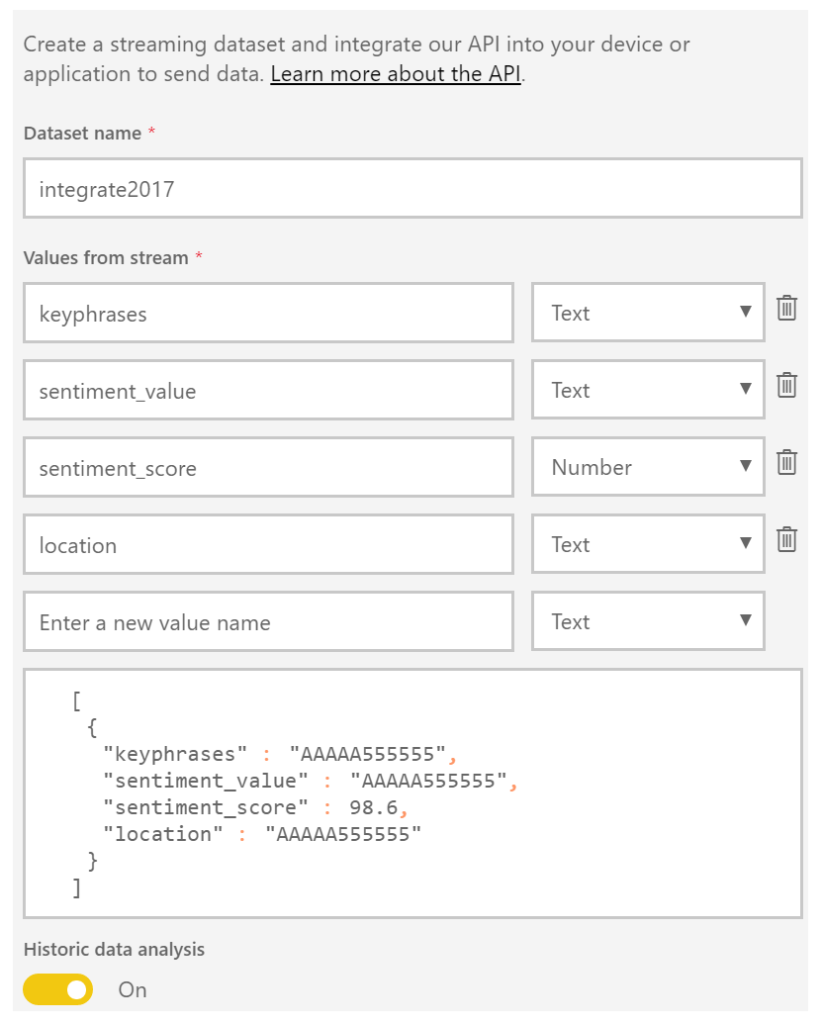
The next service is Power BI, which is a part of the Office365 offering and can be found here: https://powerbi.microsoft.com/. You can sign in and start building datasets, dashboards, and reports. For a solution to visualize sentiment you can create a streaming data set. Go to the powerbi.com and “Streaming datasets”, create a dataset of type API, click next and name the dataset and add fields to the streaming data set like shown below.
The Solution
In a solution, I build I created four text fields and one number field. The historic data analysis was enabled to build a collection of the data to be used for a report.
Now both Cognitive Service and Power BI have been setup and next step is to create a storage account in Azure. This account will archive tweets in a blob storage container tweets. Provisioning a storage account is easy and straightforward process. In the marketplace find storage account, select it, specify name, deployment model, purpose (choose blob storage), replication, access tier (cold), secure transfer, subscription, resource group, and location.
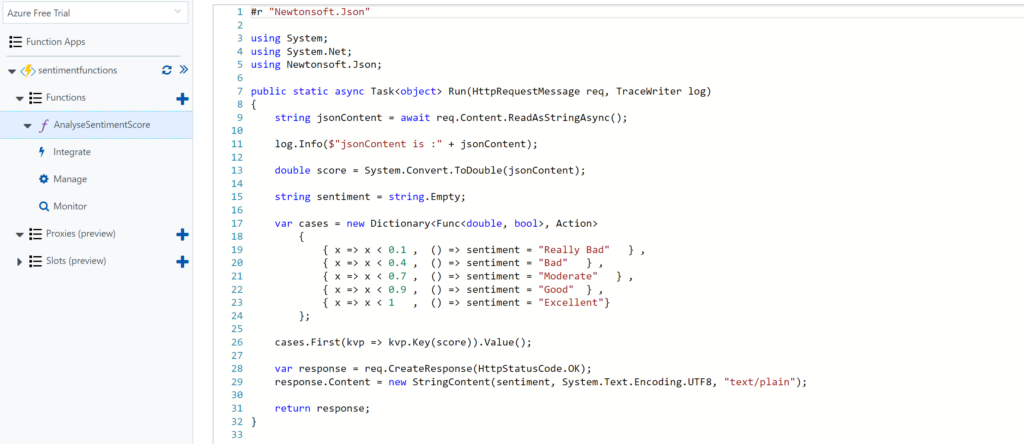
The final service required for the solution is a function. The Function in our solution will be provided with the input from the Cognitive Service API response (Score). Azure Functions provide a serverless coding capability using a Browser and the piece’s code you write can run in Azure i.e. within a Function App.
For our solution, we add a GenericWebHook-CSharp. We will rename the function to AnalyseSentimentScore. And in the Develop tab, we see some generic default code, which we will change to the code below.
Architecture
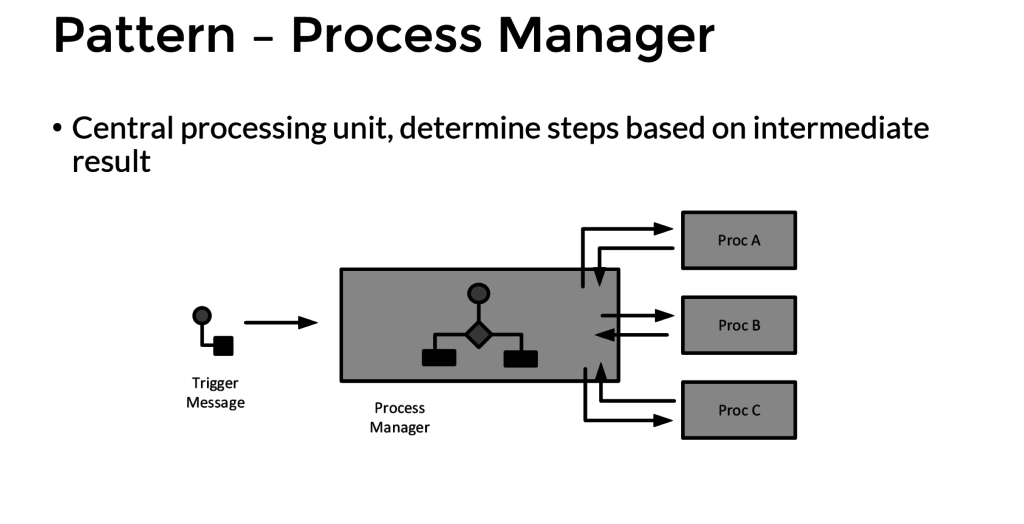
The solution architecture I build looks like the diagram below and resembles a process manager pattern.
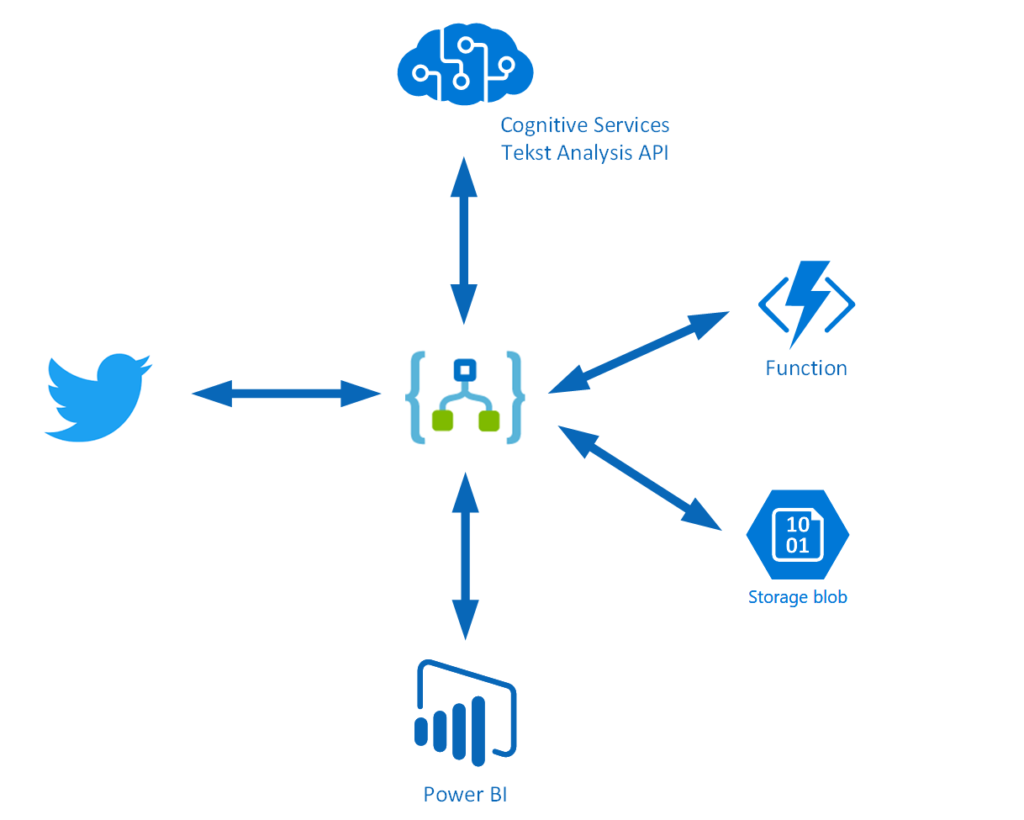
This pattern implies that a trigger message is sent to a process manager (Logic App). The process manager is a central processing unit and determines steps based on intermediate results. A tweet is the trigger message that starts a flow in a Logic App. The body is sent to Cognitive Service (Proc A) and the score is sent to a Function (Proc B), which will evaluate the score. The Tweet is stored in blob storage and a few fields are sent to Power BI to fill the dataset. A diagram of a process manager is depicted below.
Implementation
The implementation of the solution is slightly different than from the pattern as after the second intermediate step the tweet data is sent to Azure Blob Storage and Power BI dataset.
The Logic App is implemented with a Twitter trigger, authorized to use my twitter account, with the search text #integrate2017 and interval (frequency) of 5 minutes i.e. every 5 minutes tweets with #integrate2017 will be picked up. Subsequently, this trigger is followed by several actions.

The picture above shows the flow of the Logic App. First, a Twitter triggers then a compose action to create an element part containing the username of the tweet. Subsequently the detect sentiment and the detect key phrases actions. Then the second composes to create a JSON array of the key phrases. And after the second compose the score of the detected sentiment is send to the function, which will return a string (text) of the evaluated score (see also the function). Several tokenized elements are sent to blob storage (see picture below).
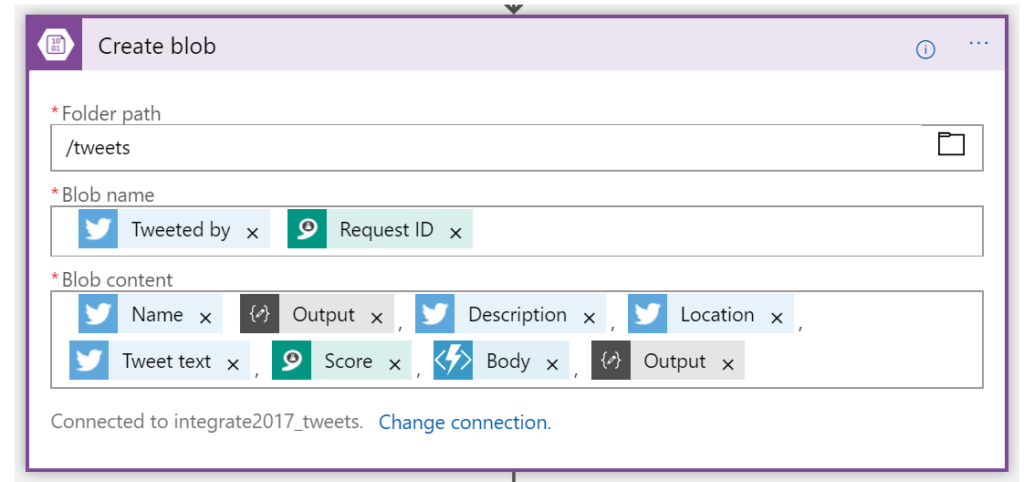
And the final step of this solution (Logic App definition) is sending some of the tokenized elements to a dataset row in Power BI dataset.
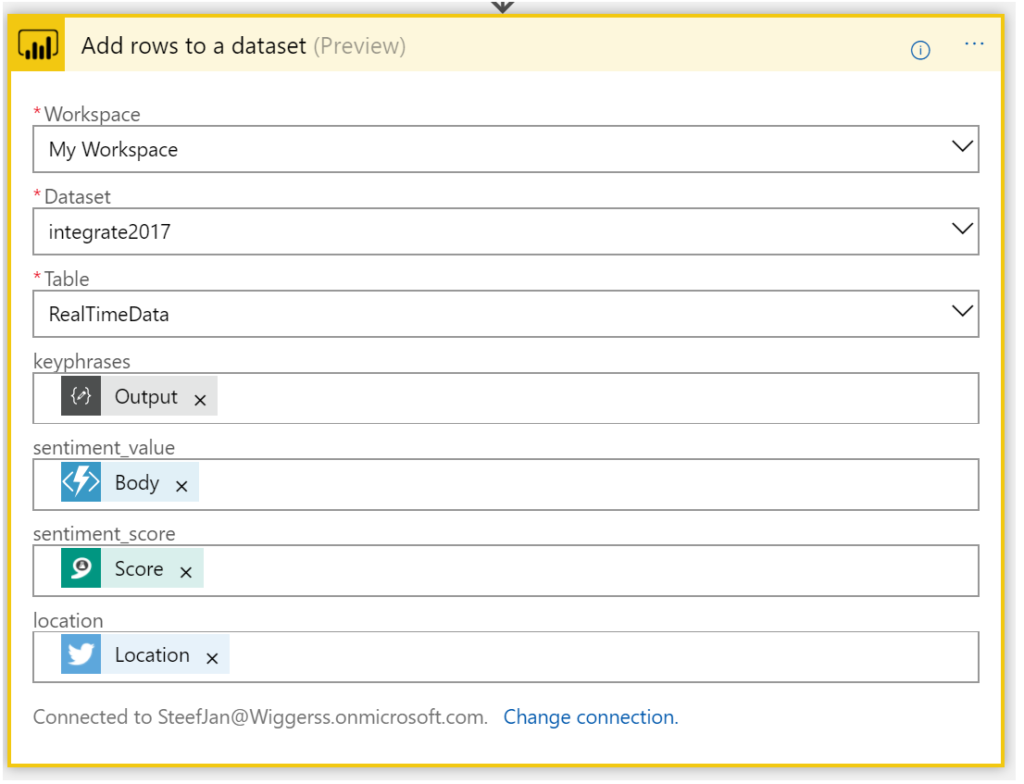
Now we have walked through the complete Logic App definition and the key actions of the solution.
Integrate 2017 Report
For integrate 2017 I ran the Logic App between 17th of June until the 1st of July. And the event took place between 26th and 28th of June in London. Every 5 minutes the Logic App collected tweets from Twitter with hashtag integrate2017. Over this period of 15 days, 3500 tweets have been aggregated around this event. It started slowly with around 50 tweets until the event started on the 24th with a burst of tweets. Below you can see a report created in Power BI with some visualization of sentiment measured in the tweets.
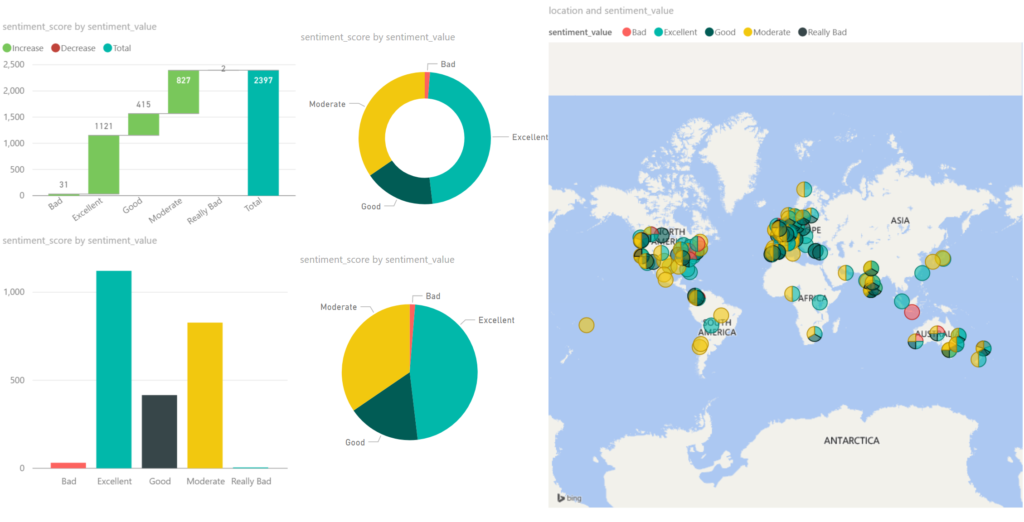
Around 2/3 of all the tweets, the sentiment was excellent/good, which can be viewed as positive. 1/3 of the tweets were evaluated as moderate. The Cognitive Service Text Analysis capability was unable to determine negative or positive. And finally, a very small percentage was negative (bad). Hence you can conclude that the event was a great event given the sentiment score.
The benefits of building a solution like described above are that with a relative simple Logic App sentiment can be analyzed leveraging several abilities provided by the Cognitive Service. Probably when a business likes to measure sentiment through Social Media channel it can use Logic Apps. Therefore, Logic Apps provide a quick solution in this manner to provide quick insights with low costs. There are no servers necessary and a pro-integration professional can build this type of solutions within a few hours depending on the complexity. Hence it provides quick time to market.
The costs
The interesting part of this solutions is cost. The breakdown of costs for this solution is:
– Logic App (Consumption)
– Function (Consumption)
– Cognitive Service (Tier)
– Storage Account (Volume)
– Power BI (Enterprise Plan)
The Logic App and Function are consumption based and measured on the execution of an action or function. And in general, it can sometimes be hard to predict the workload these services need to process. Hence you need to be aware of this. A good reference with regards to costs with Logic Apps is a post by Rene Brauwers, Tips & Tricks: Cost savings using Logic Apps.
For the Logic App in this solution, 3500 tweets were processed, and the Logic App consists of 8 actions (including the trigger). Hence 28K action calls costs based on the pricing (First 250K actions = €0.000675 / action) approximately 19 euro. And less than a euro for the executions of the Function.
Next, the costs for the Cognitive Service depends on the tier. The free tier could be an option, however, if the workload is too high then you run into rate limiting issues. The S1 Standard can be sufficient and costs 150 Euro a month. Yet you can turn it off after your campaign of measuring sentiment, which could be a few days. In this solution, the costs are 75 euro. Storage of less than 4 Mb of tweets is neglectable. This leaves the costs for Power BI. For the solution, I build I used the pro version, which is around 10 Euro per month. Thus, in total, a sentiment analysis solution costs around a 100 euro.
Conclusion
Depending what the requirements are and perceived value is, Logic Apps combined with other Azure Services and Office365 (Power BI) can be a good fit for purpose for low costs, agility and time to market. Logic Apps are becoming a leader in the iPaaS. On a short term, it will be able to cross the border from visionary to leaders in the Gartner Magic Quadrant. The Product Group is cranking out enhancements on the service and new connectors every two weeks. And they have kept this pace since the General Availability of the service a year ago. Nevertheless, the competition is strong however I am confident Logic Apps will be amongst the leaders.
Author: Steef-Jan Wiggers
Steef-Jan Wiggers has over 15 years’ experience as a technical lead developer, application architect and consultant, specializing in custom applications, enterprise application integration (BizTalk), Web services and Windows Azure. Steef-Jan is very active in the BizTalk community as a blogger, Wiki author/editor, forum moderator, writer and public speaker in the Netherlands and Europe. For these efforts, Microsoft has recognized him a Microsoft MVP for the past 5 years. View all posts by Steef-Jan Wiggers
by Sandro Pereira | May 26, 2017 | BizTalk Community Blogs via Syndication
Once again, my Microsoft Integration Stencils Pack was updated with new stencils. This time I added near 193 new shapes and additional reorganization in the shapes by adding two new files/categories: MIS Power BI and MIS Developer. With these new additions, this package now contains an astounding total of ~1287 shapes (symbols/icons) that will help you visually represent Integration architectures (On-premise, Cloud or Hybrid scenarios) and Cloud solutions diagrams in Visio 2016/2013. It will provide symbols/icons to visually represent features, systems, processes and architectures that use BizTalk Server, API Management, Logic Apps, Microsoft Azure and related technologies.
- BizTalk Server
- Microsoft Azure
- BizTalk Services
- Azure App Service (API Apps, Web Apps, Mobile Apps and Logic Apps)
- API Management
- Event Hubs
- Service Bus
- Azure IoT and Docker
- Virtual Machines and Network
- SQL Server, DocumentDB, CosmosDB, MySQL, …
- Machine Learning, Stream Analytics, Data Factory, Data Pipelines
- and so on
- Microsoft Flow
- PowerApps
- Power BI
- Office365, SharePoint
- DevOpps: PowerShell, Containers
- And much more…
Microsoft Integration Stencils Pack v2.5
The Microsoft Integration Stencils Pack v2.5 is composed by 13 files:
- Microsoft Integration Stencils v2.5
- MIS Apps and Systems Logo Stencils v2.5
- MIS Azure Portal, Services and VSTS Stencils v2.5
- MIS Azure SDK and Tools Stencils v2.5
- MIS Azure Services Stencils v2.5
- MIS Deprecated Stencils v2.5
- MIS Developer v2.5 (new)
- MIS Devices Stencils v2.5
- MIS IoT Devices Stencils v2.5
- MIS Power BI v2.5 (new)
- MIS Servers and Hardware Stencils v2.5
- MIS Support Stencils v2.5
- MIS Users and Roles Stencils v2.5
These are some of the new shapes you can find in this new version:
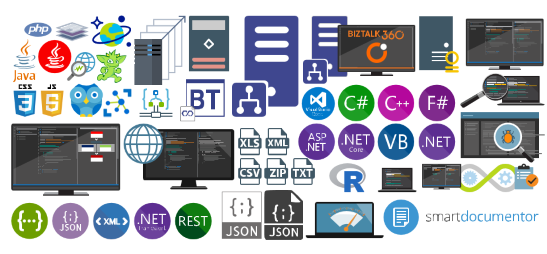
You can download Microsoft Integration Stencils Pack for Visio 2016/2013 from:
 Microsoft Integration Stencils Pack for Visio 2016/2013 (10,1 MB)
Microsoft | TechNet Gallery
Author: Sandro Pereira
Sandro Pereira lives in Portugal and works as a consultant at DevScope. In the past years, he has been working on implementing Integration scenarios both on-premises and cloud for various clients, each with different scenarios from a technical point of view, size, and criticality, using Microsoft Azure, Microsoft BizTalk Server and different technologies like AS2, EDI, RosettaNet, SAP, TIBCO etc. He is a regular blogger, international speaker, and technical reviewer of several BizTalk books all focused on Integration. He is also the author of the book “BizTalk Mapping Patterns & Best Practices”. He has been awarded MVP since 2011 for his contributions to the integration community. View all posts by Sandro Pereira

by Sandro Pereira | May 15, 2017 | BizTalk Community Blogs via Syndication
We are 3-days away of Tuga IT 2017 to return to Lisbon! And you are still on time to register for this event here. This year, in addition to organizing the integration track, I will also present 2 sessions, one focused on PowerApps and Microsoft Flows on SharePoint/Office365 track, and the second focused on Azure Enterprise Integration features: Logic Apps.
You can check the full event agenda here.
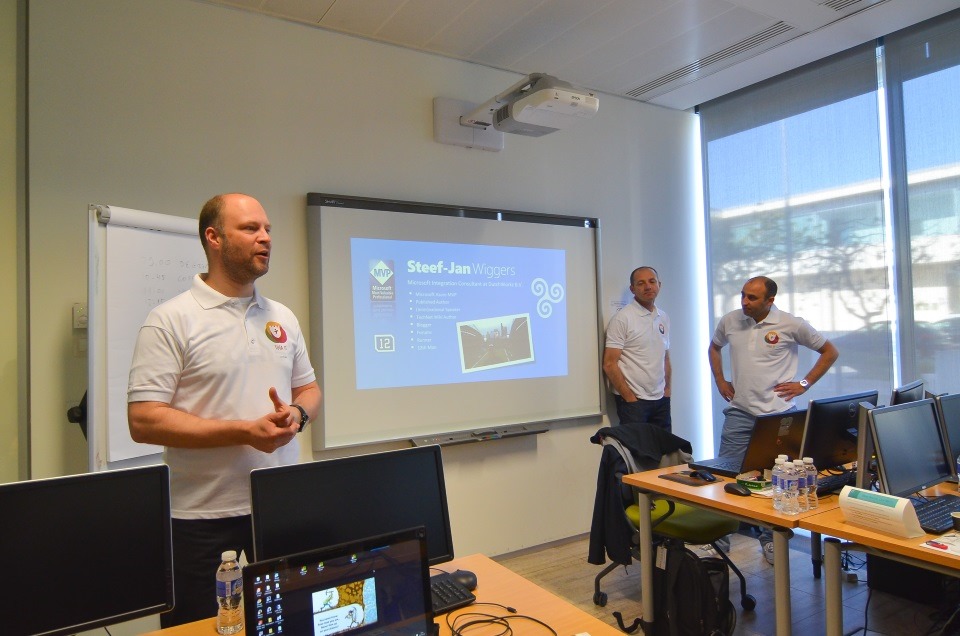

Here are the title and abstract of the sessions I will deliver at TUGA IT 2017
How can PowerApps and Microsoft Flow allows your power users to quickly build Enterprise Mobile Apps
How can PowerApps and Microsoft Flow allows your power users to quickly build Enterprise Mobile Apps will occur May, 19th at SharePoint/Office365 track between 9 AM to 10 AM.
Every organization faces constant pressure to do more with less. While technology is often the key to operating more effectively and efficiently, cost and complexity have often prevented organizations from taking maximum advantage of the potential benefits. The growth of SaaS (software as a service) has lowered barriers – no need to deploy servers or to install and configure complex software systems. Just sign up and go.
Microsoft Flow and Microsoft PowerApps will help these people (normally business users) achieve more.
We know not every business problem can be solved with off-the-shelf solutions. But developing custom solutions has traditionally been too costly and time-consuming for many of the needs teams and departments face, especially those projects that integrate across multiple data sources or require delivery across multiple devices from desktop to mobile. As a result, too many technology needs end up unsolved or under-optimized. We piece together spreadsheets, email chains, SharePoint or/and manual processes to fill in the gaps.
PowerApps and Microsoft Flow are both aimed squarely at these gaps. They give people who best understand their needs and challenges the power to quickly meet them, without the time, complexity and cost of custom software development.
In this session, we will look at these two new offering from Microsoft: PowerApps and Flow. What are they? How can I use it? But special we will walk through and create from scratch some live demos showing how to create Enterprise Mobile Application that easily connects with all your enterprise platforms like Office36, SharePoint Online, Dynamic CRM, on-premise SQL, Social Networks and much more and also how they can automate some common tasks using the new Microsoft Flow.
The Speaker Nightmare: Eval Forms, OCR, Logic Apps & Power BI
The Speaker Nightmare: Eval Forms, OCR, Logic Apps & Power BI will occur May, 20th at Enterprise Integration track between 10:20 AM to 11:30 AM
An evaluation form is something that a speaker love and hates, especially, if the results are processed in real-time and public available. If the result was excellent, then it is extremely rewarding, other times, it may “hurt” the speaker who has made himself available to share his knowledge and has been evaluated negatively. Sometimes the attendees are unfair in their evaluations, like, to basic in a 100-level session (these types of sessions are supposed to be basic or introductory) or sometimes the speaker had a bad day (it happens with everyone).
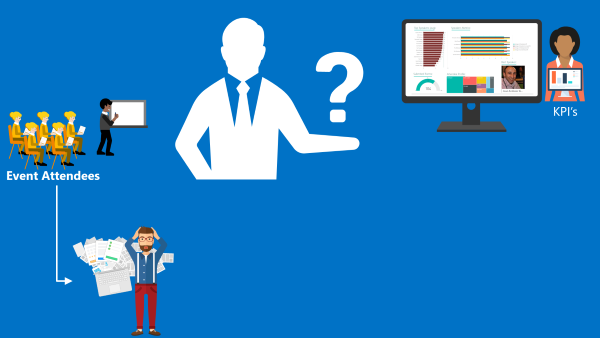
(this demo will be in real time)
I speak from personal experience, is these last 6 years that I have been doing speaking at community events, in Portugal and abroad, I already been evaluated in all ways: badly, reasonable, good and excellent, sometimes I saw in, the same sessions, attendees with different profiles evaluate me badly and excellent. The key point for the speaker is:
- All feedback is good, either negative or positive, he can learn to improve itself, if that’s the case, or that I specific topic is not good for a certain audience
- He only needs to give his best! We cannot please everyone, and the goal is to fill happy with yourself and your performance.
I love evaluation forms and I love for them to be public available, even better if they are public available during the event. Because, at least, it will give during the event a good topic of conversation for people that do not know each other and it will keep the conversation flowing (naturally), people normally are affray or shy to start a conversation between unfamiliar persons, this is a good ice break.
In this session, I will show and explain a real live demo on how we can easily build a robust solution for process evaluation forms, using an OCR software and easily integrate them with Power BI to present the results in an interactive and beautiful way. But most important: How you can educate your enterprise Developers and IT pros users to easily extend capabilities for power users, who understand their business challenges the best, and allow them to use their familiar tools like: OCR software (SmartDocumentor) to process Evaluation forms and quickly build and deliver Power BI solutions to build Interactive Data dashboards. And at the same time integrate these tools, platforms or systems and a very quick and robust way using integrate feature on Azure, like, Logic Apps, API Apps and Azure Functions. How to start from a simple solution and evolve them enabling new functionalities.
Registration For TUGA IT 2017
TUGA IT 2017 will take place in Microsoft Portugal’s offices, in Lisbon, on May 18-20, 2017. It will feature 3 days of breakout sessions and full-day workshops by world-class speakers where IT Professionals can spend 3 amazing days checking the future of IT and also take the time to network with top-level speakers and other IT Professionals.
Registration for TUGA IT 2017 is a few euro’s or even free if you do require lunch (the fee is there to reduce waste and prevent having an abundance of food).
You can register here and I will see you there in Lisbon!
Author: Sandro Pereira
Sandro Pereira lives in Portugal and works as a consultant at DevScope. In the past years, he has been working on implementing Integration scenarios both on-premises and cloud for various clients, each with different scenarios from a technical point of view, size, and criticality, using Microsoft Azure, Microsoft BizTalk Server and different technologies like AS2, EDI, RosettaNet, SAP, TIBCO etc. He is a regular blogger, international speaker, and technical reviewer of several BizTalk books all focused on Integration. He is also the author of the book “BizTalk Mapping Patterns & Best Practices”. He has been awarded MVP since 2011 for his contributions to the integration community. View all posts by Sandro Pereira

by Steef-Jan Wiggers | May 4, 2017 | BizTalk Community Blogs via Syndication
Two more weeks and I will, once again, return to Lisbon for the TUGAIT event. Last year during the 2016 edition Azure MVP’s Sandro, Nino and myself (the three integration animals, see picture below) did a workshop and several sessions on integration i.e. BizTalk, Open Source connectivity (GrabCaster), and Hybrid And this was no doubt a successful event and the debut of the integration track. Hence this year the track will active again!

TUGAIT 2017
The May 18th until the 20th, a variety of speakers will present on a myriad set of technologies like Xamarin, Angular, DataScience, Agile, Scrum, DevOps, Integration, DotNet, SQL Server, SharePoint, Office365, Azure and IoT.
The integration track on Saturday the 2oth will be packed with session by Azure MVP’s Sandro, Nino, Eldert, Riccardo, Tomasso and myself.
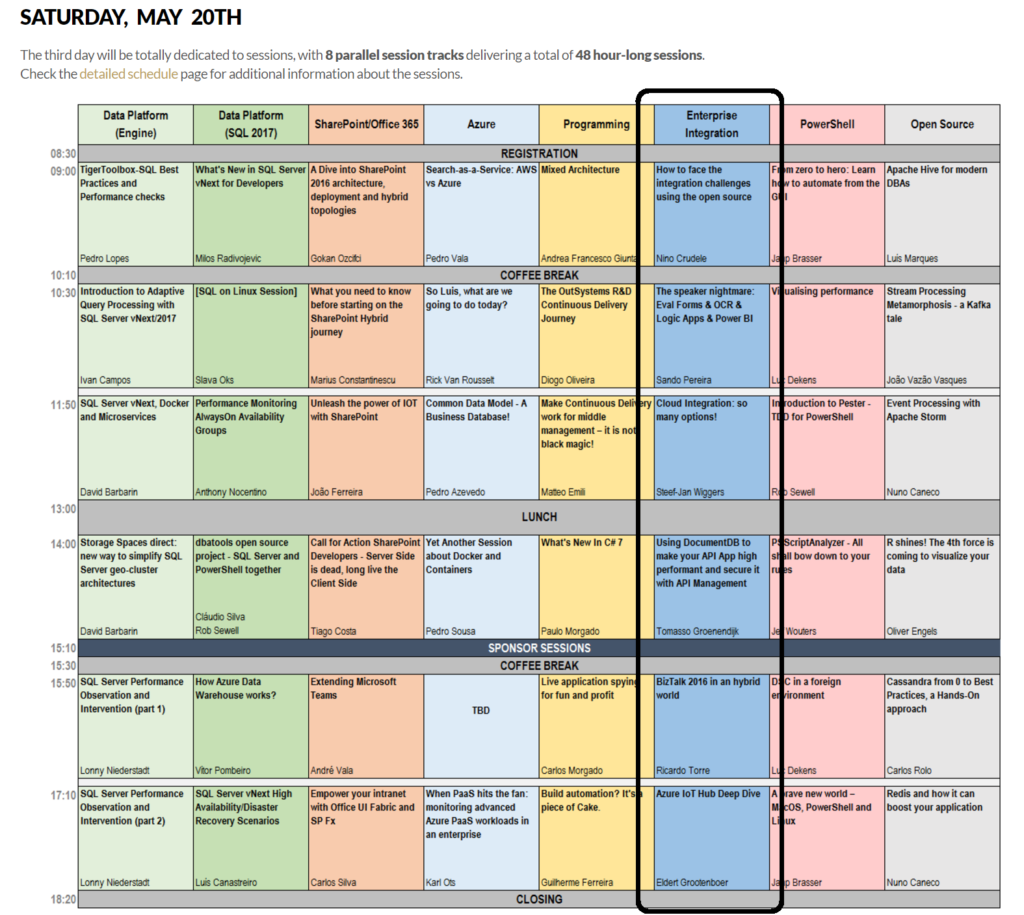
Integration in 2017: Logic Apps
Microsoft has made a leap forward with several of there Azure Services including Logic Apps. A Service that went GA end of July 2016 and evolved rapidly to maturity. Already we see a steady growing adoption of this service within enterprises. Logic Apps is not the replacement of BizTalk, its Microsoft answer to solve integration challenges in the Cloud. The Logic App connectors provide connectivity to other Azure Services and several SaaS solutions like MailChip, SalesForce and CRM online. At TUGAIT 2017 in the Integration Track you will learn more about Logic Apps.
Why attend?
“Nice there’s an integration track, but what if I like to learn about other technologies (too)?”
Well you are at the right place as on the 18th there’s a full day of workshops you can choose from. On Friday there are 5 parallel tracks from which you can pick and choose. The same accounts for Saturday, including the integration track!
The event is located in one of the most beautiful, cultural cities of Portugal. It’s three days packed with content, stellar speakers and community leaders you can listen to and grab to ask questions.
Registration
Registration is a few euro’s or even free if you do require lunch (the fee is there to reduce waste and prevent having an abundance of food).
You can register here and I will see you there in Lisbon!
Cheers,
Steef-Jan
Author: Steef-Jan Wiggers
Steef-Jan Wiggers is all in on Microsoft Azure, Integration, and Data Science. He has over 15 years’ experience in a wide variety of scenarios such as custom .NET solution development, overseeing large enterprise integrations, building web services, managing projects, designing web services, experimenting with data, SQL Server database administration, and consulting. Steef-Jan loves challenges in the Microsoft playing field combining it with his domain knowledge in energy, utility, banking, insurance, health care, agriculture, (local) government, bio-sciences, retail, travel and logistics. He is very active in the community as a blogger, TechNet Wiki author, book author, and global public speaker. For these efforts, Microsoft has recognized him a Microsoft MVP for the past 6 years. View all posts by Steef-Jan Wiggers

by Steef-Jan Wiggers | May 4, 2017 | BizTalk Community Blogs via Syndication
Two more weeks and I will, once again, return to Lisbon for the TUGAIT event. Last year during the 2016 edition Azure MVP’s Sandro, Nino and myself (the three integration animals, see picture below) did a workshop and several sessions on integration i.e. BizTalk, Open Source connectivity (GrabCaster), and Hybrid And this was no doubt a successful event and the debut of the integration track. Hence this year the track will active again!

TUGAIT 2017
The May 18th until the 20th, a variety of speakers will present on a myriad set of technologies like Xamarin, Angular, DataScience, Agile, Scrum, DevOps, Integration, DotNet, SQL Server, SharePoint, Office365, Azure and IoT.
The integration track on Saturday the 2oth will be packed with session by Azure MVP’s Sandro, Nino, Eldert, Riccardo, Tomasso and myself.
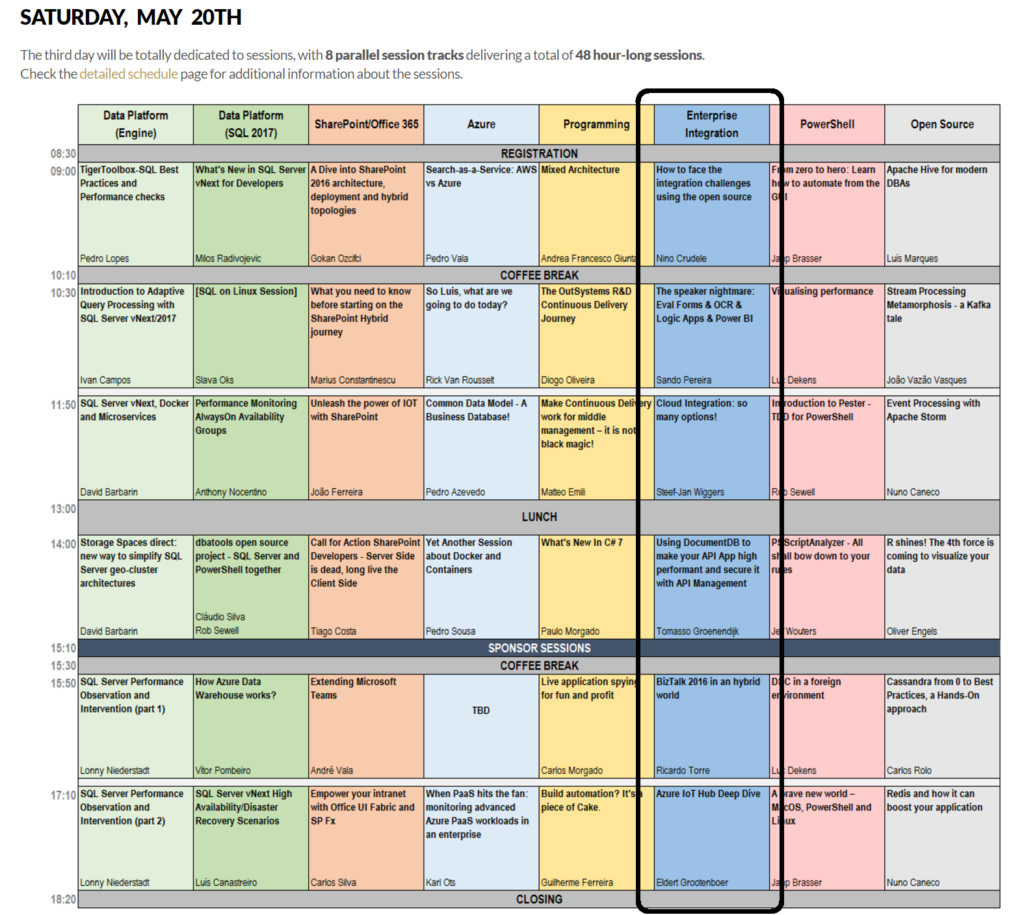
Integration in 2017: Logic Apps
Microsoft has made a leap forward with several of there Azure Services including Logic Apps. A Service that went GA end of July 2016 and evolved rapidly to maturity. Already we see a steady growing adoption of this service within enterprises. Logic Apps is not the replacement of BizTalk, its Microsoft answer to solve integration challenges in the Cloud. The Logic App connectors provide connectivity to other Azure Services and several SaaS solutions like MailChip, SalesForce and CRM online. At TUGAIT 2017 in the Integration Track you will learn more about Logic Apps.
Why attend?
“Nice there’s an integration track, but what if I like to learn about other technologies (too)?”
Well you are at the right place as on the 18th there’s a full day of workshops you can choose from. On Friday there are 5 parallel tracks from which you can pick and choose. The same accounts for Saturday, including the integration track!
The event is located in one of the most beautiful, cultural cities of Portugal. It’s three days packed with content, stellar speakers and community leaders you can listen to and grab to ask questions.
Registration
Registration is a few euro’s or even free if you do require lunch (the fee is there to reduce waste and prevent having an abundance of food).
You can register here and I will see you there in Lisbon!
Cheers,
Steef-Jan
Author: Steef-Jan Wiggers
Steef-Jan Wiggers is all in on Microsoft Azure, Integration, and Data Science. He has over 15 years’ experience in a wide variety of scenarios such as custom .NET solution development, overseeing large enterprise integrations, building web services, managing projects, designing web services, experimenting with data, SQL Server database administration, and consulting. Steef-Jan loves challenges in the Microsoft playing field combining it with his domain knowledge in energy, utility, banking, insurance, health care, agriculture, (local) government, bio-sciences, retail, travel and logistics. He is very active in the community as a blogger, TechNet Wiki author, book author, and global public speaker. For these efforts, Microsoft has recognized him a Microsoft MVP for the past 6 years. View all posts by Steef-Jan Wiggers

by Sandro Pereira | Apr 20, 2017 | BizTalk Community Blogs via Syndication
This post is for the BizTalk Server and Microsoft Azure Portuguese Community, will be held on April 22, 2017 – between 9:00 AM – 6:00 PM the Global Azure Bootcamp 2017 – Lisboa at Microsoft Portugal in Lisbon.
In April of 2013, the first Global Windows Azure Bootcamp has held in more than 90 locations around the globe. And each year number is increasing! This year it is expected the event will be hosted in 244 cities worldwide!

O Global Azure Bootcamp (#GlobalAzure) está de regresso a Lisboa no próximo dia 22 de Abril para a edição de 2017!
No maior evento de Azure do planeta, a comunidade vai ter a oportunidade de experimentar as últimas novidades da plataforma e entrar em contacto com os maiores especialistas portugueses na plataforma.
Junta-te a nós a partir das 9h00 para um dia repleto de coisas interessantes para fazer/assistir:
- Sessões técnicas
- Global Science Lab
- Intro & Advanced Labs
Traz o teu portátil e aproveita para experimentar alguns dos desafios que temos para ti!
Além das sessões técnicas teremos vários labs à disposição dos participantes. Existirão labs mais introdutórios para quem quer ganhar conhecimentos e labs mais avançados para quem pretende aprofundar o know-how em Azure.
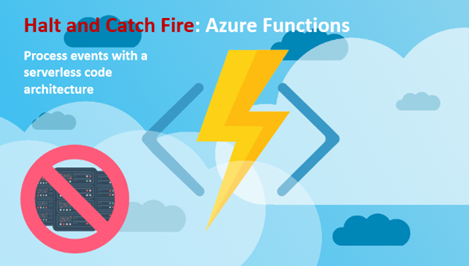
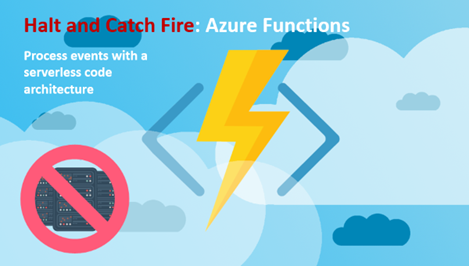
Sobre a minha sessão – Halt and Catch Fire: Azure Functions
“Halt and Catch Fire: Azure Functions” – No início dos anos 1980, o espírito de inovação na computação pessoal estava a iniciar-se, podemos mesmo dizer “catching fire”. Hoje vivemos numa era semelhante na inovação de Serverless computing, também conhecido como function as a service (FaaS), um modelo de execução de código na Cloud no qual o fornecedor de serviços Cloud gere todos os recursos necessários para a execução das funções como um serviço (PaaS).
Nesta deep-dive sessão, iremos ver como Azure Functions podem ser uma ferramenta poderosa no seu toolkit de desenvolvimento, saber quais os seus benefícios e desafios que poderemos encontrar. Onde iremos abordar temas como:
- Usar Azure Functions juntamente com Logic Apps: onde mostrarei um cenário de reconhecimento de formulários e interligá-los com Power BI
- Usar Azure Functions juntamente com Microsoft Flow
- HTTP e Event Hubs triggers em Azure Functions
- Ou Usar Azure Functions juntamente com PowerApps
(ainda a trabalhar noutras demos por isso poderão aparecer novas surpresas (tópicos)
Data Evento: 22 Abril 2017 – 09:00H
Local do Evento: Microsoft Portugal | Rua do Fogo de Santelmo Lote 2.07.02 | Lisboa 1990-110 | Portugal
O evento é gratuito! De que está à espera? Reserve já o seu lugar aqui e participe: Global Azure Bootcamp 2017 – Lisboa
Estamos a sua espera!
Author: Sandro Pereira
Sandro Pereira lives in Portugal and works as a consultant at DevScope. In the past years, he has been working on implementing Integration scenarios both on-premises and cloud for various clients, each with different scenarios from a technical point of view, size, and criticality, using Microsoft Azure, Microsoft BizTalk Server and different technologies like AS2, EDI, RosettaNet, SAP, TIBCO etc. He is a regular blogger, international speaker, and technical reviewer of several BizTalk books all focused on Integration. He is also the author of the book “BizTalk Mapping Patterns & Best Practices”. He has been awarded MVP since 2011 for his contributions to the integration community. View all posts by Sandro Pereira

by Sandro Pereira | Apr 20, 2017 | BizTalk Community Blogs via Syndication
This post is for the BizTalk Server and Microsoft Azure Portuguese Community, will be held on April 22, 2017 – between 9:00 AM – 6:00 PM the Global Azure Bootcamp 2017 – Lisboa at Microsoft Portugal in Lisbon.
In April of 2013, the first Global Windows Azure Bootcamp has held in more than 90 locations around the globe. And each year number is increasing! This year it is expected the event will be hosted in 244 cities worldwide!

O Global Azure Bootcamp (#GlobalAzure) está de regresso a Lisboa no próximo dia 22 de Abril para a edição de 2017!
No maior evento de Azure do planeta, a comunidade vai ter a oportunidade de experimentar as últimas novidades da plataforma e entrar em contacto com os maiores especialistas portugueses na plataforma.
Junta-te a nós a partir das 9h00 para um dia repleto de coisas interessantes para fazer/assistir:
- Sessões técnicas
- Global Science Lab
- Intro & Advanced Labs
Traz o teu portátil e aproveita para experimentar alguns dos desafios que temos para ti!
Além das sessões técnicas teremos vários labs à disposição dos participantes. Existirão labs mais introdutórios para quem quer ganhar conhecimentos e labs mais avançados para quem pretende aprofundar o know-how em Azure.
Sobre a minha sessão – Halt and Catch Fire: Azure Functions
“Halt and Catch Fire: Azure Functions” – No início dos anos 1980, o espírito de inovação na computação pessoal estava a iniciar-se, podemos mesmo dizer “catching fire”. Hoje vivemos numa era semelhante na inovação de Serverless computing, também conhecido como function as a service (FaaS), um modelo de execução de código na Cloud no qual o fornecedor de serviços Cloud gere todos os recursos necessários para a execução das funções como um serviço (PaaS).
Nesta deep-dive sessão, iremos ver como Azure Functions podem ser uma ferramenta poderosa no seu toolkit de desenvolvimento, saber quais os seus benefícios e desafios que poderemos encontrar. Onde iremos abordar temas como:
- Usar Azure Functions juntamente com Logic Apps: onde mostrarei um cenário de reconhecimento de formulários e interligá-los com Power BI
- Usar Azure Functions juntamente com Microsoft Flow
- HTTP e Event Hubs triggers em Azure Functions
- Ou Usar Azure Functions juntamente com PowerApps
(ainda a trabalhar noutras demos por isso poderão aparecer novas surpresas (tópicos)
Data Evento: 22 Abril 2017 – 09:00H
Local do Evento: Microsoft Portugal | Rua do Fogo de Santelmo Lote 2.07.02 | Lisboa 1990-110 | Portugal
O evento é gratuito! De que está à espera? Reserve já o seu lugar aqui e participe: Global Azure Bootcamp 2017 – Lisboa
Estamos a sua espera!
Author: Sandro Pereira
Sandro Pereira lives in Portugal and works as a consultant at DevScope. In the past years, he has been working on implementing Integration scenarios both on-premises and cloud for various clients, each with different scenarios from a technical point of view, size, and criticality, using Microsoft Azure, Microsoft BizTalk Server and different technologies like AS2, EDI, RosettaNet, SAP, TIBCO etc. He is a regular blogger, international speaker, and technical reviewer of several BizTalk books all focused on Integration. He is also the author of the book “BizTalk Mapping Patterns & Best Practices”. He has been awarded MVP since 2011 for his contributions to the integration community. View all posts by Sandro Pereira
by stephen-w-thomas | Apr 6, 2017 | Stephen's BizTalk and Integration Blog
I had a great time presenting at the Microsoft Technology Center a few weekends ago in Manhatten covering Azure Functions and Azure Logic Apps as part of the Global Integration Bootcamp!
We had a great group of presenters and an even better group of participants.
If you are interested in the slides and lab for the session, you can download them below. The topics covered are Azure Logic Apps, Azure Functions, and Azure Storage,
Download Slides: Logic App Cloud Adapters, Functions, and Storage
Download Lab: Lab – Logic App Cloud Adapters, Functions, and Storage
Notes for the lab: You need a hosted email account (Gmail, Outlook, Office 365, etc) and a trail Twilio account (this can be skipped if you don’t want to receive a text)

by Steef-Jan Wiggers | Mar 26, 2017 | BizTalk Community Blogs via Syndication
Success has many fathers and with the Global Integration Bootcamp that is a fact. Organizers, speakers, companies hosting the event, the Microsoft Pro-Integration Team, and above all the attendees. This global event showed how passionate, strong and active this integration community is!
The Event
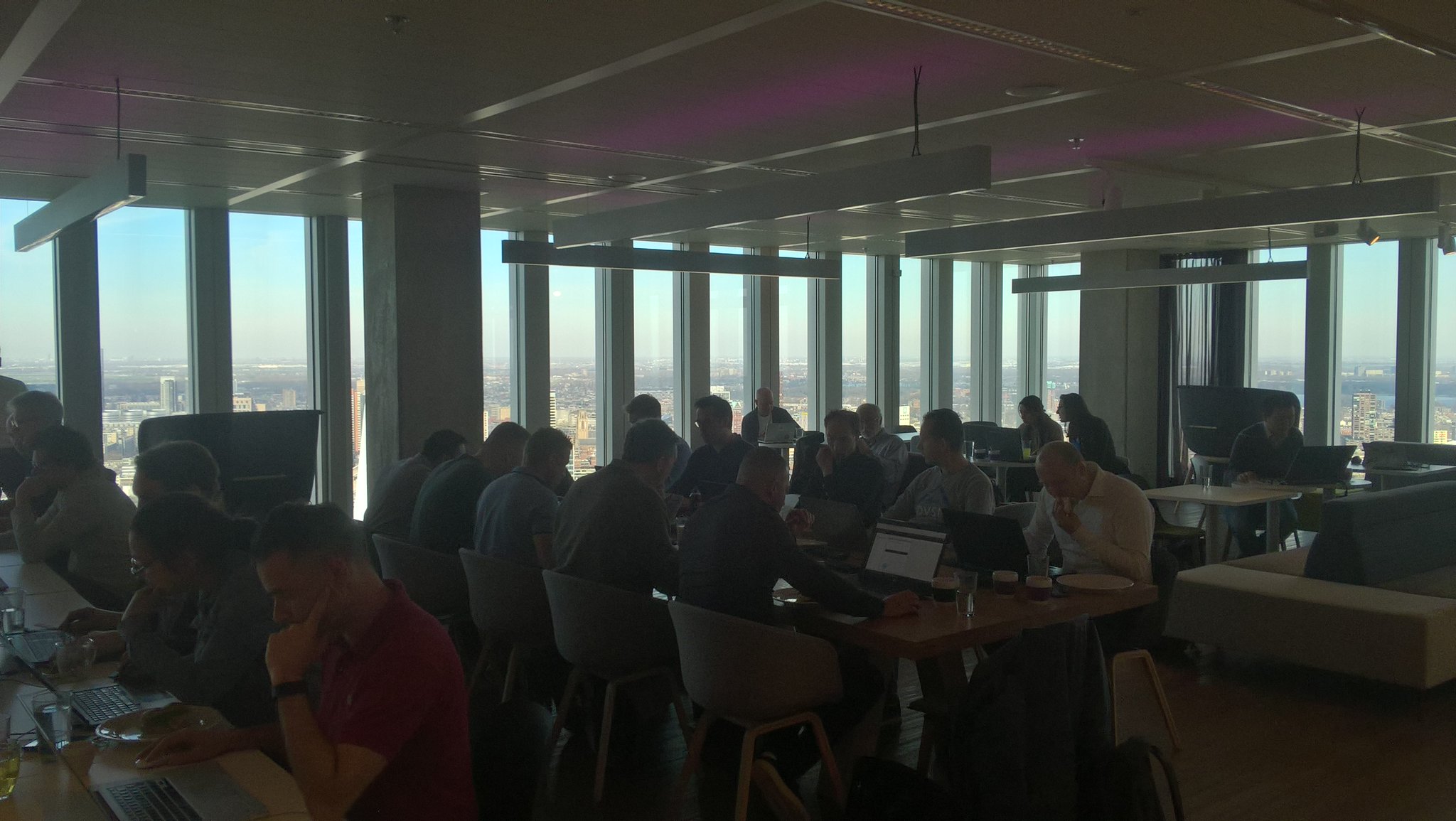
During the Global Integration Bootcamp at the Dutch location at motion10 in Rotterdam I did a few interviews with fellow organizers of this amazing event:
The motion10 has an amazing view over Rotterdam, which you can see in two of the video interviews.

In case you like to learn more about the history and how this great event came its tremedous success do read these two excellent posts:
Start of the day
In holland we kicked of at motion10 HQ at the same time as some of the other locations in Europe. Our friends in New Zealand, Australia and India just completed there day.
Sessions
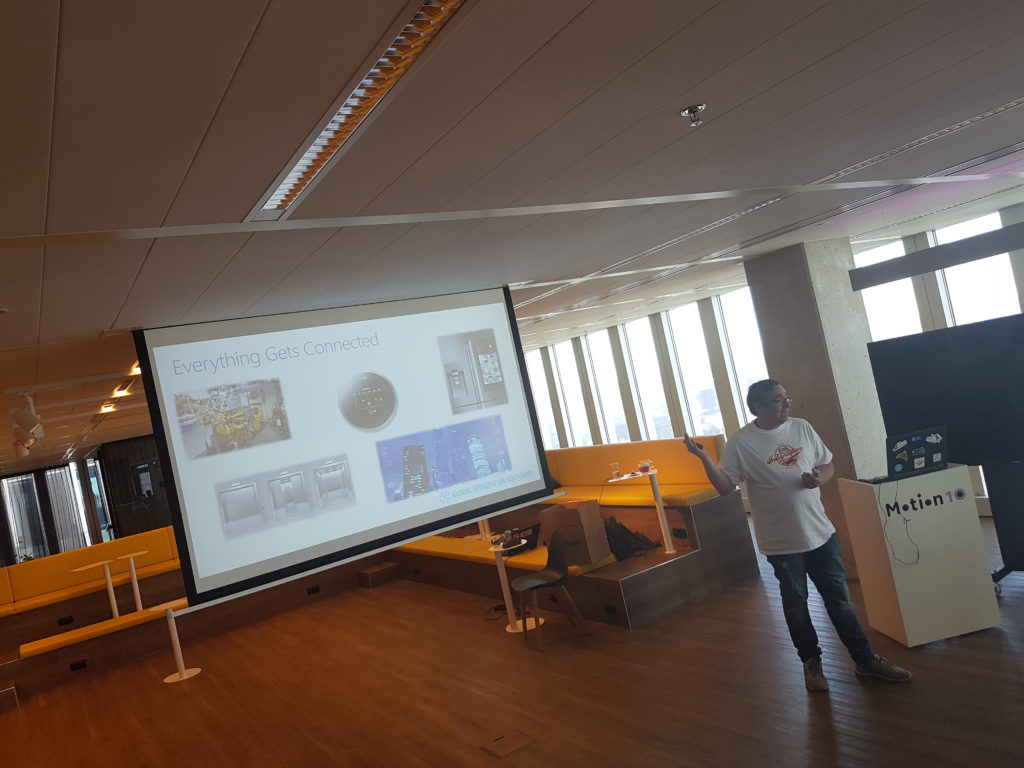
At motion10 Gijs kick off the day followed by Tomasso presenting on API Management.
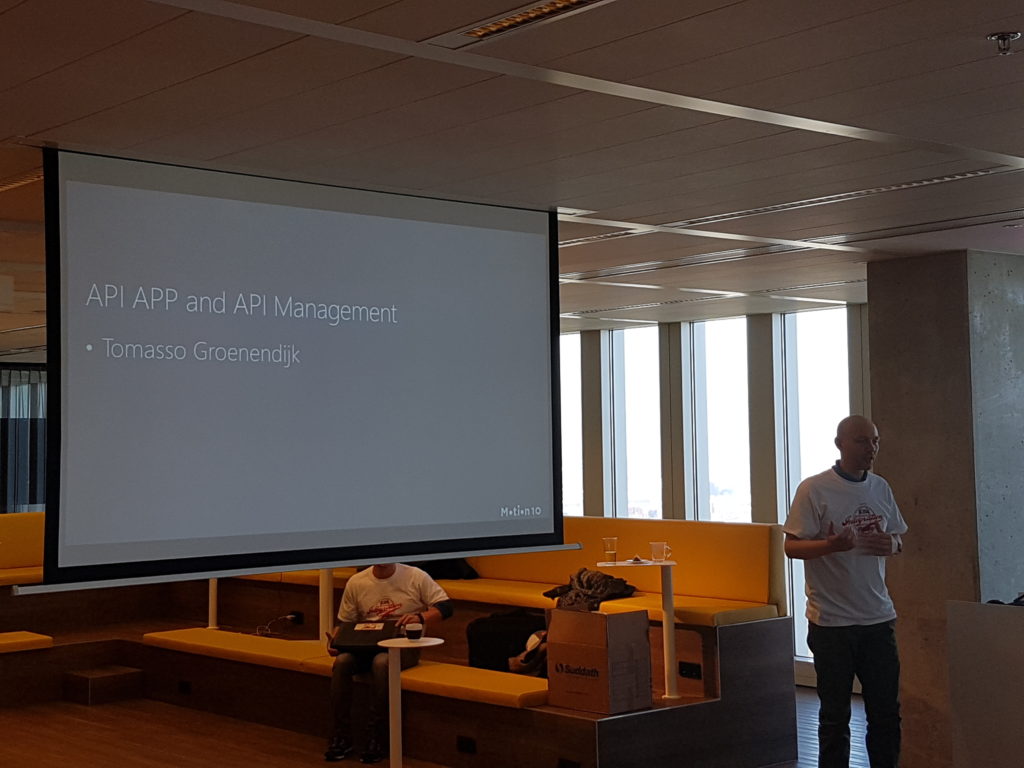
After Tomasso session the attendees dive into the first lab. The requirements to do the labs yourself can be found here and the labs will be published soon in an eBook by BizTalk360.
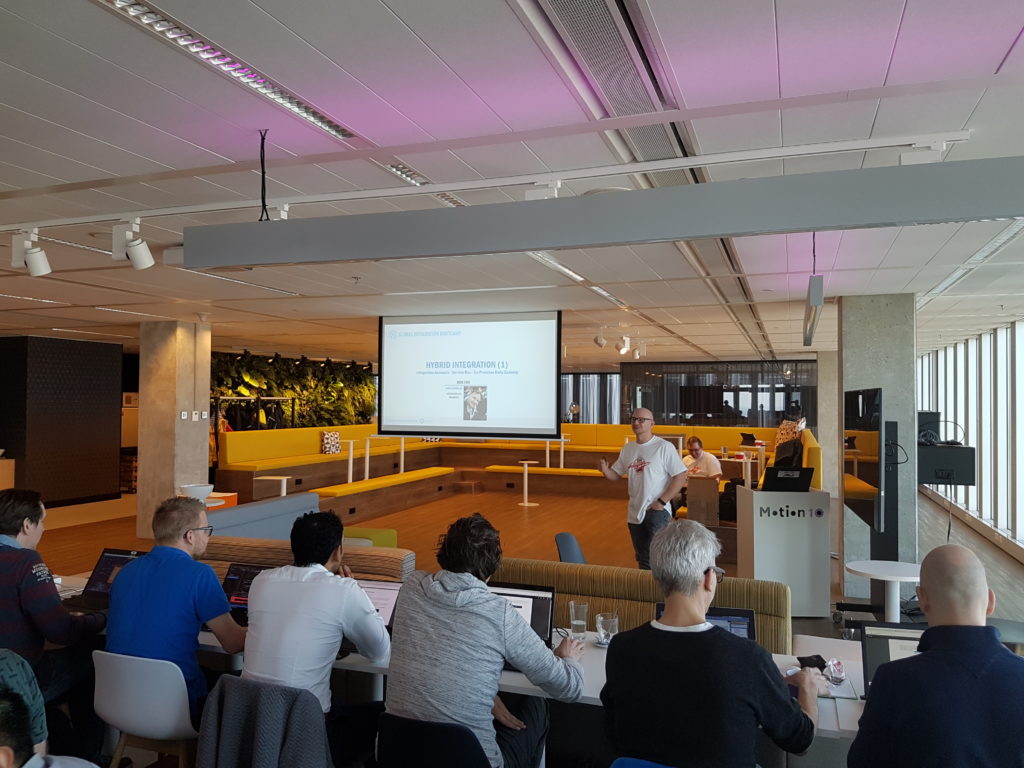
The second session was done by Rob Fox on Hybrid Integration including working with the on-premise gateway.
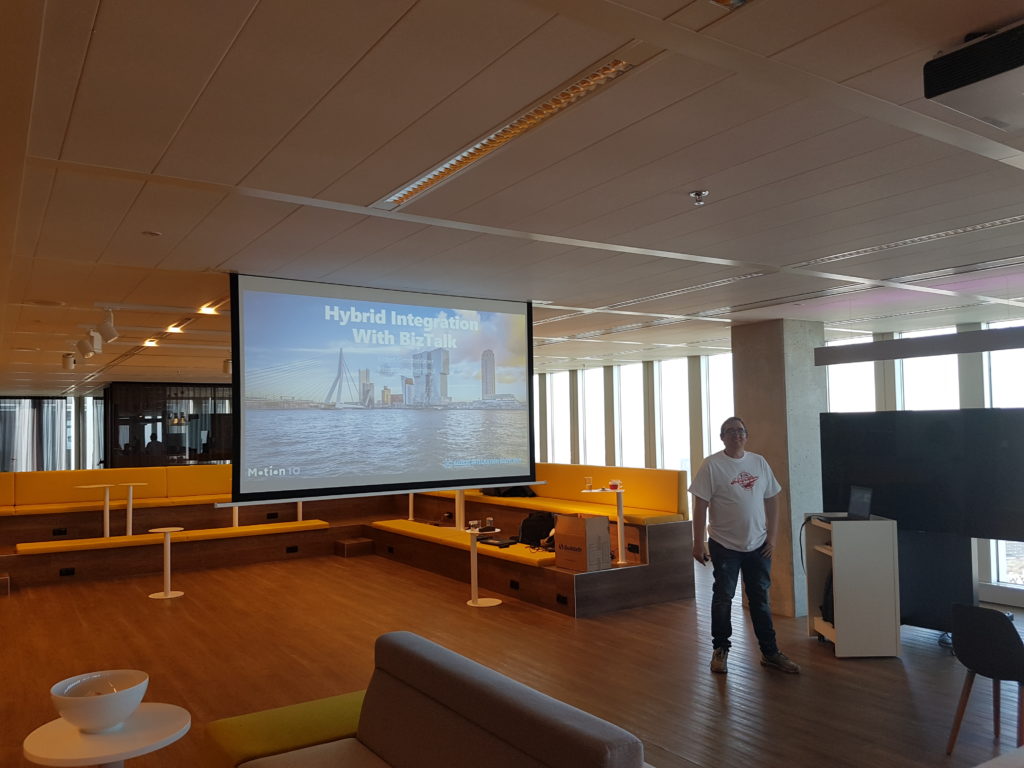
During the lunch people continued with their labs, followed by the third talk by Eldert, who continued with the hybrid integration story. This story included the connectivity through Logic Apps with on-premise BizTalk Server.
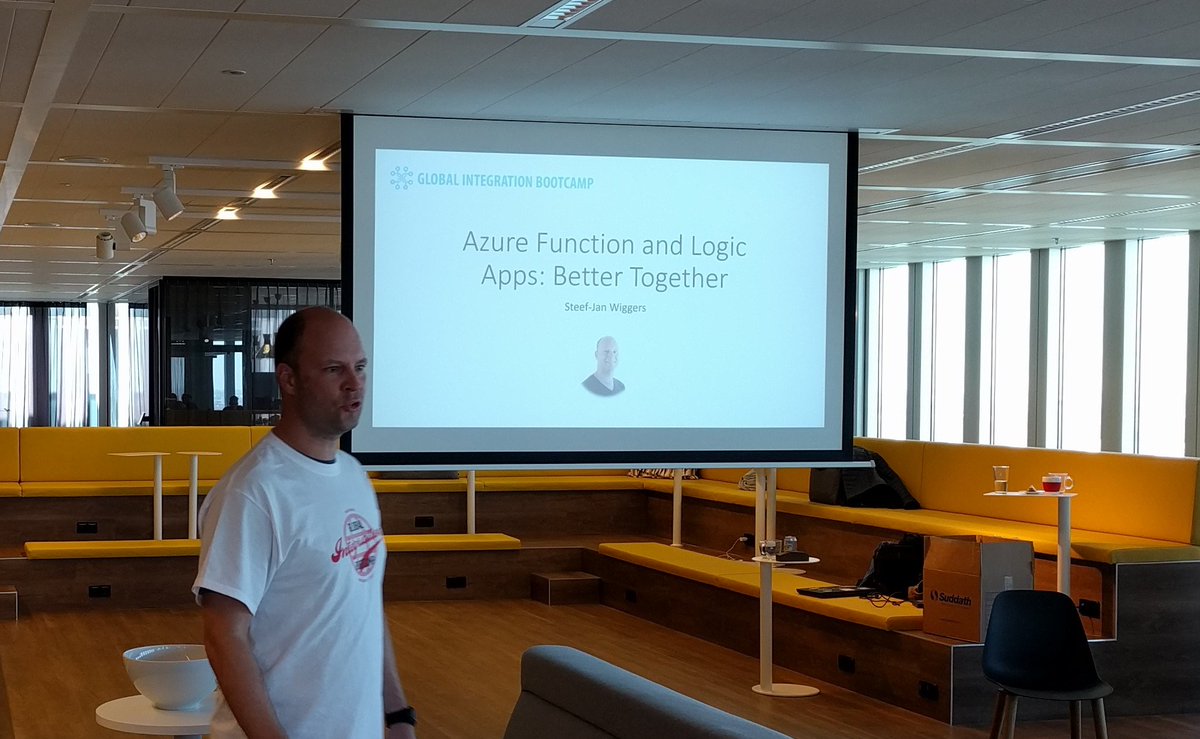
My session, number four, was to showcase some great Azure services like Logic Apps and Azure Functions. It was fun to do as I was able to show my trumpizer demo again.
The final session of the day was about IoT and done by Eldert again.
Acknowledgements
I am proud to be able to be part of this great event and journey to it. Loved the close collaboration with Eldert, who has been a key factor in organizing this event. His passion and drive is amazing and his recent MVP award is well deserved as it is a crown of his dedicated work for the community. And this something that I like to point out as his mentor. Well done buddy!
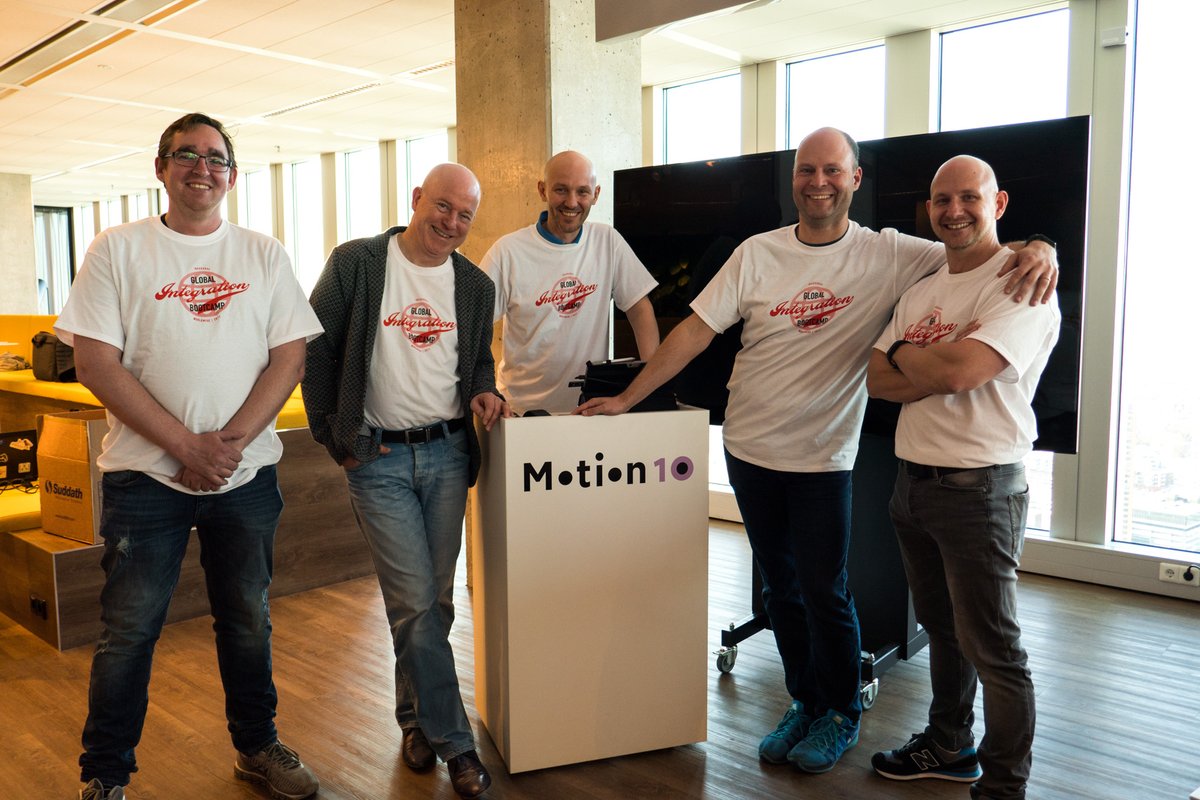
Thanks from the Dutch speakers #gib2017 and see you next year at #gib2018!
Cheers,
Steef-Jan
Author: Steef-Jan Wiggers
Steef-Jan Wiggers is all in on Microsoft Azure, Integration, and Data Science. He has over 15 years’ experience in a wide variety of scenarios such as custom .NET solution development, overseeing large enterprise integrations, building web services, managing projects, designing web services, experimenting with data, SQL Server database administration, and consulting. Steef-Jan loves challenges in the Microsoft playing field combining it with his domain knowledge in energy, utility, banking, insurance, health care, agriculture, (local) government, bio-sciences, retail, travel and logistics. He is very active in the community as a blogger, TechNet Wiki author, book author, and global public speaker. For these efforts, Microsoft has recognized him a Microsoft MVP for the past 6 years. View all posts by Steef-Jan Wiggers

by Sandro Pereira | Mar 13, 2017 | BizTalk Community Blogs via Syndication
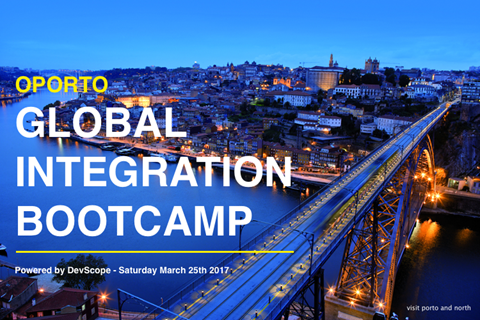
I am really excited to announce that all the arrangements for first Oporto Global Integration Bootcamp are almost finalized and I can now release 90% of the event agenda. This event will be held at DevScope offices in Oporto on March 25, 2017, between 09:00 – 17:00.
What is Global Integration Bootcamp?

This is a free, event driven by user groups and communities around the world, backed by Microsoft, for anyone who wants to learn more about Microsoft’s integration story. In this full-day boot camp, we will deep-dive into Microsoft’s integration stack with hands-on sessions and labs, delivered to you by the experts and community leaders. In this Boot Camp, we will focus on:
- BizTalk Server 2016: BizTalk Server 2016, what’s new, and using the new Logic Apps adapter.
- Logic Apps: Creating Logic Apps using commonly-used connectors.
- Service Bus: Build reliable and scalable cloud messaging and hybrid integration solution
- Enterprise Integration Pack: Using the Enterprise Integration Pack (EIP) with Logic Apps
- API Management: How does API management help you organize your APIs and how does it increase security?
- On-Premise Gateway: Connecting to on-prem resources using the On-Premise Gateway
- Hybrid Integration: Hybrid integrations using BizTalk Server and Logic Apps
- Microsoft Flow: Learn to compose flows with Microsoft Flow
But much more. Porto will be joining locations all over the globe holding this event on the same day. Check out the global website for information about the global organizers and other locations, or follow the Twitter hashtag #integrationbootcamp.
Oporto Global Integration Bootcamp Agenda
09:00 Registration opens and welcome
10:00 BIZTALK 2016 IN A HYBRID WORLD
The integration landscape has definitely evolved to be a hybrid, significant on-premise investment has been accumulated over the years while at the same time cloud computing brought new challenges and new ways of implementing integration. Let’s navigate through the innovations in both worlds and how BizTalk and the cloud currently live together. – Ricardo Torre
11:00 BIZTALK OCTOPUS DEPLOY
How to deploy BizTalk solutions with Octopus – José António Silva & Pedro Sousa, DevScope
11:30 Coffee-break
11:45 UNLEASH THE POWER OF IOT WITH SHAREPOINT
SharePoint is becoming modern, there are modern sites ready for mobile, a modern framework to develop web parts, but what about embracing modern concepts?
Internet of things will be everywhere in a blink of an eye and probably you are already dealing with it every day without even knowing.
In this session, we will explain how to collect data from sensors, send it to SharePoint and how to display it in a modern dashboard using modern SharePoint sites.
The possibilities are endless, from temperature sensors to access control devices you can have all this data inside your SharePoint Intranet with a modern look and feel. – João Ferreira, BindTuning
12:45 THE SPEAKER NIGHTMARE: Eval Forms & OCR & Logic Apps & Power BI
In this session, I will show and explain a real live demo on how we can easily build a robust solution for process evaluation forms, using an OCR software and easily integrate them with Power BI to present the results in an interactive and beautiful way. But most important: How you can educate your enterprise Developers and IT pros users to easily extend capabilities for power users, who understand their business challenges the best, and allowing them to use their familiar tools like: OCR software to process Evaluation forms and quickly build and deliver Power BI solutions to build Interactive Data dashboards. And at the same time integrate these tools, platforms or systems and a very quick and robust way using integrate feature on Azure, like, Logic Apps, API Apps and Azure Functions. How to start from a simple solution and evolve them enabling new functionalities. – Sandro Pereira, Microsoft Integration MVP
13:15 Lunch and Networking
Register
The agenda is not completely defined, you see that there are some sessions to be announced and can be subject to changes in terms of order of the sessions.
Thanks to sponsorship from DevScope, this event will be free of charge, including the catering, however, capacity will be limited in the venue so don’t delay and reserve your ticket at https://www.eventbrite.com/e/oporto-global-integration-bootcamp-tickets-31508629158. I’m looking forward to welcoming you to the Oporto Global Integration Bootcamp on March 25, 2017!
Author: Sandro Pereira
Sandro Pereira lives in Portugal and works as a consultant at DevScope. In the past years, he has been working on implementing Integration scenarios both on-premises and cloud for various clients, each with different scenarios from a technical point of view, size, and criticality, using Microsoft Azure, Microsoft BizTalk Server and different technologies like AS2, EDI, RosettaNet, SAP, TIBCO etc. He is a regular blogger, international speaker, and technical reviewer of several BizTalk books all focused on Integration. He is also the author of the book “BizTalk Mapping Patterns & Best Practices”. He has been awarded MVP since 2011 for his contributions to the integration community. View all posts by Sandro Pereira