by Dan Toomey | Mar 30, 2018 | BizTalk Community Blogs via Syndication
 Last Saturday I had the great privilege of organising and hosting the 2nd annual Global Integration Bootcamp in Brisbane. This was a free event hosted by 15 communities around the globe, including four in Australia and one in New Zealand!
It’s a lot of work to put on these events, but it’s worth it when you see a whole bunch of dedicated professionals give up part of their weekend because they are enthusiastic to learn about Microsoft’s awesome integration capabilities.
The day’s agenda concentrated on Integration Platform as a Service (iPaaS) offerings in Microsoft Azure. It was a packed schedule with both presentations and hands-on labs:
It wasn’t all work… we had some delicious morning tea, lunch and afternoon tea catered by Artisan’s Café & Catering, and there was a bit of swag to give away as well thanks to Microsoft and also Mexia (who generously sponsored the event).
 Overall, feedback was good and most attendees were appreciative of what they learned. The slide decks for most of the presentations are available online and linked above, and the labs are available here if you would like to have a go.
I’d like to thank my colleagues Susie, Lee and Adam for stepping up into the speaker slots and giving me a couple of much needed breaks! I’d also like to thank Joern Staby for helping out with the lab proctoring and also writing an excellent post-event article.
Finally, I be remiss in not mentioning the global sponsors who were responsible for getting this world-wide event off of the ground and providing the lab materials:
- Martin Abbott
- Glenn Colpaert
- Steef-Jan Wiggers
- Tomasso Groenendijk
- Eldert Grootenboer
- Sven Van den brande
- Gijs in ‘t Veld
- Rob Fox
Really looking forward to next year’s event!
by Gautam | Mar 19, 2018 | BizTalk Community Blogs via Syndication
Do you feel difficult to keep up to date on all the frequent updates and announcements in the Microsoft Integration platform?
Integration weekly update can be your solution. It’s a weekly update on the topics related to Integration – enterprise integration, robust & scalable messaging capabilities and Citizen Integration capabilities empowered by Microsoft platform to deliver value to the business.
If you want to receive these updates weekly, then don’t forget to Subscribe!
Packt $10 Sale: Get your copy to start building Robust Cloud Integration solution in Azure Robust cloud Integration with Azure
New Book: Stay tuned for our next book on cloud integration with Steef-Jan Wiggers, Abhishek Kumar, & Srinivasa Mahendrakar
Feedback
Hope this would be helpful. Please feel free to reach out and let me know your feedback on this Integration weekly series.

by Sandro Pereira | Jan 19, 2018 | BizTalk Community Blogs via Syndication
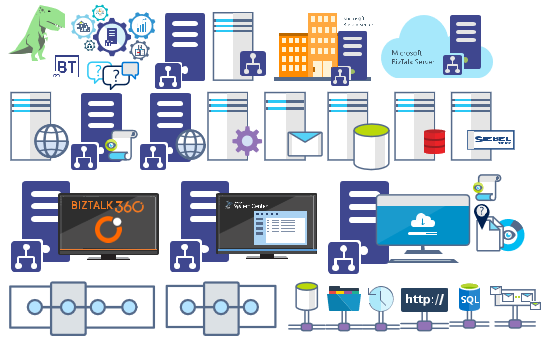
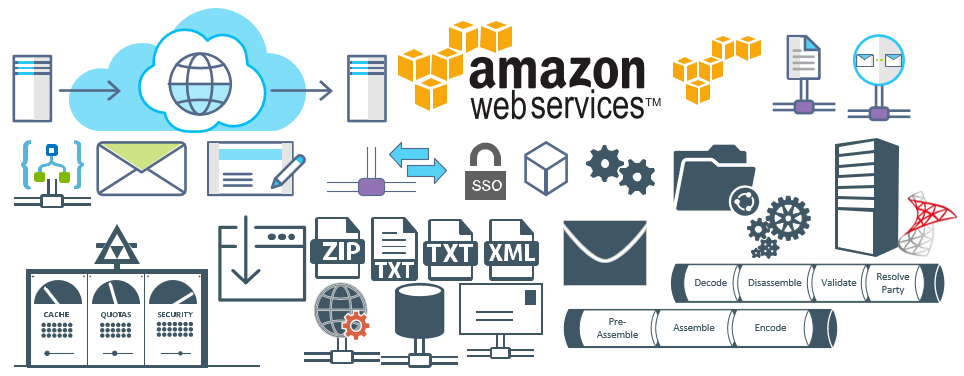
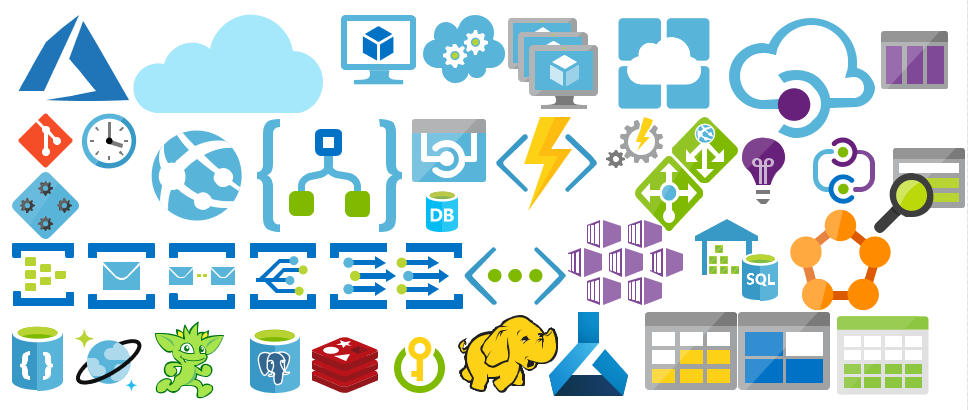
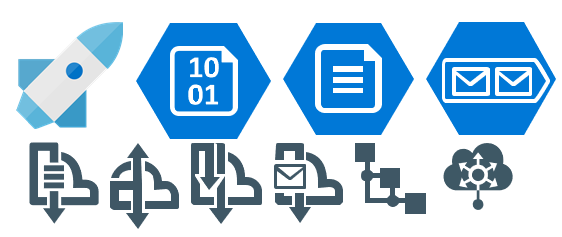
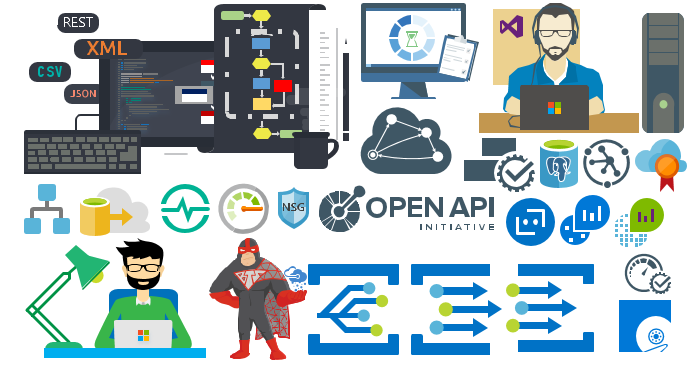
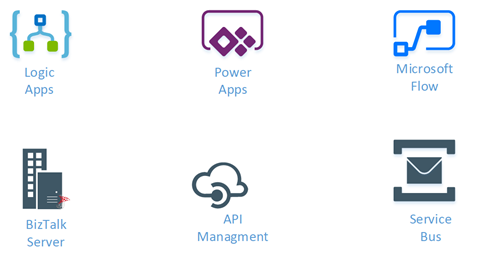
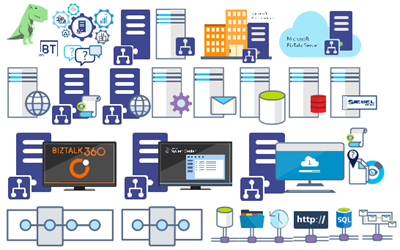
Microsoft Integration (Azure and much more) Stencils Pack it’s a Visio package that contains fully resizable Visio shapes (symbols/icons) that will help you to visually represent On-premise, Cloud or Hybrid Integration and Enterprise architectures scenarios (BizTalk Server, API Management, Logic Apps, Service Bus, Event Hub…), solutions diagrams and features or systems that use Microsoft Azure and related cloud and on-premises technologies in Visio 2016/2013:
- BizTalk Server
- Microsoft Azure
- BizTalk Services
- Azure App Service (API Apps, Web Apps, Mobile Apps and Logic Apps)
- Event Hubs
- Service Bus
- API Management, IoT, and Docker
- Machine Learning, Stream Analytics, Data Factory, Data Pipelines
- and so on
- Microsoft Flow
- PowerApps
- Power BI
- PowerShell
- Infrastructure, IaaS
- And many more…

I start this project because at the time I didn’t find nice shapes – graphically beautiful and resizable shapes – to produce BizTalk Server topologies diagrams and high-level overview of integrating processes. The project grew as community member asked for new shapes and during the last few years I have been updating and publishing new shapes, particularly associated with Azure services, which has a very low release cadence.
This time I cannot say it was an update because was actually a complete makeover and the reasons behind this decision are mainly these 2:
- The Project Become Huge: more than 1000 shapes, and due to the project structure that I decide to implement at the time, it became a little difficult to maintain since even I had difficulty finding and organizing all the shapes and there were several duplicate shapes (some were purposely duplicated and still are).
- A Fresh New Look: at the time, almost all the shapes were blue – not a beautiful blue but an obsolete annoying blue – so I decide to use, in almost the cases, a monochrome approach opting for a darker color – but after all these years it was already a little worn and needing for a new modern look and this time I decided to follow the look that Microsoft is implementing in Microsoft Docs – in fact, several stencils were collect from there – a more light and multicolored approach.
- You liked the old aspect? Do not worry, I still kept the old (monochrome) shapes but moved to support files.
What’s new in this version?
Is this version all about a fresh and modern new look? No, it is not. That was indeed one of the main tasks, but in addition:
- New shapes: 571 new forms have been added – many of them are in fact a redesign of the existing features to have a modern look – but it is still an impressive number. Making a total of 1883 shapes available in this package.
- The package structure changed: It is more organized – went from 13 files to 20 – which means that more categories were created and for that reason, I think it will be easier to find the shapes you are looking for. The Microsoft Integration (Azure and much more) Stencils Pack v3.0.0 is now composed of 20 files:
-
- Microsoft Integration Stencils v3.0.0
-
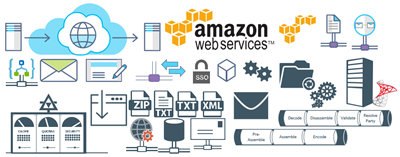
- MIS Additional or Support Stencils v3.0.0
-
- MIS Apps and Systems Logo Stencils v3.0.0
-
- MIS Azure Additional or Support Stencils v3.0.0

-
- MIS Azure Others Stencils v3.0.0

-
- MIS Azure Stencils v3.0.0
-
- MIS Buildings Stencils v3.0.0

-
- MIS Databases Stencils v3.0.0
-
- MIS Deprecated Stencils v3.0.0
-
- MIS Developer Stencils v3.0.0
-
- MIS Devices Stencils v3.0.0

-
- MIS Files Stencils v3.0.0
-
- MIS Generic Stencils v3.0.0
-
- MIS Infrastructure Stencils v3.0.0
-
- MIS Integration Patterns Stencils v3.0.0
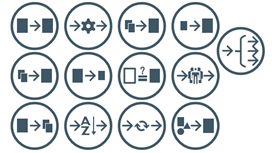
-
- MIS IoT Devices Stencils v3.0.0

-
- MIS Power BI Stencils v3.0.0
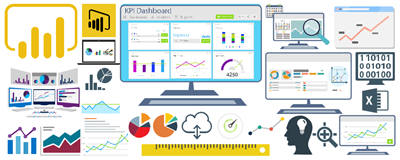
-
- MIS PowerApps and Flows Stencils v3.0.0
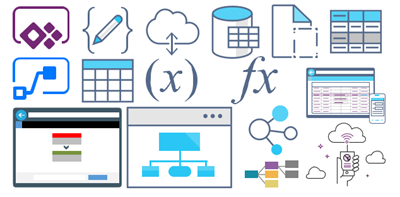
-
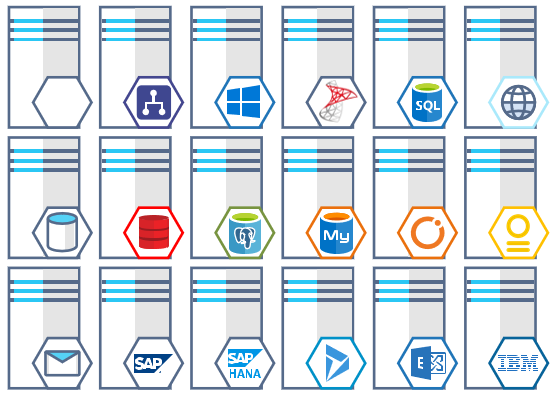
- MIS Servers (HEX) Stencils v3.0.0
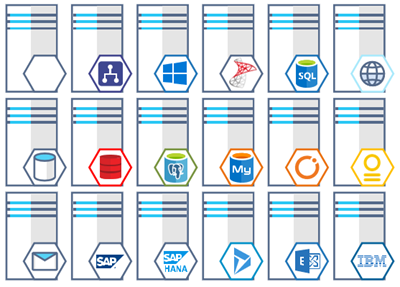
-
- MIS Users and Roles Stencils v3.0.0

You can download Microsoft Integration (Azure and much more) Stencils Pack from:
 Microsoft Integration Stencils Pack for Visio 2016/2013 v3.0.0 (16,6 MB)
Microsoft | TechNet Gallery
Author: Sandro Pereira
Sandro Pereira lives in Portugal and works as a consultant at DevScope. In the past years, he has been working on implementing Integration scenarios both on-premises and cloud for various clients, each with different scenarios from a technical point of view, size, and criticality, using Microsoft Azure, Microsoft BizTalk Server and different technologies like AS2, EDI, RosettaNet, SAP, TIBCO etc. He is a regular blogger, international speaker, and technical reviewer of several BizTalk books all focused on Integration. He is also the author of the book “BizTalk Mapping Patterns & Best Practices”. He has been awarded MVP since 2011 for his contributions to the integration community. View all posts by Sandro Pereira
by Gautam | Dec 17, 2017 | BizTalk Community Blogs via Syndication
Do you feel difficult to keep up to date on all the frequent updates and announcements in the Microsoft Integration platform?
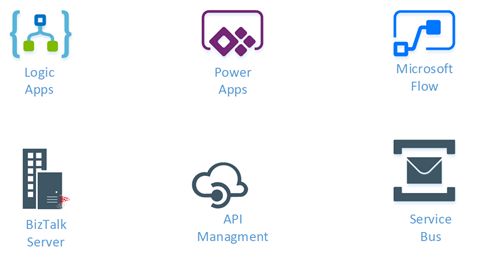
Integration weekly update can be your solution. It’s a weekly update on the topics related to Integration – enterprise integration, robust & scalable messaging capabilities and Citizen Integration capabilities empowered by Microsoft platform to deliver value to the business.
If you want to receive these updates weekly, then don’t forget to Subscribe!
Feedback
Hope this would be helpful. Please feel free to provide your feedback on the Integration weekly series.

by Sandro Pereira | Sep 29, 2017 | BizTalk Community Blogs via Syndication
This is probably the quickest and smallest update that I made in my Microsoft Integration (Azure and much more) Stencils Pack: only 1 new stencil and I only do it for its importance, since it is definitely one of Microsoft’s fastest growing business these days, and the Ignite context: the new Azure logo.
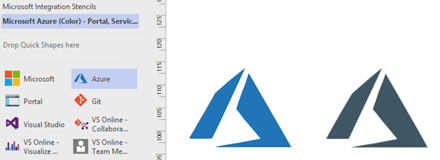
This will be probably the first Visio pack containing this shape.
The Microsoft Integration (Azure and much more) Stencils Pack v2.6.1 is composed by 13 files:
- Microsoft Integration Stencils v2.6.1
- MIS Apps and Systems Logo Stencils v2.6.1
- MIS Azure Portal, Services and VSTS Stencils v2.6.1
- MIS Azure SDK and Tools Stencils v2.6.1
- MIS Azure Services Stencils v2.6.1
- MIS Deprecated Stencils v2.6.1
- MIS Developer v2.6.1
- MIS Devices Stencils v2.6.1
- MIS IoT Devices Stencils v2.6.1
- MIS Power BI v2.6.1
- MIS Servers and Hardware Stencils v2.6.1
- MIS Support Stencils v2.6.1
- MIS Users and Roles Stencils v2.6.1
That will help you visually represent Integration architectures (On-premise, Cloud or Hybrid scenarios) and Cloud solutions diagrams in Visio 2016/2013. It will provide symbols/icons to visually represent features, systems, processes and architectures that use BizTalk Server, API Management, Logic Apps, Microsoft Azure and related technologies.
- BizTalk Server
- Microsoft Azure
- · Azure App Service (API Apps, Web Apps, Mobile Apps and Logic Apps)
- API Management
- Event Hubs
- Service Bus
- Azure IoT and Docker
- SQL Server, DocumentDB, CosmosDB, MySQL, …
- Machine Learning, Stream Analytics, Data Factory, Data Pipelines
- and so on
- Microsoft Flow
- PowerApps
- Power BI
- Office365, SharePoint
- DevOpps: PowerShell, Containers
- And many more…
You can download Microsoft Integration (Azure and much more) Stencils Pack from:
Microsoft Integration Stencils Pack for Visio 2016/2013 (11,4 MB)
Microsoft | TechNet Galler
Author: Sandro Pereira
Sandro Pereira lives in Portugal and works as a consultant at DevScope. In the past years, he has been working on implementing Integration scenarios both on-premises and cloud for various clients, each with different scenarios from a technical point of view, size, and criticality, using Microsoft Azure, Microsoft BizTalk Server and different technologies like AS2, EDI, RosettaNet, SAP, TIBCO etc. He is a regular blogger, international speaker, and technical reviewer of several BizTalk books all focused on Integration. He is also the author of the book “BizTalk Mapping Patterns & Best Practices”. He has been awarded MVP since 2011 for his contributions to the integration community. View all posts by Sandro Pereira
by Steef-Jan Wiggers | Sep 25, 2017 | BizTalk Community Blogs via Syndication
A couple of weeks ago Azure Event Grid service became available in public preview. This service enables centralized management of events in a uniform way. Moreover, it scales with you when the number of events increases. This is made possible by the foundation the Event Grid relies on Service Fabric. Not only does it auto scale you also do not have to provision anything besides an Event Topic to support custom events (see the blog post Routing an Event with a custom Event Topic).
Event Grid is serverless, therefore you only pay for each action (Ingress events, Advanced matches, Delivery attempts, Management calls). Moreover, the price will be 30 cents per million actions in the preview and will be 60 cents once the service will be GA.
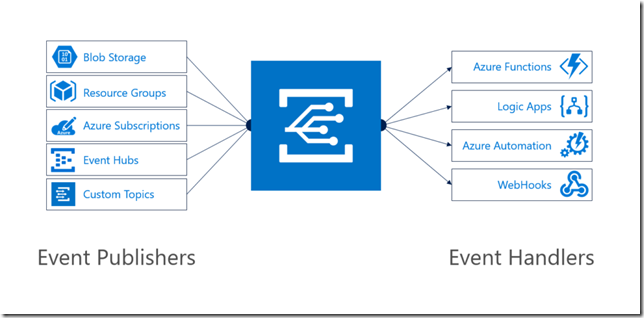
Azure Event Grid can be described as an event broker that has one of more event publishers and subscribers. Furthermore, Event publishers are currently Azure blob storage, resource groups, subscriptions, event hubs and custom events. Finally, more will be available in the coming months like IoT Hub, Service Bus, and Azure Active Directory. Subsequently, there are consumers of events (subscribers) like Azure Functions, Logic Apps, and WebHooks. And on the subscriber side too more will be available with Azure Data Factory, Service Bus and Storage Queues for instance.
To view Microsoft’s Roadmap for Event Grid please watch the Webinar of the 24th of August on YouTube.
Event Grid Preview for Azure Storage
Currently, to capture Azure Blob Storage events you will need to register your subscription through a preview program. Once you have registered your subscription, which could take a day or two, you can leverage Event Grid in Azure Blob Storage only in Central West US!

The Microsoft documentation on Event Grid has a section “Reacting to Blob storage events”, which contains a walk-through to try out the Azure Blob Storage as an event publisher.
Scenario
Having registered the subscription to the preview program, we can start exploring its capabilities. Since the landing page of Event Grid provides us some sample scenarios, let’s try out the serverless architecture sample, where one can use Event Grid to instantly trigger a Serverless function to run image analysis each time a new photo is added to a blob storage container. Hence, we will build a demo according to the diagram below that resembles that sample.
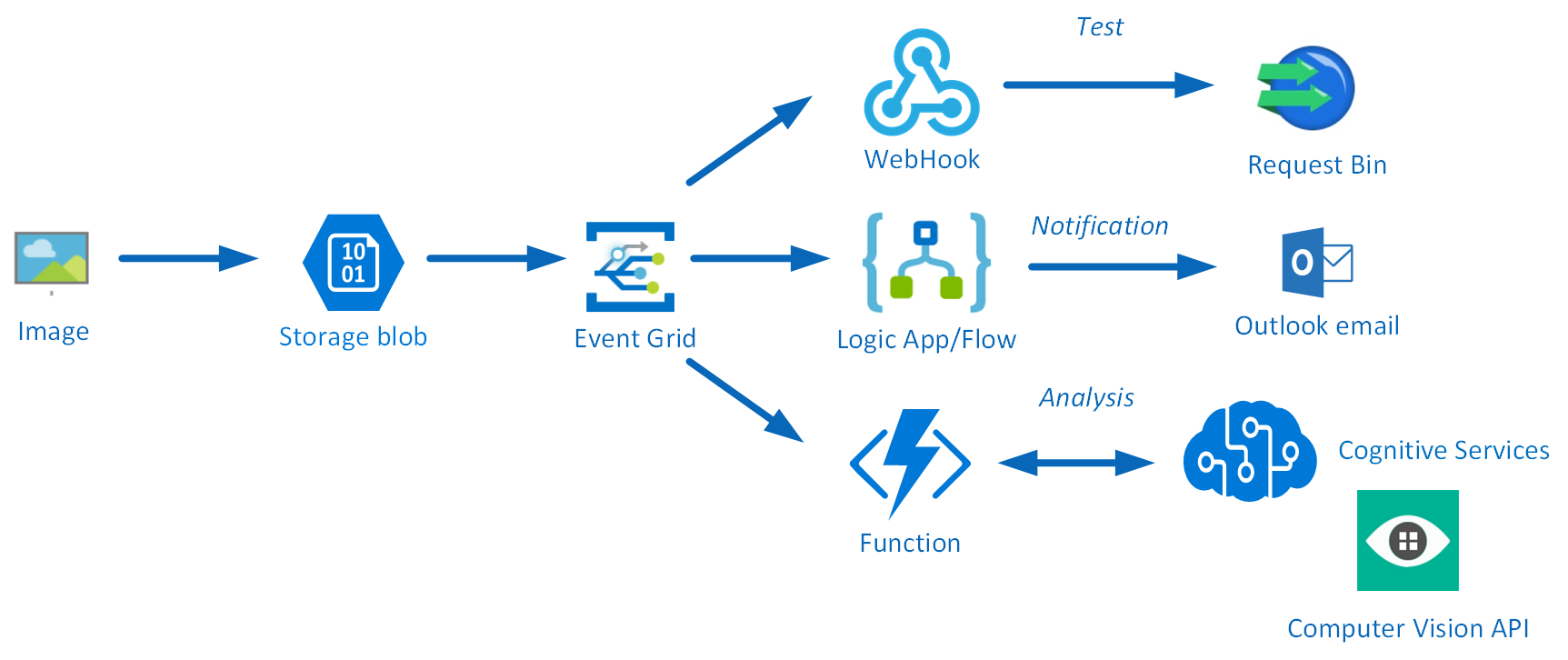
An image will be uploaded to a Storage blob container, which will be the event source (publisher). Subsequently, the Storage blob container belongs to a Storage Account containing the Event Grid capability. And finally, the Event Grid has three subscribers, a WebHook (Request Bin) to capture the output of the event, a Logic App to notify me a blob has been created and an Azure Function that will analyze the image created in the blob storage, by extracting the URL from the event message and use it to analyze the actual image.
Intelligent routing
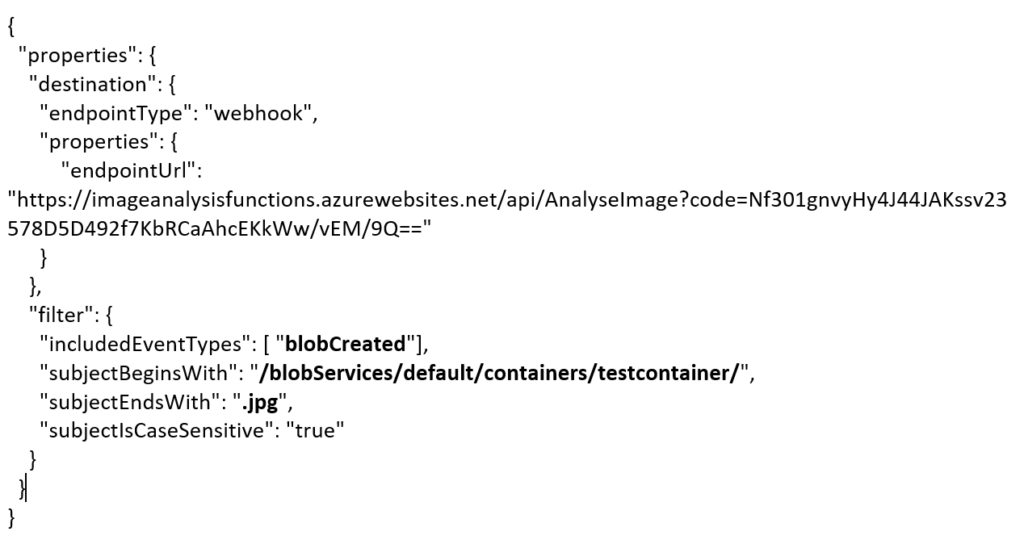
The screenshot below depicts the subscriptions on the events on the Blob Storage account. The WebHook will subscribe to each event, while the Logic App and Azure Function are only interested in the BlobCreated event, in a particular container(prefix filter) and type (suffix filter).
Besides being centrally managed Event Grid offers intelligent routing, which is the core feature of Event Grid. You can use filters for event type, or subject pattern (pre- and suffix). Moreover, the filters are intended for the subscribers to indicate what type of event and/or subject they are interested in. When we look at our scenario the event subscription for Azure Functions is as follows.
- Event Type : Blob Created
- Prefix : /blobServices/default/containers/testcontainer/
- Suffix : .jpg
The prefix, a filter object, looks for the beginsWith in the subject field in the event. And in addition the suffix looks for the subjectEndsWith in again the subject. Consequently, in the event above, you will see that the subject has the specified Prefix and Suffix. See also Event Grid subscription schema in the documentation as it will explain the properties of the subscription schema. The subscription schema of the function is as follows:
<pre>{
"properties": {
"destination": {
"endpointType": "webhook",
"properties": {
"endpointUrl": "https://imageanalysisfunctions.azurewebsites.net/api/AnalyseImage?code=Nf301gnvyHy4J44JAKssv23578D5D492f7KbRCaAhcEKkWw/vEM/9Q=="
}
},
"filter": {
"includedEventTypes": [ "<strong>blobCreated</strong>"],
"subjectBeginsWith": "<strong>/blobServices/default/containers/testcontainer/</strong>",
"subjectEndsWith": "<strong>.jpg</strong>",
"subjectIsCaseSensitive": "true"
}
}
}</pre>
Azure Function Event Handler
The Azure Function is only interested in a Blob Created event with a particular subject and content type (image .jpg). This will be apparent once you inspect the incoming event to the function.
<pre>[{
"topic": "/subscriptions/0bf166ac-9aa8-4597-bb2a-a845afe01415/resourceGroups/rgtest/providers/Microsoft.Storage/storageAccounts/teststorage666",
"<strong>subject</strong>": "<strong>/blobServices/default/containers/testcontainer/</strong>blobs/NinoCrudele.<strong>jpg</strong>",
"<strong>eventType</strong>": "<strong>Microsoft.Storage.BlobCreated</strong>",
"eventTime": "2017-09-01T13:40:33.1306645Z",
"id": "ff28299b-001e-0045-7227-23b99106c4ae",
"data": {
"api": "PutBlob",
"clientRequestId": "206999d0-8f1b-11e7-a160-45670ee5a425",
"requestId": "ff28299b-001e-0045-7227-23b991000000",
"eTag": "0x8D4F13F04C48E95",
"contentType": "image/jpeg",
"contentLength": 32905,
"blobType": "<strong>BlockBlob</strong>",
"url": "https://teststorage666.blob.core.windows.net/testcontainer/NinoCrudele.jpg",
"sequencer": "0000000000000AB100000000000437A7",
"storageDiagnostics": {
"batchId": "f11739ce-c83d-425c-8a00-6bd76c403d03"
}
}
}]</pre>
The same intelligence applies for the Logic App that is interested in the same event. The WebHook subscribes to all the events and lacks any filters.
The scenario solution
The solution contains a storage account (blob), a registered subscription for Event Grid Azure Storage, a Request Bin (WebHook), a Logic App and a Function App containing an Azure function. The Logic App and Azure Function subscribe to the BlobCreated event with the filter settings.
The Logic App subscribes to the event once the trigger action is defined. The definition is shown in the picture below.
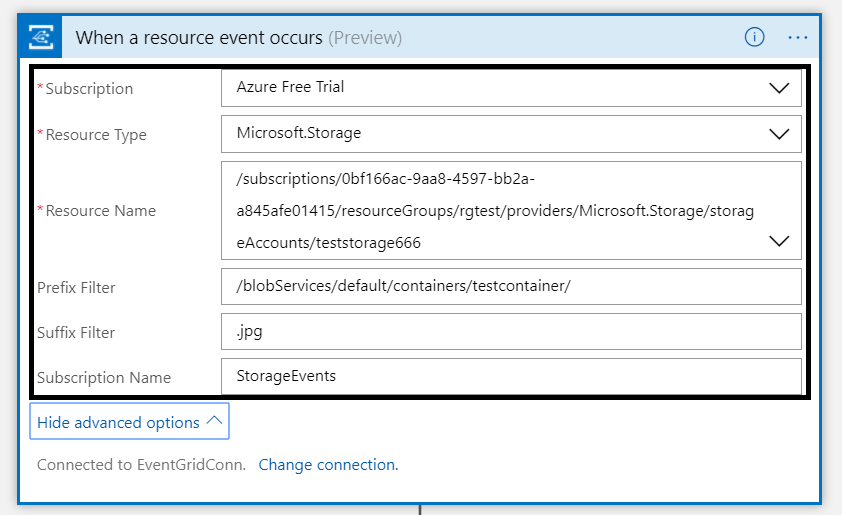
Note that the resource name has to be specified explicitly (custom value) as the resource type Microsoft.Storage has been set explicitly too. The resource types currently available are Resource Groups, Subscriptions, Event Grid Topics and Event Hub Namespaces, while Storage is still in a preview program. Therefore, registration as described earlier is required. As a result with the above configuration, the desired events can be evaluated and processed. In case of the Logic App, it is parsing the event and sending an email notification.
Image Analysis Function
The Azure Function is interested in the same event. And as soon as the event is pushed to Event Grid once a blob has been created, it will process the event. The URL in the event https://teststorage666.blob.core.windows.net/testcontainer/NinoCrudele.jpg will be used to analyse the image. The image is a picture of my good friend Nino Crudele.

This image will be streamed from the function to the Cognitive Services Computer Vision API. The result of the analysis can be seen in the monitor tab of the Azure Function.
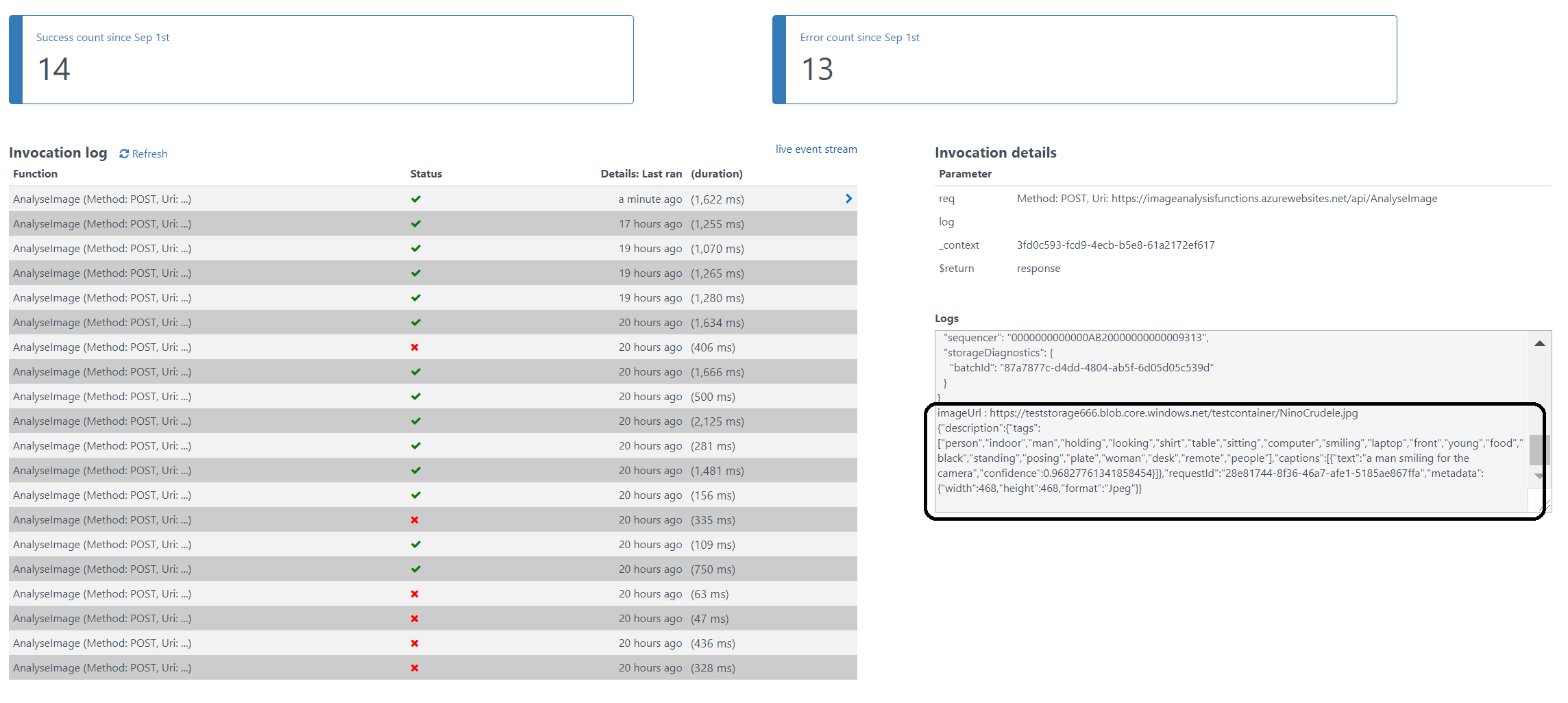
The result of the analysis with high confidence is that Nino is smiling for the camera. We, as humans, would say that this is obvious, however do take into consideration that a computer is making the analysis. Hence, the Computer Vision API is a form of Artificial Intelligence (AI).
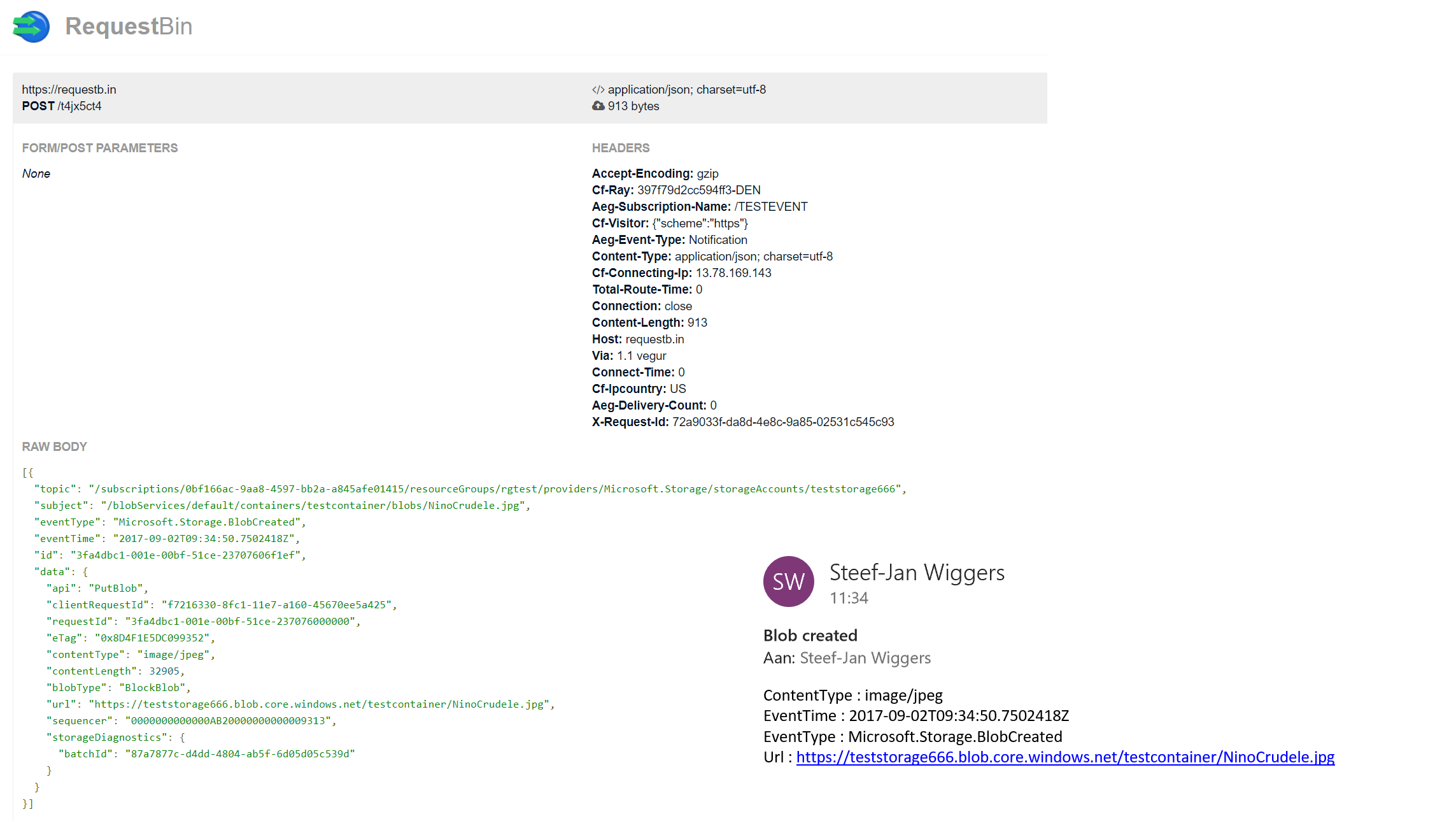
The Logic App in our scenario will parse the event and sent out an email. The Request Bin will show the raw event as is. And in case I, for instance, delete a blob, then this event will only be caught by the WebHook (Request Bin) as it is interested in any event on the Storage account.
Summary
Azure Event Grid is unique in its kind as now other Cloud vendor has this type of service that can handle events in a uniform and serverless way. Although it is still early days as this service is in preview a few weeks. However, with expansion of event publishers and subscribers, management capabilities and other features it will mature in the next couple of months.
The service is currently only available in, West Central US and West US. However, over the course of time it will become available in every region. And once it will become GA the price will increase.
Working with Storage Account as a source (publisher) of events unlocked new insights in the Event Grid mechanisms. Moreover, it shows the benefits of having one central service in Azure for events. And the pub-sub and push of events are the key differentiators towards the other two services Service Bus and Event Hubs. Therefore, no longer do you have to poll for events and/or develop a solution for it. To conclude the Service Bus Team has completed the picture for messaging and event handling.
Author: Steef-Jan Wiggers
Steef-Jan Wiggers has over 15 years’ experience as a technical lead developer, application architect and consultant, specializing in custom applications, enterprise application integration (BizTalk), Web services and Windows Azure. Steef-Jan is very active in the BizTalk community as a blogger, Wiki author/editor, forum moderator, writer and public speaker in the Netherlands and Europe. For these efforts, Microsoft has recognized him a Microsoft MVP for the past 5 years. View all posts by Steef-Jan Wiggers
by Sandro Pereira | Sep 19, 2017 | BizTalk Community Blogs via Syndication
I decided to update my Microsoft Integration (Azure and much more) Stencils Pack with a set of 24 new shapes (maybe the smallest update I ever did to this package) mainly to add the Azure Event Grid shapes.
One of the main reasons for me to initially create the package was to have a nice set of Integration (Messaging) shapes that I could use in my diagrams, and during the time it scaled to a lot of other things.
With these new additions, this package now contains an astounding total of ~1311 shapes (symbols/icons) that will help you visually represent Integration architectures (On-premise, Cloud or Hybrid scenarios) and Cloud solutions diagrams in Visio 2016/2013. It will provide symbols/icons to visually represent features, systems, processes, and architectures that use BizTalk Server, API Management, Logic Apps, Microsoft Azure and related technologies.
- BizTalk Server
- Microsoft Azure
- Azure App Service (API Apps, Web Apps, Mobile Apps and Logic Apps)
- API Management
- Event Hubs & Event Grid
- Service Bus
- Azure IoT and Docker
- SQL Server, DocumentDB, CosmosDB, MySQL, …
- Machine Learning, Stream Analytics, Data Factory, Data Pipelines
- and so on
- Microsoft Flow
- PowerApps
- Power BI
- Office365, SharePoint
- DevOpps: PowerShell, Containers
- And much more…
The Microsoft Integration (Azure and much more) Stencils Pack v2.6 is composed by 13 files:
- Microsoft Integration Stencils v2.6
- MIS Apps and Systems Logo Stencils v2.6
- MIS Azure Portal, Services and VSTS Stencils v2.6
- MIS Azure SDK and Tools Stencils v2.6
- MIS Azure Services Stencils v2.6
- MIS Deprecated Stencils v2.6
- MIS Developer v2.6
- MIS Devices Stencils v2.6
- MIS IoT Devices Stencils v2.6
- MIS Power BI v2.6
- MIS Servers and Hardware Stencils v2.6
- MIS Support Stencils v2.6
- MIS Users and Roles Stencils v2.6
These are some of the new shapes you can find in this new version:
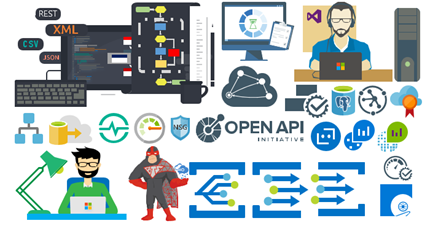
- Azure Event Grid
- Azure Event Subscriptions
- Azure Event Topics
- BizMan
- Integration Developer
- OpenAPI
- APIMATIC
- Load Testing
- API Testing
- Performance Testing
- Bot Services
- Azure Advisor
- Azure Monitoring
- Azure IoT Hub Device Provisioning Service
- Azure Time Series Insights
- And much more
You can download Microsoft Integration (Azure and much more) Stencils Pack from:
Microsoft Integration Stencils Pack for Visio 2016/2013 (11,4 MB)
Microsoft | TechNet Gallery
Author: Sandro Pereira
Sandro Pereira lives in Portugal and works as a consultant at DevScope. In the past years, he has been working on implementing Integration scenarios both on-premises and cloud for various clients, each with different scenarios from a technical point of view, size, and criticality, using Microsoft Azure, Microsoft BizTalk Server and different technologies like AS2, EDI, RosettaNet, SAP, TIBCO etc. He is a regular blogger, international speaker, and technical reviewer of several BizTalk books all focused on Integration. He is also the author of the book “BizTalk Mapping Patterns & Best Practices”. He has been awarded MVP since 2011 for his contributions to the integration community. View all posts by Sandro Pereira
by Dan Toomey | Sep 3, 2017 | BizTalk Community Blogs via Syndication
(This post was originally published on Mexia’s blog on 1st September 2017)
Microsoft recently released the public preview of Azure Event Grid – a hyper-scalable serverless platform for routing events with intelligent filtering. No more polling for events – Event Grid is a reactive programming platform for pushing events out to interested subscribers. This is an extremely significant innovation, for as veteran MVP Steef-Jan Wiggers points out in his blog post, it completes the existing serverless messaging capability in Azure:
- Azure Functions – Serverless compute
- Logic Apps – Serverless connectivity and workflows
- Service Bus – Serverless messaging
- Event Grid – Serverless Events
And as Tord Glad Nordahl says in his post From chaos to control in Azure, “With dynamic scale and consistent performance Azure Event grid lets you focus on your app logic rather than the infrastructure around it.”
The preview version not only comes with several supported publishers and subscribers out of the box, but also supports customer publishers and (via WebHooks) custom subscribers:
In this blog post, I’ll describe the experience in building a sample logging mechanism for a service hosted in Azure Service Fabric. The solution not only logs all events to table storage, but also sends alert emails for any error events:
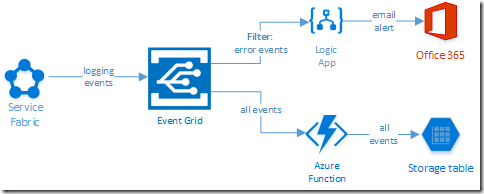
Creating the Event Grid Topic
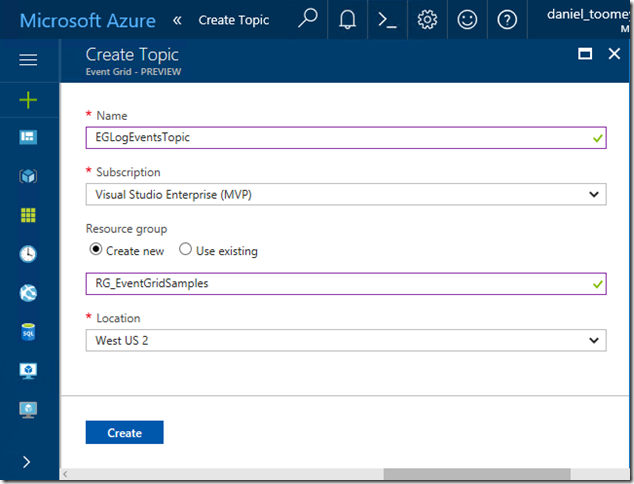
This was an extremely simple process executed in the Azure Portal. Create a new item by searching for “Event Grid Topic”, and then supply the requested basic information:
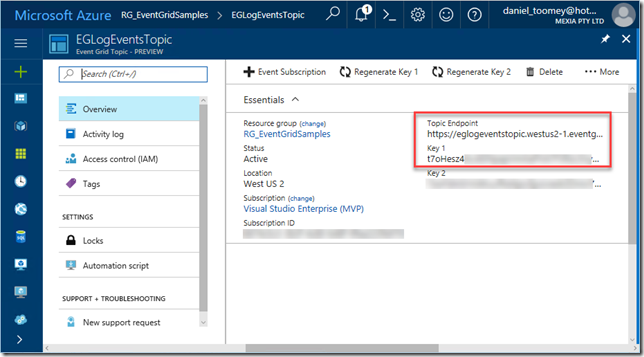
Once created, the key items you will need once the topic is created is the Topic Endpoint and the associated key:
Creating the Event Publisher
As mentioned previously, there are a number of existing Azure services that can publish events to Event Grid including Event Hubs, resource groups, subscriptions, etc. – and there will be more coming as the service moves toward general availability. However, in this case we create a custom publisher which is a service hosted in Azure Service Fabric. For this sample, I used an existing Voting App demo which I’ve written about in a previous blog post, modifying it slightly by adding code to publish logging events to Event Grid.
The first requirement was storing the topic endpoint and key in the parameter files, and of course creating the associated configuration items in the ServiceManifest.xml and ApplicationManifest.xml files (this article provides information about application configuration in Service Fabric):
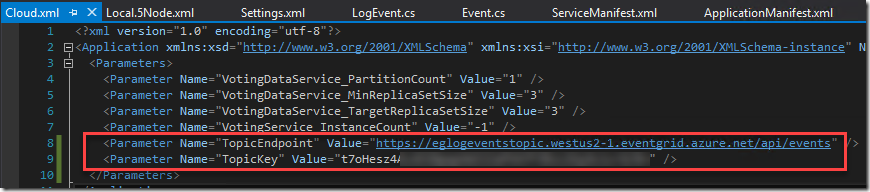
Note that in a production situation the TopicKey should be encrypted within this file – but for the purposes of this example we will keep it simple.
Next step was creating a small class library in the solution to house the following items:
- The Event class which represents the Event Grid events schema
- A LogEvent class which represents the “Data” element in the Event schema
- A utility class which includes the static SendLogEvent method
- A LogEventType enum to define logging severity levels (ERROR|WARNING|INFO|VERBOSE)
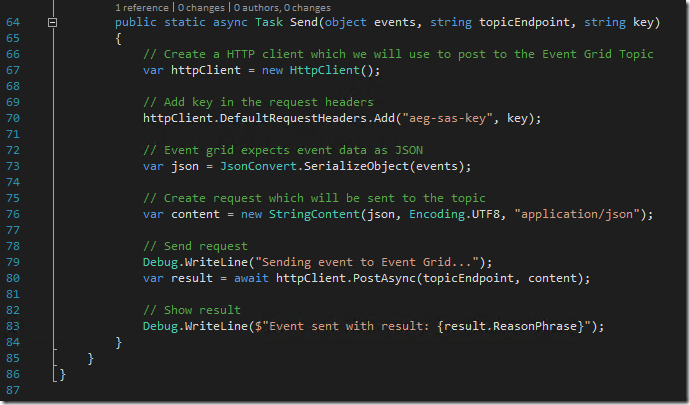
To see an example of how to create the Event class, refer to fellow Azure MVP Eldert Grootenboer’s excellent post. The only changes I made were to assign the properties for my custom LogEvent, and to add a static method for sending a collection of Event objects to Event Grid (notice how the Event.Subject field is a concatenation of the Application Name and the LogEventType – this will be important later on):
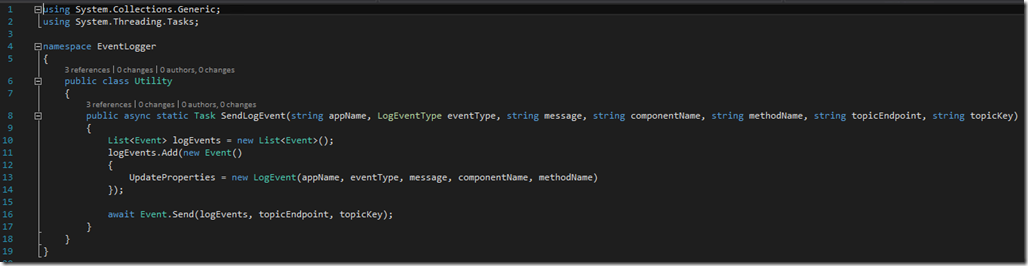
The utility method that creates the collection and invokes this static method is pretty straight forward:
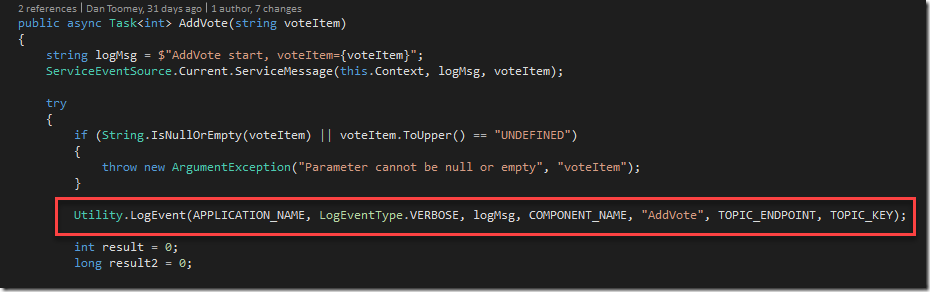
This all makes it simple to embed logging calls into the application code:
Creating the Event Subscribers
Capturing All Events
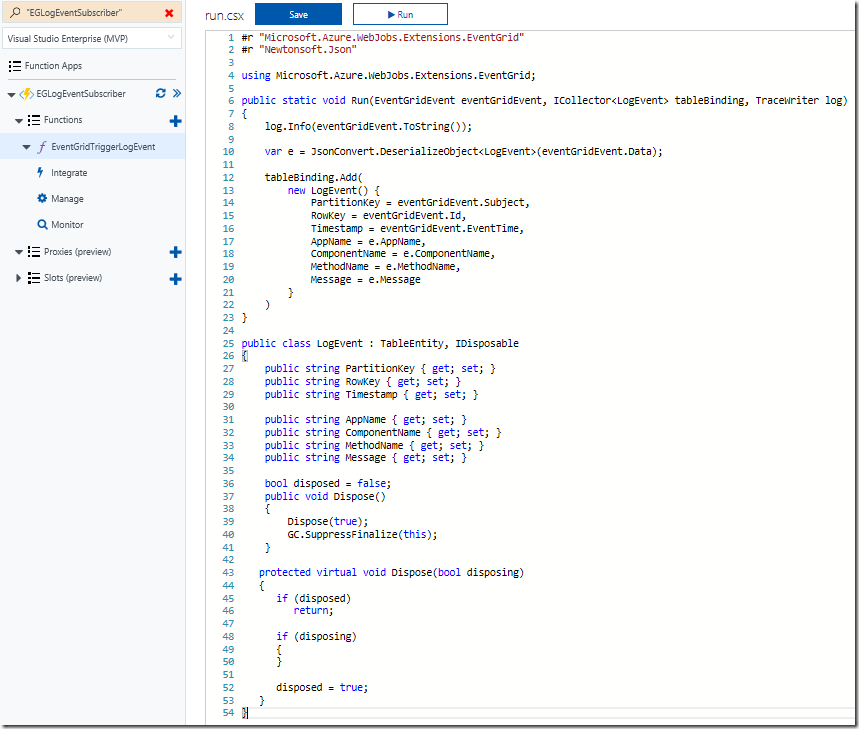
The first topic subscription will be an Azure Function that will write all events to Azure table storage. Provided you’ve created your Function App in a region that supports the Event Grid preview (I’ve just created everything aside from the Service Fabric solution within the same resource group and location), you will see that there is already an Event Grid Trigger available to choose. Here is my configured trigger:
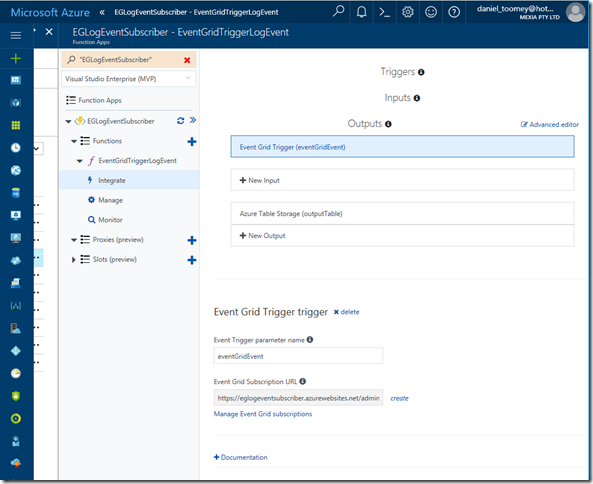
As you can see, I’ve also configured a Table Storage output. The code within this function creates a record in the table using the Event.Subject as a partition and the Event.Id as the row key:
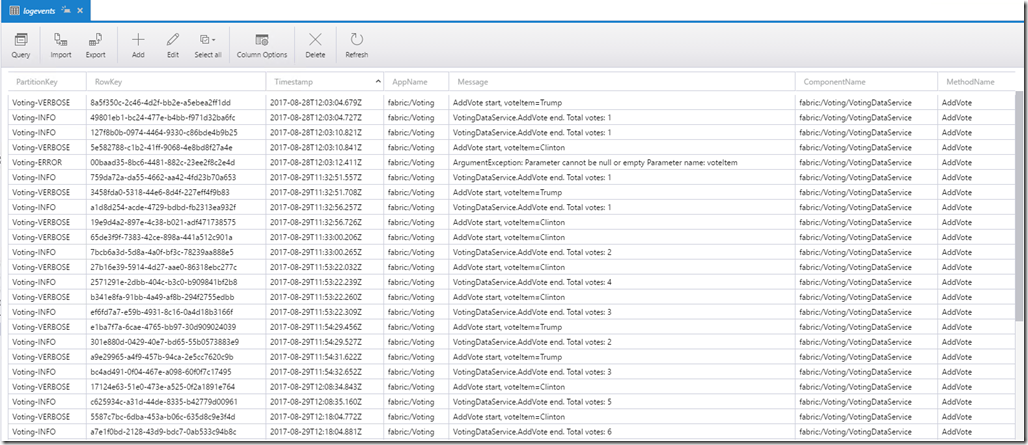
Using the free Azure Storage Explorer tool, we can see the output of our testing:
Alerting on ERROR Events
Now that we’ve completed one of the two subscriptions for our solution, we can create the other subscription which will use a filter on ERROR events and raise an alert via sending an email notification.
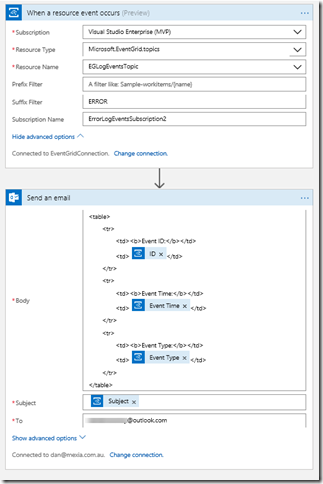
The first step is to create the Logic App (in the same region as the Event Grid) and add the Event Grid Trigger. There are a few things to watch out for here:
- When you are prompted to sign in, the account that your subscription belongs to may or may not work. If it doesn’t, try creating a Service Principal with contributor rights for the Event Grid topic (here is an excellent article on how to create a service principal)
- The Resource Type should be Microsoft.EventGrid.topics
- The Suffix field contains “ERROR” which will serve as the filter for our events
- If the Resource Name drop-down list does not display your Event Grid topic at first, type something in, save it and then click the “x”; the list should hopefully appear. It is important to select from the list as just typing the display name will not create the necessary resource ID in the topic field and the subscription will not be created.
You can then follow this with an Office365 Email action (or any other type of notification action you prefer). There are four dynamic properties that are available from the Event Grid Trigger action (Subject, ID, Event Type and Event Time):
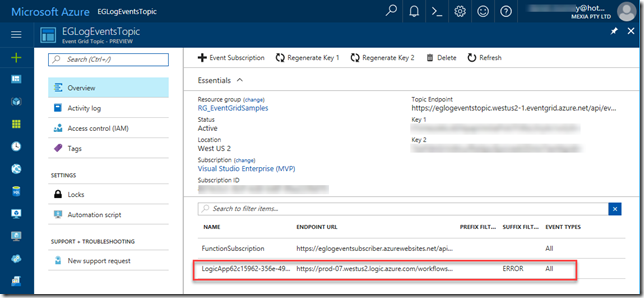
After saving the Logic App, check for any errors in the Overview blade, and then check the Overview blade for the Event Grid Topic – you should see the new subscription created there:
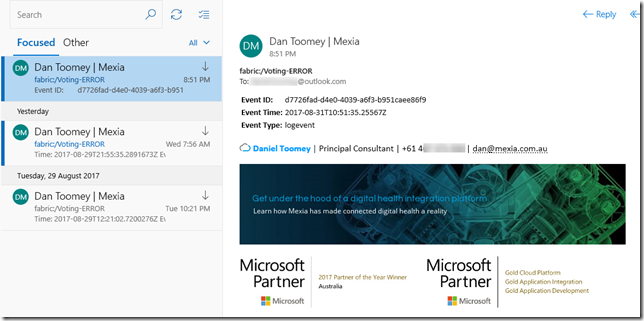
Finally, we can test the application. My Voting demo service generates an exception (and a ERROR logging event) when a vote is cast for a null/empty candidate (see the ERROR entry in the table screenshot above). This event now triggers an email notification:
Summary
So this example may not be the niftiest logging application on the market (especially considering all of the excellent logging tools that are available today), but it does demonstrate how easy it is to get up and running with Event Grid. You’ve seen an example of using a custom publisher and two built-in subscribers, including one with intelligent filtering. To see how to write a custom subscriber, have a look at Eldert’s post “Custom Subscribers in Event Grid” where he uses an API App subscriber to write shipping orders to table storage.
Event Grid is enormously scalable and its consumption pricing model is extremely competitive. I doubt there is anything else quite like this on offer today. Moreover, there will be additional connectors coming in the near future, including Azure AD, Service Bus, Azure Data Factory, API Management, Cosmos DB, and more.
For a broader overview of Event Grid’s features and the capabilities it brings to Azure, have a read of Tom Kerkhove’s post “Exploring Event Grid”. And to understand the differences between Event Hub, Service Bus and Event Grid, Saravana Kumar’s recent post sums it up quite nicely. Finally, if you want to get your hands dirty and have a play, Microsoft has provided a quickstart page to get you up and running.
Happy Eventing!
by Steef-Jan Wiggers | Sep 2, 2017 | BizTalk Community Blogs via Syndication
A few weeks ago Azure Event Grid service became available in preview. This service enables centralized management of events in a uniform way. It’s scales with you when the number of events increases. And this is made possible by the foundation the event grid relies on service fabric. Not only does is auto scale you also do not have to provision anything beside a Event Topic to support custom events (see my blog Routing an Event with a custom Event Topic). Event Grid is Serverless, you only pay for each action (Ingress events, Advanced matches, Delivery attempts, Management calls). Moreover, the price will be 30 cents per million action in preview, and will be 60 cents once the service will be GA.
Azure Event Grid can be described as an event broker that has one of more event publishers and subscribers. Event publishers are currently Azure blob storage, resource groups, subscriptions, event hubs and custom events. More will be added in the coming months like IoT Hub, Service Bus, and Azure Active Directory. Subsequently, there are consumers of events (subscribers) like Azure Functions, Logic Apps, and WebHooks. And more will be added on the subscriber side too with Azure Data Factory, Service Bus and Storage Queues for instance.
Azure Event Grid Storage registeration
Currently to capture Azure Blob Storage events you will need to register your subscription through a preview program. Once you have registered your subscription, which could take a day or two you can leverage Event Grid in Azure Blob Storage only in Central West US!

The Microsoft documentation on Event Grid has a section “Reacting to Blob storage events”, which contains a walkthrough to try out the Azure Blob Storage as an event publisher.
Azure Event Grid Storage Account Events Scenario
Having registered my subscription to the preview program I started exploring its capability as in the landing page of Event Grid sample scenario’s were explained. And I wanted to try out the serverless architecture sample, where one can use Event Grid to instantly trigger a serverless function to run image analysis each time a new photo is added to a blob storage container. Hence, I build a demo according to the diagram below.
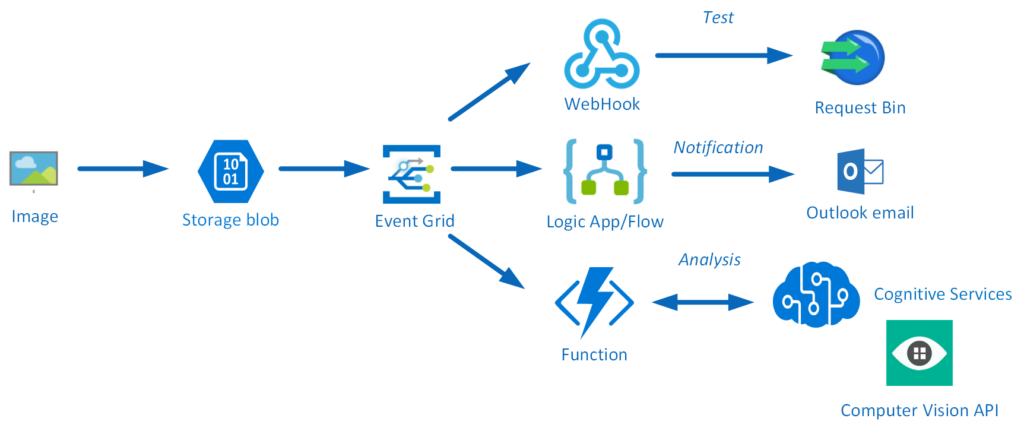
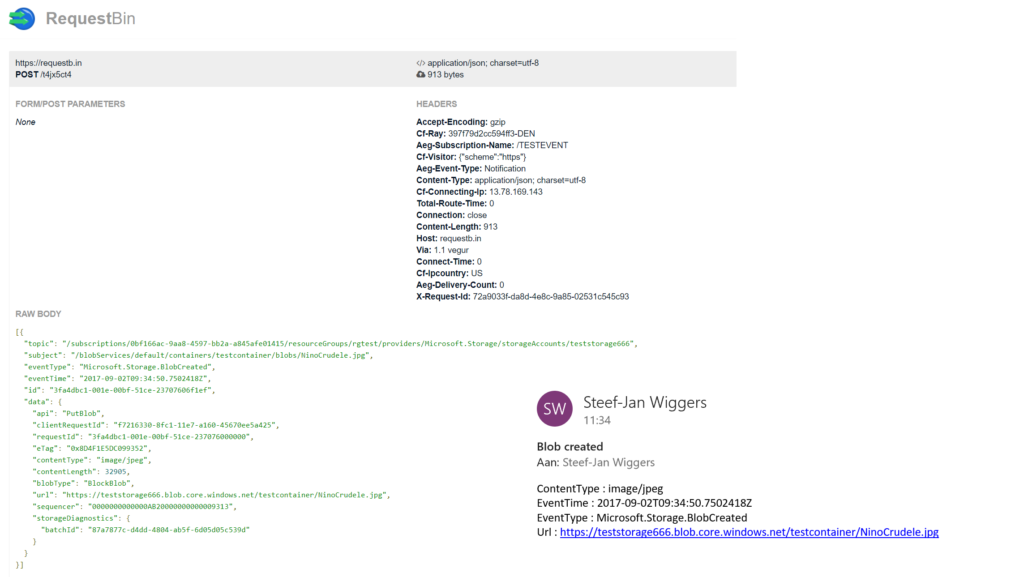
An image will be uploaded to a Storage blob container, which will be the event source (publisher). Subsequently, the Storage blob container belongs to a Storage Account containing the Event Grid capability. And the Event Grid has three subscribers, a WebHook (Request Bin) to capture the output of the event, a Logic App to notify me a blob has been created and an Azure Function that will analyze the image created in the blob storage, by extracting the URL from the event and use it to analyze the actual image.
Intelligent routing
The screenshot below depicts the subscriptions on the events on the Blob Storage account. The WebHook will subscribe to each event, while the Logic App and Azure Function are only interested in the BlobCreated event, in a particular container(prefix filter) and type (suffix filter).

Besides being centrally managed Event Grid offers intelligent routing, which is the core feature of Event Grid. And you can use filters for event type, or subject pattern (pre- and suffix). Moreover, the filters are intended for the subscribers to indicate what type of event and/or subject they are interested in. When we look at our scenario the event subscription for Azure Functions is as follows.
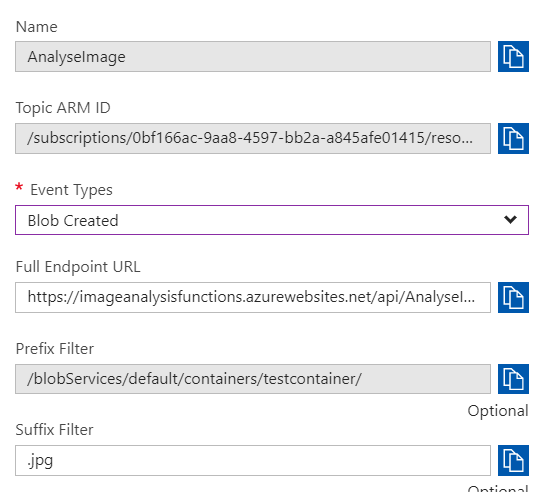
- Event Type : Blob Created
- Prefix : /blobServices/default/containers/testcontainer/
- Suffix : .jpg
The prefix, a filter object, looks for the beginsWith in the subject field in the event. And the suffix looks for the subjectEndsWith in again the subject. In the event above you see that the subject has the specified Prefix and Suffix. See also Event Grid subscription schema in the documentation as it will explain the properties of the subscription schema. The subscription schema of the function is as follows:
The Azure Function is only interested in a Blob Created event with a particular subject and content type (image .jpg). And this will be apparent once you inspect the incoming event to the function.
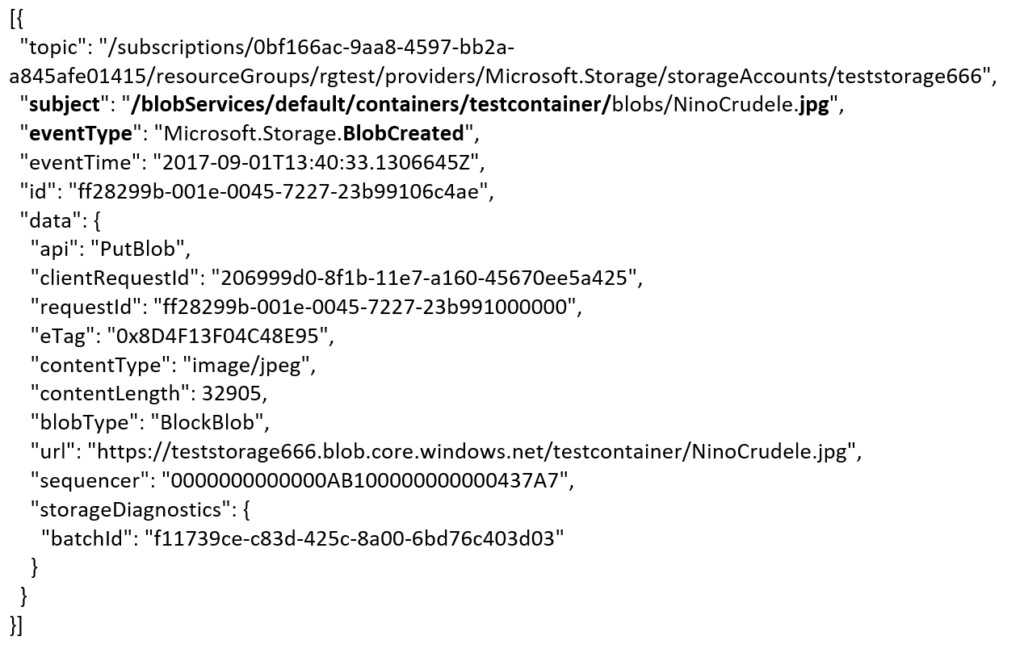
The same intelligence applies for the Logic App that is interested in the same event. The WebHook subscribes to all the events and lacks any filters.
The scenario solution
The solution contains of a storage account (blob), registered subscription for Event Grid Azure Storage, Request Bin (WebHook), a Logic App and a Function App containing a function. The Logic App and Azure Function subscribe to BlobCreated event with the filter settings.
The Logic App subscribes to the event once the trigger action is defined. The definition is shown in the picture below.
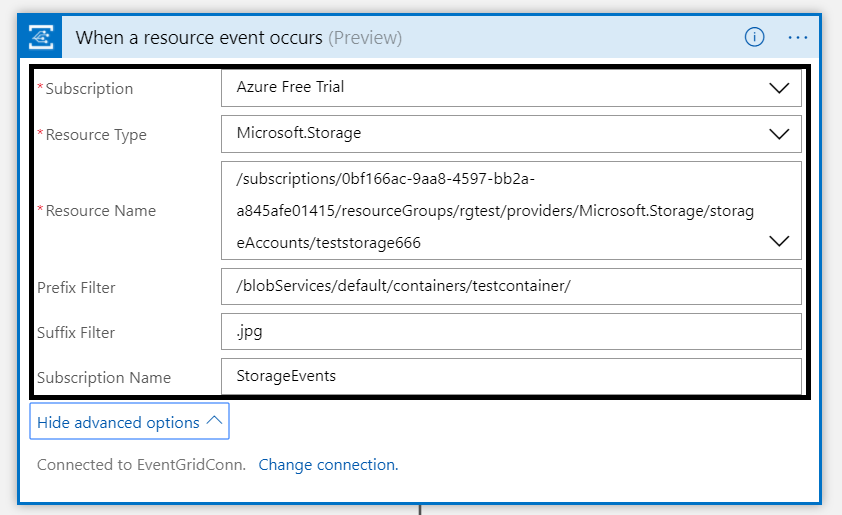
Note that the resource name has to be specified explicitly (custom value) as the resource type Microsoft.Storage has be set explicitly too. The resource types that are listed are Resource Groups, Subscriptions, Event Grid Topics and Event Hub Namespace as Storage is still in a preview program. With this configuration the desired events can be evaluated and processed. In case of the Logic App it is parsing the event and sending an email notification.
Azure Function Storage Event processing
The Azure Function is interested in the same event. And as soon as the event is pushed to Event Grid once a blob has been created it will process the event. The url in the event https://teststorage666.blob.core.windows.net/testcontainer/NinoCrudele.jpg will be used to analyze the image. The image is a picture of my good friend Nino Crudele.

This image will be streamed from the function to the Cognitive Services Computer Vision API. The result of the analysis can be viewed in the monitor tab of the Azure Function.
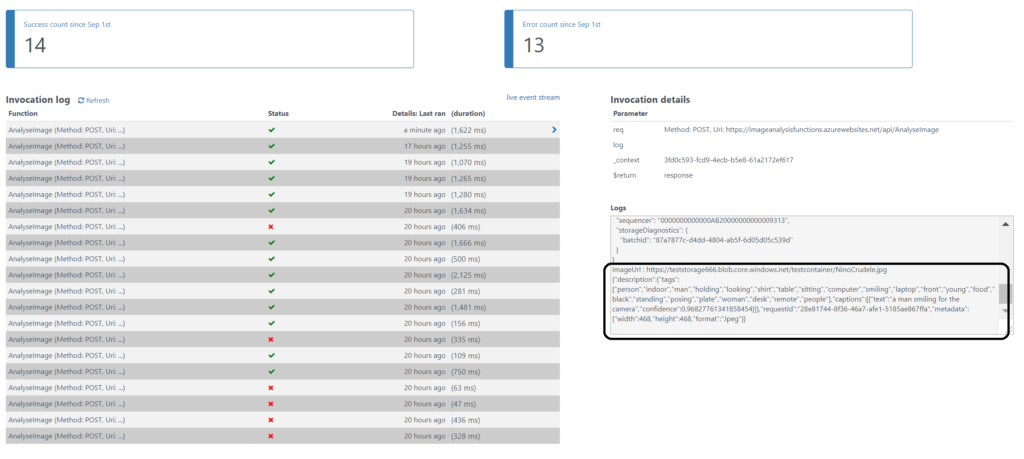
The result of the analysis that Nino is smiling for the camera with confidence. The Logic App will parse the event and sent an email. The Request Bin will show the raw event. And in case I deleted the blob than this will only be captured by the WebHook (Request Bin) as it is interested in any event on the Storage account.
Summary
Azure Event Grid is unique in its kind as now other Cloud vendor has this type of service that can handle events in a uniform and serverless way. Although it is still early days as this service is in preview a few week. However, with expansion of event publishers and subscribers, management capabilities and other features it will mature in the next couple of months. The service is currently only available in the West Central US and West US, yet over course of time it will become available in every region. And once it will become GA the price will increase.
Working with Storage Account as source (publisher) of events unlocked new insights in the Event Grid mechanisms. Moreover, it shows the benefits of having a managed service by Azure for events. And the pub-sub and push of events are the key differentiators towards the other two services Service Bus and Event Hubs. No longer do you have to poll for events and/or develop a solution for it. To conclude the Service Bus Team has completed the picture for messaging and event handling.
Author: Steef-Jan Wiggers
Steef-Jan Wiggers is all in on Microsoft Azure, Integration, and Data Science. He has over 15 years’ experience in a wide variety of scenarios such as custom .NET solution development, overseeing large enterprise integrations, building web services, managing projects, designing web services, experimenting with data, SQL Server database administration, and consulting. Steef-Jan loves challenges in the Microsoft playing field combining it with his domain knowledge in energy, utility, banking, insurance, health care, agriculture, (local) government, bio-sciences, retail, travel and logistics. He is very active in the community as a blogger, TechNet Wiki author, book author, and global public speaker. For these efforts, Microsoft has recognized him a Microsoft MVP for the past 7 years. View all posts by Steef-Jan Wiggers
by Steef-Jan Wiggers | Jul 19, 2017 | BizTalk Community Blogs via Syndication
Serverless is hot and happening. Hence, it is not a buzzword, but a new interesting part of Computer Science, which is amazing and also a driver of the second machine age, which we are currently experiencing. I read two books sequentially recently: Computer Science Distilled and the Second Machine Age.
The first book dealt with the concepts of Computer Science. And few aspects in it caught my attention like breaking a problem into smaller pieces. Hence, in Azure I could use functions to solve partial of a complete problem or process parts of a large workload. The second book discusses the second machine age around automation, robotics, artificial intelligence and so on. And little repetitive tasks can be build using Functions. Azure Functions to be precise that can automate those little tasks. Thus, why not consolidate my little research of the current state of Azure Functions into a blog post with the context of both books in the back of my mind.
Serverless
Serverless computing is a reality and Microsoft Azure provides several platform services that can be provisioned dynamically. Resources are allocated without you worrying about scale, availability and security. And the beauty of it all is you only pay what you use.
Azure Functions is one of Microsoft’s serverless capabilities in Azure. Functions enable you to run pieces of code in Azure. Cool eh! And can be run independently, in orchestration or flow (durable functions), or as a part of a Logic App definition or Microsoft Flow.
You provision a Function App, which acts as a container for one or more functions. Subsequently, either attach a price plan to it, when you want share resources with other services like web app or you choose a consumption plan (pay as you go).
Finally, you have the function app available and you can start adding functions to them. Either using Visual Studio that has templates for building a function or you use the Azure Portal (Browser). Both provide features to build and test your function. However, Visual Studio will deliver intellisense and debugging features to you.
Function Types
Functions can be build using your language of choice like C#, F#, JavaScript, or Node.js. Furthermore, there are several types of functions you can build such as a WebHook + API function or a trigger based function. The latter can be used to integrate with the following Azure Services and SaaS solutions :
- Cosmos DB
- Event Hubs
- Mobile Apps (tables)
- Notification Hubs
- Service Bus (queues and topics)
- Storage (blob, queues, and tables)
- GitHub (webhooks)
- On-premises (using Service Bus)
- Twilio (SMS messages)
The integration is based upon a binding and trigger, key concepts with Azure Functions. Bindings provide a way to connect to in- and outputs of earlier mentioned services and solutions, see Azure Functions triggers and bindings concepts.
WebHook + API function
A popular quick start template for Azure Functions is WebHook + API function. This type of function is supported through the HTTP/WebHook binding and enables you to build autonomous functions that can be (re)used is various types of applications like a Logic App.
After provisioning a Function App you can add a function easily. As shown below you can select a premade function, choose CSharp and click Create this function.
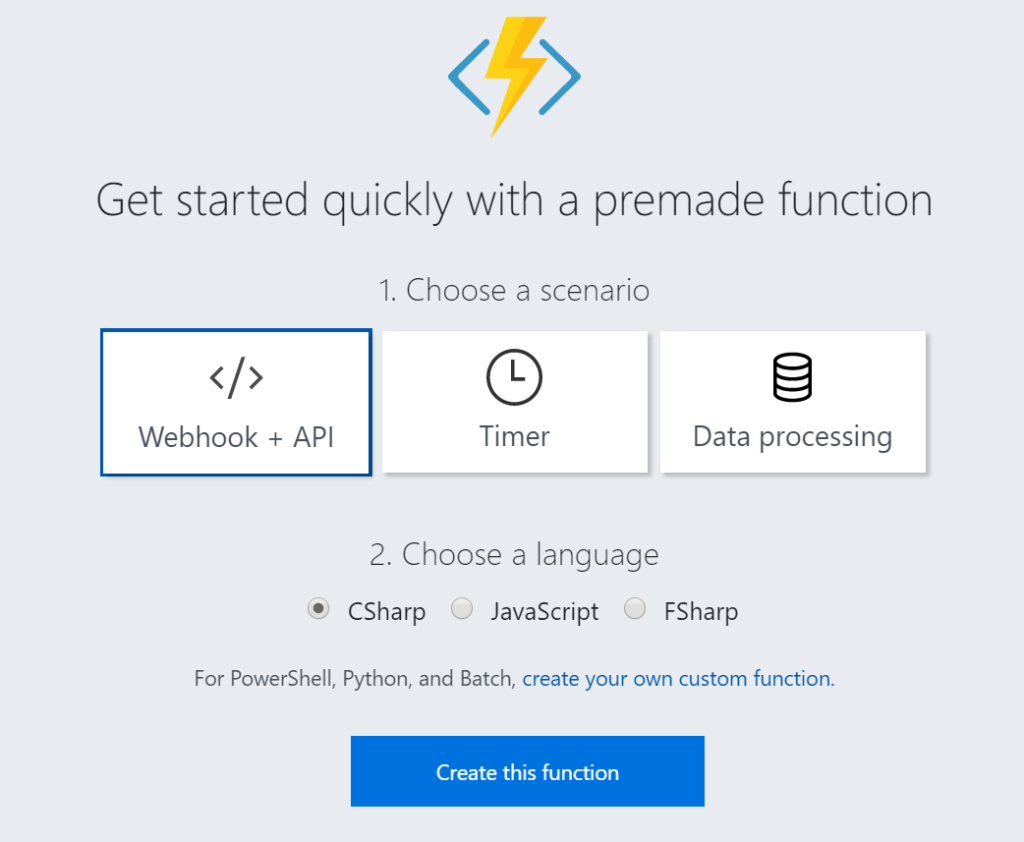
A function named HttpTriggerCSharp1 will be made available to you. The sample is easy to experiment with. I changed the given function to something new like the screenshot below.
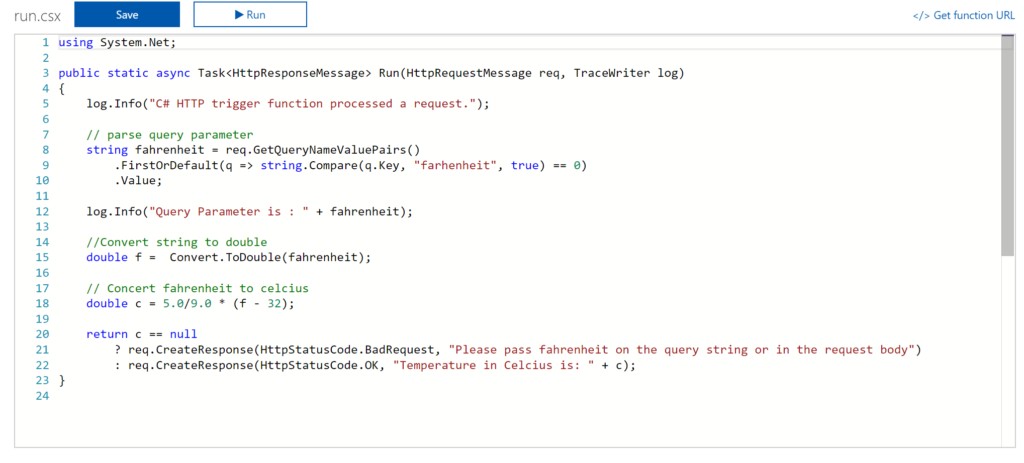
And now it gets interesting. You can click Get Function URL as the function is publically accessible that is if you know the function key. By clicking the Get Function URL you’ll receive an URL that looks like this:
https://myfunctioncollection.azurewebsites.net/api/HttpTriggerCSharp1?code=iaMsbyhujlIjQhR4elcJKcCDnlYoyYUZv4QP9Odbs4nEZQsBtgzN7Q==
And the code resembles the default function key, which you can change through the Manage pane in the Function App blade.
Since your function is accessible you can call it using for instance postman.
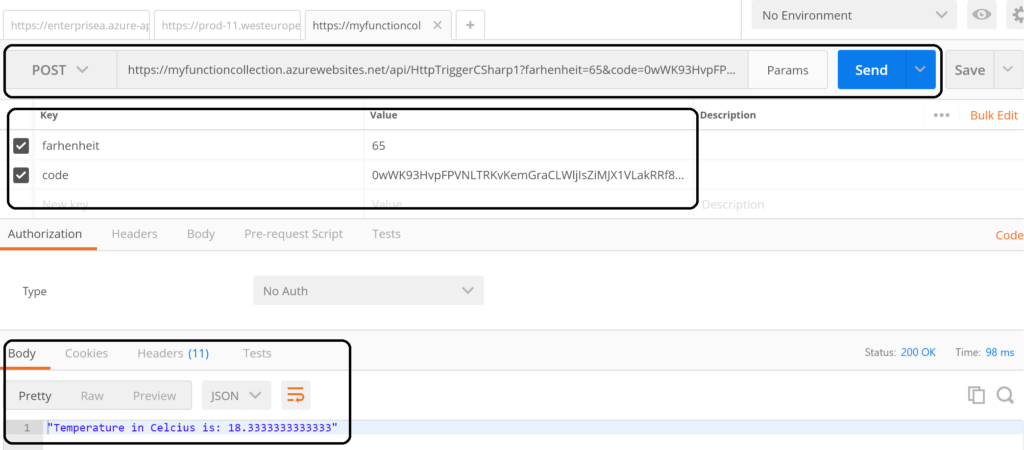
The screenshot above shows an example of a call to the function endpoint . The request includes the function key (code). However, a call like above might not be as secure as you need. Hence, you can secure the function endpoint by using API Management Service in Azure. See Using API Management to protect Azure Functions (Middleware Friday) blog post. The post explains how to do that and it’s more secure!
Integrate and Monitor
You can bind Azure Storage as an extra output channel for a function. Through the Integrate pane I can add an extra output to the function. Configure the new output by choosing Azure Blob Storage, set Storage Account Connection and specify the path.
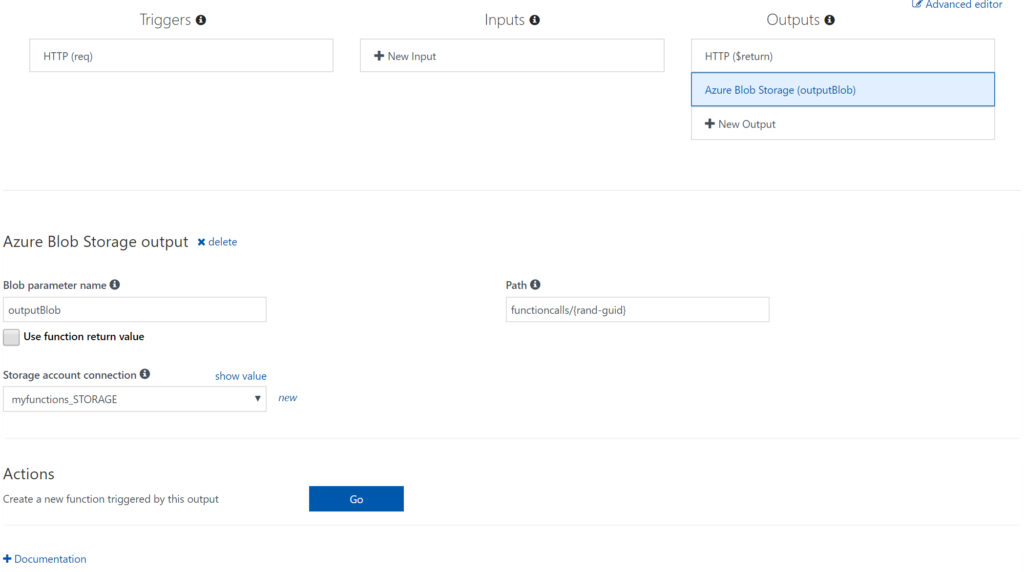
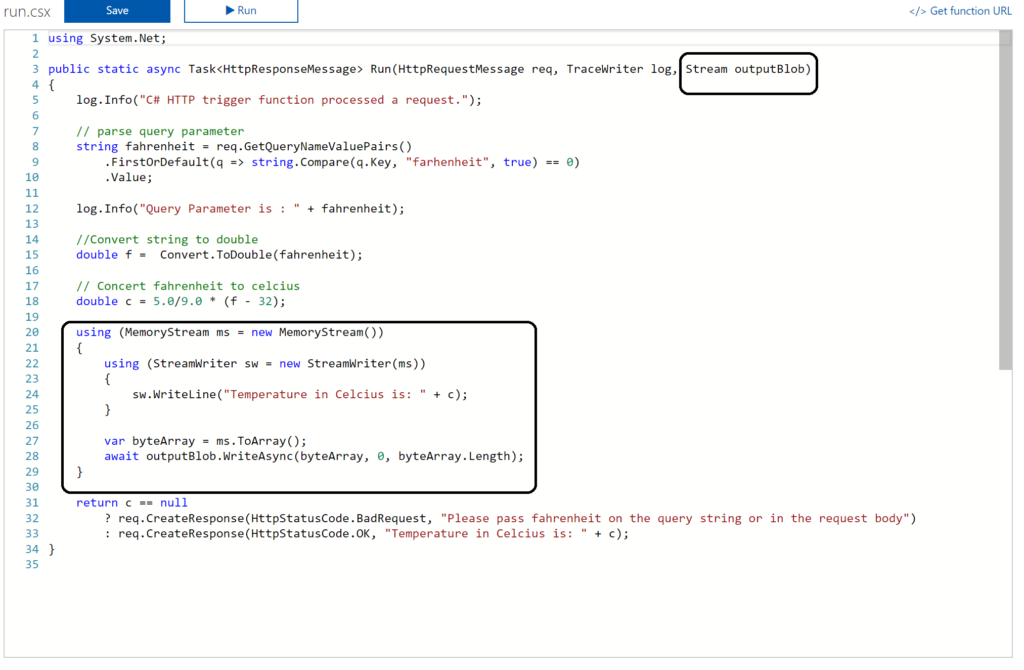
Next you have to update the Function signature with outputBlob parameter and implement the outputBlob.
Finally, you can monitor your functions through the Monitor pane, which provides you some basic insights (logs). For a more richer monitoring experience, including live metrics and custom queries, Microsoft recommends using Azure Application Insights. See also Monitoring Azure Functions.
Visual Studio Experience
Azure Functions can be build with Visual Studio. Now the templates are now available after a default installation of Visual Studio. You need download them. Visual Studio 2017 the templates for Azure Functions are available on the marketplace. For Visual Studio 2015 read this blog post, which includes the steps I did for my Visual Studio 2015 installation.
Once the templates are available in your Visual Studio version (2015 or 2017) you can create a FunctionApp project. Within the created FunctionApp project you can add functions. Right click the project and select Add –> New Azure Function. Now you can choose what type of function you can build. You will have a similar experience as with the portal.
For instance you can create a ServiceBusTrigger Function (WindSpeedToBeaufort), which will be triggered once a message arrives on a queue (myqueue).
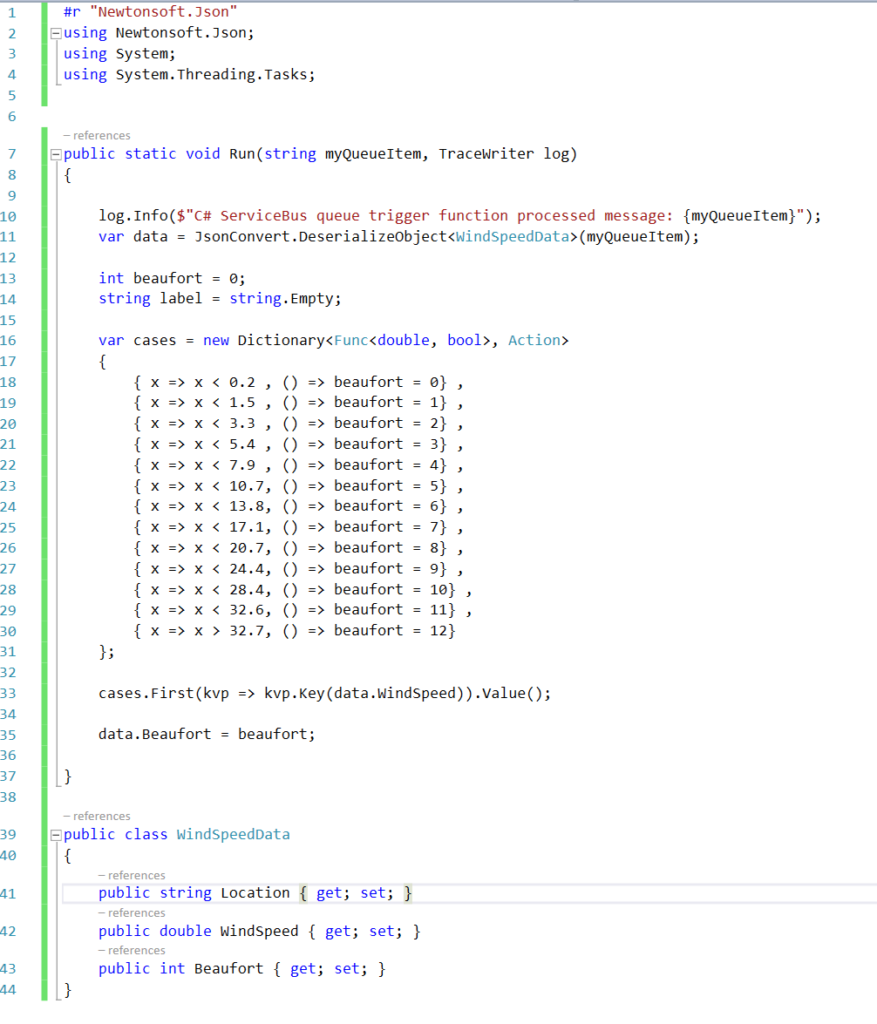
As a result you will see the following code once you hit Create:
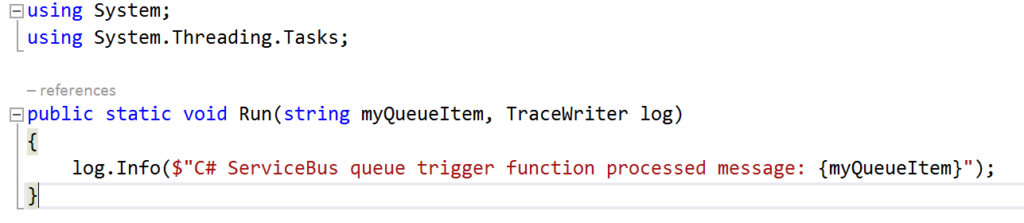
Now let’s work on the function so it will resemble the diagram below:
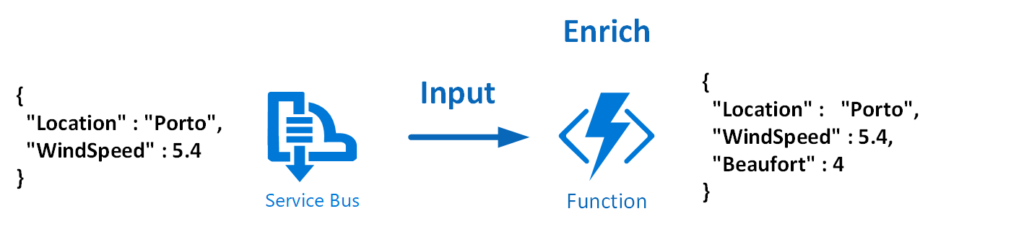
To modify the function that does the above the necessary code is shown below:
And the json.setting needs to be renamed to local.settings.json, the function.json needs modification to:
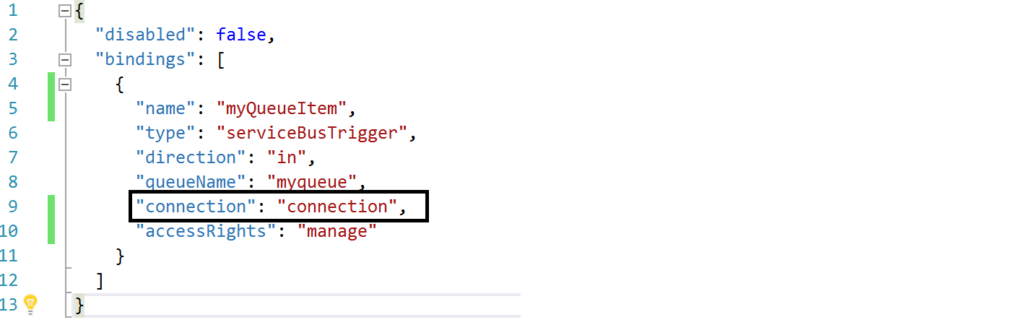
The connection string is moved to the local.settings.json as depicted below:

Most of all this change is important, otherwise you will run into errors.
Debugging with Visual Studio
Visual Studio provides the capability to debug your custom function. Compile and start a debug instance. A command line dialog box will appear and your function is running (i.e. hosted and running).
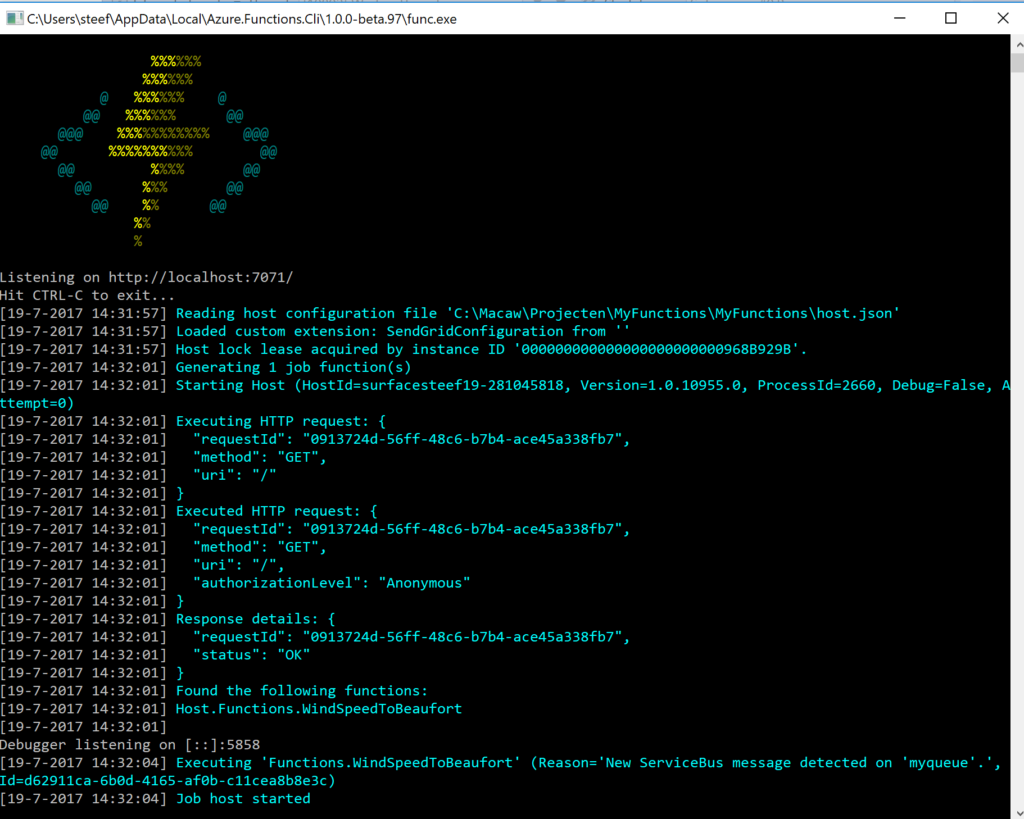
To debug our function in this blog a message is sent to myqueue using the ServiceBus360 service.
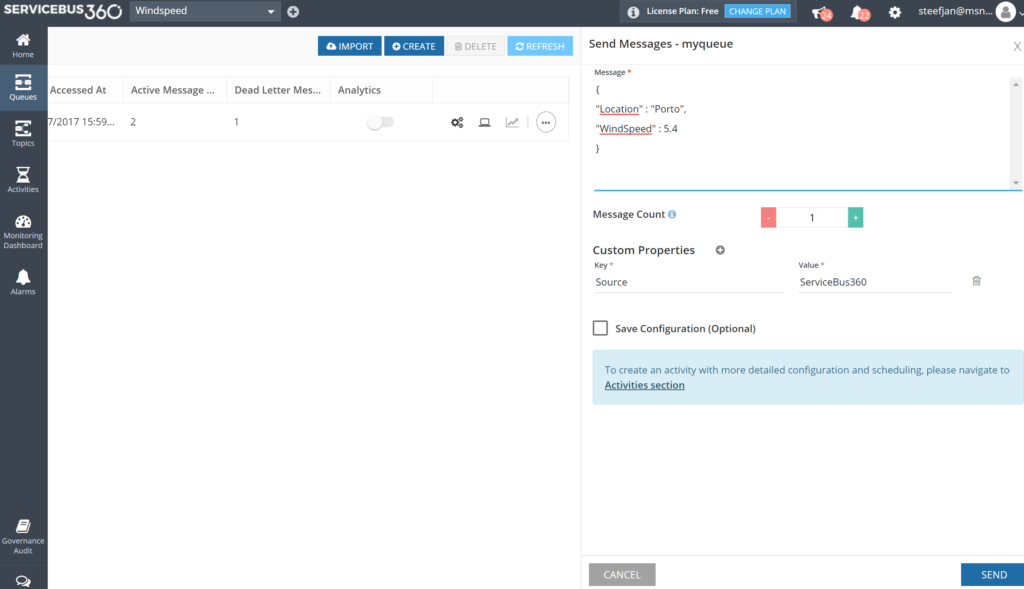
Once the message arrives at the queue it will trigger the function. Hence, the debugging can start on the position in the code, where a breakpoint has been set.
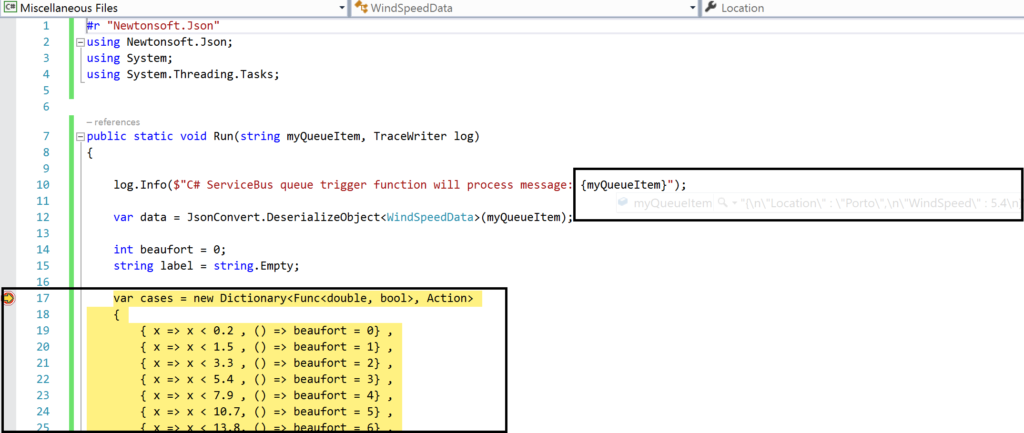
And the result of execution will be visible in the command line dialog box:
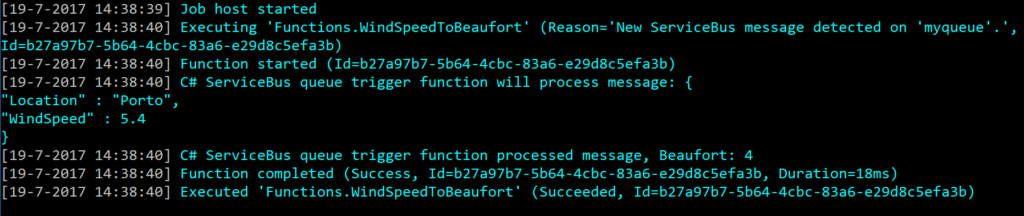
In conclusion this is the debugger experience you will have with Visual Studio. Combined with having intellisense while developing your function.
Deployment
You have build and tested your function to your satisfaction in Visual Studio. Now it’s time to deploy it to Azure, therefore you right click the project and choose publish. A dialog will appear and you can choose AppService. Subsequently, if you are logged in with your Azure Credentials you will see based on the subscription one or more resource groups.
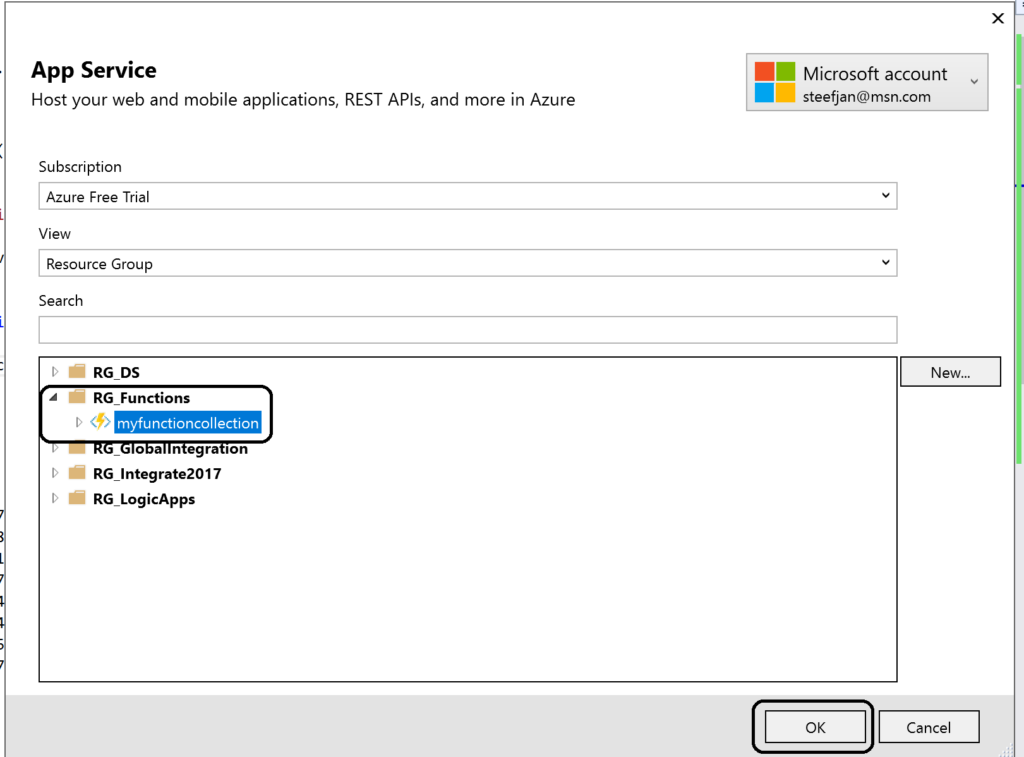
You can click OK and proceed with next steps to publish your function to the desired resource group –> function app. However, this will in the end not work!
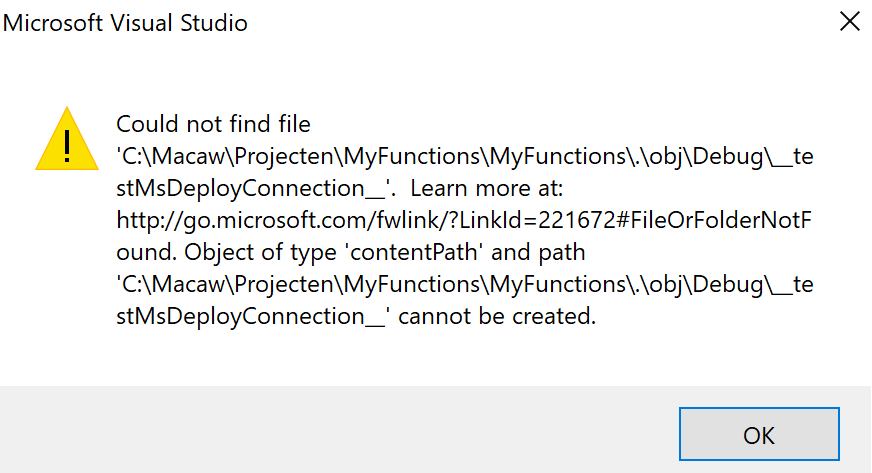
As a result you will need a workaround as explained in Publishing a .NET class library as a Function App at least that’s what I found online. However, I as able to deploy it. However, I stumbled on another error in the portal:
Error:
Function ($WindSpeedToBeaufort) Error: Microsoft.Azure.WebJobs.Host: Error indexing method ‘Functions.WindSpeedToBeaufort’. Microsoft.Azure.WebJobs.ServiceBus: Microsoft Azure WebJobs SDK ServiceBus connection string ‘AzureWebJobsconnection‘ is missing or empty.
Hence, not a truly positive experience. In the end it’s missing a setting i.e. application setting of the Function App.
Anyways, another walkaround is to create add a new function to existing function app. Choose ServiceBusTrigger template, create it and finally copy the code from the local project into the template over the existing code. In conclusion this works as now you see a setting for the Service Bus connection string in the application setting and the reference in the function.json file.
Considerations
There are some considerations around Azure Function you need to be aware of. First of all the cost of execution, which determines whether you will choose a consumption or app plan. See Function Pricing and use the calculator to have a better indication of costs. Also consider some of the best practices around functions. These practices are:
- Azure Functions should do just one task,
- finish as quickly as possible,
- be stateless
- and be idempotent.
See also Optimize the performance and reliability of Azure Functions.
Finally, be aware of the fact that some features of Azure Functions are still preview like Proxies, Slots and the Visual Studio Tools.
Resources
This blog contains several links to some resources you might like to explore. An excellent starting point for a researching Azure functions is https://github.com/Azure/Azure-Functions. And if you are interested how Functions can play a role in Logic Apps have a look at this blog post: Building sentiment analysis solution with Logic Apps.
Explore Azure Functions, go serverless!
Cheers,
Steef-Jan
Author: Steef-Jan Wiggers
Steef-Jan Wiggers is all in on Microsoft Azure, Integration, and Data Science. He has over 15 years’ experience in a wide variety of scenarios such as custom .NET solution development, overseeing large enterprise integrations, building web services, managing projects, designing web services, experimenting with data, SQL Server database administration, and consulting. Steef-Jan loves challenges in the Microsoft playing field combining it with his domain knowledge in energy, utility, banking, insurance, health care, agriculture, (local) government, bio-sciences, retail, travel and logistics. He is very active in the community as a blogger, TechNet Wiki author, book author, and global public speaker. For these efforts, Microsoft has recognized him a Microsoft MVP for the past 7 years. View all posts by Steef-Jan Wiggers

 Last Saturday I had the great privilege of organising and hosting the 2nd annual Global Integration Bootcamp in Brisbane. This was a free event hosted by 15 communities around the globe, including four in Australia and one in New Zealand!
 Overall, feedback was good and most attendees were appreciative of what they learned. The slide decks for most of the presentations are available online and linked above, and the labs are available here if you would like to have a go.