
by community-syndication | Jun 29, 2009 | BizTalk Community Blogs via Syndication
There are a few capabilities advertised in the Microsoft ESB Toolkit for BizTalk Server that I have yet to try out. One thing that seemed possible, although I hadn’t seen demonstrated, was the ability to sequentially call a set of BizTalk maps.
Let’s say that you have maps from “Format1 to Format2″ and “Format2 to Format3.” […]
by community-syndication | Jun 29, 2009 | BizTalk Community Blogs via Syndication
Originally posted by Nick Heppleston at: http://www.modhul.com/2009/06/29/configuring-biztalk-for-disaster-recovery-part-1/
I’m often surprised by the lack of disaster recovery capability organisations have for BizTalk, the novel (read: ‘unsupported’) approaches taken to provide a theoretical level of cover that is then never tested, or the lengthy procedures (24 hours +) for a task that should be as simple as pressing […]
by community-syndication | Jun 29, 2009 | BizTalk Community Blogs via Syndication
Originally posted by Nick Heppleston at: http://www.modhul.com/2009/06/29/configuring-biztalk-for-disaster-recovery-part-1/
I’m often surprised by the lack of disaster recovery capability organisations have for BizTalk, the novel (read: ‘unsupported’) approaches taken to provide a theoretical level of cover that is then never tested, or the lengthy procedures (24 hours +) for a task that should be as simple as pressing […]

by community-syndication | Jun 28, 2009 | BizTalk Community Blogs via Syndication
While preparing for my webcast on the WCF-SQL Adapter as part of a series of webcasts* I ran into a requirement that is quite frequent with BizTalk solutions: merging the contents of a flat file with a SQL Server database table. I wrote a post a while ago on how call the same stored procedure […]
by community-syndication | Jun 27, 2009 | BizTalk Community Blogs via Syndication
Hi all
Recently, I posted a post about handling mapping to and from a comma separated list.
You can find it at http://blog.eliasen.dk/2009/06/22/HandlingCommaSeparatedValuesInsideAMapPartI.aspx
I came to think that this was actually also a great opportunity for me to develop
my first cumulative functoid. The functoid is then supposed to take the values as
input and output the list of values with a comma in between them.
The functoid has been developed and added to my functoid library at http://eebiztalkfunctoids.codeplex.com –
free to download. Also another functoid in the library, which has been there for a
while is the “CSV Extract” functoid which extracts a specific position from a separated
list.
—
eliasen
by community-syndication | Jun 27, 2009 | BizTalk Community Blogs via Syndication
It was a logn time ago, so, I guess, it’s ok to tell this story at last…
Well, everybody knows what “checkin” is, right? That’s when you send your updated, fixed or new code to the depository for safekeeping. There is a lot of systems for that. OpenSource guys usually use CVS for that, there are other commercial ones like PVC, Microsoft has the one of its own called “source depot”, as well as SourceSafe.
All they do is just one thing: enable you to restore a previous version if somebody broke the current one. Also, to keep a special version for this very-special-big-corporate-customer, which is not easy, but at least possible with the version control. AFAIK, we don’t do that at Microsoft, but one of the companies, I worked before for, had about three major branches for critical customers like Chevron.
Of course, that’s not panacea, and when 10+ developers start to checkin their changes left and right,… well… the result is normally not that encouraging. Everybody has his features working standalone, but making it work together becomes a challenge. Actually, we had such a period in our life at the early stage in Windows Home Server. We had a lot to do, and VERY little time to accomplish it. Guess what? Nightly tests become broken and did not want to run no matter what. As a little token of pride, I’d like to mention that tests for my features worked fine — I was responsible for communications between server and the clients. Which means that when my areas are broken, half of the product tests would fail instantly, so I had to keep my parts in shape. But most of other areas weren’t that lucky and overall tests package did not want to run no matter how angry the management was and how actively we as a team were fixing the problems.
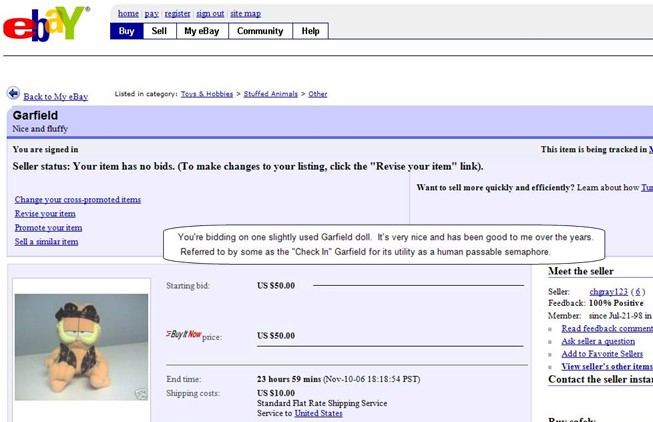
Then we found a solution… I had a toy Garfield in my office. After speaking with one of the leads and the manager, we introduced the following rule: to make a checkin, you should have Garfield in your hand. So, you get Garfield, run the tests, if all pass, you do checkin, and give Garfield away to the next one in the line. A sort of a physical mutex preventing concurrent changes.
People hated Garfield. Enough to say that in a couple of weeks my boss put it on the eBay! Don’t believe it? See for yourself!
Well, nobody bought it, nevertheless the problem was solved. In three days all the tests were running fine again and never broke again in several weeks. And after the Thansgiving 2006 Garfield was sent to the honorable retirement, while we continued in a more easy way but still without breaking the tests…
By the way, Garfield is still around. It’s hanging in my office on the corkboard, reminding the team’s veterans of the old times 🙂

by community-syndication | Jun 27, 2009 | BizTalk Community Blogs via Syndication
Starting Monday morning I will be starting a new project for a client of my employer Improving Enterprises. I’ve spent a good deal of time talking with my new teammates about what technologies we will be using for the project, and I thought that work might be of interest to others, so here are some of the highlights.
Technology Stack : VS2010, .NET 4, C#
The first thing that was decided, during the initial scoping phase of the project, was that this project was a nearly ideal candidate for Visual Studio 2010 and .NET 4.0. How did we come to that decision? The desired architecture for the project is such that certain features of WCF 4.0 and Entity Framework 4.0 would help with the implementation, and the timeline of the project is such that we have a no concerns over the current lack of the a “Go Live” license. For language it was decided we will primarily be working in C#. With that decided, we get to the far more interesting pieces.
Inversion of Control : StructureMap
Obviously we are going to need an IoC container for the project, and we have settled on StructureMap for that. The competition in this regard was Castle Windsor as Improving has the benefit of employing Craig Neuwirt, we knew we had an expert. The final decision to go with StructureMap instead hinged on two related things, complexity and learning curve. While we were quite certain we could pick up Castle quickly enough (2 of the 3 did not know it already), we were not as certain how easy it would be for those who follow us. StructureMap had a single well defined scope (IoC), versus the larger bite that the Castle Project would be for those who follow. We recognize we could have just done Windsor, but we found no compelling reasons to do that versus StructureMap.
As noted, we will be doing a good bit of WCF 4.0 on this project, so it naturally followed we would need to integrated StructureMap into the channel stack to let it handle the creation of our service instances. Jimmy Bogard has an excellent post on this subject, and we followed that guidance closely, though we updated the StructureMapServiceHostFactory to use ObjectFactory.Initialize as was recommended by the excellent ObsoleteAttribute usage in the latest StructureMap.
Source Control : GIT
Even within a group of people as passionate about creating great technology as we have at Improving, there are certain debates that deeply divide us. Source Control is definitely one of them. We have a certain segment of the company that are passionate advocates for Team System, obviously including Chris Tullier our resident Team System MVP. But there are others who are passionate believers in Subversion. Still others are not happy with either of those options, and still seek the “better mouse trap” for Source Control. We discussed the pros and cons of various solutions and decided in the end to try GIT, because of its distributed model, and see how we liked it in comparison to the others. It is an experiment, and we shall see.
Logging : log4net
Really, is there another option? The definitive logging library for .NET, it does what it needs to and does not bring along any additional baggage. As we are also using StructureMap, we found this blog post by John Rudolf Lewis helpful in discussing how to inject log4net using StructureMap (or Ninject) without losing fidelity in the logs.
Conclusion
So there are a few of our technology decisions, things I’ll be learning on in the coming months more and more.

by community-syndication | Jun 26, 2009 | BizTalk Community Blogs via Syndication
First, this post is not about any automated tools for mapping your activities, so don’t get too excited. :) Instead, I wanted to take the opportunity to talk about the changes to the base activity library in the context of the activities available today in WF 3. If you are using WF today, there are some activities that have direct counterparts, while others are split into multiple activities and yet others disappear completely. Of course there are also some new activities that were not available in WF 3. In the tables below, I outline each of these different categories with some notes. Hopefully this mapping helps you see what is changing, what is new, and what goes away.
NOTE: this information is based on Beta 1 of WF 4 and some changes are possible, though nothing big is likely, between now and the RTM.
Activities with direct or indirect equivalents
| WF3 Activity |
WF4 Activity |
Notes |
| Delay |
Delay |
The activity works the same, but the timers are handled differently in the framework. |
| Sequence |
Sequence |
|
| Parallel |
Parallel |
Similar, but the internals of execution may differ slightly by RTM. |
| Replicator |
ForEach<T>, ParallelForEach<T>,
ForEach, ParallelForEach |
These provide <optional> typed access to the instance data and truly declarative authoring experience. Each represents the different execution modes of the Replicator activity – so it has been split into four similar activities. I think most people will use the generic versions more than the others, but time will tell. |
| CallExternalMethod |
InvokeMethod, InvokeMethod<T> |
Provides .NET method invocation and optional return of a typed return value. This can be a call on an instance stored in a variable or a static method. |
| HandleExternalEvent |
Receive, ReceiveAndSendReply |
WCF messaging activities replace the Local communications model, even for host-> workflow communication. |
| Listen |
Pick |
The Pick activity is the primary WF4 activity that replaces the Listen and the State which were both containers for EventDriven activities. |
| EventDriven |
PickBranch |
This is an indirect mapping and you don’t use the PickBranch outside the pick, but it serves the same basic purpose of the EventDriven. |
| Compensate |
Compensate |
Though the mechanism are slightly different, the activity serves the same purpose – to execute the compensation handler for a compensable scope. |
| CompensatableSequence |
CompensableActivity |
The new activity includes a ConfirmationHandler which can execute when a confirmation is signaled using the Confirm activity. |
| FaultHandler(s) |
TryCatch |
The try catch logic is more explicit now and you use the TryCatch activity to model your fault handling instead of using fault handlers on the composite activities. |
| IfElse |
If |
In WF 4, this can only have two branches, the If and the Else. For more branches, use the switch activity. |
| InvokeWebService |
Send, SendAndReceiveReply |
All web service communication in WF4 uses WCF. |
| Throw |
Throw |
|
| TransactionScope |
TransactionScopeActivity |
|
| WebServiceInput (output and fault) |
Receive, ReceiveAndSendReply |
WCF is THE messaging system to use with WF. |
| While |
While/DoWhile |
WF4 introduces the DoWhile in addition to the While to ensure the first iteration executes. |
WF3 Activities with no direct WF4 equivalent
| WF3 Activity |
Note |
| ConditionedActivityGroup |
Based on limited use (my guess) this activity was not moved to WF4. |
| Code |
There is no code-behind file for workflows so there is no place to write code in the workflow. Create custom activities or use expressions where appropriate. |
| EventHandlingScope |
No real equivalent, probably b/c this is an activity that gets overlooked or people use the state machine instead. |
| InvokeWorkflow |
In the Beta, there is no activity like this one. One option is to host child workflows as WCF services and use the Send or SendAndReceiveReply messaging activities to start the child workflows. |
| Policy |
In order to use rules in WF4, create a WF3 activity with a Policy activity inside it. Create properties on the activity and use them in the policy definition. Then use the InteropActivity to invoke the WF3 activity and execute the policy. You can use the properties on the activity as input and outputs to the policy. |
| Suspend |
In WF4 there is more focus on having a “suspend on error” style exception handling, so direct suspend is not currently supported in the form of an activity. |
| SynchronizationScope |
Again, my assumption here, this was not used a lot by folks so didn’t get moved over. |
| Terminate |
No direct option to terminate, but exception handling has changed so that when a workflow throws an exception, you can abort, terminate or cancel it. |
| CompensatableTransactionScope |
In WF4, use a Compensable activity and put a TransactionScopeActivity in the body. |
| State, StateInitialization, StateFinalization |
There is no State Machine workflow in WF 4. |
WF4 activities with no direct WF3 equivalent
| AddToCollection<T> |
Helper activity to simplify declarative workflow development and manipulation of collection variables. |
| Assign |
Assigns a value to a variable – useful for declarative workflows. |
| CancellationScope |
Allows you to define a scope of work and the steps to take if that work is canceled. Replaces the cancelation handler in WF3. |
| ClearCollection<T> |
|
| Confirm |
Schedules the Confirmation logic for a Compensable activity. |
| ExistsInCollection<T> |
|
| Persist |
Explicit declaration of persistence from the workflow. Replaces the need for the PersistOnClose attribute on activities. |
| RemoveFromCollection<T> |
|
| Switch<T> |
Provides multiple branches of execution each based on a specific result from evaluating an expression. |
| Interop |
Executes a WF3 activity in the context of a WF4 workflow. All public properties on the activity become In/Out arguments. Custom designers are not supported. |

by community-syndication | Jun 25, 2009 | BizTalk Community Blogs via Syndication
Dallas TechFest is behind me, and now it is time to look forward. Forward to Visual Studio 2010, Forward to .NET 4.0.
Tomorrow (Friday, June 26th) I will be presenting at the Dallas DevCares event on Parallelism in .NET 4.0. This talk is one I’ve given before, but two things will be different this time. First, I will be presenting with the use of Visual Studio 2010 Beta 1, so you will see how this actually works on actual .NET 4.0 bits. Second, I will be presenting for a somewhat longer time than my usual User Group talk, we will be have time to take lots of questions, and to cover some fundamentals that I might not normally cover at this talk.
I’d love to see any of my readers and followers there, so cruise over to their website and register.
by community-syndication | Jun 25, 2009 | BizTalk Community Blogs via Syndication
Declarative Services is one of the new features included in the .NET framework 4.0. In a nutshell, declarative services are WCF services modeled and implemented entirely in XAML. This feature is fundamentally enabled by extending Windows Workflow Foundation…(read more)
