by community-syndication | Oct 18, 2009 | BizTalk Community Blogs via Syndication
Whilst on my travels last week I also ran into Oleg Lofman (MCS SharePoint Consultant)
whom amongst other things (showed me a great travel game – http://www.travelpod.com/traveler-iq?ba96=7587)
pointed me towards a tool called WIM2VHD.
Basically this tool allows you to go straight from a WIM file to VHD!! You
can even specify an Answer file also. So no need to mount the ISO, go through the
bootloader and copy all the files needed, then expand etc etc as part of the setup.
So seeing that Windows 7/Server 2008 R2 has a bunch of WIMs under the \Sources folder,
you can simply go there and take your pick as to how extensive you want the base OS
to be : Coreor something more!
Check it out:
http://code.msdn.microsoft.com/wim2vhd
As you can see below, it’s a pretty extensive and detailed tool: (you can even apply
hotfixes to the VHD during this process)
— snip from the above page —
Usage
Usage: WIM2VHD.WSF /wim:<wimPath> /sku:<sku>
[/vhd:<vhdPath>] [/size:<vhdSizeInMb>] [/disktype:<dynamic|fixed>]
[/unattend:<unattendXmlPath>] [/qfe:<qfe1,...,qfeN>]
[/ref:<ref1,...,refN] [/dbg:<args>] [/copylocal:<localFolder>]
[/passthru:<physicalDrive>] [/signdisk:<true|false>]
[/mergefolder:<folderToMerge>]

Required parameters:

  /wim:<wimPath>

    The path of the WIM file to use when creating the VHD.  For example:
    X:\sources\install.wim

    Where X: is the drive letter of your DVD ROM drive.

  /sku:<skuName>|<skuIndex>

    The SKU within the WIM to use when creating the VHD (e.g. "ServerStandard",
    "ServerDatacenterCore", "2", etc.).  This value can either be passed as a
    SKU name (typically the easiest method) or as a SKU index (which requires
    you to have manually inspected the WIM with a tool like IMAGEX.EXE).

Optional parameters:

  /vhd:<vhdPath>

    The path and name of the VHD to be created.  If a file with this name
    already exists, it will be overwritten.  If no VHD is specified, a VHD will
    be created in the current folder with a name in the following format:
    <Major>.<Minor>.<Build>.<Rev>.<Arch>.<Branch>.<Timestamp>.<SKU>.<Lang>.vhd
    ex:
       6.1.7100.0.x86fre.winmain_win7rc.090421-1700.Ultimate.en-us.vhd

    NOTE: If the language cannot be determined from the WIM, no <Lang> block
    will be included in the VHD name.

  /size:<vhdSizeInMb>

    For Fixed disks, this is the size in MB of the VHD that will be created.
    For Dynamic disks, this is the maximum size in MB that the VHD can grow to
    as additional space is required.
    If unspecified, a default value of 40960 MB (40 GB) will be used.

  /disktype:<Dynamic|Fixed>

    Specifies what kind of VHD should be created: Dynamic or Fixed.
    A Fixed disk allocates all of the necessary disk space for the VHD upon
    creation.  A Dynamic disk only allocates the space required by files in
    the VHD at any given time, and will grow as more space is required.
    The default value is Dynamic.

  /unattend:<unattendXmlPath>

    The path to an unattend.xml file that will be used to automate the OOBE
    portion of Windows setup the first time the VHD is booted.

  /qfe:<qfe1,...,qfeN>

    A comma-separated list of QFEs to apply to the VHD after the WIM is
    applied.  QFEs must be in the .MSU file format, which is the default
    QFE format for Windows 7.  They can also be provided in a .CAB format
    if you'd prefer to extract the .CABs from the .MSU files.

    To extract a CAB from an .MSU, use the following command:

    expand -f:win*.cab <.MSU file> <location to extract to>

  /ref:<ref1,...,refN>

    A comma-separated list of WIM pieces to apply to the VHD.
    A "WIM piece" is the result of a Split WIM, and typically has a .SWM
    file extension.  The first piece of the Split WIM should be specified with
    the /WIM switch. Subsequent pieces should be specified with /REF.
      ex: WIM2VHD.WSF /WIM:C:\split.swm /REF:C:\split2.swm,c:\split3.swm

    See IMAGEX.EXE /SPLIT /? for more information.

  /dbg:<protocol>,<port/channel/target>[,<baudrate>]

    Configures debugging in the OS on the VHD.
    examples:
      /dbg:serial,1,115200 - configures serial debugging on COM1 at 115200bps
      /dbg:1394,10 - configures 1394 debugging on channel 10
      /dbg:usb,debugging - configures USB debugging with the target DEBUGGING

  /copylocal:<localFolder>

    Copies all of the files necessary to run WIM2VHD.WSF to localFolder,
    eliminating the need to install the Windows AIK or OPK.  This does not
    include any WIM files, just the binaries that WIM2VHD.WSF depends on.
    After this operating completes, run WIM2VHD.WSF from localFolder.
    If this switch is specified, no VHD will be created.

  /passthru:<physicalDrive>

    Applies the WIM directly to the specified drive and makes it bootable.
    NOTE: The partition on the disk must be marked as ACTIVE in order to boot
    successfully. This action is NOT performed by WIM2VHD.WSF.

  /signdisk:<true|false>

    Specifies whether or not WIM2VHD.WSF should leave a signature on the VHD
    that indicates what version of WIM2VHD.WSF created the VHD, and the date
    of creation.  The signature will be located at <VHD>:\Windows\WIM2VHD.TXT.
    The default value is "true".

  /mergefolder:<folderToMerge>

    Copies the contents of folderToMerge to the root directory of the VHD.
    This includes all subfiles and subfolders.  Any files that already exist on
    the VHD will be overwritten.
This will certainly make my life easier when it comes to building VMs!!! Thanks Oleg
for the tip.
by community-syndication | Oct 18, 2009 | BizTalk Community Blogs via Syndication
Last week I met up with Leonid
(MCS SharePoint consultant) whom has a great upfront and practical view on life.
Funny guy.
He mentioned to me about a SharePoint Faceted Search – which is a series of Search
Web Parts that drill into the Search Index and return metadata tags, content types
and a bunch of other stuff to give you accurate search results grouped by Author,
Content Type, etc. (what ever you want)
Add them to the search results page of your SharePoint Search and you’re away. The
webparts examine the Query String and have a bunch of customisations that allow you
to tweak it just the way you like.
Great work Leonid!!!! (he’s
a very clever guy – SharePoint Search is one of his passionsRed Wine is the other
🙂 )
Standard View – notice the red regions, categories with the exact
number of results. Where std. search says “..about 512 results”
Adding a Couple of Categories – and looking at Content Type Search.
Here I clicked on Author – Mick Badran and a Content Type of ’Word’. You can see how
the ’advanced search’ is being visually built for me.
The best thing I like about all of this is that the RHS Web Part is totally customisable.
The results all come from an XML File (property of the webpart) that you can customise
– we can have icons, map different words/terms for things like ’Word’ as a content
type.
You can even add/remove your own.
The webpart has collapsible sections to it (you can even set how many items you want
visible when collapse in the section!) and the collapsing/expanding is driven off
Javascript calls back to the Server, so no round tripping.
Simply download, install the Solution, Activate the Feature for your Site Collection
and add the Web Parts to your page. Easy as that to get started.
Brilliant – absolutely Brilliant (I’ve already had some of our users
emailing me to say how easy it is)
Grab them here from CodePlex – http://www.codeplex.com/Wikipage?ProjectName=FacetedSearch
—- snip from the CodePlex Main Page —-
Project Description
MOSS Faceted Search is a set of web parts that provide intuitive way to refine search
results by category (facet).
The facets are implemented using SharePoint API and stored within native SharePoint
METADATA store. The solution demonstrates following key features:
-
Grouping search results by facet
-
Displaying a total number of hits per facet value
-
Refining search results by facet value
-
Update of the facet menu based on refined search criteria
-
Displaying of the search criteria in a Bread Crumbs
-
Ability to exclude the chosen facet from the search criteria
-
Flexibility of the Faceted search configuration and its consistency with MOSS administration

by community-syndication | Oct 18, 2009 | BizTalk Community Blogs via Syndication
In my previous post I wrote about the beta of the BizTalk management classes.
Every now and then you need to do some BizTalk management things in code. This is where the classes come in very handy.
Last week I wrote a small sample to show and explain the use of the classes to a co-BizTalker. […]
by community-syndication | Oct 18, 2009 | BizTalk Community Blogs via Syndication
With the SharePoint conference starting this week I’m sure there’ll be some great
messaging coming out.
When we’re given the green light I’ll talk about the many fantastic improvements on
the way to a SharePoint site near you!!!
Stay tuned.
by community-syndication | Oct 18, 2009 | BizTalk Community Blogs via Syndication
Available. Usable for demos, Hands-On labs and just getting a peak at BizTalk Server 2009 if you aren’t yet running it. Good news. Get it here.
by community-syndication | Oct 18, 2009 | BizTalk Community Blogs via Syndication
Hi all
My apologies for writing something that is only relevant for the Danish audience.
Anyway, my friend and former colleague Jesper Petersen and his wife, Helle Petersen
have started a new web site at http://www.delebarn.dk.
The web site is a tool for parents that are divorced and need a some way of communicating
about their children. There are lots of features that a free and you can buy a VIP
membership quite cheap.
The site is only in Danish.
So if you are divorced and need some way of handling information about your children,
like; How did it go at the doctor? When is football practice? And lots, lots and lots
other stuff, then take a look at http://www.delebarn.dk.
Thanks
—
eliasen
by community-syndication | Oct 17, 2009 | BizTalk Community Blogs via Syndication
Hi all
The other day I ran into a strange error when compiling my BizTalk solution. It was
a simple solution, which I was fairly sure there was nothing wrong with. I had two
projects. In the first I had a public orchestration and in the second I had a schema
and an orchestration that calls the orchestration in the first project.
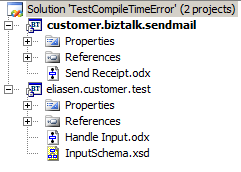
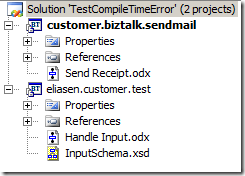
So the project structure looks like this:
So not something that would normally go wrong. Anyway, the “customer.biztalk.sendmail”
project compiles just fine. But when I compile the “eliasen.customer.test” project
it fails with these three errors:
-
identifier ‘biztalk’ does not exist in ‘eliasen.customer’; are you missing an assembly
reference?
-
cannot find symbol ‘customer.biztalk.sendmail.Send_Receipt’
-
‘biztalk.sendmail.Send_Receipt’: can only call or exec a service
This was weird. Apparently the called orchestration (customer.biztalk.sendmail.Send_Receipt)
could not be found. Now since there has been a lot of issues with the copy local functionality
being broken, that was my first thought. But since my solution had never been deployed
and using Reflector on the customer.biztalk.sendmail assembly that was copied to the
bin folder of the eliasen.customer.test project had all the right classes, I skipped
that idea.
Then, just to be sure, I checked that “biztalk”, “customer” and “sendmail” aren’t
reserved words in XLANG/s here: http://msdn.microsoft.com/en-us/library/aa547020(BTS.10).aspx –
they weren’t.
Then I googled the “can only call or exec a service” error and found a couple of hits,
but none that I could directly relate to my issue.
Then, as if struck by divine intervention, I thought of changing the namespace of
the orchestration that was being called. Maybe in hindsight it makes sense, since
one of the errors is telling me that it is looking for “biztalk” in the “eliasen.customer”
namespace, which really doesn’t make sense at all.
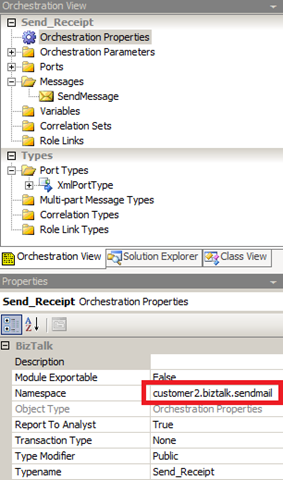
Anyway, I opened up the properties of the called orchestration and changed the namespace:
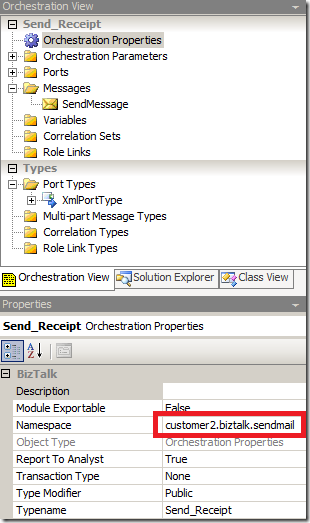
and then it compiled after re-choosing the called orchestration in my “Call Orchestration”
shape. This, of course, is not acceptable – I want to be able to have any namespace
I want. It seems that somehow the compiler matches the “customer” in “customer.biztalk.sendmail”
to the “customer” in “eliasen.customer.test” with each other.
I have tried looking deeper into this, but I can’t seem to find the exact reason it
is failing, so I will probably just report it to Microsoft and then let them deal
with it 🙂
Hope this helps someone
—
eliasen
by community-syndication | Oct 16, 2009 | BizTalk Community Blogs via Syndication
Late in the summer we have released WCF sources publically in the reference source. You can now browse and debug WCF source code through Visual Studio. We are working to get the WF in reference source later this year. I will provide an update when WF is also available.
Please note that this is version-dependent and we currently support this for 3.5 SP1 RTM only. Any support QFE or GDR upgrades for the assemblies aren’t currently part of the package. New updates will be available in future. Here are the options to browse or debug thorugh WCF sources:
Option 1 – Install & Local Debugging
- Download Reference Source Code Center.
Install Reference Source WCF MSI in your local machine say under: ‘C:\ReferenceSource’.
- Launch Visual Studio 2008.
- From the Tools menu, choose Options.
- In the Options dialog box, open the Debugging node and select General
- Uncheck “Enable Just My Code (Managed only)”
- Check “Enable source server support”
- Uncheck “Require source files to exactly match the original version”
- Select Symbols under Debugging.
- In the Symbol File Locations box, validate the location where the installed symbol files (.pdb) are present. If not, then add originally downloaded symbols location: C:\ReferenceSource\Symbols
- Build you app, set breakpoints and F5 to debug..
Option 2 – Remote Debugging
You will need to make sure that the version of the framework is 3.5 SP1 RTM (no GDR update for now) as the project assemblies’ versions and symbols must match. With this option you can debug and step through WCF framework code remotly through the reference source server.
Reference instructions under: http://referencesource.microsoft.com/serversetup.aspx
( Same as above, just set your .pdb location to: http://referencesource.microsoft.com/symbols )
by community-syndication | Oct 16, 2009 | BizTalk Community Blogs via Syndication
We’ve just published the first chapter of the WCF Extensibility Guidance series.
One of the powerful things about WCF is its extensible architecture. However, the degree of extensibility can also be daunting. It’s not something you do every day, so you might not know which is the best extensibility option to use to achieve your goal.
Jesus Rodriguez was the lead author on this guidance. If I am ever on “Who wants to be a Millionaire?” and I expect hard WCF questions, Jesus will be my lifeline. I’ve needed his help many times and I haven’t been able to stump him yet. Pablo Cibraro, an expert in WCF security, also contributed significantly.
We’ll be rolling the other chapters out over the next few weeks. Please let us know how this guidance is useful to you and if there are other extensibility topics you would be interested in.
by community-syndication | Oct 16, 2009 | BizTalk Community Blogs via Syndication
Christian Weyer has published a great article on the topic of Schema-based Development with Windows Communication Foundation.
Few would argue with the value of Contract First programming when building large systems. However when programming web services, the choice comes down to Code-based Contract First or Schema-based Contract First.
The WCF tools provide great support for the Code-based model – you define an interface using normal code constructs as you would for any .NET class or component, and then apply the ServiceModel attributes. Then the WCF plumbing automatically handles things like WSDL generation, and serialization issues. For most developers this is a very convenient model.
However, there are reasons, especially when interoperability with other web service stacks is a priority, why many prefer the Schema-based model. For them, the WSDL is the contract. WCF does support this with tools like SvcUtil, but manipulating WSDL by hand can be a daunting task.
Christian has long been a proponent of Schema-based Contract First and has developed tools to plug into Visual Studio to better support this model. In this article he explores the reasons you may want to consider the Schema-based approach, how WCF supports it, and how the latest version of the Web Service Contract First tool, WSCFBlue (a free tool hosted on CodePlex), makes it even easier.