

Interview Series: Four Questions With Michael Stephenson
Happy New Year to you all! This is the 16th interview in my series of chats with thought leaders in the “connected systems” space. This month we have the pleasure of harassing Michael Stephenson who is a BizTalk MVP, active blogger, independent consultant, user group chairman, and secret lover of large American breakfasts.
Q: You head […]
ASP.NET 4, ASP.NET MVC, and Silverlight 4 Videos of my Talks in Europe
[In addition to blogging, I’m also now using Twitter for quick updates and to share links. Follow me at: twitter.com/scottgu]
Hope you all had a great holiday – welcome to 2010!
Last month I did a blog post about some of the presentations I did in Europe and posted the slides+demo files from them. High-quality videos of the talks I did in Sweden were posted two weeks ago on the Channel9 site, so you can also now watch videos of the talks online as well. The videos use a nice format where you can watch me talking as well as the screen at the same time. The code is readable when running in full-screen mode.
Below are links to the different talks along with the slides+sample files:
ASP.NET 4 and VS 2010 Web Development
This 90 minute talk provides a nice introduction to ASP.NET 4 and VS 2010 for Web Development. It is primarily demo-driven and walks-through a lot of the new features coming with the release.
The talk starts with a 2 minute introduction of someone introducing me which is in Swedish – but the rest of the talk is of me talking in English.
- Watch the Talk – Part 1
- Watch the Talk – Part 2
- Download the Slides
- Download the Demos
- Read other .NET 4 and VS 2010 blog posts
ASP.NET MVC
This 2 hour talk provides a nice introduction to ASP.NET MVC, and explains it by walking through how to build a simple application with it from scratch. Along the way it highlights and discusses some of the new features coming in ASP.NET MVC 2.
Silverlight 4
This 60 minute talk recaps the keynote I gave at PDC. It walks-through the new Silverlight 4 features and capabilities.
Hope this helps,
Scott

MVP Again
Thanks to the Microsoft team for granting me a third straight BizTalk MVP. I suspect that they keep doing this just to see what regrettable statements I’ll make at the next MVP Summit. Either way, it’s an honor to receive, and I’m grateful for the perks it has to offer.
I need to get ready for […]
Reprocessing SAP IDocs through BizTalk Server using WE19
First off this technique should work with any RFC connected system but since the only RFC connected system that I use is BizTalk it will therefore have some BizTalk specific information.
I have touched on this topic before in my web cast and in my blog that integrating with SAP can be tough due to the vast differences in terminology, process and technologies used. A situation that I have come across is that you often need a Subject Matter Expert (SME) or someone very familiar with a Business Process to generate an IDoc for a BizTalk developer to test or validate their portion of the integrated application. Sometimes creating an IDoc is very simple where as sometimes it may take a few transactions and screens to generate the IDoc in order to validate one of your use cases. This can lead to some frustration by both the BizTalk Developer and SAP resource as the BizTalk developer is always bothering the SAP resource to create “just one more IDoc”.
Something that a colleague brought to my attention was an SAP transaction called WE19 that allows you to re-process an existing IDoc. This allows the BizTalk developer to have the SAP resource create an initial IDoc and have the BizTalk developer re-submit that IDoc however many times they would like. Another benefit of this is process that involved deltas. We have a process where SAP will provide a “dump” of employee data that we need to update a down stream system with. We don’t need to process this data every day so we will just send the differences, or deltas, on a regular basis. So, even in a test or staging environment, once I have received the IDoc that contains all employee data I will not get that data again unless I ask for it. If we have not had any changes to our employees I will also not get the delta information either since there is no new data to feed the downstream system with.
Using this transaction is great because I don’t need to bother anyone from the SAP side to create data for me. All I need to know is when the last time that particular IDoc was sent. I can find this information in BizTalk by querying tracked message instances or by querying WE02 in SAP. Once I find this information I need to capture the IDoc number as this piece of information is required in order to resubmit the IDoc.
Here are 3 different ways to find an IDoc number. The first two involve BizTalk and the last involves using the WE02 transaction in SAP. You may want to check with your BASIS administrator if you do not have access to the WE02 transaction.
- Option #1 Obtaining the IDoc number from BizTalk Admin by viewing the message context property
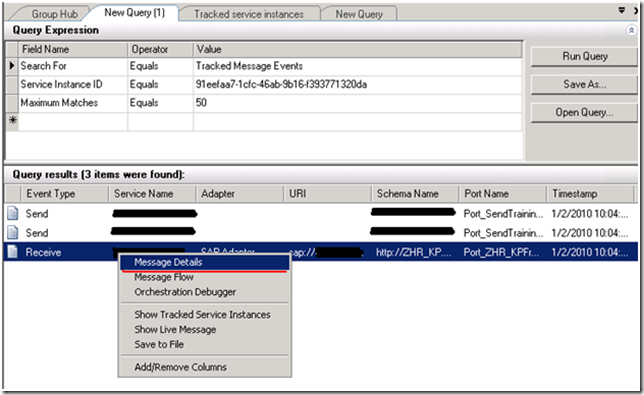
- Use a Tracked Message Events query from BizTalk 2009 Admin console and right mouse click on the IDoc that you previously received and select “Message Details”

- Click on the “Context” caption

- Observe the “DOCNUM” value and record it (unfortunately you can’t copy or paste from this screen)

- Option #2 Saving IDoc message to disk and then inspecting context document.
- Once again find the particular IDoc that you are looking for by running a Tracked Message Events query from BizTalk 2009 Admin Console. Once you find this message, right mouse click and select “Save to File”

- Navigate to the folder that you saved these message to and open up the XML file that contains all of the message context information

- Once again locate the “DOCNUM” property and copy that value

- Option #3 Use SAP transaction WE02 to locate your IDOC

- Right mouse click on row and select “Copy Text”. Note it will copy all text in row.

Resubmitting the IDoc
- Now that you have the IDoc number using one of the approaches above you can navigate to SAP transaction WE19, populate the “Existing IDoc” field and click on the clock with the green checkmark in the upper left hand corner(underlined in red) .

- The selected IDoc will then be displayed and then click on the “Standard outbound processing” button

- You now have the ability to provide the number of instances of this IDoc that you would like sent so you can use this as a load testing tool for BizTalk as well. Click the green checkmark to proceed.

- You should now see a successful message indicating that the IDoc has been re-sent.

Summary
I know I have found the WE19 transaction to be very helpful so hopefully you will find it helpful as well. It can be pretty frustrating when you have a deadline and there is no one around to create IDocs for you. Using this approach will lessen your dependency on having a SAP resource around. You can also use this same technique to load up BizTalk with messages and test the robustness of the SAP adapter no matter whether it be the dot net connector version or the WCF version.

Microsoft MVP in BizTalk Server
Everyone who becomes MVP for the first time has blogged about it for sharing his thoughts and commitment to the community. This is the first time I am honoured by Microsoft with the MVP award for my contributions to the community via my blog and BizTalk Server forums. I will be working more deeply with […]

BizTalk Server 2006 R2 Exam
I like to wish you all a happy new year to start with. Before end of 2009 I passed the 70-241 BizTalk exam. This exam has been around for quite a while and I kept postponing to take it for a long time, but I finally decided to take it. So now my logo looks like this (maybe not exciting and many of you may have similar logo’s but still I am proud to have achieved this):

As soon as there will be an exam for BizTalk 2009 I will take sooner and not wait for ever :).
Transform System.Drawing.ContentAlignment property to System.Drawing. StringFormat Alignment property
Recently we had the need to transform System.Drawing.ContentAlignment property to System.Drawing. Stringformat alignment property for creating a Graphic object with text drawn on it inside a given rectangle. Assuming that you want the text printed from left to right, you can use the ContentAlignment Enum values to obtain the desired StringAlignment Enum value. For example:
[…]
Adding SQLite to a Windows Mobile Application
Using SQLite in a Windows Mobile Application provides a simple way to add pre-populated data for consumption by the application. There are a couple of configuration considerations when adding the database to the project.
1. Adding reference to SQLite.dll. After installing SQLite there will be a Compact Framework folder in the following path :C:\ProgramFiles\SQLite.NET\bin. This folder […]
Unit testing: COM object that has been separated from its underlying RCW cannot be used
Let’s say you’re writing unit tests for code which uses COM objects. You want some initialization and some cleanup to be done. So you set up your test:
private static MyStore store;
[ClassInitialize()]
public static void MyClassInitialize(TestContext testContext)
{
    store = new MyStore("some value");
}
[ClassCleanup]
public static void MyClassCleanup()
{
    store.DoWork(someArgument);
}
However, as your ‘store’ instance uses a COM object, you will get a test run error, saying: “System.Runtime.InteropServices.InvalidComObjectException: COM object that has been separated from its underlying RCW cannot be used..”.
The way to solve this issue is to open up your testrunconfig file using the XML editor and adding the highlighted element to it:
<?xml version="1.0" encoding="UTF-8"?>
<TestRunConfiguration name="Local Test Run" id="fbbfe81f-97fa-4e33-bde1-00b3827b933e" xmlns="http://microsoft.com/schemas/VisualStudio/TeamTest/2006">
  <ExecutionThread apartmentState="MTA" />
  <Description>This is a default test run configuration for a local test run.</Description>
  <TestTypeSpecific />
</TestRunConfiguration>
The ExecutionThread element will instruct the test to use the MTA threading model. This way, the static instance of “store” can be shared across tests.