BizTalk vNext features or WF/WCF vnext features?
Look at the next version of BizTalk 2009 R2, coming soon, and then think what else would I like to …

Look at the next version of BizTalk 2009 R2, coming soon, and then think what else would I like to …

WSCF.blue v1.0.7 now supports VS10 RC in addition to VS2008. There are no new features as such although v1.0.6 which we released a short while ago fixes a number of important bugs in data contract generation. Alex , our code-master extraordinaire, blogged about the 1.0.6 release here.
The generated code has not changed (from previous versions) […]


Haven’t blog for awhile since I am preparing for a session I giving on Monitoring Business Integration Suite (branded for SQL Server, BizTalk Server and MOSS in an integration context). This session will be given during the Dutch Application Platform Event. Will be my second talk I ever done for general public so one way I am quite excited (only time preparing a lot of stuff (demo’s) is hard task to do). Now I am enjoying my holiday currently in Chester (UK) and still cannot stay away from my laptop in the evenings 🙂
Update: Unfortunelty due to family matters and highly visible project within a customer I am working for I was unable to do the presentation. I regret it, but some things had higher priority.
While browsing Microsoft’s Virtualization site, I stumbled across an upcoming event:
Looking at Desktop Virtualization including VDI? Thinking about Windows 7 migration; wants savings, but wondering about ROI?
Join Microsoft, industry experts and IT leaders: Desktop Virtualization Hour, March 18th, 9am PST.
This is all the information they’re sharing with the public at the moment, which normally might indicate a lack of planned content… but considering the fact that they purchased a domain just for this event, http://www.desktopvirtualizationhour.com/, Microsoft is being suspiciously vague about their plans.
I managed to find a ZDNet whitepaper posting from January that has some extra lines of description:
Have more questions than answers on the topic?
…
Watch and interact live with Microsoft, industry experts and IT leaders for a moderated televised discussion. Submit your questions in the hour or in advance.
Does the fact that these lines don’t appear on the event-specific domain mean something? Perhaps they’ve already chosen the questions they’re going to answer, or perhaps the list of experts grew too large to allow viewer participation? We’ll have to wait and see what transpires.
In the mean time, you can study up on VDI in preparation of this event:
Last week, I spent some time looking at a problem with a customer’s orchestration. In one place, the developer had made use of the infamous BizTalk xpath() function to assign a value in one messageto a decimal field in another message. He got an error stating that the application is “Unable to cast object of type ‘System.Double’ to type ‘System.Xml.XmlNodeList'”. This is due to a logical error in BizTalk’s code. Read more at http://geekswithblogs.net/cyoung/archive/2010/02/23/biztalk-server-handling-decimal-types-with-the-xpath-function.aspx.
Last week I undertook a completely unscientific study of the .NET Blogosphere (as much as I loathe that term), to determine which namespaces and classes people are most excited about, confused by, or frustrated with – at least to the point that they would dedicate the time to write in their blog about them. My methods for undertaking this study were rather simplistic. I wrote a quick and dirty console application to reflect through the .NET Framework namespaces and classes, and search the internet for mentions of them alongside the terms .NET and blog. For classes whose namespaces contained no periods, the full name of the class was used as the search term. For those classes whose namespaces did contain periods, the namespace and name of the class were used as separate search terms. For example, the class System.IO.File would result in a search for “System.IO File .NET blog”, whereas the class System.String would result in a search for “System.String .NET blog”.
More than to just do a popularity contest of the different classes, I wanted to try to determine the best sources of information for each component of the framework. I wanted to see which sites seemed to consistently beat out others as authoritative sources with complete coverage of a given area. In preparation for the transition to .NET 4, I also was interested to see if the features new to .NET 3, and .NET 3.5 received similar coverage to those classes/namespaces that are used in nearly every project created. This final concern will require further testing and analysis before any conclusions can be reached.
What I did find, however, was that (perhaps unsurprisingly considering the methods) those classes/namespaces which one might use more often round out the top 10 result getters:
| Class / Namespace | Result Count |
| System.IO | 14000000 |
| System.IO.File | 12500000 |
| System.Xml | 12200000 |
| System.Collections.Generic | 10600000 |
| System.Collections | 10400000 |
| System.Net | 8280000 |
| System | 7480000 |
| System.Web | 5970000 |
| System.Text | 5950000 |
| Microsoft.VisualBasic | 5810000 |
I was surprised at how strong of a showing the Microsoft.VisualBasic namespace had among all other contenders. Another interesting study would be to look into those sites that are represented in the result count and find the ratio of C# to VB code contained within.
When looking only at classes, we find the following in the top 10:
| Class | Result Count |
| System.IO.File | 12500000 |
| System.Collections.IList | 5250000 |
| System.Windows.Forms.Form | 5190000 |
| System.Collections.Generic.List<T> | 4360000 |
| System.Windows.Forms.Application | 4180000 |
| System.IO.Directory | 3950000 |
| System.Windows.Forms.Control | 3780000 |
| System.IO.Stream | 3380000 |
| System.Transactions.Transaction | 3080000 |
| System.Windows.Window | 2520000 |
From here it looks like features from .NET 2.0 (List<T>) and .NET 3.0 (System.Windows.Window) have gotten enough traction to make a big splash. Generics have had quite a long time to catch on so that’s not surprising. Features from WPF making the top 10 already is surprising (considering how much longer classes have had to be written about), and in this case may simply come as a result of the search term that the application used, which would split off Window from System.Windows.Window as its own term alongside the rest.
The top 10 sources for information about .NET would appear to be the following:
| Site | Top Result for X Classes/Namespaces |
| www.dotnet247.com | 4029 |
| blogs.msdn.com | 1343 |
| msdn.microsoft.com | 724 |
| primates.ximian.com | 255 |
| www.codeproject.com | 236 |
| weblogs.asp.net | 231 |
| social.msdn.microsoft.com | 137 |
| msmvps.com | 88 |
| www.c-sharpcorner.com | 87 |
| www.ucertify.com | 83 |
The number next to the name of the site indicates how many classes/namespaces for which the site is the top result. Further investigation shows that this might be inaccurate since dotnet247 seems to just index the entire framework and aggregate information from other sites in an automated fashion. Sounds like a great way to make some money from ads, but it might not be the best information source (though is still fairly genius). MSDN blogs definitely provide some serious coverage of the .NET Framework, and likely have excellent information about those classes/namespaces for which they were the top results.
Another interesting statistic that came out of this entirely informal study is that 29% of the .NET Framework (3.5) has less than 5 articles of coverage on the internet. In fact there are 389 classes or namespaces that would appear to have nothing written about them at all (according to the semi-flawed methodology described above).
You can use the download link below to download the complete results that contain all of the raw data that was analyzed, as well a pivot table, and some charts that can be used to explore it to some extent. What interesting information can you find? Has anyone else done a more formal survey of the same?
Download Now: Complete Survey Results
I have had to look this query up a few times, so I thought I would write about it here:
USE [DBInstanceName]
GO
SELECT  st.row_count as [Row Count]
FROM sys.dm_db_partition_stats st
WHERE index_id < 2
and OBJECT_NAME(OBJECT_ID)='TableName'
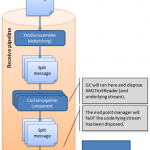
Recently there’s been a few really good resources on streaming pipeline handling published. You can find some of the here.aspx) and here.aspx).
The Optimizing Pipeline Performance.aspx) MSDN article has two great examples of how to use some of the Microsoft.BizTalk.Streaming.dl.aspx) classes. The execute method of first example looks something like below.
public IBaseMessage Execute(IPipelineContext context, IBaseMessage message)
{
    try
    {
        ...
        IBaseMessageContext messageContext = message.Context;
        if (string.IsNullOrEmpty(xPath) && string.IsNullOrEmpty(propertyValue))
        {
            throw new ArgumentException(...);
        }
        IBaseMessagePart bodyPart = message.BodyPart;
        Stream inboundStream = bodyPart.GetOriginalDataStream();
        VirtualStream virtualStream = new VirtualStream(bufferSize, thresholdSize);
        ReadOnlySeekableStream readOnlySeekableStream = new ReadOnlySeekableStream(inboundStream, virtualStream, bufferSize);
        XmlTextReader xmlTextReader = new XmlTextReader(readOnlySeekableStream);
        XPathCollection xPathCollection = new XPathCollection();
        XPathReader xPathReader = new XPathReader(xmlTextReader, xPathCollection);
        xPathCollection.Add(xPath);
        bool ok = false;
        while (xPathReader.ReadUntilMatch())
        {
            if (xPathReader.Match(0) && !ok)
            {
                propertyValue = xPathReader.ReadString();
                messageContext.Promote(propertyName, propertyNamespace, propertyValue);
                ok = true;
            }
        }
        readOnlySeekableStream.Position = 0;
        bodyPart.Data = readOnlySeekableStream;
    }
    catch (Exception ex)
    {
        if (message != null)
        {
            message.SetErrorInfo(ex);
        }
        ...
        throw ex;
    }
    return message;
}
We used this example as a base when developing something very similar in a recent project. At first every thing worked fine but after a while we stared getting an error saying:
Cannot access a disposed object. Object name: DataReader
It took us a while to figure out the real problem here, everything worked fine when sending in simple messages but as soon as we used to code in a pipeline were we also debatched messages we got the “disposed object” problem.
It turns out that when we debatched messages the execute method of the custom pipeline ran multiple times, one time for each sub-messages. This forced the .NET Garbage Collector to run.
The GC found the XmlTextReader that we used to read the stream as unreferenced and decided to destoy it.
The problem is that will also dispose the readOnlySeekable-Stream stream that we connected to our message data object!
It’s then the BizTalk End Point Manager (EPM) that throws the error as it hits a disposed stream object when trying to read the message body and save it to the BizTalkMsgBox!
Turns out that the BizTalk message context object has a nice little class connected to it called the ResourceTracker. This object has a “AddResouce”-method that makes it possible to add an object and the context will the hold a reference to this object, this will tell the GC not to dispose it!
So when adding the below before ending the method everything works fine – even when debatching messages!
context.ResourceTracker.AddResource(xmlTextReader);
I rebuilt my laptop recently with Windows 7 and installed AppFabric, .net4, VS 2010, etc.
When I came to configure BIzTalk 2009 I got the error in the subject line because the SSOSQL assembly needed to be re-registered.
Follow the instructions here to get it to work http://tomas-simonavicius.blogspot.com/2010/02/sso-service-failed-to-start-after.html