
by community-syndication | Apr 9, 2010 | BizTalk Community Blogs via Syndication
With the impending release of Visual Studio 2010, I find myself with large numbers of solutions that need be upgraded from VS 2008. The thought of opening them all manually and running the upgrade wizard was daunting. Then I considered that I would also need to change the target framework of the projects to .NET 4, and in some cases update the references (why the target framework change didn’t fix that I’m not sure). So I did what any lazy programmer does, I wrote some code to do it for me.
At first, I just wanted to upgrade all of my solutions, so I used some PowerShell to find all the solutions and invoke devenv.exe passing in the solution and the /upgrade switch. This gets a little tricky, as passing command line parameters to executables in PowerShell always seems harder to me than it should be. But I came up with this one line script that handles it nicely. I get all the solution files, then do a for each. The trick was to set variables for the parameters and then invoke it all at once with the variables. I sleep after so that too many solutions aren’t open at once. You can play with the sleep time for best results, or remove it if you don’t need it. (Note that I have a 64 bit installation of Windows, so the (x86) in the path)
gci * -include *.sln -recurse | foreach-object {$switchName= "/upgrade"; $slnPath = $_; & 'C:\Program Files (x86)\Microsoft Visual Studio 10.0\Common7\IDE\devenv.exe' $slnPath $switchName; start-sleep -seconds 10}
That got all my solutions upgraded, but the target framework for each was still .NET 2 or .NET 3.5. So I used a macro from The Visual Studio Blog to retarget all of my applications to .NET Framework 4. To run the macro, I used a similar approach with PowerShell, but this time using the /command switch and the name of my macro.
gci * -include *.sln -recurse | foreach-object {$sln = $_; $vs = "c:\program files (x86)\microsoft visual studio 10.0\common7\ide\devenv.exe"; $cmd = "/command"; $cmdparam = "`"Macros.MyMacros.ProjectManagement.SwitchFramework`""; & $vs $sln $cmd $cmdparam }
In this case, I had to wrap the command in quotes, so I used the PowerShell escape character (`). The gotcha with this command is that the IDE stays open after executing the macro. If you have a lot of solutions, you can run out of resources on your system. So you may want to break this up and only process a small set of solutions at once.
Finally, I found that when I tried to build my solutions, many of them were referencing the 3.0 version of System.ServiceModel and System.Runtime.Serialization. I used another macro, and the same PowerShell command, to switch the references. The macro I used is:
Sub SwapReferences()
        For Each project As EnvDTE.Project In DTE.Solution.Projects
            If project.Kind = PrjKind.prjKindCSharpProject OrElse project.Kind = PrjKind.prjKindVBProject Then
                Dim vp As VSProject = CType(project.Object, VSProject)
                Dim ref As VSLangProj.Reference = vp.References.Find("System.ServiceModel")
                If (Not ref Is Nothing) Then
                    ref.Remove()
                    vp.References.Add("System.ServiceModel")
                End If
                Dim dcref As VSLangProj.Reference = vp.References.Find("System.Runtime.Serialization")
                If (Not dcref Is Nothing) Then
                    dcref.Remove()
                    vp.References.Add("System.Runtime.Serialization")
                End If
            End If
        Next
    End Sub
Pretty simple and targeted, but it got the job done to replace the references I cared about.
So, with a few macros, and a little PowerShell, I was able to convert over 30 solutions in a few minutes.

by community-syndication | Apr 9, 2010 | BizTalk Community Blogs via Syndication
AppFabric has this great new Dashboard that gives you insight into what is happening with your services and workflows. In this video, Senior Programming Writer Michael McKeown shows you what the Dashboard can do for you.
Watch it now on endpoint.tv
For more on the AppFabric Dashboard see the following articles on MSDN
We have more great episodes available at http://endpoint.tv so keep watching
Ron Jacobs
Host of endpoint.tv

by community-syndication | Apr 9, 2010 | BizTalk Community Blogs via Syndication
Windows Server AppFabric has this great new Dashboard that gives you insight into what is happening with your services and workflows. In this video, Senior Programming Writer Michael McKeown shows you what the Dashboard can do for you.
Watch it now on endpoint.tv
For more on the AppFabric Dashboard see the following articles on MSDN
We have more great episodes available at http://endpoint.tv so keep watching
Ron Jacobs
Host of endpoint.tv
by community-syndication | Apr 9, 2010 | BizTalk Community Blogs via Syndication
This is the twentieth in a series of blog posts I’m doing on the upcoming VS 2010 and .NET 4 release.
Today’s blog post covers some of the nice improvements coming with JavaScript intellisense with VS 2010 and the free Visual Web Developer 2010 Express. You’ll find with VS 2010 that JavaScript Intellisense loads much faster for large script files and with large libraries, and that it now provides statement completion support for more advanced scenarios compared to previous versions of Visual Studio.
[In addition to blogging, I am also now using Twitter for quick updates and to share links. Follow me at: twitter.com/scottgu]
Improved JavaScript Intellisense
Providing Intellisense for a dynamic language like JavaScript is more involved than doing so with a statically typed language like VB or C#. Correctly inferring the shape and structure of variables, methods, etc is pretty much impossible without pseudo-executing the actual code itself – since JavaScript as a language is flexible enough to dynamically modify and morph these things at runtime.
VS 2010’s JavaScript code editor now has the smarts to perform this type of pseudo-code execution as you type – which is how its intellisense completion is kept accurate and complete. Below is a simple walkthrough that shows off how rich and flexible it is with the final release.
Scenario 1: Basic Type Inference
When you declare a variable in JavaScript you do not have to declare its type. Instead, the type of the variable is based on the value assigned to it. Because VS 2010 pseudo-executes the code within the editor, it can dynamically infer the type of a variable, and provide the appropriate code intellisense based on the value assigned to a variable.
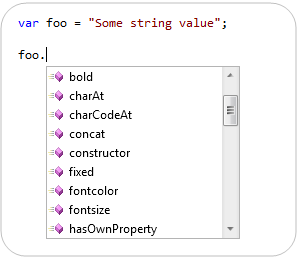
For example, notice below how VS 2010 provides statement completion for a string (because we assigned a string to the “foo” variable):
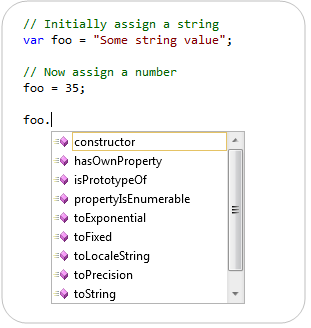
If we later assign a numeric value to “foo” the statement completion (after this assignment) automatically changes to provide intellisense for a number:
Scenario 2: Intellisense When Manipulating Browser Objects
It is pretty common with JavaScript to manipulate the DOM of a page, as well as work against browser objects available on the client.
Previous versions of Visual Studio would provide JavaScript statement completion against the standard browser objects – but didn’t provide much help with more advanced scenarios (like creating dynamic variables and methods). VS 2010’s pseudo-execution of code within the editor now allows us to provide rich intellisense for a much broader set of scenarios.
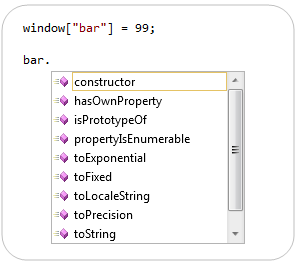
For example, below we are using the browser’s window object to create a global variable named “bar”. Notice how we can now get intellisense (with correct type inference for a string) with VS 2010 when we later try and use it:

When we assign the “bar” variable as a number (instead of as a string) the VS 2010 intellisense engine correctly infers its type and modifies statement completion appropriately to be that of a number instead:
Scenario 3: Showing Off
Because VS 2010 is psudo-executing code within the editor, it is able to handle a bunch of scenarios (both practical and wacky) that you throw at it – and is still able to provide accurate type inference and intellisense.
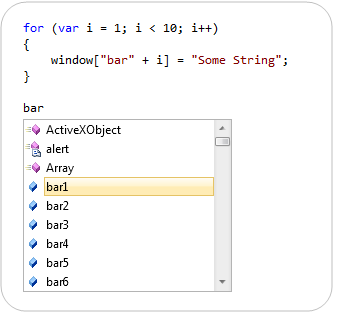
For example, below we are using a for-loop and the browser’s window object to dynamically create and name multiple dynamic variables (bar1, bar2, bar3bar9). Notice how the editor’s intellisense engine identifies and provides statement completion for them:

Because variables added via the browser’s window object are also global variables – they also now show up in the global variable intellisense drop-down as well:
Better yet – type inference is still fully supported. So if we assign a string to a dynamically named variable we will get type inference for a string. If we assign a number we’ll get type inference for a number.
Just for fun (and to show off!) we could adjust our for-loop to assign a string for even numbered variables (bar2, bar4, bar6, etc) and assign a number for odd numbered variables (bar1, bar3, bar5, etc):
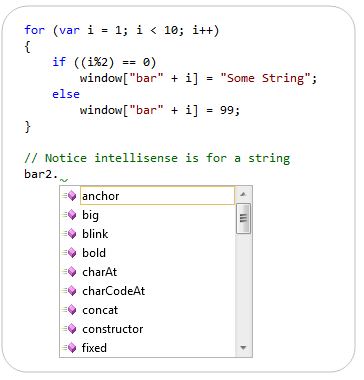
Notice above how we get statement completion for a string for the “bar2” variable.
Notice below how for “bar1” we get statement completion for a number:

This isn’t just a cool party trick
While the above example is a bit contrived, the approach of dynamically creating variables, methods and event handlers on the fly is pretty common with many Javascript libraries. Many of the more popular libraries use these techniques to keep the size of script library downloads as small as possible. VS 2010’s support for parsing and pseudo-executing libraries that use these techniques ensures that you get better code Intellisense out of the box when programming against them.
Summary
Visual Studio 2010 (and the free Visual Web Developer 2010 Express) now provide much richer JavaScript intellisense support. This support works with pretty much all popular JavaScript libraries. It should help provide a much better development experience when coding client-side JavaScript and enabling AJAX scenarios within your ASP.NET applications.
Hope this helps,
Scott
P.S. You can read my previous blog post on VS 2008’s JavaScript Intellisense to learn more about our previous JavaScript intellisense (and some of the scenarios it supported). VS 2010 obviously supports all of the scenarios previously enabled with VS 2008.

by community-syndication | Apr 8, 2010 | BizTalk Community Blogs via Syndication
A few years back now (sheesh, that long already??) I wrote a post about debatching messages from the classic BizTalk SQL adapter. Since that time, we’ve seen the release of the new and improved WCF-based SQL adapter. You can read about the new adapter in a sample chapter of my book posted on the Packt […]

by community-syndication | Apr 8, 2010 | BizTalk Community Blogs via Syndication
The text below is based on the beta release of BizTalk 2010. It might not (completely) apply to the RTM release. So what is the greatest new feature in BizTalk 2010? For me it is by far sizeable code window for expression shapes and message assignment shapes in the orchestration designer. Although this seems like […]
by community-syndication | Apr 8, 2010 | BizTalk Community Blogs via Syndication
A developer in the same team made me aware of an issue they were seeing where if the BizTalk Send Port returned an exception the Client that called the ReceivePort would get a response that was interpreted as null instead of as an exception.
Now this is a synchronous service call without any orchestration, where BizTalk is just a broker of the web service calls. What we want out of it is this:
- For exceptions throw by the backend service to get relayed back to the original caller.
- For no suspended messages to be visible in BizTalk when an exception occurs with the backend service – so that operations won’t be bothered with removing them.
- For operations to get notified of all other exceptions, ie suspended messages.
Now this is all quite easy, all you need to do is make sure the propagate fault flag is checked on the send port adapter settings:
(somewhat shortened dialog)
What can happen though is that when the SOAP version does not match between what the Send Port receives and relays and what the client that called the Receive Port/Location is expecting is that the Fault ends up not being correctly formatted and thus the client is unable to interpret it.
This happens when you use the BasicHttp adapter or BasicHttpBinding with the Custom Adapter on the Receive Port and NetTcp (or WSHttp or etc) on the Send Port (or vice versa). It happens because the SOAP version that BasicHttp uses is different than that used by the other WCF Adapters.
A sample SOAP 1.1 Fault look like this:
<s:Fault>
  <faultcode>s:Client</faultcode>
  <faultstring xml:lang="sv-SE">You entered 666</faultstring>
</s:Fault>
.csharpcode, .csharpcode pre
{
font-size: small;
color: black;
font-family: consolas, "Courier New", courier, monospace;
background-color: #ffffff;
/*white-space: pre;*/
}
.csharpcode pre { margin: 0em; }
.csharpcode .rem { color: #008000; }
.csharpcode .kwrd { color: #0000ff; }
.csharpcode .str { color: #006080; }
.csharpcode .op { color: #0000c0; }
.csharpcode .preproc { color: #cc6633; }
.csharpcode .asp { background-color: #ffff00; }
.csharpcode .html { color: #800000; }
.csharpcode .attr { color: #ff0000; }
.csharpcode .alt
{
background-color: #f4f4f4;
width: 100%;
margin: 0em;
}
.csharpcode .lnum { color: #606060; }
(where the namespace s is defined on the envelope and points to xmlns:s="http://schemas.xmlsoap.org/soap/envelope/")
While a sample SOAP 1.2 Fault look like this:
<s:Fault xmlns:s="http://www.w3.org/2003/05/soap-envelope">
  <s:Code>
    <s:Value>s:Sender</s:Value>
  </s:Code>
  <s:Reason>
    <s:Text xml:lang="sv-SE">You entered 666</s:Text>
  </s:Reason>
</s:Fault>
.csharpcode, .csharpcode pre
{
font-size: small;
color: black;
font-family: consolas, "Courier New", courier, monospace;
background-color: #ffffff;
/*white-space: pre;*/
}
.csharpcode pre { margin: 0em; }
.csharpcode .rem { color: #008000; }
.csharpcode .kwrd { color: #0000ff; }
.csharpcode .str { color: #006080; }
.csharpcode .op { color: #0000c0; }
.csharpcode .preproc { color: #cc6633; }
.csharpcode .asp { background-color: #ffff00; }
.csharpcode .html { color: #800000; }
.csharpcode .attr { color: #ff0000; }
.csharpcode .alt
{
background-color: #f4f4f4;
width: 100%;
margin: 0em;
}
.csharpcode .lnum { color: #606060; }
In our scenario, with the type of metadata that BizTalk exposes for the service, what happens at the client is that what is actually a Fault instead gets interpreted as a valid response, but since the element that represents the response, let’s call it GetDataResponse just for sake of illustration, is missing – the client will interpret it as a null response. Highly unwanted.
The solution is to make sure that the Fault response is valid for the version of SOAP used by the receive side adapter, that is; do a transformation. A transformation can be done in many places: a map, a pipeline component, a WCF Message Inspector. In my case I prefer to place the component resolving the problem as close as possible to the thing causing the problem – which here means I opt for the Message Inspector, but a map might be the easiest for many. I might add the implementation of the message inspector in a later post, but for now, below is some custom xslt you can use in a map (or elsewhere) (if you do not use custom xslt you might get complaints from the client that the namespace prefixes are incorrect for reserved namespaces) – it maps from SOAP 1.1 to SOAP 1.2 (from BasicHttp to others, like NetTcp). You might perhaps also have to map in the other direction.
<xsl:stylesheet xmlns:xsl="http://www.w3.org/1999/XSL/Transform"
                xmlns:msxsl="urn:schemas-microsoft-com:xslt"
                xmlns:var="http://schemas.microsoft.com/BizTalk/2003/var"
                exclude-result-prefixes="msxsl var s0" version="1.0"
                xmlns:s0="http://schemas.xmlsoap.org/soap/envelope/"
                xmlns:xml="http://www.w3.org/XML/1998/namespace"
                xmlns:s="http://www.w3.org/2003/05/soap-envelope">
  <xsl:output omit-xml-declaration="yes" method="xml" version="1.0" />
  <xsl:template match="/">
    <xsl:apply-templates select="/s0:Fault" />
  </xsl:template>
  <xsl:template match="/s0:Fault">
    <s:Fault>
      <s:Code>
        <s:Value>
          <xsl:value-of select="faultcode/text()" />
        </s:Value>
      </s:Code>
      <s:Reason>
        <s:Text xml:lang="sv-se">
          <xsl:value-of select="faultstring/text()" />
        </s:Text>
      </s:Reason>
      <xsl:if test="faultactor">
        <s:Role>
          <xsl:value-of select="faultactor/text()" />
        </s:Role>
      </xsl:if>
      <xsl:for-each select="detail">
        <s:Detail>
          <xsl:value-of select="./text()" />
        </s:Detail>
      </xsl:for-each>
    </s:Fault>
  </xsl:template>
</xsl:stylesheet>
.csharpcode, .csharpcode pre
{
font-size: small;
color: black;
font-family: consolas, "Courier New", courier, monospace;
background-color: #ffffff;
/*white-space: pre;*/
}
.csharpcode pre { margin: 0em; }
.csharpcode .rem { color: #008000; }
.csharpcode .kwrd { color: #0000ff; }
.csharpcode .str { color: #006080; }
.csharpcode .op { color: #0000c0; }
.csharpcode .preproc { color: #cc6633; }
.csharpcode .asp { background-color: #ffff00; }
.csharpcode .html { color: #800000; }
.csharpcode .attr { color: #ff0000; }
.csharpcode .alt
{
background-color: #f4f4f4;
width: 100%;
margin: 0em;
}
.csharpcode .lnum { color: #606060; }
by community-syndication | Apr 8, 2010 | BizTalk Community Blogs via Syndication
Here is a nice intro to Windows Server Appfabric by a good friend and colleague Steve and Danny.Cutting through all the hype and misunderstandings especially between AppFabric in the Cloud vs. Windows Server AppFabric. Also on when to position BizTalk versus Windows Server AppFabric.
by community-syndication | Apr 7, 2010 | BizTalk Community Blogs via Syndication
The Windows Azure platform AppFabric April Release is now live. In addition to improvements in stability, scale, and performance, this release addresses two previously communicated issues in the March billing preview release. We recommend that you re-check your usage previews for April 7th or later per the instruction in the March Billing Preview announcement to ensure that you sign up for the appropriate pricing plan in preparation for AppFabric billing that will start after April 9. For more information about pricing and the billing related issues addressed in this release, please visit our pricing FAQ page.
Please refer to the release notes for a complete list of known issues and breaking changes in this release. To obtain the latest copy of the AppFabric SDK, visit the AppFabric portal or the Download Center.
Windows Azure platform AppFabric Team
by community-syndication | Apr 7, 2010 | BizTalk Community Blogs via Syndication
When I start talking to people about the caching functionality that is part of Windows Server AppFabric I am usually asked “What is the AppFabric Cache?” The MSDN page at http://msdn.microsoft.com/en-us/library/ee790954.aspx provides a great overview (below) as well as additional information. The Cache is defined as:
“Windows Server AppFabric caching features use a cluster of servers that communicate with each other to form a single, unified application cache system. As a distributed cache system, all cache operations are abstracted to single point of reference, referred to as the cache cluster. In other words, your client applications can work with a single logical unit of cache in the cluster regardless of how many computers make up the cache cluster. “
When you develop against the AppFabric Cache you utilize the cache-aside pattern. This pattern outlines the steps in which the application will first check to see if the data is in the cache. If not, then query a database (or other data source), load the cache, then return the value. The idea is that the cache will be populated over time as instances of the application call for data. The AppFabric Cache comes with a number of options around how long data should remain in the cache and provides you the flexibility to tune the performance to your needs.
One thing that the cache-aside pattern doesn’t provide for is the pre-population of data in the cache. This entry will walk through how we can provide this functionality.
The first thing we need to do is to create the cache. I outline how to create a cache in .NET code in my previous entry. You can check that out but I will also include the code in the sample below. As you go about creating the cache you also need to decide if you want eviction to occur and if so how long the data will stay in the cache until it is evicted. For this example I am going to setup the cache so that eviction is turned off (Expirable is set to false). Since I am preloading the cache I want to the data to remain in the cache. If I read your mind, the next question will be how will the code handle when new data is entered into the database. Through the use of the SQL Dependency functionality we can setup an event handler to respond when an event is raised when there is a change at the database layer. Once this event is caught we can empty the cache and reload it. We could also add code to take advantage of the cache-aside pattern and if we don’t the data in the cache then query the database and populate the cache on demand.
As we look at the code example below lets jump directly to the PopulateLookUpCache method. The first part of this method sets up the database connection, the SQL Dependency and loads the data into a dataset. The second part of the method focuses on the loading of the cache. This is the part that we will focus on.
Before we can use the cache we need to create an instance of the DataCacheFactory. This object requires configuration information. This can either be through entries in a config file as shown below:
<
dataCacheClient>
<hosts>
<host name=“AppFabricBeta2“ cachePort=“22233“ />
</hosts>
<localCache isEnabled=“true“ sync=“TTLBased“ objectCount=“100000“ ttlValue=“300“ />
</dataCacheClient>
or through code by creating a DataCacheFactoryConfiguration object and passing it to the DataCacheFactory as shown below:
var config = new DataCacheFactoryConfiguration();
config.Servers = new List<DataCacheServerEndpoint>
{
new DataCacheServerEndpoint(Environment.MachineName, 22233)
};
DataCacheFactory dcf = new DataCacheFactory(config);
We can now call the GetCache method which will return a cache object based on the name of the cache that is passed into the method. The Cache object has a number of methods which allow us to interact with the cache. I use the Put method as the Put will add or replace an object in the cache whereas the Add method only adds an entry. If there is already an object in the cache it will return an exception.
In the code below, I loop through the DataSet and call the Put method to populate the cache. The Put method takes two parameters. The first is the key that will be used and the second is the value. In this case, since I am using the AdventureWorks sample database, the Products table contains the product id and the product which works very nicely for this example.
Once the loop has been executed and the data is now in the cache we can double check that the cache has been populated through the use of a PowerShell cmdlet. Switch to a PowerShell command window and type in (without the quotes) “Get-CacheStatistics -CacheName <your cache name>” and hit enter. This will return a list of attributes related to the cache and will show you how many items are currently in the cache.
We now have a populated cache and a now can use the GetLookUpCacheData method to read data out of the cache for our application. Take a look at the code below to see how all of this was done as well as how to setup the SQL Dependency code to get events. As always this code is provided as is and there are a number of places that should be refactored – such as the repeating DataCacheFactory objects.
using
System;
using System.Collections.Generic;
using System.Linq;
using System.Text;
using System.Data.SqlClient;
using System.Data;
using Microsoft.ApplicationServer.Caching;
using System.Management.Automation;
using System.Management.Automation.Runspaces;
namespace AppFabricCacheWrapper
{
public class CacheHelper : IDisposable
{
private static DataSet lookUpDataset = null;
private string connString = string.Empty;
private string cacheName = “PreLoadSampleCache”;
public CacheHelper()
{
connString = “Data Source=(local);Initial Catalog=AdventureWorksLT;Integrated Security=SSPI;”;
SqlDependency.Start(connString);
CreateCache(cacheName);
PopulateLookUpCache(cacheName);
}
~CacheHelper()
{
SqlDependency.Stop(connString);
Dispose(false);
}
public void Dispose()
{
Dispose(true);
GC.SuppressFinalize(this);
}
protected virtual void Dispose(bool disposing)
{
}
public string GetLookUpCacheData(string keyValue)
{
var config = new DataCacheFactoryConfiguration();
config.Servers = new List<DataCacheServerEndpoint>
{
new DataCacheServerEndpoint(Environment.MachineName, 22233)
};
DataCacheFactory dcf = new DataCacheFactory(config);
var cache = dcf.GetCache(cacheName);
string data = cache.Get(keyValue) as string;
if (data == null)
{
//Determine if you are going to query the database
}
return data;
}
/// <summary> /// Retrieves look up data for the given key and type from database /// </summary>
private void PopulateLookUpCache(string CacheName)
{
SqlConnection conn = null;
SqlCommand comm = null;
SqlCommand commDependency = null;
SqlDataAdapter sqlAdapter = null;
//populate DataSet
try
{
//Connect to look up database and retrieve the names of the products.
conn = new SqlConnection(connString);
conn.Open();
comm = new SqlCommand();
comm.Connection = conn;
comm.CommandText = “select ProductID, Name from SalesLT.Product”;
comm.CommandType = CommandType.Text;
if (lookUpDataset == null)
{
lookUpDataset = new DataSet();
}
else
{
lookUpDataset.Clear();
}
sqlAdapter = new SqlDataAdapter(comm);
sqlAdapter.Fill(lookUpDataset);
//Command object used for subscribing to notifications
commDependency = new SqlCommand();
commDependency.Connection = conn;
commDependency.CommandText = “select ProductID, Name from SalesLT.Product”;
commDependency.Notification = null;
SqlDependency dependency = new SqlDependency(commDependency);
dependency.OnChange += new OnChangeEventHandler(dependency_OnChange);
commDependency.ExecuteNonQuery();
}
catch (Exception e)
{
throw new Exception(e.Message + e.StackTrace);
}
finally
{
</PBR
sqlAdapter.Dispose();
comm.Dispose();
commDependency.Dispose();
conn.Close();
conn.Dispose();
}
//populate cache
try
{
//This can also be kept in a config file
var config = new DataCacheFactoryConfiguration();
config.Servers = new List<DataCacheServerEndpoint>
{
new DataCacheServerEndpoint(Environment.MachineName, 22233)
};
DataCacheFactory dcf = new DataCacheFactory(config);
if (dcf != null)
{
var cache = dcf.GetCache(CacheName);
foreach (DataRow product in lookUpDataset.Tables[0].Rows)
{
cache.Put(product[“ProductID”].ToString(), product[“Name”].ToString());
}
}
}
catch (Exception e)
{
throw new Exception<FONT size=2 face=Consolas p e.StackTrace);
}
}
}
/// <summary>
/// Event which will be fired when there are any database changes done to the dependency query set
/// </summary>
private void dependency_OnChange(object sender, SqlNotificationEventArgs e)
{
if (e.Info != SqlNotificationInfo.Invalid)
{
PopulateLookUpCache(cacheName);
}
}
private void(<FONT size=2 face=Consolas font CreateCache(string CacheName)
{
//This can also be kept in a config file
var config = new DataCacheFactoryConfiguration();
config.Servers = new List<DataCacheServerEndpoint>
{
new DataCacheServerEndpoint(Environment.MachineName, 22233)
};
DataCacheFactory dcf = new DataCacheFactory(config);
if (dcf != null)
{
var state = InitialSessionState.CreateDefault();
state.ImportPSModule(new string[] { “DistributedCacheAdministration”, “DistributedCacheConfiguration” });
state.ThrowOnRunspaceOpenError = true;
var rs = RunspaceFactory.CreateRunspace(state);
rs.Open();
var pipe = rs.CreatePipeline();
pipe.Commands.Add(new Command(“Use-CacheCluster”));
var cmd = new Command(“New-Cache”);
cmd.Parameters.Add(new CommandParameter(“Name”, CacheName));
cmd.Parameters.Add(new CommandParameter(“Expirable”, false));
pipe.Commands.Add(cmd);
var output = pipe.Invoke();
}
}
}



