by community-syndication | May 19, 2010 | BizTalk Community Blogs via Syndication
BetterXml is a Visual Studio 2010 extension I’ve been working on recently in an attempt to improve the experience of the built-in XML editor in VS. Right now it’s only on its early stages, so it doesn’t add much, but I hope to improve it as I find new things I’d like to add.
What does […]
by community-syndication | May 19, 2010 | BizTalk Community Blogs via Syndication
We will be announcing the public Beta of BizTalk Server 2010 at the Application Infrastructure Virtual Launch tomorrow (Thursday, May 20th, 2010 at 8:30 AM PST) with planned RTM in Q3 of 2010.
BizTalk Server 2010 aligns with the latest Microsoft platform releases, including SQL Server 2008 R2, Visual Studio 2010 and SharePoint 2010, and will integrate with Windows Server AppFabric and with .NET 4.
At this virtual launch event we will disclose details on new features and capabilities in BizTalk Server 2010 though presentations, whitepapers, videos and recorded demos.
Please join us tomorrow for an exciting launch!
The BizTalk Team
by community-syndication | May 19, 2010 | BizTalk Community Blogs via Syndication
Did you know that you can use the AppFabric Cache with ASP.NET? AppFabric Cache provides an ASP.NET session state provider. There are a number of reasons that you would want to consider using the AppFabric Cache instead of other caching technologies, including the built in ASP.NET caching.
The AppFabric Cache provides a number of benefits to ASP.NET programmers. When web applications need to maintain state, especially across a Web Farm, or needs to maintain objects across restarts AppFabric Cache provides the out of process, distributed highly available functionality you require. In addition, because of the distributed nature of the cache you no longer need to worry about sticky routing (getting the client back to the same machine as their cached objects). You also no longer need to add additional code and incur the overhead of storing state in a database. By keeping activity oriented objects closer to the consuming logic you can eliminate the overhead and increase performance of your application.
To utilize the AppFabric Cache ASP.NET session state provider open your applications’ Web.Config file and enter the following XML fragment.
<system.web>
    <sessionState mode="Custom" customProvider="SessionStoreProvider">
        <providers>
            <add name="SessionStoreProvider" type="Microsoft.ApplicationServer.Caching.DataCacheSessionStoreProvider,  Microsoft.ApplicationServer.Caching.Client, Version=1.0.0.0, Culture=neutral,  PublicKeyToken=31bf3856ad364e35" />
        </providers>
    </sessionState>
</system.web>
.csharpcode, .csharpcode pre
{
font-size: small;
color: black;
font-family: consolas, “Courier New”, courier, monospace;
background-color: #ffffff;
/*white-space: pre;*/
}
.csharpcode pre { margin: 0em; }
.csharpcode .rem { color: #008000; }
.csharpcode .kwrd { color: #0000ff; }
.csharpcode .str { color: #006080; }
.csharpcode .op { color: #0000c0; }
.csharpcode .preproc { color: #cc6633; }
.csharpcode .asp { background-color: #ffff00; }
.csharpcode .html { color: #800000; }
.csharpcode .attr { color: #ff0000; }
.csharpcode .alt
{
background-color: #f4f4f4;
width: 100%;
margin: 0em;
}
.csharpcode .lnum { color: #606060; }

by community-syndication | May 18, 2010 | BizTalk Community Blogs via Syndication
I just can back from my holiday in Canada/US and noticed that BizTalk Server 2010 beta (although it can be broken or not work initially, I managed to get to the site in the end!) is available. That is cool eh (pick that up in Canada :)). It supports Windows 7; Windows Server 2008; Windows Server 2008 R2; Windows Vista.
To run BizTalk Server 2010 Beta you need:
- 32-bit (x86) platforms: Computer with an Intel Pentium-compatible CPU that is 1 GHz or faster for single processors; 900 MHz or faster for double processors; or 700 MHz or faster for quad processors
- 64-bit (x64) platforms: Computer with a CPU that is compatible with the AMD64 and Extended Memory 64-bit Technology (EMT64T), 1.7 GHz or faster processor recommended for BizTalk Server 2010
- 2 GB of RAM minimum (more recommended)
- 10 GB of available hard-disk space
- VGA monitor (1024 x 768) or higher-resolution monitor
- Microsoft Mouse or compatible pointing device
To use BizTalk Server 2010 Beta you need the following software:
- Microsoft Windows: Can be Windows 7, Windows Server 2008 R2, Windows Server 2008 SP2, Windows Vista%u00ae with Service Pack 2 (SP2)
- SQL Server 2008 R2 or SQL 2008 SP1
- Microsoft .NET Framework 4 and .NET Framework 3.5 with Service Pack 1 (SP1)
- Microsoft Visual Studio 2010 [Required for selected features only]
- Microsoft Office Excel 2010 or 2007 [Required for selected features only]
- SQL Server 2005 Notification Service [Required for selected features only]
- SQLXML 4.0 with Service Pack 1[Required for selected features only]
- Internet Information Services (IIS) Version 7.5 and 7.0 [Required for selected features only]
See also my previous post versions and Jean-Paul’s latest post, platforms and considerations. I decided to download the software and build a virtual machine using Hyper-V. In my latest post I discussed how to build BizTalk Virtual Machines using Hyper-V. Besides the BizTalk 2010 beta you can download:
- BizTalkAccelerators2010_Beta.exe
- BizTalkAdapterPack_x64_Beta.exe
- BizTalkAdapterPack_x86_Beta.exe
- BizTalkLOBAdapters2010_Beta.exe
- BizTalkWCFLOBAdapterSDK_x64_Beta.exe
- BizTalkWCFLOBAdapterSDK_x86_Beta.exe
- Documentation on another site (contains installation/upgrade documentation).
I going to build Virtual Machine on x86 platform using Windows 2008 SP2(Centrino Duo Core, 2Gb RAM, 20 Gb Harddisk), SQL Server 2008 SP1, and Visual Studio 2010 Professional. I used the Installing BizTalk Server 2010 on Windows Server 2008 R2 and 2008 document. I installed critical updates, enabled IIS, Installed VS2010, SQL Server 2008 and applied SP1 in this order. I left out notification services 2005 , WSS, MQ and Excel 2010 installations.
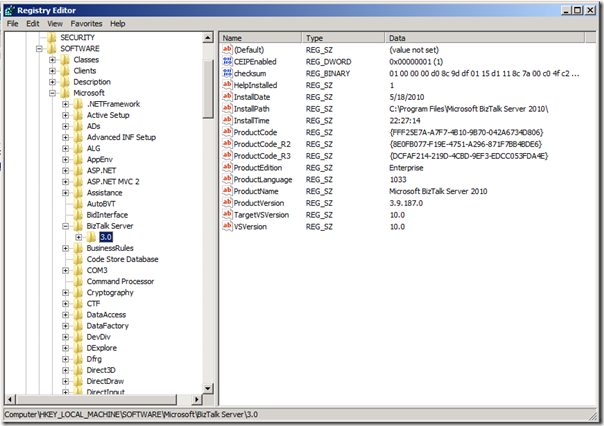
I then installed the BizTalk 2010 beta and verified the installation looking in the registry reviewing this key:
HKEY_LOCAL_MACHINE\SOFTWARE\Microsoft\BizTalk Server\3.0
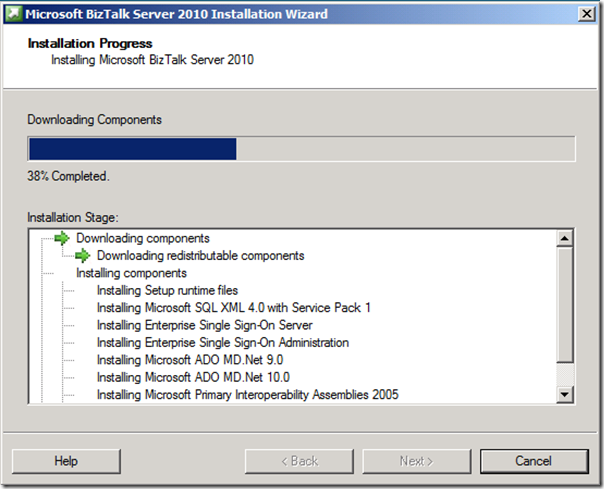

Configuration in my case was pretty straight forward and same as previous versions 2006, 2006 R2 and 2009.
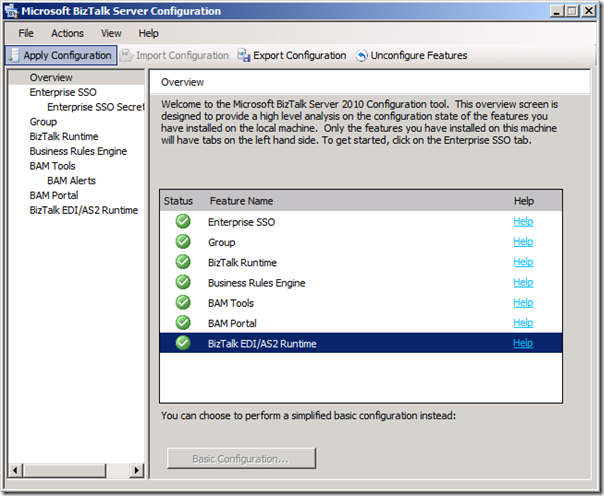
My environment is setup successfully and I am ready to explore new features and try things out. I do like to note that this is a lab (experimental) setup and to setup a sustainable environment in future you need to wait for the official version and follow the installation guide (prerequisites, procedures, etcetera).
Cheers.
Technorati: biztalk biztalk server 2010
by community-syndication | May 18, 2010 | BizTalk Community Blogs via Syndication
Looks like the beta of BizTalk Server 2010 was released today – three words: Windows 7 Support!
http://www.microsoft.com/downloads/details.aspx?displaylang=en&FamilyID=0f852e77-f792-4784-b2d4-95113d40db64
Hat-tip: Nick M.
by community-syndication | May 18, 2010 | BizTalk Community Blogs via Syndication
In Windows Workflow Foundation 4 it’s easy to create a workflow and expose it as a WCF service. But one thing is that it exposes a XAMLX endpoint to each client can see the service actually implemented as a workflow service instead of a regular service. One way to hide that is to use a regular SVC file as the implementation and point that to a workflow using the WorkflowServiceHostFactory.
See the original XAMLX extension
To change this to an SVC extension we need to do a few things. First we need to use a regular workflow instead of a workflow service. The reason is a regular workflow is compiled into the assembly while a workflow service isn’t compiled. So first step is to add a Workflow1.xaml workflow and copy the content of the Service1.xamlx into it.
<Activity mc:Ignorable="sap" x:Class="DeclarativeServiceLibrary1.Workflow1" sap:VirtualizedContainerService.HintSize="317,384" mva:VisualBasic.Settings="Assembly references and imported namespaces for internal implementation" xmlns="http://schemas.microsoft.com/netfx/2009/xaml/activities" xmlns:mc="http://schemas.openxmlformats.org/markup-compatibility/2006" xmlns:mv="clr-namespace:Microsoft.VisualBasic;assembly=System" xmlns:mva="clr-namespace:Microsoft.VisualBasic.Activities;assembly=System.Activities" xmlns:p="http://tempuri.org/" xmlns:p1="http://schemas.microsoft.com/netfx/2009/xaml/servicemodel" xmlns:s="clr-namespace:System;assembly=mscorlib" xmlns:s1="clr-namespace:System;assembly=System" xmlns:s2="clr-namespace:System;assembly=System.Xml" xmlns:s3="clr-namespace:System;assembly=System.Core" xmlns:sad="clr-namespace:System.Activities.Debugger;assembly=System.Activities" xmlns:sap="http://schemas.microsoft.com/netfx/2009/xaml/activities/presentation" xmlns:scg="clr-namespace:System.Collections.Generic;assembly=System" xmlns:scg1="clr-namespace:System.Collections.Generic;assembly=System.ServiceModel" xmlns:scg2="clr-namespace:System.Collections.Generic;assembly=System.Core" xmlns:scg3="clr-namespace:System.Collections.Generic;assembly=mscorlib" xmlns:sd="clr-namespace:System.Data;assembly=System.Data" xmlns:sl="clr-namespace:System.Linq;assembly=System.Core" xmlns:st="clr-namespace:System.Text;assembly=mscorlib" xmlns:x="http://schemas.microsoft.com/winfx/2006/xaml">
<Sequence DisplayName="Sequential Service" sad:XamlDebuggerXmlReader.FileName="c:\users\maurice\documents\visual studio 2010\Projects\DeclarativeServiceLibrary1\DeclarativeServiceLibrary1\Workflow1.xaml" sap:VirtualizedContainerService.HintSize="277,344">
<Sequence.Variables>
<Variable x:TypeArguments="p1:CorrelationHandle" Name="handle" />
<Variable x:TypeArguments="x:Int32" Name="data" />
</Sequence.Variables>
<sap:WorkflowViewStateService.ViewState>
<scg3:Dictionary x:TypeArguments="x:String, x:Object">
<x:Boolean x:Key="IsExpanded">True</x:Boolean>
</scg3:Dictionary>
</sap:WorkflowViewStateService.ViewState>
<p1:Receive x:Name="__ReferenceID0" CanCreateInstance="True" DisplayName="ReceiveRequest" sap:VirtualizedContainerService.HintSize="255,90" OperationName="GetData" ServiceContractName="p:IService">
<p1:Receive.CorrelationInitializers>
<p1:RequestReplyCorrelationInitializer CorrelationHandle="[handle]" />
</p1:Receive.CorrelationInitializers>
<p1:ReceiveMessageContent>
<OutArgument x:TypeArguments="x:Int32">[data]</OutArgument>
</p1:ReceiveMessageContent>
</p1:Receive>
<p1:SendReply Request="{x:Reference __ReferenceID0}" DisplayName="SendResponse" sap:VirtualizedContainerService.HintSize="255,90">
<p1:SendMessageContent>
<InArgument x:TypeArguments="x:String">[data.ToString()]</InArgument>
</p1:SendMessageContent>
</p1:SendReply>
</Sequence>
</Activity>
Next we add a WCF Service named Workflow1.svc. Delete the code behind file and add a factory pointing to “System.ServiceModel.Activities.Activation.WorkflowServiceHostFactory”
<%@ ServiceHost Service="DeclarativeServiceLibrary1.Workflow1"
Factory="System.ServiceModel.Activities.Activation.WorkflowServiceHostFactory" %>
And that is all there is to it [:)]
Select the Workflow1.svc and press F5 to fire up the WCF Test Client to test the SVC worklfow.
A side benefit is that using the WorkflowServiceHostFactory allows us to derive from it and add our own logic to the WorkflowServiceHost like adding WorkflowExtensions.
Enjoy!
www.TheProblemSolver.nl
Wiki.WindowsWorkflowFoundation.eu
by community-syndication | May 18, 2010 | BizTalk Community Blogs via Syndication
If you are in Minneapolis on Thursday May 20th please join us for the Twin Cities Connected Systems User Group Meeting.
The meeting takes place at 6:00 p.m. at the Microsoft offices at 8300 Norman Center Drive, Bloomington, MN 55437.
Scott Colestock will be speaking on “Everything you wanted to know about Velocity but were afraid to cache”
Here is a write-up of what will be covered:
“Scott Colestock will be talking about Microsoft’s AppFabric Cache. The AppFabric Cache (aka Velocity) offers a distributed caching solution, not unlike the popular "memcached" open source library. Come and hear about the concepts and terminology, as well as deployment considerations, typical usage patterns, pitfalls, and more.”

by community-syndication | May 18, 2010 | BizTalk Community Blogs via Syndication
The final release of the Silverlight 4 Tools for Visual Studio 2010 and WCF RIA Services is now available for download.
Download and Install
If you already have Visual Studio 2010 installed (or the free Visual Web Developer 2010 Express), then you can install both the Silverlight 4 Tooling Support as well as WCF RIA Services support by downloading and running this setup package (note: please make sure to uninstall the preview release of the Silverlight 4 Tools for VS 2010 if you have previously installed that).
The Silverlight 4 Tools for VS 2010 package extends the Silverlight support built into Visual Studio 2010 and enables support for Silverlight 4 applications as well. It also installs WCF RIA Services application templates and libraries:
Today’s release includes the English edition of the Silverlight 4 Tooling – localized versions will be available next month for other Visual Studio languages as well.
Silverlight Tooling Support
Visual Studio 2010 includes rich tooling support for building Silverlight and WPF applications.
It includes a WYSIWYG designer surface that enables you to easily use controls to construct UI – including the ability to take advantage of layout containers, and apply styles and resources:

The VS 2010 designer enables you to leverage the rich data binding support within Silverlight and WPF, and easily wire-up bindings on controls. The Data Sources window within Silverlight projects can be used to reference POCO objects (plain old CLR objects), WCF Services, WCF RIA Services client proxies or SharePoint Lists.
For example, let’s assume we add a “Person” class like below to our project:

We could then add it to the Data Source window which will cause it to show up like below in the IDE:

We can optionally customize the default UI control types that are associated for each property on the object. For example, below we’ll default the BirthDate property to be represented by a “DatePicker” control:
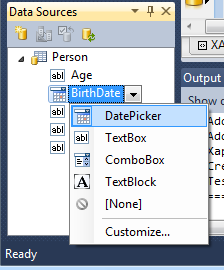
And then when we drag/drop the Person type from the Data Sources onto the design-surface it will automatically create UI controls that are bound to the properties of our Person class:

VS 2010 allows you to optionally customize each UI binding further by selecting a control, and then right-click on any of its properties within the property-grid and pull up the “Apply Bindings” dialog:
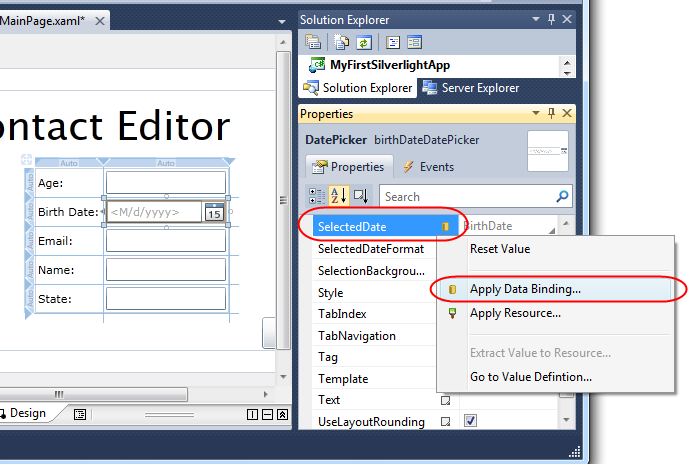
This will bring up a floating data-binding dialog that enables you to easily configure things like the binding path on the data source object, specify a format convertor, specify string-format settings, specify how validation errors should be handled, etc:

In addition to providing WYSIWYG designer support for WPF and Silverlight applications, VS 2010 also provides rich XAML intellisense and code editing support – enabling a rich source editing environment.
Silverlight 4 Tool Enhancements
Today’s Silverlight 4 Tooling Release for VS 2010 includes a bunch of nice new features. These include:
Support for Silverlight Out of Browser Applications and Elevated Trust Applications
You can open up a Silverlight application’s project properties window and click the “Enable Running Application Out of Browser” checkbox to enable you to install an offline, out of browser, version of your Silverlight 4 application. You can then customize a number of “out of browser” settings of your application within Visual Studio:

Notice above how you can now indicate that you want to run with elevated trust, with hardware graphics acceleration, as well as customize things like the Window style of the application (allowing you to build a nice polished window style for consumer applications).
Support for Implicit Styles and “Go to Value Definition” Support:
Silverlight 4 now allows you to define “implicit styles” for your applications. This allows you to style controls by type (for example: have a default look for all buttons) and avoid you having to explicitly reference styles from each control.
In addition to honoring implicit styles on the designer-surface, VS 2010 also now allows you to right click on any control (or on one of it properties) and choose the “Go to Value Definition” context menu to jump to the XAML where the style is defined, and from there you can easily navigate onward to any referenced resources. This makes it much easier to figure out questions like “why is my button red?”:

Style Intellisense
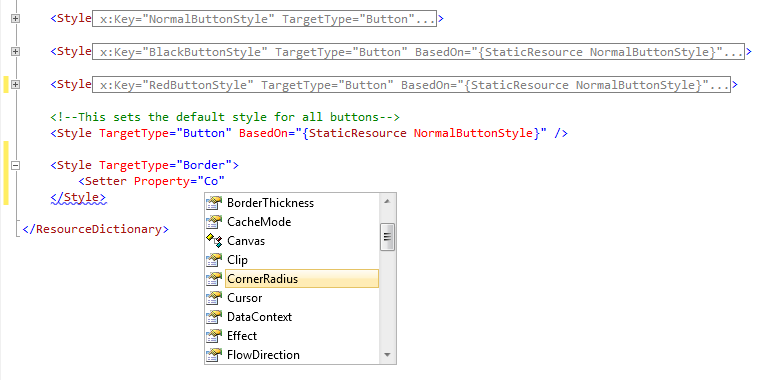
VS 2010 enables you to easily modify styles you already have in XAML, and now you get intellisense for properties and their values within a style based on the TargetType of the specified control. For example, below we have a style being set for controls of type “Button” (this is indicated by the “TargetType” property). Notice how intellisense now automatically shows us properties for the Button control (even within the <Setter> element):
Great Video – Watch the Silverlight Designer Features in Action
You can see all of the above Silverlight 4 Tools for Visual Studio 2010 features (and some more cool ones I haven’t mentioned) demonstrated in action within this 20 minute Silverlight.TV video on Channel 9:

WCF RIA Services
Today we also shipped the V1 release of WCF RIA Services. It is included and automatically installed as part of the Silverlight 4 Tools for Visual Studio 2010 setup.
WCF RIA Services makes it much easier to build business applications with Silverlight. It simplifies the traditional n-tier application pattern by bringing together the ASP.NET and Silverlight platforms using the power of WCF for communication. WCF RIA Services provides a pattern to write application logic that runs on the mid-tier and controls access to data for queries, changes and custom operations. It also provides end-to-end support for common tasks such as data validation, authentication and authorization based on roles by integrating with Silverlight components on the client and ASP.NET on the mid-tier.
Put simply – it makes it much easier to query data stored on a server from a client machine, optionally manipulate/modify the data on the client, and then save it back to the server. It supports a validation architecture that helps ensure that your data is kept secure and business rules are applied consistently on both the client and middle-tiers.
WCF RIA Services uses WCF for communication between the client and the server It supports both an optimized .NET to .NET binary serialization format, as well as a set of open extensions to the ATOM format known as ODATA and an optional JavaScript Object Notation (JSON) format that can be used by any client.
You can hear Nikhil and Dinesh talk a little about WCF RIA Services in this 13 minutes Channel 9 video.
Putting it all Together – the Silverlight 4 Training Kit
Check out the Silverlight 4 Training Kit to learn more about how to build business applications with Silverlight 4, Visual Studio 2010 and WCF RIA Services.
The training kit includes 8 modules, 25 videos, and several hands-on labs that explain Silverlight 4 and WCF RIA Services concepts and walks you through building an end-to-end application with them.

The training kit is available for free and is a great way to get started.
Summary
I’m really excited about today’s release – as they really complete the Silverlight development story and deliver a great end to end runtime + tooling story for building applications.
All of the above features are available for use both in VS 2010 as well as the free Visual Web Developer 2010 Express Edition – making it really easy to get started building great solutions.
Hope this helps,
Scott
P.S. In addition to blogging, I am also now using Twitter for quick updates and to share links. Follow me at: twitter.com/scottgu
by community-syndication | May 17, 2010 | BizTalk Community Blogs via Syndication
http://www.microsoft.com/australia/technet/ie8milk/Default.aspx
by community-syndication | May 17, 2010 | BizTalk Community Blogs via Syndication
When using WCF receive adapter with SQL binding inPolling modeplease be aware of the following problem.
Problem:
At some regular but seemingly random intervals the application stops processing new requests, places a lock on the database and prevent other application from accessing it. Initially it looked like DTC issue, as it was distributed transaction that stalled most of the time.
Symptoms:
Orchestration instances in Dehydrated state, receive location not picking up new messages, exclusive locks on database tables, errors in DTC trace. You may see DTCXact transaction open when executing DBCC OPENTRAN. Other applications accessing the same tables may not be able to execute queries and return timeouts.
Cause:
Microsoft hasconfirmed that there is a bug in the WCF-SQL adapter that results in threadand memory leak.In the receive adapter binding configuration there’s receiveTimeout property set to 10 minutes by default. If during this period data is not found in the table the adapter would start new thread and allocate more memory without releasing old resources.Thus if there’s no new data in the table for a long time a new thread will be created in the host instance every 10 minutes until it reaches threshold (1000) and then there’s no threads left for this host instance and it can’t start/complete any tasks. Then this host instance won’t be able to do anything. If other artifacts are hosted in the instance they will suffer consequences as well.
Solution:
– Set receiveTimeout to the maximum time 24.20:31:23.6470000.
– Place WCF-SQL receive locations in separate host to provide its own thread pool and eliminate impact on other processes
– Ensure WCF-SQL dedicated host instances are restarted at interval less or equal to receiveTimeout to flush threads and memory
– Monitor performance counters Process/Thread Count/BTSNTSvc{n} for thread count trend and respond to alert if it grows by restarting host instance
If you use WCF-SQL Adapter in the Notification mode then make sure to remove sqlAdapterInboundTransactionBehavior otherwise this location will exhibit the same issue. In this case though, setting receiveTimeout doesn’t help and new thread will be created at default intervals (10 min) ignoring maximum setting.



