by community-syndication | Jun 17, 2010 | BizTalk Community Blogs via Syndication
In my previous post I mentioned I was going to try out AppFabric on my BizTalk Server 2010 Beta VM. There is whitepaper out called BizTalk + AppFabric, Better Together, but I used different set of prerequisites:
- Latest version AppFabric that can be download from MS;
- SQL Server 2008 Enterprise Edition;
- BizTalk Server 2010 Beta;
- BizTalkWCFLOBAdapterSDK_x86_Beta.exe;
- BizTalkAdapterPack_x86_Beta.exe.
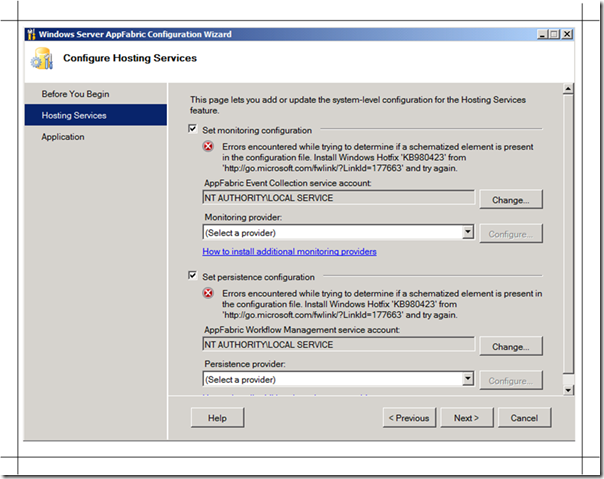
I forgot to install the hotfix, so when you want to configure AppFabric you will see the screen below.
You need to install this hotfix and IIS Web Deployment tool first, before you install AppFabric. Depending on your environment (operating system and architecture) you can choose :
- Windows Server 2008 x86 – WindowsServerAppFabricSetup_x86_6.0.exe <— My choice for my VM
- Windows Vista x86 – WindowsServerAppFabricSetup_x86_6.0.exe
- Windows Server 2008 x64 – WindowsServerAppFabricSetup_x64_6.0.exe
- Windows Vista x64 – WindowsServerAppFabricSetup_x64_6.0.exe
- Windows 7 x86 – WindowsServerAppFabricSetup_x86_6.1.exe
- Windows Server 2008 R2 x64 – WindowsServerAppFabricSetup_x64_6.1.exe
- Windows 7 x64 – WindowsServerAppFabricSetup_x64_6.1.exe
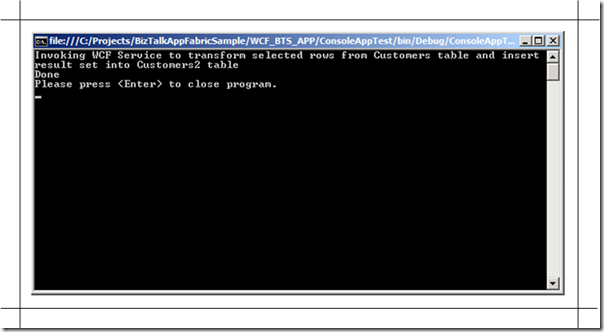
And as soon as you got your AppFabric installed and configured you can follow the steps in the whitepaper, which are pretty straight forward as a walkthrough. In the end you can run the console app.
And check the results in SQL Management Studio.
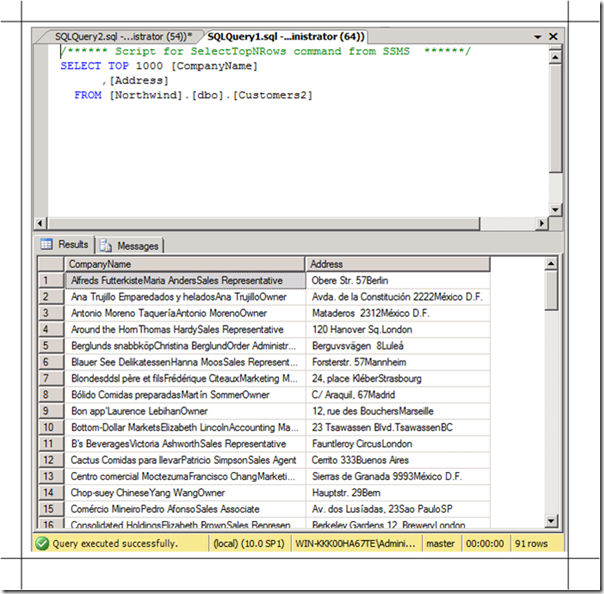
I can conclude that AppFabric and BizTalk Server 2010 Beta with Beta Adapter SDK and Beta Adapter Pack work well together. Some other related resources you can check on BizTalk Server and AppFabric, see Thiago’s post and a post I did in the past Working with Windows Server AppFabric. This is definitely a technology to learn looking at future and confirmation that BizTalk is here to stay.
Technorati: biztalk server 2010 appfabric
by community-syndication | Jun 17, 2010 | BizTalk Community Blogs via Syndication
Recently I saw a question on forum where some asked the question if Microsoft stops the production of BizTalk. If you look at BizTalk roadmap it ends at the version after the one that is coming up in Q3 or perhaps 4 this year. That roadmap can make you think that it ends after vNext, but my thinking is that with current evolution in Technology (which is at a fast pace) it is hard to assess how BizTalk will look like (feature wise) in 2014. In a current and future IT landscapes with Windows products in a dominant position there will always be a need for integration. Within the integration ecosystem there are various Microsoft and other products (i.e. ERP systems like SAP, which I see a lot in the Netherlands), and BizTalk still fulfills integration of that, which are not handled by any other product. For example, EDI, enterprise integration (be it application integration or inter enterprise integration), and ESB capabilities are still not handled by some other product well in a dominant Windows landscape. So BizTalk is here to stay for a long while and is not at the end of its lifecycle. It is being improved every two years and keeps pace with other technologies like .NET, Operating Systems and SQL Server. In the past there have been rumors, when Workflow came into play and project Dublin (now AppFabric) about BizTalk being retired. My thinking with current evolution of BizTalk is that it will become a first class citizen with Microsoft offerings. AppFabric and BizTalk will work together nicely as describe in the WhitePaper BizTalk + AppFabric, Better Together, which I am going to try out next in my BizTalk 2010 Beta VM.
Technorati: biztalk
by community-syndication | Jun 17, 2010 | BizTalk Community Blogs via Syndication
Since the latest release of the Windows Azure Development Kit (June), Azure provides support for .NET 4 applications, which is a real important step from the point of adoption, I believe.
The first thing we wanted to try was to host a XAMLX Workflow Service in a web role on Azure.
Example workflow service
I created a standard Workflow Service that accepted two parameters, on one operation (Multiply) and returns the result of the multiplication to the client. This service was called Calc.xamlx.
These are the steps I followed to make my service available. I added the exceptions, because that’s typically what users will search for J
Enable visualization of errors
Standard behavior of web roles, is to hide the exception for the users, browsing to a web page. Therefore, it is advised to add the following in the system.web section of the web.config:
<customErrors mode="Off"/>
Configure handler for Workflow Services
The typical error one would get, when just adding the Workflow Service to your web role and trying to browse it, is the following:
The requested url ‘/calc.xamlx’ hosts a XAML document with root element type ‘System.ServiceModel.Activities.WorkflowService’; but no http handler is configured for this root element type. Please check the configuration file and make sure that the ‘system.xaml.hosting/httpHandlers’ section exists and a http handler is configured for root element type ‘System.ServiceModel.Activities.WorkflowService’.
We need to specify the correct HTTP handler that needs to be used for XAMLX files. Therefore, we link the workflow services and activities to the correct Workflow Service ServiceModel handler.
To solve this, the following needs to be added to the web.config.
<configuration>
<configSections>
<sectionGroup name="system.xaml.hosting" type="System.Xaml.Hosting.Configuration.XamlHostingSectionGroup, System.Xaml.Hosting, Version=4.0.0.0, Culture=neutral, PublicKeyToken=31bf3856ad364e35">
<section name="httpHandlers" type="System.Xaml.Hosting.Configuration.XamlHostingSection, System.Xaml.Hosting, Version=4.0.0.0, Culture=neutral, PublicKeyToken=31bf3856ad364e35"/>
</sectionGroup>
</configSections>
<!– Removed other sections for clarity –>
<system.xaml.hosting>
<httpHandlers>
<add xamlRootElementType="System.ServiceModel.Activities.WorkflowService, System.ServiceModel.Activities, Version=4.0.0.0, Culture=neutral, PublicKeyToken=31bf3856ad364e35" httpHandlerType="System.ServiceModel.Activities.Activation.ServiceModelActivitiesActivationHandlerAsync, System.ServiceModel.Activation, Version=4.0.0.0, Culture=neutral, PublicKeyToken=31bf3856ad364e35"/>
<add xamlRootElementType="System.Activities.Activity, System.Activities, Version=4.0.0.0, Culture=neutral, PublicKeyToken=31bf3856ad364e35" httpHandlerType="System.ServiceModel.Activities.Activation.ServiceModelActivitiesActivationHandlerAsync, System.ServiceModel.Activation, Version=4.0.0.0, Culture=neutral, PublicKeyToken=31bf3856ad364e35"/>
</httpHandlers>
</system.xaml.hosting>
</configuration>
Enabling metadata exposure of the workflow service
To enable consumers of our workflow service to generate their proxy classes, we want to expose the WSDL metadata of the service, by providing the following configuration section in the web.config.
Notice the simplicity of configuration, compared to WCF3.5. Making use of the default behaviors, allows us to only specify what we want to override.
<system.serviceModel>
<serviceHostingEnvironment multipleSiteBindingsEnabled="true" >
<serviceActivations>
<add relativeAddress="~/Calc.xamlx" service="Calc.xamlx" factory="System.ServiceModel.Activities.Activation.WorkflowServiceHostFactory"/>
</serviceActivations>
</serviceHostingEnvironment>
<behaviors>
<serviceBehaviors>
<behavior>
<serviceMetadata httpGetEnabled="true"/>
</behavior>
</serviceBehaviors>
</behaviors>
</system.serviceModel>
Testing and publishing
After successfully testing locally in the Azure Development Fabric, I uploaded and deployed the package, using the new Tools in Visual Studio to my Azure test account.
Sam Vanhoutte, CODit
by community-syndication | Jun 16, 2010 | BizTalk Community Blogs via Syndication
Topic: BizTalk integration with SharePoint and the Cloud
Speaker: Kent Weare
Date: 22-June-2010
Location: Nexen Conference Center
801-7th Ave. S.W., Calgary, AB. (Plus 15 level)
Map
Registration: 5:00 pm – 5:30 pm
Presentation: 5:30 pm
http://dotnetcalgary.com/
Abstract
Part 1 – Discover how you can leverage BizTalk to integrate with SharePoint and InfoPath
In this session, Kent will demonstrate some of the ways that you can integrate with SharePoint using the BizTalk WSS Adapter and Web Services. Kent will also discuss some real world scenarios where this technology has been used to provide value to the business.
Part 2 – Discover how you can leverage BizTalk to integrate with the AppFabric Service Bus
Learn about Microsoft’s cloud based Service Bus and how you can leverage BizTalk to communicate with external applications and services. Kent will demonstrate BizTalk’s ability to expose on premise services to the cloud and consume AppFabric Service Bus end points. Kent will also discuss some scenarios where it may be appropriate to leverage these integration patterns in the real world.
by community-syndication | Jun 15, 2010 | BizTalk Community Blogs via Syndication
The MSDN team has been working some potential changes to the online MSDN Library designed to help streamline the navigation experience and make it easier to find the .NET Framework information you need.
To solicit feedback on the proposed changes while they are still in development, they’ve posted a preview version of some proposed changes to a new MSDN Library Preview site which you can check out. They’ve also created a survey that leads you through the ideas and asks for your opinions on some of the changes. We’d very much like to have as many people as possible people take the survey and give us feedback.
[In addition to blogging, I am also now using Twitter for quick updates and to share links. You can follow me at: twitter.com/scottgu]
Quick Preview of Some of the Changes
Below are some examples of a few of the changes being proposed:
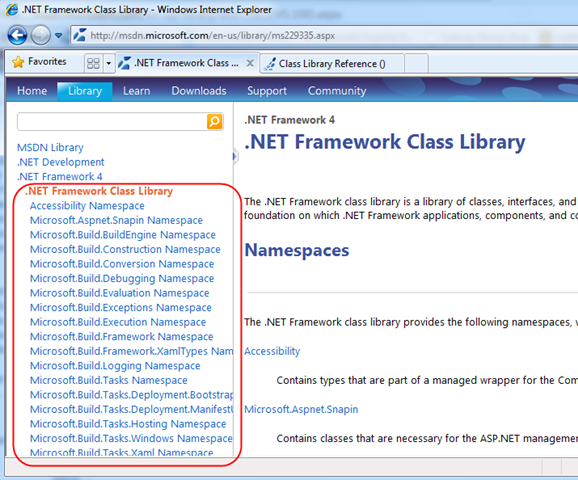
Streamlined .NET Namespaces Navigation
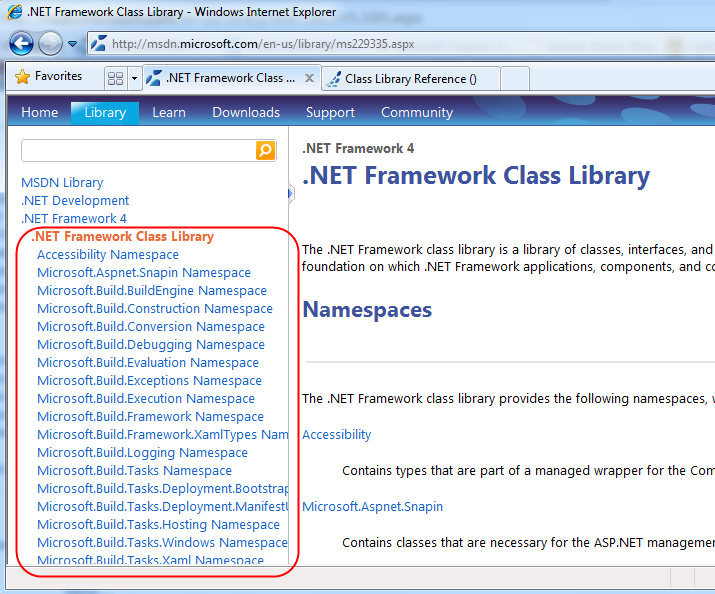
The current MSDN Class Library lists all .NET namespaces in a flat-namespace (sorted alphabetically):
Two downsides of the above approach are:
- Some of the least-used namespaces are listed first (like Microsoft.Aspnet.Snapin and Microsoft.Build.BuildEngine)
- All sub-namespaces are listed, which makes the list a little overwhelming, and page-load times to be slow
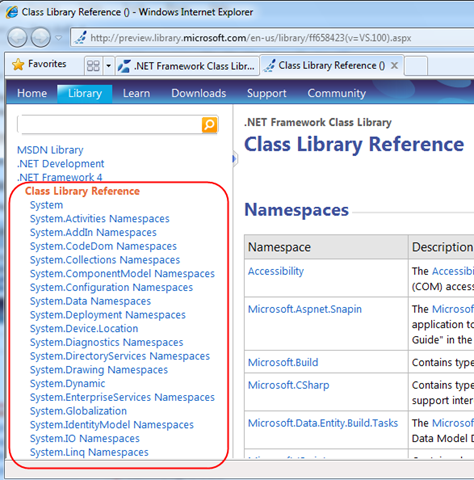
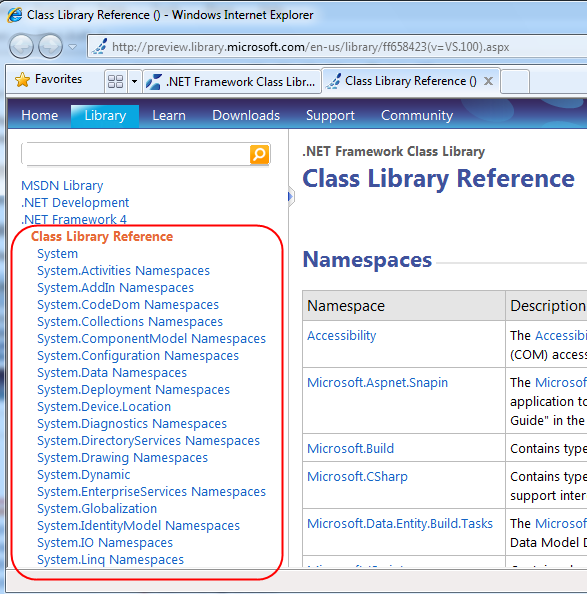
The new MSDN Library Preview Site now lists “System” namespaces first (since those are the most used), and the home-page lists just top-level namespace groups – which makes it easier to find things, and enables the page to load faster:
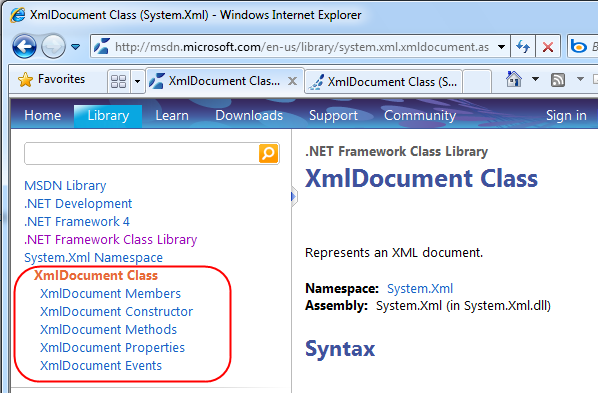
Class overview and members pages merged into a single topic about each class
Previously you had to navigate to several different pages to find member information about types:
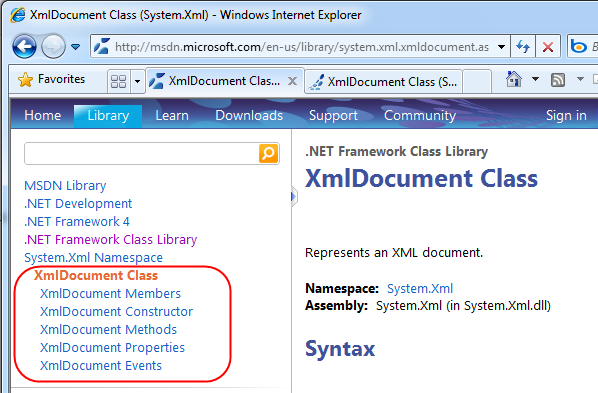
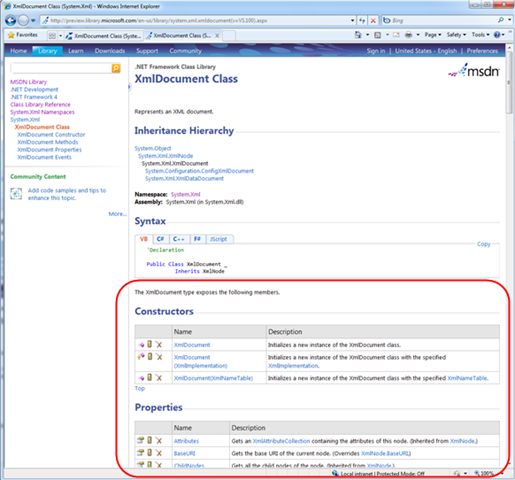
Links to these are still available in the MSDN Library Preview Site TOC – but the members are also now listed on the overview page, which makes it easy to quickly find everything in one place:
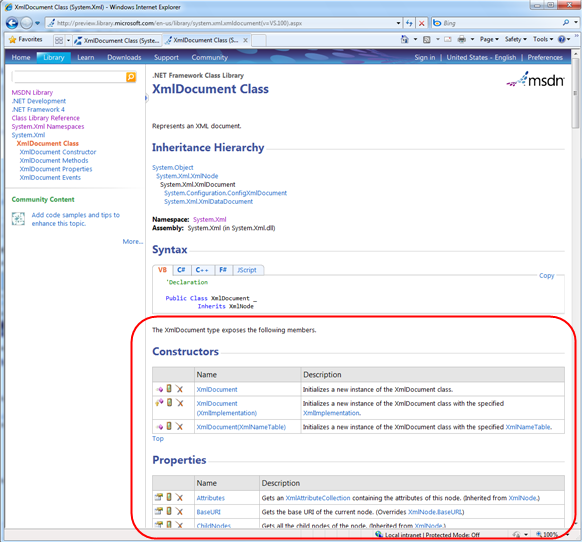
Commonly used things are nearer the top of the page
One of the other usability improvements with the new MSDN Library Preview Site is that common elements like “Code Examples” and “Inheritance Hierarchy” (for classes) are now listed near the top of the help page – making them easy to quickly find:
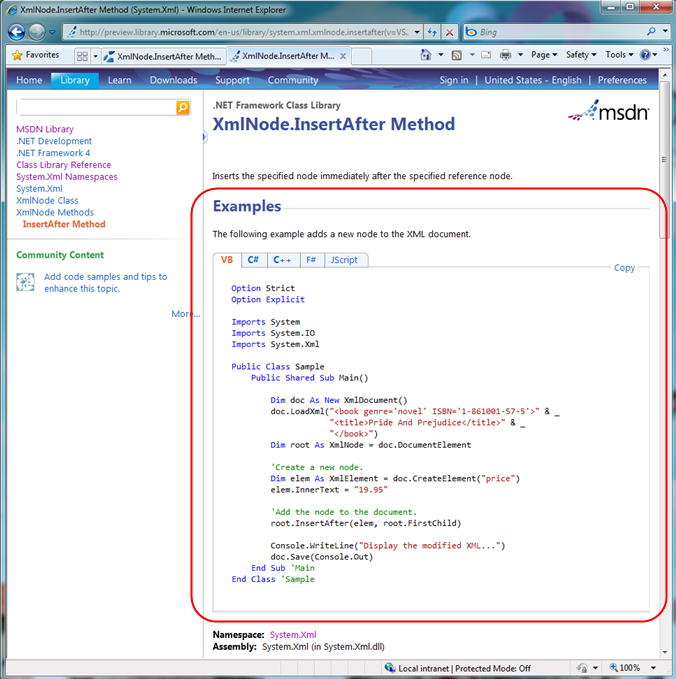
Give Us Feedback with a Survey
Above are just a few of the changes made with the new MSDN preview site – there are many other changes also rolled into it. The MSDN team is doing usability studies on the new layout and navigation right now, and would very much like feedback on it.
If you have 15 minutes and want to help vote on which of these ideas makes it into the production MSDN site, please visit this survey before June 30, play with the changes a bit, and let the MSDN team know what you think.
Important Note: the MSDN preview site is not a fully functional version of MSDN – it’s really only there to preview the new ideas themselves, so please don’t expect it to be integrated with the rest of MSDN, with search, etc. Once the MSDN team gets feedback on some of the changes being proposed they will roll them into the live site for everyone to use.
Hope this helps,
Scott
by community-syndication | Jun 15, 2010 | BizTalk Community Blogs via Syndication
Take control of your learning experience – get the BizTalk training you need when and where you want it.
Online Anytime Self-Paced Training offers QuickLearn’s high-quality BizTalk training, hands-on lab experience, and instructor support, without the cost of travel or set hours.
Self-paced training for BizTalk Server 2009/2010 includes…
- Instructor-led video presentations
- Technical demonstrations
- Remote hands-on labs
- Technical support
QuickLearn’s Online Anytime Self-Paced BizTalk Training Provides:
- Cost Savings – no travel costs and lower tuition fees
- Flexibility – set your own hours and study from home or work
- Control – choose your lessons and study in any order
Learn more about QuickLearn Online Anytime Self-Paced BizTalk Training
by community-syndication | Jun 15, 2010 | BizTalk Community Blogs via Syndication
It’s been a few weeks since I last blogged and, trust me, I am not happy about it 🙁 I have been crazily busy with some of our projects at Tellago which you are going to hear more about in the upcoming weeks 🙂 I was so busy that I didn’t even have time…(read more)
by community-syndication | Jun 15, 2010 | BizTalk Community Blogs via Syndication
Ok, that’s a bit of an attention grabbing headline, so let me clarify that statement: SCOM can cause unchecked growth in SSODB if you’re not regularly backing up the SSODB transaction log.
We encountered this one today – a client’s SSODB ran out of space overnight, causing the BizTalk environment to shut-down. On further investigation, it […]
by community-syndication | Jun 14, 2010 | BizTalk Community Blogs via Syndication
Recently somebody asked me about doing APIKey verification in .NET 4. Previously in .NET 3.5 we provided the REST Starter Kit which included a fair bit of server side code to enable a collection of RequestInterceptor objects that we showed doing API Key verification. In this post I’ll show you how you can be a ServiceAuthorizationManager in WCF to accomplish the same goal.
Download the sample code
Read the rest at Ron Jacobs Blog

by community-syndication | Jun 14, 2010 | BizTalk Community Blogs via Syndication
A former student approached me with a problem related to the Web programming model using WCF in .NET 3.5. In short, he was using a custom IErrorHandler to create a custom fault message, but the client was always receiving a generic error. I knew that WCF REST Starter Kit and WCF 4 both allowed for custom error messages, so I did some digging to see what might be at the root of the problem. It turns out that the WebHttpBehavior inserts its own IErrorHandler and it was getting in the way of the custom handler he was adding. After pointing this out to Dave, he quickly realized he could create a class that derived from the WebHttpBehavior and override the AddServerErrorHandlers to insert his own error handler. He also created the requisite BehaviorExtensionElement so the new endpoint behavior could be added in the configuration file.
public class JsonWebHttpBehavior : WebHttpBehavior
    {
        protected override void AddServerErrorHandlers(ServiceEndpoint endpoint,
        System.ServiceModel.Dispatcher.EndpointDispatcher endpointDispatcher)
        {
            endpointDispatcher.DispatchRuntime.ChannelDispatcher.ErrorHandlers.Add(
               new JsonErrorHandler(endpointDispatcher.DispatchRuntime.ChannelDispatcher.IncludeExceptionDetailInFaults));
        }
    }

    public class JsonWebHttpElement : BehaviorExtensionElement
    {
        protected override object CreateBehavior()
        {
            return new JsonWebHttpBehavior();
        }

        public override Type BehaviorType
        {
            get { return typeof(JsonWebHttpBehavior); }
        }
    }
The job of the custom error handler is to create a custom fault class that provides data back to the calling application. This solution nicely takes into consideration the IncludeExceptionDetailsInFaults property to correctly send the details only when configured to do so. In this case, the status code is always set to 500 to trigger the correct error handling in the client library, but you could also modify this to send more specific HTTP status codes depending on the error message caught on the server.
[DataContract]
    public class JsonFault
    {
        [DataMember]
        public string ExceptionType;

        [DataMember]
        public string Message;

        [DataMember]
        public string StackTrace;
    }

    public class JsonErrorHandler : IErrorHandler
    {
        public JsonErrorHandler(bool includeExceptionDetailInFaults)
        {
            this.includeExceptionDetailInFaults = includeExceptionDetailInFaults;
        }

        public bool HandleError(Exception error)
        {
            return false;
        }

        public void ProvideFault(Exception error,
            System.ServiceModel.Channels.MessageVersion version,
            ref System.ServiceModel.Channels.Message fault)
        {
            JsonFault jsonFault;
            if (includeExceptionDetailInFaults)
            {
                jsonFault = new JsonFault
                {
                    ExceptionType = error.GetType().FullName,
                    Message = error.Message,
                    StackTrace = error.StackTrace
                };
            }
            else
            {
                jsonFault = new JsonFault
                {
                    ExceptionType = typeof(System.Exception).FullName,
                    Message =
                        "An error occurred on the server. See server logs for details.",
                    StackTrace = null
                };
            }

            DataContractJsonSerializer serializer =
                new DataContractJsonSerializer(typeof(JsonFault));

            fault = Message.CreateMessage(version, null, jsonFault, serializer);
            fault.Properties.Add(WebBodyFormatMessageProperty.Name,
                new WebBodyFormatMessageProperty(WebContentFormat.Json));
            WebOperationContext.Current.OutgoingResponse.ContentType = "application/json";
            WebOperationContext.Current.OutgoingResponse.StatusCode =
                System.Net.HttpStatusCode.InternalServerError;
        }

        private bool includeExceptionDetailInFaults;
    }
You could certainly make modifications to only provide faults for certain types of exceptions (which is what .NET 4 does) log information in the HandleError method, etc. Many thanks to Dave Grundgeiger for the inspiration to look into this and the final solution which he designed and allowed me to share here.