

Introducing ASP.NET MVC 3 (Preview 1)
This morning we posted the “Preview 1” release of ASP.NET MVC 3. You can download it here.
We’ve used an iterative development approach from the very beginning of the ASP.NET MVC project, and deliver regular preview drops throughout the development cycle. Our goal with early preview releases like the one today is to get feedback – both on what you like/dislike, and what you find missing/incomplete. This feedback is super valuable – and ultimately makes the final product much, much better.
ASP.NET MVC 3
As you probably already surmised, ASP.NET MVC 3 is the next major release of ASP.NET MVC.
ASP.NET MVC 3 is compatible with ASP.NET MVC 2 – which means it will be easy to update projects you are writing with MVC 2 to MVC 3 when it finally releases. The new features in MVC 3 build on top of the foundational work we’ve already done with the MVC 1 and MVC 2 releases – which means that the skills, knowledge, libraries, and books you’ve acquired are all directly applicable with the MVC 3 release. MVC 3 adds new features and capabilities – it doesn’t obsolete existing ones.
ASP.NET MVC 3 can be installed side-by-side with ASP.NET MVC 2, and you can install today’s “Preview 1” release on your machine without it impacting existing MVC 2 projects you are working on (they will continue to use MVC 2 unless you explicitly modify the projects to retarget them to MVC 3). When you install “Preview 1” you will have a new set of ASP.NET MVC 3 project templates show up within Visual Studio 2010’s “New Project” dialog – choosing one of those when you create a new project will cause it to use MVC 3.
Below are details about some of the new features and capabilities in today’s “Preview 1” release. Unless otherwise noted, all of the features I describe are enabled with the preview build you can download and use today. More ASP.NET MVC 3 features will come in future preview refreshes as we flesh out the product more and iterate on your feedback.
View Improvements
ASP.NET MVC 3 “Preview 1” includes a bunch of view-specific improvements.
Add->View Dialog
“Preview 1” includes a new “Add->View” dialog that makes it easy for you to choose the syntax you want to use when you create new view template files. It allows you to select any of of the available view engines you have installed on your machine – giving you the ability to use whichever view templating approach feels most natural to you:
There are a bunch of great open source view template engines out there (including Spark, NHaml, NDjango and more) – it is now much easier for them to integrate into Visual Studio.
Today’s “Preview 1” build of ASP.NET MVC 3 comes with two view-engine already pre-enabled within the dialog: ASPX and Razor.
New “Razor” View Engine
Earlier this month I blogged about the new “Razor” view engine we’ve been working on. Based on the comments in the post, a lot of people are eagerly waiting to use it. The good news is that you can start using it with today’s “Preview 1” release.
Simple Razor Example
Let’s build a super-simple store site that lists product categories, and allows visitors to click the categories to see a listing of products within them. You can download a completed version of this sample here.

Below is a StoreController class that implements the two action methods (“Index” and “Browse”) needed to build the above scenario:

We’ll use the new “Razor” view engine to implement the view templates for our StoreController.
Below is the “Layout.cshtml” layout-page that will define the common layout UI we want across our site. The “RenderBody()” method indicates where view templates that are based on this master layout file should “fill in” the body content:
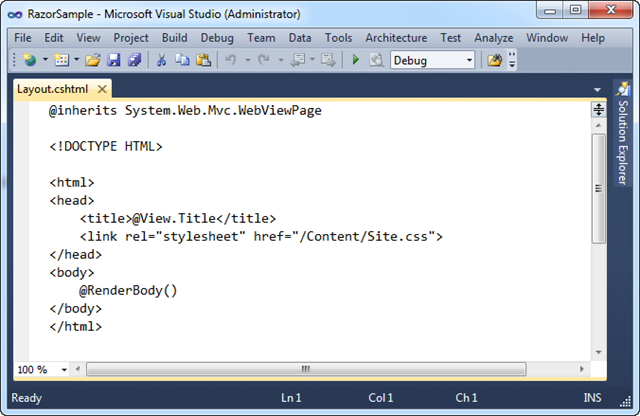
Below is the view template for the Index action. It is based on the above layout page, and outputs a <ul> list of category names:

The template above is using the standard Html.ActionLink() helper method in ASP.NET MVC to render a hyperlink that links to the “Browse” action method of our StoreController. All of existing HTML helper methods in ASP.NET MVC work in “Razor” views – this is true both for the HTML helper methods built-into ASP.NET MVC, as well as those built by others (including vendors and the MvcContrib project).
Below is the view template for the Browse action. It lists the products within a specific category:
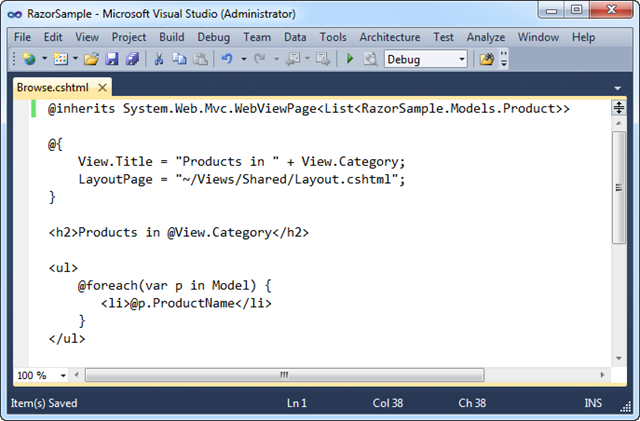
Notice above how we are using the “Model” property within our foreach statement to access the strongly-typed List of products we passed from our Controller. We are doing this just like we would within .aspx view templates. Razor also supports a “View” property which allows us to access un-typed “ViewData” passed to the view template. “View” is a dynamic property (a new feature of .NET 4) – which gives us a slightly cleaner syntax when accessing ViewData. Instead of writing ViewData[“Cateogry”] we can now just write View.Category.
Clean and Concise
The code in the screen-shots above contains everything we need to write to implement our Controller + Views. “Razor” helps make view templates clean and concise, and I think you’ll find it enables a very fluid coding workflow. Read my “Razor” blog post from earlier in the month to learn more about the syntax and understand how it works. You can download a running version of the above sample here.
Code Intellisense and Colorization
One of the things you might have noticed from the screen-shots above is that “Razor” file colorization and code intellisense is not yet supported in Visual Studio with today’s “Preview 1” release. We will be enabling full code intellisense and colorization with a future preview refresh. The VS 2010 editor will support Razor file intellisense for C#/VB code, as well as for HTML/CSS/JavaScript.
Other Improvements in the Future
Three other enhancements we are working to enable in a future preview refresh are:
- The ability to use a @model statement at the top of a “Razor” file instead of having to explicitly inherit from a base class. This reduces the code and simplifies it.
- The ability to specify a default LayoutPage for the site to avoid having to explicitly set it within each view template. This further reduces the code within the view template, and makes your code more DRY.
- The ability to unit-test individual “Razor” template files without having to run the application or launch a web-server.
With these first two changes the above Browse template will be able to be written as simply:

The above template syntax will be supported in a future preview refresh. Full colorization and code-intellisense will be provided within the editor.
Controller Improvements
ASP.NET MVC 3 “Preview 1” includes several nice controller-specific enhancements.
Global Filters
ASP.NET MVC supports the ability to declaratively apply “cross-cutting” logic using a mechanism called “filters”. You can specify filters on Controllers and Action Methods today using an attribute syntax like so:
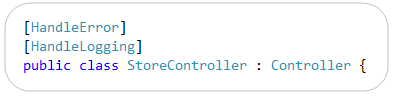
Developers often want to apply some filter logic across all controllers within an application. ASP.NET MVC 3 now enables you to specify that a filter should apply globally to all Controllers within an application. You can now do this by adding it to the GlobalFilters collection. A RegisterGlobalFilters() method is now included in the default Global.asax class template to provide a convenient place to do this (it is then called by the Application_Start() method):

The filter resolution logic in MVC 3 is flexible so that you can configure a global filter that only applies conditionally if certain conditions are met (for example: debugging is enabled, or if a request uses a particular http verb, etc). Filters can also now be resolved from a Dependency Injection (DI) container – more on that below.
New Dynamic ViewModel Property
ASP.NET MVC Controllers have supported a “ViewData” property that enables you to pass data to a view template using a late-bound dictionary API. For example:
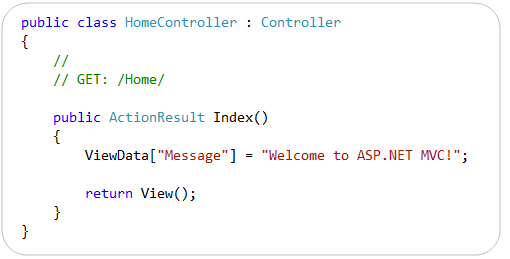
The “ViewData” API is still supported in ASP.NET MVC 3. MVC 3 augments it, though, with a new “ViewModel” property on Controller that is of type “dynamic” – and which enables you to use the new dynamic language support within VB and C# to pass ViewData items using a slightly cleaner syntax than the current dictionary API. Now you can alternatively write the following code to achieve the same result as above:
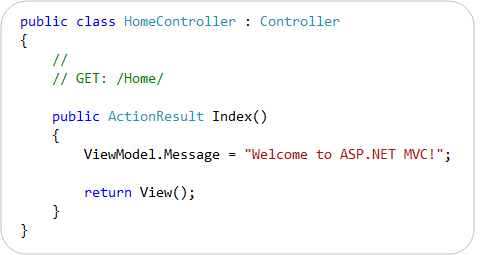
You do not need to define any strongly-typed classes to use the ViewModel property. Because it is a “dynamic” property you can instead just get/set properties on it and it will resolve them dynamically at runtime. It internally stores the property name/value pairs within the ViewData dictionary.
New ActionResult Types
ASP.NET MVC 3 “Preview 1” includes several new ActionResult types and corresponding helper methods.
HttpNotFoundResult
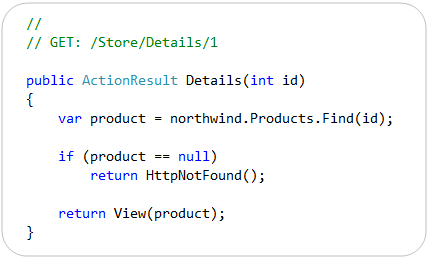
The new HttpNotFoundResult class is used to indicate that a resource requested by the current URL was not found. It returns a 404 HTTP status code to the calling client. You can optionally use the new HttpNotFound() helper method on Controller to return an instance of this action result type, as shown in the following example:
Permanent Redirects
The HttpRedirectResult class has a new Boolean “Permanent” property that is used to indicate whether a permanent redirect should occur. A permanent redirect uses the HTTP 301 status code. In conjunction with this change, the Controller class now has three new methods for performing permanent redirects: RedirectPermanent(), RedirectToRoutePermanent(), and RedirectToActionPermanent(). These methods return an instance of HttpRedirectResult with the Permanent property set to true.
HttpStatusCodeResult
The new HttpStatusCodeResult class can be used to set an explicit response status code and description.
JavaScript and AJAX Improvements
ASP.NET MVC 3 includes built-in JSON binding support that enables action methods to receive JSON-encoded data and model-bind it to action method parameters.
To see this feature in action, consider the jQuery client-side JavaScript below. It defines a “save” event handler that will be invoked when a save button is clicked on the client. The code within the event handler constructs a client-side JavaScript “product” object with three fields whose values are retrieved from HTML input elements. It then uses jQuery’s .ajax() method to POST a JSON based request containing the product to a /Store/UpdateProduct URL on the server:

ASP.NET MVC 3 now enables you to implement the /Store/UpdateProduct URL on the server using an action method like below:

The UpdateProduct() action method above accepts a strongly-typed Product object as a parameter. ASP.NET MVC 3 can now automatically bind the incoming JSON post values to the .NET Product type on the server – without you having to write any custom binding or marshalling logic. ASP.NET MVC’s built-in model and input validation features all work as you’d expect with this.
We think this capability will be particularly useful going forward with scenarios involving client templates and data binding (like I’ve previously blogged about here). Client templates will enable you to format and display a single data item or set of data items by using templates that execute on the client. ASP.NET MVC 3 will enable you to easily connect client templates with action methods on the server that return and receive JSON data.
Other JavaScript/AJAX Improvements in the Future
Future preview refreshes of ASP.NET MVC 3 will include better support for unobtrusive JavaScript. ASP.NET MVC 3 will also directly support the jQuery Validation library from within its built-in validation helper methods.
Model Validation Improvements
ASP.NET MVC 2 came with significant model validation improvements. You can read my previous blog post to learn more about them.
ASP.NET MVC 3 extends this work further, and adds support for several of the new validation features introduced within the System.ComponentModel.DataAnnotations namespace in .NET 4. In particular:
- MVC 3 supports the new .NET 4 DataAnnotations metadata attributes such as DisplayAttribute.
- MVC 3 supports the improvements made to the ValidationAttribute class in .NET 4. The ValidationAttribute class was improved in .NET 4 to support a new IsValid overload that provides more information about the current validation context, such as what object is being validated. This enables richer scenarios where you can validate the current value based on another property of the model.
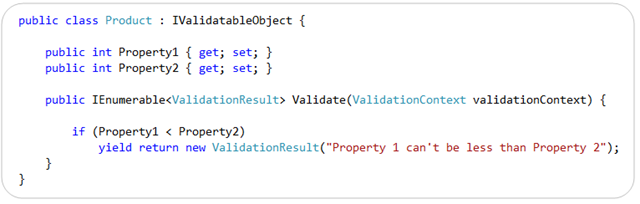
- MVC 3 supports the new IValidatableObject interface introduced in .NET 4. The IValidatableObject interface enables you to perform model-level validation, and enables you to provide validation error messages specific to the state of the overall model, or between two properties within the model.
Below is an example of using the IValidatableObject interface built-into .NET 4 to implement a custom validation method on a class. This method can apply validation rules across multiple properties and yield back multiple validation errors (and optionally include both an error message like below as well as a list of property names that caused the violation):
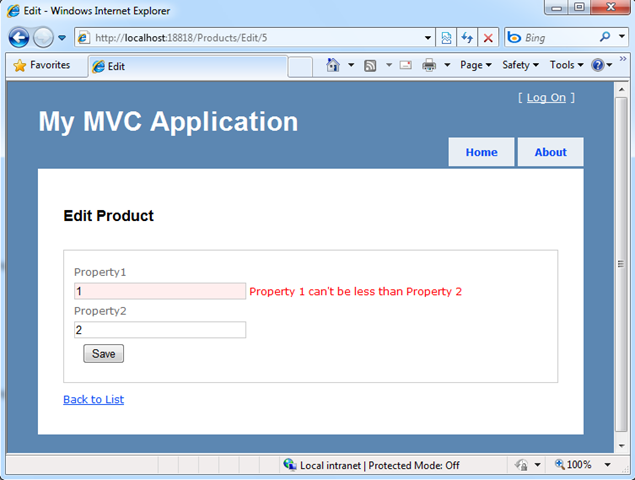
ASP.NET MVC 3 now honors the IValidateObject interface when model binding (in addition to all of the other validation approaches it already supported with MVC 2), and will retrieve validation errors from it and automatically flag/highlight impacted fields within a view using the built-in HTML form helpers:
ASP.NET MVC 3 also introduces a new IClientValidatable interface that allows ASP.NET MVC to discover at runtime whether a validator has support for client validation. This interface has been designed so that it can be integrated with a variety of validation frameworks. MVC 3 also introduces a new IMetadataAware interface that simplifies how you can contribute to the ModelMetadata creation process.
Dependency Injection Improvements
ASP.NET MVC 3 provides better support for applying Dependency Injection (DI) and integrating with Dependency Injection/IOC containers.
In “Preview 1”, we’ve added support for dependency injection in the following places:
- Controllers (registering & injecting controller factories, injecting controllers)
- Views (registering & injecting view engines, injecting dependencies into view pages)
- Action Filters (locating & injecting filters)
For future previews we are investigating adding dependency injection support for:
- Model Binders (registering & injecting)
- Value Providers (registering & injecting)
- Validation Providers (registering & injecting)
- Model metadata Providers (registering & injecting)
ASP.NET MVC 3 will support the Common Service Locator library, and any DI container that supports it’s IServiceLocator interface. This will make it really easy to integrate any DI container that supports the Common Service Locator with ASP.NET MVC.
Note: In Preview 1, we redefined the CSL interface in our codebase, and didn’t include the CSL DLL in our setup. This means that existing implementations of CSL won’t “just work” with “preview 1” – instead they’ll have to recompile their CSL implementations against our interface to make them work. Future preview refreshes will make this CSL library dependency easier, and avoid this extra step.
Brad Wilson is starting a great blog series on ASP.NET MVC 3’s Dependency Injection Support. Below are links to his first few articles about it:
- ASP.NET MVC 3 Service Location: Introduction (Part 1)
- ASP.NET MVC 3 Service Location: Controllers (Part 2)
- ASP.NET MVC 3 Service Location: Views (Part 3)
- ASP.NET MVC 3 Service Location: Filters (Part 4)
Click here to download a simple ASP.NET MVC 3 example that demonstrates how to use the popular Ninject Dependency Injection Container with ASP.NET MVC 3.
Downloads and Links
Click here to download ASP.NET MVC 3 Preview 1. Post feedback/issues about it in the ASP.NET MVC Forum.
Once ASP.NET MVC 3 is installed, you can download and run the simple Razor sample I demonstrated in the blog post above.
Read my previous “Razor” blog post to learn more about how it works and its syntax. Also read my recent EF4 Code-First and EF4 Code-First Schema Mapping posts to learn more about the database code and clean model layer I built using EF4 Code-First and SQL Express within the above sample.
Summary
We are excited to get today’s ASP.NET MVC 3 “Preview 1” release in people’s hands, and start receiving feedback on it.
Our primary goal with these early preview releases is to get feedback – both on what you like/dislike, and what you find missing/incomplete. This feedback is super valuable – and ultimately makes the final product much, much better. If you do install today’s “Preview 1” build, please post your feedback and any bugs/issues you find to the ASP.NET MVC forum at http://forums.asp.net. The team will be monitoring this forum closely, and will be happy to help with anything you run into.
We will then iterate on the feedback you send us, and further refine ASP.NET MVC 3 in future preview refreshes.
Hope this helps,
Scott
P.S. In addition to blogging, I am also now using Twitter for quick updates and to share links. Follow me at: twitter.com/scottgu

