
by community-syndication | Dec 2, 2010 | BizTalk Community Blogs via Syndication
This week I was intereviewed by my friend and fellow MVP Richard Seroter. Here is the link to the questions and answers: http://seroter.wordpress.com/2010/12/02/interview-series-four-questions-with-ben-cline/. Thanks Richard, it was nice to be included in the monthly interview series.
by community-syndication | Dec 2, 2010 | BizTalk Community Blogs via Syndication
Occasionally, when working with StreamInsight queries an unusual result will crop up, leading to asking the rather blunt question “where did that come from?”. Luckily the StreamInsight Event Flow Debugger has a great feature (Root Cause Analysis) that will let us examine how certain results were generated.
If you’ve never used the Event Flow Debugger, or are having trouble working with it, please have a look through StreamInsight: Getting started with using the (Event Flow) debugger, viewing diagnostics, and exposing the management service.
We’ll start by creating a system that produces “questionable” results, then examining it with the Event Flow Debugger. This system will:
- Pull in a stream of events from the Northwind OData feed
- Look for a specific condition occuring in the Orders table (thanks to Allan Mitchell for the query idea ), using LINQPad and the StreamInsight driver to execute the query
If you haven’t installed LINQPad with the StreamInsight driver, the step-by-step instructions may be found at StreamInsight LINQPad Driver on the StreamInsight team blog. This tool combination makes ad-hoc querying drastically simpler, and I highly recommend dropping down the $30 for autocompletion. Well worth it!
With the system up and running, we’ll use the offline trace file capabilities of StreamInsight to capture events flowing through the system, then analyze the results to see if it “makes sense”. The details of using LINQPad to pull an OData stream from the internet and query it with StreamInsight are covered StreamInsight: Reading from other data contexts into StreamInsight with LINQPad. The trace file that I use in this blog post was generated by running the LINQ statement from that blog post.
Capturing a trace
We’ll use the offline trace capability of StreamInsight to figure out some root cause analysis of output events. From the previous post, let’s track down what went into producing this output event:
7/12/1996 7:00:00 AM +00:00
7/15/1996 7:00:00 AM +00:00
null
4
- Open up a command prompt, and navigate to the C:\Program Files\Microsoft StreamInsight 1.1\Tools directory.
- From this directory, use trace.cmd to start capturing tracing information via trace start rootcause.etl.
- From LINQPad, execute the query again.
- From the command prompt stop tracing by executing the command trace stop.
- If you observe the contents of the C:\Program Files\Microsoft StreamInsight 1.1\Tools directory the rootcause.etl file should be visible with a non-zero length. We’ll now use the Event Flow Debugger to perform a root cause analysis.
Using the Event Flow Debugger against a Trace file
- Start the Event Flow Debugger (Start –> Microsoft StreamInsight 1.1 x64 (en) –> Event Flow Debugger).
- Click on File, then on Open.
- Browse to the C:\Program Files\Microsoft StreamInsight 1.1\Tools directory. Select the rootcause.etl file and click Open.
- From the Object Explorer, expand the rootcause.etl node, then the Server node, then the test application node.
- Right-click on the IEnumerable subscription 0 query, and click Display Query.
- If we expand the IEnumerable stream 1 input adapter, we’ll see all of the events that flowed into this query. We’ll come back to this in a bit, but we’re more interested right now in looking at the output and determining root cause.
- Scroll down to the OutputAdapter_Cleanse box, and expand it. Since we’re (for this exploration) only interested in the actual output events (rather than the liveliness of the query by examining CTI’s), let’s go ahead and filter for INSERT events by adding a filter to the operator view. This filter will be EventKind == “Insert”.
- We’re trying to track down what went into producing a specific event, so let’s add a more detailed filter to the cleanse box. In this case we added “&& StartTime == DateTime.Parse(“7/12/1996 7:00:00 AM”)”
- Now that we’ve tracked down the specific event we’re interested in, let’s go ahead and see what went into producing it. Click on the event to select it, then click Analysis in the menu, and finally click Root Cause Analysis.
- Scroll back up to the input adapter, and we can now observe the four events that went into generated our output event!
Takeaways
- LINQPad, together with the StreamInsight LINQpad driver makes a great ad-hoc query and exploratory interface.
- Use the offline trace viewing capability of the Event Flow Debugger to capture query activity and investigate how your output events came to be.

by community-syndication | Dec 2, 2010 | BizTalk Community Blogs via Syndication
Hello and welcome to my 26th interview with a thought leader in the “connected technology” domain. This month we are chatting with Ben Cline. Ben is a BizTalk architect at Paylocity, Microsoft MVP for BizTalk Server, blogger, and super helpful guy on in the Microsoft forums. We’re going to talk to Ben about BizTalk best […]
by community-syndication | Dec 2, 2010 | BizTalk Community Blogs via Syndication
When using Windows Azure AppFabric Caching you will have to configure the caching client to use a provisioned cache. In the past I’ve given examples of doing this using an application configuration file, but there are times where you may want to programmatically configure the caching client. Fortunately, it’s really quite easy and straight forward. […]

by community-syndication | Dec 2, 2010 | BizTalk Community Blogs via Syndication
If you want to dive more into Windows Azure you can have a look at BidNow. BidNow is an online auction site designed to demonstrate how you can build highly scalable consumer applications running in the Windows Azure Platform.
When BidNow was originally released, it was a sample built using Windows Azure and Windows Azure Storage, along with authentication provided via Live Id. Since the original release, a number of additional services and capabilities have been released. Consequently, BidNow now utilizes the following pieces of the platform:
These updates not only provide important and useful capabilities, but also highlight the ways in which to build applications in the Windows Azure Platform. If you like to learn more you can read Wade Wegner’s latest post. It will show how setup a platform (what you need to install, OS, Visual Studio, SDK, Identity Framework) to make this sample run.
My environment is as follows on a 8740w HP Elitebook, 8Gb RAM, Intel Core i7 machine:
- Windows 7, Professional x64
- Windows PowerShell 2.0 (already installed on Windows 7)
- Windows Azure Software Development Kit 1.3
- Windows Azure AppFabric SDK 2.0
- Internet Information Services 7.5
- Microsoft .NET Framework 4.0
- Microsoft SQL Express 2008 R2
- Microsoft Visual Studio 2010 Ultimate
- Windows Identity Foundation Runtime
- Windows Identity Foundation SDK 4.0
When downloading the sample you will get a zipped file and need to unpack (run it). After that you need to start ’StartHere’ (Windows Command Script). It will then show the screen below:
Click next will run scan to check if all required software is installed.
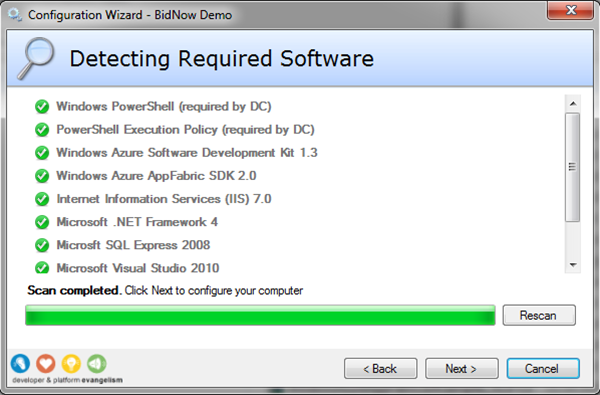
Click Next.
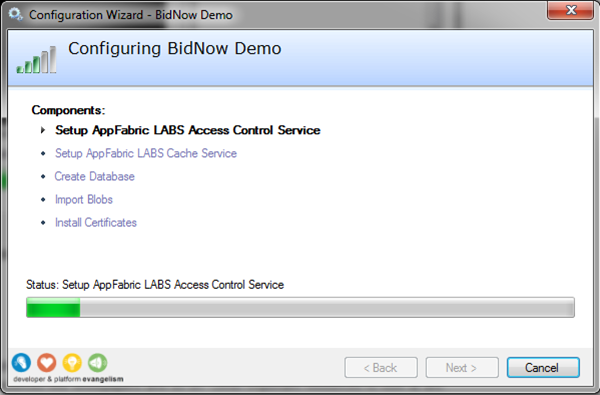
Configuration of BidNow Demo starts and will setup AppFabric Labs ACS and Cache, Database (SQL Azure, SQL Express or both), blobs and certificates. During the setup you will see a couple of screens like below, where you will have to type in namespace, secret keys and so on.
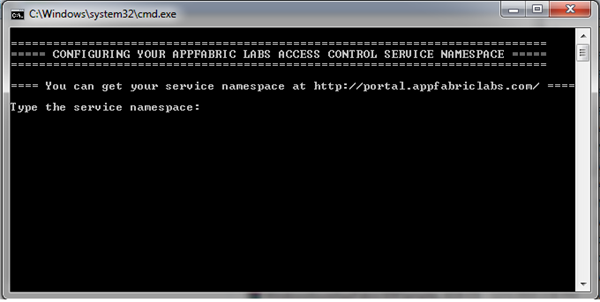
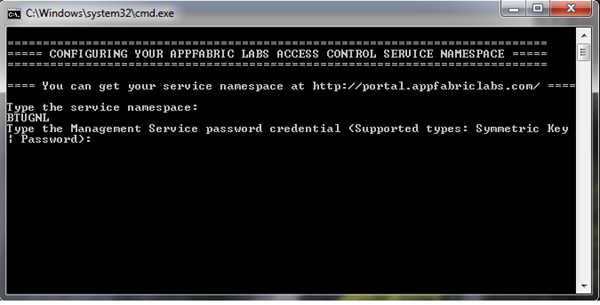
Steps to undertake and actions to perform are described in a wiki.
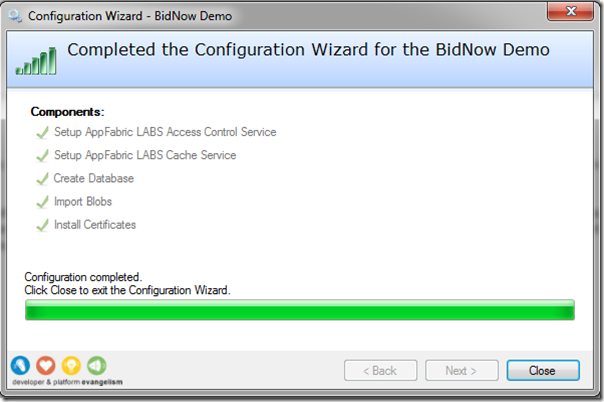
After configuration is completed code can be opened through visual studio and then it simply build and run.
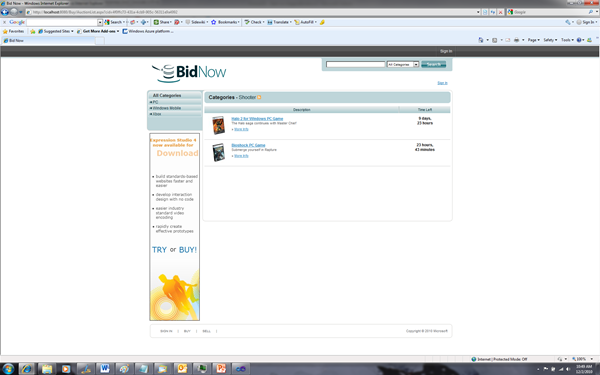
If you that familiar yet with Windows Azure you can start by going to Windows Azure Platform Portal, where you find lots of resources like whitepapers and so on. Other important resources to look at are:
Have fun and there are more samples to be found for Azure on code gallery.
Technorati:microsoft azure
by community-syndication | Dec 1, 2010 | BizTalk Community Blogs via Syndication
This video provides a walkthrough of the steps required to get the BidNow Sample up and running on your computer. BidNow is an online auction site that shows how our comprehensive set of cloud services can be used to develop a highly scalable consumer application. We have recently released a significant update that increases BidNows […]
by community-syndication | Dec 1, 2010 | BizTalk Community Blogs via Syndication
While connecting to a VPN via Windows 7 VPN I got the above error.
Here’s how to fix it:
1.Right click on CMD and run as Administrator
2.Type in the following commands
ipconfig /flushdns
netsh int ip reset
netsh winsock reset
3.close window
4.reboot computer
by community-syndication | Dec 1, 2010 | BizTalk Community Blogs via Syndication
I did a tech talk (an internal presentation for Tallan) on 11/30 with the intent to do a quick demonstration of the new features of ASP.NET MVC3. Unfortunately (or fortunately, depending on how you look at it), there’s are just too many new features to cover in a 45 minute presentation.
I’m writing a series of […]

by community-syndication | Dec 1, 2010 | BizTalk Community Blogs via Syndication
Storing SSO data in cache can be very useful in a low latency scenario. Performance of services can also be improved by caching configuration data such as a Status Codes table (which has business level exception status codes and descriptions). Using cache in SOA and BPM solutions is not new neither storing SSO data in […]
by community-syndication | Dec 1, 2010 | BizTalk Community Blogs via Syndication
Tomorrow BizTalk User Group will get together for some interesting sessions at BTUG Meeting. One can still sign up for it. The BTUG meetings are for architects, engineers and project managers, who are interested in and have experience working with Microsoft BizTalk Server.
BizTalk User Group (BTUG) aims to create a network of companies, which inspire each other and share knowledge. The purpose of the BTUG is to accelerate the learning effect on the application of new technology and the consequences for the organization.
The BTUG provides a platform for knowledge and experience exchange between users and the ability to make informal contacts.
Tomorrow the BTUG meeting will extensively dive into BizTalk 2010 and all Dutch BizTalk MVP’s will do a session:
BizTalk 2010, what’s new? (Randal van Splunteren and myself)
Extended and scalable integration through the cloud (Leveraging the Microsoft Application Platform and Windows Azure AppFabric to the max) (Gijsbert in ‘t Veld)
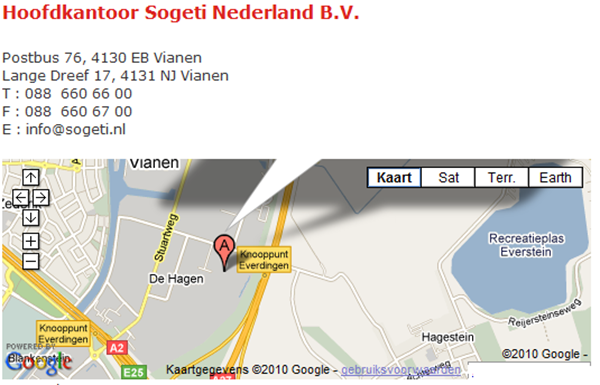
It will start at 16:00 at Sogeti (see below).
See you there!
Technorati: biztalk server 2010 appfabric



