by community-syndication | Dec 19, 2011 | BizTalk Community Blogs via Syndication
I've uploaded a new version of the bLogical.BizTalkManagement restore powershell commandlets originally posted by Mikael. The updates are minor and adress the parsing of filenames and cleanup of the code to get rid of some god intentions that never became more then intentions, aka unused code.
If you have no idea what I am talking about, feel free to read the original article and give them a try. We are using these heavily for customers instead of log shipping and it really makes the whole process of restoring your databases easy.
Blog Post by: Johan Hedberg
by community-syndication | Dec 18, 2011 | BizTalk Community Blogs via Syndication
In this blog post we are going look at how to manage routing in the new Azure ServiceBus EAI CTP.
As a scenario, I’m going to send a request for information (RFI) to some of my fellow MVP’s. To do that, I’m going to create a One-Way Xml Bridge, to receive the messages. After receiving the RFI message I tend to route it to one of three queues.
1. Create a ServiceBus project
If you haven’t already downloaded the SDK, you can do this here. After you’ve installed the SDK, you can sign in to the labs environment using a Windows Live ID.
Open Visual Studio 2010, and select Create Project. In the list of project templates, select ServiceBus, and Enterprise Application Integration. Give it a name and click Ok.
2. Create a Message Type
Right-click the project and select Add->New Item. At this time there are two types of artifacts you can add; Schemas and Maps. Select Schema and sett an appropriate name. In my case I set the name to RFI.xsd. Continue building up your schema. Notice, you don’t have to promote any nodes as you’d have to do in BizTalk.
3. Designing the Bridge
Double-click the BridgeConfiguration.bcs and drag a Xml One-Way Bridge from the toolbox to the canvas. This is going to be your entry point to your process, similar to a Receive Location in BizTalk. Set the name appropriately, and notice the Router Address which is going to be your endpoint in Azure ServiceBus.
4. Add Queues
As stated before, the incoming RFI message is going to be routed to any of the three queues. You might not your message relayed to a queue, and could there for use any of the other Destinations such as Relay– or External Service EndPoints. Either way, the principle of routing is the same.
Connect the Bridge with all Destinations.
5. Configure the Bridge
Next we’ll define the incoming message type(s). Double-click your Bridge (ReceiveRFI in my case). Click the plus button in the Message Types stage. Select the Message Type you created earlier, and click the arrow button on the right.
6. Enrich the Message
This is the interesting step, where we are going to promote some fields in the payload so that we can route on these in the next step.
First open your schema and select the node you care to use for routing (in my case Receive). Copy the Instance XPath from the Property window.
Then double-click the Bridge, select either of the Enrich stages, and then click the Property Definition button in the Property window. There are two Enrich stages, as you might be using a Transformation, in which case you might want to promote fields from either the original message or the transformed message.
For more information about transformations, have a look at Kent’s post.
Set the Type to XPath, and paste the XPath expression in the Identifier text box. Select the Message Type and set the name of the property. Finish be setting the data type and click the Add button (+). Close the dialog by clicking the Ok button.
7. Set the routing conditions
As you have promoted your property (or properties), you’re now ready to set the Filter Conditions on each of the Connectors. Select one of the selectors and type the Filter in the Property window. Eg. receiver=’SteefJan’ or customerId=1234.
8. Create the Queues
Before we deploy the solution, you need to create the queues. There are several tools for this, but with the samples comes a MessageReceiver project you can use.
Type MessageReceiver.exe <Your namespace> owner <Your issuer key> <Queue name> Create
After creating the queues verify they are created in the portal.
9. Deploy your solution
Right-click the project and select Deploy. Supply the secret.
10. Test the solution
Along with the MessageReceiver tool, you’ll find a MessageSender project as well. Just type:
MessageSender.exe <Your namespace> <Your issuer key> <Your endpoint> <Path to sample file> application/xml
Use the MessgeReceiver to get the messages from the queues:
HTH
Blog Post by: wmmihaa
by community-syndication | Dec 18, 2011 | BizTalk Community Blogs via Syndication
There are a lot of reasons why the 2011 holiday season is a great time to take a look at Azure development. There are a number of offers and releases that allow you to start to explore cloud-based development on the Microsoft platform, best of all; they are all pretty much free to take advantage of.
$0 Spending Limit on Azure Trial & MSDN Accounts
Ever since the introduction of billing for Windows Azure it has always been an issue for many developers wanting to learn Azure that, if you are not careful, you can easily run up charges on the trial accounts when going above the free quotas.
With the “$0 spending limit” available on 90 day trial and MSDN accounts Azure development developers can start to explore the Azure platform without fear of an unexpected bill at the end of the month. You will, however, have to enter credit-card details.
It is great to see this option available, I know it is something that developers have been clamoring for ever since billing was introduced on the platform. Hopefully this will be extended to a fixed-price limit on Azure billing at some point in the future.
Details of the trail offers are
here
.
No Charge for Azure Service Bus until April 2012
The Azure Service bus provides brokered and relayed messaging capabilities hosted in Windows Azure datacenters. Launched in CTP in 2007 under the name of “BizTalk Services”, then re-branded to “.NET Services”, “AppFabric Service Bus”, and now “Azure Service Bus” the messaging services are a great way to explore the capabilities of Azure when creating hybrid (part cloud, part on-premise) applications.
I’ve spent a lot of time exploring the brokered messaging capabilities of the service bus and am very impressed with the functionality provided. With four months of being above to use the services for free (data transfer charges still apply), now is a perfect time to gain some experience of using the technologies, or even create a small proof-of-concept application in your organization.
You may like to check out my free e-book on the brokered messaging capabilities of the service bus “The Developer’s Guide to AppFabric”. It’s available
here
.
As “AppFabric” has been dropped from these branding of the service bus I’ll be re-branding the title of the book in the next release.
Details of the offer are
here
.
CTP of Azure Service Bus Integration Services
If, like me, you have been following the long and winding roadmap of BizTalk Server, and want to get an early insight into what “BizTalk vNext” will look like, now is your chance.
The first CTP of Microsoft’s cloud-based integration capabilities has been released and is available to use in the AppFabric Labs environment. As the technology is in developer-preview mode, it’s free to use, no credit card required!
Details of the CTP are
here
.
by community-syndication | Dec 17, 2011 | BizTalk Community Blogs via Syndication
Ive been doing a little stuff with the Twitterize library and the twitter API.
I started unexpectedly getting a 401 unauthorized error when things had been working fine previously.
Eventually I tracked this down to be an issue with clock sync. I am using VM Ware fusion on Mac and when if suspended then resumed my VM the clock wasnt always in sync. When this was fixed it all works fine.
Note to self the way to change the VM is
http://kb.vmware.com/selfservice/microsites/search.do?language=en_US&cmd=displayKC&externalId=1021718
by community-syndication | Dec 16, 2011 | BizTalk Community Blogs via Syndication
I just finished reading new book on Microsoft BizTalk 2010 written by BizTalk colleagues Kent Weare, Richard Seroter, Thiago Almeida, Sergei Moukhnitski, and Carl Darski. There are many good books that explore core BizTalk features for beginners, intermediate, and advanced developers. This one stands out by the fact that it covers relatively less documented aspect of BizTalk development – integrating with different line of business applications. The subject is vast and diverse so attempt to fit it in one book is a challenge by itself.
The book opens with the chapter on WCF Adapters SDK which can be good introduction into the world of WCF based adapters. It explains high level design and idea of LOB adapters and WCF bindings. The chapter contains a simple application example that uses custom WCF adapter. While working through this exercise readers will get acquainted with adapter metadata, binding configuration, endpoint URI, SOAP action mapping, and other fundamental concepts of the WCF enabled adapters.
Next chapter explores probably the most frequently used and well-known of the WCF Adapters – WCF SQL Adapter. All features of this adapter including more advanced like typed polling, notification and debatching are covered in details with examples. It makes this chapter great practical WCF-SQL handbook for all levels from beginner to advanced user and an excellent addition to the MSDN documentation.
Then follow few chapters each dedicated to one specific LOB application integration: Microsoft Dynamics CRM, WCF SAP Adapter, SharePoint, Dynamics AX, and SalesForce. Every chapter has overview of the Line of Business application, its role in business processes, and then goes into detailed integration example with explanations, sample code, and screen shots.
Separate consideration deserves chapter on integration with Windows Azure Platform AppFabric. This is a new exciting feature of the BizTalk 2010 that expands its capabilities into the cloud based service bus solutions. This chapter alone makes the book worth having.
Overall, authors and editors has done a great job covering such wide and important area of BizTalk functionality. Sure, it’s impossible to go into very deep details and explore all intricacies of every LOB application in just one book. Yet this one is a very good starting point for any consultant in the field who has to deal with disparate systems integration on a daily basis.
by community-syndication | Dec 16, 2011 | BizTalk Community Blogs via Syndication
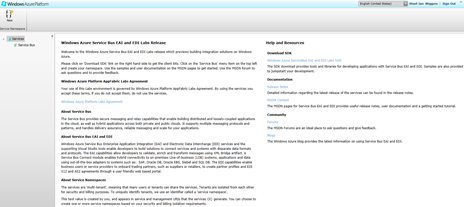
Microsoft today has put Windows Azure Service Bus EAI and EDI Labs on its Windows Azure Platform. These labs provides integration capabilities for the Windows Azure Platform to extend on-premises applications to the cloud, provides rich messaging endpoints on the cloud to process and transform the messages, and helps organizations integrate with disparate applications, both on cloud and on-premises. In other words, Service Bus EAI and EDI Labs provides common integration capabilities (e.g. bridges, transforms, B2B messaging) on Windows Azure Service Bus.
Below you find list of resources (taken from Windows Azure Service Bus EAI and EDI Labs – December 2011 Release page):
- Installing the Windows Azure Service Bus EAI and EDI Labs – December 2011
-
Supplies details about what is required to properly install and run Service Bus EAI and EDI Labs.
- Service Bus EAI and EDI Labs – Tutorials
-
Start learning the basics of developing Service Bus EAI and EDI Labs solutions using these short tutorials.
- Business to Business Messaging
-
Learn how Service Bus EAI and EDI Labs enables business-to-business messaging on Windows Azure
- Rich Messaging Endpoints
-
Learn about the basic concepts about of rich messaging endpoints and how to use them in Service Bus EAI and EDI Labs.
- Transforms
-
Learn how to use and configure transforms with rich messaging endpoints.
- Service Bus Connect
-
Learn how to use Service Bus Connect in an EAI application to extend the reach of cloud-based applications to on-premises LOB applications.
- Samples: Service Bus EAI and EDI Labs
-
Download the samples available for Service Bus EAI and EDI Labs.
This is great news for us BizTalk professionals and ones that are interested in integration capabilities in the cloud.
I can see the labs through my management portal:
Have fun.
by community-syndication | Dec 16, 2011 | BizTalk Community Blogs via Syndication
It’s always exciting when a new application you’ve worked on goes live. The last couple of weeks have seen the ‘soft’ launch of a new service offered by the UK government called ‘Tell Us Once’ (TUO). You can probably guess from the name what the service does. Currently, the service allows UK citizens to inform the government (as opposed to Register Officers, who must still be notified separately) just once of two types of ‘change-of-circumstance’ event; namely births and deaths. You can go, say, to your local authority contact centre, where an officer will work through a set of screens with you, collecting the information you wish to provide. Then, once the Submit button is clicked, that’s it! With your consent, the correct data sets are parcelled up and distributed to wherever they need to go – central and local government departments, public sector agencies such as the DVLA, Identity and Passport Service, etc. No need to write 50 letters!
With my colleagues at
SolidSoft
, I’m really proud to have been involved with the team that designed and developed this new service. For the past few years, we worked originally on the prototypes and pilots (there was more than one!). Over the last eighteen months or so, we have been engaged in building the national system, and development work in on-going. It’s been a journey! The idea is very simple, but as you can imagine, the realisation of that idea is rather more complex. Look for future enhancements to today’s service, with the ability to report events on-line from the comfort of your own home and the possible extension of the system to cover additional event types in future.
Interaction with government has just got a whole lot better for UK citizens, and we helped make that happen. It’s a pity that I don’t intend to have any more children (four is enough!), and I reallyhope I don’t have to report a death in the near future, but if I do, I’ll be beating a path to the door of my local council’s contact centre in order to ‘tell them once’.
See
http://www.guardian.co.uk/government-computing-network/2011/dec/16/tell-us-once-matt-briggs?utm_source=twitterfeed&utm_medium=twitter
http://www.guardian.co.uk/public-leaders-network/2011/nov/10/tell-us-once-birth-death
by community-syndication | Dec 16, 2011 | BizTalk Community Blogs via Syndication
Overview
I’ve been looking into a solution recently which has a series of remote nodes publishing events to a central node. The publishers have no logic, they just need to contact the central node and record that an event has happened. Off the back of that, the central node does some work inferring what the event means, and computing its relationship to a bunch of other events. Simple enough, but the solution needs to be scalable and make efficient use of its resources.
I started off building it around NServiceBus, but when I had a better understanding of the components and the physical architecture, decided on a different approach. The central node will most likely be an EC2 cluster; using NServiceBus, cluster nodes can communicate with each other’s queues, but the remote nodes would need a bridging mechanism to talk to the central node, and I’d rather have a consistent communication model. So I started rebuilding the service layer in WCF, but I wanted flexibility on how the central cluster nodes distributed work amongst themselves.
Solution
Briefly, I wanted a nice solution for this scenario: remote nodes will always talk to the central cluster over HTTP with a REST service; central nodes will distribute load amongst themselves as efficiently as they can. In a low-load situation, the node receiving the originating message should do all the work in the workflow. In a high-load situation, the node receiving the originating message should farm out work to the other nodes. EC2 will let you set up a nice load balancer, but the option to balance load between nodes OR within a node needs a bit more thought – i.e. when a cluster node receives an event published message, it can call the next service in the workflow either by remotely sending a WCF service request to the load balanced URL, or by executing the code locally.
This is actually very simple, and I’ve published a working example on my github code gallery: DistributedServiceSample. In the sample, all service calls in the central node are run through a generic service invoker:
Service
.Execute<
IComputeService
>(svc => svc.Compute(jobId));
The invoker either builds a WCF client proxy, or instantiates the service implementation locally, and makes the call. In the sample the logic for deciding whether to go remote or local is done in config, but this could be worked into something more complex based on current capacity etc. The sample also allows the invoker to decide whether to make a synchronous call, or farm the work out to an async task (again, through config).
Dependencies
Dynamically building a WCF client proxy is very simple, there are no dependencies outside .NET and you can leave all the endpoint configuration to the normal <serviceModel> config section. When the central node is in remote mode, it gets the proxy like this:
var factory = newChannelFactory<TService>(“*”);
service = factory.CreateChannel();
(The asterisk tells WCF to pull the client endpoint and binding from config based on the contract name and assumes there is only one client entry per contract).
When in local mode, it’s a little bit more involved to do it dynamically. In the sample I have a marker interface (IService) to denote a service contract. In the service application startup I register all service implementations in an IoC container (a wrapper around Unity), and then the central node gets the service like this:
service =
Container.Get<TService>();
The actual method call on the service is done through functions or actions (depending on whether the service returns a response), so it’s all typesafe.
Running the sample
Build the sample locally, and open http://localhost/DistributedServiceSample.Services/JobService.svc in WCFStorm or soapUI. Call CreateJob with whatever parameter you like, and you will see output similar to this in DebugView:
JobService.CreateJob called with Name: fhwfiy
Service.GetExecutionMode using *Synchronous* for service: DistributedServiceSample.Contracts.Services.IJobService
Service.GetServiceLocation using *Remote* for service: DistributedServiceSample.Contracts.Services.IJobService
JobService.SaveJob called with jobId: fhwfiy
Service.GetExecutionMode using *AsynchronousIgnoreResponse* for service: DistributedServiceSample.Contracts.Services.IComputeService
Service.GetServiceLocation using *Local* for service: DistributedServiceSample.Contracts.Services.IComputeService
ComputeService.Compute called with jobId: 621849676
The workflow is that CreateJob triggers a SaveJob call, which in turn triggers a Compute call. The service decides whether each downstream call will be made locally or remotely, synchronously or asynchronously based on the contents of the <distributedservicesample.invoker> section in Web.config.
Extensions
The obvious extension is to add an operation name to the config settings, so different operations within the same service can be executed in different ways, which is pretty straightforward. More complex is the idea of dynamically deciding whether to make a local or a remote call. The logic for the decision is all isolated, so it would be a case of swapping out the config stuffwith some environment checks, so calls were made locally unless CPU or private bytes or current connections were above a threshold.
by community-syndication | Dec 15, 2011 | BizTalk Community Blogs via Syndication
The WCF-SQL adapter provides support for multiple inserts through the Consume Adapter Service feature:
However, sometimes you might want to validate the data on the SQL side before before making the insert. For instance, if you have a collection of Customers, where some of them might already exist in the database, and should only be updated. In such a case, you’d have to first make a database lookup, to determine the state of the Customer and then make either an insert or update.
In such a case, using user-defined table types might be your solution. User-defined tables are similar to ordinary tables, but can be passed in as a parameter.
In my sample, I have a Contacts table, and I’m receiving a collection of Persons where some entities are new and some are to be updated.
Create the User-Defined Table Type
The user-defied table type will serve as our contract.
CREATE TYPE [dbo].[InsertContactRequest] AS TABLE
(
    [PersonNo] [varchar](50) NOT NULL,
    [FirstName] [varchar](50) NOT NULL,
    [LastName] [varchar](50) NOT NULL,
    [Phone] [varchar](50) NOT NULL,
    PRIMARY KEY CLUSTERED ([PersonNo] ASC)WITH (IGNORE_DUP_KEY = OFF)
)
Create the Stored Procedure
The stored procedure takes the user-defined table type as a parameter (@insertContactRequest), then updates all existing rows and inserting all new once.
CREATE PROCEDURE [dbo].[sp_InsertContacts] @insertContactRequest InsertContactRequest READONLY
AS
BEGIN

    UPDATE dbo.Contacts
    SET Phone = r.Phone
    FROM dbo.Contacts c
    JOIN @insertContactRequest r on r.PersonNo = c.PersonNo

    INSERT INTO dbo.Contacts (PersonNo, FirstName, LastName, Phone)
    SELECT r.PersonNo, r.FirstName, r.LastName, r.Phone
    FROM    @insertContactRequest r
    WHERE    r.PersonNo not in(SELECT PersonNo FROM dbo.Contacts)

END
Generate BizTalk artefacs
1. In you Visual Studio, right-click the BizTalk project and select Add->Add Generated Items. Select Consume Adapter Service.
2. In the Consume Adapter Service dialog, click the configure button to set the credentials. Click Ok, and then Connect.
3. In the tree-view, select Strongly Typed Procedures, and select your stored procedure in the right pane. Click Add and Ok to generate the schemas.
4. Make your transformation, and complete your solution.
Here is the sample source.
HTH
(Kudos Daniel %u00d6stberg)
Blog Post by: wmmihaa
by community-syndication | Dec 14, 2011 | BizTalk Community Blogs via Syndication
”There is no Hello World in BizTalk”
– Dan Rosanova (author of the book)
I really want to like this book. Right off the bat the title is awesome with a capital A. Right up my alley as it were. For a long time there has been a lack of literature about the more practical details around patterns and anti-patterns and how they are implemented in BizTalk. I am not saying that there has not been anything about patterns, there is a ton of them, but nothing really about how to implement them in a BizTalk solution, and how to do that in practice. Enter this book.
Oh, how I would like to like his book. I am however somewhat disappointed, but you should definitely buy it.
Insightful author
There are chapters and headings that underline how very insightful the author is about BizTalk and its implementation. Headers that are very helpful in summarizing all the disparate definitions that you might already have about BizTalk. One particular header is “When to use BizTalk”, which does the best job ever to answer that question. Another is “Visual Studio solution structure” that explains in very practical and well-grounded points how the author feels the solution has to be structured. In my opinion; if you do not already have a solution structure document, use this one.
Author style
The text oozes with practical knowledge and a lot of humor as well. There is no doubt in my mind what so ever that the author, does not only know what he is talking about, but also that there is quite a lot that has been left out of the book in order to shorten the text. He does a very good job of taking a practical approach to development and architecture. He makes use of the same example solution throughout the book. This makes you feel for the solution as you might do for a real life solution. You started it and have seen it grow from a mere file-copy solution to being a core process handler in the enterprise. Another good point in doing this is that he shows the importance of doing the architecture right from the start. To really think ahead and figure out what might be next in order not to “paint yourself into a corner”. I think there is too little of this in the book. I would have liked more of a discussion about what might be the best solution within the current context. As all of you know; the problem usually is not to find a solution, but to find the best one within a certain context. That is the beauty of BizTalk in my opinion.
Also, once I would like to read a BizTalk book that assumes I know BizTalk and can tell the difference between a pipeline and a map, and know how to use custom xslt. This book does not, and spends few too many pages about the basics. I think this is due to the editor or publisher. They think you need that in order to make the book complete. I would say you do not. Anyone that would pick up this book feels confident about the basics. The title says so.
Practical approach
The author takes a very practical approach, and together with the code supplied you can easily follow along and learn hands on as well. Once again I would like to point out that some parts might focus too much on the practical but some people really like that so it is just an opinion.
Then there is another thing about the book as a whole. Due to the fact that the author wants you to see the solution grow as it might in a real life scenario, the disposition of the book is partly totally off the wall. The same chapter covers Unit testing and BAM, and another mixes configuring WCF-receive and BRE.
So tell me, what should I do?
So, bottom line: Should you buy this book? Of course you should! The technical aspect of it together with the experience of the author is an opportunity you should not miss. Another point I would like to reiterate is that it fills a gap in the integration literature and I would especially recommend it to people that have worked with BizTalk for two years and changed projects during that time. It might be time to move ahead and have an option during the next ICC meeting.
Though I would like to discuss certain parts about solution structure with the author, there are a lot of tips and tricks I will use in the future.
More info on the author: blog, twitter.
Blog Post by: Mikael Sand

