by community-syndication | Mar 9, 2012 | BizTalk Community Blogs via Syndication
I’m finally back home after a great trip to Seattle and to see some fellow VTSPs from
all over the globe. Very switched on bunch.
I was fortunate enough to be asked to present and with Scotty at
the demo controls, we steered a pretty good session.
Thanks to ’all y-all’ whom was in the session and I hope you got as much out of it
as I did.
Grab the Public Version of the slide Deck – HERE.
So as promised on the advice of John Brockmeyer here’s some current limitations of
the Azure ’Integration’ Services.
Blog Post by: Mick Badran
by community-syndication | Mar 9, 2012 | BizTalk Community Blogs via Syndication
Easy but effective
<script type=’text/javascript’>
var msg = “your big title goes here”;
msg = ” ….. ” + msg;pos = 0;
function scrollTitle() {
document.title = msg.substring(pos, msg.length) + msg.substring(0, pos); pos++;
if (pos > msg.length) pos = 0
window.setTimeout(“scrollTitle()”,300);
}
scrollTitle();
</script>
Blog Post by: Mick Badran
by community-syndication | Mar 9, 2012 | BizTalk Community Blogs via Syndication
When using ESB Toolkit’s Exception Management WCF service in .NET Applications to submit faults to the Esb Management Portal. You might see the below errors in the event log of the server where BizTalk and Esb Toolkit are installed
“A message sent to adapter “SQL” on send port “ALL.Exceptions” with URI “SQL://<server name>/EsbExceptionDb/” is suspended.
Error details: There was a failure executing the send pipeline: “Microsoft.Practices.ESB.ExceptionHandling.Pipelines.ESBFaultProcessor, Microsoft.Practices.ESB.ExceptionHandling.Pipelines, Version=2.1.0.0, Culture=neutral, PublicKeyToken=31bf3856ad364e35” Source: “ESB BAM Tracker” Send Port: “ALL.Exceptions” URI: “SQL://<servername>/EsbExceptionDb/” Reason: Error 125006: The BAM Activity Id could not be found in the Fault message using the xpath : xpath
MessageId: {7D272E10-5655-4063-8D70-D1AB6ABBFDE9}
InstanceID: {B65710D2-2F2B-4A4F-A38B-77F90978E1F8}“
and
“There was a failure executing the send pipeline: “Microsoft.Practices.ESB.ExceptionHandling.Pipelines.ESBFaultProcessor, Microsoft.Practices.ESB.ExceptionHandling.Pipelines, Version=2.1.0.0, Culture=neutral, PublicKeyToken=31bf3856ad364e35” Source: “ESB BAM Tracker” Send Port: “ALL.Exceptions” URI: “SQL://<server name>/EsbExceptionDb/” Reason: Error 125006: The BAM Activity Id could not be found in the Fault message using the xpath : xpath“.
If you see the above errors, all you have to do is,
- Open the BizTalk Admin console
- Navigate to the application called “Microsoft.Practices.ESB”
- In the application navigate to the send port called “All.Exceptions”
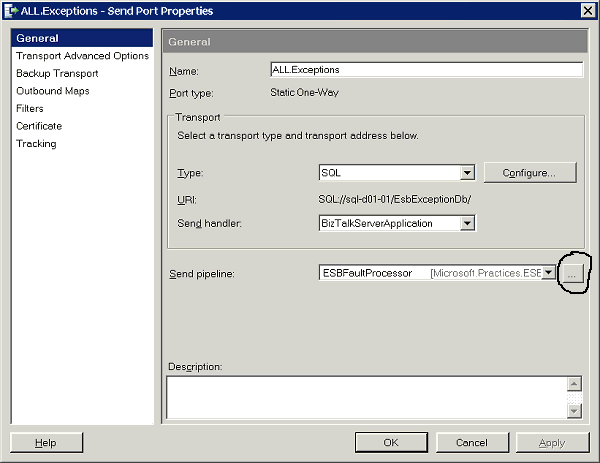
- Open properties of the send port, click the ellipses against the Send Pipeline called “ESBFaultProcessor”. The ellipses in highlighted in the image below
5. After clicking the ellipses, under the “Component(2): ESB BAM Tracker”, Make Enabled “False”. It is set to “True” by default. As highlightd in the below image
6. Click Ok twice and restart the host instances
The above mentioned steps should fix the errors, and you will be able to use ESB Toolkit’s Exception Management WCF service in .NET Applications to submit faults to the Esb Management Portal. Happy BizTalking!!!

by community-syndication | Mar 9, 2012 | BizTalk Community Blogs via Syndication
Lately one of the questions asked on BizTalk Server Forums intrigued me. The question was how one could archive a message including its message context.
Archiving received message
As soon as a message reaches BizTalk it can go through one of the default pipelines (XMLReceive,PassThruReceive) and a message context is added to incoming message.
The XMLReceive pipeline has a XmlDisassembler pipeline component on the disassembling stage.
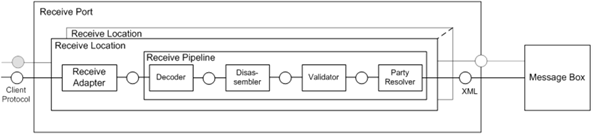
Whenever an Xml message is received via the XmlReceive pipeline the XmlDisassembler will do the following tasks:
- Promote the “MessageType” context property by taking the combination of TargetNamespace and Root Element in the format of: Targetnamespace#RootElement. So one of context properties BizTalk will set (promote) is the MessageType.
| Name: MessageType – Namespace: http://schemas.microsoft.com/BizTalk/2003/system-properties – http://BizTalk.Archiving.BankTransaction#Transaction |
- Remove Envelopes and disassemble the interchanges
- Promote the content properties from interchange and individual document into message context based on the configured distinguished fields and promoted properties.
I will discuss here a custom disassembler pipeline component that will promote the “MessageType” context property and archive the message context and body to file. It will not perform the other two default actions by XmlDisassembler pipeline component.
Pipeline component is targeted for disassembler stage of the receive pipeline. The component category is CATID_DisassemblingParser will be set above the class amongst other attributes. Since the component is targeted at the disassembling stage the IDisassemblerComponent needs to be implemented. This interface has two methods, Disassemble and GetNext. In the Disassemble method you will find the implementation for archiving the received message.
        ///
        /// Implements IDisassemblerComponent.Disassemble method.
        ///
        ///

Pipeline context
        ///

Input message.
        /// Message
        ///
        /// IComponent.Execute method is used to initiate
        /// the processing of the message in pipeline component.
        ///
        public void Disassemble(IPipelineContext pContext, IBaseMessage pInMsg)
        {
            //Trace
            System.Diagnostics.Debug.WriteLine("1.  Pipeline Disassemble Stage");

            //Create XmlDocument object
            XmlDocument xmlDoc = new XmlDocument();

            //Create a copy of the message
            IBaseMessage archiveMessage = pInMsg;

            //Trace
            System.Diagnostics.Debug.WriteLine("2.  Call GetMessagePayLoad()");

            //Get Message PayLoad
            xmlDoc = GetMessagePayLoad(archiveMessage);

            //Trace
            System.Diagnostics.Debug.WriteLine("3.  Message PayLoad :" + xmlDoc.OuterXml);

            // Promote MessageType in order to the Biztalk to have a unique key for evaluating the subscription
            archiveMessage.Context.Promote("MessageType", "http://schemas.microsoft.com/BizTalk/2003/system-properties", xmlDoc.DocumentElement.NamespaceURI + "#" + xmlDoc.DocumentElement.LocalName.ToString());

            //Debug
            System.Diagnostics.Trace.WriteLine("4. Call ReadContextProperties");

            //Get the context properties and assign them to contextProperties  archiveMessage
            string contextProperties = ReadContextProperties(archiveMessage);

            //Debug
            System.Diagnostics.Trace.WriteLine("5. Context Properties: " + contextProperties);

            //Get the message content (BodyPart)
            string messageBody = xmlDoc.OuterXml;

            //Debug
            System.Diagnostics.Trace.WriteLine("6. Message Body: " + messageBody);

            //Debug
            System.Diagnostics.Trace.WriteLine("7. Write to output file");

            //Write output
            using (StreamWriter outfile = new StreamWriter(_ArchiveLocation + System.Guid.NewGuid().ToString() + "_Message" + ".txt"))
            {

                //Debug
                System.Diagnostics.Trace.WriteLine("8. File Location :" + _ArchiveLocation);

                outfile.Write(contextProperties + " " + Environment.NewLine + messageBody);

                //Debug
                System.Diagnostics.Trace.WriteLine("9. Write to output file");
            }

            //Debug
            System.Diagnostics.Trace.WriteLine("10. Pipeline Disassemble Stage Exit");


            //Return orginal message
            IBaseMessage outMessage;
            outMessage = pContext.GetMessageFactory().CreateMessage();
            outMessage.AddPart("Body", pContext.GetMessageFactory().CreateMessagePart(), true);
            IBaseMessagePart bodyPart = pInMsg.BodyPart;
            Stream originalStream = bodyPart.GetOriginalDataStream();
            originalStream.Position = 0;
            outMessage.BodyPart.Data = originalStream;

            outMessage.Context = PipelineUtil.CloneMessageContext(pInMsg.Context);

            _qOutMessages.Enqueue(outMessage);

            //Return orginal message to queue
            _qOutMessages.Enqueue(outMessage);
        }

        ///
        /// Default method
        ///
        ///

Context
        /// null
        public IBaseMessage GetNext(IPipelineContext pContext)
        {
            if (_qOutMessages.Count > 0)
            {
                IBaseMessage msg = (IBaseMessage)_qOutMessages.Dequeue();
                return msg;
            }
            else
                return null;

        }

        ///
        /// Read the context properties of the message
        ///
        ///

IBaseMessage archiveMessage
        /// string containing all context properties
        private string ReadContextProperties(IBaseMessage archiveMessage)
        {
            string name;
            string nmspace;
            string contextItems = "";

            for (int x = 0; x < archiveMessage.Context.CountProperties; x++)
            {
                archiveMessage.Context.ReadAt(x, out name, out nmspace);
                string value = archiveMessage.Context.Read(name, nmspace).ToString();
                contextItems += "Name: " + name + " - " + "Namespace: " + nmspace + " - " + value + "\r\n";
            }

            return contextItems;
        }

        ///
        /// Method extract message into XMLDocument
        ///
        ///

IBaseMessage
        /// XML Document
        private XmlDocument GetMessagePayLoad(IBaseMessage archiveMessage)
        {
            IBaseMessagePart bodyPart = archiveMessage.BodyPart;
            Stream originalStream = bodyPart.GetOriginalDataStream();

            XmlDocument XMlDoc = new XmlDocument();
            XMlDoc.Load(originalStream);

            return XMlDoc;
        }
The complete code can be found through MSDN Code Gallery here.
Buy versus Build
This is just a custom solution that took me a couple hours to develop and test. To add more functionality would mean more development work. A custom solution can bring a tremendous amount of flexibility and power. However it will also cost a fair amount of time to develop and some more time to maintain it (i.e. changes). An alternative can be buying one of the off-shelve products for archiving BizTalk messages like BizTalk Message Archiving Pipeline Component. This product has a great deal of features, offers support and has a license model.
BizTalk Tracking for Archiving
BizTalk offers tracking capabilities, which can be used to archive messages for a short period of time. Basically BizTalk tracking is created in such a way that you can use tracking for troubleshooting purposes not really for archiving. You can use tracking for archiving purposes, but then you need to be aware of fact that you have to configure the tracking and purging BizTalk database job correctly and move your tracking data! Why the job is so important is clearly explained in MSDN Archiving and purging the BizTalk Tracking Database:
As BizTalk Server processes more and more data on your system, the BizTalk Tracking (BizTalkDTADb) database continues to grow in size. Unchecked growth decreases system performance and may generate errors in the Tracking Data Decode Service (TDDS). In addition to general tracking data, tracked messages can also accumulate in the MessageBox database, causing poor disk performance.
By placing the backups somewhere else you can later on extract tracked messages from it. Tracked messages are compressed in BizTalk tracking database and you can extract these programmatically. Thiago Almeida has written post on how to do that. So again you need a custom solution to view the message body and its context.
You can use BizTalk tracking for archiving purposes, yet you need to offload the data from time to time to another another database. Retention on BizTalk databases is limited, because of the growth of data that eventually will impact BizTalk Server performance. In my personal opinion (view) I would not use BizTalk tracking for archiving purposes.
Archiving send message
In this post you have seen the implementation of the receive side of archiving a message. At send side a similar process can be performed to archive the message that is send by BizTalk to another system, application or service. Normally when a message is send by BizTalk, one of the default pipelines (XMLSend, PassThruSend) is used. With the XmlSend pipeline the reverse of what in a XmlReceive pipeline happens. The XMLSend has a XmlAssembler component in the Assemble stage. Whenever an Xml message is send via the XMLSend pipeline the XmlAssembler will do the following tasks:
- XML Assembler Builds envelopes as needed and appends XML messages within the envelope.
- Populates content properties on the message instance and envelopes.
The custom assembler component will neither of these, it will only archive the message to file. Pipeline component is targeted for assembler stage of the send pipeline. The component category is CATID_AssemblingParser will be set above the class amongst other attributes.
[ComponentCategory(CategoryTypes.CATID_PipelineComponent)]
[ComponentCategory(CategoryTypes.CATID_AssemblingSerializer)]
[System.Runtime.InteropServices.Guid(“728609D1-8282-4D73-B4D3-4792D6580537”)] |
Since the component is targeted assembling stage the IAssemblerComponent needs to be implemented. This interface has two methods, Assemble and AddDocument. In the AddDocument method you will find the implementation for archiving the send message.
        ///


        /// Implements IAssemblerComponent.Assemble method.
        ///
        ///

Pipeline context
        /// Message
        ///
        /// IComponent.Assemble method is used to
        ///
        public IBaseMessage Assemble(IPipelineContext pipelineContext)
        {
            if (_qOutMessages.Count > 0)
            {
                IBaseMessage msg = (IBaseMessage)_qOutMessages.Dequeue();
                return msg;
            }
            else
                return null;
        }

        ///
        /// IAssembler.AddDocument Method
        ///
        ///

Pipeline context
        ///

Message send out
        public void AddDocument(IPipelineContext pContext, IBaseMessage pInMsg)
        {
            //Trace
            System.Diagnostics.Debug.WriteLine("1.  Pipeline Assemble Stage");

            //Create XmlDocument object
            XmlDocument xmlDoc = new XmlDocument();

            //Create a copy of the message
            IBaseMessage archiveMessage = pInMsg;

            //Trace
            System.Diagnostics.Debug.WriteLine("2.  Call GetMessagePayLoad()");

            //Get Message PayLoad
            xmlDoc = GetMessagePayLoad(archiveMessage);

            //Trace
            System.Diagnostics.Debug.WriteLine("3.  Message PayLoad :" + xmlDoc.OuterXml);

            //Debug
            System.Diagnostics.Trace.WriteLine("4. Call ReadContextProperties");

            //Get the context properties and assign them to contextProperties  archiveMessage
            string contextProperties = ReadContextProperties(archiveMessage);

            //Debug
            System.Diagnostics.Trace.WriteLine("5. Context Properties: " + contextProperties);

            //Get the message content (BodyPart)
            string messageBody = xmlDoc.OuterXml;

            //Debug
            System.Diagnostics.Trace.WriteLine("6. Message Body: " + messageBody);

            //Debug
            System.Diagnostics.Trace.WriteLine("7. Write to output file");

            //Write output
            using (StreamWriter outfile = new StreamWriter(_ArchiveLocation + System.Guid.NewGuid().ToString() + "_Message" + ".txt"))
            {

                //Debug
                System.Diagnostics.Trace.WriteLine("8. File Location :" + _ArchiveLocation);

                outfile.Write(contextProperties + " " + Environment.NewLine + messageBody);

                //Debug
                System.Diagnostics.Trace.WriteLine("9. Write to output file");
            }

            //Debug
            System.Diagnostics.Trace.WriteLine("10. Pipeline Disassemble Stage Exit");

            //Return orginal message
            IBaseMessage outMessage;
            outMessage = pContext.GetMessageFactory().CreateMessage();
            outMessage.AddPart ("Body", pContext.GetMessageFactory().CreateMessagePart(), true);
            IBaseMessagePart bodyPart = pInMsg.BodyPart;
            Stream originalStream = bodyPart.GetOriginalDataStream();
            originalStream.Position = 0;
            outMessage.BodyPart.Data = originalStream;

            outMessage.Context = PipelineUtil.CloneMessageContext(pInMsg.Context);

            _qOutMessages.Enqueue(outMessage);
        }
The complete code can be found through MSDN Code Gallery here.
Conclusion
This is a very basic and straight forward custom solution to archive messages going in and out of BizTalk Server. It can be leveraged to create a more sophisticated archiving solution. There are however some considerations that have to be taken into account.
- When you expect a high volume of messages flowing in and out of BizTalk a lot of disk I/O will be the result when using these pipelines for archiving messages. So basically a high disk contention can occur when writing archived messages to same disk as where the BizTalk instance resides. A good approach would be having the archived messages stored on a separate dedicated disk.
- This solution shows writing archived messages to file, yet you can also choose to store them in a database or send the archived messages to a queue where they are picked up to be stored elsewhere. In the end you have to decide where you want your archived messages stored, for how long (retention) and possibly how to retrieve them if you want to look up a certain archived message later on. The latter will be rather difficult when having archived messages on file.
- Another thing you have to consider is data inside the messages. Is it data everyone can see or is sensitive data? Storing the files either on file or in database that easily accessible by others may not be a good option.
Having a solid, robust archiving solution in place for your BizTalk messages is an easy walk in the park. You’ll need a good design up front that is fit for purpose. I hope that with this post you have some food for thought.
by community-syndication | Mar 9, 2012 | BizTalk Community Blogs via Syndication
Microsoft states to developers using Azure that one can build applications using any language, tool or framework. This blog post will show you how to deploy a Spring application on an Azure cloud. Our first step will be to install a Jetty instance on to the cloud, and then we’ll import jars and do any […]
Blog Post by: Richard Krajunus
by community-syndication | Mar 9, 2012 | BizTalk Community Blogs via Syndication
If you’ve been wondering where I am been – I’ve been putting down my thoughts about HTML5 development with native mobile apps – and its now live at Pluralsight! http://www.pluralsight-training.net/microsoft/Courses/TableOfContents?courseName=native-mobile-apps-with-html5 If you want to try it out you can start … Continue reading →
Blog Post by: jon

by community-syndication | Mar 8, 2012 | BizTalk Community Blogs via Syndication
There is a great article posted by Microsoft which explains how BizTalk can be configured to call a ReST service. You can find it here. Althought this article is based on BizTalk 2010 (.net 4.0), I have tested this with BizTalk 2009 (.net 3.5) and it works. Check it out!
Blog Post by: DipeshA
by community-syndication | Mar 8, 2012 | BizTalk Community Blogs via Syndication
The session about server side JavaScript is available online with its slides and its video.
Here are the links (NB: the content is in French) |
La session “JavaScript aussi sur le serveur et jusque dans le cloud?” est disponible en ligne |
http://aka.ms/wd3afq
| JavaScript becomes more and more important and Microsoft makes its execution very efficient. This session is about the use cases of this language on the server side on the Microsoft Platform. This will be shown with Node.js but also Hadoop Map/Reduce on Windows Server and Windows Azure. |
JavaScript prend de plus en plus d’importance et Microsoft rend son ex%u00e9cution tr%u00e8s efficace. Nous verrons dans cette session les cas d’utilisation de ce langage sur la plateforme Microsoft au niveau du serveur que ce soit par exemple avec Node.js ou Hadoop Map/Reduce sur Windows Server et Windows Azure.
|
Benjamin
Blog Post by: Benjamin GUINEBERTIERE



