by community-syndication | Mar 28, 2012 | BizTalk Community Blogs via Syndication
I generally try to write a blog each month about something I have been doing around BizTalk but lately I have been doing more and more work outside of the BizTalk world and I have not written anything. I have shifted to a new role in the company I work for, where I now give […]
Blog Post by: mbrimble
by community-syndication | Mar 28, 2012 | BizTalk Community Blogs via Syndication
For the last decade, I have repeatedly, in my imitable
Microsoft fan boy style, offered an alternative view to commonly held beliefs
about Microsoft’s stance on open source licensing. In earlier times, leading figures in
Microsoft were very vocal in resisting the idea that commercial licensing is
outmoded or morally reprehensible. Many
people interpreted this as all-out corporate opposition to open source
licensing. I never read it that way. It
is true that I’ve met individual employees of Microsoft who are antagonistic
towards FOSS (free and open source software), but I’ve met more who are
supportive or at least neutral on the subject.
In any case, individual attitudes of employees don’t necessarily reflect
a corporate stance. The strongest
opposition I’ve encountered has actually come from outside the company. It’s not a charitable thought, but I
sometimes wonder if there are people in the .NET community who are opposed to
FOSS simply because they believe, erroneously, that Microsoft is opposed.
Here, for what it is worth, are the points I’ve repeated
endlessly over the years and which have often been received with quizzical scepticism.
a) A decade ago,
Microsoft’s big problem was not FOSS per se, or even with copyleft. The thing which really kept them awake at
night was the fear that one day, someone might find, deep in the heart of the
Windows code base, some code that should not be there and which was published
under GPL. The likelihood of this ever
happening has long since faded away, but there was a time when MS was running
scared. I suspect this is why they held
out for a while from making Windows source code open to inspection. Nowadays, as an MVP, I am positively
encouraged to ask to see Windows source.
b) Microsoft has
never opposed the open source community.
They have had problems with specific people and organisations in the
FOSS community. Back in the 1990s, Richard
Stallman gave time and energy to a successful campaign to launch antitrust
proceedings against Microsoft. In more
recent times, the negative attitude of certain people to Microsoft’s submission
of two FOSS licences to the OSI (both of which have long since been accepted),
and the mad scramble to try to find any argument, however tenuous, to block their
submission was not, let us say, edifying.
c) Microsoft has never, to my knowledge, written off the
FOSS model. They certainly don’t agree
that more traditional forms of licensing are inappropriate or immoral, and
they’ve always been prepared to say so.
One reason why it was so hard to convince people that
Microsoft is not rabidly antagonistic towards FOSS licensing is that so many
people think they have no involvement in open source. A decade ago, there was virtually no evidence
of any such involvement. However, that
was a long time ago. Quietly over the
years, Microsoft has got on with the job of working out how to make use of FOSS
licensing and how to support the FOSS community. For example, as well as making increasingly
extensive use of Github, they run an important FOSS forge (CodePlex) on which
they, themselves, host many hundreds of distinct projects. The total count may even be in the thousands
now. I suspect there is a limit of about
500 records on CodePlex searches because, for the past few years, whenever I
search for Microsoft-specific projects on CodePlex, I always get approx. 500
hits. Admittedly, a large volume of the
stuff they publish under FOSS licences amounts to code samples, but many of
those ‘samples’ have grown into useful and fully featured frameworks, libraries
and tools.
All this is leading up to the observation that yesterday’s
announcement by Scott Guthrie marks a significant milestone and should not go
unnoticed. If you missed it, let me
summarise. From the first release of
.NET, Microsoft has offered a web development framework called ASP.NET. The core libraries are included in the .NET
framework which is released free of charge, but which is not open source. However, in recent years, the number of
libraries that constitute ASP.NET have grown considerably. Today, most professional ASP.NET web
development exploits the ASP.NET MVC framework.
This, together with several other important parts of the ASP.NET
technology stack, is released on CodePlex
under the Apache 2.0 licence. Hence,
today, a huge swathe of web development on the .NET/Azure platform relies
four-square on the use of FOSS frameworks and libraries.
Yesterday, Scott Guthrie announced
the next stage of ASP.NET’s journey towards FOSS nirvana. This involves extending ASP.NET’s FOSS stack
to include Web API and the MVC Razor view engine which is rapidly becoming the
de facto ‘standard’ for building web pages in ASP.NET. However, perhaps the more important
announcement is that the ASP.NET team will now accept and review contributions
from the community. Scott points out
that this model is already in place elsewhere in Microsoft, and specifically draws
attention to development of the Windows Azure SDKs. These SDKs are central to Azure development. The .NET and Java SDKs are published under
Apache 2.0 on Github and
Microsoft is open to community contributions.
Accepting contributions is a more profound move than simply releasing
code under FOSS licensing. It means that
Microsoft is wholeheartedly moving towards a full-blooded open source approach
for future evolution of some of their central and most widely used .NET and
Azure frameworks and libraries. In
conjunction with Scott’s announcement, Microsoft has also released Git support
for CodePlex (at long last!) and, perhaps more importantly, announced
significant new investment in their own FOSS forge.
Here at SolidSoft we have several reasons to be very
interested in Scott’s announcement. I’ll draw attention to one of them. Earlier this year we wrote the initial
version of a new UK Government web application called CloudStore. CloudStore provides a way for local and
central government to discover and purchase applications and services. We wrote
the web site using ASP.NET MVC which is FOSS.
However, this point has been lost on the ladies and gentlemen of the
press and, I suspect, on some of the decision makers on the government
side. They announced a few weeks ago
that future versions of CloudStore will move to a FOSS framework, clearly
oblivious of the fact that it is already built on a FOSS framework. We are, it is fair to say, mildly irked by
the uniformed and badly out-of-date assumption that “if it is Microsoft, it
can’t be FOSS”. Old prejudices live on.
by community-syndication | Mar 28, 2012 | BizTalk Community Blogs via Syndication
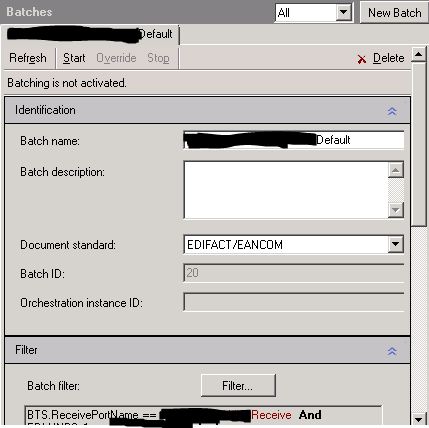
If you have been working with BizTalk and EDI Batches you would most likely have run in to problems with starting and stopping EDI Batches as this require you to go into a screen on the party to start and stop the EDI batch:
If you have a lot of EDI parties with batches on them then this is a big job to do if you need to import bindings as EDI batches must not be running when you import bindings with party information. There is an unsupported way around this.
When you press the start or the stop button you are sending a row into the PAM_CONTROL table in the BizTalk management database. And the BizTalk EDI Application have a receive location that looks for data in the table (through a stored procedure). So with a little bit of SQL magic we can stop every EDI batch that is running in the BizTalk Server:
— Stop EDI Batches
INSERT INTO [BizTalkMgmtDb].[dbo].[PAM_Control]
([DestinationParty]
,[EdiMessageType]
,[ActionType]
,[ActionDateTime]
,[UsedOnce]
,[BatchId]
,[BatchName]
,[DestinationPartyName])
SELECT edi.PartyId as ‘DestinationParty’
,[EdiMessageType]
,’EdiBatchTerminate’ as ‘ActionType’ –EdiBatchActivate
,GetDate() as ‘ActionDateTime’
,0 as ‘UsedOnce’
,edi.[BatchId]
,[BatchName]
,p.nvcName as ‘DestinationPartyName’
FROM EdiPartnerBatchSchedule edi inner join bts_party p
on edi.PartyId = p.nID
inner join PAM_Batching_Log pam on edi.PartyId = pam.PartyId and edi.BatchId = pam.BatchId
And if we want to start the batches again we can use this SQL magic (you have to specify which parties that you want enable batches for or some other criteria in the where section):
— Start EDI Batches
INSERT INTO [BizTalkMgmtDb].[dbo].[PAM_Control]
([DestinationParty]
,[EdiMessageType]
,[ActionType]
,[ActionDateTime]
,[UsedOnce]
,[BatchId]
,[BatchName]
,[DestinationPartyName])
SELECT edi.PartyId as ‘DestinationParty’
,[EdiMessageType]
,’EdiBatchActivate’ as ‘ActionType’
,GetDate() as ‘ActionDateTime’
,0 as ‘UsedOnce’
,edi.[BatchId]
,[BatchName]
,p.nvcName as ‘DestinationPartyName’
FROM EdiPartnerBatchSchedule edi inner join bts_party p
on edi.PartyId = p.nID
where edi.PartyId in (4,20)
A lot easier than going through the parties UI. I have only tested this on BizTalk 2009. I will update when I get a chance to test it on other BizTalk versions.
by community-syndication | Mar 27, 2012 | BizTalk Community Blogs via Syndication
One of the perks of working at Pluralsight is getting to watch all the other great content put together by the other authors Of course I prefer watching them streamed to my 32 inch LCD from my iPad through my … Continue reading →
Blog Post by: jon
by community-syndication | Mar 27, 2012 | BizTalk Community Blogs via Syndication
The first meeting was a success. Not as good as BUGS I can tell you that, but the feedback had a lot of nice words in it at least.
Next Thursday is Holy Thursday, which by Swedish work ethic means that no one attends a meeting after 12. Therefore the meeting is held next Thursday (the 12th) at the same time.
The topic is: A lot of useful hints and tricks that are in BizTalk but that you might know of or seldom use.
Blog Post by: Mikael Sand
by community-syndication | Mar 27, 2012 | BizTalk Community Blogs via Syndication
| On my development machine, I wanted to install the SQL Server Data Tools. With Visual Studio 2010 and SQL Server 2012 RTM installed, the SSDT are still to be installed from here : |
Sur ma machine de d%u00e9veloppement, je voulais installer les outils de donn%u00e9es SQL Server (SSDT). Avec Visual Studio 2010 et SQL Server 2012 RTM install%u00e9s, les SSDT restent %u00e0 installer depuis ici : |
http://msdn.microsoft.com/en-us/data/hh297027
| From Windows Platform Installer (WebPI), it failed, so I went to the bottom of this same installation page where there is the possibility to download SSDTSetup.exe. After executing this setup in an interactive way, I got the error message: |
Depuis Windows Platform Installer (WebPI), cela ne fonctionnait pas; je suis donc all%u00e9 en bas de la page d’installation o%u00f9 il y a la possibilit%u00e9 de t%u00e9l%u00e9charger SSDTSetup.exe. Apr%u00e8s l’avoir ex%u00e9cut%u00e9, j’ai eu le message d’erreur suivant: |
—————————
Microsoft SQL Server Data Tools
—————————
Another version of this product is already installed. Installation of this version cannot continue. To configure or remove the existing version of this product, use Add/Remove Programs on the Control Panel.
—————————
OK
—————————
| and the log file contained: |
et le fichier journal contenait: |
[19B0:19B4][2012-03-27T16:53:31]: Burn v3.6.2019.0, path: C:\afac\SSDTSetup.exe, cmdline: ‘-burn.unelevated BurnPipe.{6A283163-FBB4-4D58-A2FA-589771413B38} {8CB390BD-E4D0-42B0-95B6-707B31E19B86} 6536’
[19B0:19B4][2012-03-27T16:53:31]: Initializing numeric variable ‘InstallLanguage’ to value ‘1033’
[19B0:19B4][2012-03-27T16:53:31]: Setting string variable ‘WixBundleName’ to value ‘Microsoft SQL Server Data Tools’
[19B0:19B4][2012-03-27T16:53:32]: Setting string variable ‘WixBundleLog’ to value ‘C:\Users\bengui\AppData\Local\Temp\2\sql_SSDT_1000_20120327165332.log’
[19B0:19B4][2012-03-27T16:53:32]: Setting string variable ‘WixBundleOriginalSource’ to value ‘C:\afac\SSDTSetup.exe’
[19B0:19B4][2012-03-27T16:53:32]: Detect 24 packages
[19B0:19B4][2012-03-27T16:53:32]: Setting string variable ‘dotnetfx4setupexe_x64_DetectKey’ to value ‘4.0.30319’
[19B0:19B4][2012-03-27T16:53:32]: Setting numeric variable ‘dotnetfx4setupexe_x64_DetectKeyExists’ to value 1
[19B0:19B4][2012-03-27T16:53:32]: Setting string variable ‘dotnetfx4setupexe_x86_DetectKey’ to value ‘4.0.30319’
[19B0:19B4][2012-03-27T16:53:32]: Setting numeric variable ‘dotnetfx4setupexe_x86_DetectKeyExists’ to value 1
[19B0:19B4][2012-03-27T16:53:32]: Setting string variable ‘intShellInstall_DetectKey’ to value ‘1’
[19B0:19B4][2012-03-27T16:53:32]: Setting numeric variable ‘KB2468871V2_DetectKeyExists’ to value 1
[19B0:19B4][2012-03-27T16:53:32]: Setting numeric variable ‘KB2544514_DetectKeyExists’ to value 1
[19B0:19B4][2012-03-27T16:53:32]: Registry key not found. Key = ‘SOFTWARE\Microsoft\Microsoft SQL Server\MSSQL11E.LOCALDB’
[19B0:19B4][2012-03-27T16:53:32]: Setting numeric variable ‘localDBInstall_x64_DetectKeyExists’ to value 0
[19B0:19B4][2012-03-27T16:53:32]: Registry key not found. Key = ‘SOFTWARE\Microsoft\Microsoft SQL Server\MSSQL11E.LOCALDB’
[19B0:19B4][2012-03-27T16:53:32]: Setting numeric variable ‘localDBInstall_x86_DetectKeyExists’ to value 0
[19B0:19B4][2012-03-27T16:53:32]: Registry key not found. Key = ‘SOFTWARE\Microsoft\DevDiv\vs\Servicing\10.0\procore\’
[19B0:19B4][2012-03-27T16:53:32]: Registry key not found. Key = ‘SOFTWARE\Microsoft\DevDiv\vs\Servicing\10.0\procore\1033’
[19B0:19B4][2012-03-27T16:53:32]: Setting string variable ‘RegSearch_SSDTCTP3Exists’ to value ‘10.1.10712.0’
[19B0:19B4][2012-03-27T16:53:32]: Setting numeric variable ‘vs2010sp1Install_DetectKeyExists’ to value 1
[19B0:19B4][2012-03-27T16:53:32]: Registry key not found. Key = ‘SOFTWARE\Microsoft\DevDiv\vs\Servicing\10.0\vstdcore\’
[19B0:19B4][2012-03-27T16:53:32]: Registry key not found. Key = ‘SOFTWARE\Microsoft\DevDiv\vs\Servicing\10.0\vstdcore\1033’
[19B0:19B4][2012-03-27T16:53:32]: Setting string variable ‘vstscore_DetectKey’ to value ‘1’
[19B0:19B4][2012-03-27T16:53:32]: Setting string variable ‘vstscore1033_DetectKey’ to value ‘1’
[19B0:19B4][2012-03-27T16:53:32]: Registry key not found. Key = ‘SOFTWARE\Microsoft\IIS Extensions\MSDeploy\3’
[19B0:19B4][2012-03-27T16:53:32]: Setting numeric variable ‘WebDeployV3_DetectKeyExists’ to value 0
[19B0:19B4][2012-03-27T16:53:32]: Setting numeric variable ‘BootstrapperAction’ to value 4
[19B0:19B4][2012-03-27T16:53:32]: Condition ‘((1 <> 1) OR ((vstscore1033_DetectKey = 1)) OR ((vstdcore1033_DetectKey = 1)) OR ((procore1033_DetectKey = 1)) OR ((NOT((1 <> 1) OR ( (vstscore_DetectKey = 1)) OR ( (vstdcore_DetectKey = 1)) OR ( (procore_DetectKey = 1))))))’ evaluates to true.
[19B0:19B4][2012-03-27T16:53:32]: Condition ‘(NOT(RegSearch_SSDTCTP3Exists = v10.1.10712.0))’ evaluates to false.
[19B0:19B4][2012-03-27T16:53:32]: Error 0x80070666: Another version of this product is already installed. Installation of this version cannot continue. To configure or remove the existing version of this product, use Add/Remove Programs on the Control Panel.
[19B0:19B4][2012-03-27T16:53:33]: Error 0x80070666: cannot continue install due to BAL condition.
[19B0:19B4][2012-03-27T16:53:33]: Error 0x80070643: UX aborted detect package begin.
[19B0:19B4][2012-03-27T16:53:33]: Comparing bundle tags: SSDT 10.3.20225.0 1033 {ACC007DE-6558-46E4-A0A0-F76A2E10DA06} —
[19B0:19B4][2012-03-27T16:53:33]: Detect complete, result: 0x80070643
I couldn’t find information with the error message. I searched manually and found this page which provides a script (and a way to execute it) that removes project codename Juneau CTP3.
Here is the magic URL: |
En cherchant sur le message d’erreur, je n’ai pas trouv%u00e9 d’information. J’ai cherch%u00e9 ensuite plus manuellement et ai trouv%u00e9 cette page qui fournit un script (et un moyen de l’ex%u00e9cuter) qui supprime l’ancienne version CTP3 qui avait le nom de code Juneau.
Voici l’URL magique: |
http://blogs.msdn.com/b/ssdt/archive/2011/11/21/uninstalling-ssdt-ctp3-code-named-juneau.aspx
| More context is available here: |
Plus de contexte est disponible ici |
http://blogs.msdn.com/b/ssdt/archive/2012/03/12/ssdt-rtw-supports-in-place-upgrade.aspx
| NB: Be aware that uninstallation script may reboot your machine without prompting you |
Attention: le script de d%u00e9sinstallation peut red%u00e9marrer la machine sans avertissement pr%u00e9alable |
| After that, SSDTSetup.exe can install: |
Apr%u00e8s cela, SSDTSetup.exe peut installer: |
| Then you get the tools: |
Puis on dispose des outils: |
Benjamin
Blog Post by: Benjamin GUINEBERTIERE

by community-syndication | Mar 27, 2012 | BizTalk Community Blogs via Syndication
The Informatica Cloud is an integration-as-a-service platform for designing and executing Extract-Transform-Load (ETL) tasks. This is the fourth and final post in a blog series that looked a few realistic usage scenarios for this platform. In this post, I’ll show you how you can send real-time data changes from Salesforce.com to a local SQL Server […]
Blog Post by: Richard Seroter

by community-syndication | Mar 27, 2012 | BizTalk Community Blogs via Syndication
In Part 1 and Part 2 of this series, I’ve taken a look at doing Extract-Transform-Load (ETL) operations using the Informatica Cloud. This platform looks like a great choice for bulk movement of data between cloud or on-premises systems. So far we’ve seen how to move data from on-premises to the cloud, and then between […]
Blog Post by: Richard Seroter

by community-syndication | Mar 27, 2012 | BizTalk Community Blogs via Syndication
A guest post from my super resourceful and wise beyond his years colleague Colin Dijkgraaf (you can stop pointing the gun at my head now Colin ), who came to the rescue with an out of the box solution where I was about to put on my coding hat and write my own custom pipeline […]
Blog Post by: Johann