by community-syndication | Oct 17, 2012 | BizTalk Community Blogs via Syndication
If you happen to live in Stockholm and work with BizTalk you should hurry up and get one of the last spots at the next Swedish BizTalk User Group meeting, me and Steef-JanWiggers are on stage talking about “BizTalk ServerAdministration Aspects”. As I’m writing this there is only 9 spots left! This is the first
Blog Post by: Tord Glad Nordahl
by community-syndication | Oct 17, 2012 | BizTalk Community Blogs via Syndication
Have you heard that the Microsoft Surface is now available for pre-order?
Be one of the first to score the hottest Windows tablet! Register for any 5-day class before November 1st and when you attend you will receive a free Microsoft Surface from QuickLearn.
Visit QuickLearn’s Course Calendar and select your next course!
Take advantage of this offer while registering by using the promotion code: SURFACE.
This offer is only valid for 5-day courses from Kirkland, WA with a retail value of $2,995 or higher booked between October 17th and November 1st, 2012. Not valid when combined with any other offer or discount. Offer is for 32 GB Surface with Windows RT ($499 value). Does not include cover or accessories.
See the ads
by community-syndication | Oct 17, 2012 | BizTalk Community Blogs via Syndication
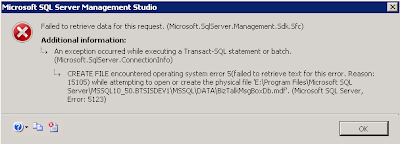
When trying to reattach a database I kept getting following error:
In the SQL log I could find below error. The same error was given when trying to attach the DB with a T-SQL statement.
Msg 5120, Level 16, State 101, Line 3 Unable to open the physical file “E:\Program Files\Microsoft SQL Server\MSSQL10_50.BTSISDEV1\MSSQL\DATA\BizTalkMsgBoxDb.mdf”. Operating system error 5: “5(failed to retrieve text for this error. Reason: 15105)”.
After several attempts on how to solve this I finally found the solution.
Turned out, all I needed to do was run the SQL Server Management Studio as an Administrator.
How can it be that simple, yet has me looking for a solution for over an hour :).

by community-syndication | Oct 17, 2012 | BizTalk Community Blogs via Syndication
I’ve been asked quite often of late what the best way to keep track of BizTalk WCF Services is, and I have found myself changing my mind quite a few times on this one (theprevious incumbent involved creating WCF Service projects in my BizTalk solutions but I’ve since gone sour on this idea)before I settled […]
Blog Post by: Johann

by community-syndication | Oct 17, 2012 | BizTalk Community Blogs via Syndication
I recently ran into an intermittent problem where we were receiving the following exception: System.InvalidOperationException: There were not enough free threads in the ThreadPool to complete the operation. in conjunction with a stack trace indicating we were well and truly down in the WCF ServiceModel code base. This resulted in numerous suspended messages, and a […]
Blog Post by: Brett

by community-syndication | Oct 16, 2012 | BizTalk Community Blogs via Syndication
This is a continuation to my previous article. Please have a look if you hadn’t seen it. Sending Soap with Attachments (SwA) using BizTalk Below are the steps that we have to follow for this exercise. 1. Create a custom message encoder which can send XML as an attachment in the SOAP envelope message. 2. […]
Blog Post by: shankarsbiztalk

by community-syndication | Oct 16, 2012 | BizTalk Community Blogs via Syndication
Soap With attachments is a very old technique and is still used in lot of legacy systems. More new technologies has emerged like MTOM which is widely used within the WCF arena. That said, there is no out of the box support within WCF to send a SOAP message with attachments. An Austrian Microsoft Interoperability […]
Blog Post by: shankarsbiztalk

by community-syndication | Oct 16, 2012 | BizTalk Community Blogs via Syndication
I am happy to see that my contribution – BizTalk custom pipeline component has made it to list. http://social.technet.microsoft.com/wiki/contents/articles/11679.biztalk-list-of-custom-pipeline-components-en-us.aspx My component is listed in the Transformation section Mapper Pipeline Component This gave me an idea of developing the tranform concept in a pipeline component, wherein you don’t have to actually create a map for transforming […]
Blog Post by: shankarsbiztalk
by community-syndication | Oct 16, 2012 | BizTalk Community Blogs via Syndication
Last week, as part of Tellago’s Technology Update, I delivered a presentation about the modern enterprise mobility powered by cloud-based, mobile backend as a service models. During the presentation we covered some of the most common enterprise mBaaS…(read more)
Blog Post by: gsusx

by community-syndication | Oct 15, 2012 | BizTalk Community Blogs via Syndication
We recently hit a problem on a project we were working on whereby we were forced to switch from using a native BizTalk database adapter to using the third-party Community Adapter for ODBC which has been refactored for BizTalk 2010 by TwoConnect. Having access to the source code allowed us the opportunity to work around […]
Blog Post by: Johann