by community-syndication | Nov 9, 2012 | BizTalk Community Blogs via Syndication
So people, it’s happening in the UK. The BizTalk Crew (SaravanaKumar, Nino Crudele, Steef-JanWiggers, Sandro Pereira and me, TordGlad Nordahl) are presenting all new presentation in London January 16th 2013! We have all seen that BizTalk2013Beta has been released and I will focus on the new things in BizTalk 2013, Windows Server 2012 and SQL […]
Blog Post by: Tord Glad Nordahl
by community-syndication | Nov 9, 2012 | BizTalk Community Blogs via Syndication
One of the big problems with BizTalk Server 2010 and earlier is that it isn’t possible to change which host you want your dynamic send port to run on. This is now possible in BizTalk Server 2013 and this will show you how to do it.
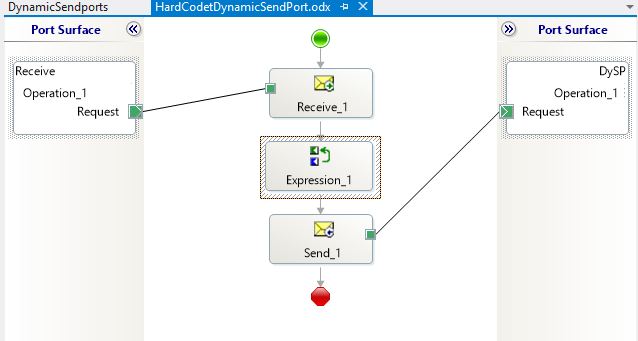
I will just do a very simple sample where I receive a file and send it to a hardcodet destination. In really life this might depend on the message or the content of the message or it can be something you look up in a database.
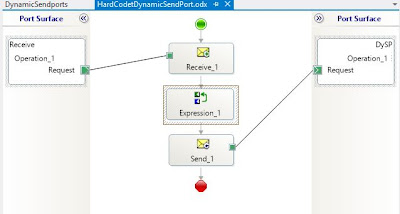
So first the orchestration:
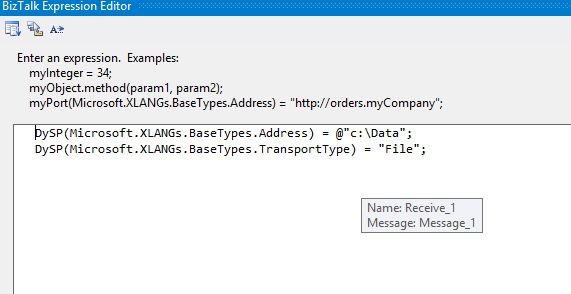
Where the DySP port is set to have a dynamic binding. You configure the DySP port inside the Expression_1 shape like this:
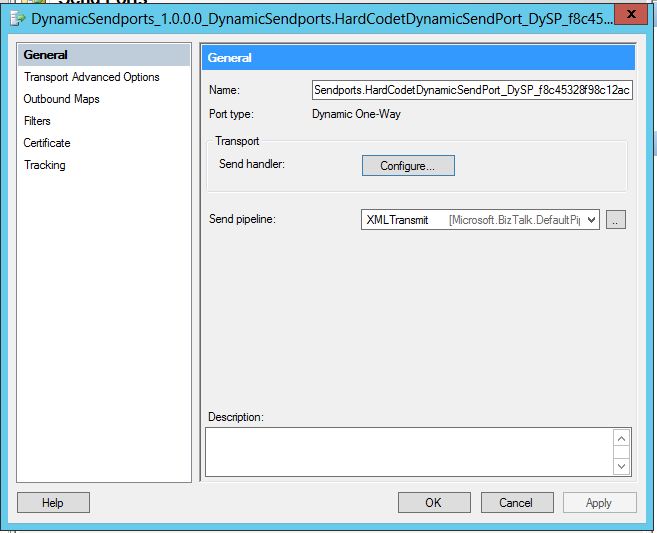
And now you are ready to build and deploy. Once you have deployed the solution it is time to configure the send handler for you dynamic send port. You open you send port, where you see a button that lets you configure your send handler:
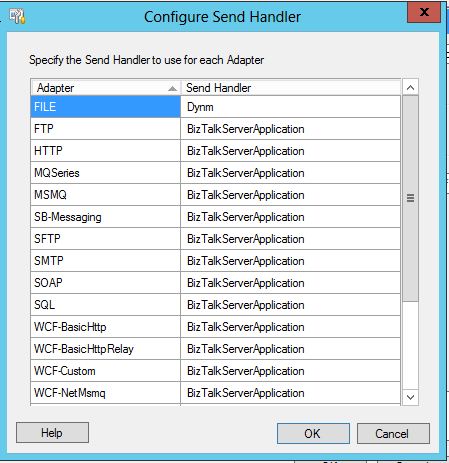
After you click the Configure button in the screen above you will be able to configure on which host that you want your messages to be send. There an option for every adapter that you have installed in your environment as in first on runtime that we know which adapter to use:
This feature alone will be enough to upgrade to BizTalk Server 2013 if you are using Dynamic send ports a lot as you will have a lot more control over where your workload gets executed.
Random posts:

by community-syndication | Nov 8, 2012 | BizTalk Community Blogs via Syndication
Microsoft recently released the beta release of BizTalk Server 2013. The first good news is that the initial name (BizTalk 2010 R2) has changed to BizTalk 2013, indicating it will be a major release, providing longer support to our customers! The beta contains the following capabilities: Integration with Windows Azure Service Bus – these are […]
Blog Post by: DipeshA

by community-syndication | Nov 8, 2012 | BizTalk Community Blogs via Syndication
Well it has been a while since I last posted. I have been sitting on a couple things and wanted to get this information out there. Recently I had to work on an ADFS 2.0 to 2.1 migration. There is apparently not any supported easy way to upgrade an ADFS environment to work on Windows […]
Blog Post by: clineer

by community-syndication | Nov 8, 2012 | BizTalk Community Blogs via Syndication
Besides this blog, I still write regularly for InfoQ.com as well in as a pair of blogs for my employer, Tier 3. It’s always a fun exercise for me to figure out what content should go where, but I do my best to spread it around. Anyway, in the past couple weeks, I’ve written a […]
Blog Post by: Richard Seroter
by community-syndication | Nov 8, 2012 | BizTalk Community Blogs via Syndication
Tellago’s Technology Updates series continues throughout November and December. We would like your input to help us prioritize some of the topics. NFC, enterprise big data, enterprise mobility, gamification? the all sound exciting. Please take 5 seconds…(read more)
Blog Post by: gsusx
by community-syndication | Nov 7, 2012 | BizTalk Community Blogs via Syndication
In the last post BizTalk Server 2013 BETA I mentioned BizTalk Server 2013 beta will allow me install the software on a Windows 8 laptop and continue my BizTalk development, without getting stuck in the old OS. Thanks to the platform alignment in 2013. There were few comments on the blog asking whether BTS 2013 […]
The post BizTalk Server 2013 BETA–Window 8 Configuration issues appeared first on BizTalk360 Blog.
Blog Post by: Saravana Kumar

by community-syndication | Nov 7, 2012 | BizTalk Community Blogs via Syndication
In my last mapping pattern post, I explained how and described the pros and cons of four methods to accomplish a mapping from hierarchical schema to a name value pair so the logically next step would be to describe the inverse process. When I decided to implement this mapping I really thought it would be […]
Blog Post by: Sandro Pereira
by community-syndication | Nov 7, 2012 | BizTalk Community Blogs via Syndication
| I regularly use the following trick while writing an e-mail so that I don’t send it by error before it is fully written: |
J’utilise r%u00e9guli%u00e8rement le truc suivant lorsque j’%u00e9cris des e-mails, de fa%u00e7on %u00e0 ne pas envoyer par erreur un message encore en cours de r%u00e9daction et que je n’ai pas encore relu: |
| I put a user called “attendre” (this means “wait” in French). |
Je mets un utilisateur “attendre” en copie. |
| If by mistake, I press the send button before removing attendre, the e-mail doesn’t get sent because attendre does not exist, and it is not a valid address either. |
Si par erreur, j’appuie sur le bouton d’envoi avant d’avoir supprim%u00e9 attendre, l’e-mail ne part pas car attendre n’existe pas, et ne correspond pas non plus %u00e0 une adresse e-mail valide. |
| I use the trick with Outlook but I suppose this would work with most e-mail clients as well. |
J’utilise ce truc avec Outlook mais je suppose que cela fonctionnerait %u00e9galement avec la plupart des clients de messagerie %u00e9galement. |
Benjamin
Blog Post by: Benjamin GUINEBERTIERE

by community-syndication | Nov 7, 2012 | BizTalk Community Blogs via Syndication
Many of you will have noticed or heard the buzz that the new BizTalk release will be called 2013. It was not a surprise to me or a few others in the blogosphere. Mark Burch on his blog post in July already gave hints to the name or Johan Hedberg beginning of this year Why BizTalk Server 2010 R2 should be BizTalk Server 2013. Anyways the name is now officially 2013.
What will its beta bring us? Well you can find an overview on the BizTalk Server Team Blog. Basically it aligns with the new Microsoft Platform releases like Windows Server 2012, SQL Server 2012 and Visual Studio 2012. Besides that you will find the enhancements in adapters, new adapters like the SB-Messaging, and ESB Toolkit integration (no separate download anymore).
I downloaded the BizTalk 2013 beta and installed it on a new VM. I will not detail the complete installation and configuration here as it is a pretty straight forward experience as with the previous 2010 version. Do mind that there are some slight differences when you read the documentation. For instance when installing SQL Server 2012 you will need to install SQL Server Data Tools (documentation still mentions Business Intelligence Development Studio, yet you will not find this feature in the features list of SQL Server 2012).
What I will do now is share my installation and configuration experience regarding some of the new features.
Adapters
BizTalk Server 2013 has a few new adapters:
Also notice the Windows SharePoint Services adapter that is available by default. WCF-SQL or other LOB Adapters have to be installed separately through LOB Adapter Pack. This can be done through Installation Media.
ESB Toolkit Integration
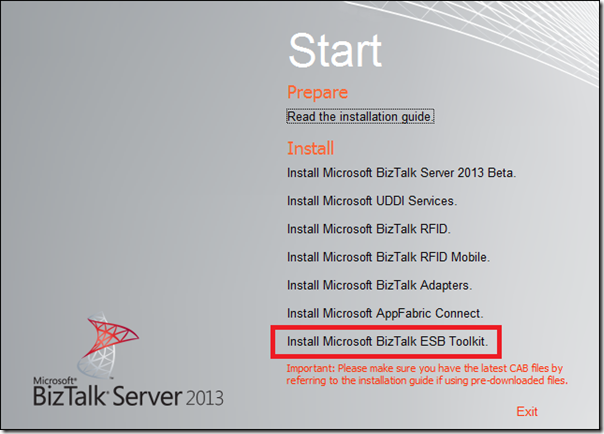
ESB Toolkit is now fully integrated with BizTalk Server, which means it does not require you to download it separately. So the ESB Toolkit is now packaged by BizTalk media like adapter pack was with the BizTalk 2010 release. The ESB Toolkit configuration experience is vastly simplified to enable a quick setup. Through Installation Wizard you can install the ESB Toolkit.
A wizard starts when clicking the Install Microsoft BizTalk ESB Toolkit link.
Click Next to continue the installation.
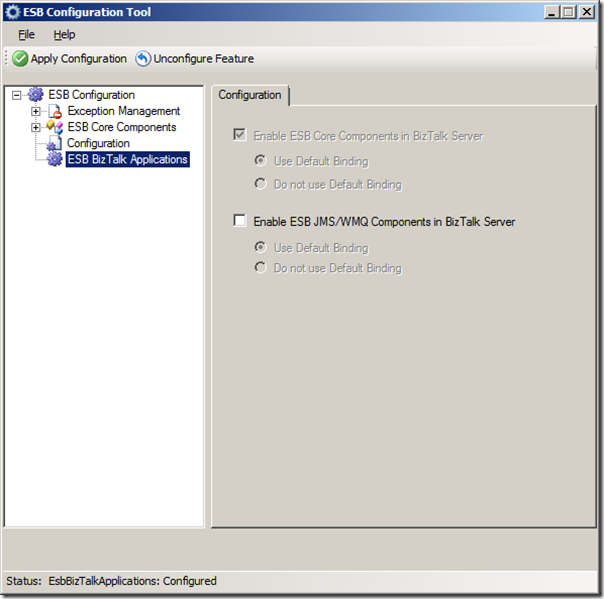
Click Install. The Installation ESB Toolkit is a very straight forward and quick. After installation you can configure the ESB Toolkit through ESB Configuration Tool. A dialog will appear where you fill detail for configuration of the ESB.
Click Apply Configuration. The ESB BizTalk Components under the ESB BizTalk applications is new.
Default the check boxes are not checked. Check the Enable ESB Core Components in BizTalk and click Apply Configuration.
Configuration is done and Microsoft.Practices.ESB application is available in the BizTalk runtime.
The final step is installing the Exception Management Portal, which needs to be installed the same way as with version 2.1. You will installation guide in C:\Program Files (x86)\Microsoft BizTalk ESB Toolkit.
Tracking Dependencies Between Artifacts in a BizTalk Server Application
In the BizTalk administration console the dependencies between artifacts can now be viewed and navigated. A BizTalk applications can have many dependencies and if for instance you need to adjust one of the artifacts. Dependency information of an artifact can be very valuable; you must know which artifacts in the dependency hierarchy must be stopped or re-deployed. The BizTalk Server Administration console displays the dependency information in modes – whether an artifact uses another artifact as well as whether an artifact is used by another artifact.
The Microsoft.Practices.ESB.Agents.Delivery has one dependency (Send Port)
Click Send Ports and you will the send port.
There are more enhancements and more new features than the ones I discussed here. I will be trying out some of the other features in the near future and share my experience.
Cheers,
Steef-Jan