
by community-syndication | Dec 29, 2012 | BizTalk Community Blogs via Syndication
Complexity abstraction of certain tasks Due to several reasons, either for not having enough work to keep resources busy, thereby justifying not having a dedicated team or simply for financial reasons, few companies have a dedicated BizTalk administration team. This way organizations tend to group these administration tasks in a team with extended functionalities to […]
Blog Post by: Sandro Pereira
by community-syndication | Dec 28, 2012 | BizTalk Community Blogs via Syndication
So it’s been a long year and a lot of things have happened, I wanted to highlight all this in my recap of 2012! The first BizTalk Admin book was canceled in an agreement with us authors and PackT, me and Steef-JanWiggers are working on a new one, so stay tuned it will come out […]
Blog Post by: Tord Glad Nordahl

by community-syndication | Dec 27, 2012 | BizTalk Community Blogs via Syndication
While closing out some tasks before the Christmas holidays I ran into this “head scratcher” during the Enable Exception Management Database step of the ESB Toolkit configuration. Error Exception calling “Create” with “0″ argument(s): “Create failed for Login ‘XXXX\BizTalk Server Administrators Prod’. “ Fix The server I was configuring the ESB Toolkit 2.1 on was […]
Blog Post by: Colin Meade

by community-syndication | Dec 27, 2012 | BizTalk Community Blogs via Syndication
Monitoring and Alert Notification capabilities BizTalk360 allows us to monitor all kinds of resources associated with the different BizTalk Server infrastructure layers in which we can highlight: Services and Applications Allows us to monitoring HTTP address or external Web services codes for known errors (e.g. 200, 202, etc.). We can monitor the expected state (Started, […]
Blog Post by: Sandro Pereira
by community-syndication | Dec 27, 2012 | BizTalk Community Blogs via Syndication
Almost two years ago I wrote a post on the location of the BizTalk Adapters for BizTalk 2010. For BizTalk 2010 there are basically two folders both containing a setup application. One folder contains the setup for installation of BizTalk, RFID and Adapter Pack. The other folder contains a setup for BizTalk accelerators. This is a little bit different for BizTalk Server 2013 Beta.
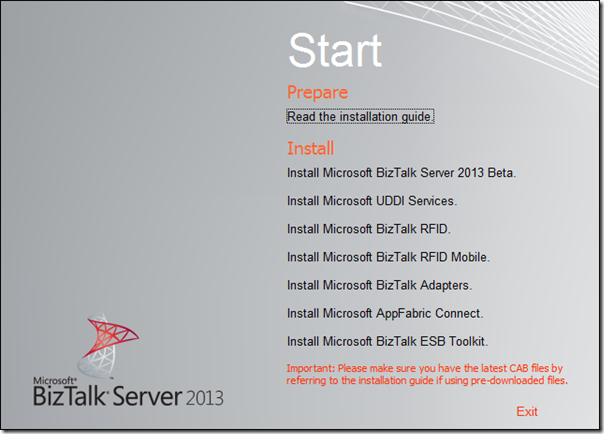
In case you download BizTalk2013Beta.exe from the Download Center you will have a folder named for instance BizTalk2013beta (depending how you named the folder when unpacking the media). When you run the setup in that folder you can install BizTalk, UDDI Services, RFID, BizTalk Adapters and ESB Toolkit.
For BizTalk Server 2013 Beta itself there is documentation available for installation (divers Operating Systems), and the product itself.
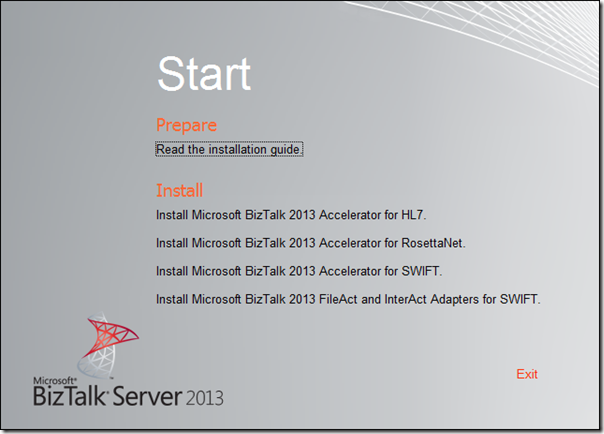
In case you download BizTalk2013AcceleratorsBeta.exe from the Download Center you will have a folder for instance called BizTalk2013AcceleratorsBeta (depending how you named the folder when unpacking the media).
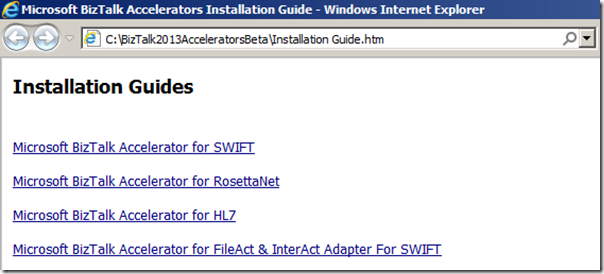
Within this folder you will also find the installation guide for the accelerators.
In case you download HIS2013BETA.exe from the Download Center you will have a folder for instance called HIS2013Beta (depending how you named the folder when unpacking the media).
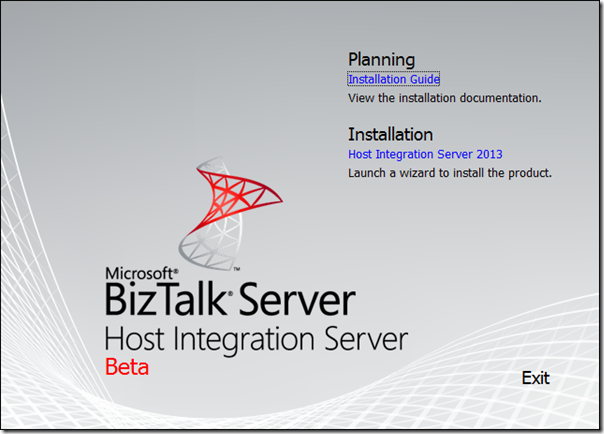
You have installation guide and installation links for your usage.
BizTalk Server 2013 beta is in my view an improvement from an installation and configuration perspective. There a now loose ends as in separate downloads for additional features like adapter pack or ESB Toolkit. Everything is on the media and for the accelerators or HIS there is a separate download, available through same location on the Download Center.
Cheers,
Steef-Jan

by community-syndication | Dec 26, 2012 | BizTalk Community Blogs via Syndication
Advanced capabilities for managing permissions The authorization model included out-of-the-box with BizTalk Server is very limited, you can give someone BizTalk administrators or BizTalk operator’s rights, but that is about it, however this is insufficient and is it’s imperative for organizations to be able to manage access permissions to various resources on Microsoft BizTalk Server […]
Blog Post by: Sandro Pereira
by community-syndication | Dec 26, 2012 | BizTalk Community Blogs via Syndication
In the previous post I showed how to configure the Exception Management Framework in the ESB toolkit to route BizTalk fault messages to SQL Azure. In this post I want to create a portal to show the BizTalk errors to a user. As always, there are several ways to do this. SharePoint Online seems like a nice option because it already has building blocks to connect with Azure and you don’t have to worry about authorization, credentials, etc. It’s included in Office 365 and is a cloud-based service. I’m not a SharePoint developer but on iLoveSharePoint.com already is a great article about connecting SQL Azure to SharePoint Online so let’s see if it can be converted to my example!
Steps
To use data from a SQL Azure database, you have to create an External List by using Business Connectivity Services (BCS) and Secure Store. BCS connects SharePoint to external data, and Secure Store enables user authentication for the data. By using an External List, you can display the contents of a table from SQL Azure in SharePoint Online.
The following tasks must be performed:
- Route fault messages from BizTalk to SQL Azure
- Create a Secure Store Mapping
- Create the External Content Type in SharePoint Designer 2013
- Create the External List in SharePoint Designer 2013
- Grant permissions to manage the ECT
| Route fault messages from BizTalk to SQL Azure |
See the previous post how to create the EsbExceptionDb database in SQL Azure that I’m going to use
in this example and how to route the fault messages from BizTalk to it. |
| |
| |
| Create a Secure Store Mapping |
| First map a SharePoint user or a SharePoint group to the SQL Azure account. |
| Go to the SharePoint admin center within Office 365. |
|
| |
| Click secure store. |
| In the ribbon, click New. |
|
| |
In the Target Application Settings section set the Target Application ID, Display Name, etc,.
In the Credential Fields section, enter the field names that you want to use for the user name and password of the external data system.
In the Target Application Administrators field, enter the name of a group or a list of users who
can edit this Target Application.
In the Members section, in the Members field enter the name of the group that will use the Target Application. |
|
| |
After you create the Target Application, you can enter the credentials that Secure Store uses to
access the external data. |
| Click Set Credentials. |
|
| |
In the Set Credentials for Secure Store Target Applications dialog box, enter the user name and
password of the SQL Azure account. |
|
| |
| |
| Create the External Content Type in SharePoint Designer 2013 |
| You can create an External Content Type (ECT) by using Microsoft Visual Studio, or by using Microsoft SharePoint Designer 2013. (Don’t use the SharePoint Designer 2013 Preview version!!!) |
| Start Microsoft SharePoint Designer. |
| Click the Open Site button to open the SharePoint Online site. |
|
| |
After the site opens, in the Site Objects tree on the left of the application window, click
External Content Types. |
| Select the External Content Types tab and in the ribbon click External Content Type. |
|
| |
In the External Content Type Information section of the page, change the Name and Display Name.
The Display Name is a friendly name for the ECT.
Select the hyperlink Click here to discover external data sources and define operations to open the Operation Designer page. |
|
| |
Click Add Connection to open the External Data Source Type Selection dialog box.
Select SQL Server to access the EsbExceptionDb database in SQL Azure. |
|
| |
In the SQL Server Connection dialog box:
Specify the Database Server, Database and the Name.
Select Connect with Impersonated Custom Identity.
In the Secure Store Application ID text box, type the Secure Store Application ID that stores
credentials for the target database. |
|
| |
To see a list of possible operations for the Fault table, right-click the table to open a shortcut menu.
Select a specific option such as New Read Item Operation Or just select Create All Operations. |
|
| |
Click Create All Operations to open a wizard, and then click Next.
Select Finish to accept the operations properties that you configured. |
|
| |
| |
| Create the External List in SharePoint Designer 2013 |
| On the ribbon, click Create Lists and Forms. |
|
| |
In the Create List and Forms for Faults dialog, type a meaningful name for the External List in the List Name text box.
Select a Read Item Operation from the list of Operations.
Enter the name of the SQL Azure database in the System Instance text box. |
|
| |
| |
| Grant permissions to manage the ECT |
| Set Object Permissions for the admins to manage the ECT. |
Go to the SharePoint admin center, and then click bcs.
Select Manage BDC Models and External Content Types.
Select the check box next to the name of the ECT that you just created, and then click
the Set Object Permissions.
Select Propagate permissions to all methods of this external content type.
Doing this overwrites any existing permissions. |
|
| |
Test the solution
When you now open your site and navigate to your new external list you will most likely get an error because SharePoint Online is not allowed to create an connection to SQL Azure.
|
| |
Go to the Azure Management Portal and select the EsbExceptionDb database.
Click on Manage allowed IP addresses to set the IP address of SharePoint Online. |
|
| |
Now you can navigate to your external list and view the BizTalk errors in the Fault table.
When you click on you can create a View to only see specific fields. |
|
| |
| Right click on a row and select View Item to see all the fields in the Fault table. |
|
| |
| Right click on a row and select Delete Item to delete an BizTalk error from the Fault table. |
|
| |
Conclusion
External Lists in SharePoint Online are a good choice if you only want to have a simple overview of the contents of the Fault table from SQL Azure. You do not need to have a lot of SharePoint development experience to generate the External List and the standard operations like View Item or Delete Item. It’s also very easy to create a view in SharePoint Online for the External List. If you want more functionality like resubmitting the BizTalk message, External Lists are not sufficient but in that case you can use SharePoint Apps!
Sign up for an Office 365 Developer Site:
http://msdn.microsoft.com/en-us/library/fp179924.aspx
by community-syndication | Dec 25, 2012 | BizTalk Community Blogs via Syndication
In blink of an eye 2012 has come and gone and we have accomplished incredible things together. We are growing at an incredible phase and it’s time to take a moment and think about our "Sense of Purpose". This year on behalf of BizTalk360 we are donating $1625 to "Great Ormand Street Hospital" charity. The […]
The post BizTalk360 – Thanks 2012, time to give back appeared first on BizTalk360 Blog.
Blog Post by: Saravana Kumar

by community-syndication | Dec 24, 2012 | BizTalk Community Blogs via Syndication
To start things off: Happy holidays! We are almost at the end of the year 2012. Before that is a fact I would like to one final story for BizTalk Community Series this year.
The story of today will be on my colleague from motion10 Sander Nefs. We have been collaborating on a few projects in the past and are currently working on a project at a big online retailer. Sander is a young and smart BizTalk professional. He has a blog on BizTalk for a few years now. From time to time he posts very useful information on BizTalk.
Sander is a BizTalk consultant at motion10. Like me he works on different BizTalk projects. He would describe his job as follows:
My job consists of involvement albeit architecting-designing/developing integration based solutions using BizTalk Server in basically all phases of projects, like POC’s, presentations, designs, implementations etc. (Unless you ask my parents, they will say I’m a PC doctor :).
Sander is usually involved in different phases of the project. During the project he more involved with the architecture, design and development. He considers this as a nice position to be in. It allows him to design and later validate that design of the solution. This helps in evaluating what works and what can be improved. In the future projects Sander plans to focus more on designing solutions with new technologies that are similar with BizTalk. In his last project he saw a lot of scenarios on how to apply patterns and components like the ESB Toolkit, which helped a lot in determining ideal solutions and capabilities of handling business requirements.
Sander has the following to say about BizTalk:
“I think BizTalk is a cool product, which allows you from day one to be productive starting. Besides that BizTalk is extremely flexible. I like to the idea of going to a customer, ask about their scenarios, lay-out the options and get into business without any headache because you know you bring a suite of useful facilities to the table which are reliable, fast, efficient and flexible, without any coding. You can develop and entire solution and now it just works, more power required. Let’s scale out, more logic required. Let’s define some rules, more logging/analysis required Let’s use BAM. The list goes on and on.”
And on his projects:
“When I was involved in integration projects before using C# and web services, a lot had to be custom developed, which is time-consuming, I’m still happy with BizTalk when a customer has a list of requirements and you have 3 days to prove that BizTalk is capable, until now. It certainly is.”
During his spare time Sander is very busy with sports. He at least swims and plays squash once a week. Tries other sports and is in for a challenge. For instance last summer he tried to master ’staying on a Wakeboard for a full lap’ at a cable runway. He succeeded and is determined to do it again next summer. Besides sports he likes to have a good time in the weekend like going out for drinks (e.g. Belgium caf%u00e9), clubbing, see a movie etc.
A final quote from Sander:
“To all readers I would like to say, thanks for taking the time to get better, read about experiences from others and I hope that you will be inspired to share your knowledge as well, as experience is what helps in getting better, quicker and making it easier go really dive into problems and solve them. I’m trying to share my experiences with the purpose to help myself and others and I hope that others will follow up on this.”
I would like to thank Sander for his time and contributions to the community.
Cheers, Steef-Jan

by community-syndication | Dec 24, 2012 | BizTalk Community Blogs via Syndication
In which BizTalk360 differs from other tools? The BizTalk Server Administration Console is a Microsoft Management Console (MMC) and is the only tool included in the product that have the ability to manage and monitor, of course this is a very useful and powerful tool with many, many features allowing it to be used for […]
Blog Post by: Sandro Pereira



