by community-syndication | Sep 20, 2013 | BizTalk Community Blogs via Syndication
In march I promised to do a post on the last new adapter released with BizTalk Server 2013: SFTP. I wanted to discuss all the new adapters and did so for the relays, SB-Messaging and WebHttp. I forgot about SFTP. I got reminded of that fact when I read latest TechNet Wiki article by Suleiman Shakhtour.
Excerpt of the article:
In the BizTalk 2010 release, Microsoft enhanced the existing FTP
by community-syndication | Sep 18, 2013 | BizTalk Community Blogs via Syndication
Last week I attended the Hybrid Organisation Event in London. A story on the event can be found on BizTalk360 blog. I enjoyed it and was good to see some friends and my old colleagues Sander Nefs and Rene Brauwers,
After event Sander wrote to two interesting posts on Windows Azure Services Bus after seeing Sam VanHoutte session:
UK Connected Systems User Group – BizTalk Services questions
by community-syndication | Sep 18, 2013 | BizTalk Community Blogs via Syndication
This blogpost will give an overview on how to implement role links into real life scenario situations.

by community-syndication | Sep 18, 2013 | BizTalk Community Blogs via Syndication
In the past, I’ve written and talked about integrating the Windows Azure Service Bus with non-Microsoft platforms like Salesforce.com. I enjoy showing how easy it is to use the Service Bus Relay to connect on-premises services with Salesforce.com. On multiple occasions, I’ve been asked how to do this with Service Bus brokered messaging options (i.e. […]
Blog Post by: Richard Seroter
by community-syndication | Sep 18, 2013 | BizTalk Community Blogs via Syndication
When I joined BizTalk360 a few weeks ago I was given the chance to participate in the UK Connected Systems User Group The Hybrid Event. Of course I enthusiastically accepted, what a humbling experience to present to such great audience and alongside such strong speakers. As part of the Microsoft Cloud O/S initiative this event […]
The post The Hybrid Organisation – The story of the day appeared first on BizTalk360 Blog.
Blog Post by: Ricardo Torre
by community-syndication | Sep 17, 2013 | BizTalk Community Blogs via Syndication
Windows Azure BizTalk Services is a relative new technology offered by Microsoft through Windows Azure. The service was launched beginning of June during the TechNet North America. It is still in preview mode. I have written a few posts on this technology through this blog.
During the recent event in London called the Hybrid Organisation, Sam VanHoutte from Codit presented A lap around the
by community-syndication | Sep 17, 2013 | BizTalk Community Blogs via Syndication
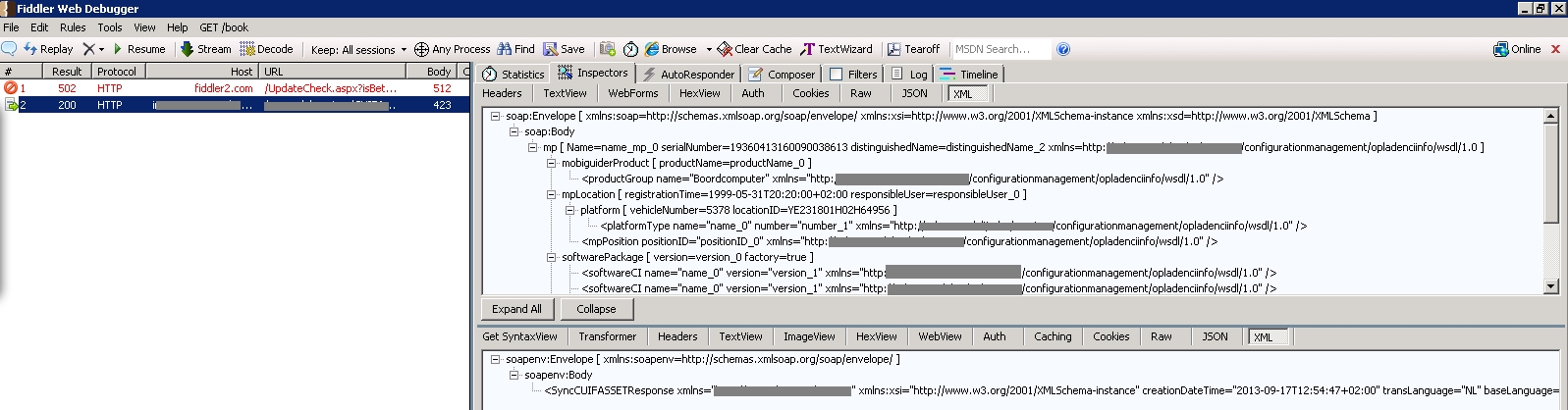
I was trying to view the SOAP messages and headers that were actually exchanged with a certain webservice.
To do so, I used Fiddler2… available from http://fiddler2.com/.
Fiddler2 will allow you to monitor traffic when using HTTP, SOAP or WCF ports in BizTalk. However, Fiddler will not trace any messages sent to endpoints by BizTalk by default as it does not use WinInet. To overcome this issue, you’ll need to configure a proxy to allow Fiddler to intercept the messages.
Note that these proxy settings will need to be removed when Fiddler is not running. Because otherwise all traffic through this proxy will not be received by anything.
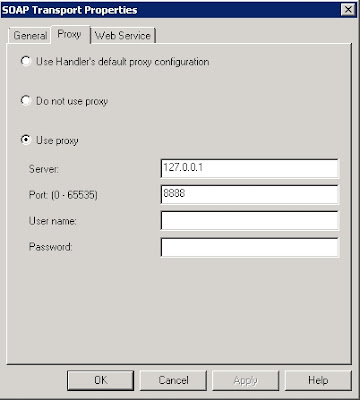
In the send port of BizTalk go to the Configuration settings. Open the tab ‘Proxy’ to configure the necessary settings. Now you should change following settings:
- Server: 127.0.0.1
- Port: 8888
That’s is all you need to do. Now open fiddler2 and process a message. If all is configured correctly, you should see the exchanged messages coming through fiddler.
by community-syndication | Sep 16, 2013 | BizTalk Community Blogs via Syndication
In past I have written quite a few articles for the TechNet Wiki and I sometimes blog on TechNet Wiki Blog. One of my recent posts was on tools:
There are many tools 3rd party available or from Microsoft that can help a professional in building robust applications. This accounts for many technologies and server products like BizTalk Server, .NET, and SharePoint. The TechNet Wiki plays an
by community-syndication | Sep 16, 2013 | BizTalk Community Blogs via Syndication
In the event of a change in BizTalk, you normally deploy at a specific time/date all your changes when there is no “traffic”. This is because you first have to remove the Schemas, Maps and Orchestrations before you can deploy the changes. Therefore all the processes in BizTalk that make use of these artifacts have to be stopped and can not run. Especially when you use a Canonical Data Model (CDM) it can be difficult to deploy changes because Maps and Orchestrations in different processes use the same Canonical Schemas.
One of the advantages of the ESB toolkit is that you can easily deploy modified Maps and XSD schemas but how does it work?
Designing processes in an ESB that makes use of a CDM
Orchestration-based and messaging-based services in an Itinerary don’t depend on Schemas and Maps like “regular” Orchestrations do. So in the event of a change, there’s much less disruption with this model.
| In the following diagram are three different message types shown that are mapped and routed in the ESB to the specific applications. Each message type is processed by an itinerary. |
|
| |
| In this scenario, you have 4 BizTalk Applications. The “ESB” Application is a generic Application with the Receive Ports and the custom Itinerary Services because they are generic and designed for multiple Message Types. |
|
| |
| The "ESB.UBL" Application contains all canonical .XSD schemas. The .XSD schemas can be put in one “UBL.Schemas” Project in Visual Studio. |
|
| |
| For each system that needs to be linked, there is a separate Application in BizTalk with the specific Schemas and Maps. |
|
|
| For each Message Type is a separate Itinerary. The ProcessOrders Itinerary in this example has 2 custom RecipientList Services to map and route the messages to Dynamics AX and the Warehouse. |
|
| |
Change in a Map
Orchestrations are not bound to a specific map because transformations are performed by the MapHelper class. Therefore they don’t have to be removed when deploying a change.
Deployment steps:
- Disable specific Receive Locations.
- Only disable the Receive Locations that receive the messages that uses the changed Map.
- Only remove the maps from the BizTalk BizTalkMgmtDb (with BizTalk Administration Console)
- Don’t remove the Assembly from the GAC so other maps can still be executed.
- When using the Deployment Framework you can also remove the .XSD schemas from BizTalk that are in the same Solution in Visual Studio as the changed Maps.
- Deploy the changes.
- Restart the BizTalk Host Instances.
- Start the disabled Receive Locations.
Change in a .XSD schema
Orchestrations are not bound to a specific .XSD schema because the used Message Type is a XmlDocument. Therefore they don’t have to be removed when deploying a change.
Deployment steps:
- Disable specific Receive Locations.
- Only remove the maps from the BizTalk BizTalkMgmtDb (with BizTalk Administration Console)
- Don’t remove the Assembly from the Global Assembly Cache (GAC) so other Maps can still be executed.
- Only remove the XSD schemas from BizTalk BizTalkMgmtDb
- Don’t remove the Assembly from the Global Assembly Cache (GAC)
- Deploy the changes.
- Restart the BizTalk Host Instances.
- Start the disabled Receive Locations.
Conclusion
Orchestration-based and messaging-based services in an Itinerary don’t depend on Schemas and Maps. When Schemas and Maps are removed from BizTalk, the ESB still can process the messages and map to the other message types because the maps are still in the GAC. This can be very useful in an 24*7 environment where it’s crucial that it is possible to deploy changes without stopping other processes that do not depend on the changed Schema or Map.
Deploying changes with the ESB Toolkit is very powerful so you have to be careful and know what you are doing!
by community-syndication | Sep 15, 2013 | BizTalk Community Blogs via Syndication
How to add custom validation logic to validate a phone field (UI)
1. On the UI, go to List Settings
2. Click on Column that stores the phone (code below assumes the field is called Business Phone. Note that Business Phone is a built-in field in SharePoint)
3. Expand the Validation section
4. In the formula […]
Blog Post by: kadasani