by Nino Crudele | May 15, 2017 | BizTalk Community Blogs via Syndication
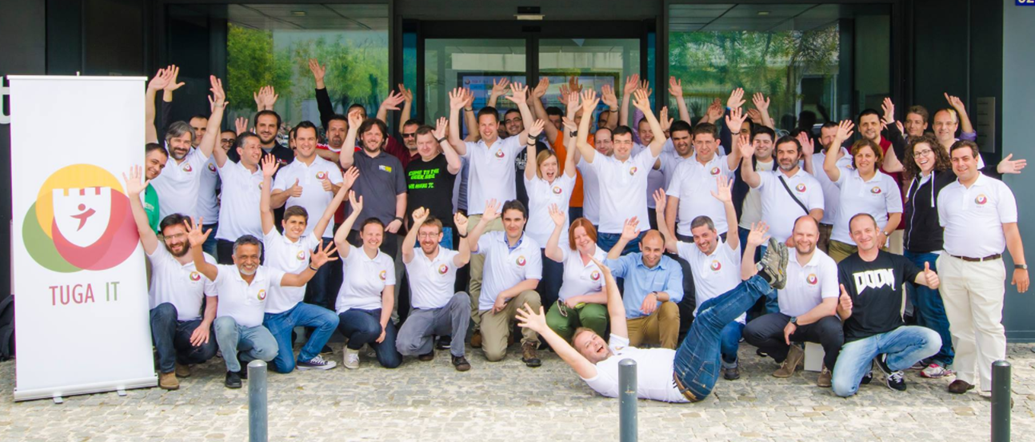
TUGAIT is one of the most important community events in Europe, many speakers across all countries join the conference and most of them are Microsoft MVPs.
The community events are the higher expression of the passion for technologies because organized just for a pure scope of sharing knowledge and experience.
This year I will present 2 sessions, here the full agenda, one focused to Microsoft Azure, the second focused more to the development aspect.
In the first session, Microsoft Azure EventHubs workout session, I will present
how I see EventHubs, all the technologies normally involved with it and how to use it in real scenario.
For this session I prepared a very interesting demo which involve, EventHubs, Stream Analytics, Service Bus, Data Factory, Data Catalog, Power Bi, Logic App, On premise integration.
I will explain how to manage EventHubs, the most important challenges in a scenario using it and how to solve them.
We will compare EventHubs with the other technologies and how to use it in different scenarios like IoT , event driven integration, broadcasting messaging and more.
In the second session, How to face the integration challenges using the open source, I will present how to integrate technologies today using all the technologies available, the differences between them and the best approaches to use.
I will present the most interesting challenges about hybrid integration and messaging scenarios using Cloud and on premise options.
We will examine all the technologies stack available and how to combine them to solve integration scenarios like hybrid data ingestion, big data moving, high loading, reliable messaging and more.
We will see how to manipulate specific technologies stacks and how to use them in different ways to save cost and to obtain first class solutions.
I’m very excited because TUGAIT is a very important event and it’s a great opportunity to share your personal experience with a lot of people, have a lot of fun in a perfect community spirit.
The TUGAIT is free and you can register here
See you there then!
Author: Nino Crudele
Nino has a deep knowledge and experience delivering world-class integration solutions using all Microsoft Azure stacks, Microsoft BizTalk Server and he has delivered world class Integration solutions using and integrating many different technologies as AS2, EDI, RosettaNet, HL7, RFID, SWIFT. View all posts by Nino Crudele

by Umamaheswaran Manivannan | May 15, 2017 | BizTalk Community Blogs via Syndication
Microsoft Build (often stylized as //build/) is an annual conference event held by Microsoft, aimed towards software engineers and web developers using Windows, Windows Phone, Microsoft Azure and other Microsoft Technologies. This year’s conference was conducted in Seattle, WA from May 10 to May 12.
Unlike the previous year which concentrated mainly on Visual Studio & .Net Core, Microsoft this time concentrated mainly on AI and Azure Services. This blog provides a compilation of all the Azure announcements from the 3-day event.
Azure IoT Edge
IoT Edge provides easy orchestration between code and services, so they flow securely between cloud and edge to distribute intelligence across IoT devices. This leverages on Azure Stream Analytics, Microsoft Cognitive Services, and Azure Machine learning to create more advanced IoT solutions with less time and effort.
To get more info on Azure IoT Edge please click here or check out the video on channel9.
Azure Batch AI Training
On Wednesday Microsoft announced a new service called Azure Batch AI training. It uses Azure to train deep neural networks, which means that now it is possible for developers to train their AI without having to worry about hardware.
To get more info on Azure Batch AI Training please click here.
Azure Cloud Shell
Microsoft has put a huge investment on Command line interface. Now you can use Azure Cloud shell from inside the azure portal!! Yes, you heard me right; now Azure portal has real bash command line interface. It is also preloaded with Azure CLI, so that you can directly use commands like azure vm list right from the portal.
Azure cloud shell is still in preview mode please click here to find more information on Azure Cloud Shell.
MySQL and PostgresSQL on Azure
With this support now developers will be able to use their favourite databases on Azure. Developers will surely appreciate this, since more options means more flexibility.
Azure Database for MySQL and Azure Database for PostgreSQL services are built on the intelligent, trusted and flexible Azure relational database platform. This platform extends similar managed services benefits like Global Azure region reach, and innovations that currently power Azure SQL database and Azure SQL Data warehouse services to the MySQL and PostgreSQL database engines.
Cosmos DB
It’s Microsoft’s first globally distributed, multi-model database. Azure Cosmos DB enables you to elastically and independently scale throughput and storage across any number of Azure’s geographic regions.
To find more information on Azure Cosmos DB please click here.
Cognitive Services
Microsoft also announced new cognitive services on top of the 25 existing ones. These new services include a machine vision service, a Bing-based search engine powered by AI, a video indexer, and a new online lab where more experimental services may be unveiled.
Check out this page to find all the available cognitive services in Azure Platform.
Conclusion
And that’s actually all of it! Since Microsoft Build is a developer conference most of the feature announcement targeted developers, but these will probably influence the future of AI, since Microsoft is making it easy for developers to include the power of AI with minimal effort.
Author: Umamaheswaran Manivannan
Umamaheswaran is the Senior Software Engineer at BizTalk360 having 6 years of experience. He is a full stack developer worked in various technologies like .NET, Angular JS etc. View all posts by Umamaheswaran Manivannan
by Gautam | May 14, 2017 | BizTalk Community Blogs via Syndication
Do you feel difficult to keep up to date on all the frequent updates and announcements in the Microsoft Integration platform?
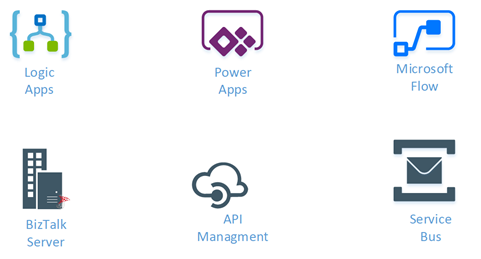
Integration weekly update can be your solution. It’s a weekly update on the topics related to Integration – enterprise integration, robust & scalable messaging capabilities and Citizen Integration capabilities empowered by Microsoft platform to deliver value to the business.
If you want to receive these updates weekly, then don’t forget to Subscribe!
On-Premise Integration:
Cloud and Hybrid Integration:

by Sivaramakrishnan Arumugam | May 12, 2017 | BizTalk Community Blogs via Syndication
Every year BizTalk360 releases with 3 or 4 major versions (with few minor patch releases addressing critical bugs) with new key features with every major release. From Version 8.2.2385.2511, we started to support BizTalk Server 2016 RTM. Once after the release, we faced a strange case that the customers were not able to view the Context properties and Message Content in BizTalk360, but the customer is able to view the properties and content in the BizTalk Server Administration Console.
Strange enough, before BizTalk Server 2016 RTM, we were able to view the Content properties and Message content in BizTalk360 with the BizTalk Server customer preview versions. Once after the upgrade to the RTM release, we started to face this case.
From the exception message, we found that some DLL is missing and when we asked to check that dll at the customer’s end, we found that it was missing. Then we proceeded the case on how the DLL was eliminated, we found that the DLL, Microsoft.BizTalk.Message.Interop.CompressionStreams, was removed by BizTalk itself.
Use of Microsoft.BizTalk.Message.Interop.CompressionStreams.dll
Let’s have a look at the use of Microsoft.BizTalk.Message.Interop.CompressionStreams. By default, BizTalk server stores the message body parts in the Parts table and context in the Spool table in the BizTalkMessageBoxDb. The message is inserted in the tables through the bts_InsertMessage Stored Procedure. The values in these columns of the message part and context are respectively encrypted or they might be compressed. The messages stay in the Spool table only while they’re in flight being processed by BizTalk. Then they are removed and optionally moved to the tracking database. If you stop the send port or orchestration that is subscribing to the messages (but leave them enlisted) they will sit on the Spool and Parts tables for you to check them out. There are also a few messages that stay in the Spool table that are for the messaging agent cache and not the usual BizTalk messages.
As the XML is compressed, the clue is to use a Microsoft.BizTalk.Message.Interop.CompressionStreams.Decompress method. From the Microsoft.BizTalk.Pipeline.dll the message body content and context can be retrieved and viewed. The bts_GetTrackedMessageParts stored procedure inside the tracking database expects the message GUID and will return the compressed message data back. We can then use reflection to invoke the Decompress method of the Microsoft.BizTalk.Message.Interop.CompressionStreams class inside Microsoft.BizTalk.Pipeline.dll to decompress the data returned from SQL.
Where the Microsoft.BizTalk.Message.Interop.CompressionStreams.dll went?
When we deeply investigated the case why the DLL is missing, we are able to find that the methods of the Microsoft.BizTalk.Message.Interop.CompressionStreams DLL were moved under Microsoft.BizTalk.StreamProcessing.
Use of Microsoft.BizTalk.StreamProcessing.dll
Stream processing saves programs from having to load data entirely into memory.
Instead, a program gets a hold on a stream instead of the actual data. The program then starts asking the stream to send a chunk of the data. BizTalk implements a forward-only streaming design. Forward-only means that the stream can only be read, and cannot be sought back. Out of the box pipelines are stream-based; they utilize streaming when fetching data from the adapter and as data passes from one stage to another. For example, out-of-the-box components such as the Flat-File Disassembler and the XML Disassembler, are built with streaming in mind.
We changed in the BizTalk360 source code to support BizTalk Server 2016 and refer to Microsoft.BizTalk.StreamProcessing.
If you have any suggestions or feedback, you can write to us at [email protected]. Have a try at our latest version by downloading a 14-day free trial of BizTalk360.
Read: BizTalk360 Supports for BizTalk Server 2016
Author: Sivaramakrishnan Arumugam
Sivaramakrishnan is our Support Engineer with quite a few certifications under his belt. He has been instrumental in handling the customer support area. He believes Travelling makes happy of anyone. View all posts by Sivaramakrishnan Arumugam

by Swetha Mohandas | May 11, 2017 | BizTalk Community Blogs via Syndication
In BizTalk360 v8.4, we have enriched the existing NT services and SQL server jobs section by providing the operation’s ability. Earlier, both the sections only list out the NT services and SQL server jobs available in the environment. Governance and Auditing are also enabled for the NT services operations which are performed within BizTalk360.
A quick overview of NT services:
NT services run quietly and independently in the background of Microsoft Windows.
Beforehand NT services in BizTalk360:
In earlier versions of BizTalk360, it was only possible to view the NT services in the operations section for the configured environment.
In the Monitoring section, NT Services status can be monitored and the Auto healing ability is available. Whenever a violation happens, the user will be getting the email alerts through their configured Notification channel (Email, SMS, HP operations Manage, Slack, Service Now and Webhook channels)).
Where can you find the NT service operation for BizTalk server and SQL server
BizTalk Server ->NT Services:
We have added NT services section in two areas one is under BizTalk server section. Here you can access the NT service and perform all the operation.
SQL Server>>NT services:
As requested by customers, we introduce a new section in the v8.4 to operate on SQL servers. Here you can access the NT services of your SQL server, that is once you configure the SQL server under the setting side. After configuring the SQL server, the respective server name will be shown under SQL server section. We aware already showing the BizTalk Server CPU and Memory usage statistics as a graph format, but as of v8.4, you can do the same for SQL servers. Analytics can visible only those who can access to the analytics section.
What are all the operations that can be performed in the NT services?
You can perform all the possible operations (start/stop/pause/restart) as done in Services.msc console in Windows OS. But now you no need to context switch to the services window on your server for performing the operations.
The below screenshot shows what are all the operation abilities provided by BizTalk360 for the NT Services.
We make sure auditing activity for NT service operation:
Security(Governance) is one of the core features of BizTalk360.It provides the precise access to the support people. We have auditing activities for Application(Start/Stop), Service instance activity, Host Instance activity, Business rule Activity and we have added server activity in the v8.4 version where you can see all the activities performed for NT services. We represent the activity based on which section you would perform. If you perform any operation under the BizTalk server NT services, we represent as BizTalk next to the server name. Otherwise, you perform the operation on the SQL server will represent as SQL.
Live Feed Activity
We are showing the server activity under the Live Feed section the same as what we are showing in the Governance & Auditing section.
We make sure for periodic purging
For every application, purging is very important criteria to prevent the data growth and improve the performance of the application. You can configure the purging of Governance and Auditing by navigating Setting>>BizTalk360Health>>Data Purging>>Governance and auditing. The default purging value is 3 months.
Licensing Clarification
The existing licensing policy will remain the same. There is no licensing change for this feature. This feature applicable for all the license tier since it is coming under the Bronze tier, anyone who has got Bronze or a higher tier will enjoy this feature.
Performance of the System
One important thing to be noted while performing the NT services is that there will be a performance lag while doing the bulk operations. Sometimes it may crash your system also. For some of the NT services, performing the operations will affect the performance of the system in both Service console and as well as in BizTalk360. For this kind of situation, we should be wise enough to secure the system from the performance lag.
Migration Scenario:
During the migration from the previous version, the NT services operation ability will be enabled in the BizTalk Server section. A new Menu will be added in the Operations->Infrastructure settings and you can view the SQL server NT services and CPU and Memory utilization graph section.
Conclusion
BizTalk360 already had features to monitor NT services. With its latest release 8.4, it fills the gap by bringing in the capability of performing the NT service operations. If you have any feedback or suggestions, please write to us at [email protected]. Have a try at our latest version by downloading a 14-day free trial of BizTalk360.
Author: Swetha Mohandas
Test Engineer at BizTalk360. Software Test Engineer having good knowledge of SDLC and STLC. Love to test the software product. View all posts by Swetha Mohandas
by michaelstephensonuk | May 10, 2017 | BizTalk Community Blogs via Syndication
Every now and then as an architect you would get a request to be able to expose a mapping service for another application to consume and the requirement was preferred if the map was exposed over HTTP so it could be called in real time without the message box over head from executing the map internally to BizTalk.
There were a number of solutions which evolved to do this, even the ESB toolkit offered some of these kind of features.
At the same time on Azure, the integration offerings were dabbling with different ways of implementing a map as a service feature. There were new designers which would be interesting for a while but then never kept up to date with visual studio. More recently the Integration Account on Azure is offering mapping capability as part of a premium costing package if your customer is making a heavy bet on Logic Apps.
I was playing around recently and wondering if I could just run a BizTalk map in a Function?
The answer was yes I could
How do I do it?
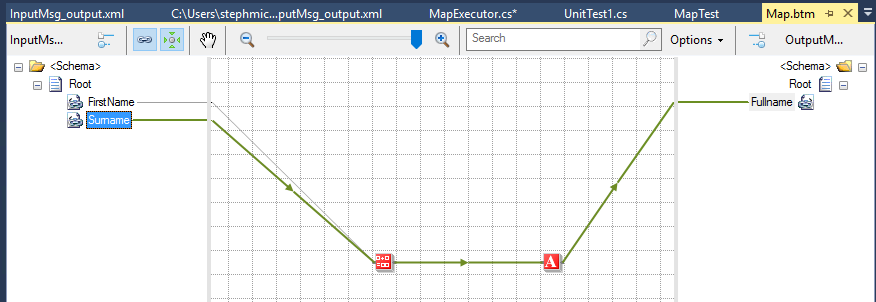
To start with I created an input and output schema and a simple map as shown in the picture below.
There is nothing complex here and we know from unit testing that we can test a map by calling it directly in C# using the XslCompiledTransform class.
I compiled the BizTalk artefacts in the BizTalk project and left them at that.
Next up I created an Azure function in the normal way and then in the settings I went into the AppService Advanced Editor which allows me to upload stuff to the function. See picture below.
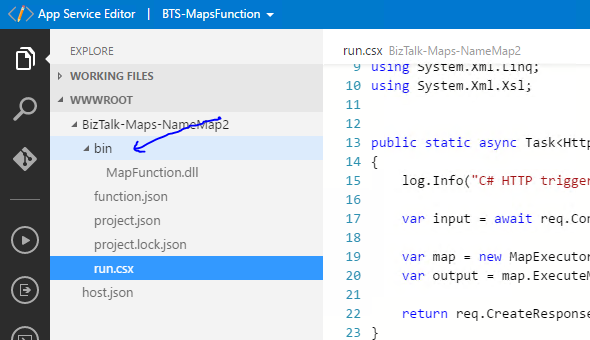
In the function I created a bin directory and uploaded the MapFunction.dll output from my BizTalk project. I also uploaded a number of the BizTalk runtime assemblies (or you can possibly grab these via nuget in the function if its easier).
Next up I used a modified version of the helper class I usually use to test maps when unit testing. This class would instantiate an instance of the map based and then be passed a string which it would use as the input xml for the map and it would return xml.
| public class MapExecutor<TMap>
{
private TransformBase _bizTalkMap;
public MapExecutor()
{
var map = (TMap)Activator.CreateInstance(typeof(TMap));
_bizTalkMap = map as TransformBase;
}
public string ExecuteMap(string input)
{
string outputText = string.Empty;
if (_bizTalkMap == null)
throw new ApplicationException(“The map is null, check it inherits from TransformBase”);
//Save input to disk ready to run map
using (var outputStream = new MemoryStream())
{
var outputWriter = XmlWriter.Create(outputStream);
using (var inputStream = new MemoryStream())
{
var writer = new StreamWriter(inputStream);
writer.Write(input);
writer.Flush();
inputStream.Flush();
inputStream.Seek(0, SeekOrigin.Begin);
var inputReader = XmlReader.Create(inputStream);
//Run the map
XslCompiledTransform transform = new XslCompiledTransform();
XsltSettings setting = new XsltSettings(false, true);
transform.Load(XmlReader.Create(new StringReader(_bizTalkMap.XmlContent)), setting, new XmlUrlResolver());
transform.Transform(inputReader, outputWriter);
outputWriter.Flush();
outputStream.Flush();
outputStream.Seek(0, SeekOrigin.Begin);
var outputReader = new StreamReader(outputStream);
outputText = outputReader.ReadToEnd();
}
}
return outputText;
}
public XsltArgumentList GetExtensionObjects(XDocument extObjects)
{
XsltArgumentList arguments = new XsltArgumentList();
foreach (XElement node in extObjects.Descendants(“ExtensionObject”))
{
string assembly_qualified_name = String.Format(“{0}, {1}”, node.Attribute(“ClassName”).Value, node.Attribute(“AssemblyName”).Value);
object extension_object = Activator.CreateInstance(Type.GetType(assembly_qualified_name));
arguments.AddExtensionObject(node.Attribute(“Namespace”).Value, extension_object);
}
return arguments;
}
}
|
The helper class was pasted directly into the function (or you could put this in a dll if you really wanted) and then I added some using statements for the function and referenced some assemblies in the function like in the below picture.
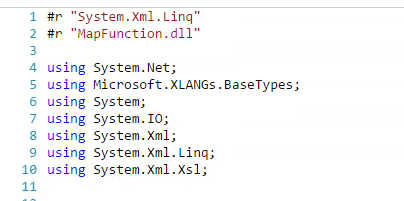
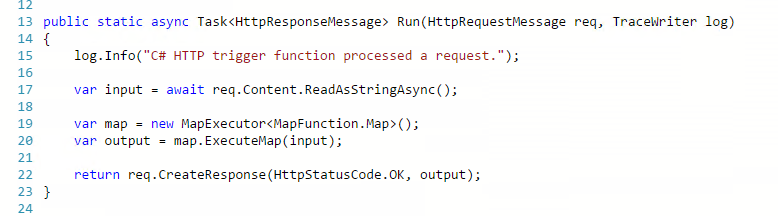
I then modified the method body for a function which is executed over HTTP so that I can read the body as a string, execute my map then return the response. The picture below shows how simple it is to execute the map.
Now we need to test it so fortunately I can use the testing capability in the Azure portal. I added some sample xml for the input to the function and clicked POST
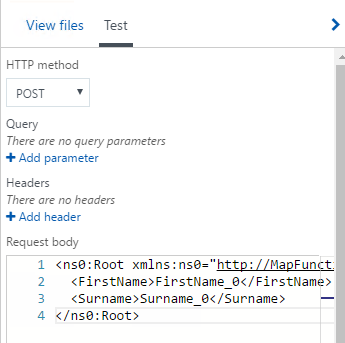
In the function console I can see my map executes and in the test response I can see my output xml.
In this case my map has successfully been executed
Finally consuming the mapping function is really easy. Above I used to test function capabilities in the portal but I can execute the function over HTTP using code or something like postman. I simply need the url for the function and a key from the portal, then im good to go.
What about helper assemblies?
I haven’t tried this scenario yet, but Im pretty sure it should work. If your map references a custom .net dll you could just upload it to the function and it should just run the same as we do in unit testing in c#.
Are there limitations?
Im sure there will be a number of limitations to this approach, for example some of the functoids in a map will be unusable. An example would be if you wanted to use the database connector functoids they will obviously not have line of sight to the database. Any functoids which don’t have external dependencies should work.
I think if you can get it to work with a C# unit test then you should be able to make it work in a function.
I know I can, but should I?
I think the problem with this approach however is you are almost definitely going to be in a grey area around licensing. I know there are some cases where having a BizTalk Enterprise license allows you to use BizTalk artefacts on non BizTalk servers. Im thinking the BizTalk WCF LOB Adapters and I think there is also a scenario with the rules engine too.
With respect to the developer SDK and runtime its probably more of a grey area and im sure the initial answer would probably be that you cant do this.
What would we like to see?
The use case is a valid use case and has been around for years. I would like to see Microsoft offer BizTalk Enterprise customers something like this simply because BizTalk mapper is really mature and is one of the better mappers out there and if they included a feature in Visual Studio where you could develop a map and just right click and deploy as an Azure Function which generated all of the boiler plate code above, this would be a really simple way to build a reusable mapping service with almost no complex overhead. The map could then be consumed by BizTalk, Logic Apps or any other service as its just an HTTP call.

by Sandro Pereira | May 10, 2017 | BizTalk Community Blogs via Syndication
After the success of last year, Tuga IT 2017 is one week away from returning to Lisbon! From May 18th until the 20th, a variety of world class speakers (local and international) that will present a huge variety of “fresh” and “hot” topics about Microsoft Data Platform, SharePoint, Office 365, Enterprise Integration, Agile Methodologies, Open Source Technologies, Azure and much more. And this is only possible thank to the collaboration of all of the 9 communities taking part in Tuga IT 2017 event organizers or track owners.
Once again, I was invited to lead the Integration track and yes, we will once again have again a dedicated Enterprise Integration track! The integration track on Saturday the 20th will be packed with amazing sessions by Azure MVP’s Nino Crudele, Steef-Jan Wiggers, Eldert Grootenboer, Tomasso Groenendijk, myself and Ricardo Torre.
Enterprise Integration Track Agenda
8:30 Registration
9:00 How to face the integration challenges using the open source by Nino Crudele [Azure MVP]
“The open source space offers a lot of different options and opportunities in order to face the endless challenges that we normally need to face in the integration of technologies.
During this session, we will explore all the best open source options to cover the most advanced and complex requirements.
We will explore new options to extend the actual technologies and how to use the open source in conjunction with technology stacks like, pure .Net Framework, BizTalk Server and Microsoft Azure to solve complex integration scenarios.
During the session, we will also examine the best options available in the market and in the open source space.”
10:10 Coffe break
10:30 The speaker nightmare: Eval Forms & OCR & Logic Apps & Power BI by Sandro Pereira [Azure MVP]
“An evaluation form is something that a speaker love and hates, especially, if the results are processed in real-time and public available. If the result was excellent, then it is extremely rewarding, other times, it may “”hurt”” the speaker who has made himself available to share his knowledge and has been evaluated negatively. Sometimes the attendees are unfair in their evaluations, like, to basic in a 100-level session (these types of sessions are supposed to be basic or introductory) or sometimes the speaker had a bad day (it happens with everyone).
I speak from personal experience, is these last 6 years that I have been doing speaking at community events, in Portugal and abroad, I already been evaluated in all ways: badly, reasonable, good and excellent, sometimes I saw in, the same sessions, attendees with different profiles evaluate me badly and excellent. The key point for the speaker is:
- All feedback is good, either negative or positive, he can learn to improve itself, if that’s the case, or that I specific topic is not good for a certain audience
- He only needs to give his best! We cannot please everyone, and the goal is to fill happy with yourself and your performance.
I love evaluation forms and I love for them to be public available, even better if they are public available during the event. Because, at least, it will give during the event a good topic of conversation for people that do not know each other and it will keep the conversation flowing (naturally), people normally are affray or shy to start a conversation between unfamiliar persons, this is a good ice break.
In this session, I will show and explain a real live demo on how we can easily build a robust solution for process evaluation forms, using an OCR software and easily integrate them with Power BI to present the results in an interactive and beautiful way. But most important: How you can educate your enterprise Developers and IT pros users to easily extend capabilities for power users, who understand their business challenges the best and allowing them to use their familiar tools like OCR software to process Evaluation forms and quickly build and deliver Power BI solutions to build Interactive Data dashboards. And at the same time integrate these tools, platforms or systems and a very quick and robust way using integrate feature on Azure, like, Logic Apps, API Apps and Azure Functions. How to start from a simple solution and evolve them enabling new functionalities.”
11:50 Cloud Integration: so many options! by Steef-Jan Wiggers [Azure MVP]
Traditional integration has changed with the rise and evolution of cloud computing. And connectivity between systems on premise will evolve to connections with services and solutions in the cloud. Data is everywhere, applications are everywhere and people are everywhere with their devices always connected. In this world integration is key. Azure offers us various ways to implement integration solutions to provide connectivity to the business to their data. This talk will be a journey of options you have when building these types of solutions!
13:00 Lunch
14:00 Using DocumentDB to make your API App high performant and secure it with API Management by Tomasso Groenendijk [Azure MVP]
APIs are becoming more important for organizations and people even talk about the API economy but how can you create your own API, expose it globally and make a profit with it? In this session, Tomasso is going to show how you can use API Apps and DocumentDB to create a high performant API and how to use API Management in combination with Web Apps to expose the API.
15:10 Sponsor Session
15:30 Cofee Break
15:50 BizTalk 2016 in a hybrid world by Ricardo Torre
The integration landscape has definitely evolved to be a hybrid, significant on-premise investment has been accumulated over the years while at the same time cloud computing brought new challenges and new ways of implementing integration. Let’s navigate through the innovations in both worlds and how BizTalk and the cloud currently live together.
17:10 Azure IoT Hub Deep Dive by Eldert Grootenboer [Azure MVP]
Azure IoT Hub gives us the possibility to manage and secure and do bi-directional communication with billions of IoT devices. In this session, we will dive into all these possibilities, to show how you can easily set up a robust and hyper-scalable solution for your IoT needs.
18:20 Closing
More information on the official website: http://tugait.pt/2017.
Invitation for a social game.
A social SPEAKER game… there might be other games (and awards) but that is still under NDA!
Speaker game has 1 objective: getting you the MAXIMUM social experience, getting you to LEARN about your fellow speakers, about the event and about THE ATTENDEES.
The winner/s will be determined by the collection of the maximum number of points and we shall determine the winner on Saturday evening … (the prize, again, is still under NDA) and here is how you can start collecting points on the game card will receive at the airport/event:
- Get to know 5 people at the event and write down their name, company, it area & specialty: 5 points
- Vote your favorite Tuga IT 2017 speaker (you will need to attend that session): 1 point
- Write down the number of countries that Tuga IT 2017 speakers represent: 1 point
- Write down the number of countries that Tuga IT 2017 attendees represent: 1 point
- Name all Tuga IT 2016 sponsors: 1 point
- Name the person who was the most influential in your career: 1 point
- Name 3 IT Celebrities (MVPs/Speakers/PMs) who started outside of IT: 1 point
- Name the creation dates of the involved User Groups: 1 point per correct answer (there are 9 groups in total)
- Name the youngest speaker of Tuga IT 2017: 1 point
- Discover how many MVPs/Microsoft MVPs/Oracle Aces do we have at the Tuga IT 2017? 1 point
And even more for the social part:
It might be worth playing… you know… you never lose in trying.
Registration For TUGA IT 2017
TUGA IT 2017 will take place in Microsoft Portugal’s offices, in Lisbon, on May 18-20, 2017. It will feature 3 days of breakout sessions and full-day workshops by world-class speakers where IT Professionals can spend 3 amazing days checking the future of IT and also take the time to network with top-level speakers and other IT Professionals.
Registration for TUGA IT 2017 is a few euro’s or even free if you do require lunch (the fee is there to reduce waste and prevent having an abundance of food).
You can register here and I will see you there in Lisbon!
Author: Sandro Pereira
Sandro Pereira lives in Portugal and works as a consultant at DevScope. In the past years, he has been working on implementing Integration scenarios both on-premises and cloud for various clients, each with different scenarios from a technical point of view, size, and criticality, using Microsoft Azure, Microsoft BizTalk Server and different technologies like AS2, EDI, RosettaNet, SAP, TIBCO etc. He is a regular blogger, international speaker, and technical reviewer of several BizTalk books all focused on Integration. He is also the author of the book “BizTalk Mapping Patterns & Best Practices”. He has been awarded MVP since 2011 for his contributions to the integration community. View all posts by Sandro Pereira
by Sivaramakrishnan Arumugam | May 10, 2017 | BizTalk Community Blogs via Syndication
For any product, customer support will be considered as the face of the product and company. They deal with the customers and try to solve the problems which customers are facing. As a test and product support engineer of BizTalk360, I would like to share some of my experiences.
Let’s start with a support ticket which I handled and learnt from. A year back we received a support ticket from one of our customers. They were trying to renew their BizTalk360 license, for which they had to send their environment details to issue new license key (for 7.10 version). It’s a very simple process, the customer needs to select the environment and Generate License code using the Generate License Request button. But after selecting the environment, the ‘Generate Request’ button was not enabled. We found that the customer was missing some steps in between the process because the page was not used frequently by customers and at last we helped him to generate new keys after which they upgraded to the latest version (8.0).
Also, read Challenges in BizTalk360 Licensing after Environment Changes.
Issue faced by the customer after upgrade
After the upgrade to the latest version, customers must use the newly provided License keys to activate the environment so that they will be able to use the product. But unfortunately, this customer was stuck in the Settings page, it was loading for hours and no result. This case was very strange to us because we didn’t face the same problem anywhere in our testing although our testing team put lots of efforts in testing migrations. So, we planned to help them immediately by a web meeting, even though it was a Non-production environment.
Once after upgrading to the 8.0 version, we observed that the database table “b360_admin_BizTalkEnvironment” was empty and hence the environment details were not reflected in the BizTalk360 application UI, without which they cannot move forward in the application.
Our foremost task was to make the application up and running so that the customer can explore the new features available. We asked the customer to confirm if they had by any chance deleted/modified the table but he was not sure about it. But we were sure that without any manual changes those data will not get truncated.
Also, read Our experience solving a Culture Variant Issue in BizTalk360.
Approaching the case with the different plans
There were two options available to resolve the case. Plan A was to restore the database and then move on with the upgrade. Plan B was to proceed with the fresh installation, in case if no backup is available. We suggested plan A first, to restore the database if they have taken any backup before the upgrade. If so, we can restore the database and then update to the latest one, so that we can find out the root cause of the problem. But unfortunately, they did not have any backup before the upgrade process and the one they had was very old (taken early in 2014 exactly 3 years old), but they had taken the whole machine backup. With the least hope we requested to restore if possible and closed the call.
What happened during the web meeting?
The next day we received a mail that they were not able to restore the whole server as it contained lot of data and conveyed that they got a backup of BizTalk360 database. So, we thought to get into the call once again with plan A, i.e. to restore the database. We asked them to restore before the call. During the 2nd call we understood that the customer was very frustrated because of the launching issue and they didn’t restore it. Then we came to know that the database backup was the very old one. We conveyed to the customer that the backup will not be useful as it was very old. By this time, the customer got more frustrated as it was very hard to find and get database backup. We have no other go to, so we decided to go with the very old database restore, which took 2:00 hours of time to restore after we found that the database belonged to BizTalk360 7.0.
It took 2:00 hours of time to restore the backup of Database without my involvement and I was there in the call. 🙁
Finally, with the restoration of the database backup, we were now ready to set the application up and running with the following steps:
- We uninstalled the current version and we installed the version 7.0 with the temporary Database name
- Deleted the newly created database
- Renamed the old one with the new name so that UI will be linked to the old database.
- It helped us to check if BizTalk360 was working properly with that and we found that the environment details were also available
- Followed by 7.0 we installed 7.2, 7.8 and 8.0 for the proper upgrade and we resolved the problem.
But, the call took 3 hours and 9 minutes exactly, involving one of our Product Leads.
Do’s and Don’ts in Support Call Handling
I was very proud for resolving the case and satisfying the customer who was frustrated due to the long call, and the customer was happy too! Then I came to know what I should and shouldn’t have done in the call.
- If something needs to be done on customer side, we should give them time to do what they want and should request to complete it – Restoring the database took 2:00 hours of time without my involvement while I was there in the call
- If anything is not really important and there is less chance to work, we should say directly to the customer – Very old database backup
- If we are not confident about some suggestions, we should not take the risk. Without knowing which version the old database supports, I restored the old database. At that time, if it did not match with the UI and had some issues, the customer would have got even more frustrated
- Should always approach the best way – Reinstalling the current version.
- Should convey the best approach to the customer even though the customer becomes frustrated.
We have taken these points seriously from that day and we do some basic homework before the call, like what need to be discussed and what all the information we need from the customer side. Now this makes our troubleshooting during the web meeting very short and edge, so that saves both customer’s and our time.
You can write to us at [email protected] or visit our support portal. Have a try at our latest version by downloading a 14-day free trial of BizTalk360.
Author: Sivaramakrishnan Arumugam
Sivaramakrishnan is our Support Engineer with quite a few certifications under his belt. He has been instrumental in handling the customer support area. He believes Travelling makes happy of anyone. View all posts by Sivaramakrishnan Arumugam

by Saravana Kumar | May 9, 2017 | BizTalk Community Blogs via Syndication
About 10-12 years ago (around 2004-2005), Service Oriented Architecture (SOA) was a big topic in the enterprise world. Massive projects were initiated to align enterprises to be more service oriented with a middleware/ESB platform like BizTalk Server in the middle.
When we talked about SOA implementation using Microsoft technologies during this period, only two technologies/platform stood out –
- Windows Communication Foundation (WCF), and
- Microsoft BizTalk Server
WCF was set of libraries built on top of the .NET Framework that helped to build SOAP based (later REST support was added) web services. WCF was more of a platform that shipped along with the .NET Framework and evolved gradually along with the .NET releases. BizTalk Server, on the other hand, was a full blown Enterprise Server Product that acted as a Middleware platform mainly addressing the challenge of not creating an integration spaghetti between those services (represented as APP in below pictures) created using WCF.
| Without BizTalk Server |
With BizTalk Server |
|
|
BizTalk360 journey between 2011 – 2016
When we started BizTalk360 back in 2010, the objectives were pretty straight forward. Nearly 10,000 medium to large organisations have invested in Microsoft BizTalk Server to address their integration requirements.
We spotted a lot of gaps in BizTalk Server when it comes to BizTalk Server day-to-day administration and monitoring. It looked like a straightforward bet to build a world-class product that can help these 10,000+ customers to improve their operational efficiency.
We started off initially with BizTalk360 as a monitoring solution for BizTalk Server and the product slowly evolved into addressing various operational and analytics needs of the BizTalk Server. There are over 100 features in the product now covering various aspects of day-to-day operational needs like Security, Governance/Auditing, Monitoring, Analytics, Productivity Tools, Knowledge Base, Rich Dashboards, etc. making it a must have add-on product for any Microsoft BizTalk Server customers.
BizTalk360 currently has over 500 enterprise customers, and we are proud to say that Microsoft itself is one of our biggest customers. Microsoft internally uses BizTalk Server for all of their IT and Supply Chain requirements and they rely on BizTalk360 for their day-to-day operations. You can read the case study “Why Microsoft chose BizTalk360 instead of SCOM”
What is the state of Integration today in Microsoft Stack?
In the last 5-6 years, the innovation around technology exploded in all directions. Cloud and mobile became mainstream and companies like Microsoft, Amazon, Google and IBM pumped a lot of investment into the cloud. On the other hand, SaaS (Software as a Service) based products exploded in other direction. Today, no one really wants to buy off-the-shelf software products, run their own servers and manage upgrades and patches. They simply want to use software or services provided by the third party rather than owning them. About 10-15 years ago, SIEBEL was the leader in CRM space, however, today that segment is ruled by technologies like Salesforce and Microsoft Dynamics 365. Similar story exists in all software segments like Source Control (GIT and Visual Studio Team Service), Productivity Tools (Office365, Google Apps), Email (Office365, Google) etc.
With all these changes, it’s natural for Integration Platforms and Products to evolve as well. The role of integration has become so immense in the last 5 years due to the above mentioned reasons. Today, companies buy/use multiple software products which do one thing really well rather than living with a monolithic beast software which claims to do everything but not good at anything.
This change in attitude also means all these independent software product/services need to talk to each other, which created a new segment of integration products in the likes of IFTTT, Zapier, Azure Logic Apps, SnapLogic, Dell Boomi, etc
Microsoft responded well to this growing challenge in the integration space, addressing the requirements of: Hybrid Integration solutions (the combination of Cloud + On-Premise integrations), Quick & Easy integration solutions, Business Users (aka citizen integrators) integration solutions etc.
If you look at Microsoft Integration Stack today, it’s not just BizTalk Server and WCF anymore. There are at least a dozen products/services that are mainly geared towards Integration in Microsoft Stack.
- Microsoft BizTalk Server
- ASP.NET Web API’s
- Azure Logic Apps
- Azure App Services (Web Jobs)
- Azure Functions (Serverless Compute)
- Azure API Management
- Azure Service Bus (Queues/Topics)
- Azure Stream Analytics
- Azure Event Hubs
- Microsoft PowerApps
- Microsoft Flow
- Azure Gateway (Hybrid Connection)
BizTalk360 – 2017 and beyond
One of the key aspects of a product company like us is that we need to be on the forefront of technology all the time. We need to adapt quickly to the change and understand the fact “change is the only constant”. We cannot just sit back and relax saying BizTalk360 is doing well. We have been closely monitoring the trend what’s going on, what will happen to the existing BizTalk Server customers in the next 10-15 years.
We are fortunate enough to build up a close relationship with Microsoft and the Integration community and are fully aware of the changes that are happening around Integration.
BizTalk360 is now slowly evolving into a product that will cater for the big picture. We wanted to create a single unified tool that will help any customer who invested in Microsoft platform for their integration needs.
We can clearly see the challenges that are building up when you have so many technologies included in a solution. There is no single management tool that will cater for the day-to-day operations. Customers might end up using BizTalk Server Admin Console for some of the activities and Azure Portal for some of the other activities, which is not productive and you are never going to be confident you set up access rights correctly across multiple tools, educating support people how to operate and monitor your solutions.
There are various other challenges like, for example, for Monitoring, you will need an end-to-end monitoring solution that covers both on-prem and cloud, you will also need tracking and analytics solution that will stretch between on-prem and cloud etc. We predict customers might end up building management tools, exactly like what they did 10 years ago for BizTalk solutions. BizTalk360 was born to address the challenge faced by BizTalk Server customers.
Today we are at a juncture where we see the same challenge at a bigger level and BizTalk360 is well positioned to address that challenge since we are already halfway through covering the on-premise solution.
What available and what’s coming in BizTalk360
We realized this situation almost 2 years ago and started expanding BizTalk360 to cover both on-premise and cloud technologies that fall into the Integration bucket with a vision of creating a single unified management and monitoring tool for Microsoft Integration.
Today, BizTalk360, in addition to its full blown support for BizTalk Server, can also manage and monitor related Azure Integration Technologies like
In the upcoming 8.5 version (planned for July 2017), we are bringing in support for Azure Integration Accounts, App Services, and Azure Stream Analytics.
We are also working on a secret project with a bigger vision, which I cannot talk much at this stage (stay tuned).
We will continue our investment in this direction and make BizTalk360 a single must have tool for anyone using Microsoft Technologies for their Integration Requirements.
Author: Saravana Kumar
Saravana Kumar is the Founder and CTO of BizTalk360, an enterprise software that acts as an all-in-one solution for better administration, operation, support and monitoring of Microsoft BizTalk Server environments. View all posts by Saravana Kumar
by Saravana Kumar | May 9, 2017 | BizTalk Community Blogs via Syndication
About 10-12 years ago (around 2004-2005), Service Oriented Architecture (SOA) was a big topic in the enterprise world. Massive projects were initiated to align enterprises to be more service oriented with a middleware/ESB platform like BizTalk Server in the middle.
When we talked about SOA implementation using Microsoft technologies during this period, only two technologies/platform stood out –
- Windows Communication Foundation (WCF), and
- Microsoft BizTalk Server
WCF was set of libraries built on top of the .NET Framework that helped to build SOAP based (later REST support was added) web services. WCF was more of a platform that shipped along with the .NET Framework and evolved gradually along with the .NET releases. BizTalk Server, on the other hand, was a full blown Enterprise Server Product that acted as a Middleware platform mainly addressing the challenge of not creating an integration spaghetti between those services (represented as APP in below pictures) created using WCF.
| Without BizTalk Server |
With BizTalk Server |
|
|
BizTalk360 journey between 2011 – 2016
When we started BizTalk360 back in 2010, the objectives were pretty straight forward. Nearly 10,000 medium to large organisations have invested in Microsoft BizTalk Server to address their integration requirements.
We spotted a lot of gaps in BizTalk Server when it comes to BizTalk Server day-to-day administration and monitoring. It looked like a straightforward bet to build a world-class product that can help these 10,000+ customers to improve their operational efficiency.
We started off initially with BizTalk360 as a monitoring solution for BizTalk Server and the product slowly evolved into addressing various operational and analytics needs of the BizTalk Server. There are over 100 features in the product now covering various aspects of day-to-day operational needs like Security, Governance/Auditing, Monitoring, Analytics, Productivity Tools, Knowledge Base, Rich Dashboards, etc. making it a must have add-on product for any Microsoft BizTalk Server customers.
BizTalk360 currently has over 500 enterprise customers, and we are proud to say that Microsoft itself is one of our biggest customers. Microsoft internally uses BizTalk Server for all of their IT and Supply Chain requirements and they rely on BizTalk360 for their day-to-day operations. You can read the case study “Why Microsoft chose BizTalk360 instead of SCOM”
What is the state of Integration today in Microsoft Stack?
In the last 5-6 years, the innovation around technology exploded in all directions. Cloud and mobile became mainstream and companies like Microsoft, Amazon, Google and IBM pumped a lot of investment into the cloud. On the other hand, SaaS (Software as a Service) based products exploded in other direction. Today, no one really wants to buy off-the-shelf software products, run their own servers and manage upgrades and patches. They simply want to use software or services provided by the third party rather than owning them. About 10-15 years ago, SIEBEL was the leader in CRM space, however, today that segment is ruled by technologies like Salesforce and Microsoft Dynamics 365. Similar story exists in all software segments like Source Control (GIT and Visual Studio Team Service), Productivity Tools (Office365, Google Apps), Email (Office365, Google) etc.
With all these changes, it’s natural for Integration Platforms and Products to evolve as well. The role of integration has become so immense in the last 5 years due to the above mentioned reasons. Today, companies buy/use multiple software products which do one thing really well rather than living with a monolithic beast software which claims to do everything but not good at anything.
This change in attitude also means all these independent software product/services need to talk to each other, which created a new segment of integration products in the likes of IFTTT, Zapier, Azure Logic Apps, SnapLogic, Dell Boomi, etc
Microsoft responded well to this growing challenge in the integration space, addressing the requirements of: Hybrid Integration solutions (the combination of Cloud + On-Premise integrations), Quick & Easy integration solutions, Business Users (aka citizen integrators) integration solutions etc.
If you look at Microsoft Integration Stack today, it’s not just BizTalk Server and WCF anymore. There are at least a dozen products/services that are mainly geared towards Integration in Microsoft Stack.
- Microsoft BizTalk Server
- ASP.NET Web API’s
- Azure Logic Apps
- Azure App Services (Web Jobs)
- Azure Functions (Serverless Compute)
- Azure API Management
- Azure Service Bus (Queues/Topics)
- Azure Stream Analytics
- Azure Event Hubs
- Microsoft PowerApps
- Microsoft Flow
- Azure Gateway (Hybrid Connection)
BizTalk360 – 2017 and beyond
One of the key aspects of a product company like us is that we need to be on the forefront of technology all the time. We need to adapt quickly to the change and understand the fact “change is the only constant”. We cannot just sit back and relax saying BizTalk360 is doing well. We have been closely monitoring the trend what’s going on, what will happen to the existing BizTalk Server customers in the next 10-15 years.
We are fortunate enough to build up a close relationship with Microsoft and the Integration community and are fully aware of the changes that are happening around Integration.
BizTalk360 is now slowly evolving into a product that will cater for the big picture. We wanted to create a single unified tool that will help any customer who invested in Microsoft platform for their integration needs.
We can clearly see the challenges that are building up when you have so many technologies included in a solution. There is no single management tool that will cater for the day-to-day operations. Customers might end up using BizTalk Server Admin Console for some of the activities and Azure Portal for some of the other activities, which is not productive and you are never going to be confident you set up access rights correctly across multiple tools, educating support people how to operate and monitor your solutions.
There are various other challenges like, for example, for Monitoring, you will need an end-to-end monitoring solution that covers both on-prem and cloud, you will also need tracking and analytics solution that will stretch between on-prem and cloud etc. We predict customers might end up building management tools, exactly like what they did 10 years ago for BizTalk solutions. BizTalk360 was born to address the challenge faced by BizTalk Server customers.
Today we are at a juncture where we see the same challenge at a bigger level and BizTalk360 is well positioned to address that challenge since we are already halfway through covering the on-premise solution.
What available and what’s coming in BizTalk360
We realized this situation almost 2 years ago and started expanding BizTalk360 to cover both on-premise and cloud technologies that fall into the Integration bucket with a vision of creating a single unified management and monitoring tool for Microsoft Integration.
Today, BizTalk360, in addition to its full blown support for BizTalk Server, can also manage and monitor related Azure Integration Technologies like
In the upcoming 8.5 version (planned for July 2017), we are bringing in support for Azure Integration Accounts, App Services, and Azure Stream Analytics.
We are also working on a secret project with a bigger vision, which I cannot talk much at this stage (stay tuned).
We will continue our investment in this direction and make BizTalk360 a single must have tool for anyone using Microsoft Technologies for their Integration Requirements.
Author: Saravana Kumar
Saravana Kumar is the Founder and CTO of BizTalk360, an enterprise software that acts as an all-in-one solution for better administration, operation, support and monitoring of Microsoft BizTalk Server environments. View all posts by Saravana Kumar

