
One of the most commonly asked about and requested “features” of the BizTalk ESB Toolkit is the ESB Management Portal. I say “features” because I think we sometimes forget that this is just a sample application, and not something that is production ready. So the task I’ve undertaken is to not only make the necessary modifications to make the portal production ready, but also to add a few features. In an upcoming post I’ll review the changes made to prep the portal for production, but for now, I will share the new features I’ve been working on.
Itinerary Tracking/Monitoring
Possibly my favorite feature of the ESB Toolkit is the BAM activity that comes with the Itinerary engine. As we strive for better intelligence and instrumentation of our solutions, having this low hanging fruit available seems like an easy win. To begin collecting basic metrics of your itineraries, only two steps are required:
- Deploy the BAM Activity Definition. This is described in the ESB Toolkit installation guide:
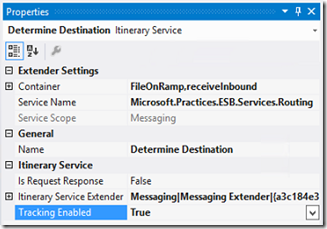
- Enable tracking on your Itinerary shapes. This is as simple as setting the “Enable Tracking” property on each Itinerary Service in the Itinerary Designer to “True”.
Install BAM itinerary tracking activity definition. BAM itinerary tracking can be used to track the progress and eventual completion of itineraries as they advance through various steps. The BAM definition file (Microsoft.BizTalk.ESB.BAM.Itinerary.xml) is located in the BAM folder in the installation directory and can be installed using the Bm.exe tool. Use the following command as an example.
Bm.exe deploy-all -DefinitionFile:"C:\Program Files\Microsoft BizTalk ESB Toolkit 2.1\Bam\Microsoft.BizTalk.ESB.BAM.Itinerary.xml"

Now you have some basic tracking information being collected for your Itinerary. However, there is no way out of the box to view this tracking data other than the BAM Portaluntil now. By simple adding a few components to the ESB Portal web application, and simply querying the BAMPrimaryImport and EsbItineraryDb databases, we can now see tracking information for our itineraries. Here is what the new pages look like (at least these early “beta” versions):
List of Itineraries
This is a list of all the Itineraries in the EsbItineraryDb, providing a simple inventory of my itinerary-based processes. The chart just shows what is possible in terms of easy reporting

View of Instances for a selected Itinerary Type

Details of each step of a selected Itinerary Instance

Notice the links here for each step. We can drill down even further to view any Tracked Messages in DTA, as well as view the Fault (something we already have with the portal out of the box). Here you can see I’ve enabled DTA tracking for just the after-port-processing message:

and I get a message body in the ESB Portal for that one message.

The great thing about this is that no changes are necessary to accommodate new itineraries. Just enable tracking on your Itinerary Services before you deploy, and it will automatically show up.
SSO Application Configuration Management
I’m sure more than a few of us have used SSO as a configuration store for BizTalk solutions. I grew increasingly annoyed that I had to use a separate tool to manage those key-value pairs, not to mention that the tools available didn’t work very well. So, I also added SSO Configuration management to this modified ESB Portal. Very simple and straightforward, but being able to do all of this in one place I feel is a big value-add. One note on this functionality was the creation of a SSO WCF service to give the portal access to the configuration data in the SSO database. This service not only make these portal pages possible, but provide a way for non-BizTalk applications to use SSO as a configuration store without a requirement to execute on a BizTalk Server or a server licensed to run SSO dll’s.
View SSO Configuration Applications
Notice how only my custom SSO configurations show upanything native to BizTalk is filtered out.

View/Edit SSO Configuration Application

Obviously I’ve got some clean-up work to do on the UIbeing a BizTalk-person, my front-end skills are rusty to say the least! I hope this gives you some ideas on what is possible when you combine the power of Itinerary-based processing using the ESB Toolkit with some enhancements to the ESB Portal.
Cheers,
Dan