by stephen-w-thomas | Aug 24, 2005 | Downloads
This sample shows how a map can be called dynamically inside an Orchestration in Biztalk. This can allow for the map to be set at run time by setting a message context property or reading the value from the SSO or database. This can greatly reduce effort if a single business process is used for many different messages that need different maps.
This sample should work with BizTalk 2004 and BizTalk 2006.
Get more information from the original blog post on this topic: http://www.biztalkgurus.com/biztalk_server/biztalk_blogs/b/biztalk/archive/2005/08/28/using-dynamic-transforms-_2800_mapping_2900_-in-biztalk-2004-orchestrations.aspx
by stephen-w-thomas | Aug 23, 2005 | Stephen's BizTalk and Integration Blog
Quick Tip on Property Promotion:
Distinguished fields can not be used to promote values in a record.
Promoted Properties can only be used on records with Simple Content type.
Both can be used to promote elements and attributes. Don’t forget Promoted Properties are limited to 255 characters.

by stephen-w-thomas | Aug 22, 2005 | Stephen's BizTalk and Integration Blog
Biztalk Server 2006 introduces many exciting new features like Recoverable Message Processing and Suspended Message Routing. With great new features like these, sometimes the map and schema editor improvements can get overlooked.
Anyone that has worked with Biztalk 2004 maps has probably seen this message pop up: “The map contains invalid links. Please validate the contents of your map. Saving the map file will delete all references to the invalid links.” This is caused when the map references a schema that has changed and the changed fields are used inside the map.
Since I have never been on a project that has successfully locked down the schemas after they were created, this message is something I have seen quite frequently. In case you are lucky and haven’t seen this message before it looks like this:

In the past, these types of errors could be hard to track down. If another developer made changes to the schema, the person working on the map may have to review the map field by field to track down the exact problem. In the worse case scenario, a link could be broken and never fixed.
In Biztalk Server 2006, we now get this message:
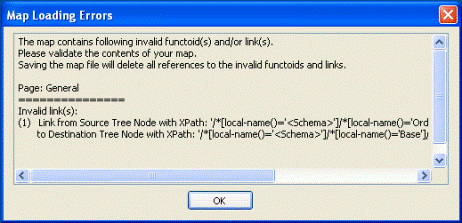
This messages shows in great detail what links have been broken by the schema changes.
Since I have done my fair share of mapping in the past, I differently consider this one of the greatest enhancements to developer productivity in Biztalk 2006. Now, if they could only make those property picker windows bigger…
While I’m on the developer productivity kick, another great enhancement is to right click on a host instance and select “Restart”. Sure bests having to Stop, Wait, and Start again…
We also have a few new functoids available. These include IsNil (Logical), Nil Value (Advanced) and Assert (Advanced).
The IsNil functoid takes in one parameter and returns true if the input is set to Nil.
The Nil Value functoid sets the destination node to Nil.
The Assert functoid takes in 3 parameters. 1: expression to evaluate or result from logical functoid, 2: text to throw in the exception if 1 is false, 3: text to pass forward if 1 is true. As expected, this only works for assemblies built in Development mode.

by stephen-w-thomas | Aug 10, 2005 | Stephen's BizTalk and Integration Blog
Direct binding in Biztalk Server 2004 can be used to send messages from one Orchestration to another. It can also be used to send messages directly into the message box, but that is not the focus of this post. Direct binding is easily misunderstood, specifically Partner Port binding since can be somewhat confusing to set up.
I will walk through the 4 simple steps to set up direct binding using partner ports.
It is important to note direct binding still uses the publish and subscribe system in Biztalk to send messages between Orchestrations.
Terminology:
Orchestration1 – The process that will send the message to another Orchestration.
Orchestation2 – The process that will receive the message from another Orchestration.
Step 1: Create a new port and port type in Orchestation2. Note that you can also use any existing internal or referenced public port type.
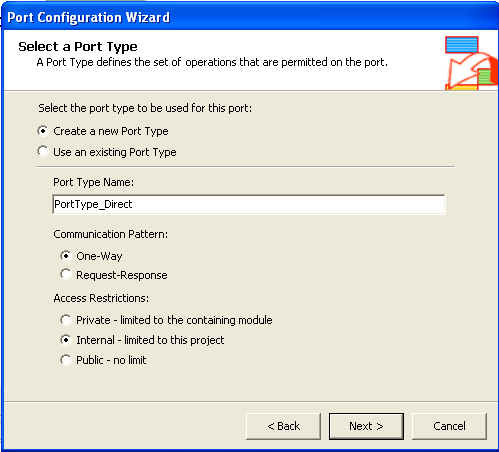
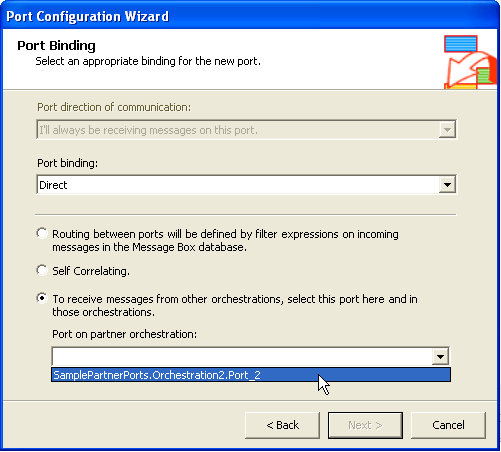
Step 2: Set Porting Bindings. Select Direct Binging, Partner Port – 3rd radio button. Select the new port you are creating in the Port On Partner Orchestration drop down.
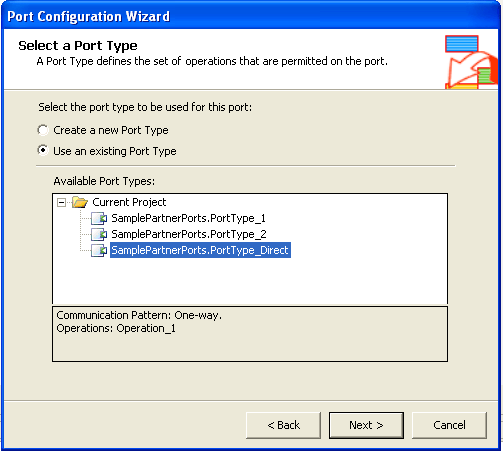
Step 3: Create a new port in Orchestration1 using the existing port type created (or selected) in Step 1.
Step 4: Set Porting Bindings. Select Direct Binging, Partner Port – 3rd radio button. Select the port you created in Step 2 on Orchestration2 in the Port On Partner Orchestration drop down.
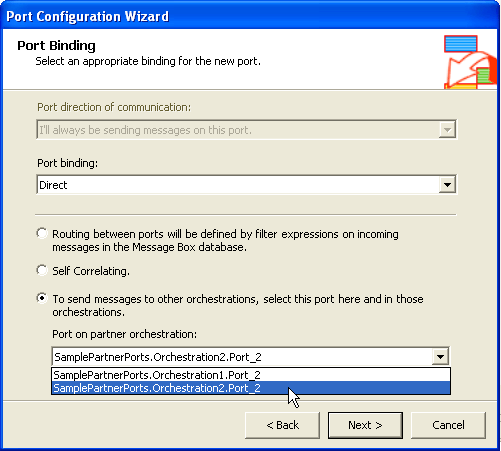
It is that easy. If you have additional questions or want more information on Direct Binding, Charles Young has by far the best blog posting on this subject.
I have also put together a sample. This sample shows how to use Direct Binding with Partner Ports to send a message from one Orchestration to another.
Download: Biztalk Direct Binding Sample
To run the sample, just deploy the solution and start both Orchestrations. Drop a message into the In folder and it shows up in Out. Check HAT, you will see both Orchestrations ran.
by stephen-w-thomas | Aug 10, 2005 | Downloads
This sample shows up to use Direct Binding in Biztalk Server 2004 to send messages from one Orchestration to another using Partner Ports. Direct binding is easily misunderstood and Partner Port binding can be rather confusing to set up. Direct binding still uses the publish and subscribe system in Biztalk to send messages between Orchestrations.
This sample should work with BizTalk 2004 and BizTalk 2006.
Get more information from the original blog post on this topic: http://www.biztalkgurus.com/biztalk_server/biztalk_blogs/b/biztalk/archive/2005/08/10/direct-binding-sample-for-biztalk-2004.aspx
by stephen-w-thomas | Aug 9, 2005 | Stephen's BizTalk and Integration Blog
I came across Adrian Hamza’s blog today. His blog seems to be totally dedicated to the Sharepoint Adapter for Biztalk.
It looks like it will be a great resource for information on anything related to Sharepoint and Biztalk integration.
The post I like best gives a detailed comparison between the GotDotNet Sharepoint Adapter and the new Biztalk 2006 Sharepoint Adapter.
I think the best new “feature” of the Sharepoint Adapter is that it will be supported by Microsoft. I know this has held up a lot of customers from using it in the past.
by stephen-w-thomas | Aug 5, 2005 | Stephen's BizTalk and Integration Blog
Larry Beck from Avanade has released a Biztalk Throughput and Capacity Testing Tool for testing Biztalk Performance.
This tool will automatically generate files for you to submit them into Biztalk. In addition, it will track server parameters in a nice graph. It’s configurable through a UI.
You can get more information on his blog or on the GotDotNet workspace.
Who is Larry Beck? He is a Connected System Evangelist and fellow Texan who works for Avanade. Avanade is a joint venture between Accenture and Microsoft. If you went to TechEd, you probably saw there video in the Key Note.
Look for more good things to come from him blog!
by stephen-w-thomas | Aug 3, 2005 | Downloads
This sample shows how to use Error Reporting to route suspended message to an Orchestration in Biztalk 2006. It includes two Orchestrations, one intended to fail on the Receive Port and one on the Send Port. Both a manual installation and MSI installation is available.
Get more information from the original blog post on this topic:http://www.biztalkgurus.com/biztalk_server/biztalk_blogs/b/biztalk/archive/2005/08/02/suspended-message-routing-and-reporting-in-biztalk-server-2006.aspx
by stephen-w-thomas | Aug 2, 2005 | Stephen's BizTalk and Integration Blog
Suspended message routing is arguably the greatest and most anticipated new feature in Biztalk 2006.
Suspended message routing gives you the ability to subscribe to messages that fail inside the messaging system. Matt Hall going into detail on how to generate Error Reports for Suspended Message Routing and what properties you have available to subscribe to. In addition, the documentation that ships with Beta 1 cover this is great detail.
The ability to react to errors in the messaging system goes much deeper then just “No Matching Subscription” errors. You now have the ability to easily handle all messaging errors that occur inside a pipeline, an adapter, and even maps. That’s right, no more looking into the great abyss for Send and Receive Port mapping errors.
In a post about a year ago, I point out that Delivery Notification in Biztalk 2004 did not work when the map fails on the Send Port. Not any more! Now, Delivery Notification supports Send Port mapping exceptions as well as adapter exceptions.
That brings up another point. You now have Error Reporting, native support for First-in First-out on EVERY Send Adapter, and the traditional Delivery Notification to accomplish FIFO in Biztalk 2006. With all these options available it could be very easy to go overboard and needlessly bog down a process with too many bells and whistles. Off hand, I can not see a need in using both Delivery Notification and FIFO on a Send Adapter together in a single process.
I have put together a small sample that works with Error Reporting and Suspended Message Routing. It includes two Orchestrations, one intended to fail on the Receive Port and one on the Send Port. In addition, I have included a map that throws an Exception. In the suspended message routing Orchestration, I subscribe to the ErrorReport.FailureCode exists property.
Download: Biztalk 2006 Suspended Message Routing Sample
The download includes a binding file with source code as well as a packaged MSI. This should only be run on Biztalk 2006.
by stephen-w-thomas | Aug 1, 2005 | Stephen's BizTalk and Integration Blog
Biztalk 2004 provides a variety of built in macros for dynamically naming files. A full list of macros can be found in the help guide or here.
Recently, I have been looking at SourceFileName. I have posted a sample in the past that covers how to name output files inside your Orchestration using the %SourceFileName% macro. In that sample, I completely override the File.ReceivedFileName property with a new value. The File.ReceivedFileName property is the data source for the %SourceFileName% macro.
What if I wanted to append or prepend data to the original file name? When using the File Receive Adapter, the File.ReceivedFileName property looks like this: “c:\somepath\FileName.xml”.
If you prepend or appended text to this, you will get “PrePend_c:\somepath\FileName.xml” or “c:\somepath\FileName.xml_Append”.
When the %SourceFileName% macro runs, it looks for the last “\” and truncates the beginning part of the filename. So, in the Prepend case, the prepended text is completely lost.
How can I prepend or append text to the filename? Easy, just use a simple static helper class to prep the filename. The method to prepend text would look like this:
public static string PrePendText(string sReceivedFileName, string sPreppendText)
{
int nLastIndex = sReceivedFileName.LastIndexOf(@”\”);
return sPreppendText + sReceivedFileName.Substring(nLastIndex+1);
}
I have put together a sample with three methods; one to prepend text, one to append text, and one to append text and change the file extension.
Download: Prepend and Append Text to Filename Sample
Setup is easy. Just deploy the Orchestration and do not forget to GAC the Helper class.
