by stephen-w-thomas | Apr 3, 2007 | Stephen's BizTalk and Integration Blog
The public beta of BizTalk Server 2006 R2 is now available on http://connect.microsoft.com. I think all you have to do is sign in with a passport and go to Available Connections.
BizTalk 2006 R2 adds some great new features on the adapter side along with support for WCF.
Enjoy!
by stephen-w-thomas | Dec 23, 2006 | Stephen's BizTalk and Integration Blog
Ready to take a look at some of the new features of BizTalk 2006 R2?
I have put together a short 13 minute video walking through how simple it is to expose BizTalk Orchestrations as WCF Services and then consume them inside a Windows Application.
This video show how to use the BasicHTTP Binding and the WCF Wizard.
This is intended to give you a first look into some of the new features in BizTalk 2006 R2.
Take a look at the video today! Available via live play or WMI download. Source code is also available although without R2 installed you will not be able to run the sample.
Please note that anything you see is subject to change in later releases of BizTalk.
by stephen-w-thomas | Dec 22, 2006 | Stephen's BizTalk and Integration Blog
The latest edition of The BizTalker has been released.
This issue headlines John Callaway from QuickLearn. He talks about Specify Now, Specify Later, Dynamic, and Direct Port Binding options inside an Orchestration. He goes into details about when to use what and the scenarios each works well for.
View this issue online or subscribe now to make sure you do not miss an issue.
The BizTalker is published every month or so to over 1400 people worldwide.
by stephen-w-thomas | Dec 20, 2006 | Downloads
This sample shows a basic WCF Service using Basic HTTP Binding. This service is hosted inside IIS and uses a WCF Receive Location to process WCF messages inside BizTalk.
This code was built using a beta version of BizTalk 206 R2. The concepts are the same in the RTM release of BizTalk 2006 R2 but this code may not work.
Watch the video related to this sample here: http://www.biztalkgurus.com/biztalk_server/biztalk_2006_r2/m/biztalk_2006_r2_samples/32391.aspx
by stephen-w-thomas | Dec 20, 2006 | Downloads
Note: This video is based on BizTalk Server 2006 R2 BETA
This nearly 13 minute video gives a quick, high level First Look at BizTalk Server 2006 R2 WCF Adapter using the Basic HTTP Binding. This is intended to show how easy it is to use BizTalk 2006 R2 and WCF to build applications.
Note that this is based on Beta code and is subject to change in future releases.
This content should be current for the RTM release of BizTalk 2006 R2 and beyond.
by stephen-w-thomas | Dec 11, 2006 | Stephen's BizTalk and Integration Blog
I have updated the BizTalk Bloggers OPML file. This update adds about 6 new BizTalk related blogs bringing the total to 97.
You can download the OPML file here.
If you do not want to track the blogs yourself, you can see most of them online on our syndicated blog site. Currently, Community Server does not support ATOM feeds. So the blogs that only have ATOM feeds will not show up.

by stephen-w-thomas | Nov 28, 2006 | Stephen's BizTalk and Integration Blog
Deployment in BizTalk 2006 is a greatly improved process over that of BizTalk 2004. The typical deployment process in BizTalk 2006 goes something like this:
1. Export the MSI using BizTalk Administration
2. Move to target computer
3. Import MSI through BizTalk Administration or BTSTASK
4. Run the MSI to GAC the DLL’s
Simple and straight forward. But why do we need to run the MSI after we import it?
This accomplishes a few things, mostly to GAC the DLL’s and to have the MSI package show up under Add/Remove programs. This makes is easy to see what has been deployed to the target computer.
But what if you only wanted to move the code to one target computer and you did not care about seeing the items under Add/Remove programs?
Well, then you could change the DLL properties (a.k.a. Resources) inside BizTalk Administration to
actually GAC your DLLs on MSI import.
How to change the Resource properties in BizTalk 2006
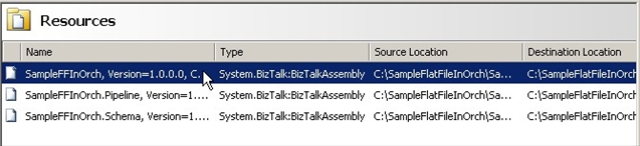
Step 1: Open BizTalk 2006 Administration, select your Application, click on Resources.
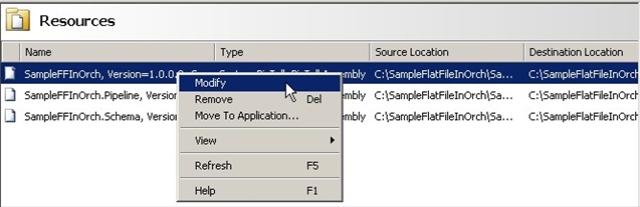
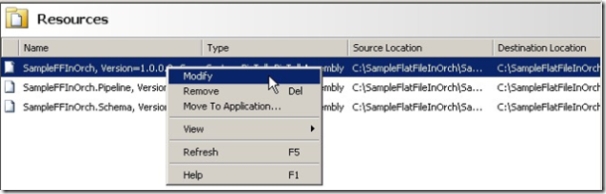
Step 2: Select the first BizTalk Assembly Resource, right click, select Modify
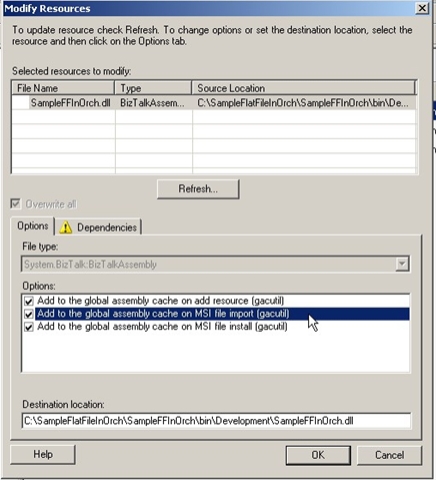
Step 3: Under Modify Resources – Options box, check the “Add to the Global Assembly Cache on MSI file import (gacutil)”
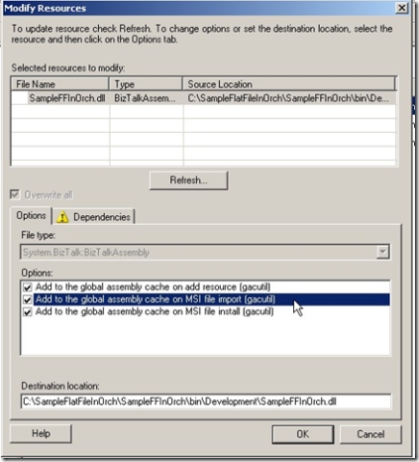
4. Repeat for each BizTalk Assembly or other resources in your application that you needed GACed.
It is that easy! Now when you import the MSI your BizTalk resources will be put into the global assembly cache without any additional effort.
Now remember, just because you can do something does not mean you should. This most likely would be most valuable on a single computer install and remember you MSI will not show up under Add/Remote programs.
by stephen-w-thomas | Nov 20, 2006 | Stephen's BizTalk and Integration Blog
The latest edition of The BizTalker is now available.
This issues focuses on how to use RSS to harness the knowledge in the BizTalk Blogging Community. It details how to get the BizTalkGurus.com OPML file that contains over 80 BizTalk Bloggers.
View this issue online or subscribe now to make sure you do not miss the next issue.
by stephen-w-thomas | Oct 22, 2006 | Stephen's BizTalk and Integration Blog
Another new BizTalk book is now available from APress.
This book, Pro BizTalk 2006, published by APress and written by George Dunphy (works for Microsoft Consulting Services) and Ahmer Metwally (works for Microsoft) is described as a high-end resource based on real feedback from developers. It covers topics not covered well in other BizTalk books like performance tuning, scalability, and administration.
Amazon.com also has a package so you can get both the Pro BizTalk 2006 book and the BizTalk 2006 Recipes book for one price.
Lots of other great BizTalk Books coming around the corner as well…
by stephen-w-thomas | Oct 21, 2006 | Stephen's BizTalk and Integration Blog
If you live in the Dallas, TX area and are interested in Microsoft BizTalk Server then the Dallas BizTalk Users Group is for you!
Tim Rayburn and others are working hard to get things started. I never knew how much work it was to set up a new users group!
The first meeting is scheduled for Monday, November 13th, 2006 at 6 PM at the Microsoft campus in Las Colinas.
If you are interested, please register on the user group web site at http://biztalkusergroup.com
Hope to see you at the first meeting!