
by Sandro Pereira | Feb 23, 2017 | BizTalk Community Blogs via Syndication
This post is for the BizTalk Server and other Portuguese Community, will be held on February 28, 2017 between 18:45 – 21:30 the XXVIII Porto.Data Community meeting at the Science and Technology Park of University of Porto (UPTEC) in Oporto.
For me it is a pleasure to return once again to this community, this time with a topic about SharePoint, PowerApps and Microsoft Flow: “SharePoint integration: How can PowerApps and Microsoft Flow give power to your SharePoint users”
Abstract
Every organization faces constant pressure to do more with less. While technology is often key to operating more effectively and efficiently, cost and complexity have often prevented organizations from taking maximum advantage of the potential benefits. The growth of SaaS (software as a service) has lowered barriers – no need to deploy servers or to install and configure complex software systems. Just sign up and go.
Microsoft Flow and Microsoft PowerApps will help these people (normally business users) achieve more.
We know not every business problem can be solved with off-the-shelf solutions. But developing custom solutions has traditionally been too costly and time consuming for many of the needs teams and departments face, especially those projects that integrate across multiple data sources or require delivery across multiple devices from desktop to mobile. As a result, too many technology needs end up unsolved or under-optimized. We piece together spreadsheets, email chains, SharePoint or/and manual processes to fill in the gaps.
PowerApps and Microsoft Flow are both aimed squarely at these gaps. They give people who best understand their needs and challenges the power to quickly meet them, without the time, complexity and cost of custom software development.
In this session, we will look at these two-new offering from Microsoft: PowerApps and Flow. What are day? How can I use it? But special we will walk through and create from scratch some live demos showing how to create a new PowerApp that connects to a list stored in SharePoint Online, or how to create a new Microsoft Flow that connects to a list stored in SharePoint Online.
Agenda
18:45 – Welcome reception
18:50 – Community News
19:00 – “Elasticsearch – First Glance” – Vitor Saraiva – Software Architect at Farfetch & Mário Barbosa – Engineering Lead at Farfetch
20:10 – Coffee break
20:30 – ” SharePoint integration: How can PowerApps and Microsoft Flow give power to your SharePoint users” – Sandro Pereira – Azure MVP – DevScope
21:15 – Closure
21:20 – Prize draw
21:30 – Dinner (optional)
This is a free event with very limited vacancies that you will not want to miss, register now!
Join us and come to spend a different carnival night! We are waiting for you.
Author: Sandro Pereira
Sandro Pereira lives in Portugal and works as a consultant at DevScope. In the past years, he has been working on implementing Integration scenarios both on-premises and cloud for various clients, each with different scenarios from a technical point of view, size, and criticality, using Microsoft Azure, Microsoft BizTalk Server and different technologies like AS2, EDI, RosettaNet, SAP, TIBCO etc. He is a regular blogger, international speaker, and technical reviewer of several BizTalk books all focused on Integration. He is also the author of the book “BizTalk Mapping Patterns & Best Practices”. He has been awarded MVP since 2011 for his contributions to the integration community. View all posts by Sandro Pereira

by Sandro Pereira | Feb 22, 2017 | BizTalk Community Blogs via Syndication
After the success of the first year, TUGA IT is back for its second edition on May 18-20 at Microsoft Portugal’s Headquarters in Lisbon. This is one of the broadest and largest IT conferences in Portugal, covering topics like SharePoint, Office 365, Data Platform, Azure, Integration (BizTalk, API Management, App Service, Logic Apps, IoT, Functions, …) and Programming I a 3-day conference is organized by TUGA Association with the involvement of several technical communities and Microsoft MVPs, in which I fit. TUGA Association, a non-profit association whose main purpose is to promote knowledge, is also behind events such as SharePoint Saturday and SQL Saturday.
The Call for Speakers is now open until March 1st, 2017. So, if you’re interested in delivering a session, hurry up and follow these steps:
- Register on the website as a speaker
- Login to website using the account you have just registered
- Submit your sessions
There are already several sessions submitted to the event but I encourage everyone, whether they are MVPs, Microsoft product group or community member enthusiasts, who want to talk about the following topics:
- BizTalk Server 2016: new capabilities, open source tools or frameworks, …
- Logic Apps and Enterprise Integration Pack
- Building reliable and scalable cloud messaging and hybrid integration solutions with Service Bus
- Event Hubs
- IoT
- API Management
- Hybrid Integration using BizTalk Server and Logic Apps, or connecting to on-prem resources using the On-Premise Gateway
- Microsoft Flow
Or other related Integrate topic, to submit a session on the Integration track, everyone can have a shot to speak in one of the best IT conferences in Portugal.
The organization is preparing a lot of new stuff for this second edition, but it is still too early for announcements. Stay tuned!
Author: Sandro Pereira
Sandro Pereira lives in Portugal and works as a consultant at DevScope. In the past years, he has been working on implementing Integration scenarios both on-premises and cloud for various clients, each with different scenarios from a technical point of view, size, and criticality, using Microsoft Azure, Microsoft BizTalk Server and different technologies like AS2, EDI, RosettaNet, SAP, TIBCO etc. He is a regular blogger, international speaker, and technical reviewer of several BizTalk books all focused on Integration. He is also the author of the book “BizTalk Mapping Patterns & Best Practices”. He has been awarded MVP since 2011 for his contributions to the integration community. View all posts by Sandro Pereira

by Sandro Pereira | Feb 21, 2017 | BizTalk Community Blogs via Syndication
“The risk of changing the name of something people have grown to know and love is too big. For others, the risk of being boxed into something they no longer feel much affinity for is even bigger”
For the last 6 or 7 years, I had my blog hosted on WordPress.com which is an amazing (for me the best) platform and that served my purposes well. However, as everything that is free, it has its limitations… and the two main limitation for me was:
- Design Customization: The customizations that you are able to do in a free WordPress is very limited and also the list of available themes. And it was impossible to make the layout and look of my blog exactly how I see it in my head.
- Advertising: The fake annoying ads that were appearing in my blog posts that I could not control, annoying me and to my readers. The reason here was not to have the option to monetize my blog (which, to be honest, also always helps a little) but especially to get rid of this fake ads.
I have to say, it was an old dream of mine, and some of my friends had already warned me that I should redesign my blog and asked me why didn’t I do it …. My response was always the same: I don’t really have time to do it, my skills at web designer are not the best these days and I don’t really want to spend extra money… but the dream was there that one day I will find a way to do it…
… Well, I’m glad to say that this day has come! Welcome to my “new” blog!
At first glimpse, it looks the same as the old one with a new modern layout/skin. In fact, this blog is a continuation of my former blog hosted on WordPress.com, but this one is actually hosted on my own site so, now, I can do lots of new things with it.
The old blog is redirecting to this new blog and all the old content is here, so you should expect the same content but I hope with better quality and a better user experience.
Nonetheless, this dream would not have come true without the help of my dear friend Saravana Kumar and his amazing team behind BizTalk360 … yes, my blog sponsor!
While I was discussing with him my dream, he not only made himself available to sponsor my blog… but he also said… you do not have to do anything, I have an excellent team very experienced and able to do everything that is necessary to migrate your blog including redesign it according to your specifications… and they did it!
After several weeks of work behind the scenes, BizTalk360 team made an amazing and extraordinary work that I now present to you… During this time, I just had to relax and in only in last week, I step in and review one by one a modest amount of 543 posts.
So, thank you Saravana and BizTalk360 for collaborating with me, for supporting me and for making this dream a reality!
But do not be fooled … This is still my personal blog, I now have a sponsor, but I will continue to be independent and speaking about any topic or tool in an impartial way.
However, the surprises don’t end here … I have some amazing free gifts provided by my sponsor that I will be giving away within a few days: A Free Production Bronze License of BizTalk360 and some Free ServiceBus360 namespaces.
Stay tuned for more details about this gifts!
Once again, THANKS BizTalk360 team for this amazing work and I hope that my readers enjoy this new and more professional layout and that they consider it more appealing with better quality and better user experience.
Author: Sandro Pereira
Sandro Pereira lives in Portugal and works as a consultant at DevScope. In the past years, he has been working on implementing Integration scenarios both on-premises and cloud for various clients, each with different scenarios from a technical point of view, size, and criticality, using Microsoft Azure, Microsoft BizTalk Server and different technologies like AS2, EDI, RosettaNet, SAP, TIBCO etc. He is a regular blogger, international speaker, and technical reviewer of several BizTalk books all focused on Integration. He is also the author of the book “BizTalk Mapping Patterns & Best Practices”. He has been awarded MVP since 2011 for his contributions to the integration community. View all posts by Sandro Pereira

by Sandro Pereira | Feb 7, 2017 | BizTalk Community Blogs via Syndication
To finalize this series of posts about how to check what BizTalk Server <version> Cumulative Updates are installed in your Servers with PowerShell:
We just need to talk about BizTalk Server 2013 to cover the last 4 versions of the product. And I know some environments that still are running in this version, for this reason, it is still a valid and quite useful script.
This script is very similar to the script that I created for BizTalk Server 2010 because, in earlier versions, such as BizTalk Server 2010 and 2013, there were dedicated versions for BizTalk Server and BizTalk Adapter Pack. This has changed since BizTalk Server 2013 R2 where Microsoft decide to create Cumulative Updates for BizTalk Server, Adapter Pack, and Accelerators in a single resource and part of a single download.
PowerShell to check what BizTalk Server 2013 Cumulative Updates are installed in your Servers with PowerShell: This is a simple script that allows you to configure the template name of the cumulative updates, that will change from version to version, and will give you the list of all BizTalk Server 2013 cumulative updates installed on your machine:
This is the list of BizTalk Server 2013 Cumulative Update installed in this machine: BTS2013LAB01
- Microsoft BizTalk Server 2013 CU1
- Microsoft BizTalk Server 2013 CU2

This is the list of BizTalk Server 2013 Adapter Pack Cumulative Update installed in this machine: BTS2013LAB01
- BizTalk Adapter Pack 2013 CU1
The sample script (the link to the full script is available at the end of this post):
#Name template for BizTalk Server CU's for BizTalk Server 2013 (normally they are "Microsoft BizTalk Server 2013 CU#")
$CUNameTemplate = 'Microsoft BizTalk Server 2013 CU'

#The Wow6432 registry entry indicates that you're running a 64-bit version of Windows.
#It will use this key for 32-bit applications that run on a 64-bit version of Windows.
$keyResults = Get-ChildItem -path HKLM:SOFTWAREWow6432NodeMicrosoftWindowsCurrentVersionUninstall -Recurse -ErrorAction SilentlyContinue | where { $_.Name -match $CUNameTemplate}

if($keyResults.Count -gt 0)
{
 write-host "This is the list of BizTalk Server 2013 Cumulative Update installed in this machine: $env:computername"
}
else
{
 write-host "There is the no BizTalk Server 2013 Cumulative Update installed in this machine: $env:computername"
}

foreach($keyItem in $keyResults)
{
 if ($keyItem.GetValue("DisplayName") -like "*$CUNameTemplate*")
 {
 write-host "-" $keyItem.GetValue("DisplayName").ToString().Substring(0,$keyItem.GetValue("DisplayName").ToString().IndexOf(" CU")+4)
 }
}

...

#Name template for BizTalk Server Adapter Pack CU's for BizTalk Server 2013 (normally they are "BizTalk Adapter Pack 2013 CU#")
$CUNameTemplate = 'BizTalk Adapter Pack 2013 CU'

#The Wow6432 registry entry indicates that you're running a 64-bit version of Windows.
#It will use this key for 32-bit applications that run on a 64-bit version of Windows.
$keyResults = Get-ChildItem -path HKLM:SOFTWAREWow6432NodeMicrosoftWindowsCurrentVersionUninstall -Recurse -ErrorAction SilentlyContinue | where { $_.Name -match $CUNameTemplate}

...
THIS SQL SCRIPT IS PROVIDED “AS IS”, WITHOUT WARRANTY OF ANY KIND.
 Check all BizTalk 2013 Cumulative Updates installed in server with PowerShell (3 KB)
Microsoft | TechNet Gallery
Author: Sandro Pereira
Sandro Pereira lives in Portugal and works as a consultant at DevScope. In the past years, he has been working on implementing Integration scenarios both on-premises and cloud for various clients, each with different scenarios from a technical point of view, size, and criticality, using Microsoft Azure, Microsoft BizTalk Server and different technologies like AS2, EDI, RosettaNet, SAP, TIBCO etc. He is a regular blogger, international speaker, and technical reviewer of several BizTalk books all focused on Integration. He is also the author of the book “BizTalk Mapping Patterns & Best Practices”. He has been awarded MVP since 2011 for his contributions to the integration community. View all posts by Sandro Pereira

by Sandro Pereira | Feb 2, 2017 | BizTalk Community Blogs via Syndication
This is a collection of 5 different image formats of the new Unofficial BizTalk Server 2016 logotype (check the official logo here), three of them are available in vector format that will allow you to use and resize without losing quality:
- BizTalkServer2016-linhas.ai
- BizTalkServer2016-linhas.eps
- BizTalkServer2016-linhas.pdf
- BizTalkServer2016-linhas-01.jpg
- BizTalkServer2016-linhas-01.png
that can be used to customize a banner for your blog, an article, making flyers, stickers, brochure or rollups for BizTalk events.
Again, this is not the official logo. In the official logo, Microsoft decided to drop the fancy Server icon from the logo and the version identification, now it is a simple generic logo with just Text that will be consistent in this and further versions of BizTalk Server. But people sometimes prefer to use the “old” format just because it is easier to visual specify the version of BizTalk Server… for that reason only there you have!
Thanks to António Lopes (UX/UI DESIGNER at DevScope) for helping me creating these resources.
(Unofficial) BizTalk Server 2016 logo in vector format (2.4 MB)
Microsoft | TechNet Gallery
Author: Sandro Pereira
Sandro Pereira lives in Portugal and works as a consultant at DevScope. In the past years, he has been working on implementing Integration scenarios both on-premises and cloud for various clients, each with different scenarios from a technical point of view, size, and criticality, using Microsoft Azure, Microsoft BizTalk Server and different technologies like AS2, EDI, RosettaNet, SAP, TIBCO etc. He is a regular blogger, international speaker, and technical reviewer of several BizTalk books all focused on Integration. He is also the author of the book “BizTalk Mapping Patterns & Best Practices”. He has been awarded MVP since 2011 for his contributions to the integration community. View all posts by Sandro Pereira
by Sandro Pereira | Jan 31, 2017 | BizTalk Community Blogs via Syndication
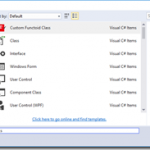
Time to update and improve a very old project of mine: Item Template for Visual Studio 2010: Custom BizTalk Functoid. I really like this one because I normally create a lot of custom functoids and this will help me streamline my work. Be fast, more productive and avoid repeating and annoying task… that is my goal.
This template will allow you to easily create new Functoids for BizTalk Server 2016 – but I think it will also work for other versions of BizTalk/Visual Studio – without having to code the entire class and therefore allowing you to focus on what really matters, the functoid behavior. Just start a new Visual Studio C# library project, or open an existing one, and add a functoid class to start building your BizTalk Server custom Functoid.
This will create a class with the basics skeleton necessary for you to start building your custom functoid, including adding the necessary references (DLLs) to your project. Again, the aim here is to you to focus on the logic of your custom functoid and not in the need to remember all the structure that you need to implement, or in the properties you need to override from the extended BaseFunctoid.
How can I install the Item Template?
To use this item template in your C# library projects just download the project (Don´t unzip) and copy the compressed file to:
- C:UsersUserNameDocumentsVisual Studio 2015TemplatesItemTemplatesVisualC#.
You can download Custom BizTalk Functoid item template for Visual Studio 2015 from:
BizTalk Server: Custom BizTalk Functoid item template for Visual Studio 2015 (3 KB)
Microsoft Code Gallery
Author: Sandro Pereira
Sandro Pereira lives in Portugal and works as a consultant at DevScope. In the past years, he has been working on implementing Integration scenarios both on-premises and cloud for various clients, each with different scenarios from a technical point of view, size, and criticality, using Microsoft Azure, Microsoft BizTalk Server and different technologies like AS2, EDI, RosettaNet, SAP, TIBCO etc. He is a regular blogger, international speaker, and technical reviewer of several BizTalk books all focused on Integration. He is also the author of the book “BizTalk Mapping Patterns & Best Practices”. He has been awarded MVP since 2011 for his contributions to the integration community. View all posts by Sandro Pereira
by Sandro Pereira | Jan 24, 2017 | BizTalk Community Blogs via Syndication
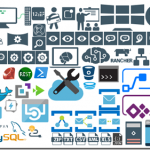
After some requests from the community, I decided to update my Microsoft Integration Stencils Pack with an additional of 183 new shapes and some reorganization. With these new additions, this package now contains an astounding total of ~1094 shapes (symbols/icons) that will help you visually represent Integration architectures (On-premise, Cloud or Hybrid scenarios) and solutions diagrams in Visio 2016/2013. It will provide symbols/icons to visually represent features, systems, processes and architectures that use BizTalk Server, API Management, Logic Apps, Microsoft Azure and related technologies.
- BizTalk Server
- Microsoft Azure
- BizTalk Services
- Azure App Service (API Apps, Web Apps, Mobile Apps and Logic Apps)
- Event Hubs
- Service Bus
- API Management, IoT and Docker
- Machine Learning, Stream Analytics, Data Factory, Data Pipelines
- and so on
- Microsoft Flow
- PowerApps
- PowerBI
- PowerShell
- And many more…
The Microsoft Integration Stencils Pack v2.4 is composed by 11 files:
- Microsoft Integration Stencils v2.4
- MIS Apps and Systems Logo Stencils v2.4
- MIS Azure Portal, Services and VSTS Stencils v2.4
- MIS Azure SDK and Tools Stencils v2.4
- MIS Azure Services Stencils v2.4
- MIS Deprecated Stencils v2.4
- MIS Devices Stencils v2.4
- MIS IoT Devices Stencils v2.4
- MIS Servers and Hardware Stencils v2.4
- MIS Support Stencils v2.4
- MIS Users and Roles Stencils v2.4
These are some of the new shapes you can find in this new version:
You can download Microsoft Integration Stencils Pack for Visio 2016/2013 from:
Microsoft Integration Stencils Pack for Visio 2016/2013 (9,1 MB)
Microsoft | TechNet Gallery
Author: Sandro Pereira
Sandro Pereira lives in Portugal and works as a consultant at DevScope. In the past years, he has been working on implementing Integration scenarios both on-premises and cloud for various clients, each with different scenarios from a technical point of view, size, and criticality, using Microsoft Azure, Microsoft BizTalk Server and different technologies like AS2, EDI, RosettaNet, SAP, TIBCO etc. He is a regular blogger, international speaker, and technical reviewer of several BizTalk books all focused on Integration. He is also the author of the book “BizTalk Mapping Patterns & Best Practices”. He has been awarded MVP since 2011 for his contributions to the integration community. View all posts by Sandro Pereira
by Sandro Pereira | Jan 17, 2017 | BizTalk Community Blogs via Syndication
While researching for my last post, Thinking outside the box (or not): How to create “Global C# function” to be reused inside a map?, in BizTalk360 blog, I encountered several errors while playing around with maps in order to find an approach that would allow me to create the concept of Global Function. And some of this errors were:
“Inline Script Error: must declare a body because it is not marked abstract, extern, or partial”
“Inline Script Error: ; expected”
or
“Inline Script Error: Type ‘BizTalkMapper.FunctoidInlineScripts’ already defines a member called ‘FunctionName’ with the same parameter types”
Causes
The cause of this problem is that you do not correctly declare the body of the Inline C# Function.
Or, if you are trying to reuse an existing Inline C# Function you are doing it properly.
To reuse Inline C# Functions these are the rules that you need to follow:
- If all of the Scripting Functoids are in the same grid page: In the first Scripting Functoid, linked from the source to the destination, we will have to specify the body function and in the following functoids, we only need the function declaration (no body).
- If the Scripting Functoids are in different grid pages: The Scripting Functoid that specifies the body function needs to be on the leftmost grid page and the remaining Scripting Functoids (with the function body declared) on the other grid pages to the right. In other words, counting the grid pages from left to right, if the Scripting Functoid that specifies the body function is on the second grid page, the remaining functoids with the function body declared, cannot be placed on the first grid page, they can only be placed from the second grid page (including the second).
Solution
The solution to solve this issue you have two options, you need to follow the rules described above (BizTalk Mapper tips and tricks: How to reuse Scripting Functoids with Inline C# inside the same map) or you need to implement the concept of global C# Function described in my post: Thinking outside the box (or not): How to create “Global C# function” to be reused inside a map?, in resume:
- Add a Grid page to your map and rename it to “GlobalFunctions”
- Set this grid as the first grid page of your map (important step)
- Drag-and-Drop a Scripting Functoid to the “GlobalFunctions” grid page and place the C# code
- Do not link any inputs and don’t map (link) this Scripting Functoids to any element in the destination Schema.
- Double click the earlier Scripting Functoids added to the “GlobalFunctions” grid page and set the expected input values as empty constant values, that by default doesn’t exist
- Now you can use these functions in other grid pages using only the function declaration
Author: Sandro Pereira
Sandro Pereira lives in Portugal and works as a consultant at DevScope. In the past years, he has been working on implementing Integration scenarios both on-premises and cloud for various clients, each with different scenarios from a technical point of view, size, and criticality, using Microsoft Azure, Microsoft BizTalk Server and different technologies like AS2, EDI, RosettaNet, SAP, TIBCO etc. He is a regular blogger, international speaker, and technical reviewer of several BizTalk books all focused on Integration. He is also the author of the book “BizTalk Mapping Patterns & Best Practices”. He has been awarded MVP since 2011 for his contributions to the integration community. View all posts by Sandro Pereira
