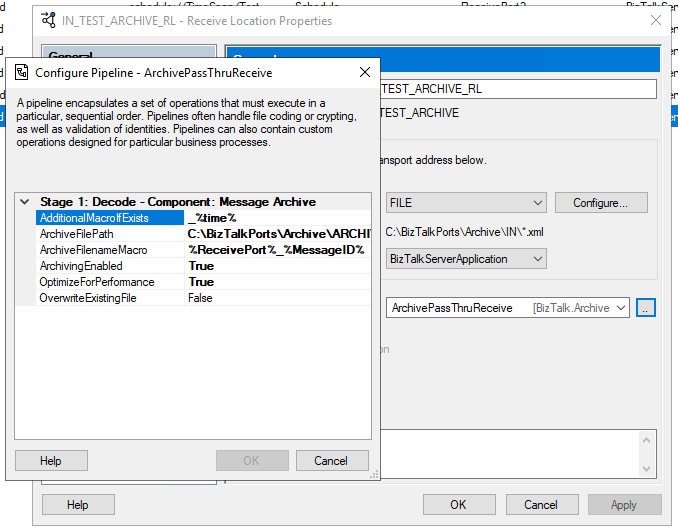
This time I decided to create a brand new component called the Message Archive Pipeline Component.
For those who aren’t familiar with it, the BizTalk Pipeline Components Extensions Utility Pack project is a set of custom pipeline components (libraries) with several custom pipeline components that can be used in receive and sent pipelines. Those pipeline components provide extensions of BizTalk’s out-of-the-box pipeline capabilities.
Message Archive Pipeline Component
The Message Archive Pipeline Component is a pipeline component that can be used to arch incoming/outgoing messages from any adapters into a local or shared folder. It is very identical and provides the same capabilities as the already existing BizTalk Server Local Archive pipeline component:
It can be used in any stage of a receive pipeline or send pipeline;
It can be used in multiple stages of a receive pipeline or send pipeline;
It provides an option for you to specify the location path for where you want to save the message: local folder, shared folder, network folder.
It can be used from any adapter:
If the adapter provides the ReceivedFileName property promoted like the File adapter or FTP adapter the component will take this value into consideration and save the message with the same name;
Otherwise, it will use the MessageID, saving the file with the MessageID has its name without extension.
So what are the differences between them?
The significant differences between these two components are that the Message Archive Pipeline Component allows you to:
Set the filename using macros like %datetime%, %ReceivePort%, %Day%, etc.
For example, %ReceivePort%_%MessageID%.xml
Set the archive file path once again using macros:
for example C:BizTalkPortsArchiveARCHIVE%Year%%Month%%Day%
If you don’t want to overwrite existing files, you can specify an additional Macro to distinguish them.
For example _%time%
You can set up this component for high performance using forward-only streaming best practices.
In short, this means developing your pipeline components so that they do their logic either as a custom stream implementation or by reacting to the events available to you through the Microsoft.BizTalk.Streaming.dll stream classes. Without ever keeping anything except the small stream buffer in Memory and without ever seeking the original stream. This is best practice from the perspective of resource utilization, both memory and processor cycles.
This is the list of properties that you can set up on the archive pipeline component:
Property Name
Description
Sample Values
OverwriteExistingFile
Define if the archive file is to be overwritten if already exists
true/false
ArchivingEnabled
Define if the archive capabilities are enabled or disabled
true/false
ArchiveFilePath
Archive folder path. You can use macros to dynamically define the path.
C:Archive%Year%%Month%%Day%
ArchiveFilenameMacro
File name template. If empty the source file name or MessageId will be used. You can use macros to dynamically define the filename.
%ReceivePort%_%MessageID%.xml
AdditionalMacroIfExists
If a file already exists and OverwriteExistingFile is set to false, a suffix can be added. If empty the MessageId will be used. You can use macros to dynamically define this suffix.
_%time%
OptimizeForPerformance
Setting to apply high performance on the archive
true/false
Available macros
This is the list of macros that you use on the archive pipeline component:
Property Name
Description
%datetime%
Coordinated Universal Time (UTC) date time in the format YYYY-MM-DDThhmmss (for example, 1997-07-12T103508).
%MessageID%
Globally unique identifier (GUID) of the message in BizTalk Server. The value comes directly from the message context property BTS.MessageID.
%FileName%
Name of the file from which the File adapter read the message. The file name includes the extension and excludes the file path, for example, Sample.xml. When substituting this property, the File adapter extracts the file name from the absolute file path stored in the FILE.ReceivedFileName context property. If the context property does not have a value the MessageId will be used.
%FileNameWithoutExtension%
Same of the %FileName% but without extension.
%FileNameExtension%
Same of the %FileName% but in this case only the extension with a dot: .xml
%Day%
UTC Current day.
%Month%
UTC Current month.
%Year%
UTC Current year.
%time%
UTC time in the format hhmmss.
%ReceivePort%
Receive port name.
%ReceiveLocation%
Receive location name.
%SendPort%
Send port name.
%InboundTransportType%
Inbound Transport Type.
%InterchangeID%
InterchangeID.
How to install it
As always, you just need to add these DLLs on the Pipeline Components folder that in BizTalk Server 2020 is by default:
In this particular component, we need to have this DLL:
BizTalk.PipelineComponents.MessageArchive.dll
How to use it
Like all previous, to use the pipeline component, I recommend you to create a generic or several generic pipelines that can be reused by all your applications and add the Message Archive Pipeline Component in the stage you desire. The component can be used in a stage of the receive and send pipelines.
Download
THIS COMPONENT IS PROVIDED “AS IS”, WITHOUT WARRANTY OF ANY KIND.
You can download Message Archive Pipeline Component from GitHub here:
For those who are not familiar, this project is a set of custom pipeline components (libraries) with several custom pipeline components that can be used in received and sent pipelines, which will extend BizTalk’s out-of-the-box pipeline capabilities.
Receive Location Name Property Promotion Pipeline Component
Receive Location Name Property Promotion Pipeline Component is a simple pipeline component to promote the Receive Location Name (ReceiveLocationName) property to the context of the message. Several BizTalk Server context properties are not promoted by default with BizTalk Server, which means that they are not available for routing.
One such property is the ReceiveLocationName property. While the ReceivePortName property is available in the BTS namespace, the ReceiveLocationName property is not promoted. It cannot be used for routing nor access it from inside an orchestration.
My team and I kept that behavior creates this project as a proof-of-concept to explain how you can promote properties to the context of the message.
Create a Property schema
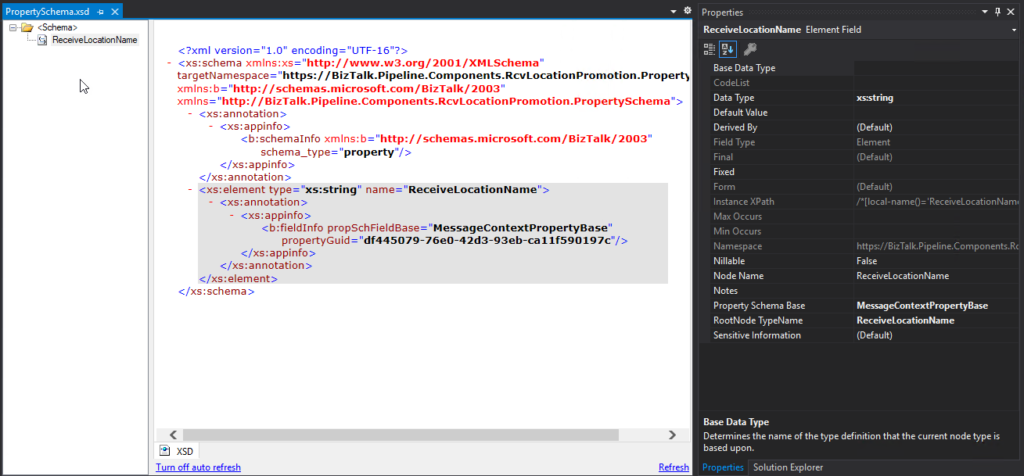
To promote properties to the context of the message, we will need a Property Schema with these properties. In our case, we will add only one property called: ReceiveLocationName.
Property Name
Date Type
Property Schema Base
ReceiveLocationName
xs:string
MessageContextPropertyBase
Note: A MessageContextPropertyBase property means that the XPath may or may not exist.
Create a Pipeline Component
To actually promote the properties to the context of the message, we need to create a pipeline component to do the trick.
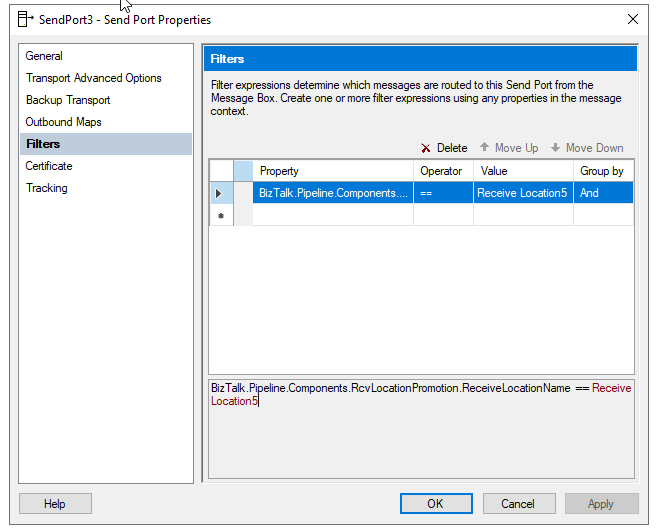
Once you deploy the property schema and a receive pipeline component containing the Receive Location Name Property Promotion Pipeline Component, you can start to apply Content-based routing using the Receive Location Name.
Download
THIS COMPONENT IS PROVIDED “AS IS”, WITHOUT WARRANTY OF ANY KIND.
You can download Receive Location Name Property Promotion Pipeline Component from GitHub here:
For those who are pt familiar, this project is a set of custom pipeline components (libraries) with several custom pipeline components that can be used in received and sent pipelines, which will extend BizTalk’s out-of-the-box pipeline capabilities.
BizTalk PDF2Xml Pipeline Component
BizTalk PDF2Xml Pipeline Component is, as the name mentioned, a decode component that transforms the content of a PDF document to an XML message that BizTalk can understand and process. The component uses the itextsharp library to extract the PDF content. The original source code was available on the CodePlex (pdf2xmlbiztalk.codeplex.com). Still, I couldn’t validate who was the original creator. So, the component first transforms the PDF content to HTML, and then using an external XSLT, will apply a transformation to convert the HTML into a know XML document that BizTalk Server can process.
My team and I kept that behavior, but we extended this component and added the capability also to, by default, convert it to a well know XML without the need for you to use an XSTL transformation directly on the pipeline.
How does this component work?
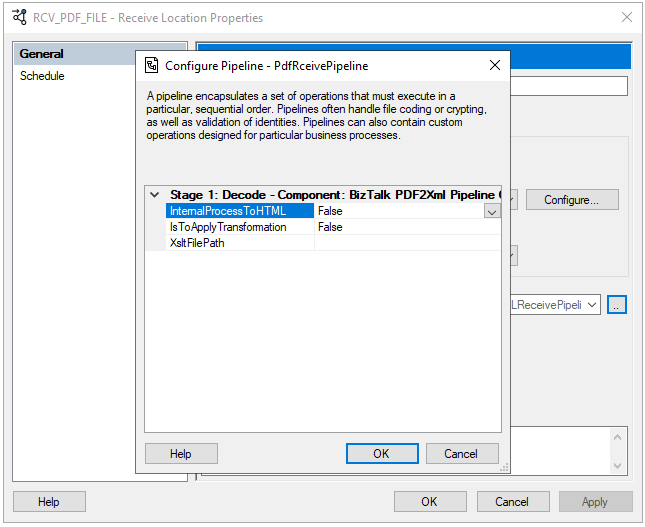
This is the list of properties that you can set up on the PDF2XML pipeline component:
Property Name
Description
Sample Values
InternalProcessToHTML
Value to decide if you want the component to transform the PDF content to HTML or XML
True/False
IsToApplyTrasnformation
Value to decide if you want to apply a transformation on the pipeline component or not
True/False
XsltFilePath
Path to an XSLT transformation file
C:transfmymap.xslt
Once you pass the PDF by this component and depending on how you configure it, the outcome can be:
All PDF content in an HTML format;
All PDF content in an XML format;
Part of the PDF content on an XML format (if you apply a transformation)
Unfortunately, on my initial tests, this component works well with some PDF files, but others simply ignore its content. Nevertheless, I make it available as a prof-of-concept.
Download
THIS COMPONENT IS PROVIDED “AS IS”, WITHOUT WARRANTY OF ANY KIND.
You can download BizTalk PDF2Xml Pipeline Component from GitHub here:
Yesterday I spoke about how you can apply custom pattern restrictions to properly validate DateTime, Date, and Time formats inside elements or attributes. You can see more about it here:
And I mention that these Regular Expressions can be simple and relatively easier to read if you have some basic knowledge like this one below:
d{4}d{2}d{2} – that is a simple format that expects 4 digits followed by 2 additional digits and another 2 digits that is the date in the YYYYMMDD format without validating the accuracy of months or days and where:
YYYY is the for digits year, like 2022.
MM is the 2 digits month, like 01.
DD is the 2 digits day, like 21.
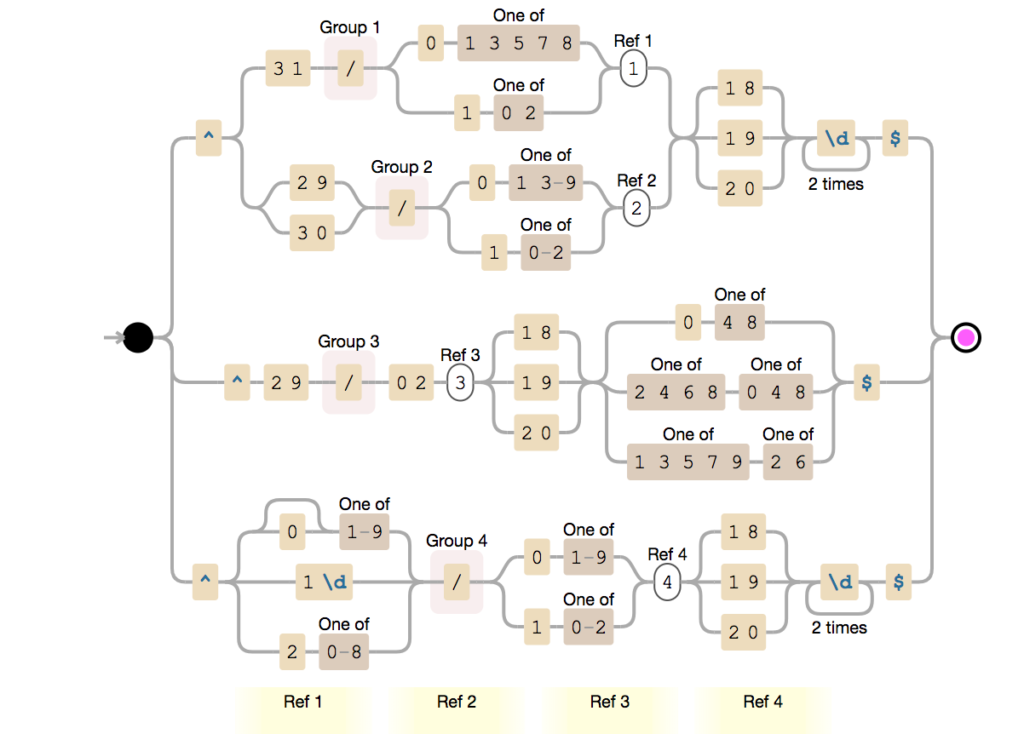
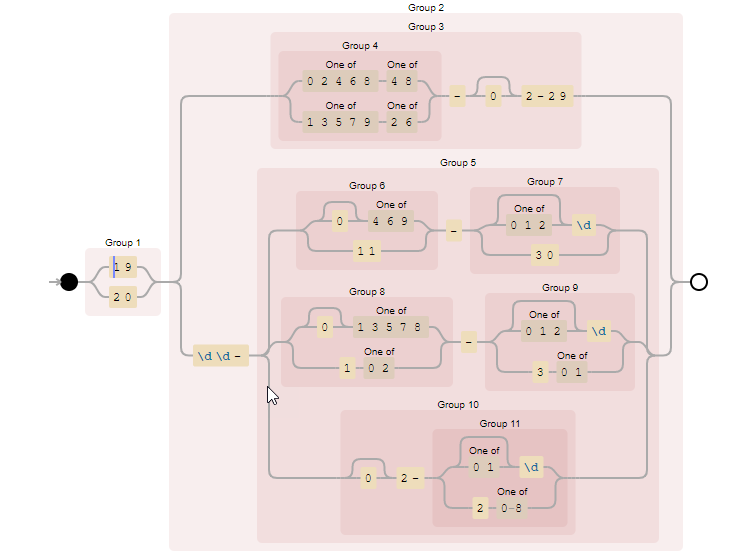
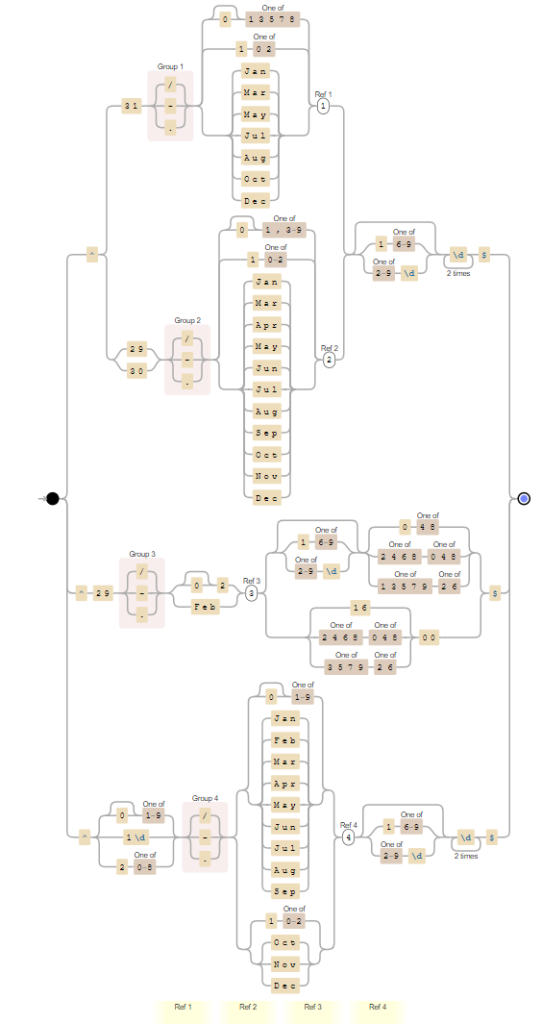
But it can get highly complex that even people with good knowledge have difficulty translating the expression to the expected pattern, like the one below:
It is not simple to look to this RegEx and say: “yep, we are expecting this Date format: MM/DD/YYYY like 12/11/1999, and by the way, it validates the Leap Year!”
Imagine users that don’t have strong know-how about RegEx!
So, what can we do to improve this experience? What are the best practices in these cases?
Best practices
A good best practice to improve readability while documenting your schemas is to add notes to these elements or attributes.
We can and should use the Notes property to enter notes, such as comments related to the business process, that you would like to make about the selected Record, Field Element, or Field Attribute node. In these DateTime, Date, and Time cases, we can simply add the expected format in the Notes property, like:
Format: YYYY-MM-DD
Format: HH:mm:ss
Format: YYYYMMDD
Format: HHmm
Format: YYYY-MM-DD – It validates Leap Year
To accomplish this, we need to
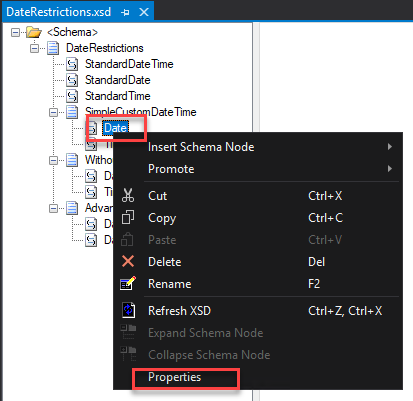
Right-click on the Element or Attribute fields in the schema tree view and select the Properties option.
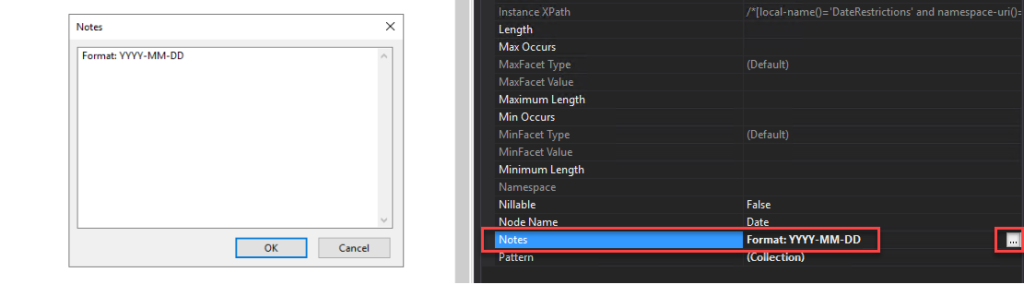
On the Properties window, click on the … (three dots) on the Notes property. This action will open a Notes window where you can add all your relevant notes.
Do that to all your elements and fields that are using pattern restrictions.
Even non-technical guys can understand the Schema specification you provide or are consuming. This best practice implementation will also help you improve productivity since you will not spend too much time decompiling Regular Expressions.
Download
THIS SAMPLE CODE IS PROVIDED “AS IS”, WITHOUT WARRANTY OF ANY KIND.
You can download the POC: BizTalk Schemas Handle Restrictions on Date from GitHub here:
Today I was involved in a BizTalk Schema importation that includes not-so-used restrictions on Date and Time elements formats. And that gave me the idea and inspiration to create this blog post.
When we work with DateTime on Schemas by default we can choose from the following data types:
xs:dateTime: The dateTime data type is used to specify a date and a time in the following form “YYYY-MM-DDThh:mm:ss.fffK” where:
YYYY indicates the year
MM indicates the month
DD indicates the day
T indicates the start of the required time section
hh indicates the hour
mm indicates the minute
ss indicates the second
fff indicates the milliseconds
K represents the time zone information of a date and time value (e.g. +05:00)
xs:date: The date data type is used to specify a date in the following form “YYYY-MM-DD” where:
YYYY indicates the year
MM indicates the month
DD indicates the day
xs:time: The time data type is used to specify a time in the following form “hh:mm:ss.fffK” where:
hh indicates the hour
mm indicates the minute
ss indicates the second
fff indicates the milliseconds
K represents the time zone information of a date and time value (e.g. +05:00)
or you could use an xs:string that b.asically accepts everything. The only problem here is that by default we can’t do a schema validation to see if it is a valid DateTime format.
But not all systems respect de DateTime formats expected by the XSD default values. So, what are my options if a system expects other types of DateTime, Date, or Time formats? Like:
MM/DD/YYYY
YYYY-DD-MM
YYYY-MM-DD HH:mm:ss
YYYYMMDD
HHmmss
HH:mm:ss
and so on.
Simple Type Derivation Using the Restriction Mechanism
Luckily for us BizTalk Schema Editor and schemas, in general, allow us to derive a simple type, for example, xs:string, by using the restriction mechanism, i.e., we are typically restricting the values allowed in a message for that attribute or element value to a subset of those values allowed by the base simple type. A good and common sample of these types of restrictions is to restrict a string type to be one of several enumerated strings.
Luckily for us, again, we can also apply a pattern (that uses Regex expression) to validate the element or attribute value.
To derive a simple type by using restriction:
Select the relevant Field Element node or Field Attribute node in the schema tree
And then, in the Properties window, on the Derived By property set as Restriction.
This will add/present the Restriction properties on the Properties window.
On the Restriction properties, click on the … (3 dots) on the Pattern property to define the RegEx.
Regular expression samples to validate date formats
Here is where the fun starts. There are many ways to archive this goal:
One’s more simple but probably not that efficient since they may not validate all cases (Leap year, and so on)
Others more complex that requires more knowladge but more accurated.
In a general overview, the use of regex to validate the date format supports a variety of situations and possibilities like:
Rule to validate the year:
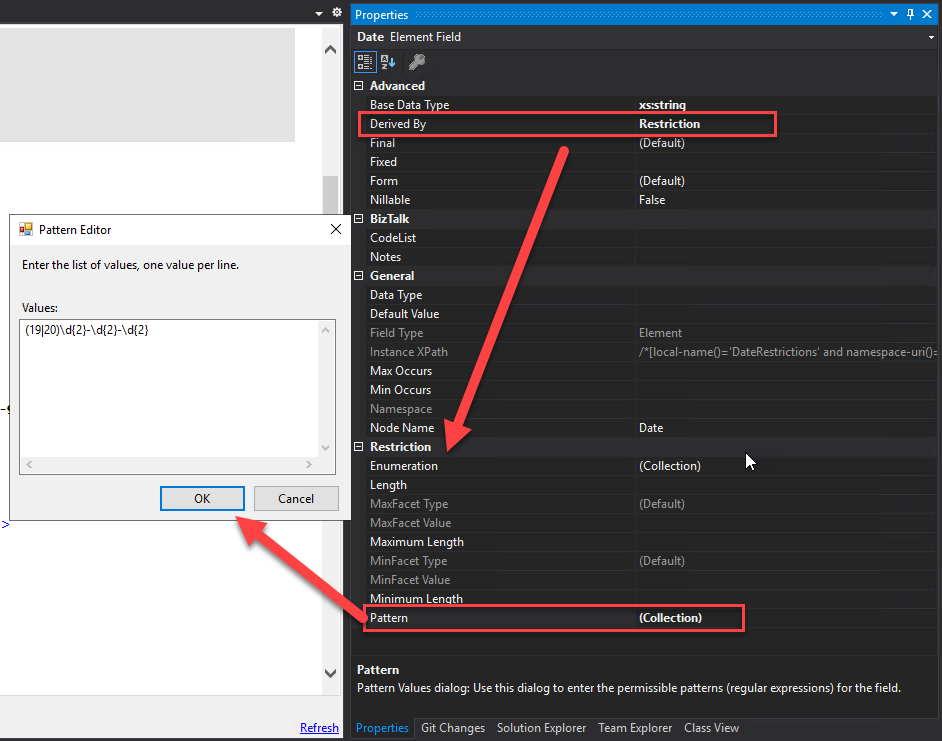
d{4} – it says that accepts 4 digits like: 2022
(19|20)[0-9][0-9] -accepts years starting with 19 or 20, i.e., from 1900 to 2099
Rule to validate the month:
d{2} – it says that accepts 2 digits like: 12, but the problem here is that also accepts invalid months like 24 or 99.
d{2} – it says that accepts 2 digits like: 12, but the problem here is that also accepts invalid days like 32 or 99. It also don’t validate what is the month we define to validate if accepts 28, 29, 30 or 31
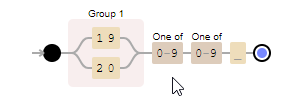
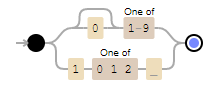
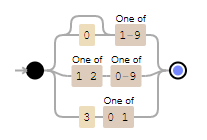
0?[1-9]|[12][0-9]|3[01] – accepts 01-09 (leading zero), 1-9 (single digit), 10-19, 20-29 and 30-31. It doesn.t check if it is a Leap year or not.
To implement the lead year that needs to be with a concatenation of several rules like this sample:
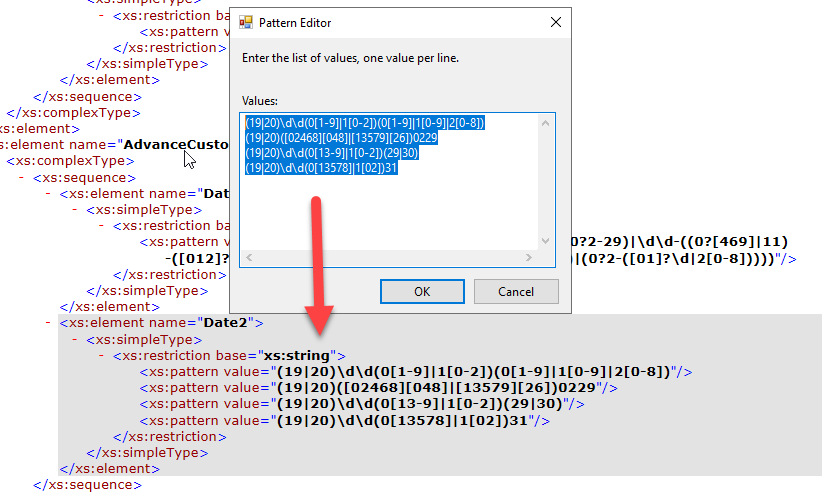
As you saw above, things can go out of control and become quite complex. Fortunately, the BizTalk Schema Editor and the schemas, in general, allow us to apply multiple patterns to simplify the overall expression.
So, for example, if I want to have the following Date format: YYYYMMDD with Leap year validated I can use the combination of these 4 expressions:
(19|20)dd(0[1-9]|1[0-2])(0[1-9]|1[0-9]|2[0-8])
(19|20)([02468][048]|[13579][26])0229
(19|20)dd(0[13-9]|1[0-2])(29|30)
(19|20)dd(0[13578]|1[02])31
Some samples
Date in the following format: YYYY-MM-DD like 2022-12-11
Simple formats
d{4}-d{2}-d{2} – simple format without validating month or day
Wow… what a 2+ years journey. Writing a book during the pandemic phase and dealing with all aspects of the book was a challenger, and for that, I have to say thank you to Tom Canter and Lex Hegt for taking this journey with me and thank you Kovai and Saravana for supporting us!
I was also surprised that the book was released today because today was also the day I got back to the office and provided a copy of the book to my team! A lucky coincidence! Thanks, Pedro Almeida and Diogo Formosinho, for the support during these last years.
And of course, I have to say thanks to the people that also make part of this book: Mandi Anez Ohlinder for writing the foreword, Steve Lemkau, and JoAnn Een for reviewing it!
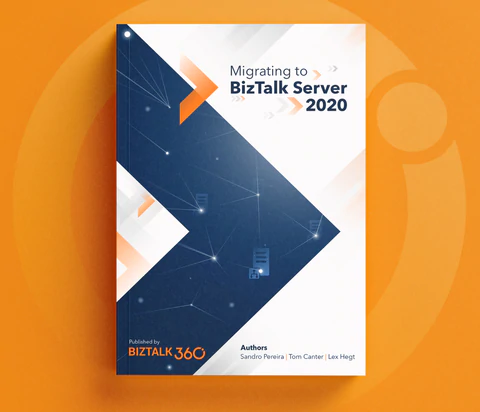
Migrating to BizTalk Server 2020
This book is intended to be a valuable resource for managers, architects, developers, testers, and administrators involved in migrating BizTalk Server platforms and solutions running on previous versions toward BizTalk Server 2020. It will provide practical recipes and strategies that will help them enhance and strengthen their knowledge in this sensitive and sometimes complicated upgrade process.
This book is a “mini” bible to migrate your BizTalk Server to the last version of the product covering all most aspects of this topic:
Overview of BizTalk Server 2020: will provide the reader with a full overview of BizTalk Server 2020, the latest version of the product, addressing topics like what are the main components and core features, what is new, what was deprecated or removed from this version and hardware and Software requirements & supported versions as well
Migration Drivers (why upgrade to BizTalk Server 2020): Many companies have this idea that upgrading to newer versions of BizTalk Server can be challenging, and they tend to skip certain version upgrades to minimize the effort and the costs. This chapter aims to address and discuss the main reasons why you should migrate from the previous version of the BizTalk Server to this latest version
Preparing for Your Upgrade: There are specific tasks, considerations, and components standard in each platform migration, but in the end, every BizTalk Server migration is different from each other. This chapter will go thru the Evaluate, Plan, and Implement (EPI) approach, providing you a path for completing your upgrade in a controlled and timely manner, focusing on the key considerations that need to be taken into account when planning your migration
In-place upgrade: Despite in-place migration or BizTalk Server upgrade is not supported in all scenarios, and in most cases, not recommended in production environments. It is still a valid option. This chapter will outline the key considerations that need to be taken into account when planning an in-place migration of your BizTalk Server environment
Migrating to BizTalk Server 2020 (side-by-side): Side-by-side migration is probably the most common migration path used. And once we decided on this approach, we need to understand and clarify all the steps that need to be performed to migrate from your previous BizTalk Server version to BizTalk Server 2020. his chapter will discuss the steps around setting up the new platform, making you aware of challenges that come with maintaining multiple (live) environments, and providing you will all the tips and recommendations for you to migrate your BizTalk solutions peacefully and transparently. After completing this chapter, you will be aware of and understand what will be involved in a migration process and the efforts required for each component
Migrating to Azure: This last chapter covers the key takeaways that you need to consider before deciding to migrate or move your on-premiss BizTalk Server machines to Azure Infrastructure as a Service (IaaS). When you can and can’t move, why you should move and what will be required. While not the focus of this book, this chapter will also briefly look at the BizTalk Server solution migration process to Azure Integration Services. Highlighting what will be possible or not, the difficulties you might encounter, and some approaches they could use to make this transition as simple as possible
Where can I order the book?
For now, the book is available for you can order the book online at Shopify here:
Finally, to my wife Fernanda and my children Leonor, Laura e José, my life would be empty and meaningless without all your hugs, jokes, crying to demand attention, affection, and all our other crazy things. Thanks for being part of my life.
At their core, mainframes are high-performance computers with large amounts of memory and processors that process billions of simple calculations and transactions in real-time. The mainframe is critical to commercial databases, transaction servers, and applications that require high resiliency, security, and agility
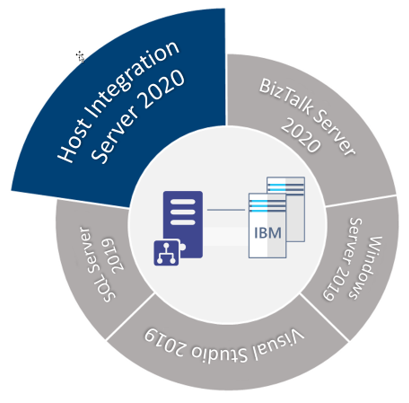
Microsoft Host Integration Server (HIS) technologies and tools enable enterprise organizations to integrate existing IBM host systems, programs, messages, and data with new Microsoft server applications.
HIS allows IT administrators to securely and efficiently connect new systems to existing systems using industry-standard High-Performance Routing (HPR) and Transmission Control Protocol (TCP) over Internet Protocol (IP). This reduces operating expenses and total cost of ownership while supporting existing and new computing workload.
HIS 2020 is available in one technology package licensed as additional software to the core editions of Microsoft BizTalk Server 2020.
This whitepaper will discuss a step-by-step guideline – how to install and configure Host Integration Server 2020 on a BizTalk Server standalone environment running Windows Server 2020.
What’s in store for you?
This whitepaper will give you a detailed understanding of the following:
Install Host Integration Server 2020
Configure Host Integration Server 2020
Install Host Integration Server 2020 Cumulative Updates
At their core, mainframes are high-performance computers with large amounts of memory and processors that process billions of simple calculations and transactions in real-time. The mainframe is critical to commercial databases, transaction servers, and applications that require high resiliency, security, and agility
Microsoft Host Integration Server (HIS) technologies and tools enable enterprise organizations to integrate existing IBM host systems, programs, messages, and data with new Microsoft server applications.
HIS allows IT administrators to securely and efficiently connect new systems to existing systems using industry-standard High-Performance Routing (HPR) and Transmission Control Protocol (TCP) over Internet Protocol (IP). This reduces operating expenses and total cost of ownership while supporting existing and new computing workload.
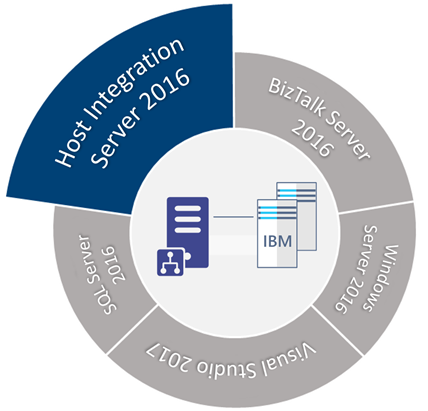
HIS 2016 is available in one technology package licensed as additional software to the core editions of Microsoft BizTalk Server 2016.
This whitepaper will discuss a step-by-step guideline – how to install and configure Host Integration Server 2016 on a BizTalk Server standalone environment running Windows Server 2016.
What’s in store for you?
This whitepaper will give you a detailed understanding of the following:
Install Host Integration Server 2016
Configure Host Integration Server 2016
Install Host Integration Server 2016 Cumulative Updates
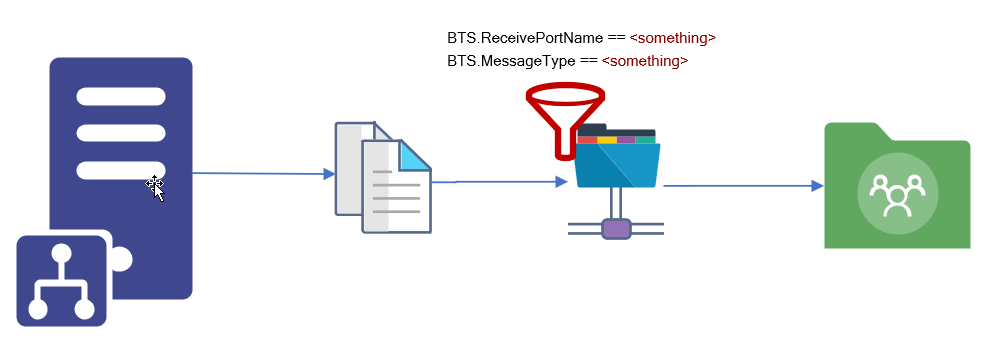
We usually see two implementation cases when dealing with unwanted or obsolete messages:
They get suspended on BizTalk Server – not that common, at least in the long run. We may see this earlier when these types of messages are encountered.
or a common way to solve these situations is to create a send port to filter these types of messages and send them to a support folder in BizTalk Server hard drive or a shared location.
Of course, this last option should be considered as a backup plan that can work as intended if you have good control and clean best practices like creating a scheduling task that cleans these messages from the hard drive from time to time. Otherwise, your hard drive becomes full at some point, and more critical issues will arise.
BizTalk Server Void Adapter
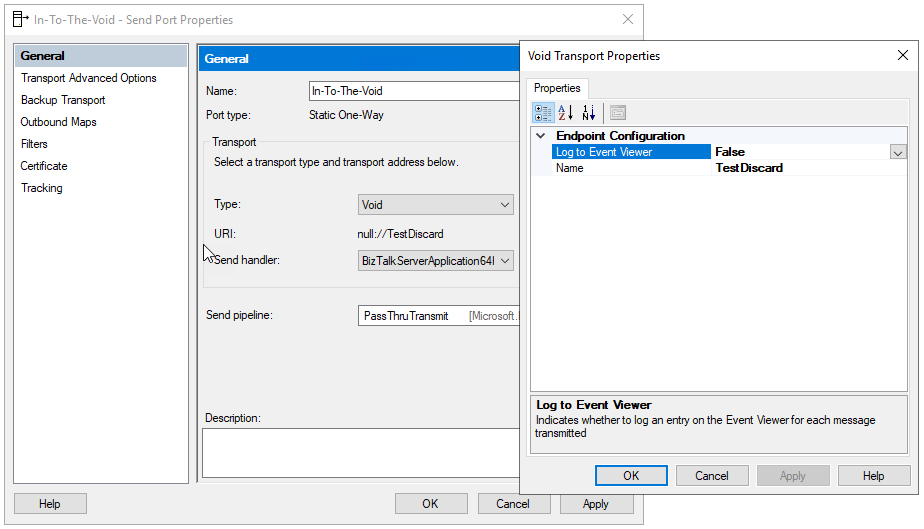
The BizTalk Server Void adapter is a simple way to easily discard all unwanted messages from your BizTalk Server environments instead of getting suspended or sent to a hard drive support folder.
This custom send adapter for BizTalk Server discards outgoing messages – sends messages to nowhere – into the void! Without the need for external jobs (like scheduling tasks) or added cleaning concerns.
How to install it?
If you want to install the BizTalk Server FILE-RADITZ Adapter, you need to:
Place the folder BizTalkVoidAdapter on any location on your BizTalk Server box. I will recommend to put it in:
C:Program Files (x86)
Note: if you put in any other path you need to modify the VoidAdapter.reg file
Access the folder and double-click on the VoidAdapter.reg file
This will register the adapter to run under 32-bit host instances. To make it available also for 64-bits, you need to:
Click Start
Type %windir%SysWoW64cmd.exe in the search box and press enter
Run the same adapter registry (.reg) file from this command prompt
Now you just need to add this adapter to the BizTalk Server Administration Console:
Open BizTalk Administration Console by pressing the Windows key to switch to the Start menu, type BizTalk Server Administration or BizTalk, click the BizTalk Server Administration option from the Search window.
In the console left tree, expand BizTalk Server Administration > BizTalk Group > Platform Settings and then Adapters.
In the Adapter Properties
In the Name box, type a descriptive name for this adapter.
Void
In the Adapter combo box, select the adapter from the drop-down that you want to add.
Void
In the Description box, type a description for the adapter (this is optional).
The BizTalk Server Void adapter is a simple way to easily discard all unwanted messages from your BizTalk Server environments instead of getting suspended or sent to a hard drive support folder.
Click OK to complete the process of adding the adapter.
Note: If you want to use the Event Viewer to track/log the discarded messages you should first create the Log Name and Log Source. This way the tracking data will not be registered in the Application Log but instead in a custom log. To do that you can use the PowerShell provided on the runtime folder: mngt-Create-Event-Source.ps1.
Where can you use it?
This version available on GitHub is currently compiled on .NET 4.6 and optimized for BizTalk Server 2020. Nevertheless, you can take this code and compile it in other versions of .NET and BizTalk Server. It will be 100% compatible.
You may already know my BizTalk Pipeline Components Extensions Utility Pack project available on GitHub for those who follow me. The project is a set of custom pipeline components (libraries) with several custom pipeline components that can be used in received and sent pipelines, which will extend BizTalk’s out-of-the-box pipeline capabilities.
This month my team and I update this project with another new component: ODBC File Decoder Pipeline Component.
ODBC File Decoder Pipeline Component
ODBC File Decoder Pipeline Component is, as the name mentioned, a decode component that you can use in a receive pipeline to process DBF or Excel files. Still, it can be possible to process other ODBC types (maybe requiring minor adjustments). The component uses basic ADO.NET to parse the incoming DBF or Excel files into an XML document.
If consuming DBF files is not a typical scenario, we can’t say the same for Excel files. Yet, we often find these requirements, and there isn’t any out-of-the-box way to process these files.
Honestly, I don’t know the original creator of this custom component. I came across this old project that I found interesting while organizing my hard drives. However, when I tested it in BizTalk Server 2020, it wasn’t working correctly, so my team and I improved and organized the structure of the code of this component to work as expected.
How does this component work?
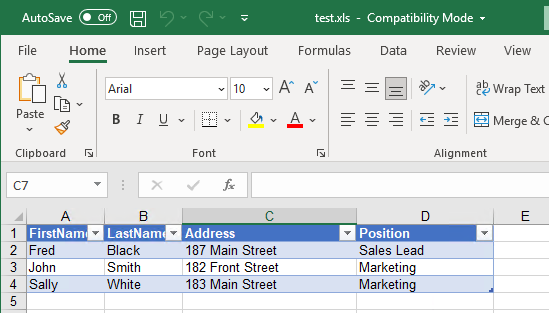
If we take has an example and Excel File (.xls) that has a table with:
FirstName
LastName
Address
Position
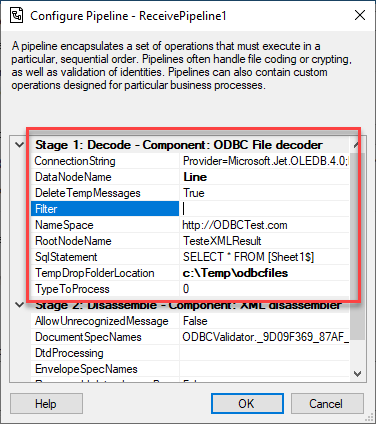
We can use the ODBC File Decoder Pipeline Component to process these documents. First, we need to create a custom pipeline component and add this component to the decode stage. Once we publish this pipeline, we can configure it as follows to be able to process these types of Excel documents:
ConnectionString: ODBC Connection String
For Excel documents: Provider=Microsoft.Jet.OLEDB.4.0;Extended Properties=Excel 8.0;
For DBF: Provider=Microsoft.Jet.OLEDB.4.0;Extended Properties=dBASE IV;
DataNodeName: Rows node name for the generated XML message
For example: Line
Filter: Filter for Select Statement
Leave it empty
NameSpace: Namespace for the generated XML message
For example: http://ODBCTest.com
RootNodeName: Root node name for the generated XML message
For example: TesteXMLResult
SqlStatement: Select Statement to Read ODBC Files
For example: SELECT * FROM [Sheet1$]
TempDropFolderLocation: Support temp folder for processing the ODBC Files
For example: c:Tempodbcfiles
TypeToProcess: Type of file being Processed
0 to process Excel
1 to process DBF
The outcome result will be an Excel similar to this:
<?xml version="1.0" encoding="utf-8"?><ns0:TesteXMLResult xmlns:ns0="http://ODBCTest.com">
  <Line>
    <FirstName>Fred</FirstName>
    <LastName>Black</LastName>
    <Address>187 Main Street</Address>
    <Position>Sales Lead</Position>
  </Line>
  <Line>
    <FirstName>John</FirstName>
    <LastName>Smith</LastName>
    <Address>182 Front Street</Address>
    <Position>Marketing</Position>
  </Line>
  <Line>
    <FirstName>Sally</FirstName>
    <LastName>White</LastName>
    <Address>183 Main Street</Address>
    <Position>Marketing</Position>
  </Line>
</ns0:TesteXMLResult>
Does it work with Xlsx files?
Honestly, I didn’t try it yet. I didn’t have that requirement, and I only remember this scenario now that I’m writing this post, but it should be able to process it. The only thing I know is that we need to use a different connection string, something similar to this: