
by community-syndication | Oct 30, 2013 | BizTalk Community Blogs via Syndication
This article is to trouble shoot the issue with the add parameters in call rules shape, writing this so that I can go back to this post for resolution. 1- Create Rule as per below using XSD in BizTalk Server BRE composer 2- Deploy the rule and restart the Rules Engine. 3- Go back to […]
Blog Post by: shadabanwer
by community-syndication | Oct 30, 2013 | BizTalk Community Blogs via Syndication
There are many ways to create virtual machines in Azure. Of course the Azure Portal is the easiest but it is completely manual. When you have a lot of virtual machines that are part of your solution then you definitely want to script that process. When you script your Azure deployment you can do it with PowerShell or directly against the REST API. There are many examples on the web that provide PowerShell examples. However, I have not found a lot of material around the REST API.
So if you are trying to use the REST API, here are a couple of findings that I have run into that I hope will help you.
When creating a virtual machine you have two APIs that you can use. The first is the Add Role and the second is the Create Virtual Machine Deployment.
Which one should you utilize? If you are creating only one virtual machine you can create it with either API.
However, the issues start to arise when you need to create multiple virtual machines in the same script. If you use the Add Role API you will be able to create the first virtual machine but when the second virtual machine in the script is encountered you will receive a 400 Bad Request error (keep in mind that there are a number of 400 error codes that can be returned so make sure to look at the text and not just the HTTP status code). You can find all the Error codes here.
When you have multiple virtual machines to create in the script then you will need to start with the Create Virtual Machine Deployment API to create the first virtual machine and then use the Add Role API to create all subsequent virtual machines in your deployment.
You will notice when you look at the XML payload you need to include in the API call that the Create Virtual Machine Deployment contains a <Role> element within a <Deployment> element. When you look at the Add Role XML everything falls under the <PersistVMRole> element. So you need to run the API the does the <Deployment> first before running the <PersistVMRole> elements.
NOTE: It is very important that you have all the XML nodes in the correct order.
This is important because if the elements are not in the correct order, your VM can still be created (usually) but things like the Availability Set or EndPoints won’t get created. What I have found is that when everything is in the right order (based on the examples in the documentation) then everything worked and all the virtual machines were created as expected.
In addition, if simple things like the <Protocol> node is before the <LoadBalancerProbe> element (in the documentation it is the only element after the <LoadBalancerProbe> element) then the endpoints will be created but the Load Balancer won’t and you will see that the Load Balancer Set Name column in the portal will show an error stating Missing Probe.
Blog Post by: Stephen Kaufman

by community-syndication | Oct 30, 2013 | BizTalk Community Blogs via Syndication
This post builds on part 1 and part 2 of this series looking at BizTalk and WCF. The first post looked at theRandomPresentWCF service and looked at design considerations, hosting and testing. The second post touched on how to consume the WCF service from BizTalk, using the BizTalk WCF Service Consuming Wizard. Process Flow The […]
Blog Post by: James Corbould

by community-syndication | Oct 30, 2013 | BizTalk Community Blogs via Syndication
%u672c%u8a18%u4e8b%u306f%u3001Microsoft Malware Protection Center %u306e%u30d6%u30ed%u30b0 “New Security Intelligence Report, new data, new perspectives” (2013 %u5e74 10 %u6708 29 %u65e5%u516c%u958b) %u3092%u7ffb%u8a33%u3057%u305f%u8a18%u4e8b%u3067%u3059%u3002
%u672c%u65e5%u3001%u30de%u30a4%u30af%u30ed%u30bd%u30d5%u30c8%u306f %u30de%u30a4%u30af%u30ed%u30bd%u30d5%u30c8 %u30bb%u30ad%u30e5%u30ea%u30c6%u30a3 %u30a4%u30f3%u30c6%u30ea%u30b8%u30a7%u30f3%u30b9 %u30ec%u30dd%u30fc%u30c8 (SIRv15) (%u82f1%u8a9e%u7248) %u306e%u7b2c 15 %u7248%u3092%u516c%u958b%u3057%u307e%u3057%u305f%u3002%u3053%u306e%u30ec%u30dd%u30fc%u30c8%u306f%u3001%u4e16%u754c%u4e2d%u306e%u83ab%u5927%u306a%u6570%u306e%u30b7%u30b9%u30c6%u30e0%u3001%u304a%u3088%u3073%u5e7e%u3064%u304b%u306e%u30a4%u30f3%u30bf%u30fc%u30cd%u30c3%u30c8%u306e%u6d3b%u767a%u306a%u30aa%u30f3%u30e9%u30a4%u30f3 %u30b5%u30fc%u30d3%u30b9%u306e%u30c7%u30fc%u30bf%u306b%u57fa%u3065%u3044%u3066%u3001%u30de%u30eb%u30a6%u30a7%u30a2%u3001%u60aa%u7528%u306b%u3064%u3044%u3066%u5206%u6790%u3057%u3066%u3044%u307e%u3059%u3002
%u6628%u5e74%u4e2d%u3001%u79c1%u9054%u306f%u30bb%u30ad%u30e5%u30ea%u30c6%u30a3 %u30a4%u30f3%u30c6%u30ea%u30b8%u30a7%u30f3%u30b9 %u30ec%u30dd%u30fc%u30c8%u306e%u7b2c 15 %u7248%u306b%u3064%u3044%u3066%u4f01%u753b%u3057%u3066%u3044%u307e%u3057%u305f%u3002%u304a%u5ba2%u69d8%u306b%u63d0%u4f9b%u3059%u308b%u30ac%u30a4%u30c0%u30f3%u30b9%u306e%u7bc4%u56f2%u3001%u304a%u3088%u3073%u6b63%u78ba%u6027%u3092%u5411%u4e0a%u3059%u308b%u305f%u3081%u306b%u306f%u3069%u3046%u3059%u308c%u3070%u826f%u3044%u306e%u304b%u8003%u616e%u3057%u305f%u305f%u3081%u3001%u904e%u53bb%u306e%u30ec%u30dd%u30fc%u30c8%u3067%u63d0%u4f9b%u3057%u305f%u30c7%u30fc%u30bf%u4ee5%u4e0a%u306b%u30de%u30eb%u30a6%u30a7%u30a2%u306e%u8513%u5ef6%u7387%u3092%u6700%u3082%u826f%u304f%u793a%u3059%u306b%u306f%u3069%u3046%u3057%u305f%u3089%u826f%u3044%u304b%u306b%u3064%u3044%u3066%u719f%u616e%u3057%u307e%u3057%u305f%u3002
%u79c1%u9054%u306f%u3001%u30ea%u30a2%u30eb%u30bf%u30a4%u30e0%u306e%u9632%u5fa1%u88fd%u54c1%u306b%u57fa%u3065%u3044%u3066%u30de%u30eb%u30a6%u30a7%u30a2%u306e%u5f71%u97ff%u5ea6%u3092%u6e2c%u308b%u6e2c%u5b9a%u57fa%u6e96%u3092%u8a2d%u3051%u308b%u5fc5%u8981%u304c%u3042%u308a%u307e%u3057%u305f%u3002
%u79c1%u9054%u306f%u3001%u65e2%u306b%u3001%u611f%u67d3%u7387%u306b%u3064%u3044%u3066%u306f%u60aa%u610f%u306e%u3042%u308b%u30bd%u30d5%u30c8%u30a6%u30a7%u30a2%u306e%u524a%u9664%u30c4%u30fc%u30eb (MSRT) %u3092 1,000 %u56de%u5b9f%u884c%u3057%u305f%u5834%u5408%u306b%u99c6%u9664%u3092%u53d7%u3051%u305f%u30b3%u30f3%u30d4%u30e5%u30fc%u30bf%u30fc%u306e%u6570%u3092%u793a%u3059 Computers Cleaned per Mille (CCM) %u3068%u547c%u3070%u308c%u308b%u6e2c%u5b9a%u57fa%u6e96%u3092%u4f7f%u7528%u3057%u3066%u5831%u544a%u3057%u3066%u3044%u307e%u3059%u3002%u3053%u308c%u306b%u3088%u308a%u3001%u611f%u67d3%u304c%u3044%u304b%u306b%u5e83%u7bc4%u306b%u5e83%u304c%u3063%u3066%u3044%u308b%u306e%u304b%u8aac%u660e%u3059%u308b%u3053%u3068%u304c%u53ef%u80fd%u3067%u3059%u3002
%u73fe%u5728%u3001%u30b3%u30f3%u30d4%u30e5%u30fc%u30bf%u30fc%u306b%u5f71%u97ff%u3092%u4e0e%u3048%u3066%u3044%u308b%u8105%u5a01%u306e%u7bc4%u56f2%u306b%u3064%u3044%u3066%u3088%u308a%u6df1%u304f%u7406%u89e3%u3059%u308b%u305f%u3081%u306b%u306f%u3001%u6c7a%u3057%u3066%u611f%u67d3%u306b%u3064%u306a%u304c%u3089%u306a%u3044%u8a66%u307f%u3092%u542b%u3080%u3001%u611f%u67d3%u306e%u8a66%u307f%u306b%u3064%u3044%u3066%u8003%u616e%u3059%u308b%u3053%u3068%u304c%u76ca%u3005%u91cd%u8981%u306b%u306a%u3063%u3066%u304d%u3066%u3044%u307e%u3059%u3002%u3053%u306e%u30c7%u30fc%u30bf%u306f%u3001%u30ea%u30a2%u30eb%u30bf%u30a4%u30e0%u306e%u30bb%u30ad%u30e5%u30ea%u30c6%u30a3%u88fd%u54c1%u306b%u3088%u3063%u3066%u306e%u307f%u63d0%u4f9b%u3055%u308c%u308b%u3082%u306e%u3067%u3059%u304c%u3001%u3053%u308c%u306f%u3001%u65b0%u305f%u306a%u6e2c%u5b9a%u57fa%u6e96%u300c%u906d%u9047%u7387%u300d%u3067%u6e2c%u3089%u308c%u3066%u3044%u307e%u3059%u3002%u906d%u9047%u7387%u3068%u306f%u3001%u30de%u30eb%u30a6%u30a7%u30a2%u3092%u5076%u7136%u898b%u3064%u3051%u308b%u3001%u3042%u308b%u3044%u306f%u906d%u9047%u3059%u308b%u3001%u30de%u30a4%u30af%u30ed%u30bd%u30d5%u30c8%u306e%u30ea%u30a2%u30eb%u30bf%u30a4%u30e0%u306e%u30bb%u30ad%u30e5%u30ea%u30c6%u30a3%u88fd%u54c1%u3092%u7a3c%u50cd%u3057%u3066%u3044%u308b%u30b3%u30f3%u30d4%u30e5%u30fc%u30bf%u30fc%u306e%u5272%u5408%u3067%u3059%u3002%u4e26%u3079%u3066%u898b%u6bd4%u3079%u308b%u3068%u3001%u611f%u67d3%u7387%u3001%u304a%u3088%u3073%u906d%u9047%u7387%u306f%u30de%u30eb%u30a6%u30a7%u30a2%u306e%u5168%u4f53%u50cf%u3092%u898b%u308b%u5834%u5408%u306b%u7570%u306a%u308b%u8996%u70b9%u3092%u6388%u3051%u3066%u304f%u308c%u3001%u5b9f%u614b%u3092%u89e3%u660e%u3059%u308b%u3053%u3068%u3067%u3088%u308a%u60c5%u5831%u306b%u901a%u3058%u305f%u30ea%u30b9%u30af%u8a55%u4fa1%u306b%u8ca2%u732e%u3057%u307e%u3059%u3002
%u4f8b%u3048%u3070%u3001%u6628%u5e74%u4e2d%u306e%u906d%u9047%u7387%u3001%u304a%u3088%u3073%u611f%u67d3%u7387%u306b%u3088%u308b%u5206%u6790%u3067%u6d6e%u4e0a%u3057%u305f%u30ad%u30fc%u3068%u306a%u308b%u767a%u898b%u306e 1 %u3064%u306f%u3001Windows XP %u3092%u7a3c%u50cd%u3057%u3066%u3044%u308b%u30b3%u30f3%u30d4%u30e5%u30fc%u30bf%u30fc%u304c Windows 7 %u3092%u7a3c%u50cd%u3057%u3066%u3044%u308b%u30b3%u30f3%u30d4%u30e5%u30fc%u30bf%u30fc%u3068%u540c%u7a0b%u5ea6%u306e%u30de%u30eb%u30a6%u30a7%u30a2%u306b%u906d%u9047%u3057%u3066%u3044%u305f%u3068%u3044%u3046%u3082%u306e%u3067%u3057%u305f%u3002Windows XP %u3092%u4f7f%u7528%u3059%u308b%u30b3%u30f3%u30d4%u30e5%u30fc%u30bf%u30fc%u306f%u3001%u305d%u306e%u4ed6%u306e%u30aa%u30da%u30ec%u30fc%u30c6%u30a3%u30f3%u30b0 %u30b7%u30b9%u30c6%u30e0%u306b%u6bd4%u3079%u3066%u3088%u308a%u591a%u304f%u306e%u611f%u67d3%u306b%u898b%u821e%u308f%u308c%u3066%u3044%u307e%u3057%u305f%u3002%u5b9f%u969b%u3001Windows XP %u306e%u611f%u67d3%u7387%u306f Windows 8 %u3068%u6bd4%u3079%u3066 6 %u500d%u3082%u9ad8%u304b%u3063%u305f%u306e%u3067%u3059%u3002
%u56f3 1: Windows %u30aa%u30da%u30ec%u30fc%u30c6%u30a3%u30f3%u30b0%u30b7%u30b9%u30c6%u30e0%u306b%u304a%u3051%u308b%u611f%u67d3%u7387%u3001%u304a%u3088%u3073%u906d%u9047%u7387
%u4eca%u5f8c%u3001%u79c1%u9054%u306f 2014 %u5e74 4 %u6708 8 %u65e5%u306e%u30b5%u30dd%u30fc%u30c8%u7d42%u4e86%u65e5%u3092%u8e0f%u307e%u3048%u3001Windows XP %u306b%u3064%u3044%u3066%u3088%u308a%u6df1%u3044%u5206%u6790%u3092%u884c%u3063%u305f%u30d6%u30ed%u30b0%u3092%u516c%u958b%u3057%u307e%u3059%u3002Tim Rains %u3082%u3001%u3053%u306e%u554f%u984c%u306b%u3064%u3044%u3066 %u6700%u65b0%u306e%u30d6%u30ed%u30b0 (%u82f1%u8a9e%u60c5%u5831)%u3067%u3055%u3089%u306b%u89e3%u8aac%u3057%u3066%u3044%u307e%u3059%u3002
%u79c1%u9054%u306e%u5168%u4f53%u50cf%u5206%u6790%u3067%u306f%u3001%u6df1%u523b%u5ea6%u306b%u57fa%u3065%u3044%u3066%u3001%u671b%u307e%u3057%u304f%u306a%u3044%u53ef%u80fd%u6027%u304c%u3042%u308b%u60aa%u8cea%u306a%u30bd%u30d5%u30c8%u30a6%u30a7%u30a2%u304b%u3089%u30de%u30eb%u30a6%u30a7%u30a2%u3092%u9664%u5916%u3057%u3066%u3044%u307e%u3059%u3002%u91cd%u8981/%u6df1%u523b%u306a%u8105%u5a01%u306f%u3001%u88fd%u54c1%u304c%u81ea%u52d5%u7684%u306b%u3053%u308c%u3089%u306e%u8105%u5a01%u3092%u30b3%u30f3%u30d4%u30e5%u30fc%u30bf%u30fc%u304b%u3089%u9664%u53bb%u3059%u308b%u306e%u306b%u5341%u5206%u306a%u7a0b%u6df1%u523b%u3067%u3042%u308b%u305f%u3081%u3001%u3053%u306e%u533a%u5225%u306f%u91cd%u8981%u3067%u3059%u3002%u8b66%u544a/%u6ce8%u610f%u306e%u8105%u5a01%u306f%u3001%u3053%u306e SIR %u3067%u306f%u671b%u307e%u3057%u304f%u306a%u3044%u53ef%u80fd%u6027%u304c%u3042%u308b%u60aa%u8cea%u306a%u30bd%u30d5%u30c8%u30a6%u30a7%u30a2%u306b%u5206%u985e%u3057%u3066%u304a%u308a%u3001%u9694%u96e2%u3059%u308b%u304b%u9664%u53bb%u3059%u308b%u304b%u306f%u30e6%u30fc%u30b6%u30fc%u6b21%u7b2c%u3067%u3059%u3002
%u307e%u305f%u3001%u30de%u30eb%u30a6%u30a7%u30a2%u3001%u304a%u3088%u3073%u671b%u307e%u3057%u304f%u306a%u3044%u53ef%u80fd%u6027%u304c%u3042%u308b%u60aa%u8cea%u306a%u30bd%u30d5%u30c8%u30a6%u30a7%u30a2%u306b%u304a%u3051%u308b%u3001%u6700%u5927%u906d%u9047%u7387%u3001%u304a%u3088%u3073%u6700%u4f4e%u906d%u9047%u7387%u306b%u3064%u3044%u3066%u56fd%u3054%u3068%u306e%u50be%u5411%u3092%u7d39%u4ecb%u3057%u3066%u3044%u307e%u3059%u3002%u8907%u6570%u306e%u56fd%u304c%u3001%u671b%u307e%u3057%u304f%u306a%u3044%u53ef%u80fd%u6027%u304c%u3042%u308b%u60aa%u8cea%u306a%u30bd%u30d5%u30c8%u30a6%u30a7%u30a2%u306b%u3064%u3044%u3066%u3001%u6700%u5927%u3001%u304a%u3088%u3073%u6700%u4f4e%u306e%u30ea%u30b9%u30c8%u306b%u63b2%u8f09%u3055%u308c%u3066%u3044%u307e%u3059%u304c%u3001%u30de%u30eb%u30a6%u30a7%u30a2%u306b%u3064%u3044%u3066%u306f%u8a72%u5f53%u3057%u307e%u305b%u3093%u3067%u3057%u305f%u3002%u3053%u308c%u306b%u3088%u308a%u3001%u7279%u5b9a%u306e%u5730%u57df%u306b%u304a%u3051%u308b%u671b%u307e%u3057%u304f%u306a%u3044%u53ef%u80fd%u6027%u304c%u3042%u308b%u60aa%u8cea%u306a%u30bd%u30d5%u30c8%u30a6%u30a7%u30a2%u306e%u5f71%u97ff%u306b%u3064%u3044%u3066%u7d50%u8ad6%u3092%u5c0e%u304f%u3053%u3068%u304c%u3067%u304d%u308b%u3060%u3051%u3067%u306f%u306a%u304f%u3001%u7570%u306a%u308b%u5730%u57df%u304c%u76f4%u9762%u3057%u3066%u3044%u308b%u6df1%u523b%u306a%u8105%u5a01%u306b%u7684%u3092%u7d5e%u308b%u3053%u3068%u304c%u3067%u304d%u307e%u3059%u3002
%u5730%u57df%u5225%u306b%u8105%u5a01%u3092%u898b%u3066%u3044%u304f%u3068%u3001%u5206%u6790%u306e%u591a%u304f%u306e%u90e8%u5206%u3067%u6df1%u523b%u5ea6%u304c%u4e0a%u6607%u3057%u305f%u56fd%u304c%u5206%u304b%u308a%u307e%u3059%u30022012 %u5e74%u4e0b%u534a%u671f%u30012013 %u5e74%u306e%u4e0a%u534a%u671f%u306e%u9593%u3001%u30c8%u30eb%u30b3%u306e%u906d%u9047%u7387%u306f13 % %u4ee5%u4e0a%u3082%u4e0a%u6607%u3057%u307e%u3057%u305f%u3002%u4e16%u754c%u306e%u305d%u306e%u4ed6%u306e%u5730%u57df%u3068%u6bd4%u3079%u305f%u5834%u5408%u306b%u3001%u30c8%u30eb%u30b3%u3067%u306f%u60aa%u7528%u3001%u3055%u307e%u3056%u307e%u306a%u30c8%u30ed%u30a4%u306e%u6728%u99ac%u3001%u304a%u3088%u3073%u30ef%u30fc%u30e0%u306e%u3059%u3079%u3066%u306b%u3088%u308a%u9ad8%u3044%u30ec%u30d9%u30eb%u3067%u906d%u9047%u3057%u3066%u3044%u307e%u3057%u305f%u3002%u30c8%u30eb%u30b3%u3068%u4ed6%u56fd%u306e%u8abf%u67fb%u7d50%u679c%u306b%u95a2%u3059%u308b%u8a73%u7d30%u306f SIR %u7b2c 15 %u7248%u3067%u3054%u89a7%u3044%u305f%u3060%u3051%u307e%u3059%u3002
%u56f3 2: 2013 %u5e74%u7b2c 2 %u56db%u534a%u671f%u306b%u304a%u3044%u3066%u3001%u691c%u51fa%u3092%u5831%u544a%u3057%u3066%u3044%u308b%u30b3%u30f3%u30d4%u30e5%u30fc%u30bf%u30fc%u3067%u306e%u3001%u5168%u4e16%u754c%u3001%u304a%u3088%u3073 10 %u5730%u57df%u3067%u306e%u8105%u5a01%u5225%u306e%u8513%u5ef6%u7387%u3002%u305d%u308c%u305e%u308c%u306e%u5730%u57df%u3067%u306e%u5408%u8a08%u306f%u30011 %u30ab%u30c6%u30b4%u30ea%u4ee5%u4e0a%u306b%u3064%u3044%u3066%u8105%u5a01%u3092%u5831%u544a%u3057%u3066%u3044%u308b%u30b3%u30f3%u30d4%u30e5%u30fc%u30bf%u30fc%u3082%u3042%u308b%u305f%u3081%u3001100 % %u3092%u8d85%u3048%u308b%u5834%u5408%u3082%u3042%u308a%u307e%u3059%u3002
%u79c1%u9054%u306f%u3001%u3042%u308b%u4e00%u5b9a%u306e%u984d%u3092%u30cf%u30c3%u30ab%u30fc%u306b%u652f%u6255%u3046%u307e%u3067%u3001%u30b3%u30f3%u30d4%u30e5%u30fc%u30bf%u30fc%u3092%u30ec%u30f3%u30c0%u30ea%u30f3%u30b0%u3001%u307e%u305f%u306f%u30b3%u30f3%u30d4%u30e5%u30fc%u30bf%u30fc%u5185%u306e%u30d5%u30a1%u30a4%u30eb%u3092%u4f7f%u7528%u4e0d%u80fd%u306b%u3059%u308b%u3088%u3046%u30c7%u30b6%u30a4%u30f3%u3055%u308c%u305f%u30de%u30eb%u30a6%u30a7%u30a2%u306e%u4e00%u7a2e%u3001%u30e9%u30f3%u30b5%u30e0%u30a6%u30a7%u30a2%u306e%u9ad8%u307e%u308a%u3064%u3064%u3042%u308b%u554f%u984c%u306b%u3082%u76ee%u3092%u5411%u3051%u3066%u3044%u307e%u3059%u3002%u826f%u304f%u77e5%u3089%u308c%u3066%u3044%u308b%u6cd5%u57f7%u884c%u6a5f%u95a2%u304b%u3089%u306e%u516c%u5f0f%u306a%u8b66%u544a%u3092%u88c5%u3046%u5834%u5408%u304c%u591a%u304f%u3001%u30b3%u30f3%u30d4%u30e5%u30fc%u30bf%u30fc%u306e%u30e6%u30fc%u30b6%u30fc%u3092%u30b3%u30f3%u30d4%u30e5%u30fc%u30bf%u30fc%u95a2%u9023%u306e%u72af%u7f6a%u3092%u50cd%u3044%u305f%u304b%u3069%u3067%u544a%u767a%u3057%u3001%u518d%u5ea6%u3001%u30b3%u30f3%u30d4%u30e5%u30fc%u30bf%u30fc%u306e%u30b3%u30f3%u30c8%u30ed%u30fc%u30eb%u6a29%u3092%u5f97%u308b%u305f%u3081%u306b%u3001%u96fb%u5b50%u9001%u91d1%u3067%u7f70%u91d1%u3092%u9001%u308b%u3088%u3046%u8981%u6c42%u3057%u307e%u3059%u3002
%u79c1%u9054%u306f%u6700%u3082%u8513%u5ef6%u3057%u3066%u3044%u308b%u30e9%u30f3%u30b5%u30e0%u30a6%u30a7%u30a2 %u30d5%u30a1%u30df%u30ea%u30fc%u3092%u8ffd%u8de1%u3057%u3001Win32/Reveton (%u82f1%u8a9e%u60c5%u5831) %u304a%u3088%u3073 Win32/Tobfy (%u82f1%u8a9e%u60c5%u5831) %u304c%u4e16%u754c%u30ec%u30d9%u30eb%u3067%u8513%u5ef6%u304c%u4e0a%u6607%u50be%u5411%u306b%u3042%u308b%u3053%u3068%u304c%u5206%u304b%u308a%u307e%u3057%u305f%u3002
%u3053%u308c%u3089%u306f%u3001%u6700%u65b0%u306e%u30ec%u30dd%u30fc%u30c8%u306b%u542b%u307e%u308c%u308b%u3001%u305f%u304f%u3055%u3093%u306e%u30ad%u30fc%u3068%u306a%u308b%u8abf%u67fb%u7d50%u679c%u306e%u307b%u3093%u306e%u4e00%u90e8%u3067%u3059%u3002%u30de%u30a4%u30af%u30ed%u30bd%u30d5%u30c8 %u30bb%u30ad%u30e5%u30ea%u30c6%u30a3 %u30a4%u30f3%u30c6%u30ea%u30b8%u30a7%u30f3%u30b9 %u30ec%u30dd%u30fc%u30c8 %u7b2c 15 %u7248%uff08%u82f1%u8a9e%u7248%uff09%u3092%u30c0%u30a6%u30f3%u30ed%u30fc%u30c9%u3059%u308b%u306b%u306f%u3001www.microsoft.com/japan/sir %u3092%u3054%u89a7%u304f%u3060%u3055%u3044%u3002
SIR %u3092%u3054%u89a7%u3044%u305f%u3060%u304d%u3001%u4ed6%u306e%u4eba%u306b%u3082%u8aad%u3080%u3088%u3046%u306b%u3059%u3059%u3081%u3001%u30a2%u30af%u30b7%u30e7%u30f3%u3092%u5b9f%u884c%u3057%u3066%u3001%u30b3%u30f3%u30d4%u30e5%u30fc%u30bf%u30fc%u3001%u304a%u3088%u3073%u7d44%u7e54%u3092%u60aa%u610f%u306e%u3042%u308b%u30bd%u30d5%u30c8%u30a6%u30a7%u30a2%u304b%u3089%u4fdd%u8b77%u3059%u308b%u305f%u3081%u306e%u30ea%u30bd%u30fc%u30b9%u3068%u3057%u3066%u4f7f%u7528%u3044%u305f%u3060%u304f%u3053%u3068%u3092%u9858%u3063%u3066%u304a%u308a%u307e%u3059%u3002
Vidya Sekhar
MMPC

Blog Post by: JSECTEAM

by community-syndication | Oct 29, 2013 | BizTalk Community Blogs via Syndication
Today I want to talk about a very common problem that can occur when we are invoking BizTalk Orchestrations exposed as a synchronous services (Request-Response Receive ports): "System.Net.WebException: The operation has timed out" In my case I was trying to invoke an orchestration exposed as a WCF service. And of course this can be very […]
Blog Post by: Sandro Pereira

by community-syndication | Oct 28, 2013 | BizTalk Community Blogs via Syndication
I’ve been asked to write a few more articles for the DeveloperForce site (the developer-centric destination for Salesforce.com developers) and the first one is now online. This article, entitled “Working with Custom SOAP and REST Services in .NET Applications” takes a look at how to construct custom SOAP and REST services in Force.com, and then […]
Blog Post by: Richard Seroter

by community-syndication | Oct 28, 2013 | BizTalk Community Blogs via Syndication
And finally the BizTalkCrew 2013 tour is over! Like last year this was a European tour that started in London (UK) with our BizTalk Summit 2013 with an astounding audience of 128 attendees from more than 70 different companies across 16 countries. Then for the first time we held the event in the beautiful city […]
Blog Post by: Sandro Pereira

by community-syndication | Oct 28, 2013 | BizTalk Community Blogs via Syndication
Hello,
I’m happy to make public the latest version of MsgBoxViewer which provides lot of great new features that I detail below.
For those who don’t dont know yet the tool, MsgBoxViewer (aka ”MBV”) is a known tool to do a complete analysis of a BizTalk group, whether it is in Production or not and supporting all versions of BizTalk since BizTalk Server 2004.
The tool is generating friendly HTML reports containing lot of information about a BizTalk group but also raising non-critical and critical warnings.
Key points of MBV :
- Provided in BizTalk 2013 and each next CU.
- Support all BizTalk versions since BizTalk 2004
- Safe to run in Production
- No setup, just copy and run
- Embeds hundreds of queries and rules coming from PG, CSS and the Field
- Frequently used by both customers and MS engineers (CSS, MCS, PFE) to check for the good health and integrity of a BizTalk group, and to retrieve a complete topology of the BizTalk Platform
- Used by BizTalk PFEs to deliver Health Checks
- Checks the integrity of BizTalk Databases and propose immediate remediation tasks to famous “Terminator” tool (http://www.microsoft.com/en-us/download/details.aspx?id=2846)
- Provided as both a GUI and a console application. The console version is used more and more as a custom monitoring tool to be scheduled as a task , generating periodically HTML reports but also sending periodically raised warnings in the
App journal, and the warnings and dashboard in emails. It can so complement ideally SCOM and the BizTalk Mgmt Pack to provide a complete monitoring of a Production BizTalk platform
New Topology Diagram :
MBV is drawing now a topology driagram if you choose to generate the Topology Report.
This diagram is quite basic in its first version but makes easier the understanding of the topology.it will be richer in the futur versions.
The idea is to represent graphically the topology of the BizTalk group analyzed and present the BizTalk Servers and the SQL Servers hosting the BizTalk databases , but also the servers source or destination of messages.
Each BTS or SQL server in the diagram provides a hyper link to display the details of the server.
Dashboard and Warnings report can now be sent automatically by mail after a collect
This feature was demanded by many users who wanted a periodic monitoring solution of their BizTalk Platform and be auto-alerted of warnings detected.
MBV, in its GUI versions, provides so a profile option to enable that feature and additional options to configure a SMTP server, port, user, pwd, subject, recipients,etc.. .
All these options are saved in an MBV profile so you can configure different values depending of the selected profile.
Once enabled, that feature will automatically send by mail to the recipient(s) of your choice the Dashboard and the Warnings report.You do not have anymore so use a third party solution to send MBV reports by mail.
The subject of the mail will inform if critical warnings were detected (thanks to Stephane Aubonnet, one of my customers I’m working with, for that suggestion).
To keep sending small mails, the full MBV report is not attached to the mail knowing that the dashboard and warnings reports are enough to have a good quick view on the health of the Platform; Maybe in a next version I will provide an extra option to attach it.

MBV GUI version provides some additional global settings
MBV provides two more options to allow disabling the dialogbox displayed at the end of a collect and disabling the automatic open of the generated HTML report.
Note: These options are saved in the registry and so are independant of MBV profiles.

Header, Dashboard, and Summary/Warnings can now be saved into a SQL Database
I found useful the possibility to store into a SQL database each main sections of an MBV report to be able then to make some statistics and be ble to compare the state of the platform between dates.
MBV provides so, still in an MBV profile, a such option.
Once this option enabled, MBV at the end of a collect will store in a SQL Db of your choice and on a SQL Server of your choice the Header report, the Summary Report, the Warnings report, and finally the Dashboard report.
This process is fast, transparent for you and done automatically at the end of each collect if the MBV profile used enable that feature of course.
The schema of the database to store these reports is quite simple and creates only 4 tables, one for each report to be saved.
Each row of each table represents an entry in the corresponding HTML report and a “Date” column store the date of the report generation.
You can so make simple queries to extract information about a report generated at a specific date for example.
Querying the dasboard table can be so very interesting to compare the size of the BizTlak databases at different dates, and then using Reporting services, you can really generate nice reports about the evolution of your BizTlak platorm.


MBV GUI can reload existing Header, Dashboard, and Summary/Warnings from a SQL database
MBV, in its GUI version, provides the possibility to re-load from the MBV SQL database the main reports of an existing collect.
The main tab “Reports” provides at the bottom a combobox which will list all the dates of the reports found in the MBV store SQL database.
Selecting a date in the combobox will re-load so the reports and display them in the corresponding tabs of MBV.
Note: The SQL server and SQL database used to search for these dates and reports are saved in the registry and are independant of the MBV profiles.

You can download this new version here:
http://blogs.technet.com/b/jpierauc/archive/2007/12/18/msgboxviewer.aspx
I think really that these additional features can help you implementing a complete monitoring solution of your BizTalk platforrm, complementing SCOM and its BizTalk Mgmt Pack, and reduce so the risks to have critcal issues raised .
Furthermore, the possibility to store in SQL Db the important sections of each MBV reports collected will help you to follow the evolution of your BizTalk Platform.
As usual, feel free to report me your comments & issues about the tool and any suggestions are welcome if they are useful for the all the BizTalk community
Thanks !
JP

Blog Post by: JPAUC
by community-syndication | Oct 28, 2013 | BizTalk Community Blogs via Syndication
Hello! As you all know there has been a lot of questions regarding BizTalk Server 2013 Developer edition, if you have an MSDN Subscription you can download it, it’s available! According to Microsoft there will be a release of BizTalk Server 2013 for a developer without MSDN and the fee for it will be around […]
Blog Post by: Tord Glad Nordahl
by community-syndication | Oct 26, 2013 | BizTalk Community Blogs via Syndication
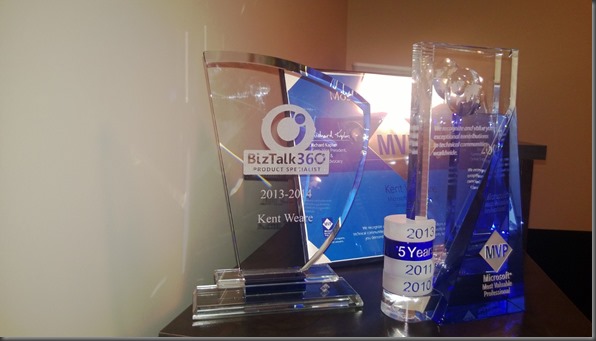
This post is long overdue but I felt it was necessary to create. Back in April, 2013 Saravana Kumar and the BizTalk360 team introduced the BizTalk360 Product Specialist award. The primary objective of the program is to honour individuals who have gained adequate knowledge in installing, configuring and implementing BizTalk360 solution at customer sites.
I have blogged( here, here and even wrote a whitepaper ) about some of my experiences with BizTalk360 in the past on this blog and am a strong supporter of the product. I have seen the benefits first hand while leading teams who are responsible for the operational support of busy BizTalk environments. I have also witnessed the adoption by non-BizTalk experts and seen their productivity increase without being intimidated by larger, complex monitoring solutions.
Recently I introduced BizTalk to a new organization and this was a tool that would provide immediate benefit. Sure enough it did, we had a source system experience issues that led to some suspended messages. The BizTalk team knew about the issues going on in that system before the system owners did. The end result was that the issues in the source system could be identified and resolved quickly, limiting the disruption to the business.
While I was in Norway, Saravana had a bit of a surprise for me and that was some hardware to keep my MVP awards company. I just wanted to take this opportunity to thank Saravana and the rest of the BizTalk360 team for their recognition and I am looking forward to working with Version 7.0 of the product. I got a sneak peak of the application while in Norway and it looks great.



