by community-syndication | Mar 18, 2007 | BizTalk Community Blogs via Syndication
I presented today alongside David Bolocker amongst others on Service Oriented Architecture, Web 2.0 and Mashups.
I even came up with my own quote…
“Software Convergence, is not the reduction of solutions but the expansion of presentation & information to user combinations.”
Check out my presentation at http://gobeyond.net.nz/brightstar and tell me what you think.
Michael Sampson live blogged the event.
by community-syndication | Mar 18, 2007 | BizTalk Community Blogs via Syndication
I was recently lucky enough to see Guy Kawasaki present to Microsoft on the Art of Evangelism… it was a very entertaining session.
While enough said Guy is a legand and you can see him virtually talking about why it’s essential to innovate-and how to do it.
Register Now (yeah too many steps I know) – session is March 19 11:00 AM Pacific Time or (6am Tuesday morning NZ time)… the web cast will be available on-demand 72 hours after the event so you don’t have to be an early bird.
One comment Guy said during his presentation that resonated with me was that since he has left Apple Apple have never asked him back to speak… their loss I guess.
Vcal here to get into your calendar.

by community-syndication | Mar 17, 2007 | BizTalk Community Blogs via Syndication
Turns out I couldn’t post that much. Anyway, I really enjoyed the deep dive sessions included in the “Connected Systems” track, at Microsoft building 43. Clemens Vasters did the introduction to an agenda that would span topics such as BizTalk, Wcf, Wf, Identity (CardSpace+MIIS/ILM), and even POX/Rest/Ajax. Session’s durations ranged from 30min to 1 hour, and some had to be cut short or the overal agenda would be delayed. Marjan Kalantar did an excelent job in the organization.
One of the sessions that was most active was by Paul “Workflow” Andrew, on the topic of BizTalk vs .Net (specifically, WF+WCF). Paul pointed out that all of these are being developed by CS people (the only part of the .Net framework not being developed by the C.S.Division is WPF), and that while .Net is a framework, BizTalk is a premium server. Some structural parts of BizTalk are being replaced, that much is true, but that also means the resources can be invested in other areas. Very little is known (by us :-)) about where exacly evolution will happen, but the information was there, for those listening atentivelly. 🙂
Like I said in the previous posts, the Summit is in a big part a “networking” event, and I did get to meet several BizTalk Mvp’s, as well as several other Mvps from random competencies. My program included a Q&A and a dinner with people from the CSD/BizTalk teams. Both proved to be very interesting. One interesting note on this was the MVPs proved to be very demanding of Microsoft, which was interesting to see. Most of us are MVP’s because we have a passion for technology, but that doesn’t make us less demanding %u00abcustomers%u00bb.
As to information I can share: BizTalk R2 will be released in the second half of 2007, and the first public beta (beta2?) will probably come out near of little after the end of this month.
Finally, Seattle: the city is located in a great place, geographically, the only problem is really the weather, makes you wonder if it affects the software Microsoft produces :-). My favourite spots were the Pike Street Market, the amazing-amazing–amazing Elliot Bay Book Company (photos: 1, 2), and obviously the Space Needle. No time to see more or drive around. Maybe next year if I am nominated again (the next summit will he held 14-18/April), or at the SOA & Business Processes Conference later this year.
[Edit]
Other stuff to try from the CSD.

by community-syndication | Mar 17, 2007 | BizTalk Community Blogs via Syndication
After recieving a few requests from a few people from this post I finally got time to create the proptotype.
I first started by creating a property schema and internal schema to use as an initilization correlation set.
I also created a flat file schema that would start the process of extracting the information.
The next part is to have amap that takes the base schema and extracts the isa id, qualifier, gs id and the control number. The below picture has all of the functiods and their subequent arguments.
So lets take a look at the orchestration that does all of this work:
The first thing that happens is that the EDI document gets parsed against the flat file, I have receive pipeline that parses the file for this orchestration to pick up.
It then creates the Who Is message, whichis the sender id (ISA qualifier, ISA Sender Id, Control Number, GS Id) is the first thing that I extract, also, I store the filename in the crossreference table for use in the flat file message later on. The following code stores the data.
Microsoft.BizTalk.CrossReferencing.CrossReferencing.SetCommonID(“EDI”,”FileName”,whoIsMsg(hipaaEnvelope.ISA05)+whoIsMsg(hipaaEnvelope.ISA06)+whoIsMsg(hipaaEnvelope.ISA13),System.IO.Path.GetFileName(skeletonMsg(FILE.ReceivedFileName)));
Then the message is sent to the HIPAA accelerator, while the accelerator is starting to parse the file, I initialize the correllation set by sending the whoIsMsg to the message box and immediately pickit up again.
Now the orchestration is waiting to pick up the subsequent HIPAA messages (well, for at least for 10 minutes), it then picks up the XML version of the HIPAA document. It then creates the flat file and assigns the filename from the original message using the following code:
flatfileMsg(FILE.ReceivedFileName)=skeletonMsg(FILE.ReceivedFileName);
Through my contact page you can get a copy of the code. Please follow the instructions in the readme.txt so that you can implement the Cross Referencing funtionality along with importing the 837 schema, as the code needs to have those pieces imported.

by community-syndication | Mar 17, 2007 | BizTalk Community Blogs via Syndication
(This post follows on from last
week’s post Web
Services and the 15 Second Delay).
Having accounted for 15 secs of
the 45 secs latency I’d been observing in my BizTalk application, I started looking
at where the additional 30 secs was coming from.
When I looked at my log files,
I noticed the entire process from start to end (including calling external Web Services)
was now taking just over three seconds. However, when invoking the BizTalk Web Service
from a test client, the measured latency was still over 30 seconds. Something wasn’t
right
I put logging code in the BizTalk
Web Service around the ServerProxy.Invoke() call (the method call the submits the
received SOAP message to BizTalk).
In my BizTalk application, the
BizTalk Web Service is used to submit a message to the MessageBox, via the SOAP Adapter
and a static request-response
Receive
Port
using the PassThru pipeline. There is an Orchestration which subscribes to messages
coming from this receive port, processes them, and then returns a response back to
the receive port (and therefore the Web Service). My logging code logged the time
at which the orchestration received a request message, and the time at which it sent
a response message.
What I saw in my log files was
that there was a 15 sec delay between calling ServerProxy.Invoke(), and the orchestration
logging that it had received a request, and then another 15 sec delay between
the orchestration sending a response, and the return from ServerProxy.Invoke() in
the WebService.
Interesting.
Our BizTalk Load Test environment
is composed of a single BizTalk 2006 Server, a single SQL Server, and SAN disk
storage. Given that everything that happens between ServerProxy.Invoke() and an orchestration
instance being started is non-user code (i.e. not my code!!), the problem was most
likely environmental i.e. network, disk, database, security or “other”.
So my first step was to attach SQL
Server Profiler and log all the database calls going between the BizTalk Server
and SQL Server.
If you haven’t used Profiler before,
be aware that it captures a huge amount of data – going through its logs can be very
very painful.
However, in this case we’re only
interested in calls that have originated from BizTalk – specifically, calls which
have originated from one of the Service Accounts that BizTalk runs under. In this
case, the service account that the Isolated host instance runs under, and the account
that my Orchestration Host’s host instance runs under.
Why these two? The SOAP adapter
runs under the Isolated host, which means that it’ll be this Isolated host instance
that will be putting the request into the MessageBox. And the Orchestration Host’s
host instance will be the one which picks up the request from the MessageBox, and
then writes the response back the MessageBox.
For the Orchestration Host’s host
instance, finding out the service account name is easy – just look in the Services
console, find the service named something like BizTalk Service BizTalk Group :
<host name>, and then note the value in the Log On As column.
For the Isolated Host’s host instance,
we need to check the identity account for the Application Pool under which the BizTalk
Web Service is running (if you’re using IIS 6 – if you’re using IIS 5, you’d use the
service account for IIS itself, usually the ASPNET account).
So all we have to do is look for
entries in the Profile log file which have a LoginName property equal to one
of these two account names. Fortunately, you can setup a filter in Profiler quite
easily – either before you run the trace (so that only events you’re interested in
are captured) or after.
I chose to capture all events
and then filtered on entries which had an EntryClass of RPC:Completed, and
a LoginName value of the Isolated host account name.
(Note: because I’m only
interested in the SQL statements being executed by BizTalk to call Stored Procedures,
I only need to see RPC events – none of the other events are relevant here as they
pertain to Audit events, Keep-Alive requests, or Transaction statements).
Running through the filtered log
means I only have to trawl through 300 odd lines, rather than 10,000!
What I’m looking for is the time
at which the Isolated host submitted the SOAP request to the MessageBox, so I’m looking
for a call to Stored Procedure (SPROC) called bts_InsertMessage:

(Note: You’ll notice in
the above image that just before bts_InsertMessage is called, there are calls
to bts_InsertPredicate_<hostname> and bts_InsertProperty followed
by a call to bts_FindSubscription.
InsertPredicate and InsertProperty
populate the MessageProps table, and FindSubscription checks whether the combination
of these predicates and properties match a current subscription – if so, bts_InsertMessage is
called; if not, a “subscription not found” exception is raised).
So now I know at what time the
SOAP request was placed in the MessageBox: 17 seconds after ServerProxy.Invoke() was
called. Now I need to check what time the message was picked up by my Orchestration
Host’s host instance.
To do this, I filter the Profiler
log on the service account name used by the host instance.
However, this time I’m looking
for a call to bts_DeQueueMessages_<hostname> which did some work – that
is, a call which has a higher duration than the others:
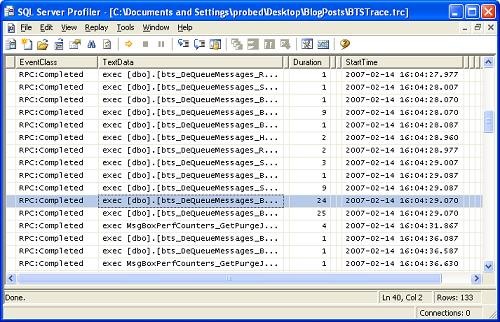
However, this doesn’t clear up
the mystery – this just shows that the message was picked up by the Orchestration
Host’s host instance 4 secs after being inserted by the Isolated host instance.
And then something hits me: what
if this related to the problems I was having earlier, with the Web Service and the
CRL?
What if “17 seconds” is really
“15 seconds plus some BizTalk processing time”?
I started up TCP
View, passed a test
message through – and sure enough, there was a CRL call with a SYN_SENT state.
Only this time, the TCP connection
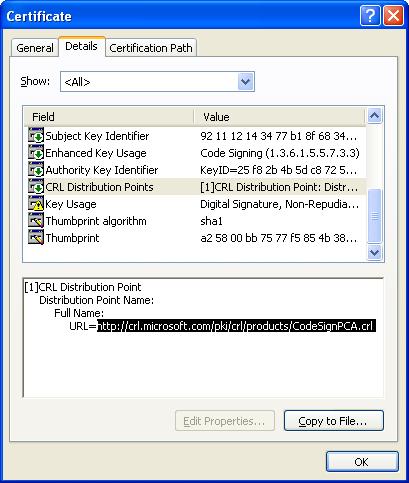
was to http://crl.microsoft.com/.
What are the chances that the
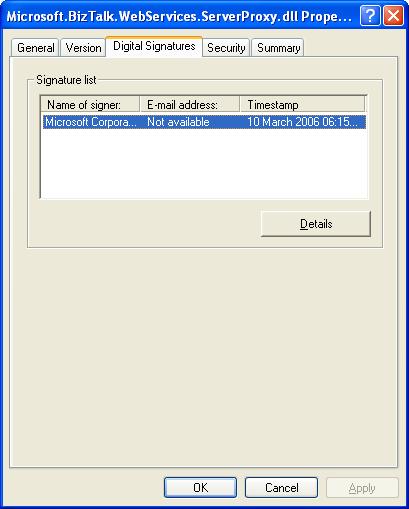
BizTalk assemblies are digitally signed? Specifically Microsoft.BizTalk.WebServices.ServerProxy.dll,
the assembly used by BizTalk Web Services.
Let’s have a look:
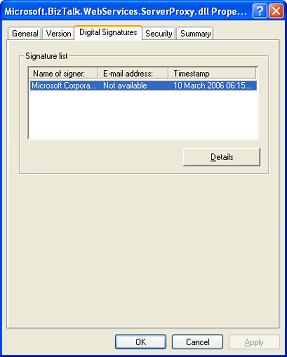
And if we drill down into the
Certificate Details, and look at the CRL Distribution point we see:
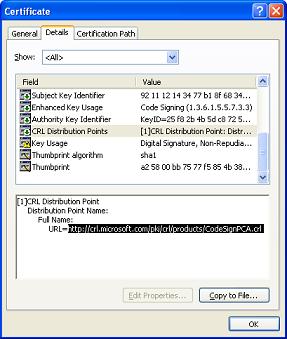
So there we are – because the
code is hosted in IIS, and is digitally signed, IIS will attempt to validate the certificate,
which involves attempting to download the CRL for the certificate.
Unlike my Web Service, I don’t
think I’d have much luck in convincing Microsoft to *not* digitally sign the BizTalk
assemblies 😉
So, we set the default proxy on
the BizTalk server (using the proxycfg command
line tool discussed in the previous post).
And sure enough, the delay in
the BizTalk Web Service went
away.
The 45 secs latency dropped to
2 secs and then dropped to 0.5 secs once I did some low-latency tuning.
So there we go. Now the only reason
my client has this issue is because they don’t want to have separate BizTalk servers
which just run the BizTalk Web Services (i.e. dedicated BizTalk Servers, most likely
in a DMZ, which don’t do anything but put received SOAP messages in the MessageBox
– all the other BizTalk servers would be behind the firewalls and in the secure portion
of the network – this is Microsoft’s recommended way of doing it, but is costlier
in terms of licensing).
We decided we could live with
the Load Test server having access to the internet via a proxy server, so applied
this change to all our BizTalk servers (both Live and Test).
by community-syndication | Mar 17, 2007 | BizTalk Community Blogs via Syndication
Hey folks – just when you wondering what to do MOSS and when should you jump on board
and get cracking….
Microsoft has this great event in Sydney.
Angus Logan is chief organiser and doing a great job….here’s a snippet from his blog
——————–snip—————–
The Conference
This exclusive Microsoft event is the third and final of three global SharePoint Conferences,
following Seattle and Berlin. This world-class, two-day conference, to be held at
the Hilton Hotel in Sydney from May
15-16, will showcase the latest innovations, features and functionality for the 2007
SharePoint products and technologies.
The conference will provide an unprecedented opportunity for customers and partners
in the Asia Pacific region to meet and network with Microsoft Office System product
development teams, fellow IT professionals and architects, and partners.
With only 500 places available, this event is not to be missed!
Expert Presenters
SharePoint experts from the Asia Pacific region and members of the SharePoint product
group such as Derek Burney (General Manager), Mike Fitzmaurice and Joel
Oleson (both Senior Technical Product Managers), will provide attendees with
technical information and demos for the latest release of SharePoint products and
technologies: Microsoft Office SharePoint Server 2007, Windows SharePoint Services
3.0, and Office SharePoint Designer 2007.
And for the first time in Australia, information on Microsoft Office PerformancePoint
Server 2007 will be presented.
Brand New Deep Dive Content
Multiple tracks focused on specific solution technologies including Collaboration,
Enterprise Search and Portals, Business Intelligence and Enterprise Content Management
will be offered. Plus, there will be additional opportunities for attendees to learn
about, and get hands on experience with, SharePoint products and technologies.
Technical “how to” breakout sessions covering subjects such as architecture, security,
integration, deployment, migration, management and scalability, will help attendees
develop, customise, integrate and build powerful, enterprise-ready solutions with
SharePoint products and technologies.
** UPDATE – Plug about the Cabana Sessions **
Instead of just the normal “break out” sessions we will be running cabana sessions
during the lunch break. These will typically be run by Microsoft partners about solutions
or problems they have overcome – hopefully really cool stuff in good 30 minute sessions.
Event Details
Dates: 15-16 May 2007
Venue: Hilton Hotel in Sydney, Australia
Cost: $549.00 for two days (includes registration, Welcome Night, conference
sessions, and evening entertainment event)
Save the Date
Registrations for this conference will open soon (look for an announcement on this
blog), and seats will be strictly limited. Block off May 15-16 on your calendar right
now, so you won’t miss out!
What about Partner Sponsorship?
**
UPDATE FROM Nick Mayhew ***
“If you are an Australian Gold/Cert partner then you can contact your account manager.
If you are a partner HQ’d outside Australia, and interested in hearing about sponsorship
packages, then you should contact one of my team, Tina Thalmeier. Tina dot Thalmeier
AT the usual microsoft.com”
by community-syndication | Mar 17, 2007 | BizTalk Community Blogs via Syndication
And so for my final report from the MVP summit. For the BizTalk MVPs, day four started with a Q&A session with product team members. A number of issues were discussed centred on the recurrent themes of evolving a coherent strategy across the Connected Services Division and the more effective inclusion of the MVP community into the feedback loop. From my perspective, the BizTalk MVPs must surely be a valuable, if rather under-utilised, resource for CSD. The collective wisdom and experience bought together in the Adams room in building 43 over the last couple of days represents decades of person-year experience in applying a central CSD product to the real-life needs of Microsoft’s customers around the globe. Listening to the MVPs in discussions over coffee or in the evenings, there was a common set of fears, complaints, wishes and hopes, and, as Jon Fancy was saying in the airport at the end of the day, we should have far more practical, ongoing, input into the product team in order to reflect the real world back to those responsible for our favourite integration toolkit.
The first session of the day was an introduction by Tony Barnard into the new EDI support in BizTalk Server 2006 R2. Microsoft has recognised the need to provide a much better out-of-the-box story for EDI, and R2 provides support and tooling for over 8000 schemas. Microsoft will continue to partner with other organisations to build, for example, robust HIPAA (US health system electronic data interchange) support, and is looking at its options with regard to managing schema updates over time.
Steve Maine led the next session looking at web development enhancements in ’Orcas’ and WCF. Specifically, he discussed and demonstrated new support for partial trust, RESTful development, a unified model for both SOAP and POX, a data model for RSS, and AJAX/JSON support.
The general WCF theme continued with a Shy Cohen demonstrating Orcas improvements for developing and testing WCF server and client applications. He demonstrated a new metadata-driven client test harness and the ’autohost’ features for testing server-side code. WCF development should be a lot easier in the future.
There was one more session, but NDA means that I cannot discuss. Sorry. Suffice to say that we have a lot of exciting stuff to look forward to from CSD in the future.
And that was that. By now, the lack of sleep, jet lag and constant activity of the last few days was beginning to take its toll, and I was glad to enjoy a leisurely lunch and then make my way back to the airport and an early-evening flight back to the UK. I can never sleep on planes (not in economy, anyway), so by Friday afternoon , back in the UK, I was shattered. 12 hours sleep later, I feel a little more human. The MVP tee-shirt has gone to my eldest daughter. The CSD Soduku game has gone to my second eldest (I already had one, anyway). Other tat has been duly distributed around the family, and I plan to spend a quiet weekend catching up with my life and remembering an excellent conference and many new faces. My thanks to Microsoft for organising a great event.
by community-syndication | Mar 17, 2007 | BizTalk Community Blogs via Syndication
Randal and I have passed the BizTalk Server partner exam (74-135) “Developing E-Business Solutions Using Microsoft BizTalk Server 2004”. It, as many have commented, was a rather difficult exam that has no real preparation materials to help get thru it.
For anyone interested in taking the exam it’s recommeneded that you have lots of hands on experience with BizTalk.
Please note, this exam is designed for Microsoft Certified Partners, so unless you work for such a company the exam is not available.
by community-syndication | Mar 17, 2007 | BizTalk Community Blogs via Syndication
I encountered a strange compilation error recently in BizTalk 2004 when importing a web service.
While I can’t put my finger on the exact cause yet, I do have a fix that works.
When you see an error message like:
C:\Project\Web References\ExtRef\MyOrch.odx(445,23): error X2044: symbol ‘@@@@’ is already defined; the first definition is in assembly @@@.dll : It may be possible to disambiguate by using fully qualified names.
The way to fix this error is to do the following:
- Open the orchestration in Notepad (In my case MyOrch.odx)
- Do a find (Ctrl+F) for “#endif // __DESIGNER_DATA”
- Delete all the code below that line
- Save your file in Notepad
- Say yes when Visual Studio asks if you want to update your file
- Recompile
Note: The code will not be regenerated until you edit an expression shape, etc. Add a “//” or something and you will then see the code re-appear when you open it in Notepad again.
I hope this may serve to save someone time, it took a while for me to figure it out.
by community-syndication | Mar 17, 2007 | BizTalk Community Blogs via Syndication
I learned a little trick the other day about the mapper which I have never seen documented. It works for BizTalk 2004 and also 2006.
Have you ever had to change a functoid and gone thru the task of dragging the new functoid onto the grid and then reconnecting all of the lines, then having to check to make sure you got them all in order?
Well, what I realized quite by accident is that you can actually just drag the new functoid over the one you want to replace and all your links will maintain themselves. The old functoid will disappear and be replaced by the new one.
Of course there is a limitation when you have different maximum inputs, etc, but for the most part this works with everything else.