by community-syndication | Mar 27, 2007 | BizTalk Community Blogs via Syndication
I ran across this great article if you’re looking embark on customising your Sharepoint
2007 menus…from Site Settings through to drop down Actions menus, then here is a
great MSDN article to start.
http://msdn2.microsoft.com/en-us/library/ms473643.aspx
— snip —
How to: Add Actions to the User Interface
Using Features makes it easy to add actions to menus of the user interface in Windows
SharePoint Services. This example shows how to add actions to various menus through
a Feature and how to activate it within the deployment.
Location and Group ID
To define a custom action for a particular menu, you must identify the menu by setting
the location to the appropriate Windows SharePoint Services namespace, and by using
the ID that Windows SharePoint Services uses to identify the specific location.
For example, to add a custom action to the Site Settings page, set the Location attribute
of the CustomAction element
to Microsoft.SharePoint.SiteSettings.and specify a particular area within the
page through the GroupId attribute.
The following table shows Location and GroupId values that are possible.
|
Area
|
Location
|
GroupId
|
|
Display form
toolbar
|
DisplayFormToolbar
|
n/a
|
|
Edit form toolbar
|
EditFormToolbar
|
n/a
|
|
New form toolbar
|
NewFormToolbar
|
n/a
|
|
List view toolbar
|
ViewToolbar
|
n/a
|
|
Edit control
block menu (per item)
|
EditControlBlock
|
n/a
|
|
New menu for
list and document library view toolbars
|
Microsoft.SharePoint.StandardMenu
|
NewMenu
|
|
Actions menu
for list and document library view toolbars
|
Microsoft.SharePoint.StandardMenu
|
ActionsMenu
|
|
Settings menu
for list and document library view toolbars
|
Microsoft.SharePoint.StandardMenu
|
SettingsMenu
|
|
Upload documents
menu for document libraries
|
Microsoft.SharePoint.StandardMenu
|
UploadMenu
|
|
Site Actions
menu
|
Microsoft.SharePoint.StandardMenu
|
SiteActions
|
|
Site Settings
Site Collection Administration links
|
Microsoft.SharePoint.SiteSettings
|
SiteCollectionAdmin
|
|
Site Settings
Site Administration links
|
Microsoft.SharePoint.SiteSettings
|
SiteAdministration
|
|
Site Settings
Galleries Links
|
Microsoft.SharePoint.SiteSettings
|
Galleries
|
|
Site Settings
Look and Feel links
|
Microsoft.SharePoint.SiteSettings
|
Customization
|
|
Site Settings
Users and Permissions links
|
Microsoft.SharePoint.SiteSettings
|
UsersAndPermissions
|
|
Site Actions
menu for surveys
|
Microsoft.SharePoint.StandardMenu
|
Different actions may require using different CustomAction attributes to identify
the menu in which to place a custom menu item. But you may also need to specify other
parameters for the action, for example, to specify a version, user permissions required
to perform the action, or placement in relation to existing actions in the menu. The
custom actions of the following example show a variety of attributes.
URL Tokens
Windows SharePoint Services supports the following tokens with which to start a relative
URL:
~site – Web site (SPWeb)
relative link.
~sitecollection – site collection (SPSite)
relative link.
In addition, you can use the following tokens within a URL:
{ItemId} – Integer ID that represents the item within a list.
{ItemUrl} – URL of the item being acted upon. Only work for documents in libraries.
[Not functional in Beta 2]
{ListId} – GUID that represents the list.
{SiteUrl} – URL of the Web site (SPWeb).
{RecurrenceId} – Recurrence index.
Procedures
To add actions to the user interface in a site collection
-
Create a UserInterfaceLightUp folder within the setup directory at the following
location: C:\Program Files\Common Files\Microsoft Shared\web server extensions\12\TEMPLATE\FEATURES.
-
Create a Feature.xml file in the new UserInterfaceLightUp folder to provide the manifest
for the feature, such as the following.
Copy
Code
<?xml version="1.0" encoding="utf-8" ?>
<Feature Id="GUID"
    Title="Light Up"
    Description="This example shows how you can light up various areas inside Windows SharePoint Services."
    Version="1.0.0.0"
    Scope="Site"
    xmlns="http://schemas.microsoft.com/sharepoint/">
  <ElementManifests>
    <ElementManifest Location="Lightup.xml" />
  </ElementManifests>
</Feature>
-
To replace the GUID placeholder in the previous Id attribute, generate a GUID by running
guidgen.exe located in the Local_Drive:\Program Files\Microsoft Visual Studio
8\Common7\Tools directory.
-
Create a Lightup.xml file to define elements for the various actions included within
the feature. For the sake of example, the URL for each action points to an .aspx file
and passes it a value that identifies the source of the request, as follows:
Copy
Code
<?xml version="1.0" encoding="utf-8" ?>
<Elements xmlns="http://schemas.microsoft.com/sharepoint/">
<!-- Document Library Toolbar New Menu Dropdown -->
  <CustomAction Id="UserInterfaceLightUp.DocLibNewToolbar"
    RegistrationType="List"
    RegistrationId="101"
    GroupId="NewMenu"
    Rights="ManagePermissions"
    Location="Microsoft.SharePoint.StandardMenu"
    Sequence="1000"
    Title="MY DOCLIB NEW MENU TOOLBAR BUTTON">
    <UrlAction Url="/_layouts/LightupHello.aspx?NewMenu"/>
  </CustomAction>
<!-- Document Library Toolbar Upload Menu Dropdown -->
  <CustomAction Id="UserInterfaceLightUp.DocLibUploadToolbar"
    RegistrationType="List"
    RegistrationId="101"
    GroupId="UploadMenu"
    Rights="ManagePermissions"
    Location="Microsoft.SharePoint.StandardMenu"
    Sequence="1000"
    Title="MY DOCLIB UPLOAD MENU TOOLBAR BUTTON">
    <UrlAction Url="/_layouts/LightupHello.aspx?UploadMenu"/>
  </CustomAction>
<!-- Document Library Toolbar Actions Menu Dropdown -->
  <CustomAction Id="UserInterfaceLightUp.DocLibActionsToolbar"
    RegistrationType="List"
    RegistrationId="101"
    GroupId="ActionsMenu"
    Location="Microsoft.SharePoint.StandardMenu"
    Sequence="1000"
    Title="MY DOCLIB ACTIONS MENU TOOLBAR BUTTON">
    <UrlAction Url="/_layouts/LightupHello.aspx?ActionsMenu"/>
</CustomAction>
<!-- Document Library Toolbar Settings Menu Dropdown -->
  <CustomAction Id="UserInterfaceLightUp.DocLibSettingsToolbar"
    RegistrationType="List"
    RegistrationId="101"
    GroupId="SettingsMenu"
    Location="Microsoft.SharePoint.StandardMenu"
    Sequence="1000"
    Title="MY DOCLIB SETTINGS MENU TOOLBAR BUTTON">
    <UrlAction Url="/_layouts/LightupHello.aspx?SettingsMenu"/>
  </CustomAction>
<!-- Site Actions Dropdown -->
  <CustomAction Id="UserInterfaceLightUp.SiteActionsToolbar"
    GroupId="SiteActions"
    Location="Microsoft.SharePoint.StandardMenu"
    Sequence="1000"
    Title="MY SITE ACTIONS BUTTON">
    <UrlAction Url="/_layouts/LightupHello.aspx?SiteActions"/>
  </CustomAction>
<!-- Per Item Dropdown (ECB)-->
  <CustomAction
    Id="UserInterfaceLightUp.ECBItemToolbar"
    RegistrationType="List"
    RegistrationId="101"
    Type="ECBItem"
    Location="EditControlBlock"
    Sequence="106"
    Title="MY ECB ITEM">
    <UrlAction Url="/_layouts/LightupHello.aspx?ECBItem"/>
  </CustomAction>
<!-- Display Form Toolbar -->
  <CustomAction
    Id="UserInterfaceLightUp.DisplayFormToolbar"
    RegistrationType="List"
    RegistrationId="101"
    Location="DisplayFormToolbar"
    Sequence="106"
    Title="MY DISPLAY FORM TOOLBAR">
    <UrlAction Url="/_layouts/LightupHello.aspx?DisplayFormToolbar"/>
  </CustomAction>
<!-- Edit Form Toolbar -->
  <CustomAction
    Id="UserInterfaceLightUp.EditFormToolbar"
    RegistrationType="List"
    RegistrationId="101"
    Location="EditFormToolbar"
    Sequence="106"
    Title="MY EDIT FORM TOOLBAR">
    <UrlAction Url="/_layouts/LightupHello.aspx?EditFormToolbar"/>
  </CustomAction>
<!-- Site Settings -->
  <CustomAction
    Id="UserInterfaceLightUp.SiteSettings"
    GroupId="Customization"
    Location="Microsoft.SharePoint.SiteSettings"
    Sequence="106"
    Title="MY SITE SETTINGS LINK">
    <UrlAction Url="/_layouts/LightupHello.aspx?Customization"/>
  </CustomAction>
<!-- Content Type Settings -->
  <CustomAction
    Id="UserInterfaceLightUp.ContentTypeSettings"
    GroupId="General"
    Location="Microsoft.SharePoint.ContentTypeSettings"
    Sequence="106"
    Title="MY CONTENT TYPE SETTINGS LINK">
    <UrlAction Url="/_layouts/LightupHello.aspx?General"/>
  </CustomAction>
</Elements>
Other common GroupId values that can be used include ViewToolbar, ViewSelectorMenu,
and PersonalActions (Welcome menu)
-
Add a LightupHello.aspx file such as the following in the \TEMPLATE\LAYOUTS directory
to serve as target for the links created in the previous step.
Copy
Code
<%@ Page Language="C#"  Inherits="System.Web.UI.Page"%>
<%
string clientQuery = Page.ClientQueryString;
if (clientQuery == "NewMenu")
{
    Response.Write("You came from the new document menu.");
}
else if (clientQuery == "UploadMenu")
{
    Response.Write("You came from the upload menu.");
}
else if (clientQuery == "ActionsMenu")
{
    Response.Write("You came from the actions menu.");
}
else if (clientQuery == "SettingsMenu")
{
    Response.Write("You came from the settings menu.");
}
else if (clientQuery == "SiteActions")
{
    Response.Write("You came from the Site Actions menu.");
}
else if (clientQuery == "ECBItem")
{
    Response.Write("You came from the document's context menu.");
}
else if (clientQuery == "DisplayFormToolbar")
{
    Response.Write("You came from the display item properties form.");
}
else if (clientQuery == "EditFormToolbar")
{
    Response.Write("You came from the edit item properties form.");
}
else if (clientQuery == "Customization")
{
    Response.Write("You came from the Site Settings menu.");
}
else if (clientQuery.StartsWith("General"))
{
    Response.Write("You came from the Content Type Settings menu.");
}
%>
-
At a command prompt, type the following commands to install the Feature in the deployment,
activate the Feature on a specified subsite, and then reset Microsoft Internet Information
Services (IIS) so that the changes can take effect.
Copy
Code
   a. stsadm -o installfeature -filename UserInterfaceLightUp\feature.xml
   b. stsadm -o activatefeature -filename UserInterfaceLightUp\feature.xml -url http://Server/Site/Subsite
   c. iisreset
-
To see the various custom actions that you have added, navigate to the following locations
from the home page of a Web site in the site collection:
-
Click Site Actions to see the new action on the Site Actions menu.
-
Click Site Settings on the Site Actions menu to see a new action in
the Look and Feel section of the Site Settings page.
-
Navigate to a document library and open each menu on the toolbar to see a new action
on each menu.
-
In a document library that contains items, click the down arrow for an item to see
the new action on the edit control block menu.
-
On the edit control block menu for an item, click View Properties and Edit
Properties to see new actions on the Display form and Edit form toolbars.
by community-syndication | Mar 27, 2007 | BizTalk Community Blogs via Syndication
Thanks to my co-worker and good friend PM Sonu Arora, I will begin posting content on the WCF LOB Adapter SDK on this site. For more information on this SDK and very useful programming information, add a link to her blog at http://blogs.msdn.com/sonuarora/
The Windows Communication Foundation (WCF) Line-of-Business (LOB) Adapter SDK is a collection of runtime engine and tools to help Adapter Developers in creating service-oriented interfaces to existing LOB applications using WCF. The goal of the WCF LOB Adapter SDK is to facilitate uniform development of reusable metadata-oriented WCF-based adapters that enable enterprise applications, databases and messaging platforms to integrate with each other. The Adapter SDK is based on WCF and it surfaces an adapter to a LOB application as a WCF Binding.
Relationship with BizTalk Server
BizTalk Server ships with BizTalk Adapter Framework which promotes creating custom adapters for use within BizTalk Server. BizTalk adapters use the BizTalk Server Administration Console for adapter management, BizTalk Explorer for adapter configuration, and the Adapter Framework for design-time APIs. WCF LOB Adapter SDK is the evolution of BizTalk Adapter Framework. Since WCF LOB Adapter SDK is based on new architecture, the adapters built to Adapter SDK will continue to co-exist side-by-side with the adapter written using BizTalk Adapter Framework. Microsoft and Microsoft’s Technology Partners have built adapters using BizTalk Adapter Framework. The future direction recommended by Microsoft is to start using WCF LOB Adapter SDK for building new adapters.
Relationship with WCF
The Adapter SDK is based on WCF. It is exposed as a WCF Binding and implements WCF System.ServiceModel.Channels.TransportBindingElement for handling communication between a client and a service. It extends WCF with metadata browse, search and resolve interfaces for Adapter Consumer to selectively compose the Service Description contract. The Adapter SDK enables Adapter Developers to easily create WCF binding(s) and channel(s) for layering existing applications with service-oriented interfaces.
Adapters differ from regular WCF transports due to these main characteristics:
Adapters are metadata-centric
o Require metadata at run-time
o Require metadata cache management
o To provide rich metadata at design-time they require search/browse/resolve protocol
Adapters are always connection-oriented
o Connection is very central concept for the adapter
o Require connection pooling and connection life-cycle management
Adapters are effectively “in-proc WCF Services”
Consuming an adapter is no different than consuming a WCF Service from the perspective of a WCF client and the adapter consumer is not required to learn a new programming model. The client can use either the WCF Service Programming Model or WCF Channel Architecture to communicate with an adapter.
A typical WCF service programming lifecycle begins by a Service Provider defining a static service contract, implementing this contract and hosting the service. Each service is defined entirely by a fixed monolithic contract. This contract needs to be updated by the service provider in order to reflect any changes in the existing application. The Adapter built using WCF LOB Adapter SDK, on the other hand, surfaces the contracts on-demand by consumer. The consumer browses through the available metadata in the adapter using the standard interfaces and then selects the operations and types for inclusion in a dynamic contract. The metadata can be updated when the existing application change providing up-to-date interfaces for the new clients. Adapters are more appropriate in scenarios where a non-WCF based system is being exposed for integration.
For an Adapter Consumer, the adapter can be accessed like a typical WCF Service and the consumer doesn’t have to learn a new programming model. The same adapter developed using the Adapter SDK can be reused in multiple .NET applications including Custom WCF Client Applications, BizTalk Server, SharePoint Server and SQL Server Integration Services. In addition, Adapter SDK provides a common facility for Adapter Developers to expose rich LOB metadata to the Adapter Consumers, who can selectively compose and create dynamic WCF contracts from this available metadata in the adapter.
Goals
Here are three main goals of the WCF LOB Adapter SDK
1. Uniformity
- No unified adapter development framework for .NET
- Every “integration technology” implements its own adapter framework
- Provides an abstraction layer between service oriented world and proprietary application interfaces
2. Reusability
- Adapters written using BizTalk adapter framework specific to BizTalk
- Duplication of effort – e.g. at least 5 SAP adapters in Microsoft
- Surfaces adapter as a WCF binding, widening reach
3. Consumer-Driven Dynamic Contracts
- Provides interfaces for browsing, searching and resolving metadata
- Provides a service-tier that reflects changes in the existing application type model
- Extends WCF to provide an ability to generate dynamic contracts (service description) from available metadata
by community-syndication | Mar 26, 2007 | BizTalk Community Blogs via Syndication
Thanks to all the people who attended to my session Unifying Integration: Building Line of Business Adapters with WCF Deep Dive at the MVP summit. My co-speaker Sonu Arora has uploaded the slides to https://msmvps.team.partners.extranet.microsoft.com/windowsserver/pgsites/default.aspx…(read more)
by community-syndication | Mar 26, 2007 | BizTalk Community Blogs via Syndication
A client was getting this compile error “in a sequential convoy the ports must be identical” when compiling an orchestration which had two consecutive receive ports in a sequential convoy. The answer was simple they needed to use a concurrent convoy not a sequential convoy. – Rob
by community-syndication | Mar 26, 2007 | BizTalk Community Blogs via Syndication
Following on from my previous post, included below is the final chapter list and a brief overview of the content covered in each chapter.
Chapter 1: Technical Primer-This chapter primes the reader on some key technologies that each developer should have a basic understanding of to aid with development and debugging. This chapter covers XML schemas, namespaces, XPath, and serializable classes.
- Chapter 2: BizTalk Architecture-This chapter is the only chapter that really deals with explaining the basic BizTalk principles. It positions the value that BizTalk brings to solutions and compares this to writing a custom solution without BizTalk. It then runs through all the key architectural pieces of BizTalk and explains what they do and how they work.
- Chapter 3: Adapters-This chapter covers key adapter concepts-such as ports, tracking, hosting, and context properties-and then drills into each adapter supplied with BizTalk to explain what the adapter does, which context properties it promotes, and, where appropriate and relevant, a walkthrough to show how to use the adapter. The chapter also details the new R2 adapters at a high-level and in time for publication we’ll add downloadable content to demonstrate how to write an adapter using the new WCF Adapter framework shipped with BizTalk Server 2006 R2 (not available at the time of writing).
- Chapter 4: Pipelines-This chapter covers the core principles of pipelines and details how they work. The chapter then highlights how pipeline components should be developed and provides a worked example.
This chapter also covers the Messaging Engine architecture and how it works, understanding this is key to being able to exploit the architecture to the fullest.
- Chapter 5: Orchestrations-This chapter introduces BizTalk orchestrations and the environment within which they execute. We discuss key areas such as persistence points and logical ports before covering how orchestrations can be developed and which features are available.
- Chapter 6: Business Activity Monitoring-This chapter introduces the Business Activity Monitoring (BAM) technology and details how BAM can be used to instrument your BizTalk solution and your entire enterprise. The chapter then covers how a fictional scenario can be instrumented and how you can make use of the information collected by BAM.
- Chapter 7: Rules Engine-This chapter discusses the key principles that underpin the Rules Engine, and then covers all the concepts to enable effective use of the Rules Engine within your solution.
- Chapter 8: Testing-This chapter starts by describing the types of testing you must apply to your BizTalk solution, including unit testing, functional testing, integration testing, and performance testing. The chapter goes on to discuss how BizUnit can be used to automate testing, how you can perform code coverage of your BizTalk solution, how LoadGen can be used to generate load, and how you can profile your solution using the Visual Studio profiler.
- Chapter 9: Performance and Scalability-This chapter covers all the things you must have in place before beginning any performance testing. Forgetting these often leads to bad performance results. The chapter then explains how to monitor BizTalk, SQL, and IIS, explaining all the relevant performance counters and what they actually mean. We also provide a complete reference on what BizTalk throttling is and how it works, including an explanation of all the various throttling states. The final section of the chapter discusses a number of common symptoms. These are problems that customers run into regularly and include high CPU usage and sudden processing drop off. The chapter explains the common reasons and things to check to identify the underlying problem.
- Chapter 10: Low Latency-This chapter covers what low latency means to BizTalk solutions and how you can measure it. We then drill into a variety of techniques that you can employ to reduce latency for your solution.
- Chapter 11: Administration-This chapter describes everything required to administer BizTalk effectively. It’s a great resource for administrators as well as developers. The chapter covers the key administration tools and tasks that you need to undertake, and highlights areas that are often overlooked, such as SSO maintenance, suspended instances, subscriptions, etc. The chapter also covers in great detail how the SQL Server used by BizTalk needs to be looked after, including backup, log shipping and how you can monitor the performance of the SQL Server. The chapter also covers MOM and how it can be used in conjunction with the BizTalk Management Pack to greatly simplify management.
- Chapter 12: End-to-End Scenarios-This chapter highlights all the End-to-End Scenarios that were shipped as part of BizTalk 2006. These are often overlooked but provide full working solutions of real-world customer scenarios that have been fully tested and demonstrate best practice. Each scenario is supplied with complete source code and provides implementations that you can use within your own solution. We cover each scenario and highlight key deliverables in each scenario such as the code required to use the SSO store for configuration data and an adapter to enable messages to be sent for manual repair.
- Chapter 13: BizTalk Best Practices-This chapter discusses a number of best practices and techniques that have been used in a number of projects, including handling large messages, storing configuration data, subscribing to failure messages, and instrumenting your solution.
- Chapter 14: Windows Workflow and BizTalk-This chapter positions the key concepts of Windows Workflow and discusses how it compares with BizTalk Server. We then demonstrate how the BAM Interceptor for Windows Workflow works and position how BizTalk, WF, and SharePoint can be used together to enable compelling solutions.
by community-syndication | Mar 26, 2007 | BizTalk Community Blogs via Syndication
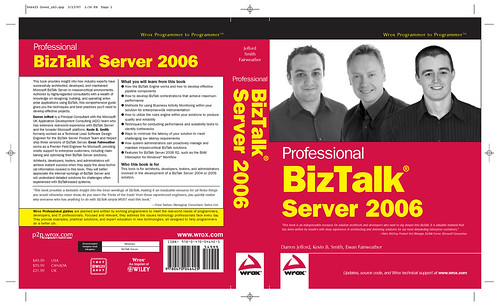
A year on, ~224,000 words and over 600 pages later, and Professional BizTalk Server 2006 has finally gone to the printers! This book has been a mammoth undertaking for all involved, but having just reviewed the entire book end-to-end I’m extremely proud of what we’ve achieved.
The final cover is shown below with all of the authors photos!
I’m also pleased to announce that Patric McElroy who is a Product Unit Manager (PUM) for the BizTalk Server Team, kindly wrote a great foreword for the book and we included the following fantastic quote on the cover:
“This book is an indispensable resource for solution architects and developers who want to dig deeper into BizTalk. It is valuable material that has been written by insiders with deep experience in architecting and delivering solutions for our most demanding enterprise customers.”
-Patric McElroy, Product Unit Manager, BizTalk Server, Microsoft Corporation
A big thanks to Yossi Dahan and Jon Fancey who both reviewed the entire book and provided some great comments and suggestions, we also included a very kind comment from Yossi on the back cover:
“This book provides a fantastic insight into the inner workings of BizTalk, making it an invaluable resource for all those things you would otherwise never know. As you learn the ’tricks of the trade’ from these experienced engineers, you quickly realize why everyone who has anything to do with BizTalk simply MUST read this book.”
-Yossi Dahan, Managing Consultant, Sabra Ltd.
The final back cover text is shown below:
This book provides insight into how industry experts have successfully architected, developed, and maintained Microsoft BizTalk Server in mission-critical environments. Authored by highly-regarded consultants with a wealth of knowledge on designing, building, and operating enterprise applications using BizTalk, this comprehensive guide gives you the techniques and best practices you’ll need to develop effective projects.
Darren Jefford is a Principal Consultant with the Microsoft UK Application Development Consulting (ADC) team who has extensive real-world experience with BizTalk Server and the broader Microsoft platform. Kevin B. Smith formerly worked as a Technical Lead Software Design Engineer for the BizTalk Server Product Team and helped ship three versions of BizTalk Server. Ewan Fairweather works as a Premier Field Engineer for Microsoft, providing onsite support to enterprise customers, including maintaining and optimizing their BizTalk Server solutions.
Achitects, developers, testers, and administrators will achieve instant success when they apply the deep technical information covered in this book. They will better appreciate the internal workings of BizTalk Server and will understand detailed solutions for challenges often experienced with BizTalk-based systems.
My initial plans were to co-author the book with Kevin Smith but he (sensibly) was reticent due to the sheer amount of work required. I therefore started the book as sole author but as the writing got underway I began to realise my limitations, BizTalk is a huge product and it’s impossible to know everything about everything, especially in enough depth for a book. I finally persuaded (nagged to death) Kevin to author 3 chapters on topics that he knew extremely well, especially as he was part of the BizTalk product team and responsible for the design and implementation of the messaging engine.
As the writing continued the Administration chapter loomed into view and being a developer at heart – Administration is a very weak point! I managed to talk an (admittedly tipsy) Ewan Fairweather into writing the chapter at the Microsoft UK summer party, he pulled out all the stops against tight deadlines to write some amazing content on Administration which given his background (supporting customers real-world BizTalk deployments) will be of great value to customers and I must admit to learning an embarrassing amount whilst reviewing his chapter.
So, your all probably wondering – why on earth did I decide to invest so much personal time writing a book on BizTalk? As ever it’s a long story, but the following fragment from the book introduction explains it nicely:
The compelling drive for me to create this book resulted from two main factors. First, after working with these customers I had a clear view of what worked, what didn’t, and the things to highlight early on to avoid problems later in the development life cycle of a BizTalk solution.
The next compelling drive was that such real-world, best-practice advice was tied up inside a small number of people’s heads. This clearly doesn’t scale to help the broader base of BizTalk customers, and it’s often frustrating (to both sides) to be called on site to see the same issues crop up again and again.
These problems, in my experience, are not the fault of the product or the customer per se but instead represent the learning curve required for enterprise software development. It’s a hard problem space, and tiny mistakes or oversights have big consequences. This book is positioned to help address this. It’s a fusion of how the product works under the covers and cutting-edge best practices designed to enable you to make best use of the product within your solution.
The decision to write a book was a tortuous one. I loved the idea of writing a book, but I was given a number of reality checks by colleagues with regard to the effort required – something that (with a young family) I wasn’t sure I could commit to, and I decided to shelve the project.
The final straw, however, came in late in 2005. While onsite with a customer, I was asked the following question: “Why does it take Darren Jefford or Kevin Smith to come in to help us understand these problems and highlight the types of things we should be aware of? This type of information isn’t in the documentation.”
The book is now off being printed and should be available in early May I’m reliably informed, based on my experience with the Team System book it will be available in the US first, followed by the UK a few weeks later so you should expect delivery by the end of May.
Ewan and I will be presenting at TechEd US (Orlando) so look out for us there if your attending, I believe Wiley will probably be setting a book signing opportunity up if your interested, once the session titles are formalised I’ll post them here.
Phew! Now back to reality and spare time! I hope you enjoy the book and the blog should hopefully get back to normal and I can post some of the interesting WCF bits and pieces I’ve been up to.
by community-syndication | Mar 26, 2007 | BizTalk Community Blogs via Syndication
I finally had the excuse to use BizTalk Server 2006 Single Sign On for application configuration data. In one of my current BizTalk projects, I’m using a long running transaction which loops through and starts up other orchestrations. When those orchestrations finish, I’m using partner bound ports to return a response. As […]
by community-syndication | Mar 26, 2007 | BizTalk Community Blogs via Syndication
Big congrats to Darren Jefford for finishing Professional BizTalk 2006. Darren throws out a quick summary of each chapter here. Given how few books existed for those struggling to learn BizTalk Server 2004, it’s a welcome change to see so many top – of – the – line books available for BizTalk Server […]
by community-syndication | Mar 26, 2007 | BizTalk Community Blogs via Syndication
Though i have not been able to attend this event , i did get the insight and other news on MVP Summit from none other than Charles Young from series of blog posts on MVP Summit.
Check them out here : http://geekswithblogs.net/cyoung/archive/2007/03/13/108607.aspx
Thanks Charles…
I also had the opportunity to volunteer my participation to use the Pilot Application […]
