Accessing the SharePoint user profile service from BizTal

Accessing the SharePoint user profile service from BizTal

v\:* {behavior:url(#default#VML);}
o\:* {behavior:url(#default#VML);}
w\:* {behavior:url(#default#VML);}
.shape {behavior:url(#default#VML);}

Normal
0
false

false
false
false

EN-AU
X-NONE
X-NONE

MicrosoftInternetExplorer4

/* Style Definitions */
table.MsoNormalTable
{mso-style-name:”Table Normal”;
mso-tstyle-rowband-size:0;
mso-tstyle-colband-size:0;
mso-style-noshow:yes;
mso-style-priority:99;
mso-style-parent:””;
mso-padding-alt:0cm 5.4pt 0cm 5.4pt;
mso-para-margin-top:0cm;
mso-para-margin-right:0cm;
mso-para-margin-bottom:10.0pt;
mso-para-margin-left:0cm;
line-height:115%;
mso-pagination:widow-orphan;
font-size:11.0pt;
font-family:”Calibri”,”sans-serif”;
mso-ascii-font-family:Calibri;
mso-ascii-theme-font:minor-latin;
mso-hansi-font-family:Calibri;
mso-hansi-theme-font:minor-latin;
mso-bidi-font-family:”Times New Roman”;
mso-bidi-theme-font:minor-bidi;
mso-fareast-language:EN-US;}

I have a client scenario where weird 3rd party
system 1, sends me an update of some information, from time to time, about a
user, this information needs to be instantly replicated into SharePoint.
I could use BCS but it’s not instant  It’s coming to me via BizTalk, so I have it in
near real time, so 
I can update SharePoint can’t I?? well yes it seems you can
There is the web service that SharePoint quite nicely exposes:
http://{Server}/_vti_bin/userprofileservice.asmx
It has many methods one of these is: ModifyUserPropertyByAccountName
It’s a one way send in BizTalk. 
When you add a reference, you need to add a generated item,
that consumes a WCF Service.
You will get 2 schema s an orchestration and a port binding,
the schema s are useful, the orchestration you can choose to use it or not, it
contains a bunch of multi-part message types, 
and a massive port for every single method.
The port is useful, because
it contains the operations, you will need to use when you create the port, so
one port can have many operations to the same web service, they give you the
binding for this port, which is very nice, I suggest you use it.
Here is where all the nice stuff ends, and the really interesting
stuff begins. If you use this, it does not work. 
You may get:
Error details: System.ServiceModel.FaultException:
<soap:Envelope
xmlns:soap=”http://schemas.xmlsoap.org/soap/envelope/”
xmlns:xsi=”http://www.w3.org/2001/XMLSchema-instance”
xmlns:xsd=”http://www.w3.org/2001/XMLSchema”><soap:Body><soap:Fault><faultcode>soap:Server</faultcode><faultstring>Server
was unable to process request. —&gt; Invalid String Value: Input must
match string data type.</faultstring><detail
/></soap:Fault></soap:Body></soap:Envelope>
This made no sense to me, as I was sending a string, and updating
a string..
If you look at the schema for the message:


value is defined as xs:anyType, which means you can put anything
in here, which is correct, I want to, a string, a datetime, a int. So the
schema is flexible
The wsdl is very vague:
      <s:complexType
name=”ValueData”>
        <s:sequence>
          <s:element
minOccurs=”0″ maxOccurs=”1″ name=”Value” />
        </s:sequence>
      </s:complexType>
The value is does not specify xs:anytype however because it
does not specify a type BizTalk interprets this, bad sharepoint.
However it does not go far enough and hence it is a real
let down when you have gotten past the authentication issue to find this. See
my other post to fix this.
If you call the method from .net code, it works however to
find out why it works, you look at the xml that this call generates:
<ValueData>
   <Value
xsi:type=xsd:dateTime>2012-06-25T10:01:17.486123+10:00</Value>   </ValueData>
The “value”  has an
uppercase V, BizTalk puts is with a lower case V.  so that’s the first fix.
The next problem: xsi:type ??
It’s not even in the schema, it’s ont in the wsdl.  I try and try and try to get it in to the
schema, it’s not going to happen.
I managed to add an attribute to the value, called type,
however it’s coming up as:
<ns0:Value ns0:type
Now the values are being set in SharePoint, all to NULL
because it cannot interpret the type.
Now I know what I need to make the message look like, I have
BizTalk pipelines I can touch up the message before I send it to SharePoint.
So I go and touch up the message and the thing works perfectly.
!!
I can now communicate from BizTalk to SharePoint, to update
the user profiles.
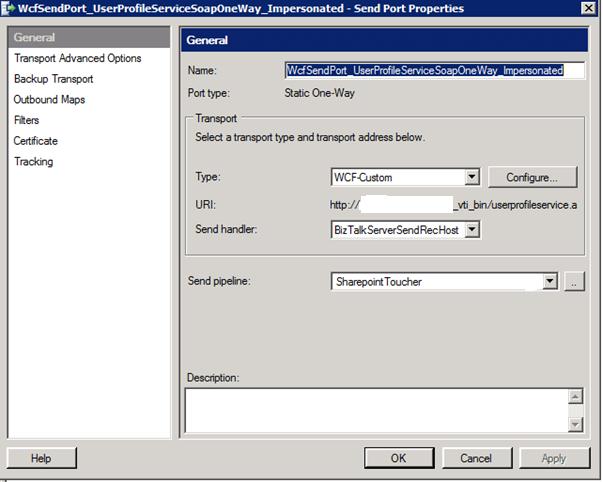
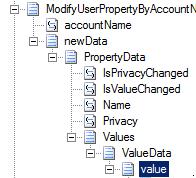
My port looked like this:

BizTalk IaaS solution: Provisioning Developer Environment

BizTalk IaaS solution: Provisioning Developer Environment

One of the new Windows Azure services is Virtual Machines (see announcements). Virtual Machines in Window Azure support the ability to deploy and run durable VMs in the cloud. You can easily create these VMs using a new Image Gallery built-into the new Windows Azure Portal, or alternatively upload and run your own custom-built VHD images.

Virtual Machines

Virtual Machines give you application mobility, allowing you to move your virtual hard disks (VHDs) back and forth between on-premises and the cloud. You can migrate existing workloads such as Microsoft SQL Server or BizTalk Server to the cloud, or bring your own customized Windows Server or Linux images, or select from a gallery.

8. BizTalk IaaS - VM BizTalk2010 From Gallery

As you see from the screenshot above there are compatible operating systems and images available in the online gallery;

  • Windows Server
    • Windows Server 2008 R2 SP 1 May 2012 
    • Windows Server 2008 R2 with SQL Server 2012 Evaluation
    • Windows Server 2012 RC
  • Linux:
    • OpenSUSE 12.1
    • CentOS 6.2
    • Ubuntu 12.04
    • SUSE Linux Enterprise Server 11 SP2
  • Custom images

This means you can for instance create a Virtual Machine Running Windows Server 2008 R2, where you can install BizTalk Server 2010. Like I described in the previous post you can provision a BizTalk Developer environment.

Creating a Virtual Machine in Windows Azure

Steps I performed to create a VM are as follows:

* Log into Windows Azure Management Portal (you need an account with Windows Azure, for instance you can start with a trail)

* Choose new Virtual Machine

1. BizTalk IaaS

* Fill in the details

2. BizTalk IaaS - Create VM BizTalk2010

* Click Create Virtual Machine

3. BizTalk IaaS - Creating the VM BizTalk2010

* Now the VM is being provisioned.This may take a few minutes.

4. BizTalk IaaS - VM BizTalk2010 Created
4. BizTalk IaaS - VM BizTalk2010 Dashboard

* Connect to VM using Remote Desktop. It may take a few minutes before you can remotely connect with your VM.

* You have to wait until Status is Running. Status is going from stopped to starting, to running (provisioning) to Running.

* You can now connect to machine through Remote Desktop

7. BizTalk IaaS - VM BizTalk2010 Connect Cert

* I had to run some update (windows update)

* Logged of as small instance is not enough resources for installing BizTalk I switch to Medium.

image

* I then save configuration and waited until provisioning was done

* Now it is time to install Visual Studio, SQL Server and BizTalk Server 2010

* After some time you will see resource utilization in the portal

image


Create a VM through Image Gallery

It is also possible to create a VM through using the Image Gallery:

1. Select an Image

8. BizTalk IaaS - VM BizTalk2010 From Gallery

2. Fill in details

9. BizTalk IaaS - VM BizTalk2010 From Gallery II

3. Choose VM Mode, DNS Name, Region and Subscription you have

10. BizTalk IaaS - VM BizTalk2010 From Gallery III

4. Choose whether or not you need a Availability set

11. BizTalk IaaS - VM BizTalk2010 From Gallery IV

5. Now VM is being provisioned.

14. Creating VM BTS2010

Installation of SQL Server, Visual Studio and BizTalk took a few hours. Now I have my BizTalk development environment running up in the cloud. Now this will cost me for a month (pay as you go) according to calculator around 130 dollars.

image

My rationale is and I may be little of is that I have one medium VM, 100 Gb of storage and some bandwidth. According to question mark of the Virtual machine:

image

It may be possible I just have to pay the 115 dollar for VM only (best to study the pricing, billing and metrics section on the portal). You get billed by the pay as you go model. Now if you stop the machine you still get billed!

12. BizTalk IaaS - Shutting down

The billing stops if you delete the Virtual Machine!

13. BizTalk IaaS - Deleting Virtual Machine

As you can see setting up a VM looks pretty easy, though there are some considerations:

  • Setting the environment using iso’s/media from local disk takes time, and I think it is better to create an image (VHD) locally and then upload that one;
  • Uploading your installation media to disk on VM may take some time too, depending on the latency. Another option is to download the media from MSDN subscription or through Volume License subscription (latency is low, pretty amazing download speed);
  • You need at least a medium VM to have some performance for you BizTalk development, so there are some costs involved. Now 115 US is the introduction price (preview), when it becomes general available the prices will go up a bit;
  • Having your VM’s in the cloud for BizTalk development you’ll still may need access local systems, which you like to integrate with. Now these systems may not be accessible from your cloud VM. Yet you can resolve this by Windows Azure Virtual Network. This enables you to provision and manage virtual private networks (VPNs) in Windows Azure as well as securely link these with on-premises IT infrastructure (on-premise systems);
  • If for some reason you do not have internet access then your environment is not accessible;
  • Finally you will have to decide if having a BizTalk development environment in Windows Azure is fit-for-purpose (depending on your organizations IT strategy/policy).

BizTalk Server running in the VM on Windows Azure

Last bit is of course running BizTalk Server itself. Installation of all components for development environment went smoothly and exact the same as setting it up locally. BizTalk operates the same as having it running in VM locally on your laptop.

image

The same experience I have is shared by fellow MVP Saravana (see his post BizTalk 2010 Environment in Windows Azure Virtual Machine (IaaS)). Having VM’s in the Windows Azure offer new possibilities if it is around hosting your virtual machines. It shows Microsoft’s investment and movement towards IaaS offering like competitors Amazon.

Cheers,

– Steef-Jan

Future BizTalk Server Release and Microsoft Integration Strategy

Future BizTalk Server Release and Microsoft Integration Strategy

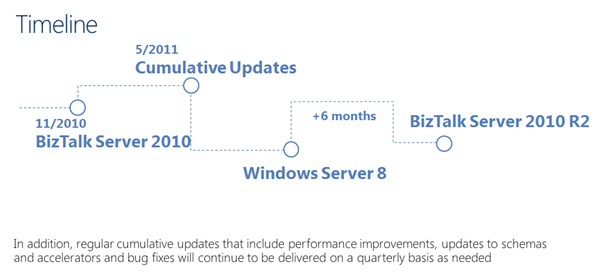
Last couple of weeks more information has been shared by Microsoft on the future release of BizTalk Server (currently named BizTalk Server 2010 R2). During the BizTalk Event in Milan 24th of May and BizTalk User Group meeting 7th of June sessions revealed more on what is coming. The release of this BizTalk version is six months after release of Windows 8, so it will in first quarter of 2013.

image

In the past there has been a lot of buzz around BizTalk being dead yet Microsoft is still committed to middleware business. This will be vivid during the sessions they will give at TechEd:

  • Application Integration Futures: The Road Map and What’s Next on Windows Azure
  • Building Integration Solutions Using Microsoft BizTalk On-Premises and on Windows Azure

These session will become available approximately a week later.

The current strategy towards the future Microsoft is following with integration is a three pronged strategy:

    On-premise BizTalk

    On-premise BizTalk will be the future release of BizTalk, the picture below will show the new features and enhancements.
    image

    BizTalk IaaS

    IaaS offering can be interesting as you will provide you the ability to provision a BizTalk developer environment on Azure. Windows Azure now supports the ability to deploy and run durable VMs in the cloud. This means you can easily create these VMs using a new Image Gallery built-into the new Windows Azure Portal, or alternatively upload and run your own custom-built VHD images.

    The Virtual Machines you create or upload are durable (meaning anything you install within them persists across reboots) and you can use any OS with them. The built-in image gallery includes both Windows Server images (including the new Windows Server 2012 RC) as well as Linux images (including Ubuntu, CentOS, and SUSE distributions). Once you have created a VM instance you can easily use Terminal Server or SSH into it in order to configure and customize the VM which ever way you want (and optionally capture your own image snapshot of it to use when creating new VM instances). This provides you with the flexibility to run pretty much any workload within Windows Azure.

    Below you find a diagram showing what BizTalk developer can do:
    image

    1. Get one default image from gallery i.e Windows 2008 R2;
    2. Create a VM with BizTalk or upload a VM;
    3. Develop BizTalk solutions on a VM hosted in Windows Azure.

    With the new Azure IaaS capabilities the traditional development and test environments can be replaced.

    BizTalk PAAS

    Windows Azure Platform now contains the following middleware services:
    image

    Integration service compromise of capabilities to extend on-premises applications to the cloud, providing rich messaging endpoints on the cloud to process and transform the messages, and help organizations to integrate with disparate applications, both on cloud and on-premises. The current Service Bus EAI and EDI Labs April 2012 provide common integration capabilities (e.g. bridges, transforms, B2B messaging) on Windows Azure Service Bus.

    image

    The integration in the cloud (BizTalk PaaS) will be the new standard in the near future.
    Cheers,

    – Steef-Jan

    New Release of Windows Azure!

    The Windows Azure Spring Release is Here..see blog post by Bill Laing.
    I’m particularly excited about a few of the new services:

    Windows Azure Virtual Machines – (IaaS) We can now move our virtual disks back and forth between on premises and cloud (supports latest Windows Server and Linux)
    Windows Azure Virtual Network – allows connectivity between the […]
    Blog Post by: Stan Kennedy

    Summary of my contributions on MSDN Code Gallery and TechNet Gallery in the first half of 2012

    Summary of my contributions on MSDN Code Gallery and TechNet Gallery in the first half of 2012

    In the following of my previous post, this is the list of my contributions in the last six months on MSDN Code Gallery and TechNet Gallery. MSDN Code Gallery is your destination for downloading sample applications and code snippets, as well as sharing your own resources. TechNet Gallery is your destination for finding resources written […]
    Blog Post by: Sandro Pereira

    Azure: Connecting Cloud and On-Premises Applications Using Windows Azure Virtual Network – Breeze

    Hi guys, I gave an online presentation earlier this afternoon as part of Microsoft
    Readiness on Azure Virtual Networks.

    I had the whole presentation prepared until the http://meetwindowsazure.com announcement,
    where I had to go to the drawing board and just share all this goodness that was pouring
    out in Azure V2.0.

    Thanks to the healthy turnout for those online and to those who registered, then check
    the emails for a link shortly.

    As promised here’s the slide deck guys that I used through my demos

    Presentation:

    Presentations

    >

    Blog Post by: Mick Badran

    Error Calling FAST Search Service GetMetadataProperties()

    Overview
    During a recent server migration we attempted to bring up a client application that utilizes Search.asmx in a SharePoint/FAST Search installation.  The application calls GetMetadataProperties() at startup to create a cache of properties for a search based web application.  We were getting errors that we hadn’t seen previously.
    Error Description
    The .NET Code executing the GetMetadataProperties() call […]
    Blog Post by: Michael Gerety