by community-syndication | Jun 15, 2012 | BizTalk Community Blogs via Syndication
BizTalk Map Editor (Mapper) is a good editor, especially in the last 2010 version of the BizTalk. But still sometimes it cannot do the tasks easily. It is time for the Xslt code, It is time to remember that the maps are executed by the Xslt engine.
Right-click the Mapper Grid (a field between the source and target schemas) and choose Properties /Custom XSLT Path. Input here a name of the file with Xslt code. Only this code will be executed, forget the picture in the Mapper, all those links and functoids.
Let’s see the real-life example.
There are two source Addresses. One is on the top level and the second is inside the Member_Address record with MaxOccurs=* .
The target address is placed inside the Locator record with MaxOccurs=*.
The requirement is to map all source address to the one target address structure.
The source Xml document looks like:
The result Xml should be like this:
Try to do this mapping with the Mapper and you will spent good amount of time and the result map would be tricky.
If we use the Xslt code, the mapping will be simple and unambiguous, like this:
Simple, elegant.

by community-syndication | Jun 15, 2012 | BizTalk Community Blogs via Syndication
This was a follow up session to the Application Integration Futures – The Road Map and what’s next on Windows Azure session that was discussed here. The primary focus of this session was to demonstrate some of the new capabilities of BizTalk On-Premises, BizTalk IaaS and BizTalk PaaS.
During the presentation there were many questions as to what the differences between the On-Premises version and the IaaS version would exist. After many questions about a particular feature (BAM, ESB Portal etc) Bala stepped in and declared that all features that exist in the On-Premises version will exist in the IaaS version. After a further discussion after the session, it looks like there is a little more work to do in the area of clustered host instances but otherwise we can expect symmetry between these two versions.
Since BizTalk Next (aka “R2”) will be released as part of the latest Microsoft platform offering (Windows Server, SQL Server, Visual Studio), all BizTalk projects will target the .Net 4.5 platform.
The primary purpose of this session was to demonstrate some of these new features lets get into some of the scenarios/demos that were discussed.
BizTalk Consuming REST services
In the first example, the team demonstrated BizTalk consuming a REST feed from the Azure Data Market. Specifically, the feed was related to flight delays. BizTalk connected using the new WCF-WebHttpBinding and performed a GET operation against this particular feed. Since the foundation for authentication when communicating with Azure is the Access Control Service (ACS), Rajesh demonstrated the out of box ACS authentication configuration.
BizTalk consuming SalesForce.com over REST API
Once again BizTalk was configured to consume a REST service. In this case it was a SalesForce customer feed. Within the Send Port, the “SOAP Action Header” was populated and once again included the GET operation. A custom transport behavior was used to provide the appropriate credentials. When executed, a list of customers was returned from SalesForce.
Next, the URI in the SOAP Action header was modified and a hard coded id was provided for a particular customer. In this case only this particular customer was returned. Both myself and Bill Chestnut were thinking “great, but how do we inject a dynamic customer id to this GET request”? Once again the BizTalk team had an answer for this and it came in the form of a new Variable Mapping button. When clicked an interface that will allow us to specify the name of a context/promoted property. Bottom line is that we can drive this dynamic value from message payload or context.
Finally, the last SalesForce demo included a POST, where they were able how to demonstrate how to update a customer record in SalesForce.com.
BizTalk PaaS: Azure EAI Services
The team then switched gears and started talking about BizTalk PaaS: Azure EAI Services. I have no idea as to whether this will be the official name. This is what the title of their slide included so I am using it here. I do like it. I do like that BizTalk is still associated with this type of functionality. I must caution that the product team did indicate not to look too much into naming/branding at this point.
Some of the functionality(some new, some old) that we can expect in the PaaS solution includes:
- Sequence of activities to perform impedance mismatch
- Flat file disassembly
- Message validation
- Transforms
- Content based routing
- XPath, FTP properties, Lookup (against SQL Azure), Http properties, SOAP
- Hosting custom code
- Scripting functoid to host .Net Code
- XSLT support
- New Service Bus Connect Wizard
- BizTalk connectivity to Azure Artifacts (Service Bus Queues, Topics, XML bridges)
EDI Portal
- Metro UI for managing trading partners
- Manage and monitor AS2, X12 agreements
- View resources like Transforms, Schemas, Certificates
EDI Bridge
- Archiving
- Batching
- Tracking
Other
- IaaS will be a public TAP
- Other BizTalk releases(On-Premises/PaaS) will be “regular” TAP
- On a lighter side, I did ask if we can expect a Metro version of the BizTalk Admin Console. Don’t expect it any time soon . Basically any new UIs that need to be created will follow the Metro styling but other than that don’t expect many updates to previous tools.
Conclusion
This was a great session that included many demos and really proved that what the Product team was speaking to in the previous session wasn’t just lip service. Having been at the MVP Summit, I must say I was pleasantly surprised at the amount of functionality that they have been working on. Once again, I love the direction that they are heading in. It has an updated feature set that should please customers no matter what their ideal deployment model is (On-Premises, IaaS, or PaaS). You can also tell that they are serious about symmetry although it may take a while for PaaS to be closer aligned to On-Premises/IaaS but I think they are headed in the right direction.
by community-syndication | Jun 14, 2012 | BizTalk Community Blogs via Syndication
| This post is to share some source code of a sample application that shows how to develop a Facebook Canvas App. hosted in Windows Azure. |
Ce billet a pour but de partager le code source d’une application exemple qui montre comment d%u00e9velopper une application Facebook de type Canvas, h%u00e9berg%u00e9e dans Windows Azure. |
| It leverages a bunch of technologies: ASP.NET MVC4, Entity Framework 4.3.1 with Code First, Windows Azure SQL Database, Windows Azure Tables (non relational), Windows Azure Cloud Services, part of the Facebook C# SDK. |
Elle utilise un certain nombre de technologies: ASP.NET MVC4, Entity Framework 4.3.1 avec Code First, Windows Azure SQL Database, Windows Azure Tables (non relationnel), Windows Azure Cloud Services, et une partie du Facebook C# SDK. |
| Source code is available in the following skydrive folder. Version is formatted YYMMDDx where x is a letter for numbering versions in a day. For instance V120614d is the fourth (d) version of 14-JUN-2012). |
Le code source est disponible dans le r%u00e9pertoire skydrive suivant. Le num%u00e9ro de version est format%u00e9 YYMMJJx o%u00f9 x est une lettre qui permet de distinguer les diff%u00e9rentes versions d’un m%u00eame jour. Par exemple, V120614d est la quatri%u00e8me version du 14 juin 2012. |
http://sdrv.ms/KYvFgQ
| Developing a Facebook Canvas App. requires to manage a number of issues like: using HTTPS, running in an IFrame where cookies might not be usable (I removed cookies dependencies), managing current user OAuth token after receiving it from the initial POST, and also manage its expiration. You can find solution in this code, and I might write further blog posts about it. Should you have further questions, please leave a comment. |
D%u00e9velopper une application Facebook de type Canvas suppose de r%u00e9soudre un certain nombre de probl%u00e8mes comme: utiliser HTTPS, s’ex%u00e9cuter dans une IFrame o%u00f9 les cookies peuvent ne pas fonctionner (j’ai enlev%u00e9 la d%u00e9pendance aux cookies), g%u00e9rer le jeton OAuth de l’utilisateur courant apr%u00e8s l’avoir re%u00e7u dans un POST initial, et aussi g%u00e9rer son expiration. Vous trouverez des solutions dans ce code, et j’%u00e9crirai probablement d’autres billets %u00e0 ce sujet. Si vous avez des questions, n’h%u00e9sitez pas %u00e0 les poser en commentaire de ce billet. |
| What does the App do? It is a whish list application where a small community (UI was not designed to handle large number of people, in this version) of people share desired objects. A sample instance of the App is available at https://apps.facebook.com/need-archims-fr/. I should share the demo invitation code thru twitter in a few days (I need the sample for a demo for now) so that you can try the App. Here are a few screen shots: |
Qu’est-ce que l’application fait? Il s’agit d’un site de listes de cadeaux pour une petite communaut%u00e9 de personnes (l’interface graphique n’a pas %u00e9t%u00e9 con%u00e7ue pour un tr%u00e8s grand nombre de personnes dans cette version) qui partagent leurs d%u00e9sirs. Un exemple de cette application est disponible %u00e0 https://apps.facebook.com/need-archims-fr/. Je partagerai le code d’invitation de d%u00e9mo via twitter d’ici quelques jours (pour l’instant j’en ai besoin pour une d%u00e9mo) de fa%u00e7on %u00e0 ce que vous puissiez essayer l’application. Voici quelques copies d’%u00e9crans: |
| I also explained how it works in this video (sorry it’s in French, but you can get an idea from the screens). |
J’ai aussi expliqu%u00e9 comment l’application fonctionne dans cette vid%u00e9o. |
| I removed secrets from the code, and they are replaced by ___. For instance, you may find this: |
J’ai supprim%u00e9 les secrets du code, que j’ai remplac%u00e9s par ___. Par exemple, vous trouverez ceci: |
| I also removed the packages folder content which had references you can find from NuGet and a development workstation. Here is what was in that folder: |
J’ai aussi supprim%u00e9 le contenu du r%u00e9pertoire packages qui contenait des r%u00e9f%u00e9rences que vous pouvez retrouver depuis NuGet et un environnement de d%u00e9veloppement. Voici ce qui %u00e9tait dans ce dossier: |
| Shoud you start from a blank visual Studio 2012 RC solution, here are a few screen shots that can help you: |
Si vous d%u00e9marrez d’une solution Visual Studio 2012 RC vide, voici quelques copies d’%u00e9crans qui peuvent vous aider: |
| Here is a view of the sample instance hosted in Windows Azure: |
Voici une vue de l’instance exemple h%u00e9berg%u00e9e dans Windows Azure: |
Benjamin
Blog Post by: Benjamin GUINEBERTIERE
by community-syndication | Jun 14, 2012 | BizTalk Community Blogs via Syndication
This presentation has hosted by Bala Sriram and Rajesh Ramamirtham
Note: This blog post is a work and progress and will be updated as time permits
Key takeaway: We are innovating in BizTalk
General Update
- BizTalk Server “R2” release will be available around 6 months after Windows 8
- CTP expect this summer
- Commitment to releasing server for years to come. Publicly indicating there will be at least another release beyond “R2”
- 12k+ BizTalk customers
- 81% of Fortune Global 100 use BizTalk
- 79% of customers are using BizTalk 2010
- CU delivered every quarter with product enhancements
- Best NSAT in the industry
- 6 of 8 largest US Pharmaceutical Companies use BizTalk
- Continue to bet on BizTalk – We will take your investments forward
- Enabling new Azure based BizTalk scenarios for EAI & EDI
- Bringing together BizTalk on-premises and in Azure
What customers are telling us?
- Keep me current with platform, standards and LOB changes
- Reduce time and cost of developing of Integration solutions
- Let me focus on business challenges, not technology infrastructure
- Cloud advantages
- Cost-effective, scalable infrastructure for easy deployment
- Some scenarios like b2b are amenable to cloud
- Cloud Challenges
- Data privacy, isolation , control more integration
- LOB assets will continue to be on-premis
- Phased cloud adoption on my terms
- One size does not fit all
How BizTalk will meet these requirements?
- Upgrade to latest MS platform
- Improved reach for B2B customers
- Better performance and manageability
- BizTalk on Azure IaaS
- Eliminate HW procurement lead times
- Reduce time and cost to setup and maintain BizTalk environments
- BizTalk on Azure PaaS for EAI and EDI
- Reduce partner onboarding and management cost
- Leverage existing BizTalk artifacts
- Rapid configuration-driven development for common integration patterns
- All of these working together seamlessly as one BizTalk
- Trying to work under “one umbrella” but no naming can be implied at this time
BizTalk Server On-Premise Update
- Platform Update
- Support for:
- VS 2012,
- Window 8 Server
- SQL Server 2012
- Office 15
- System Center 2012
- B2B enhancements:
- EDI
- HL7 2.5.1, 2.6
- SWIFT 2012 Message Pack
- Better Performance
- In order delivery process
- Serialization created delays
- Improved dynamic send ports and ESB via host handler association of Send ports
- Can configure a dynamic send port host handler in Admin Console
- MLLP adapter performance
- HIS DB2 client transaction load balancing, client bulk insert (15 times faster)
- Better manageability
- Visualize BizTalk artifact dependencies in BizTalk admin console
- ESB toolkit as core part of BizTalk setup and product
- HIS Administration using Config files with application metadata stored in XML
- Improved connectivity
- Consume REST Services directly in BizTalk
- Simplified SharePoint integration experience
- No more adapter web service installs on SharePoint
- Improvements to existing adapters (HIS, SMTP)
- Easy connectivity to Service Bus Relay, Queues and Topics
- CICS http client connectivity to Windows
BizTalk running in Azure (IaaS)
- Use case :
- First step in the cloud adoption
- Eliminate hardware procurement lead times
- Reduce time and cost to setup and maintain BizTalk environments
- Move applications from on premise and back
- Create a virtual network in Azure and enable connectivity to on-premise network
- User logs into Azure Portal
- User creates a new VM and selects BizTalk stock image
- User specifics BizTalk environment topology and adds them to existing virtual network
- New VMs are provisioned for user in Azure IaaS
- User logs into the provisioned VM which has BizTalk installed and configured and starts using it.
- Targeting same Windows 8 timeframe
- Microsoft will provide guidance on performance
- MSDTC support in Azure?
- It is supported now in IaaS and was brought in to support BizTalk
- All features that work on premise will work in IaaS
by community-syndication | Jun 14, 2012 | BizTalk Community Blogs via Syndication
An Overview of Managing Applications, Services, and Virtual Machines in Windows Azure – Karandeep Anand
In this session Karandeep walked us through the new portal. The new portal does not include Service Bus endpoints like queues or topics and also does not include caching yet. I am told that Microsoft is hoping to have this functionality in the portal by end of the year. However, they have enabled single sign on so you should be able to toggle back and forth between the old and new portals quite easily.
Within the portal we can get the state of:
- Virtual Machine
- Websites
- Cloud Services (Web roles/Worker roles etc)
- SQL Databases
- Storage
- Networks
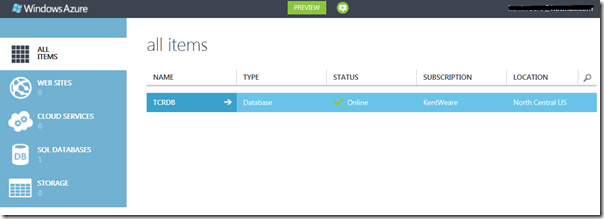
Below I have taken a screenshot of the Azure portal. I only have one SQL Database in the production portal but you can get a sense of the new look and feel.
You also have the ability to add new assets by clicking on the “+ New” link.

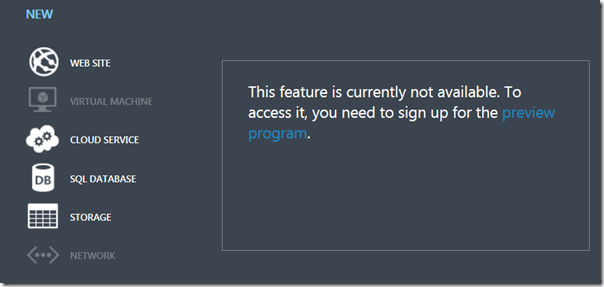
You can then specify the type of service that you would like to provision. In the case of Virtual Machines, you need to sign up for the preview before you can actually provision a VM.
Scripting Management Support
Using the VM portal is not the only way to manipulate services in Azure. There is first class support for scripting in Windows, MAC and Linux. In the case of Windows admins will find comfort knowing that there is first class support for PowerShell. These PowerShell command lets will take advantage of the same underlying REST APIs that the portal is using
High Availability and Service Level Agreements
Having a third party, such as Microsoft, host IT services for your organization may create some concerns within your organization. What if your services go down? What “skin” does Microsoft have in the game. To put it bluntly, they have some skin in the game. Perhaps not as much as some would like but Microsoft will be reimbursing organizations for their usage should they fail to live up to their commitments.
Here is a, very, loose break down of Microsoft’s SLA policy:
- 99.95 uptime – monthly SLA
- 4.38 hours of downtime per year for multiple role instances
- 99.9 for single role instances
- What’s included?
- Compute Hardware failure (disk, CPU, memory)
- Datacenter failures – network failure, power failure
- Hardware upgrades, software maintenance – HOST OS updates
- Planned downtime – 6 day notice, 6 hour window, 25 minute downtime
What is not included?
- VM container crashes, Guest OS failures
Monitoring and Auto-Scaling applications
Now this was cool! A company called AppDynamics demonstrated their monitoring solution for Azure. Some of the features included:
-
Application performance management dashboard. This included a graphical representation of your distributed solution and provided the latency that exists between each component.
-
You also had the ability to interrogate the stack level trace to get very granular
-
The tool also supported the ability to auto scale your application based upon different criteria sets including
-
CPU
-
Message through-put
-
errors
-
specific business hours
-
critical conditions
Since Azure supports a “Pay as you go” model I found this tool to be extremely intriguing. Not only did it look nice, but it provides functionality can can allow you to reduce costs when your app is not very busy and also auto scale to ensure of a good user experience when your site is busy. To read more about this company and their product for Azure, please read the following press release.
Building HTTP Services with ASP.Net Web API – Daniel Roth
The other session that I wanted to talk about was the Building HTTP Services with ASP.Net Web API. For the past couple months I have been playing with MVC3, JQuery and AJAX so this session was rather timely.
What is Web API?
- An Http Service
- Designed for broad reach
- browsers
- phones
- devices
- set top boxes
- Uses HTTP as an application protocol, not a transport protocol. So what this really means is it takes advantage of existing verbs GET, POST, PUT, DELETE
Why build Web APIs?
- Reach More Clients
- Scale with Cloud
- Embrace HTTP – simplify things
- Web API Requirements
- Need a first class HTTP Programming model
- Easily map resources to URIs and implement the uniform interface
- Rich Support for formats and HTTP Content negotiation
- separate out cross cutting concerns
- Light weight
- ASP.NET WebAPI is the end result
WebAPI description
If you like self documenting APIs, then WebAPI has some built in features to support this type of functionality.
- Use the IApiExplorer Service to expose “contract”
- Provides runtime description of WEB API
- Renders content in a useful way
- Shows request and response formats
Hosting
- Many options – self host(console), IIS, Azure roles, other web servers
- MSDN code gallery and NuGet Code packages are available
Other
- ASP.NET Web API is available as part of MVC4
- Is part of the recent open source movement that Microsoft has been involved in
- Product team accepts 3rd party contributions
- Unprecedented transparency
- When Microsoft devs check in code, you have access to code through GIT repository
- Asp.net mvc4 and web api is included in Visual Studio 2012 RC
- WebAPI is now a Visual Studio project template
- Can also create a unit test project
- New MVC like map route for WebAPI
- JSON, XML and form-url-encoded supported out of the box for HTTP Request
- JSON and XML natively supported for HTTP Response
- Validation is run on the data from every request
- Check ModelState.IsValid to see if you have a valid request
- Support for ODATA queries
Conclusion
I realize that the release of this technology has been highly contested. There have been people using the WCF stack that are now in a tough spot to migrate away from this technology to WebAPI. For me, as someone new to this space I really liked how you organize your project and have clean separation from controller to controller. You can quickly expose services without the need for heavy WSDL type contracts.
I also like how most of Daniel’s presentation was run from Fiddler. Like he mentioned several times, WebAPI at its root is really just HTTP. So what better tool to craft requests than Fiddler.
In closing, I do a lot of System Integration. Primarily with BizTalk and must admit, I like contract based development where you are defining a firm contract upfront. I have never been a big fan of loosely based lightweight services as things can quickly to to hell when doing this type of stuff for EAI. However, I have woken up and seen the light. I really do feel there are good use cases for this type of technology for light weight application based services. I don’t necessarily think that this technology is a great fit for EAI, but for applications that may be surfaced using a variety of clients (mobile, web) I think this is a great way to expose back end services to front end client.
Stay tuned for Day 4 as I expect to have some encouraging BizTalk news to report!

by community-syndication | Jun 14, 2012 | BizTalk Community Blogs via Syndication
A new release of the SchedulerTask Adapter is available. remind,The BizTalk Scheduled Task Adapter is an in process receive adapter that can be implemented on a receive location to execute a prescribed task on a daily, weekly or monthly schedule. So Bye bye windows scheduler, this adapter is very powerfull and now it’s in native […]
Blog Post by: Jeremy Ronk
by community-syndication | Jun 13, 2012 | BizTalk Community Blogs via Syndication
This week I’m at the Apple Worldwide Developer’s Conference (WWDC 2012) in San Francisco and I want to share with you some of the new improvements made by Apple that will be available in the coming weeks. Instead of trying to break down each and every one of the fantastic new features, […]
Blog Post by: mkruczek
by community-syndication | Jun 13, 2012 | BizTalk Community Blogs via Syndication
In the TechEd US session Overview and Roadmap of Windows Azure Service Bus, Microsoft demoed some really neat new bit for working with Azure in Visual Studio (both VS2010 and VS2012).
We now have access to several Azure features from Server Explorer
I am going to show you how to use the Windows Azure Service Bus in Server Explorer
Select Add New Connection
Click OK, and then expand the namespace in Server Explorer
You can Do everything you need to do with Queues, Topics, Subscriptions and Rules: Create, Delete, Properties, Send and Receive. For those that have been using the Service Bus Explorer you can do most of it functionality in this new tool, there are still some enhanced send and receiving that Service Bus Explorer is still better doing.
Right Click on a Queue and you have these options
Click Properties
You can also do a send and receive
You can do the same operations on Topics and Subscriptions and also create, edit and delete the rules.
Hope you enjoyed this quick look at the new Server Explorer features in the Azure SDK 1.7
The Overview and Roadmap of Windows Azure Service Bus session can be viewed here: http://channel9.msdn.com/Events/TechEd/NorthAmerica/2012/AZR308
More …
by community-syndication | Jun 13, 2012 | BizTalk Community Blogs via Syndication
The Meet Windows Azure event last week saw some great announcements about the current and future developments on the Windows Azure platform. Microsoft Sweden will be hosting an event at their offices that will run through these releases and demo some of the new technologies.
It will be a great chance to see the new capabilities in action, and chat to Microsoft Evangelists, MVPs and other developers about the future of the platform. This will also be the last Sweden Windows Azure Group (SWAG) meeting before the summer break, so there will be food, drinks, and the chance of some “SWAG”. We will be back in force after the summer, and have a number of great events planned for the rest of the year. We will have a big announcement to make regarding one of these, so be there and get the chance to register!
Registration is here.
by community-syndication | Jun 13, 2012 | BizTalk Community Blogs via Syndication
I found a series of blogs on how to identify Performance bottlenecks in BizTalk Environments.
Also look at this article on finding and eliminating bottlenecks
Here’s an short overview of all the steps, including a link to the more detailed explanation:
The first place to measure the BizTalk performance can be done using Performance Counters. These counters let you monitor all components like the message box, orchestrations, adapters, etc .
A deeper look at the adapter performances, again using some performance counters.
It is important to understand the impact of Pipeplines that are used. Because each of the pipelines have a significant impact on the overall BizTalk performance as they perform actions on every single message that gets through BizTalk
One way to analyze what is really going on in pipelines is using an Application Performance Management Solution with Transactional Tracing capabilities, like dynaTrace for example.
Orchestration can get quite complex sometimes, but how to analyze the performance of these orchestrations?
The actual logic behind the Orchestration Definition is compiled into an assembly, loaded into BizTalk, and gets executed when messages are processed by that Orchestration Definition. A more detailed overview of the execution of such an orchestration can be generated with PurePath for example.
Another way to analyze the orchestration performance can again be done using performance counters. BizTalk provides a set of counters for the Orchestration Engine as well as for the MessageBox.
Often BizTalk Orchestration makes a call to an external web service. PurePath can also give you an idea of the time consumed for this external web service call.
FINAL NOTE
As a final note I would like to point out to use the MessageBox Viewer Tool. The tool gives an overview of what might be wrong in your installation.
This tool runs a set of tests and queries against the MessageBox database an creates a nice report. The result can be viewed using the tool or it can generate an HTML report.



