by community-syndication | Jun 20, 2012 | BizTalk Community Blogs via Syndication
The full title would not fit the headline, but it should really read “(MSTS): Microsoft BizTalk Server 2010 (70-595) Certification Guide – a review”. Not exactly catching, is it, but do not let that fool you. This book is the ticket.
Have you ever thought “I should get certified! Take that exam, and get famous! Or at least a pay-raise and respect from my peers” but then you thought “But I don’t know if I can pass and there is really no way for me to know what to study” so you did not go thru with it?
Stop that! Now you have the best support you could ever get. A study guide for the exam. Before this you had to resort to blog posts like this, and then read more comprehensive books. The latter might not be so bad but you constantly wonder: Is this important for passing the exam? So now you do not have to worry anymore. This is a definite five star product that is a great companion in the pursuit of the coveted title of MCTS.
The book walks you thru everything you need to know in order to pass the exam and then some. I think that even if you do not plan to take the exam, this is a good book to get anyway because it shows so many BizTalk things in such rich detail. After each chapter there is a short section called “Test your knowledge” in which you get to answer a couple of questions in the style of the exam itself.
The structure of the book closely mimics the different sections in the exam so you know that you get the right amount of knowledge and know you are studying the the rights things in order to pass.
- Configuring a Messaging Architecture
- Developing BizTalk Artifacts – Creating Schemas and Pipelines
- Developing BizTalk Artifacts – Creating Maps
- Developing BizTalk Artifacts – Creating Orchestrations
- Debugging and Exception Handling
- Deploying, Tracking, and Administrating a BizTalk Server 2010 Solution
- Integrating Web Services and Windows Communication Foundation (WCF) Services
- Implementing Extended Capabilities
The last couple of chapters are the icing in the cake: the first is a very practical instruction about how to get prepared for the exam, how the exam is structured and so on. The last is a sample certification test! You can actually measure your chance of passing as well as getting feedback about your level of knowledge and what to, perhaps, read up on.
The authors are well versed in the product and have years of experience as developers, architects, Certified Trainers and to some extent as authors.
The only critique I have for this book is that it too focused of explaining how something is done (How to configure a sendport to use the HTTP-adapter) and it does not tell you why you should use the particular adapter, and perhaps discuss pros and cons. I fully realize that this is not the point of the book but I still want that.
The style of the book, that it is so packed full of information, tends to make it a bit tedious to read and you quickly fill up on information. Do not try to cram it all in at once, small chunks and you will be fine.
Go to packpub.com, or Amazon, or perhaps Bokus and buy it and get the title of MCTS, now!
More information about the authors:
Johan Hedberg, @Johed – MVP and MCT
Kent Weare, @wearsy – MVP
Morten la Cour, Microsoft Employee
Blog Post by: Mikael Sand

by community-syndication | Jun 20, 2012 | BizTalk Community Blogs via Syndication
Kent Weare has written a fantastic blog post that details some of the improvements in the upcoming release for BizTalk – http://kentweare.blogspot.co.nz/2012/06/application-integration-futures-road.html Some things stand out as pretty exciting for me BizTalk running in Azure – Finally a means to remove the requirement forhardwareprovisioning for BizTalk server, and potentially a bit more flexibility to scale […]
Blog Post by: Johann
by community-syndication | Jun 19, 2012 | BizTalk Community Blogs via Syndication
So, after a wonderful event in the Netherlands and Italy It’s now decided to do one in Norway. Together with my company and some co-workers we set up everything and I invited a total of4 MVPS and 1community member,MVP Steef-JanWiggers, MVPSandro Pereira,MVPSaravana Kumar, Lex Hegt and MVP Nino Crudele. It has kinda evolved from the
Blog Post by: Tord Glad Nordahl
by community-syndication | Jun 19, 2012 | BizTalk Community Blogs via Syndication
So, this bring up a funny discussion. How to teach your DBAthe wayBizTalk databases works! I’ll split up the different questions with my answers. You often end up in some sort of disagreements with DBAs, they sure know SQL and will be a good friend when you have trouble but they might not know that
Blog Post by: Tord Glad Nordahl
by community-syndication | Jun 19, 2012 | BizTalk Community Blogs via Syndication
I’m writing series of blog post about our story on how we set up a complete BizTalk infrastructure in the cloud in our BizTalk360 blog.
In these articles I explain how we set up virtual network, active directory, DNS, single server BizTalk installation and multi server BizTalk installation etc. You can read more about it here
How did we setup our entire BizTalk Testing Infrastructure in the Windows Azure cloud?
BizTalk Testing Infrastructure in the Windows Azure cloud – Stage 1
I’ll update this post with rest of the articles as and when we finish, hopefully before end of this week.
– Saravana

by community-syndication | Jun 17, 2012 | BizTalk Community Blogs via Syndication
Hey Everybody, Since few weeks I work on Azure (in particular Service Bus). With the new feature VM on the cloud, we’ve got a new portal : https://manage.windowsazure.com it’s a full html 5 portal and it is veryto understand how does it work For the moment Service Bus is unavailable, time question In a […]
Blog Post by: Jeremy Ronk
by community-syndication | Jun 17, 2012 | BizTalk Community Blogs via Syndication
Introduction
In my post on Future BizTalk Server Release and Microsoft Integration Strategy I discussed the three pronged Microsoft integration strategy:
- On-premise BizTalk (a CTP of next version will be released this summer)
- BizTalk IaaS (Infrastructure as a Services), Windows Azure offers services like Virtual Machine and Virtual Network to enable to have your BizTalk infrastructure in the cloud;
- BizTalk PaaS (Platform as a Services) with EDI/EAI integration capabilities using the Service Bus.
In this post I like to share my exploration of the Windows Azure Service Bus. My focus is on BizTalk professionals that do not yet have much experience/knowledge of the Windows Azure Service Bus.Two sessions by Clemens Vasters from last TechEd North America were my baseline before I started my exploration:
- Overview and Roadmap of Windows Azure Service Bus
- Achieving Enterprise Integration Patterns with Windows Azure Service Bus
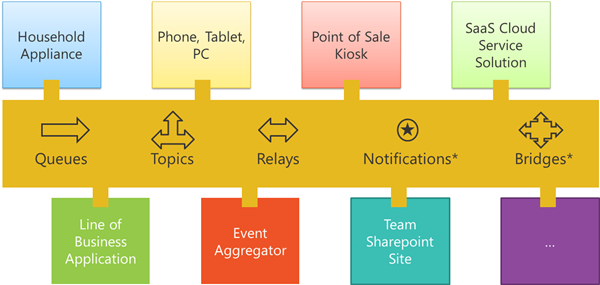
I will explore capabilities of Queues, Topics and the Relay as depicted in overview below of the Service Bus.
In picture above you see different solutions, devices that through services bus communicate with Line of Business applications (SAP, Oracle E-Business Suite), SharePoint and many other systems and applications.
The Windows Azure Service Bus offers capabilities that allow you to create solutions in the cloud that are based on message-oriented-middleware technologies including reliable message queuing and durable publish/subscribe messaging. Ergo its is a messaging infrastructure in the cloud. This means that Service Bus can act as a broker for asynchronous messaging (decoupling). Therefor this infrastructure can support publish-subscribe, temporal decoupling, and load balancing scenarios similar to BizTalk Server. Queues, Topics and Subscriptions are services (entities) of the Service Bus that provide durable, asynchronous messaging.
Relay is an entity that allows you to pass-through message (relay) from one system/application to another. Relay service that sits in Service Bus brings the ability to securely expose Windows Communication Foundation (WCF) services (even orchestrations or LoB Services) that reside within your enterprise network to the public cloud, without having to open up a firewall connection or requiring intrusive changes to your enterprise network infrastructure.
Note: Notifications topics and bridges are services (entities) in Service Bus that will be available later and are currently not present.
Get started
To get started I created a new VM with Windows Server 2008 R2 with Visual Studio 2012 RC and Windows Azure SDK 1.7. Now the SDK can also be used with Visual Studio 2010 SP1. You can use either VS2010 or VS2012 with this SDK.
Samples
The sample on the relay is a 101 sample on using the Relay. The other sample is more a walkthrough, using Queues, Topics and Subscriptions in the service bus by using the Service Bus Explorer. There illustrative to show the capabilities of these services if you are not familiar with them. You’ll need either Visual Studio 2010 SP1 or Visual Studio 2012 RC, Windows Azure SDK 1.7 (June 2012) and a namespace in Service Bus. Relay samples in this post and the walkthrough with the Service Bus Explorer is done in Visual Studio 2012 RC.
Create a namespace
To create a service namespace:
- Log on to the Windows Azure Management Portal. If you end up in the new portal then select preview and choose Take me to the previous portal (Managing the Service Bus is still done in the old portal).
- In the lower left navigation pane of the Management Portal, click Service Bus, Access Control & Caching.
- In the upper left pane of the Management Portal, click the Service Bus node, then click the New button.
- In the Create a new Service Namespace dialog box, enter a Namespace, and then to make sure that it is unique, click the Check Availability button.
- After making sure the namespace name is available, choose the country or region in which your namespace should be hosted (make sure you use the same Country/Region in which you are deploying your compute resources), and then click the Create Namespace button.
- The namespace you created will then appear in the Management Portal and takes a moment to activate. Wait until the status is Active before continuing.
Service Bus NuGet Package
The Service Bus NuGet package is the easiest way to get the Service Bus API and to configure your application with all of the Service Bus dependencies. The NuGet Visual Studio extension makes it easy to install and update libraries and tools in Visual Studio and Visual Web Developer. The Service Bus NuGet package is the easiest way to get the Service Bus API and to configure your application with all of the Service Bus dependencies.
To install the NuGet package in your application, do the following:
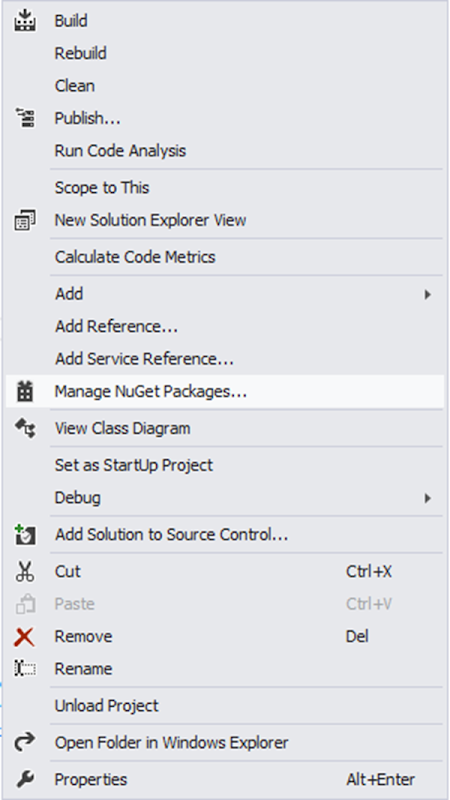
- In Solution Explorer, right-click References, then click Manage NuGet Packages.
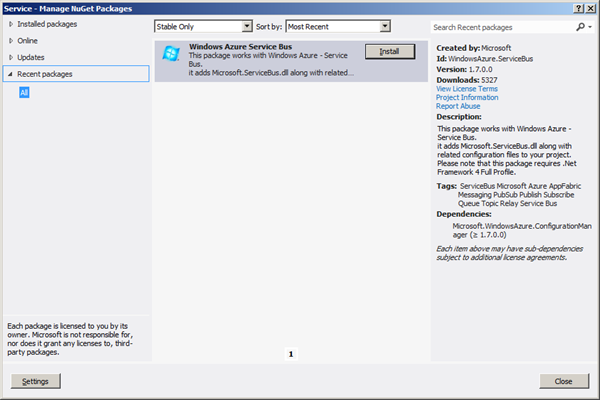
- Search for “WindowsAzure.ServiceBus” and select the Windows Azure Service Bus item. Click Install to complete the installation, then close this dialog.
Building a SIMPLE Relay Sample
To build a sample that will make use of relay service you need to create a WCF-service. The following steps show how to build a very basic service that can be exposed in the Service Bus.
- Within Visual Studio, create a console application
- Add the Windows Azure Service Bus NuGet package to the projects. This adds all of the necessary assembly references to your projects.
- Add a class to project and give it a descriptive name.
- Rename the class to HelloRelayContract and then implement code like below:
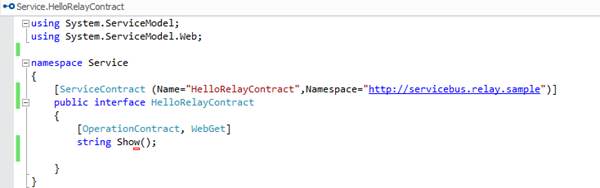
- Add a new class to the project and rename it HelloRelay and then implement code like below:
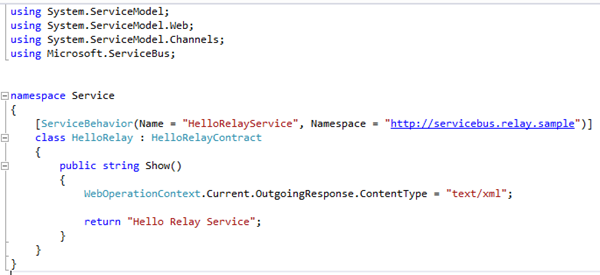
- In program.cs implement the following code:
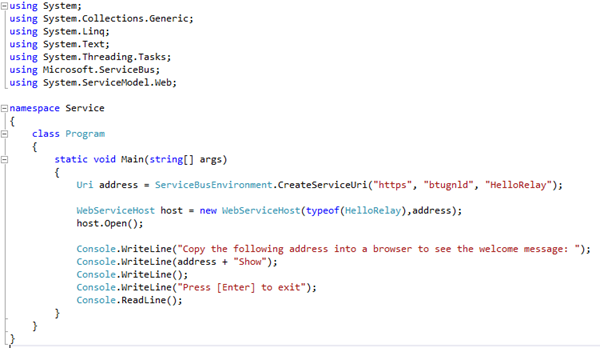
- In order to perform management operations, such as creating a relay connection, on the new namespace, you need to obtain the management credentials for the namespace.
- Select the namespace you just created from the list show below:
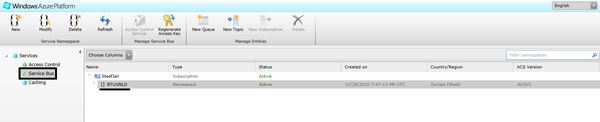
- The Properties pane on the right side will list the properties for the new namespace:
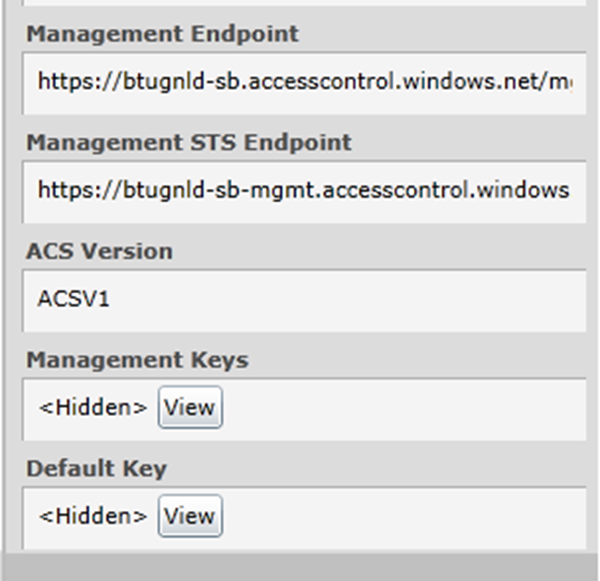
- The Default Key is hidden. Click the View button to display the security credentials:
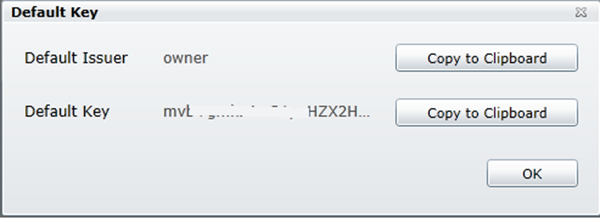
- Open app.config and make the appropriate adjustments like below:
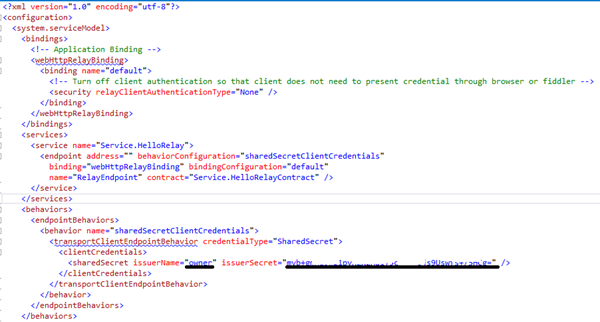
- You can past the default key in the issuerSecret attribute.
- Now that you have build and configured the service you can run the console application that will act as host for the service.
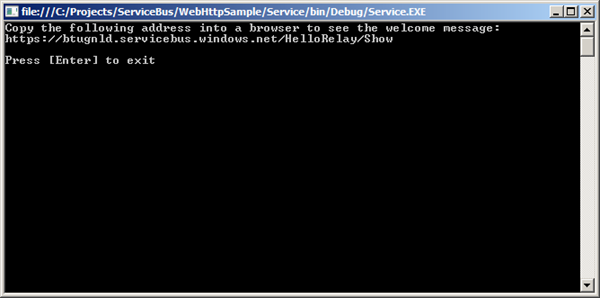
- Copy the address in your browser and you will get result like below:

Service Bus Explorer
One of new tools available through the SDK is the Service Bus Explorer. With the SDK installed you have access to several Azure features from Server Explorer.
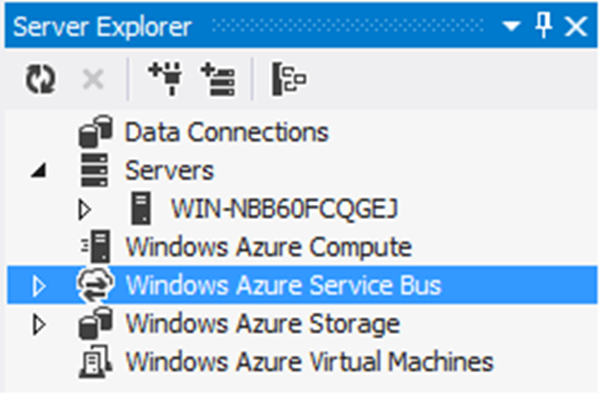
To access the service bus through the Server Explorer:
- Right click the Windows Azure Service Bus.
- Select add new connection.
- Fill in the namespace, Issuer Name and Issuer Key.
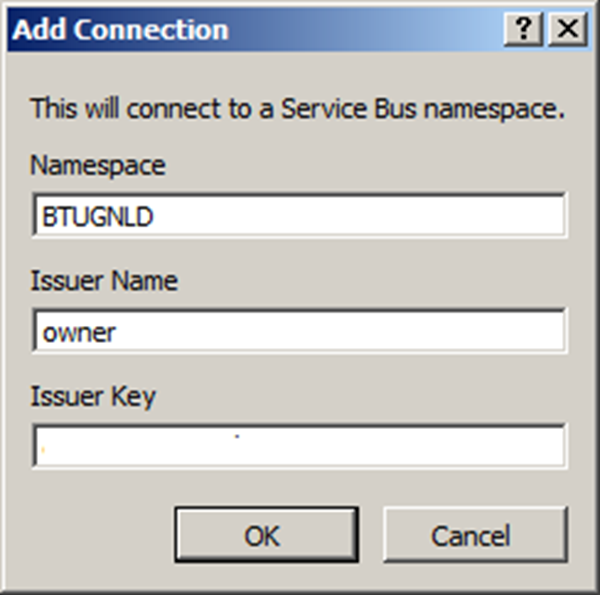
- Click Ok
- You now have access to Service Bus
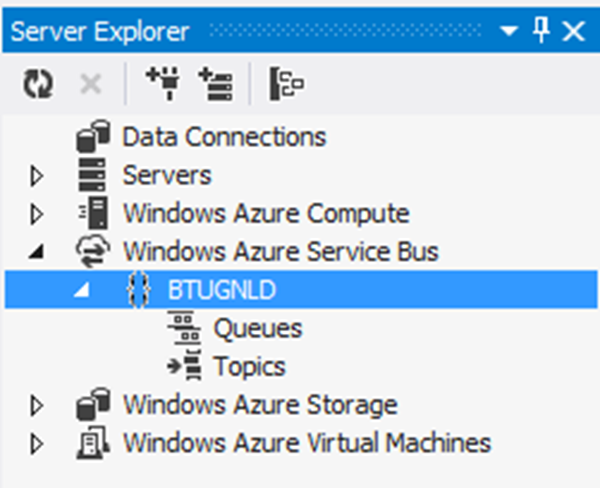
QUEUES, TOPICS AND SUBSCRIPTIONS USING THE SERVICE BUS EXPLORER
To build a sample that will make use of queues, topics and subscriptions. These services support brokered messages. With the service explorer I can manage the service bus without using the portal (see previous paragraph). You can create queues through code or through using the explorer. Using the explorer you can right click Queues and add a new Queue.
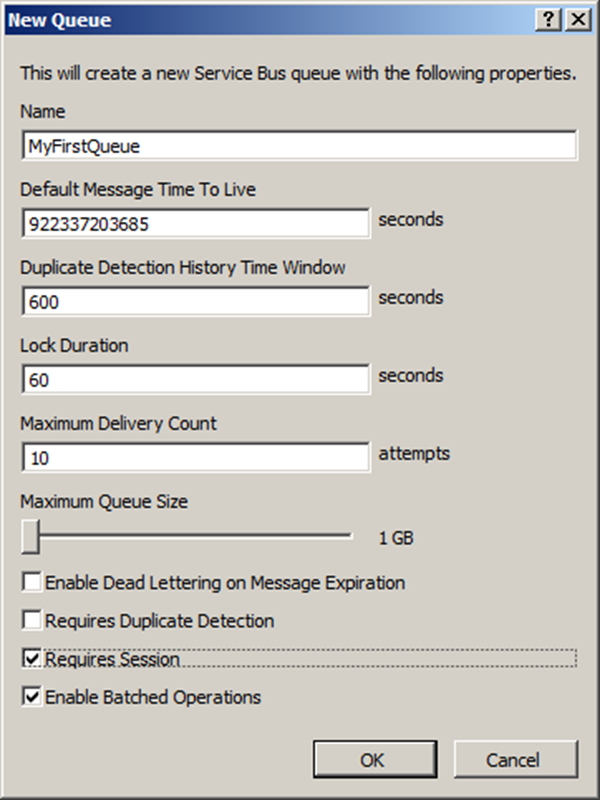
Fill in a name, change some the values if necessary, click options and click Ok. You will then see your queue in Service Explorer.
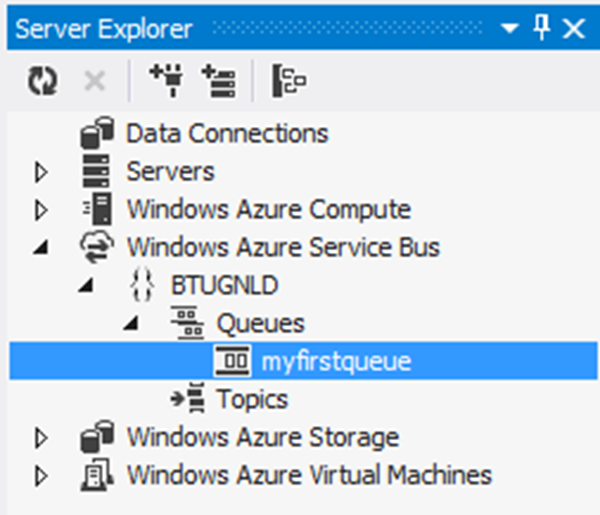
You can right click the created queue and select Send Test a Message. You will then see dialog pop up with the message.
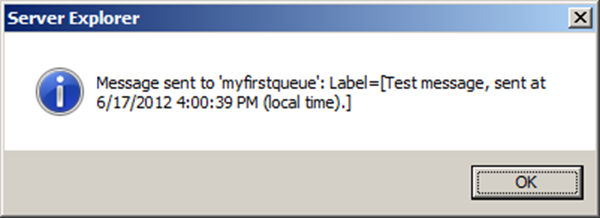
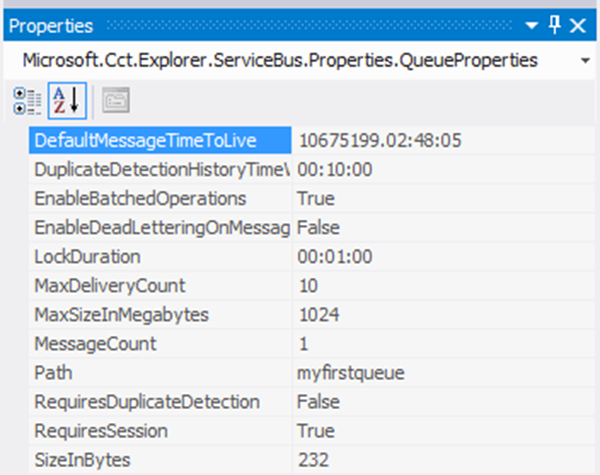
You will notice in the properties of the queue that the message count is 1.
With topics you can do the same. Right click topics and select Create New Topic.
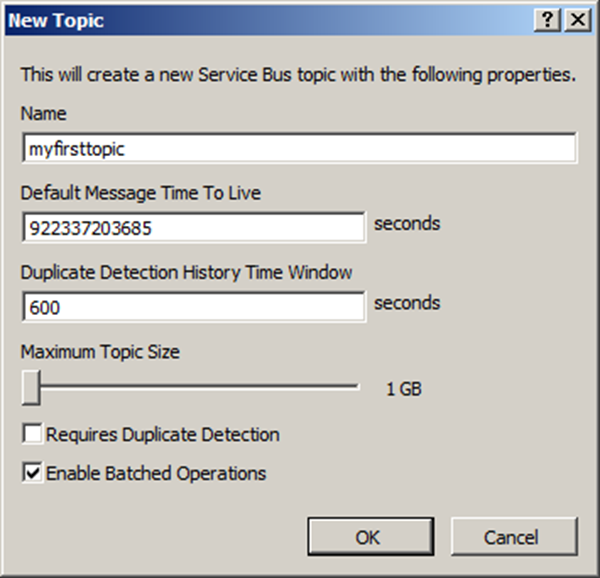
Fill in a name, change some the values if necessary, click options and click Ok. You will then see your topic in Service Explorer.
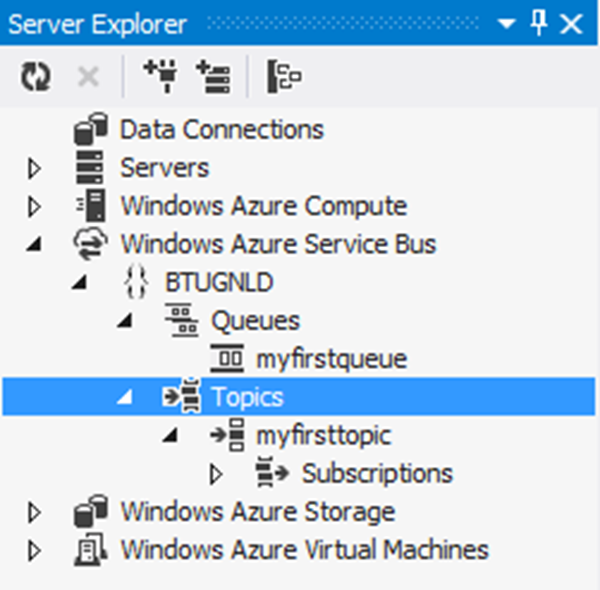
Before you can send a message to the topic you need to create a subscription. Select subscriptions and right click. Select Create New Subscription .
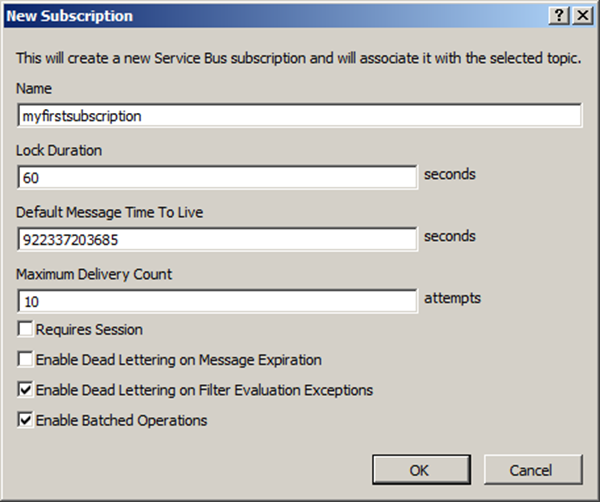
Fill in a name, change some the values if necessary, click options and click Ok. You will then see your topic in Service Explorer.
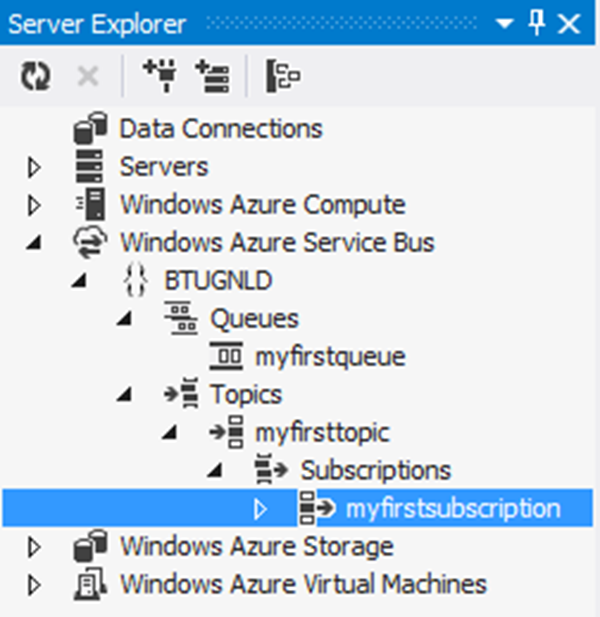
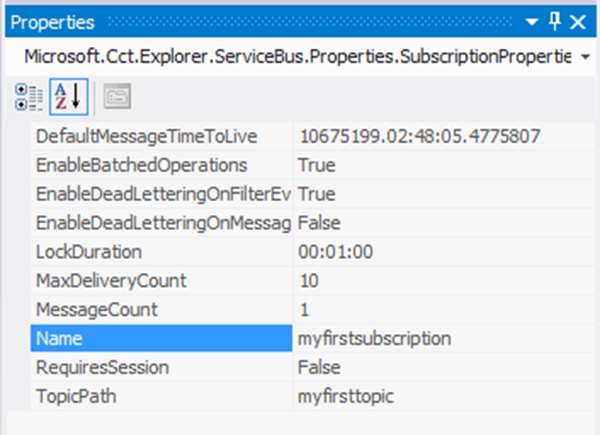
Like queues you can send a test message through the topic.You can right click the created topic and select Send Test a Message. You will then see dialog pop up with the message. In subscription properties you will see message count is 1.
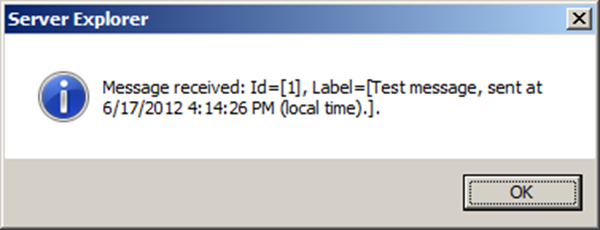
On the subscription you can right click and select Receive Message. A dialog will pop up with the message.
Now you can create more subscriptions in the topic and then sent a test message. You will then see that both subscriptions in the topic will have that message. Now you can use rules to determine, which subscription will get which message. This is new functionality with topics and subscriptions. You can within a subscription add a rule. Open the desired subscription and right click rules. Select Create New Rule. A dialog will appear.
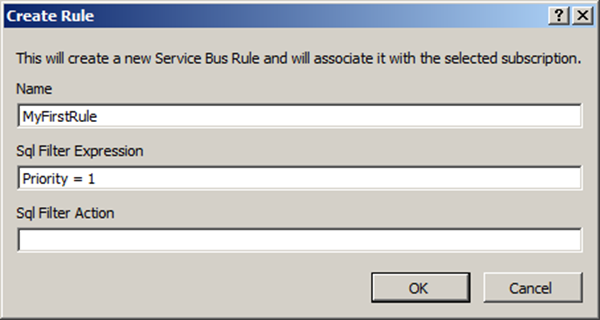
Give it a name and add a Sql Filter Expression. Click Ok. You now have created a rule on the subscription.
Note: The Overview and Roadmap of Windows Azure Service Bus session of Teched NA will provide more context on Service Bus explorer. It will also demo using queues and topics with new Worker Role with Service Bus template.
Call to action
To learn more besides the two sessions from TechEd I suggest to look at Developing Applications that Use the Service Bus on MSDN, Alan Smith’s Developers Guide to AppFabric and resources listed below:
Update: Thanks to Paolo Salvatori I have been pointed some of the articles and samples he wrote on the Service Bus:
- Service Bus Explorer (Windows Azure Sample)
- How to integrate a BizTalk Server application with Service Bus Queues and Topics
- How to integrate a WCF Workflow Service with Service Bus Queues and Topics
I myself got a little more feeling now with the new SDK and some of its features. My experience with the Service Bus explorer within Visual Studio 2012 RC so far has been great. It works seamlessly and is straight forward. Enjoy your own exploration!
Cheers,
– Steef-Jan

by community-syndication | Jun 16, 2012 | BizTalk Community Blogs via Syndication
My previous Windows Azure account was through an MSDN subscription I no longer have access to so I recently decided to take up the free 90 day trial that is currently on offer using my personal Windows Live account. However, I ran into an issue during the credit card details step that was preventing me […]
Blog Post by: Colin Meade



