Azure Thoughts, EAI Challenges: BizTalk Community Series: Introducing Torben Chron…
Thanks to Steef-Jan for write a profile about me 🙂
Azure Thoughts, EAI Challenges: BizTalk Community Series: Introducing Torben Chrona Christiansen

Thanks to Steef-Jan for write a profile about me 🙂
Azure Thoughts, EAI Challenges: BizTalk Community Series: Introducing Torben Chrona Christiansen
The year 2013 promises to be a great year for us BizTalk professionals. BizTalk Server 2013 will be released in a few months, the beta is currently available on-premise and in Windows Azure. A few events have taken place already this month like the BizTalk Summits in London, Amsterdam and Stockholm. There will be more events coming this year. A lot of community involvement in 2013.
Today’s story
In my previous post I introduced the concept of Customer Power Outages and, at a high level, introduced how Outage Management Systems work. The key take away from that blog post is that important, event driven data is passing through BizTalk and there is an opportunity use this information to provide better Customer and Employee engagement through Service Bus Notification Hubs. Think about, conceptually how different is it from BAM Alerts? The idea behind BAM Alerts is data is moving through BizTalk, Tracking Profiles pick it up and send it to subscribers who are interested in it via email (oversimplifiedI know). The process of collecting this information for Notification Hubs is different but now we can reach an audience that we may never had access to before.
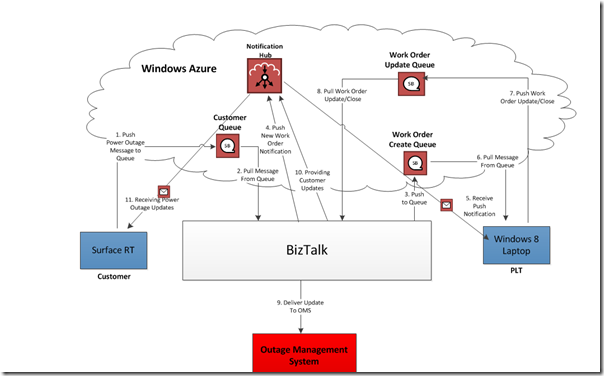
In this post we will take a closer look into how we could actually implement a Power Outage system and include notifications to both customers and employees by using Service Bus Notification Hubs.
Note: In some areas I have over-simplified the process in order to focus on some of the key technical aspects of Notification Hubs.
In the diagram below I have laid out the series of events that make up the architecture:

Conclusion
Hopefully this post has described in more detail how Service Bus Notifications can improve customer and employee engagement. I promise that the next post in the series will have some code. I just felt that if I could build a story, it would provide some worthwhile context that truly demonstrates why this Notification Hub technology is important.

Once again, Cnext is proud to announce the renewal of the gold partnership with Microsoft, demonstrating a “best-in-class” ability and commitment to meet Microsoft Corp. customers’ evolving needs in today’s dynamic business environment and distinguishing itself within the top 1 percent of Microsoft’s partner ecosystem. Cnext reached this gold partnership in the category Application Integration. […]
Blog Post by: Cnext
Microsoft Learning used the ALM Summit 3 this week to announce the new “Microsoft Certified Solution Developer (MCSD): Application Lifecycle Management” certification. The new certification required you to pass the following three exams.
QuickLearn’s two TFS instructors have both already obtained this certification and have prepared comprehensive exam preparation sessions to help candidates focus their study and pass these exams.
The exam preparation sessions are available as FREE, ONLINE WEBINARS that anyone can register to attend. Over the coming month we’ll also release online video preparation sessions.
Attending these webinars will help you in the following ways.
To sign up for any of the free webinars, simply click the following link, choose the webinar you wish to attend and register.
SESSION DATES/TIME and REGISTRATION LINK
NOTE: We do not tell you the questions or the answers. We provide sample questions that we have written ourselves. We respect the NDA we signed prior to taking these exams. We do not encourage the use of brain dumps. Brain dumps devalue the certification and reduce value for everyone.
This week QuickLearn was involved at the third annual Application Lifecycle Management Summit held on the Microsoft Corporate headquarters in Redmond.
Nick and I were both involved in delivering content and sharing our TFS knowledge and skills with attendees. Here are the two activities we presented.
I delivered a sold-out pre-conference workshop entitled “Managing your application lifecycle with TFS”. The workshop provided attendees with a rapid overview of many of the features of Microsoft’s ALM suite. Based on the number of questions from attendees, there was a lot of interest in the new features in TFS 2012.
Microsoft took the opportunity to announce the brand new MCSD: Application Lifecycle Management certification at the conference. Nick and I paired up to deliver a 90 minute exam prep session to help attendees learn the best way to prepare for the three exams required for the new certification. Fortunately, both Nick and I both already have the certification so this made things a little easier.
Feedback from both activities was overwhelmingly positive and with our commitments done, we’re both just enjoying attending sessions at the conference for the rest of the week.

TorbenChrona Christiansen wrote a very handy blog post last year on how to bulk stop and start EDI batches in BizTalk Server 2009 using SQL queries. These queries can be used to aid in creating proof of concepts, to demonstrate batching in presentations, as a setup step in integration tests, or during deployments. Seeing as […]
Blog Post by: Johann

My dev machine works so slowly, so I decided to clean it. I found a guide to perform it. But don’t do it on production plateform, it won’t be supported Here are few steps to clean up BizTalk Message Box Database. 1. There is a Stored Procbts_CleanupMsgboxin BizTalkMsgBoxDb Database. By default this stored proc does […]
Blog Post by: Jeremy Ronk
The BizTalk Server 2013 Beta release comes with the SB-Messaging adapter. This adapter allows our on-premise BizTalk environment to integrate seamlessly with the Windows Azure Service Bus queues, topics and subscriptions. Together with my colleague Mathieu, I had a look at these new capabilities.
In my previous post I introduced Service Bus Notifications and explained why you may want to use it when sending Notifications to mobile devices. In this post I want to explore its use in a corporate environment and how introducing this technology can improve customer engagement as well as employee engagement.
Use Case
Back in the Summer of 2012, I wrote a couple blog posts on BizTalk and SignalR. The idea was that BizTalk could provide real time notifications to on premise users. The notifications provided the current state of particular events that were flowing through BizTalk. In this post there is a similar theme but this time we will extend the experience onto customers and mobile field workers.
The scenario that we are going dive into is a typical Customer Power Outage scenario. We have all been there, we get home from work (or wherever) and discover that our power is out. If you have never worked in the utility sector, you probably have no idea what goes on behind the scenes. I have worked in the sector for close to 7 years and I can assure you that these scenarios are taken seriously. At least the places that I have worked have treated them that way.
Each utility will vary greatly when it comes to dealing with Power Outage scenarios. Some utilities will have very sophisticated SCADA and Outage Management Systems (OMS) others may simply rely upon customers calling their utility to notify them that their power is out. Sometimes the power outage may be widespread other times it may be only you. Much like any other company, or industry, the utility companies are looking for ways to provide Self Service capabilities to customers. Just like you can check your bank account online, why can’t you see your power consumption or inform your power company that your power is off via a mobile application?
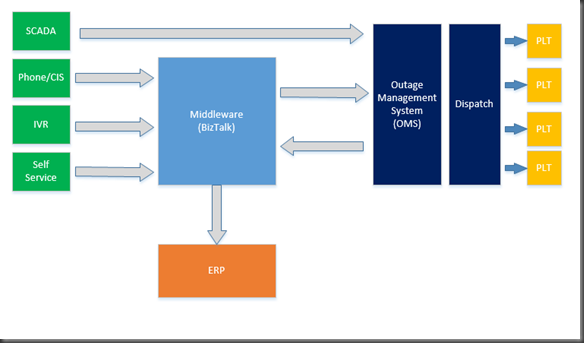
In the diagram below, you will see many different key data flows:
If an organization is using a Middleware product, such as BizTalk to bridge all of these different inputs with the Outage Management System then BizTalk has access to a lot of relevant, event driven information.
Another interesting fact is when orders are created and dispatched to Field workers aka Power Line Technicians (PLTS) information is often passed back to an ERP system. This information is often used for Financial or Reporting purposes. For instance if there is a power outage, then resources will be used to address the power outage. This will include Employee time and materials such as replacement parts and equipment used such as vehicles to fix the problem. This information is usually passed back once the outage has been completed or maybe as the outage is being resolved in the form of updates. Since ERP systems are usually not part of Outage Management Systems, this information needs to be moved via Middleware platform such as BizTalk.

Hopefully it has become apparent that BizTalk has access to a lot of important event driven information that is passing through it that may be of interest to other parties such as customers. For instance if your power was out, would you like to know when the Estimated Time to Restore (ETR) is? Or if you were the owner of a small business, who relied upon power to run its business, would you like to be notified the minute the outage is over? I am pretty sure you would. The interesting part is that any decent Outage Management System will have this information. The problem is that utilities just do not have the people resources to start calling people to let them know. Here is where the opportunity lies to use Service Bus Notification Hubs.
The Solution
Enter Service Bus Notification Hubs. I think this is a great complimentary technology to BizTalk. In this case BizTalk is performing traditional On-Premise integration and can easily hook into a progressive service like Service Bus Notification Hubs to deliver better customer engagement with very little effort.
I have built out a fairly comprehensive solution that dives deeper into this problem. I will be breaking down this problem into a series of different posts. But, as a bit of a teaser you can see part of the solution in the screen shot below.
