
Windows Updates for BizTalk 2013
Here is the first windows update for BizTalk I have ever seen. I wonder if the updates for HIS 2013 will now come the same way.
Blog Post by: mbrimble

Here is the first windows update for BizTalk I have ever seen. I wonder if the updates for HIS 2013 will now come the same way.
Blog Post by: mbrimble
You may have received this kind of e-mail and wonder if you have already VM Roles deployed. There are good chances the answer is no, but let’s check.
Dear Customer,
The Windows Azure VM Role preview is being retired on May 15. Please transition to Windows Azure Virtual Machines, and delete your VM Role preview instances as soon as possible.
Thank you for participating in the preview program for the Windows Azure VM Role. Since we started the preview program, we have learned a lot about your needs and use cases. Your feedback and insights have helped fine-tune our approach to infrastructure services. We’ve directed all of that feedback into the design of Windows Azure Virtual Machines, the evolution of VM Role.
On April 16, 2013, we announced the general availability of Windows Azure Virtual Machines. Virtual Machines provides on-demand scalable compute resources to meet your growing business needs and can extend your existing infrastructure and apps into the cloud. With the general availability of Windows Azure Virtual Machines we are retiring the VM Role preview.
ACTION REQUIRED
Please migrate from VM Role to Virtual Machines, and delete your running instances of VM Role as soon as possible. You can these follow these instructions to migrate to Virtual Machines.
Here are important dates to note:Starting May 15, 2013, calls to create new VM Role deployments will fail.
On May 31, 2013, all running VM Role instances will be deleted.
Please note that you will continue to be billed for your VM Role consumption until your running instances are deleted.
Thank you for participating in the VM Role preview program and shaping the future of Windows Azure Virtual machines! You can find more information on Windows Azure Virtual Machines here.
Thank you,
Windows Azure Team
A simple way to check whether you have VM Roles or not is to use the previous portal (the one in Silverlight) which is available at https://windows.azure.com/. From the new portal (https://manage.windowsazure.com) you can choose previous portal in the menu.
From the main page, click on Hosted Services, Storage Accounts & CDN
and VM Images
If you have a VM Role image, this looks like this
In my case, it is not instanciated as In use is False (I haven’t used VM Roles for years, I think; this image was created in March 2011!), and I don’t have anything to do.
More information is also available at http://msdn.microsoft.com/en-us/library/gg465398.aspx.
Benjamin Guineberti%u00e8re (@benjguin)
Blog Post by: Benjamin GUINEBERTIERE
I didn’t find any good reference on this so though of documenting the steps that worked for me
Step 1: Go to 64-bit
Oracle Data Access Components (ODAC) Downloads page and download 64-bit ODAC 11.2 Release 5 (11.2.0.3.20)
Xcopy for Windows x64
Step 2: Unzip the file downloaded in Step 1 it to a folder location.
Step 3: Create a folder to install Oracle Client. I created C:\Oracle\
Background
The requirement for a domain trust relationship depends on how a SharePoint Farm is configured, the SharePoint Farm could either reside in a perimeter network (or hosted environment), or the SharePoint Farm could be split between a perimeter network and the internal network.
Scenario
In this post we will assume a simple SharePoint Extranet where a SharePoint […]
Blog Post by: Ashraf Hameed
We have a great love for BizTalk 360 here at Tallan, and the many capabilities it affords to the realm of BizTalk monitoring, alerting, and governance. For those not familiar, BizTalk 360 is a web based portal designed in Microsoft Silverlight which monitors BizTalk environments and is designed to address the the common hurdles enterprises face when managing BizTalk environments.
Blog Post by: Kevin Morillo

Yesterday, BizTalk360 introduced the whole new title “BizTalk360 Product Specialist” on their blog. Because of the constantly increasing popularity of the monitoring tool BizTalk360, to streamline the process the new title and badge where introduced. The idea is to honour individuals who have gained adequate knowledge in installing, configuring and implementing BizTalk360 solution at customer sites.
The only way of obtaining this title is by receiving the confirmation from the BizTalk360 team itself. I myself filed a request immediately… And I am proud to announce my request got approved. Now I have the honour to officially call myself a “BizTalk360 Product Specialist”!
As you might have seen, I already placed the official badge at my own blog on the column on the right. I also updated my LinkedIn profile accordingly.
I was pretty busy last couple of weeks preparing for my integration session for Lead Architect Program Norway. I will more or less teaching a class full of students about integration with Microsoft Integration stack. My focus will be on Windows Azure Service Bus and BizTalk Server 2013.
The day before I will head over to Norway I would like to share another story with a BizTalk community
Our new Tellago Technology Update webinar will take place next Tuesday and the topic couldn’t be more exciting. Building cloud integration solutions using integration iPaaS technologies. Here are the details: Title: A New Way to do Integration: Introducing…(read more)
Blog Post by: gsusx
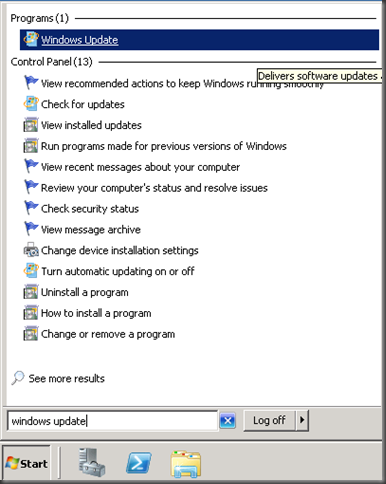
The product team recently announced that BizTalk 2013 CU1 has been released. Within the CU there are 3 issues that are fixed:
Personally, the only issue that I have noticed was item number 2. It is nice to see this fixed as I was having a horrible time configuring BAM in a multi-server environment. I definitely recommend installing the update. This time around, Microsoft is delivering these updates via the Windows Update process. Overall, the process is painless and rather convenient. Windows Update will not automatically install these updates, they are something that you need to “opt in” for.
To install the update:


Note: The KB article indicates A reboot is not required, however I was prompted for a reboot but that must be related to the Windows Server Updates.
Het is ondertussen een goed gebruik geworden dat Ordina jaarlijks een groot BizTalk-evenement organiseert en host. Na de bijeenkomst van de Dutch BizTalk User Group (BTUG) in november 2011 en het Ordina BizTalk Innovation Event in februari 2012, host Ordina dit jaar wederom een bijeenkomst van de BTUG. Dit evenement zal op donderdag 30 mei plaatsvinden, in de ondertussen voor veel BizTalkers welbekende 11e etage van de A-toren van de hoofdvestiging van Ordina, te Nieuwegein.
Het programma ziet er als volgt uit:
– BizTalk Update (Dick Dijkstra, Microsoft)
– Theorie en praktijk van messaging/service bus in Azure (Steef-Jan Wiggers en Ren%u00e9 Brauwers)
– BizTalk Disaster Recovery (Lex Hegt + Jeroen Hendriks)
Ontvangst is vanaf 15.30u. Tussen de sessies door zijn softdrinks te krijgen en vindt het dinerbuffet plaats. Er wordt afgesloten met een borrel. Uiterlijk om 21.00u moeten de deelnemers het pand hebben verlaten.
Toegang is gratis.
Maximaal aantal deelnemers: 70
Aanmelden: http://btugnl20130530-es2005.eventbrite.nl/
Locatie: Ringwade 1, Nieuwegein (kaart)