by community-syndication | May 2, 2013 | BizTalk Community Blogs via Syndication
It%u00b4s a common factor that before users can view data from a BAM model in the BAM Portal website, they must be granted access to the views. However, and contrary to what I thought, the user that makes the deploy of the BAM Definition don’t necessarily have access to this particular view in the BAM […]
Blog Post by: Sandro Pereira

by community-syndication | May 2, 2013 | BizTalk Community Blogs via Syndication
To make my job easier I’m still improving BTSDecompress. Here’s an overview of the latest updates:
- Addition of Tab Pages to be able to open more than 1 query
- Addition of a Button bar to have easy access to some of the most used functions
- Addition of a dialog screen for maintenance of namespaces
- Addition of a beter query editor
- Addition of a Grid View for presenting the output
- Addition of a command-line version
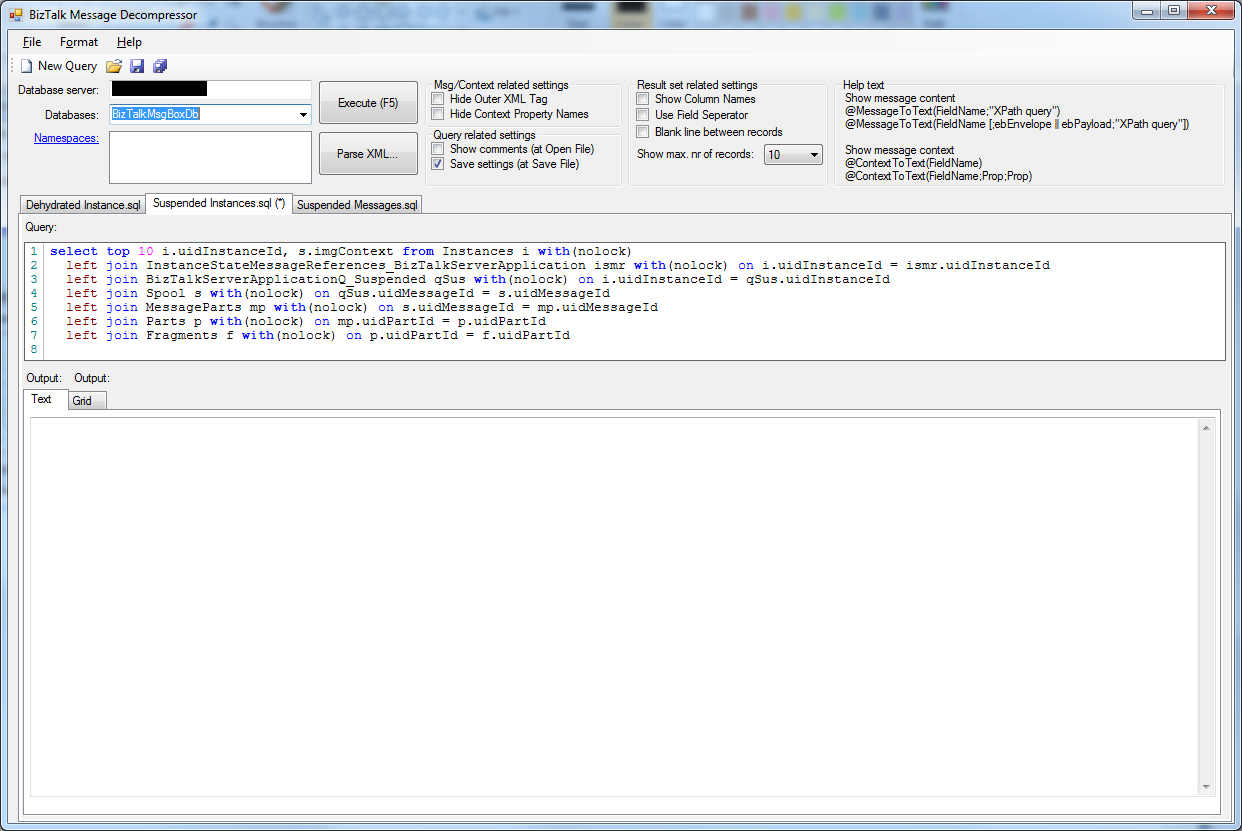
These updates are described in more detail below the following screen print.
Addition of Tab Pages
This enables you to be able to open more than one query at the same time. Most of the times I use BTSDecompress, I need 2 different queries. So I needed to open 2 instances of BTSDecompress. With the addition of Tab Pages, it’s enough to start BTSDecompress just once and open all the queries I need.
Globally it works as follows:
-
BTSDecompress always starts up with one Tab Page and an empty query window
-
when you create a new query or open an existing one, it always shows up in a new Tab Page
-
the Tab of the Tab Page contains the file name of the query you opened. If you made changes to the query an asterisk is added to the Tab Page (see screen print)
-
you can close the currently selected Tab Page by pressing Ctrl-F4 or by clicking the right mouse button of the Tab Page and choose ‘Close Tab’. In case the query has changed and might need to be saved, you are notified.
-
when you have opened multiple queries and you switch between Tab Pages (with Ctrl-Tab or mouse click), the settings which appear above the Tab Pages (Database Server, Database etc.) are also switched, making sure they reflect the settings of the currently active Tab Page/query
Addition of a Button Bar
For easy access to some of the most used functions a Button Bar is added. Currently it contains the following buttons:
-
New Query – open a new Tab Page with an new query
-
Open Query – open an existing query in a new Tab Page
-
Save Query – save the query in the active Tab Page
-
Save All – save all opened queries
It is likely that more buttons will become added in future releases.
Addition of a dialog screen for maintenance of namespaces
After you have executed a query, the results will show up in the output frame. In most cases the output consists of XML messages. One of the nice capabilities of BTSDecompress, is that it is possible to add XPath queries, enabling you to view exactly that part of the message that you are interested in.
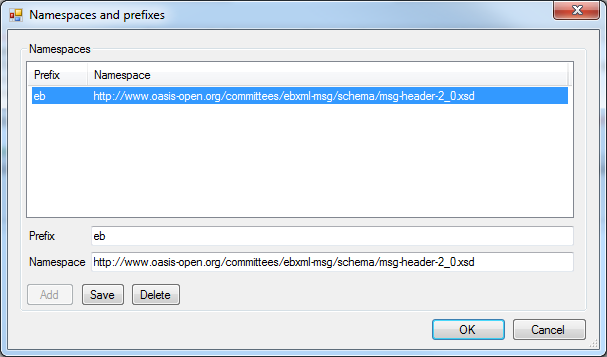
In many cases you might need namespaces to get to the part of your interest. In earlier releases of BTSDecompress, it was possible to add only 1 namespace. Since your message might contain more namespaces, it is now possible to add multiple namespaces. Maintenance (adding, editing, deleting) of these namespaces can be done with the new ‘Namespaces and prefixes’ dialog screen.
Of course the namespaces you entered are stored along with the query. This screen can be accessed by clicking the Namespaces hyperlink in the upper left corner of BTSDecompress.
Addition of a beter query editor
The query editor in the previous releases of BTSDecompress was nothing more than a multi line Text Box and did not have many features. I have to admit that I often created my queries in SQL Server Management Studio and copied them to BTSDecompress. So it was about time that BTSDecompress would get a richer query editor. I decided to use Pavel Torgashov’s
FastColoredTextBox, which is a nice and very rich Text Box!
Although currently I’m not using all of the capabilities of this Text Box, using this Text Box already makes using BTSDecompress much more attractive. This editor supports amongst others color recognition for T-SQL statements and line numbers.
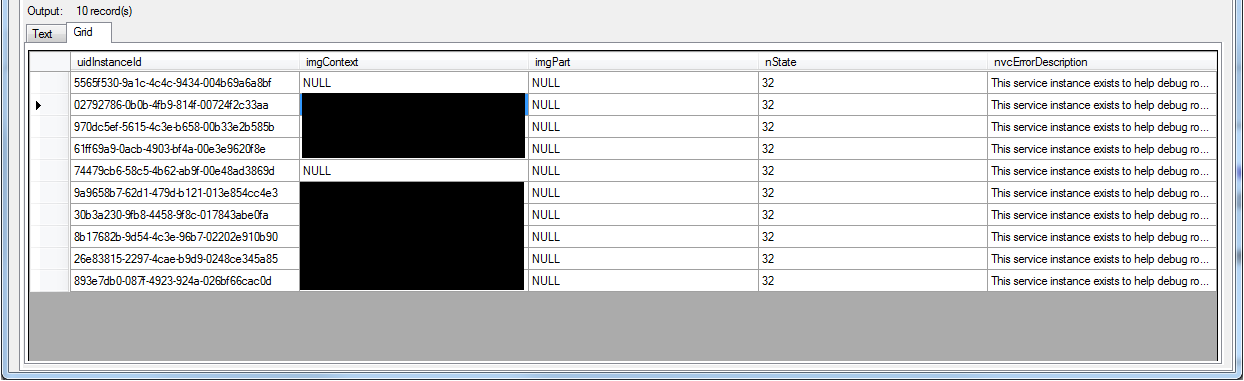
Addition of a Grid View for presenting the output
As of this release BTSDecompress not only shows the results in a Text View, but also in a nice Grid View for better readability. In contrast with SQL Server Management Studio, both Views are filled directly after executing your query.
Addition of a command-line version
This enables you to create batch jobs and have the output stored in a Text file. You can use the same queries as the ones you use for the GUI version of BTSDecompress. The command-line version of BTSDecompress is called BTSDecompress_cmd.exe and has the following parameters:
- -s: Database server
- -d: Database
- -SQLFile: Query which will be executed
- -OutputFile: Location and name of the output file
- -OverwriteOutputFile: Overwrite the output file if it already exists
- -Namespace: Add (prefix and) namespace
- -HideOuterXMLTag: Show just the content of a XML tag, without the tag itself
- -HideContextPropertyNames: Hide the Context Property Names in the result
- -ShowColumnNames: Show the field names in the result
- -UseFieldSeperator: Show a Field Seperator (‘;’) between the fields (and values) in the output
- -BlankLineBetweenRecords: Add an extra blank line between the records in the output, for better readability
- -?: Show Parameter Help
A couple of parameters can also be set in the query file, from the GUI version of BTSDecompress. By adding them as a parameter to BTSDecompress_cmd.exe, the value which is set in the query file will be overruled.
More information
Where to find
BTSDecompress is Open Source software and can be found here: btsdecompress.codeplex.com.
Hopefully this tool is helpful to others as well.
by community-syndication | May 2, 2013 | BizTalk Community Blogs via Syndication
I’m happy to announce the first BizTalk Admin Deep Dive class scheduled in the US for the first time. The date is set to be: December 2nd – 4th. Location is Los Angeles and the venue is close to LAX. SIGN UP>>> Even If you’re working as a BizTalk Admin, Developer SQL DBAor architect won’t […]
Blog Post by: Tord Glad Nordahl
by community-syndication | May 2, 2013 | BizTalk Community Blogs via Syndication
I was getting this error when trying to Run MBV from BizTalk 360.
MBVActivity Leaving Execute(Kovai.BizTalk360.InfoTrack.ActivitiesImpl.MBVSvc.MBVActivityImpl).Fatal exception in generating Message Box Viewer Reports.System.Exception: MBVActivityImpl:GenerateReport. IsReadyForMBVExecution check failed. Error EULA for MBV Console application must be accepted
I came across this post by

by community-syndication | May 1, 2013 | BizTalk Community Blogs via Syndication
This solution shows how to create setup project for the WCF Custom behavior compiled on Visual Studio 2012. This solution is using Wix toolsets to create deployment package. I was working on integrating BizTalk Server 2010 / 2013 with Service Bus for Windows. I came across very nice post by Paolo Salvatori http://code.msdn.microsoft.com/How-to-integrate-BizTalk-07fada58. I […]
Blog Post by: shadabanwer
by community-syndication | May 1, 2013 | BizTalk Community Blogs via Syndication
Beginning this year we conducted BizTalk Summit 2013 in London partnering with Microsoft. The complete details about the event can be found on the event website http://bid.biztalk360.com. One of the key objective of the event was to showcase some of the new capabilities that’s coming in BizTalk Server 2013, Azure BizTalk Services and BizTalk in […]
The post BizTalk Summit 2013, London – Keynote Video appeared first on BizTalk360 Blog.
Blog Post by: Saravana Kumar
by community-syndication | Apr 30, 2013 | BizTalk Community Blogs via Syndication
User Experience design has always been, and continues to be, a field riddled with ambiguous labeling and nomenclature. We hear all sorts of conjecture and debate as to what terms have what specific meaning. Are profiles and personas the same thing? When exactly do wireframes become mock-ups? Is “mock-up” supposed to hyphenated? These are issues […]
Blog Post by: Matt Donahue
by community-syndication | Apr 30, 2013 | BizTalk Community Blogs via Syndication
On the latest version of BizTalk (2013): a new adapter was introduced for natively working with REST endpoints, using WCF technology: the WCF-WebHttp Adapter. After the beta version was released we could find some very good articles about this adapter, but since it is a new adapter there’s a lot of ground to cover.
by community-syndication | Apr 30, 2013 | BizTalk Community Blogs via Syndication
With the new WCF-WebHttp Adapter that shipped in BizTalk Server 2013 we now have the ability to specify which HTTP verbs to use – this opens up the possibility of invoking RESTful style applications. In this post, I’ll investigate how we can RESTfully invoke an endpoint that exposes data via JSON using the GET verb […]
Blog Post by: Nick Heppleston
by community-syndication | Apr 30, 2013 | BizTalk Community Blogs via Syndication
May 6th and 7th: BizTalk Boot Camp 2013 in Charlotte BizTalk Boot Camp is a free 2 days technical event conducted by Microsoft to focus on some of the new offering in Microsoft BizTalk Server 2013, Windows Azure BizTalk Services and BizTalk server in VM Role (Azure IaaS). In these 2 days, attendees will learn […]
The post BizTalk360 Tour of America appeared first on BizTalk360 Blog.
Blog Post by: Saravana Kumar