by community-syndication | May 21, 2013 | BizTalk Community Blogs via Syndication
At a certain point in time when installing BizTalk, you will need to install some extra components. In the BizTalk installation wizard this is referred to as a prerequisite file.
This file can be downloaded automatically from within the wizard, but you might want to download them first. Here’s the list from BizTalk 2006 R2 up to BizTalk 2013!

by community-syndication | May 21, 2013 | BizTalk Community Blogs via Syndication
I have run into an instance where I need to terminate and raise an exception from within an XSLT template, based on values (or lack thereof) within the source document. The XSLT transform is running within a BizTalk map. The secret is the following little-known XSLT construct, which can be conditionally called at any point […]
Blog Post by: Brett

by community-syndication | May 20, 2013 | BizTalk Community Blogs via Syndication
After you configure with success BizTalk Server 2013 BAM Alerts, the configurator will create a new Database Mail Account called “BAM_Alerts_Account” that will be used by BizTalk to send BAM Alerts. To Validate Mail account used by BizTalk to send BAM Alerts: Press the “Windows key” to switch to Metro UI and type “SQL Management” […]
Blog Post by: Sandro Pereira
by community-syndication | May 20, 2013 | BizTalk Community Blogs via Syndication
Normal
0
false
false
false
EN-US
X-NONE
X-NONE

by community-syndication | May 20, 2013 | BizTalk Community Blogs via Syndication
Hello to the BizTalk community !
The last time I updated that blog to provide a new version of MBV is far but it took me a while to update MBV for BizTalk 2013 and collect ideas of new queries and rules to add.
For your information, a first version of MBV 13 is already provided in the support Tools folder of BizTalk 2013 !
I worked indeed with my US peers (a big thank to Mike Shea who is BizTalk Escalation Engineer in US) to produce that new version and we collaborated with the BizTalk Product group to integrate MBV in BizTalk 2013.
A first release of MBV 13 was so sent to the Product group well before the BizTalk 2013 release and since that time we continued to update the tool with additional queries and rules, and we had to fix some queries to make MBV fullly compatible with the final version of BizTalk 2013.
It is this last version of MBV 13 which is now available on my blog, and new update of MBV should be also available in each next BizTalk CUs.
MBV 13 provides the new features below :
MBV is now fully compatible with BizTalk 2013
MBV detects the new adapters provided and the additional BizTalk version, checks the build number features specific to BizTalk 2013.
New simplified UI
The graphic version of MBV was refreshed and its main window was reorganized to be smaller and easier to use.
The interface is more “flat” than before and provides so better clarity.
The format of output files changed
MBV is generating now by default a subfolder for each collect containing HTML files (and the XML and TXT ones depending of the selected options).
The output file named “MBVOutputMAINPAGE.html” is the main file to open to start the analyse of an MBV report and is composed of four frames : two of them present the list of the main report sections and the query categories, and the two remaining present the content of the selected section or query category.
This new format makes much more easy the analyze of an MBV report.
Additional queries and rules
Additional queries were added in MBV 13 about CUs, SQL, BAM, ESB, EDI, etc…
These queries and rules come from all the BizTalk community at Microsoft and my experience working with my own customers, but also from customers themselves who suggested me some ideas.
You are of course welcome to contact me to suggest queries and rules if I think they are pertinent for all the BizTalk community.
You can find this new version attached in that post.
I will continue updating MBV and its query repository,following the CUs update cycle and adding some critical rules when needed. The pertinence of MBV analyze is the key of success of that tool and comes from its queries and rules.
As usual, feel free to report me your feedbacks or submit any issues,questions or suggestions you could have about MBV.
Thanks !
JP
Jean-Pierre Auconie
Premier Mission Critical Engineer and BizTalk Escalation Engineer
MCROSOFT FRANCE
[email protected] l

Blog Post by: JPAUC
by community-syndication | May 19, 2013 | BizTalk Community Blogs via Syndication
Well folks I’ve been greeted with the news that Microsoft Windows Azure will
be in 2 geo-replicated places here on Australian soil, coming ’shortly’.
As an Azure MVP & from Breeze (a
leading Microsoft Cloud Partner) perspective we invest heavily in cloud technologies.
What does this mean and why should I care? I hear you ask good question
and I asked the same.
As most of you know I have a passion for Integration, sticking all sorts of things
together from small RFID devices, hand made hand-held devices, raspberry PIs through
to high end ERP, Financials & many other types of systems. So before I get to
the WHY aspect, let me briefly set the context.
There’s some great data coming out of Gartner a report which caught my eye – http://searchsoa.techtarget.com/news/2240173583/Gartner-Better-collaboration-for-new-era-of-application-integration came
out with these:
-
Integration Costs to rise by 33% by 2016,
more than half of new system development costs will be spent on Integration
-
By 2017, over two-thirds of all new integration
flows will extend outside the enterprise firewall.
So Integration just took on a whole new face – successful integration is about
using the right tools (in the toolbox) for the right task. Now we have a
whole new drawer in our toolbox full of Azure goodies & widgets. This functionality
is just too compelling to be ignored.
and now that it’s on Australian soil I’d be thinking that just about every Data center
service provider should be giving you cloud functionality.
Some quick cloud advantages:
-
scale, provisioning and ease of use
-
Imagine being able to spin up a SharePoint site in the time it takes me to write this
article.
-
Imagine being able to ask for an extra load balanced highly available Server/Service
at the click of a button. Importantly – Imagine being able to give it back again at
the end of the weekend/day/next hour.
-
Not wait the typical 12 weeks for a new server to be provisioned, oh and dont mention
filling out the right forms. Running an application on those machines and getting
a firewall port opened.that’ll be another 2 weeksand on it goes.
-
The much beloved Enlightenment for many companies of achieving Single Sign-On – Imagine
your customers being able to sign into your applications using their own Ids, Live
Ids, + a bunch of other Ids without you needing to provision more services. You can
house your identity accounts in Azure, locally or elsewhere – finally you don’t need
a Quantum Analyst to setup Single Sign-on.
-
My experiences in the last few weeks on client sites have been back in the world of
old – classic encumbered infrastructure service providers wanting to claim everything,
put the brakes on any new ideas and have meetings around such concepts of adding an
extra 10gb disk space to existing servers. These guys should be ’can do’ people –
it’s all about choosing the right tool for the job.
-
Microsoft have done a great job on the developer tooling front from the classic MS
toolset through to Apple, PHP, Ruby, Phython etc. all being able to access, develop
on, publish and deploy.
-
We could even give a bunch of HDD drives to Olaf (our gun cyclist @ Breeze) to ride
to the Azure Data Center and offload our data, while we wait for the NBN to never
come to our area.
-
There are some great options on the horizon coming down the track.
So let’s say we’re keen to explore – how hard/easy is it to get ’my’ own environment
& what does this mean.
The short answer is you get an Azure Footprint which could be running in a ’Data Center’
in Sydney. Depending on what you’re playing with you could get:
– SQL Databases, Cloud Services, Scalable Mobile Device Services, Load balanced Websites/Services/Restful
endpointsand the list of ’widgets’ goes on and on.
How do I interact with this environment:
Often the issue around alot of this is that because my beloved ’servers’ are running
somewhere else I’m concerned over how much control we get.
We enter into the Hybrid Integration space – where as you can imagine
not *everything* is suited for the Cloud, there will be things you keep exactly as
they are. So there will be many many scenarios where – we have something running locally
as well as something running in Azure. Some options we have available are to make
our servers ’feel at home’:
-
VPN connection – we can have several flavours of a VPN connection
that connect our Azure Footprint to our local network. for e.g. local
network is 10.10.x.x/16, Azure network 10.50.x.x/16. Full access to all the machines/services
and other things you have running. CRON jobs, FTP, scripts, processes, linux boxes,
samba shares, etc etc.. (I do realise the integration world is never as easy as we
see it in the magazines)
-
RDP Connections – standard level of service really from any Service
provider.
-
Remote PowerShell Access
-
Azure Service Bus – Applications Level Web/WCF/Restful Services connectivity.
An Application Service can run either locally or in the cloud and this feature allows
your Service to be accessed through a consistent Endpoint within the cloud, but the
calls are Relayed down to your Application Service. There’s a few different ways we
can ’relay’ but the public endpoint could house all the clients & their device
requests, while your existing application infrastructure remains unchanged.
-
SQL Azure Data Sync – sync data between clouds & local from your
databases. So for many clients, come 8pm each day, their local database has all the
Orders for the day as per normal, without the usual provisioning headaches as the
business responds to new market opportunities to support smart devices.
-
We even get pretty graphs.
-
But wait there’s more..
-
These details are typical performance monitor counters + diagnostic information. We
can use Azure Admin tools to import these regularly and import them into our typical
tools.
-
System Center does exactly this – so our ’dashboard’ of machines will list our local
machines as well as our cloud machines. Your IT guys have visibility into what’s going
on.
We’ve been using Singapore DCs or West Coast US with pretty good performance times
across the infrastructure.
What does having a local Windows Azure Data Center mean to me:
-
Medical Industry – we have several medical clients allowing us to
innovate around Cloud technologies using HL7 transports. Faster time to market and
higher degrees of re-use.
-
Cloud Lab Manager – www.cloudlabmanager.com can
run locally for all training providers. Breeze has created an award winning cloud
based application that will certainly benefit from this piece of great news.
-
Creating a cloud based application is now feasible (this particular
one was due to the sensitive nature of information it carried)
-
And lastly I can house my MineCraft server – well it’s my 10 yr old
sons and half the school I reckon.
So for you
Ask yourself the question – are you getting all these features from where you currently
host/run your hardware?
Lack of infrastructure and provisioning challenges shouldn’t be holding back new ideas
& business movement. iPads, smartphones, anywhere, any time access should be the
norm, not like we’re putting another person on the moon.
It’s all about using the right tool for the job
Enjoy folks as it’s certainly exciting times for us Aussies ahead!!
Microsoft’s
Announcement
Blog Post by: Mick Badran

by community-syndication | May 19, 2013 | BizTalk Community Blogs via Syndication
Under certain stress conditions (such as clients accessing SQL Server from the same computer), the SQL Server Shared Memory protocol may lower BizTalk Server performance. You can resolve this problem by disabling the use of the Shared Memory network protocol in SQL Server Network Configuration. Also, to facilitate transactions between SQL Server and BizTalk Server, […]
Blog Post by: Sandro Pereira

by community-syndication | May 17, 2013 | BizTalk Community Blogs via Syndication
Hello There.
If you have tried using SSO-based configuration for your ESB Config in the new ESB Toolkit 2.2, you’ve probably encountered this error:
This appears to be a bug, which I believe a hotfix request has been submitted for. Please contact Microsoft Support if you are experiencing this issue, as it will help get the fix in place faster.
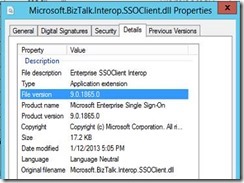
If you need a workaround for a NON-PRODUCTION environment, you can copy the old Microsoft.BizTalk.Interop.SSOClient.dll from the BizTalk 2013 Beta install media, and paste it into the Bin folder of the toolkit, so it is used by the ESB Configuration Tool. Here are some details of the differences:
From BizTalk 2013 RTM:
![clip_image002[4]](https://lh3.ggpht.com/-35BYbm6cYDY/UZY7B0qF7qI/AAAAAAAAAE8/Tr-TAbo_AIo/clip_image002%25255B4%25255D_thumb%25255B2%25255D.jpg?imgmax=800 "clip_image002[4]")
From BizTalk 2013 Beta:
![clip_image002[6]](https://lh6.ggpht.com/-NcslyVK9uUk/UZY7EewSV6I/AAAAAAAAAFM/oFQ_P_DWz48/clip_image002%25255B6%25255D_thumb.jpg?imgmax=800 "clip_image002[6]")
![clip_image002[8]](https://lh6.ggpht.com/-lsBes91C1e8/UZY7FrhFdwI/AAAAAAAAAFY/Pn_SQo6D3c0/clip_image002%25255B8%25255D_thumb%25255B2%25255D.jpg?imgmax=800 "clip_image002[8]")
Once the older version of the dll is copied over, the Configuration tool sets up SSO-based configuration correctly.
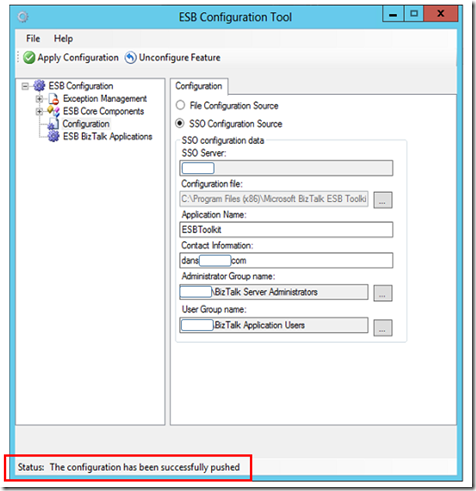
So keep your eyes open for a hotfix!
Cheers,
Dan
by community-syndication | May 17, 2013 | BizTalk Community Blogs via Syndication
BizTalk 2013 is out, but this is obviously old news for most of you. With a lot of new features and support for on premises, or in the cloud, this new version seems exciting and maybe challenging
To help you overcome any potential issues and to make sure you are ready for the new version, Codit organizes a technical BizTalk launch event with 6 expert speakers!

by community-syndication | May 16, 2013 | BizTalk Community Blogs via Syndication
In this section you’ll install BizTalk Server, confirm that the installation succeeded, and then configure BizTalk Server. When you installed SQL Server, setup granted your account Database Administrator rights. Since these rights are also required for installing BizTalk Server, you must do one of the following: Use the same account you used when you installed […]
Blog Post by: Sandro Pereira



![clip_image002[4]](https://lh5.ggpht.com/-e6g0Tt3rpfA/UZY7A2EjqpI/AAAAAAAAAE0/zQgBDDobhcU/s1600-h/clip_image002%25255B4%25255D%25255B4%25255D.jpg "clip_image002[4]")
![clip_image002[6]](https://lh3.ggpht.com/-eEwSLTNs0u8/UZY7DZOrxUI/AAAAAAAAAFE/pE36oRtnv-c/s1600-h/clip_image002%25255B6%25255D%25255B2%25255D.jpg "clip_image002[6]")
![clip_image002[8]](https://lh4.ggpht.com/-UCIJJvT3EKo/UZY7FOaFyxI/AAAAAAAAAFU/0YMd8fmPTRI/s1600-h/clip_image002%25255B8%25255D%25255B4%25255D.jpg "clip_image002[8]")
