
by community-syndication | Jun 20, 2013 | BizTalk Community Blogs via Syndication
At the company I am working for, the goal is to have Unit tests for every mapping and flow. One of the schemas we are using is a generic schema that we use to send insert statements to SQL Server. This schema contains an <Any>-element, as you can see in below image. We tried validating […]
Blog Post by: Cnext
by community-syndication | Jun 19, 2013 | BizTalk Community Blogs via Syndication
Microsoft has recently announced the Windows Azure offering of BizTalk Server Infrastructure as a Service (Iaas). Windows Azure offers a BizTalk Server 2013 Evaluation version for anyone to try the new IaaS offering. The price for this VM is same as any Windows VM where other BizTalk Server flavours (Standard and Enterprise) cost you much […]
The post Setting up BizTalk360 On Windows Azure (BizTalk IaaS) in One Click appeared first on BizTalk360 Blog.
Blog Post by: Dhana Krishnasamy
by community-syndication | Jun 19, 2013 | BizTalk Community Blogs via Syndication
| Upgrading a BizTalk project to a new version is always a smooth ride so when I upgraded a BizTalk 2010 application to BizTalk 2013 I wasn’t expecting many difficulties. 😉 Everything went as expected when I migrated to the new version in Visual Studio but when I tested the maps I got the Exception: “Exception has been thrown by the target of an invocation.” with the InnerException: “Extension functions cannot return null values.” |
| Nick Hauenstein from Quicklearn Training wrote the blog post What the BizTalk Server 2013 Mapper Updates Mean for You that pointed me in the right direction! My custom Scripting functoid in the map returned null and in BizTalk 2013 it always must return something. |
Scripting Functoid Error example
| In this sample I’m going to map a SalesOrder message to a PurchaseOrder. I’ve used a Scripting functoid that calls the MapHelper class in an external assembly to format the Date. Also the Logical Existence functoid is used to test if the OrderDate field exists in the source message. |
|
| |
| The FormatDateString method below returns null when the value of the OrderDate is empty because the default value of the result variable is null. |
|
| |
When the OrderDate field in the source message is empty, the FormatDateString method in the MapTester class is called because the Logical Existence functoid returns true.
Now you get the “Exception has been thrown by the target of an invocation.” exception because in a BizTalk 2013 map a method must return something when it is invoked and can not return null. |
| |
Testing
I’ve used the MapTester tool that I have created to test the map but I’d noticed that you couldn’t see much error information when an exception occurs.
I’ve added the InnerException and StackTrace information from the exception so now you can see detailed error information in the info screen. |
|
| |
Conclusion
It took me a while to find out which functoid caused the exception because I was searching in the wrong direction but as always are Google and Bing in those cases your best friends!
The new version of the MapTester tool can be a great help when you want to test your maps because you can quickly see what the result message is or you get a red box with detailed error information in the info screen when an exception occurs.
You can download the new version of the MapTester tool with the source code here: http://code.msdn.microsoft.com/Execute-BizTalk-2013-maps-e8db7f9e

by community-syndication | Jun 19, 2013 | BizTalk Community Blogs via Syndication
Cloud Foundry v2 has been talked about for a while – and being an open-source project, it’s easy to follow along with the roadmaps, docs, and source code – and now it’s being released into the wild. Cloud Foundry is shepherded by Pivotal (spun off from VMware earlier this year) and they have launched a […]
Blog Post by: Richard Seroter
by community-syndication | Jun 18, 2013 | BizTalk Community Blogs via Syndication
Recently I visited fellow Microsoft Integration MVP Nino Crudele in Italy and met with some of his fellow BizTalk colleagues. I am amazed by work Nino and his fellow country man put in for the (local) community and their customers. The same dedicated I see in my own country. One of them is Eldert Grootenboer. Today’s story is about him.
Eldert is 30 years old, and lives in Rijen in Brabant,
by community-syndication | Jun 18, 2013 | BizTalk Community Blogs via Syndication
This blog post will focus on the differences between the Windows Azure BizTalk Services mapping tool and the BizTalk Server 2013 mapper.

by community-syndication | Jun 18, 2013 | BizTalk Community Blogs via Syndication
Situation In some scenarii, you must poll a datatable and you use WCF-SQL. This polling must update a column for rows which are red. Due to the pollingfrequency you might encounter deadlock. Consequence there is no more activity in your BizTalk Server, and you can loose some newly data which are never inserted So you […]
Blog Post by: Jeremy Ronk
by community-syndication | Jun 17, 2013 | BizTalk Community Blogs via Syndication
This was a guest post by Michael Stephenson. Michael Stephenson is a UK based integration specialist who has worked with many consultancies and customers delivering integration solutions based on Microsoft technologies such as BizTalk and Windows Azure.Michael is heavily involved in community activities such as the UK Connected Systems User Group and speaking at events […]
The post What are the different types of alarms (alerts) you should configure in BizTalk360? appeared first on BizTalk360 Blog.
Blog Post by: Saravana Kumar

by community-syndication | Jun 16, 2013 | BizTalk Community Blogs via Syndication
I have had a frustrating weekend trying to install the Talk Adapter Service Runtime environment on my development environment and am going to write about it here. I am following "Installing the Windows Azure BizTalk Services SDK – June 2013 Preview" and keep on getting the error below when I tried to install the BizTalk […]
Blog Post by: mbrimble
by community-syndication | Jun 16, 2013 | BizTalk Community Blogs via Syndication
I am currently involved in a project where I need to integrate Dynamics AX with a 3rd party payroll system. Dynamics AX 2012 provides a rich integration framework called Application Integration Framework or (AIF). One of the core strengths of this framework is the ability to generate a typed schema through a configuration wizard. Combine that with a AX’s ability to create inbound and outbound ports and you now have the ability to generate export(and import if interested) files rather quickly.
When I mentioned in the previous paragraph “typed messages” I meant that AX will generate XSD schemas that we can include in our BizTalk projects. This is a breath of fresh air compared to some other ERP systems where you get handed a CSV flat file that you have to build a flat file schema for.
In my scenario I was receiving a list of Work Orders so a colleague working on the AX side was able to provide me with the Work Order Schema and an imported schema that includes AX types. At this point I add the schemas into my solution, build my map and wire everything up. Go to run an initial test and was presented with the following error:
Details:The published message could not be routed because no subscribers were found. This error occurs if the subscribing orchestration or send port has not been enlisted, or if some of the message properties necessary for subscription evaluation have not been promoted.
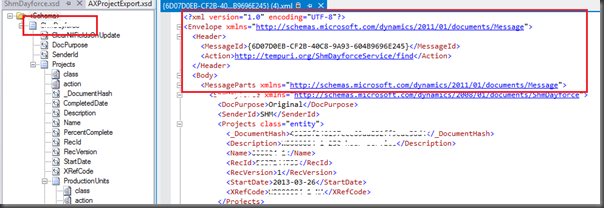
This is a pretty standard error message that basically comes down to BizTalk received a message that it was not expecting. The reason why BizTalk was not expecting it was because AX wraps outbound messages with a SOAP Envelope as you can see in the image below.
SOAP Envelopes are certainly nothing new but I didn’t expect AX to use them when writing a file to the file system. When receiving Web/WCF Services BizTalk automatically takes care of extracting the message body from the incoming SOAP message for us. With the FILE Adapter that facility just does not exist.
You will notice in screenshot below that there is a namespace that is specific to AX. This got me thinking that AX probably has an XSD for this message type as well.

After digging around a bit I did find the location of the AX schemas to be in the Program files\Microsoft Dynamics AX\60\Server\MicrosoftDynamicsAX\bin\Application\Share\Include folder. The schema that I was looking for was called Message.xsd
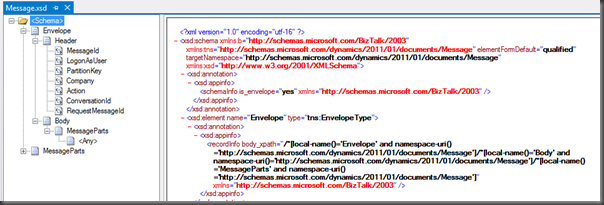
Just adding this the BizTalk project was not enough. I needed to make a few small tweaks to the schema:
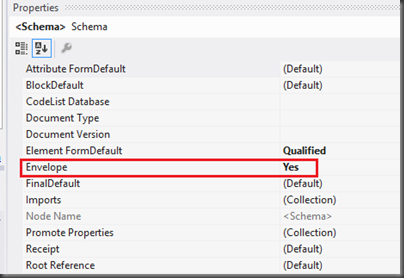
- Click the “Schema Icon” of the schema and then set the Envelope property to be True. This instructs BizTalk that it is an envelope schema and when BizTalk sees this message that it needs to strip out the Envelope which in this case is a SOAP Envelope.
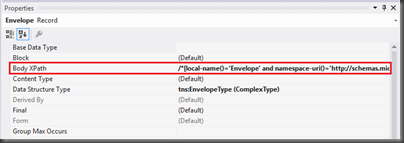
- Set the Body XPath property by selecting the Root Node of the schema and then populating the appropriate value which in this case is
/*[local-name()=’Envelope’ and namespace-uri()=’http://schemas.microsoft.com/dynamics/2011/01/documents/Message’]/*[local-name()=’Body’ and namespace-uri()=’http://schemas.microsoft.com/dynamics/2011/01/documents/Message’]/*[local-name()=’MessageParts’ and namespace-uri()=’http://schemas.microsoft.com/dynamics/2011/01/documents/Message’]
We can now deploy our application. When it comes to our Receive Location that will be picking up this message, we want to ensure that we are using the XMLReceive Pipeline. Within this Pipeline the XML Disassembler stage will take care of the SOAP envelope so that when the message body is presented to the MessageBox that any subscribers will receive the expected message body.
Conclusion
When I first discovered that I was receiving a SOAP wrapped message my instincts said maybe AX could just use a WCF port instead of a FILE port. This just wasn’t the case, there are only two options when it comes to configuring an outbound port: FILE and MSMQ. Using MSMQ would not of helped me in this case as the same issue would have existed.
AX certainly does provide the ability to call a WCF service but it is a more custom based approach. I would have had to expose this schema as a WCF service but then my AX colleagues would have had to write code against the proxy to populate all of the different data elements. This would have defeated the purpose of using the AIF framework in order to expedite the ability to delver a solution under very tight timelines. Luckily with a little tinkering we were able to come up with a reasonable solution without writing custom code.
I have to think that AX is wrapping these messages in a SOAP Envelope for a reason. Perhaps a WCF outbound port is coming in an upcoming release?



