by Gautam | Sep 8, 2019 | BizTalk Community Blogs via Syndication
Do you feel difficult to keep up to date on all the frequent updates and announcements in the Microsoft Integration platform and Azure iPaaS?
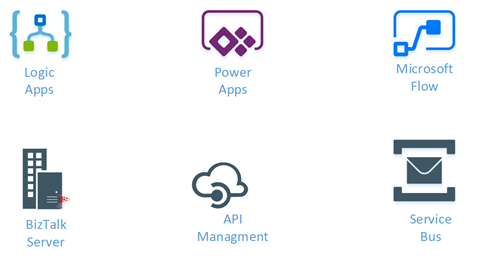
Integration weekly update can be your solution. It’s a weekly update on the topics related to Integration – enterprise integration, robust & scalable messaging capabilities and Citizen Integration capabilities empowered by Microsoft platform to deliver value to the business.
If you want to receive these updates weekly, then don’t forget to Subscribe!
Microsoft Announcements and Updates
Community Blog Posts
Videos
Podcasts
How to get started with iPaaS design & development in Azure?
- Robust Cloud Integration with Azure
- Microsoft Azure for Developers: What to Use When
- Serverless Computing: The Big Picture
- Azure Logic Apps: Getting Started
- Azure Logic Apps: Fundamentals
- Microsoft Azure Developer: Creating Enterprise Logic Apps
- Microsoft Azure API Management Essentials
- Azure Functions Fundamentals
- Cloud Design Patterns for Azure: Availability and Resilience
- Architecting for High Availability in Microsoft Azure
Feedback
Hope this would be helpful. Please feel free to reach out to me with your feedback and questions.
by Raja Sreenivasan | Sep 2, 2019 | BizTalk Community Blogs via Syndication
It’s time to upgrade to the latest version of BizTalk360 V9.0 Phase2. We always aim to improve our product based on customer’s feedback to meet their business needs. This release comes with a handful of most customer asks features and enhancements.
A brief summary of features and enhancement we introduced in V9.2
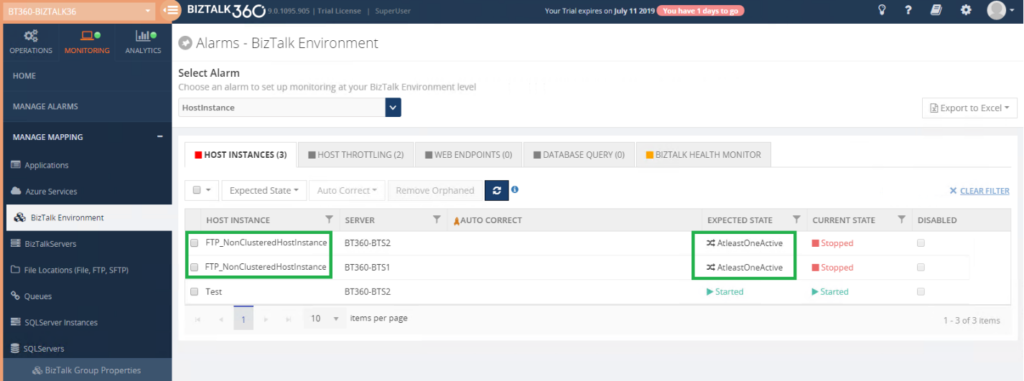
Host Instance Monitoring – This feature is extended to support “AtleastOneActive” monitoring state for Clustered and Non-Cluster Host Instances.
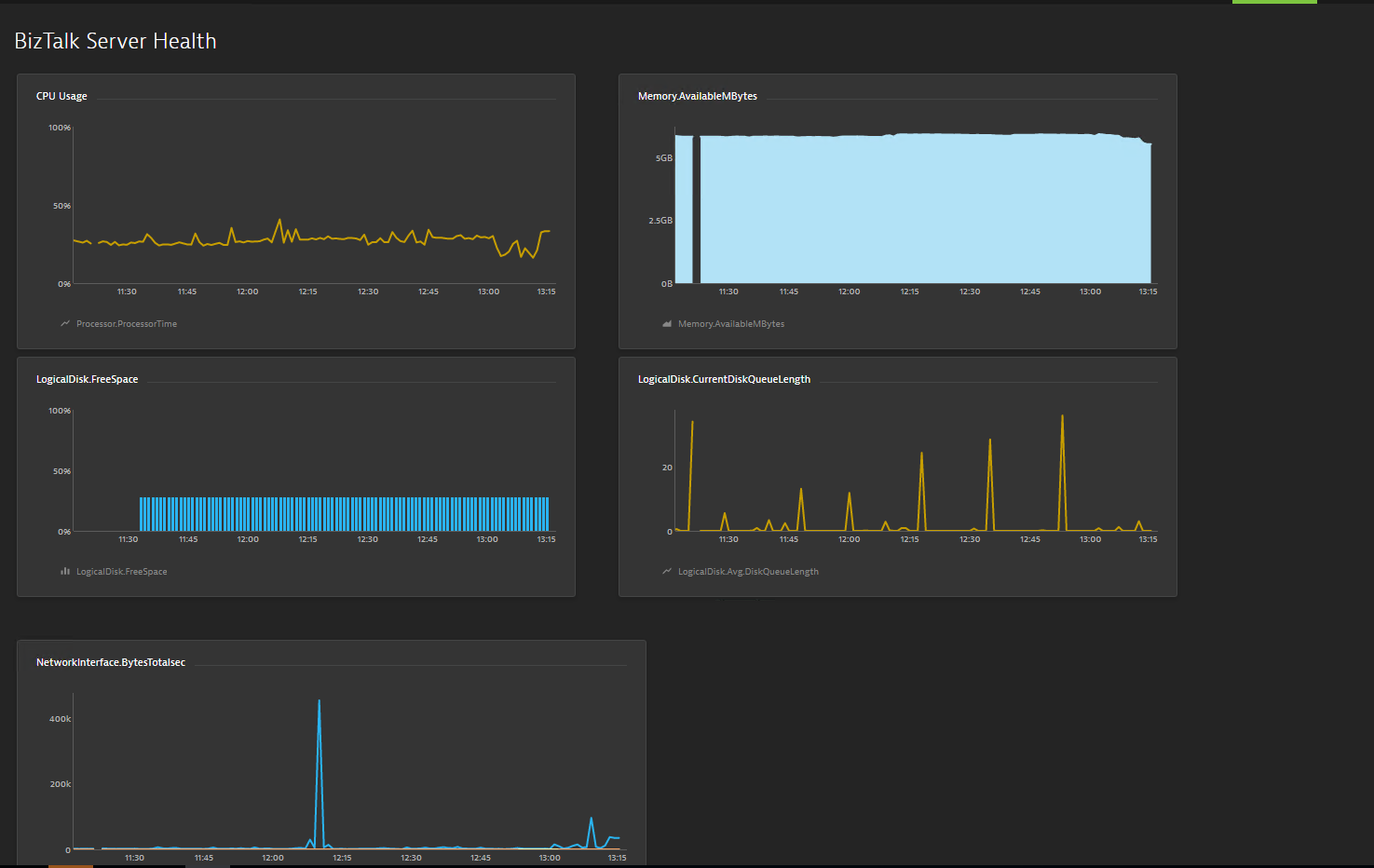
Dynatrace Integration – We have integrated Dynatrace in BizTalk360; with this, you can see the BizTalk Server related performance metrics in Dynatrace.
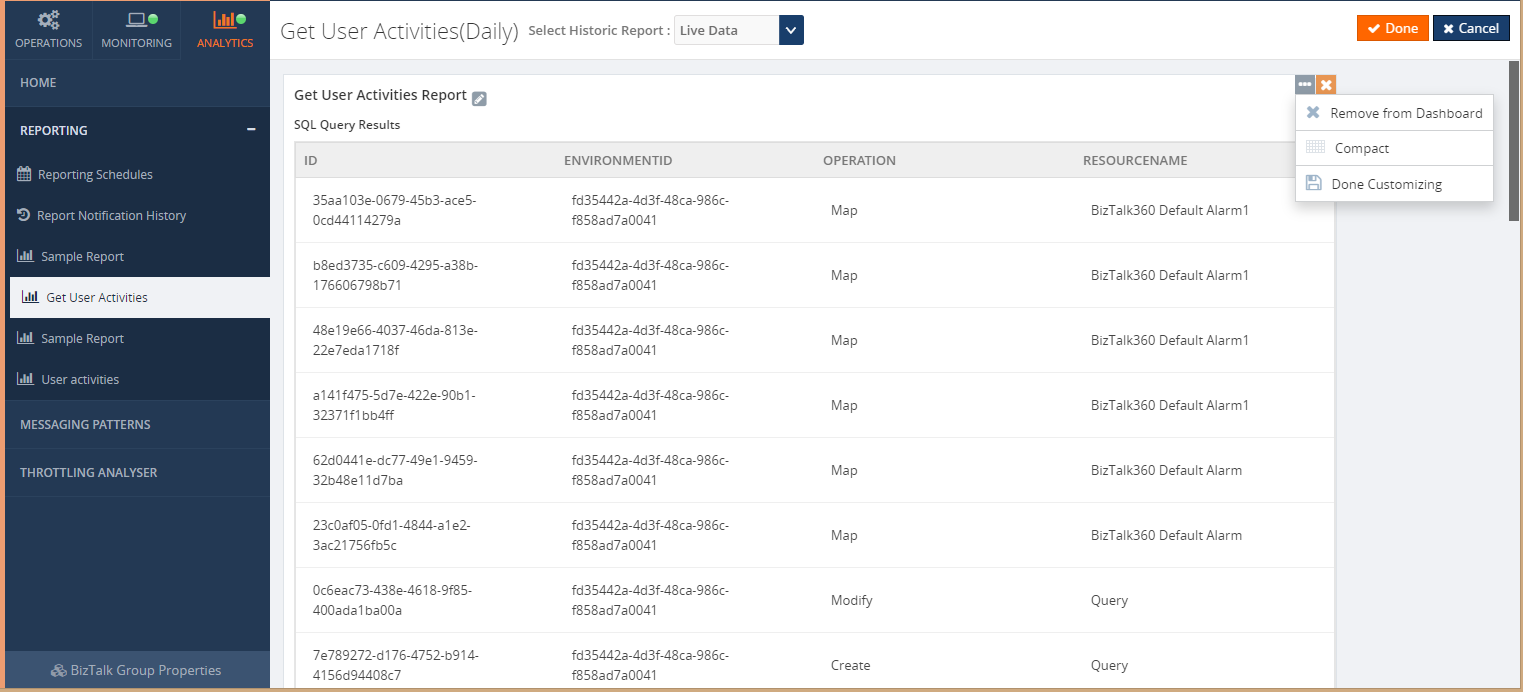
SQL Query Custom Report – In BizTalk Reporting, we introduced an additive widget called Custom SQL Query widget through which SQL queries can be mapped to get the top 100 query result as a report based on the scheduled configuration.
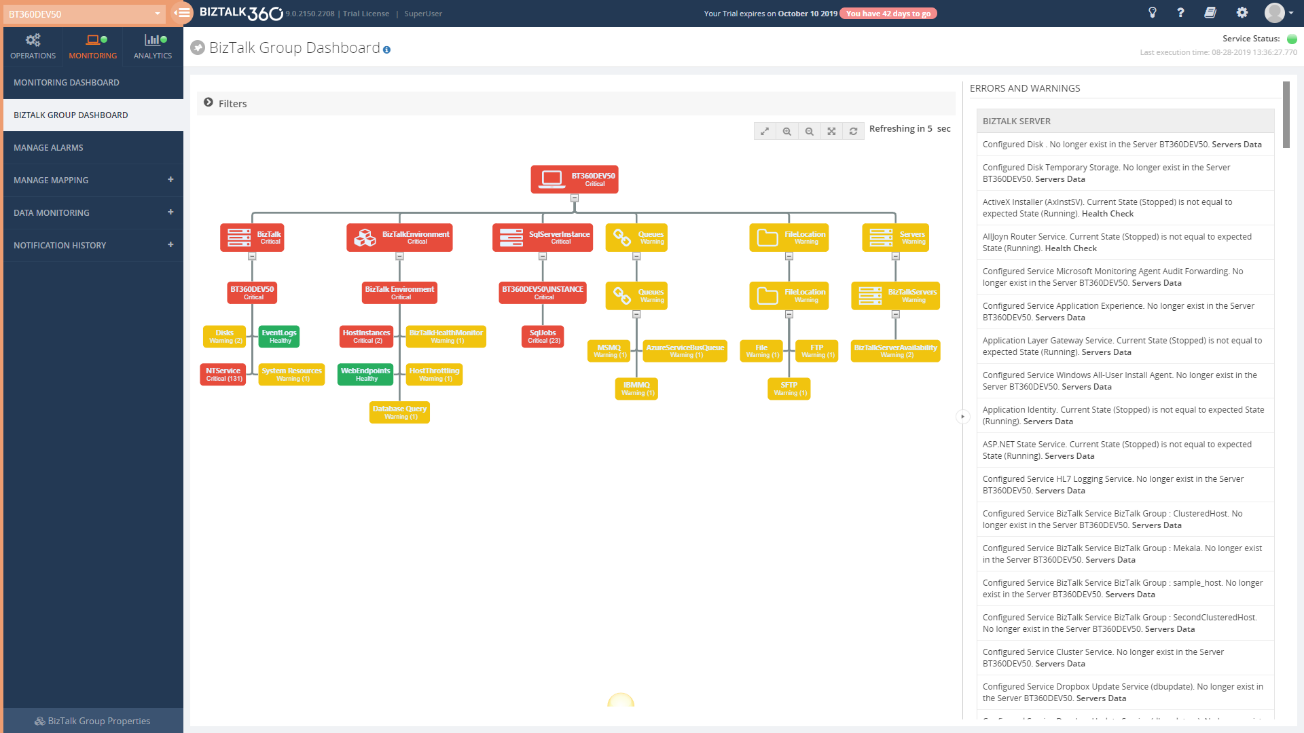
BizTalk Group Dashboard – In BizTalk360’s Monitoring dashboard it was not possible to view the status of all the mapped artifacts in a single view; the user needs to select the alarm each time to view the status of the mapped artifacts of each alarm. To overcome this challenge, we have introduced the BizTalk Group Dashboard which gives a consolidated view of the status of all the artifacts which are mapped to all the alarms in an environment.
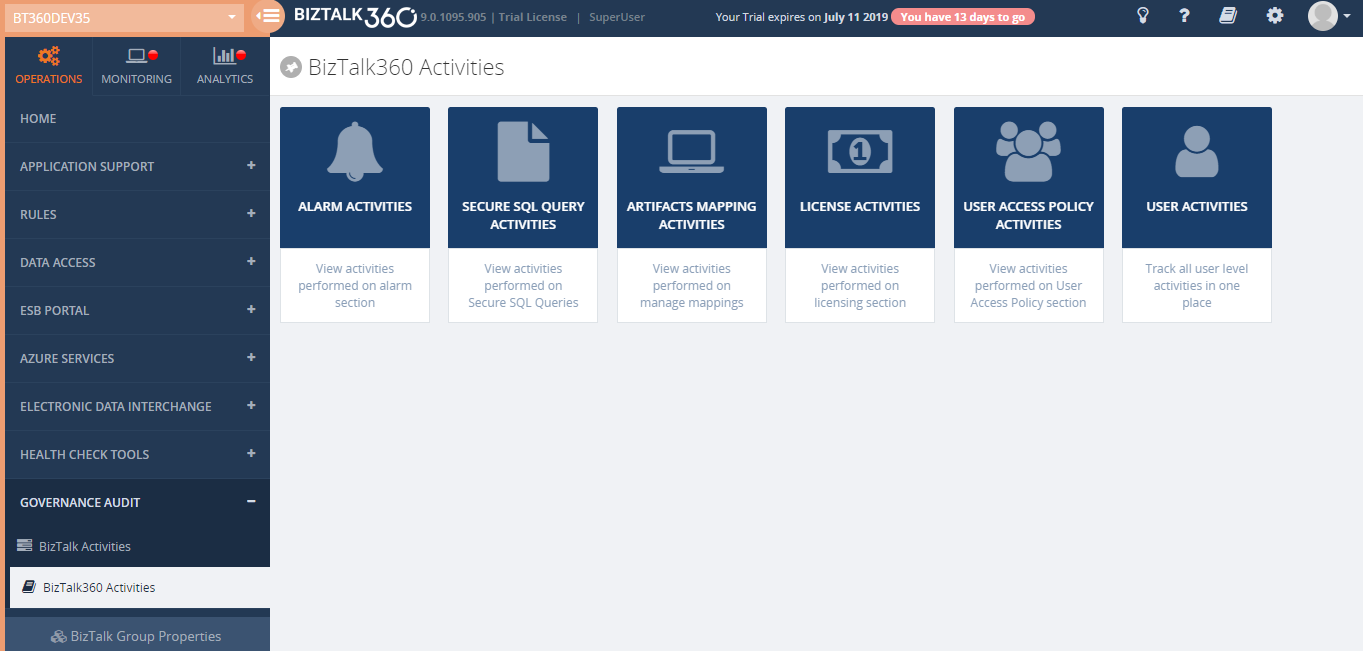
Governance Audit (User Access Policies and License Activities) – BizTalk360 Activities will give a clear view of user actions with respect to Licenses and User Access Policies. License activities include activation, deactivation, remove and manual activation and deactivation. User Access Policy activities will include create, update, delete and import operation under the following section i.e. Manage Users, Manage Application Groups and Manage Custom User profiles
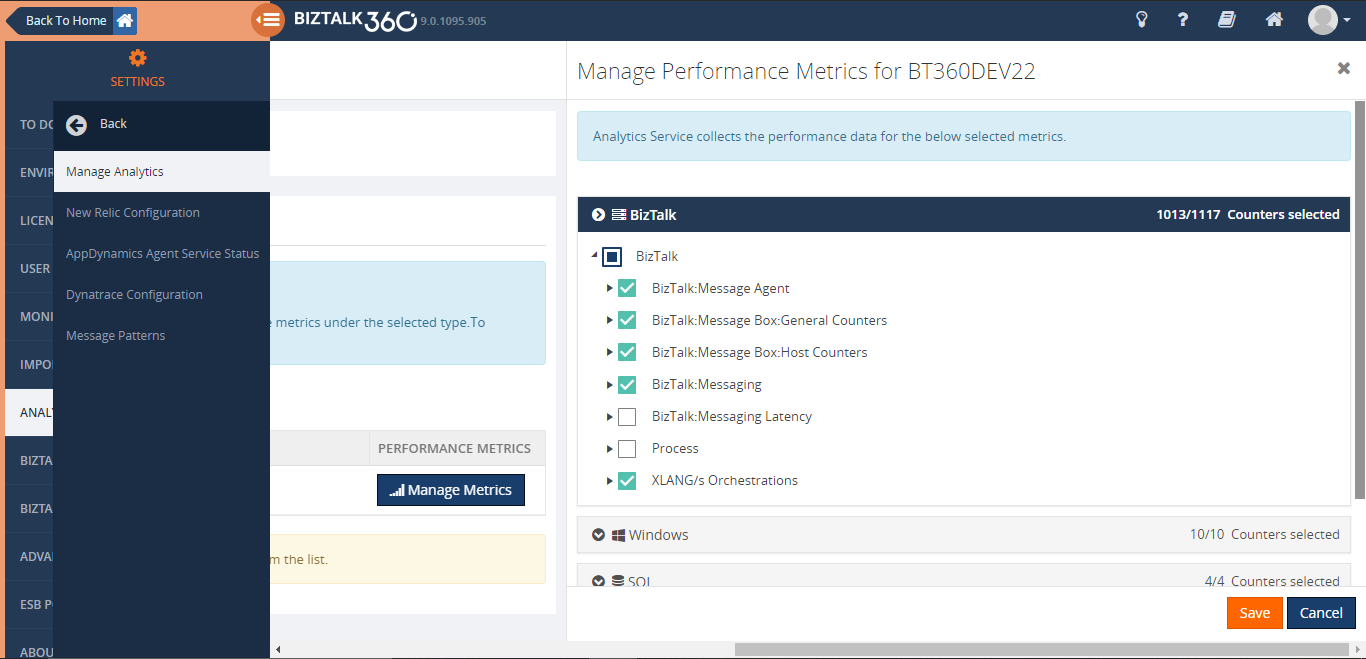
Performance Data Collection Improvements – To improve the performance data collection we are providing an option for the user to select the required performance counters on each type. This way, BizTalk360 will start collecting data only for the selected counters.
Messaging Flow Patterns – Analytics Messaging Flow Patterns can be determined from the BizTalk Management database. Users can switch the Messaging Flow determination technique in the Message Patterns configuration. The Dynamic Pattern option is used to determine the Message Patterns from the tracking database (earlier versions).
Let us jump into more detail of the new features
Host Instance Monitoring
A BizTalk Server Host is a logical container that contains the BizTalk Server runtime processes in which you deploy items such as adapter handlers, receive locations (including pipelines), and orchestrations. The host instance is the runtime process where the message processing, receiving, and transmitting occurs. Obviously, it is very important to ensure your host instances are running in your BizTalk environment. BizTalk360 already made it easy, by introducing the Host Instance Monitoring functionality. In BizTalk360, you can monitor the BizTalk Host Instances by setting the Expected State. If the expected state doesn’t match with the current state of the host instance, you will get notified.
Out of the box, BizTalk360 allows users to monitor the Host Instances using the “AtleastOneActive” state.
If this state is assigned as the Expected State, then the monitoring service will verify that across all the instances for the respective clustered host, at least one host instance is active, guaranteeing that the server is running, and no downtime happened for that host/server.
The user can also enable AutoCorrect for Clustered and Non-Clustered host instances monitoring.
Dynatrace Integration
Dynatrace is an APM tool which has a generic capability to monitor operating systems, network protocols, system metrics, network infrastructure, applications. By Integrating BizTalk360 with Dynatrace you can view the BizTalk Server performance metrics in your Dynatrace environments; which does not need any agent to be installed in the BizTalk Servers to collect data and it does not require any configuration changes at the server level.
BizTalk360 Analytics Service holds a sub-service for Dynatrace which creates custom metrics in your Dynatrace environment for all the counters which you have enabled in the BizTalk360 Analytics configuration section. Each minute the sub-service will start pushing the collected BizTalk Server performance data to the respective custom metrics. These custom metrics data can be mapped to a custom chart and viewed in your Dynatrace dashboard.
SQL Query Custom Report
With the Biztalk360 reporting users can generate PDF documents of critical performance metrics and send emails to the user at specific time periods, depending on the requirement in Reporting Section. Now with this version, you can get your SQL query results as a report just by simply mapping the configured secure SQL queries to the reporting schedule. This avoids switching between multiple tools.
Note: BizTalk360 consists of 6 default queries which the user can only execute. In addition to that, you can create new custom SQL queries as per the business need.
Reports can be generated on Daily, Weekly, and Monthly.
BizTalk Group Dashboard
Monitoring and Notification is one among the most important feature in BizTalk360.In which user can use the Monitoring dashboard to monitor their BizTalk Environment and get notified if any violation persists. But there is one usability problem exist where user cannot see the consolidated view of all the alarms and their mapped artifact in a single view. To Overcome this, we brought the “BizTalk Group Dashboard”.
The BizTalk Group Dashboard is designed to monitor all the artifacts (and view all errors) which are mapped to all the configured alarms in BizTalk360, in a single view. The “BizTalk Group Dashboard” will automatically pick up all the artifacts (which are mapped to any of the BizTalk360 alarms) and displays the status of the artifacts in a graphical manner. Also, the error/warning details of the displayed artifacts are shown in a grid view. The BizTalk Group dashboard checks the status of the artifacts in every 60 seconds.
Governance Audit (User Access Policies and License Activities)
In addition to BizTalk360 auditing Activities, now user can audit the user Access policies and license activities details in BizTalk360 activities.
In License auditing, users will be able to see the activities like License Activation, Deactivation and Removal of licenses, along with the details like Environment name, Product License Type, Environment Type, Order number, License code, License edition, and Max BizTalk servers.
In User Access Policy auditing, BizTalk360 captures the activities like,
- Adding Super/Custom users
- Modifying the access permission for existing users
- Removing users from an environment
- Creating, Modifying or Deleting the Application Groups
- Creating, Modifying or Deleting the Custom User Profiles
Enhancements
Below are some of the major improvements we have done in this release
Performance Data Collection Improvements
In earlier versions, user can enable the performance data collection for the various server types, say BizTalk, SQL, IIS, Windows, where BizTalk360 will start collecting performance data for all the counters of the selected type. From this version on, to improve the performance, we are providing an option for the user to select the required performance counters on each type. This way, BizTalk360 will start collecting data only for the selected counters.
By using “Manage Metrics” option user can manage the performance metrics data collection for each server in the configured. User can choose what type of data they want in the environment level from the neat tree view diagram. Based on the selection analytics service collects the performance data which avoids performance impact.
Messaging Flow Patterns
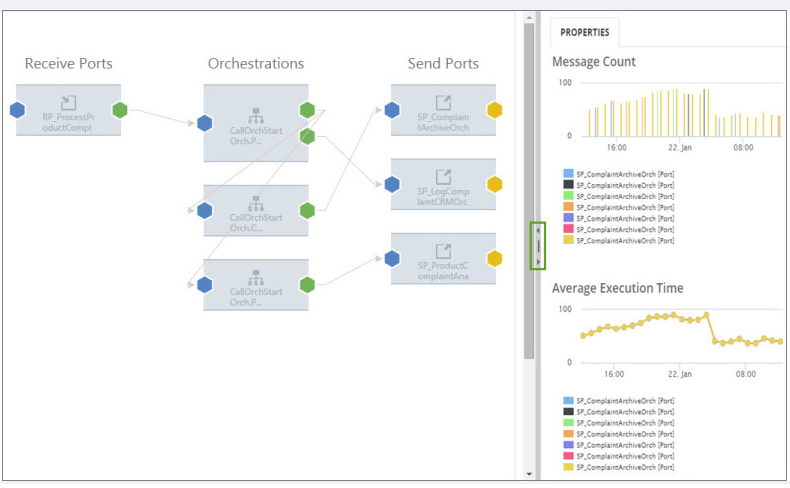
In complex BizTalk environment, it is important to visualize the patterns of how messages are processed within the system or integrate with multiple disparate systems to handle the message transfer from one point to another. It could be a simple direct transfer between the two ports, or through a complex messaging route passing through orchestrations to perform certain validations, etc. It is helpful to BizTalk Administrators or Business users to track the flow of messages in different stages. For this purpose, the BizTalk Admin Console has the capability to view the workflow of messages, although that feature will mainly be of use for BizTalk Administrators.
we are bringing management capabilities like hiding and deleting of message flows.
The Hide Operation can be used on the message patterns that are decommissioned or less frequently used. The Delete Operation can be applied on the flows that are no longer used in BizTalk Group.
FIPS Compliance Support in Cryptography
BizTalk360 now supports AE5 cryptography algorithm to support FIPS Compliance in Encryption/Decryption mechanism.
SQL Server Monitoring Improvements
- The platinum Users can now add up to 4 servers for monitoring.
- The SQL Server added for monitoring now can be removed.
- The SQL Server which is not reachable can also be added for monitoring, However, the monitoring works seamlessly only when the server is reachable.
SQL Collation support in BizTalk360
BizTalk Server can support both case sensitive and case insensitive collation. To make BizTalk360 more compatible with BizTalk Server, we have improved BizTalk360 in such a way that it will support case sensitive collation as well.
Analytics Widget Improvements
- Information about the different legends in the BizTalk Messaging Performance widget has been added.
- The date/time range for the last 24 hours has been modified to show the time range for the last 24 hours instead of 12 hours
Support for rules created using BRE Pipeline Framework
The rules created using .NET classes with BRE pipeline framework are getting displayed in BizTalk360
ESB Exceptions
In ESB Exception user can provide the Action Type and Comments while deleting the faults, the same will be audited for reference. Also when the message is edited before resubmit then it will be audited as ‘resubmit with data modification’.
Besides these new features and enhancements, we have fixed a few bugs. Refer release notes for more information.
Conclusion
Considering the feedback from our customers, BizTalk360 will continue to provide more useful features. Why not give BizTalk360 a try! It takes only 10 minutes to install on your BizTalk environments and you can witness and check the security and productivity of your own BizTalk Environments.
The post BizTalk360 V9.0.2 Release Blog appeared first on BizTalk360.
by Gautam | Sep 1, 2019 | BizTalk Community Blogs via Syndication
Do you feel difficult to keep up to date on all the frequent updates and announcements in the Microsoft Integration platform and Azure iPaaS?
Integration weekly update can be your solution. It’s a weekly update on the topics related to Integration – enterprise integration, robust & scalable messaging capabilities and Citizen Integration capabilities empowered by Microsoft platform to deliver value to the business.
If you want to receive these updates weekly, then don’t forget to Subscribe!
Microsoft Announcements and Updates
Community Blog Posts
Videos
Podcasts
How to get started with iPaaS design & development in Azure?
- Robust Cloud Integration with Azure
- Microsoft Azure for Developers: What to Use When
- Serverless Computing: The Big Picture
- Azure Logic Apps: Getting Started
- Azure Logic Apps: Fundamentals
- Microsoft Azure Developer: Creating Enterprise Logic Apps
- Microsoft Azure API Management Essentials
- Azure Functions Fundamentals
- Cloud Design Patterns for Azure: Availability and Resilience
- Architecting for High Availability in Microsoft Azure
Feedback
Hope this would be helpful. Please feel free to reach out to me with your feedback and questions.
by Sandro Pereira | Aug 30, 2019 | BizTalk Community Blogs via Syndication
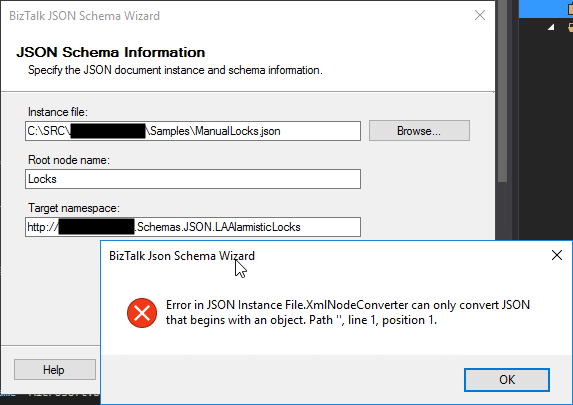
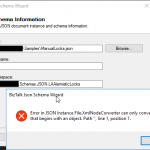
This week while trying to use the BizTalk Server 2016 JSON Schema Wizard to generate an XML schema from a specific JSON file to be sent to a Logic App I got the following error:
Error in JSON Instance File.XMLNodeConverter can only convert JSON that begins with an object. Path ‘’, line 1, position 1.
The JSON file had the following format:
[
  {
    "IntID": 208,
    "ItemLogID": 14255826,
    "Step": "IN",
    "BusinessUnit": "TST",
  },
  {
    "IntID": 209,
    "ItemLogID": 14257419,
    "Step": "IN",
    "BusinessUnit": "TST",
  }
]
Basically, I’m trying to send a list of “objects” that in my case are Locks, to be processed.
Cause
The cause of this “problem” is that a JSON array of objects, it may not make sense in a BizTalk Server XML world as Morten la Cour very well written in this forum. At that sentence, I will add: “at it his being done today”. Because with a few improvements could be smarter and support this type of messages.
Why? The BizTalk
JSON Schema Wizard is a simple and “stupid” converter, it will ask only for you
to provide a root node and a namespace that it will add to the XML Schema and
the XML JSON representation because it will require that information to be able
to uniquely identify this type of message.
But it will not understand what is a “not identified” object array because it needs to give it a Record name in the XML equivalent.
So, that means
that it will not support JSON arrays?
No, it will support JSON arrays if you provide a field name to that array, i.e., instead of having:
[
…
]
You should have:
{
   "field name": [
   …
   ]
}
Solution
If you don’t have the control over that JSON message,
you may need to create a custom pipeline component to add or remove this field
name that will identify the array in the XML equivalent message.
If you have control over the structure of the JSON
message the simple way is to modify the structure of the message to include a
field name to identify the array. Lucky it was my case, so I modify the
original structure descrived above to be:
  {
    "locks": [
    {
      "IntID": 208,
      "ItemLogID": 14255826,
      "Step": "IN",
      "BusinessUnit": "TST",
    },
    {
      "IntID": 209,
      "ItemLogID": 14257419,
      "Step": "IN",
      "BusinessUnit": "TST",
    }
  ]
}
Now, if I try to run the BizTalk JSON Schema Wizard
against this message it will be able to create the JSON Schema.
The post BizTalk JSON Schema Wizard: Error in JSON Instance File.XMLNodeConverter can only convert JSON that begins with an object appeared first on SANDRO PEREIRA BIZTALK BLOG.
by Gautam | Aug 25, 2019 | BizTalk Community Blogs via Syndication
Do you feel difficult to keep up to date on all the frequent updates and announcements in the Microsoft Integration platform and Azure iPaaS?
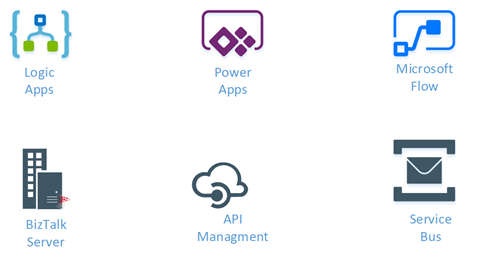
Integration weekly update can be your solution. It’s a weekly update on the topics related to Integration – enterprise integration, robust & scalable messaging capabilities and Citizen Integration capabilities empowered by Microsoft platform to deliver value to the business.
If you want to receive these updates weekly, then don’t forget to Subscribe!
Microsoft Announcements and Updates
Community Blog Posts
Videos
Podcasts
How to get started with iPaaS design & development in Azure?
- Robust Cloud Integration with Azure
- Microsoft Azure for Developers: What to Use When
- Serverless Computing: The Big Picture
- Azure Logic Apps: Getting Started
- Azure Logic Apps: Fundamentals
- Microsoft Azure Developer: Creating Enterprise Logic Apps
- Microsoft Azure API Management Essentials
- Azure Functions Fundamentals
- Cloud Design Patterns for Azure: Availability and Resilience
- Architecting for High Availability in Microsoft Azure
Feedback
Hope this would be helpful. Please feel free to reach out to me with your feedback and questions.
by Sandro Pereira | Aug 21, 2019 | BizTalk Community Blogs via Syndication
You may all remember Richard Seroter BizTalk SendPort Duplicator tool and how he descrived that frequently during development, and even in production, we have a need to create new BizTalk ports that are virtually identical to an existing one where we just need to change some small configurations like:
- Address/URI;
- Send Port Filter criteria;
- Different pipelines or pipeline components configuration;
- And so on.
And by default, the only options we have are:
- Export the application binding files, manually clean the file and change the values; And then import the Binding file again;
- Or manually recreate the entire port again;
Both options are time-consuming and need a lot of manually work.
And Richard Seroter was, and still is, an amazing lifesaving tool that allows you to duplicate send ports easily, so why a new tool?
“BizTalk Port Multiplier Tool” it has all Richard tool functionalities but is more than a Send Port Duplicator, and that is the reason I decided to create a new tool.
“BizTalk Port Multiplier Tool” is a simple tool that aims to simplify port “cloning” process by allowing you to easily “clone or duplicate” any existing port: Receive Port or Send Port.
- Send Ports are easy, you only need to give a different name to the port, and you can clone it;
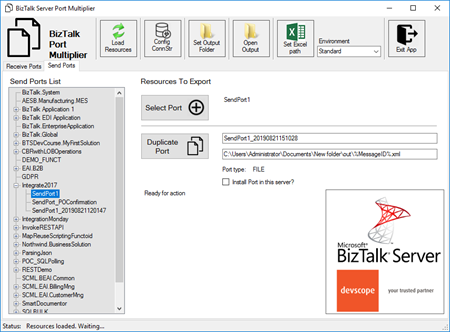
- Receive Ports are tricky because they may contain several Receive Locations and the URI needs to be unique;
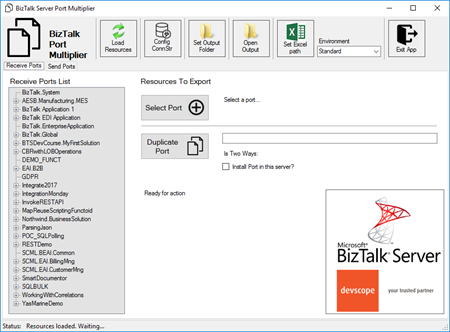
This tool will extend default BizTalk Server capabilities transforming the tedious and sometimes complicate port creation based on an existing one a little simple and easy allowing you to:
- Create a new Receive Port based on an existing one;
- It will also export the binding file from that new Receive Port;
- Create a new Send Port based on an existing one;
- It will also export the binding file from that new Send Port;
- Generate different binding files for each environment
Why do I need to “clone” a Receive Port?
Sometimes you also need to create a receive port with similar configurations of an existing one, also changing only few configurations or simple the URI and instead of manually recreating you can have 90% of the process done automatically.
Sometimes is practical, sometimes or in some scenarios it may not work but in most of the cases it will. So it is basically a best-effort operation and not an exact clone because they may have several Receive Locations and the Address/URI needs to be unique. So, you then need to go to each receive location and reconfigure them.
Download
Credits also to my team member at DevScope, Pedro Almeida that collaborated in the development of this tool.
You can download BizTalk Port Multiplier Tool from:
 BizTalk Port Multiplier Tool
GitHub
Or from:
BizTalk Port Multiplier Tool
Microsoft | Code Gallery
The post BizTalk Port Multiplier Tool appeared first on SANDRO PEREIRA BIZTALK BLOG.
by Sandro Pereira | Aug 20, 2019 | BizTalk Community Blogs via Syndication
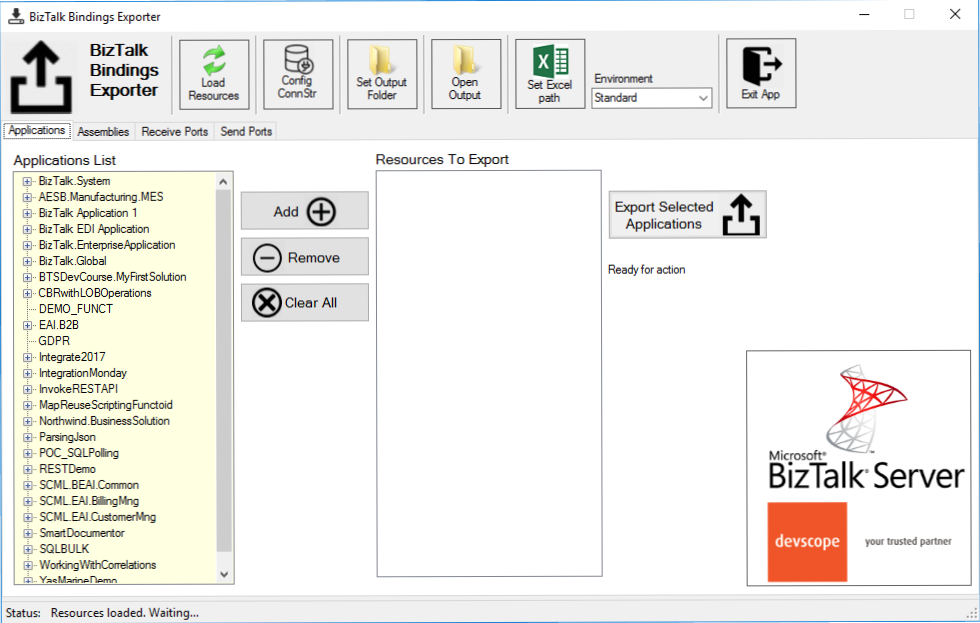
Following my commitment with the attendees at Integrate 2019 London and US that shared with me the same headaches and concerns, and following my series of posts about “BizTalk Bindings Exportation” published on BizTalk360 blog. I’m happy to announce the birth of a new BizTalk Server tool: BizTalk Bindings Exporter Tool.
“BizTalk Binding Exporter Tool” is a simple tool which will suppress the absence of advanced binding file generation capabilities in the BizTalk Server Administration Console allowing you to generate and export a binding file from BizTalk Applications in an intuitive and easy way.
Exporting a BizTalk Server Application binding is, at first sight, a simple and quick task that can be done using the BizTalk Server Administration Console:
- Click Start, click All Programs, click Microsoft BizTalk Server 20xx, and then click BizTalk Server Administration
- In the console tree, expand BizTalk Server Administration, expand the BizTalk Group, and then expand Applications
- Right-click the application whose bindings you want to export, point to Export, and then click Bindings…
- On the Export Bindings page, in Export to file, type the absolute path of the .xml file to which to export the bindings
- Ensure that Export all bindings from the current application option is selected, and then click OK
But even in simple tasks, we may encounter challenges that require us to perform some monotonous and boring manual operations that consume some of our precious time and are always subject to failures. Because out-of-the-box BizTalk Administration Console doesn’t allow you to:
- Export a Binding file of a specif Receive Port or list of Receive Ports;
- Export a Binding file of a specif Send Port or list of Send Ports;
- Export a Binding file of a specif Assembly or list of Assemblies;
And these are just a few scenarios. You can only fully Export the binding files of an entire application which will lead you sometimes an extensive and fallible manual work to clean the binding files.
Normally the binding exportation starts in development, but we also will need to generate the same bindings for other environments like production and for that we normally need to open the binding file and replace/fix the differences for each different environment… which is normally a tedious operation. What we need to replace is mainly:
- the URI’s: it should be fixed, but it is not mandatory. If you know what you are doing, you can fix them directly on the environment after you import the Binding.
- the host instances: not mandatory, if you have the same host and host instances names across all your different environments (as best practices will tell you to do).
- the NT Group Name associated in the Services (Orchestrations): according to securities best practices you shouldn’t use the same BizTalk Groups in different environments, so in this case, if you follow this best practices, you need to change these parameters in your binding file.
Normally, everyone changes the URI’s but neglecting the other parameters may be causing problems during the Binding import.
Once again, this tool will extend default BizTalk Server capabilities transforming the tedious and sometimes complicate binding generation a little simple and easy.
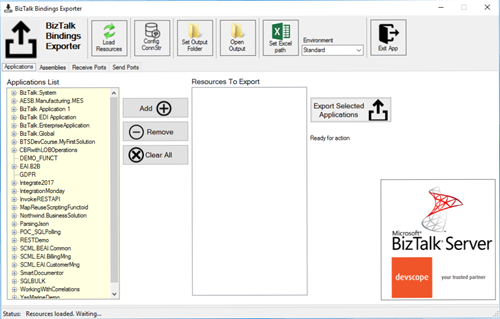
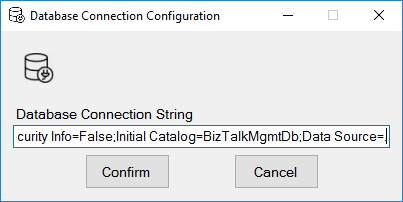
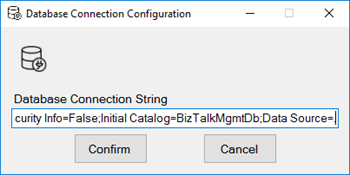
You just need to specify the connection string to the BizTalk Management database (BizTalkMgmtDb)
And this tool allows you to generate and export binding files with the following capabilities:
- Export binding(s) file(s) for an entire Application or a list of Applications;
- Export binding(s) file(s) from a specify Assembly or list of Assemblies;
- Export binding(s) file(s) from a Receive Port or list of Receive Ports;
- Export binding(s) file(s) from a Send Port or list of Send Ports;
- Or Generate different binding files for each environment if you create an Excel File with the mapping for each environment ;
Credits also to my team member at DevScope, Pedro Almeida that collaborated in the development of this tool.
You can download BizTalk Bindings Exporter Tool from:
BizTalk Bindings Exporter Tool
GitHub
Or from:
BizTalk Bindings Exporter Tool
Microsoft | Code Gallery
The post BizTalk Bindings Exporter Tool appeared first on SANDRO PEREIRA BIZTALK BLOG.
by Gautam | Aug 18, 2019 | BizTalk Community Blogs via Syndication
Do you feel difficult to keep up to date on all the frequent updates and announcements in the Microsoft Integration platform and Azure iPaaS?
Integration weekly update can be your solution. It’s a weekly update on the topics related to Integration – enterprise integration, robust & scalable messaging capabilities and Citizen Integration capabilities empowered by Microsoft platform to deliver value to the business.
If you want to receive these updates weekly, then don’t forget to Subscribe!
Microsoft Announcements and Updates
Community Blog Posts
Videos
Podcasts
How get started with iPaaS design & development in Azure?
- Robust Cloud Integration with Azure
- Microsoft Azure for Developers: What to Use When
- Serverless Computing: The Big Picture
- Azure Logic Apps: Getting Started
- Azure Logic Apps: Fundamentals
- Microsoft Azure Developer: Creating Enterprise Logic Apps
- Microsoft Azure API Management Essentials
- Azure Functions Fundamentals
- Cloud Design Patterns for Azure: Availability and Resilience
- Architecting for High Availability in Microsoft Azure
Feedback
Hope this would be helpful. Please feel free to reach out to me with your feedback and questions.
by Saranya Ramakrishnan | Aug 14, 2019 | BizTalk Community Blogs via Syndication
BizTalk360 is a one-stop tool for operations, monitoring and application performance management (APM) of BizTalk environments.
We get to see a few of our customers utilizing modern SaaS-based Application Monitoring/Analytics platforms like New Relic, AppDynamics, Dynatrace, etc., for their global enterprise analytics/monitoring requirements. In earlier releases, we have already integrated New Relic and AppDynamics in BizTalk360.
In BizTalk360 version 9.0 Phase 2, we have integrated Dynatrace in BizTalk360; with this, you can see the BizTalk Server related performance metrics in Dynatrace.
Why did we integrate Dynatrace in BizTalk360
Dynatrace is an APM tool which has a generic capability to monitor operating systems, network protocols, system metrics, network infrastructure, applications, etc. However, there is no out of the box Dynatrace plugin or agent for BizTalk Server. This means that the user needs to install an open-source plugin Fastpack (which has been updated a couple of years back and it is not up to date with the latest BizTalk release) on all the BizTalk Servers running in the environment, along with some configuration changes at BizTalk host instances config file btsntsvc.exe.config. BizTalk360 is an agentless, non-intrusive software product which requires zero configuration on BizTalk servers.
Here you can see the BizTalk360 and Dynatrace comparison in detail.
As mentioned, few of our customers are using SaaS-based analytics platforms and they would like to see the BizTalk360 Analytical data (collected for BizTalk Server environment) over there. So we thought of integrating APM tools in BizTalk360.
How does BizTalk360 collect performance metrics
Unlike other tools, BizTalk360 doesn’t need an agent to be installed in the BizTalk Servers to collect performance data and it does not require any configuration changes at the server level.
Just follow the below simple steps:
- In the BizTalk360 Analytics configuration section, choose the various performance counters that you want to collect data
- Enable the Performance data collection for the respective BizTalk/SQL servers of your BizTalk environment
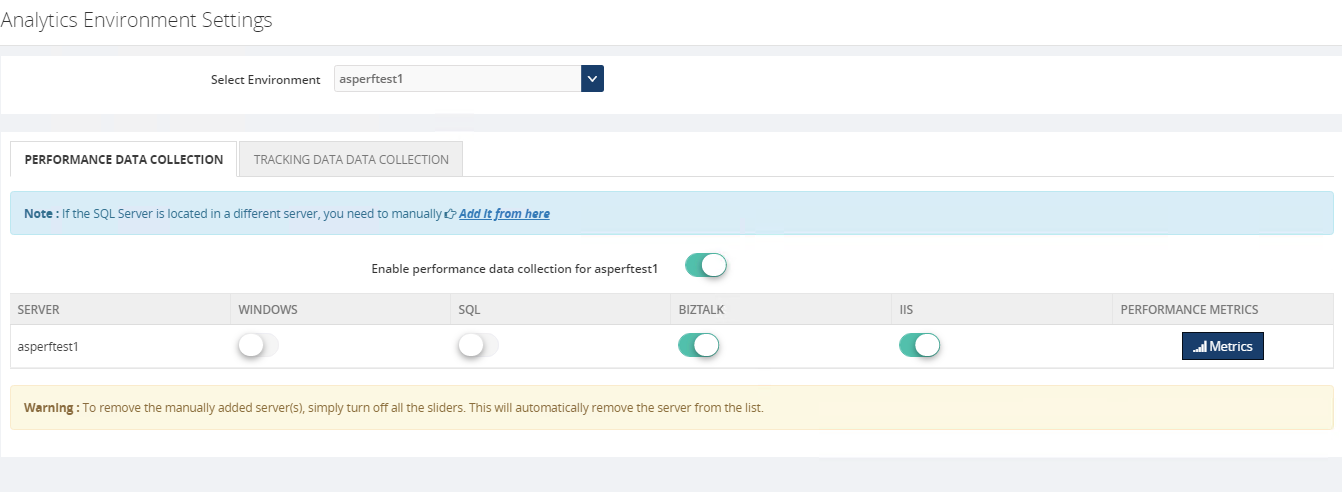
That’s it! Now the BizTalk360 Analytics Service will start collecting the performance data for the selected performance counters in the respective servers.
The cool thing here in BizTalk360 is, it’s not required that the BizTalk360 Analytics Service should run on all the BizTalk (and/or SQL) servers in your BizTalk environment.
BizTalk360 has a purging policy with which you can easily maintain the collected performance data and, to avoid performance issues, purge it after the configured period.
How to Configure Dynatrace in BizTalk360
You can easily configure your Dynatrace environment in BizTalk360, by providing your Dynatrace environment details such as tenant id and API key in the Dynatrace configuration section under (BizTalk360 Setting -> Analytics Configuration).
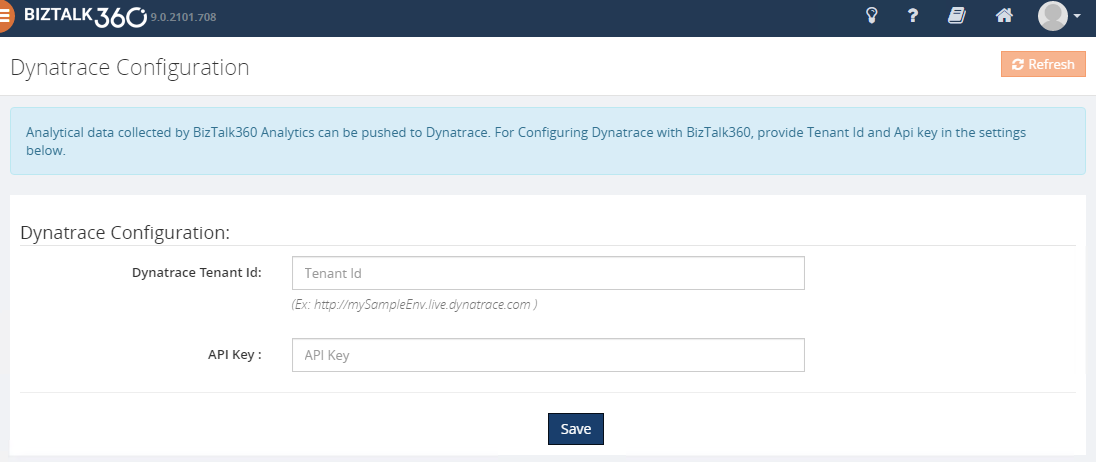
Ok, let’s see how BizTalk360 pushes the collected performance metrics to Dynatrace.
BizTalk360 Analytics Service holds a sub-service for Dynatrace which creates custom metrics in your Dynatrace environment for all the counters which you have enabled in the BizTalk360 Analytics configuration section. Each minute the sub-service will start pushing the collected BizTalk Server performance data to the respective custom metrics. These custom metrics data can be mapped to a custom chart and viewed in your Dynatrace dashboard.
To push performance data to Dynatrace, BizTalk360 uses the Dynatrace exposed TimeSeries API’s – “Custom Metrics” and “Post data point of a metrics”.
Note: In Dynatrace you have only 100 custom metrics available for free per environment. If you want to view more than 100 performance counters, then you need to purchase the custom metrics for the same from Dynatrace.
However from BizTalk360 V9.2, we provide an option to manage the performance metric data collection in Manage Analytics section (BizTalk360 settings->Manage Analytics ->Choose the Environment->Select the Server->Manage Metrics ), you can choose the required metrics for data collection as below. With this, you can limit the number of counters to be created in Dynatrace.
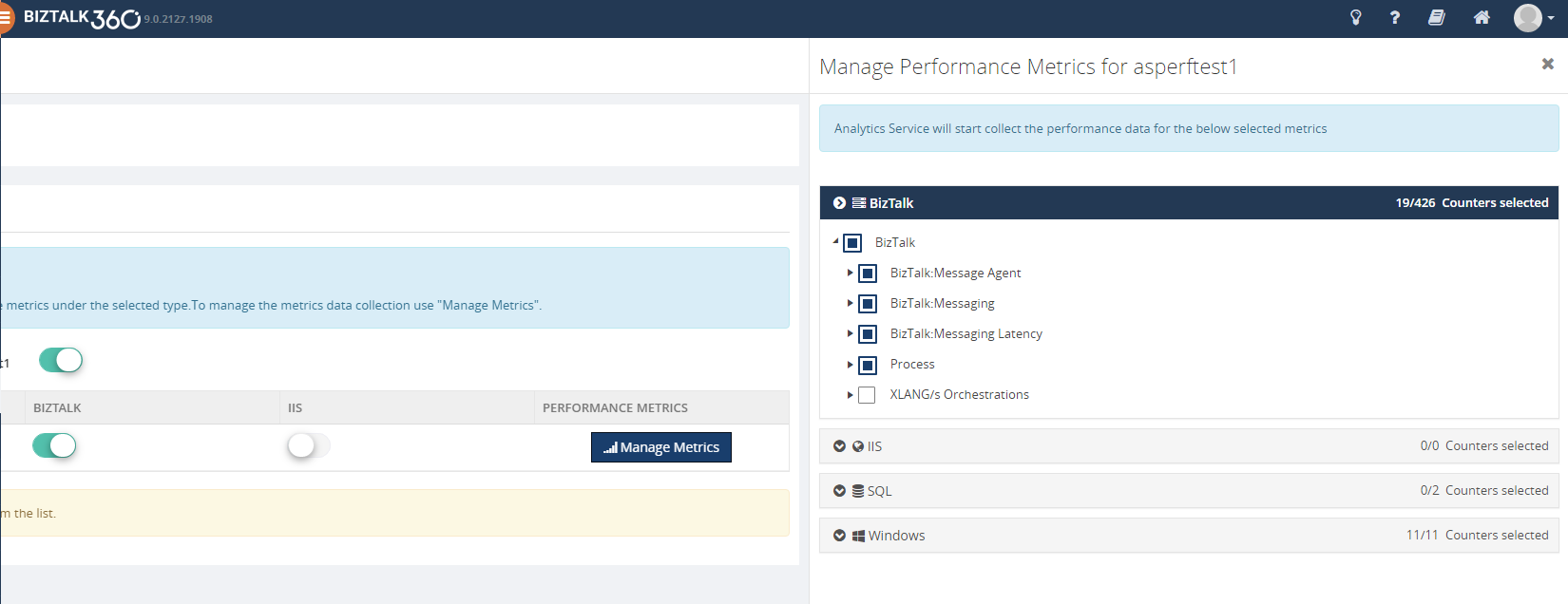
To be able to use the integration with Dynatrace from BizTalk360, you must have :
- A Dynatrace environment details (tenant id and API key )
- Enough custom metrics in your Dynatrace environment
- BizTalk360 v9.2 or later. Download the latest version of BizTalk360 from – http://www.biztalk360.com/free-trial/
- BizTalk360 Platinum license
- You must be a Super User in your BizTalk360 application to configure the Dynatrace environment in BizTalk360
How to view BizTalk360 Analytics data in Dynatrace
- Log into your Dynatrace Environment
- Create a custom chart widget in the dashboard
- Configure the custom chart by selecting performance categories, say BizTalk Messaging Performance, Failure Rate, Processor, etc. and select the respective custom metrics
You will start seeing the analytical data of the mapped custom metrics in the dashboard.
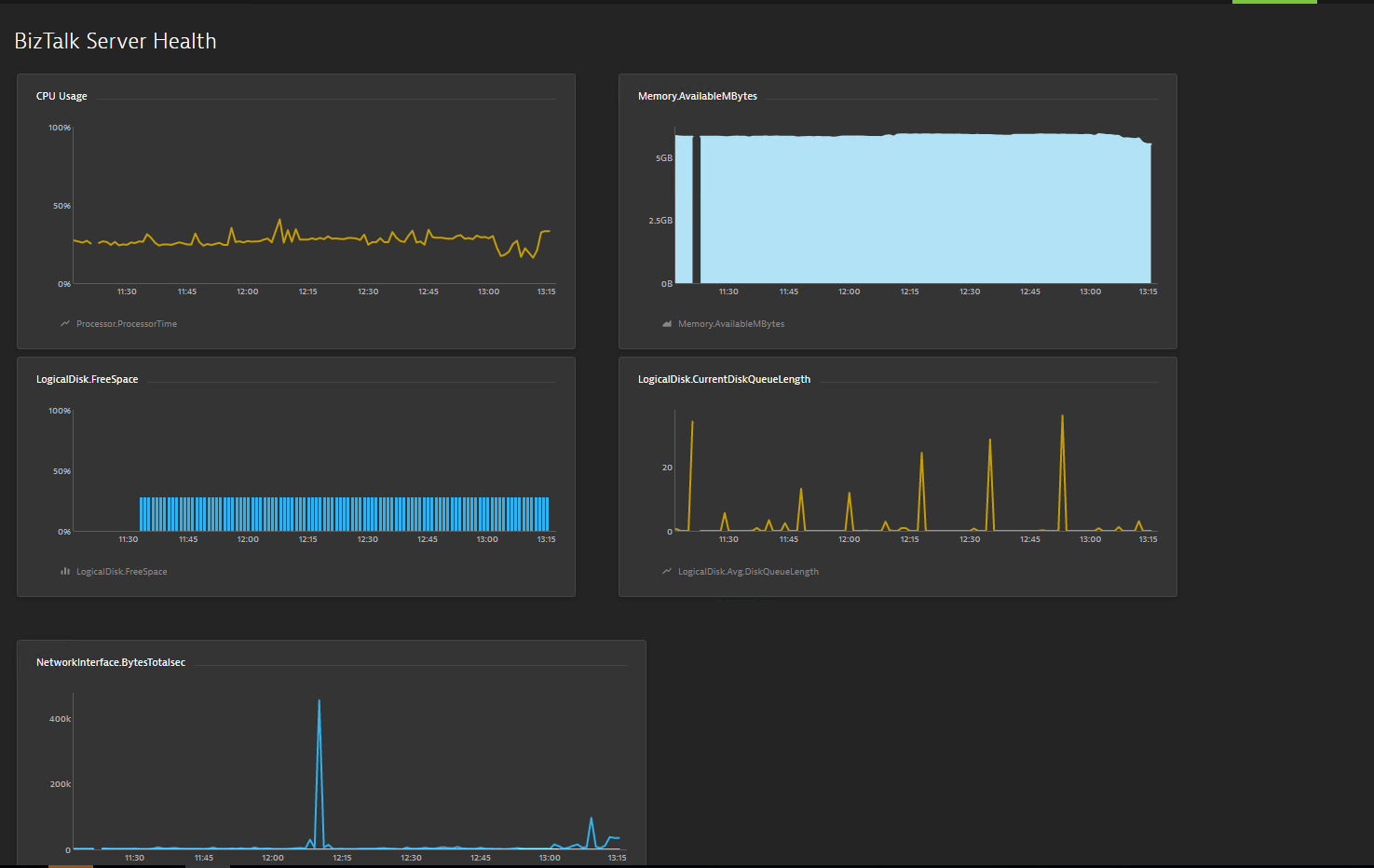
Below are some of the important performance metrics you can see in your Dynatrace dashboard.
BizTalk and SQL Server Health
- CPU Usage
- Memory Usage
- Disk Free Space
- Average Disk Queue Length
- Network Performance
- IIS Request Per Sec
- IIS Worker Process: CPU Usage
- IIS Worker Process: Memory Usage
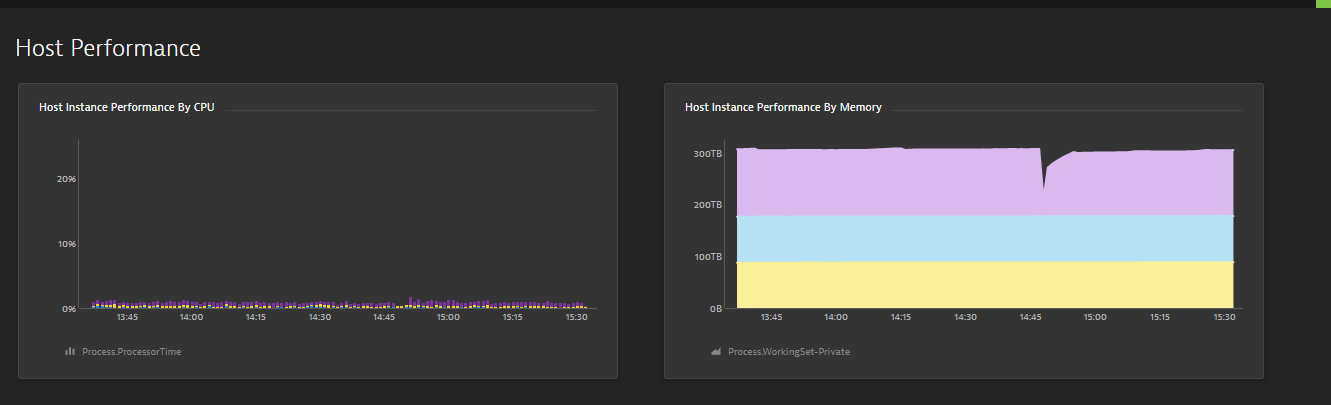
Host Performance
- Host Instance performance by CPU
- Host Instance Performance by Memory
- CPU Consuming Host Instances
- Top 10 Memory Consuming Host Instances
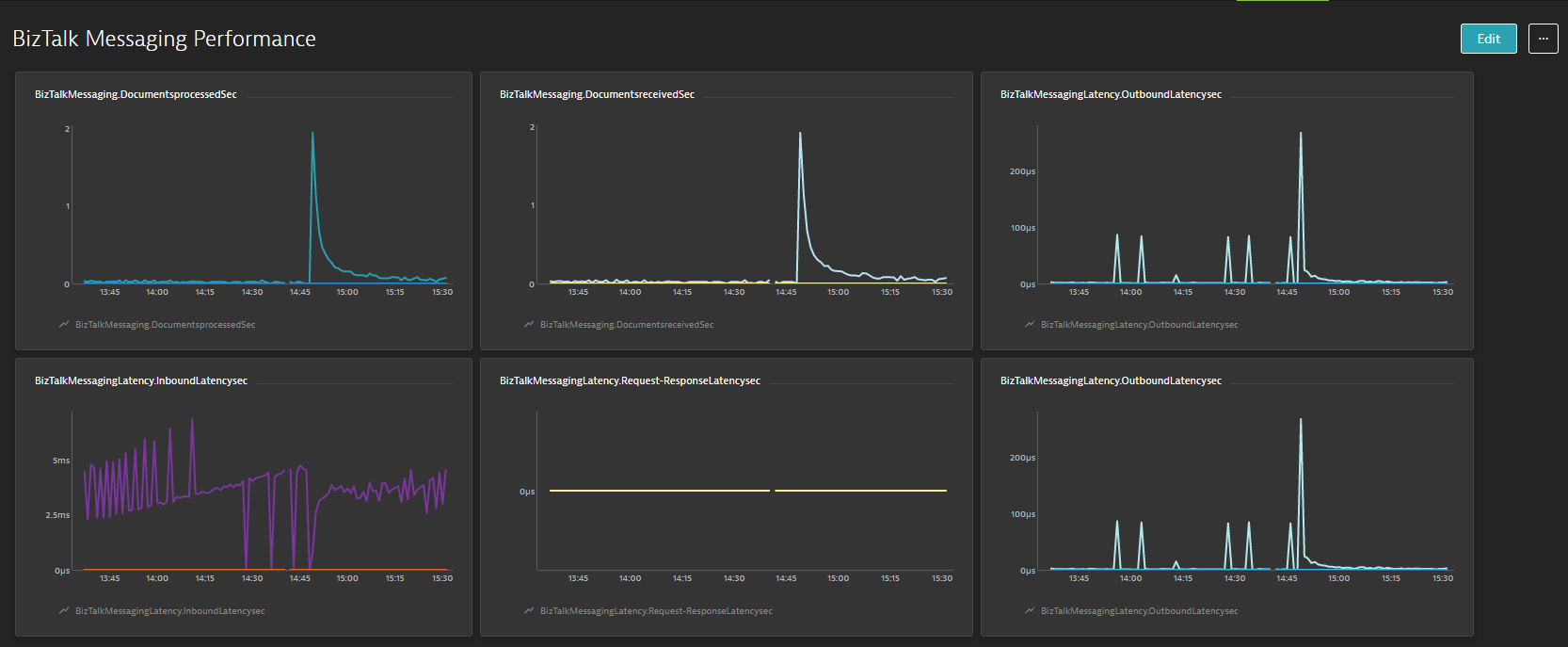
BizTalk Messaging Performance
- BizTalk Host Performance
- Documents Receive/Second
- Documents Processed/Second
- Inbound Latency (Sec)
- Outbound Latency (Sec)
- Outbound Adapter Latency (Sec)
- Request -Response Latency
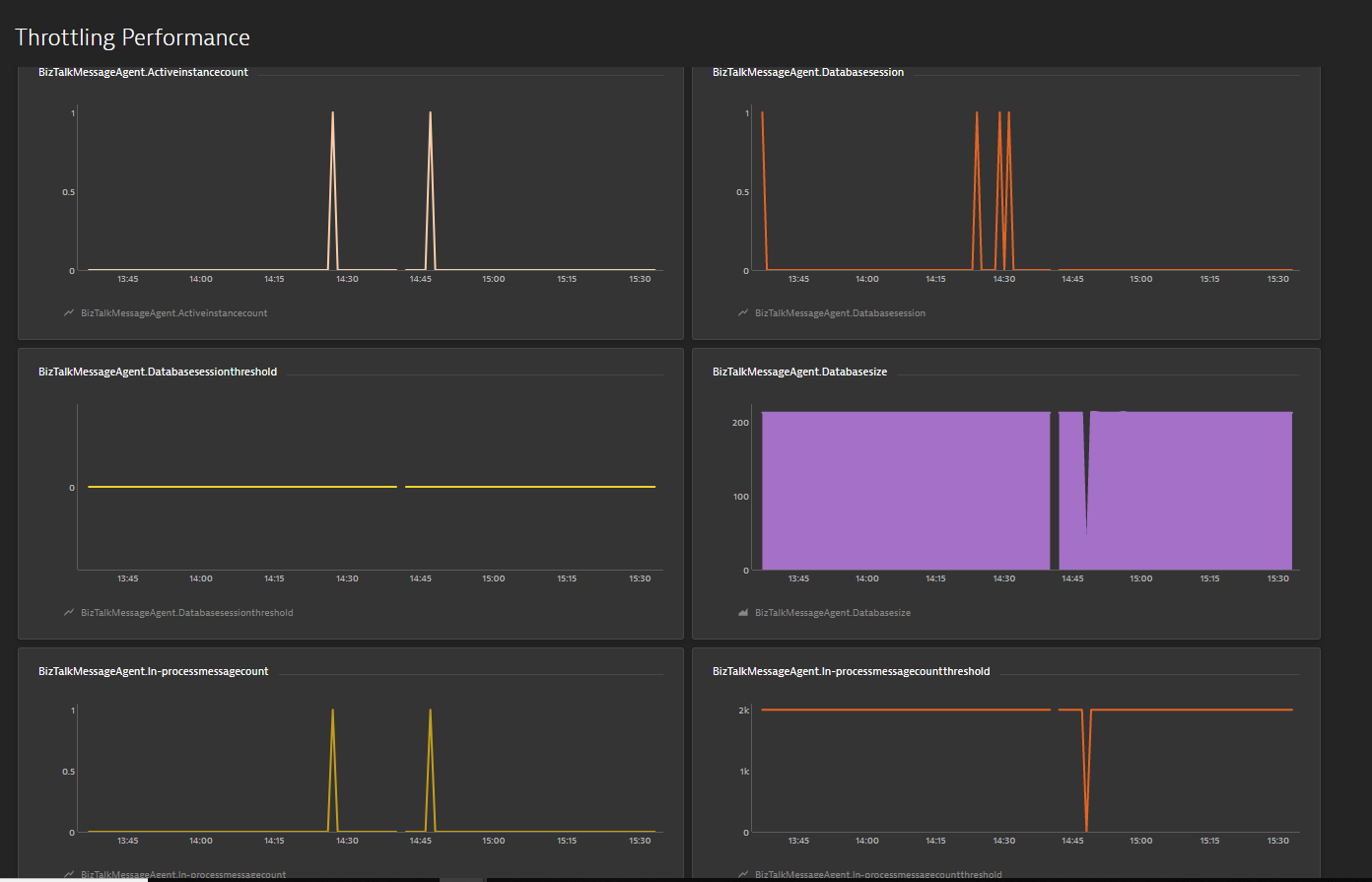
Throttling Performance
- Message delivery Throttling State
- Message Publishing Throttling State
- Message Delivery Outgoing Rate
- Message Delivery Incoming Rate
- Active Instance Count
- Database Size
- Database Session
- Database Session Threshold
- In-Process message Count
- In-Process Message Count threshold
- Message publishing incoming Rate
- Message Publishing Outgoing Rate
Conclusion
Considering the feedback from our customers, BizTalk360 will continue to provide more useful features in every release. Why not give BizTalk360 a try! It takes about 10 minutes to install on your BizTalk environments and you can witness and check the security and productivity of your own BizTalk environments.
The post Integrate BizTalk Performance data with Dynatrace from BizTalk360 appeared first on BizTalk360.
by Gautam | Aug 11, 2019 | BizTalk Community Blogs via Syndication
Do you feel difficult to keep up to date on all the frequent updates and announcements in the Microsoft Integration platform and Azure iPaaS?
Integration weekly update can be your solution. It’s a weekly update on the topics related to Integration – enterprise integration, robust & scalable messaging capabilities and Citizen Integration capabilities empowered by Microsoft platform to deliver value to the business.
If you want to receive these updates weekly, then don’t forget to Subscribe!
Microsoft Announcements and Updates
Community Blog Posts
Videos
Podcasts
How get started with iPaaS design & development in Azure?
- Robust Cloud Integration with Azure
- Microsoft Azure for Developers: What to Use When
- Serverless Computing: The Big Picture
- Azure Logic Apps: Getting Started
- Azure Logic Apps: Fundamentals
- Microsoft Azure Developer: Creating Enterprise Logic Apps
- Microsoft Azure API Management Essentials
- Azure Functions Fundamentals
- Cloud Design Patterns for Azure: Availability and Resilience
- Architecting for High Availability in Microsoft Azure
Feedback
Hope this would be helpful. Please feel free to reach out to me with your feedback and questions.


 to Transform Legacy Health Data into FHIR