by Lex Hegt | Apr 18, 2018 | BizTalk Community Blogs via Syndication
This blog is a part of the series of blog articles we are publishing on the topic “Why we built XYZ feature in BizTalk360“.
Why do we need this feature?
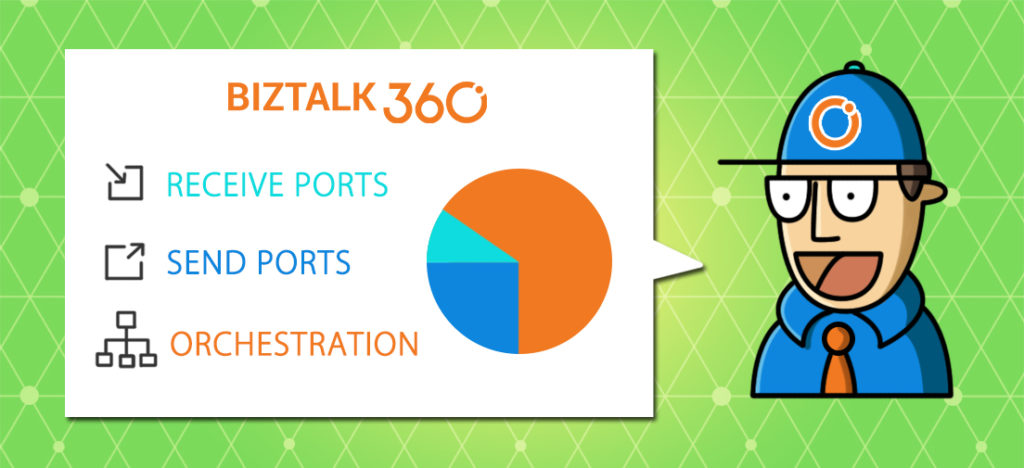
Microsoft BizTalk Server is a powerful middleware product which allows integrating all kind of information systems, independent of whether these systems are on-premise or in the cloud. BizTalk Server uses Receive and Send ports to communicate with a broad set of on-premise/cloud systems, both on the technology level (FILE, FTP, POP3, SMTP, etc.) as on the business level (ERP, CRM, etc.).
Besides just receiving and transmitting messages, BizTalk solutions might also contain Orchestrations, which can process all kind of business logic, for example, Order processing, Credit card validation, Claims processing etc.
As BizTalk Server is very scalable, a BizTalk environment can contain many deployments for all kind of different integrations. All together a BizTalk environment may contain hundreds of ports and orchestrations. The well-being of these artifacts is of vital importance to have the integrations working properly. When not running properly, these interruptions may cause serious damage to the business processes they support.
What are the current challenges?
To be well aware of the state of the BizTalk artifacts, the BizTalk administrator needs to consult the BizTalk Administration console multiple times per day. However, there are few challenges when depending on the BizTalk Administration console for checking the state of these artifacts.
Access to the Administration console – Often, the BizTalk Administration console is only installed on the BizTalk servers. Besides that there is the risk of unintended damaging the BizTalk server while accessing the server, you need to be authorized to access the servers. Not to be forgotten, is the fact that it constantly takes time to setup Remote Desktop connections to access the BizTalk server and the Administration console. Time which can easily be used for something more tangible.
Not suited for less experienced administrators – The Administration console is such a powerful tool, which is great when you are an experienced BizTalk Administrator. However, in the hands of less experienced administrators, unintentionally a lot of damage can be done. Think of for example stopping ports or terminating processes!
Not an efficient way of monitoring – Checking the state of the ports and orchestrations manually, multiple times per day, is just not efficient. It can easily be forgotten in the rush of the day, thereby putting the wellbeing of your integrations at stake.
Too many artifacts to monitor efficiently – BizTalk environments can contain hundreds of ports and orchestrations. In most scenarios, the artifacts should be in the Enabled/Started state. But there can be several reasons why certain artifacts are not in the expected state. Just to mention a few:
- After the deployment of an update of a BizTalk application the artifacts are in a wrong state
- Due to a temporary maintenance window, some of the artifacts need not be in the Enabled/Started state, to prevent suspended instances
- Artifacts might be Disabled as a result of a temporary outage
- Certain artifacts need only be Enabled/Started as a fall back scenario
By the given examples, it must be clear, that it can be very challenging to constantly be aware of the desired state of all the artifacts. This makes it hard to manually monitor the state of the artifacts in an efficient way.
Instead of having to monitor BizTalk manually, it is much more efficient to have automated, state-bound, artifact monitoring. Automated BizTalk monitoring will prevent you of constantly having to check for the state manually, enabling you to spend your time on more important activities. In the next section, we’ll show which features BizTalk360 has, to allow you to automatically monitor your BizTalk artifacts.
How BizTalk360 solves this problem?
To give you that comforting feeling that you are in control over the state of your ports and orchestrations, BizTalk360 provides multiple features.
Threshold Monitoring – While using the concept of Threshold Monitoring, BizTalk360 allows you to setup state-bound monitoring. This means that you can easily setup monitoring to have the product check for the Expected state of your ports and orchestrations.
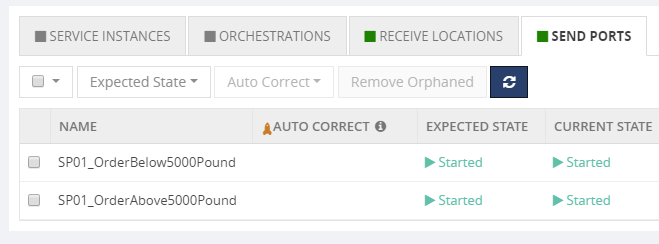
In above screenshot, you can see how some Send Ports are being monitored against their Expected State. Once, the Current State deviates from the Expected State, a threshold violation has occurred and BizTalk360 will notify you of that fact.
Positive and Negative monitoring – In most scenarios, the Expected State of your Ports and Orchestrations will be Enabled/Started; which is called Positive Monitoring. However, there might be valid reasons that certain ports/orchestrations need NOT be Enabled/Started. Setting up that kind of monitoring is called Negative Monitoring. BizTalk360 allows to setup for both Positive and negative Monitoring.
Receiving Notifications via multiple channels – Once a threshold violation has occurred, by default, you will receive notifications by email. Moving forward, BizTalk360 also allows you to receive notifications via multiple other channels.
We are constantly considering new ways to send notifications, but currently, the following Notification Channels are provided out-of-the-box: Email, SMS, Event Log, Slack, Microsoft Teams, ServiceNow, HP Operations Manager, Webhook. In addition, you can build your own custom notification channel like writing to a database, calling an internal system etc.
Auto Correct – BizTalk360 not just monitors your artifacts, it can also try to bring the artifacts back to their Expected state, once there is a mismatch between the Current State and the Expected State. Think of for example that FTP Receive Location which goes down at night or during the weekend.
The Auto-Correct feature works for the following artifacts:
- Receive Locations
- Orchestrations
- Send Ports
- BizTalk Host Instances
- Windows NT Services
- SQL Server Agent Jobs
- Azure Logic Apps
There is an extensive article on BizTalk360 Auto correct, which also explains in which kind of scenarios this feature comes at hand. You can that article here:
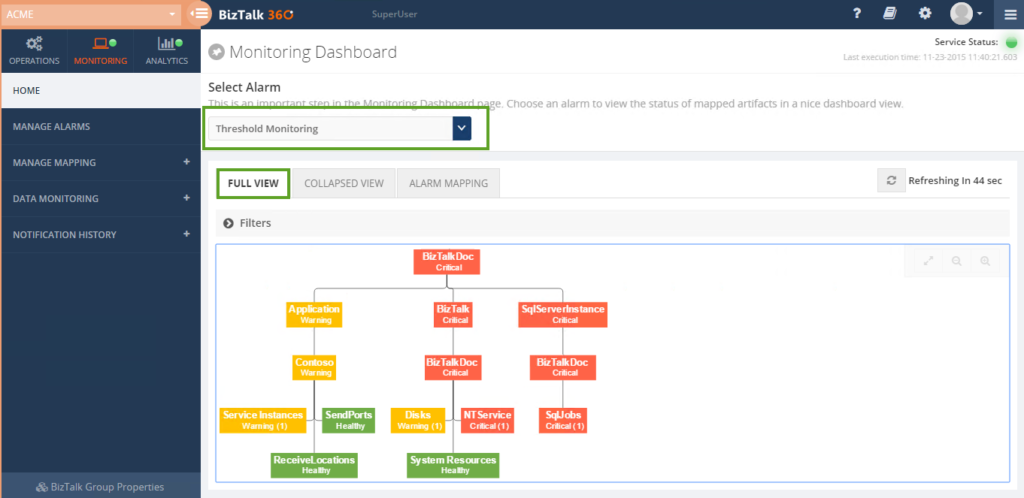
Monitoring Dashboard – Although receiving notifications of any mismatches between the Current State and the Expected State is very handy, it will equally be handy to have a large screen, at for example the Support Desk, which simply shows the current health of your artifacts. For this, we bring the Monitoring Dashboard, which does exactly that.
As you can see from below screenshot, it brings you a nice Expandable/Collapsible and filterable treeview, with automatic refresh, thereby constantly showing the current state of the artifacts.
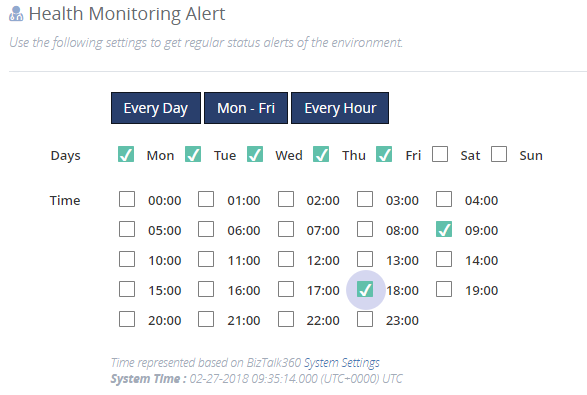
Health Check Reports – Last but not least, are the Health Check Reports you can receive at your convenient timing. These reports function as your daily health check, providing you with an overview of the state of all the artifacts from your alarm. Very handy to receive for example at the beginning of your working day!
Conclusion
In this article, we have seen why being aware of the state of your ports and orchestrations is important. We have also seen why manually monitoring that state is very inefficient and sometimes very complex. As a company which knows these challenges from our own experiences, we have brought multiple features which will help the BizTalk administrator being in control, without having to manually check the state.
Get started with a Free Trial today!
Download and try BizTalk360 on your own environments free for 30 days. The installation will not take more than 5-10 minutes.
Author: Lex Hegt
Lex Hegt works in the IT sector for more than 25 years, mainly in roles as developer and administrator. He works with BizTalk since BizTalk Server 2004. Currently he is a Technical Lead at BizTalk360. View all posts by Lex Hegt

by Sandro Pereira | Apr 17, 2018 | BizTalk Community Blogs via Syndication
Microsoft Integration, Azure, BAPI, Office 365 and much more Stencils Pack it’s a Visio package that contains fully resizable Visio shapes (symbols/icons) that will help you to visually represent On-premise, Cloud or Hybrid Integration and Enterprise architectures scenarios (BizTalk Server, API Management, Logic Apps, Service Bus, Event Hub…), solutions diagrams and features or systems that use Microsoft Azure and related cloud and on-premises technologies in Visio 2016/2013:
- BizTalk Server
- Microsoft Azure
- Azure App Service (API Apps, Web Apps, Mobile Apps and Logic Apps)
- Event Hubs, Event Grid, Service Bus, …
- API Management, IoT, and Docker
- Machine Learning, Stream Analytics, Data Factory, Data Pipelines
- and so on
- Microsoft Flow
- PowerApps
- Power BI
- PowerShell
- Infrastructure, IaaS
- Office 365
- And many more…

What’s new in this version?
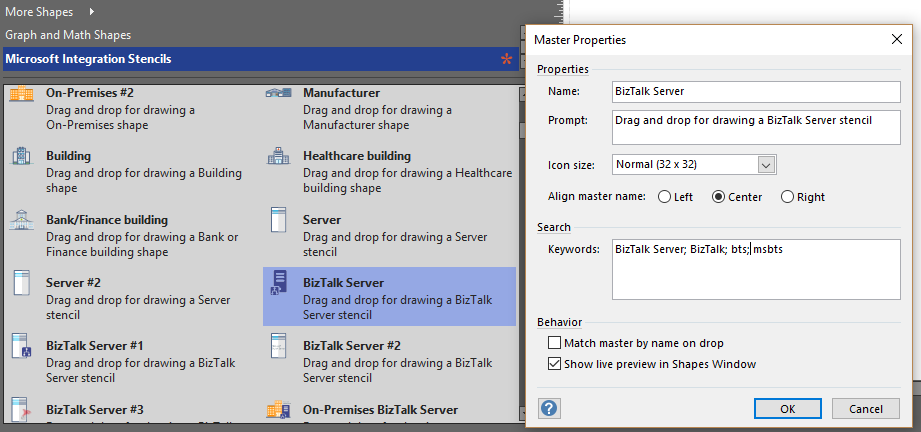
With the growing number of stencils in this package, it was becoming hard to find or look for the right shape/representation and based on some feedback I received from the community and some tips, I focused most of the work in this new version in providing search capacity to this package, but it wasn’t the only one:
- Search Capabilities: Defining the correct metadata information and keywords for all the shapes for a better search functionality.
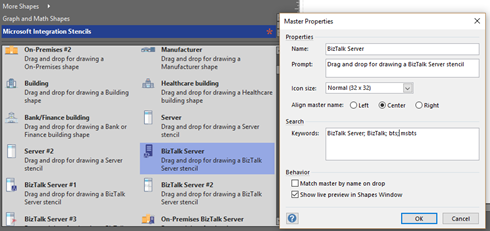
- New shapes: of course, that has happened in all other versions, new shapes were added, in particular: Generic, Microsoft Flow and PowerApps shapes
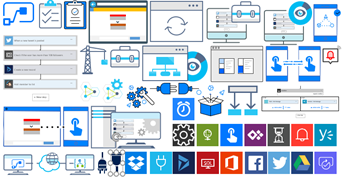

You can download Microsoft Integration, Azure, BAPI, Office 365 and much more Stencils Pack for Visio from:
 Microsoft Integration, Azure, BAPI, Office 365 and much more Stencils Pack for Visio (18,6 MB)
GitHub
Or from:
Microsoft Integration and Azure Stencils Pack for Visio 2016/2013 v3.1.0 (18,6 MB)
Microsoft | TechNet Gallery
The post New version of Microsoft Integration, Azure, BAPI, Office 365 and much more Stencils Pack for Visio is now available on GitHub appeared first on SANDRO PEREIRA BIZTALK BLOG.
by Gautam | Apr 15, 2018 | BizTalk Community Blogs via Syndication
Do you feel difficult to keep up to date on all the frequent updates and announcements in the Microsoft Integration platform?
Integration weekly update can be your solution. It’s a weekly update on the topics related to Integration – enterprise integration, robust & scalable messaging capabilities and Citizen Integration capabilities empowered by Microsoft platform to deliver value to the business.
If you want to receive these updates weekly, then don’t forget to Subscribe!
Microsoft Announcements and Updates
Community Blog Posts
Videos
Podcasts
Feedback
Hope this would be helpful. Please feel free to reach out and let me know your feedback on this Integration weekly series.

by Lex Hegt | Apr 11, 2018 | BizTalk Community Blogs via Syndication
This blog is a part of the series of blog articles we are publishing on the topic “Why we built XYZ feature in BizTalk360”.
Why do we need this feature?
In the day to day activities of a BizTalk administrator, you might come across integrations where FTP sites are used for receiving and transmitting messages. FTP sites are often used for cross-platform integrations. For example, when you have an SAP system on Unix that has to be integrated, via BizTalk Server, with other systems, you might use FTP for receiving and transmitting of messages.
SFTP & FTPS are just the secured version of FTP with advanced transport encryption mechanisms, so your end-to-end data transmission is secure and safe.
To keep the business process going, it can be of vital importance that the FTP/SFTP sites are online and the messages are being picked up. So, when a BizTalk administrator needs to be constantly aware whether the FTP/SFTP sites are online and working properly, the administrator needs to monitor the sites and the activities which take place on these sites.
What are the current challenges?
BizTalk Server offers no monitoring capabilities, not for Receive Locations / Send Ports and also not for endpoints like FTP, SFTP and FTPS sites. So, using just the out-of-the-box features of BizTalk Server, a BizTalk administrator will have to manually check whether the FTP sites are online and whether all (appropriate) files are being picked up for further processing.
Manual monitoring
This kind of manual monitoring can be quite cumbersome and time-consuming. The administrator will probably use multiple pieces of software to be able to perform these tasks. Think of for example the BizTalk Administration console to check whether the Receive Locations/Send Ports are up and some FTP client to check whether files are being picked up.
It is obvious that this is not a very efficient scenario, which could easily be automated by setting up monitoring.
Maintaining scripts for monitoring FTP sites
To reduce their workload, we experience that BizTalk administrators are creating their own scripts to monitor FTP sites and all kind of other resources. Although this kind of scripts certainly can be of help, we still think this does not fully solve the problem.
For example, often these kinds of scripts need maintenance when FTP sites need to be added, changed or deleted from monitoring. This kind of tasks can be easily forgotten.
Also from a knowledge transfer perspective, it’s easy to forget to update new colleagues about the existence of this kind of scripts, as they will probably be installed on some (monitoring) server.
Another challenge with solving this kind of problems with scripts is that not each administrator is capable to write this kind of scripts, which makes knowledge transfer even harder.
To keep the overview, we think that it is easier to use software, like BizTalk360, to have everything in one easily accessible place, with good visibility of all the features/capabilities, fine-grained security/auditing and without the need to maintain custom scripts etc..
How BizTalk360 solves this problem?
With BizTalk360, we make monitoring of FTP/SFTP/FTPS sites a lot easier. For a very long time, the product offers monitoring of Receive Locations and Send Ports, but for some time now, BizTalk360 also offers to monitor of the physical FTP/SFTP/FTPS endpoints.
We wanted to make setting up this kind of endpoint monitoring as seamless as possible and therefore we simply show all the ports in the current BizTalk group which make use of the FTP/SFTP/FTPS adapter.
In BizTalk360, you can find FTP monitoring under Monitoring => Manage Mapping => File Locations (File, FTP, SFTP).
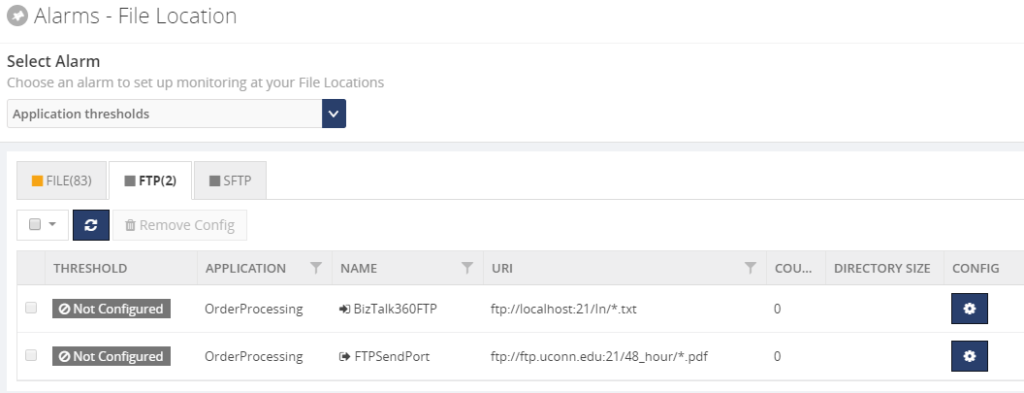 Next, you can set up monitoring rules based on File Count and Directory Size and have BizTalk360 send Warning or Error notifications through the notification channels which are configured on the associated alarm.
A fully monitored FTP endpoint might look like shown below.
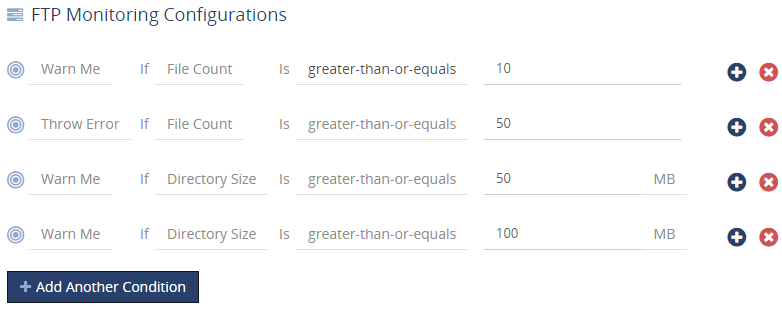
Of course, besides the greater-than-or-equals operator, also other common operators are available.
Conclusion
As a final point, we see from time to time that administration teams maintain a administrators handbook, which contains all the tasks a (BizTalk) administrator should take care of. We think that by using software like BizTalk360, we can reduce the number of pages in such handbooks, as the kind of scripts we mentioned no more have to be described in that kind of books.
This description could be replaced by, for example, a general guideline on how FTP sites should become monitored and the monitoring rules with BizTalk360.
As a result, we hope to make the work of BizTalk administrators a bit easier so the team can focus on the more exciting parts of the job of BizTalk administrators, instead of constantly having to update their handbooks.
So, we think that we make the day to day life of a BizTalk administrator, who needs to monitor the well-being of FTP sites, a little bit easier by bringing this feature.
If you want to read more on FTP/SFTP monitoring in much more detail, you can check the following article:
FTP, FTPS, SFTP Location monitoring
BizTalk360 also offers an advanced monitoring capability called “Data Monitoring” which allows monitoring the traffic/volume of messages going through the ports for a given period, ex: expected 50 PO orders from our partner via FTP/SFTP. Please check out this article. Introducing BizTalk Server Data Monitoring in BizTalk360
Get started with a Free Trial today!
Download and try BizTalk360 on your own environments free for 30 days. Installation will not take more than 5-10 minutes.
Author: Lex Hegt
Lex Hegt works in the IT sector for more than 25 years, mainly in roles as developer and administrator. He works with BizTalk since BizTalk Server 2004. Currently he is a Technical Lead at BizTalk360. View all posts by Lex Hegt
by Gautam | Apr 8, 2018 | BizTalk Community Blogs via Syndication
Do you feel difficult to keep up to date on all the frequent updates and announcements in the Microsoft Integration platform?
Integration weekly update can be your solution. It’s a weekly update on the topics related to Integration – enterprise integration, robust & scalable messaging capabilities and Citizen Integration capabilities empowered by Microsoft platform to deliver value to the business.
If you want to receive these updates weekly, then don’t forget to Subscribe!
Microsoft Announcements and Updates
Community Blog Posts
Videos
Podcasts
Feedback
Hope this would be helpful. Please feel free to reach out and let me know your feedback on this Integration weekly series.

by Lex Hegt | Apr 4, 2018 | BizTalk Community Blogs via Syndication
This blog is a part of the series of blog articles we are publishing on the topic “Why we built XYZ feature in BizTalk360”. Read the main article here.
Why do we need this feature?
On a daily base, our customers use BizTalk360 for a lot of their activities related to BizTalk operations and monitoring. However, in a number of scenarios, BizTalk administrators are faced with activities which need to be automated, for example: during the deployment of BizTalk Applications. It is easy to forget some tasks and doing them manually can be error-prone. So, it may be better to address such challenges in an automated way.
Here are some example automation scenarios in that can happen in your BizTalk Server environment
BizTalk Server Operations
- You might want to automatically stop certain Ports over the weekend, because of regular or temporary maintenance of internal or external systems
- External systems, like portals, might need BizTalk data/metrics on a regular basis, like information around EDI transactions, BizTalk usage or BizTalk performance metrics
- You want particular users to have easy access to download links for the messages of suspended instances, without having to give them access to BizTalk Server and/or BizTalk360
- You may want to Deploy/Publish a Business Rule Policy at a particular moment (additional discounts for the holiday season or laws to which should be complied as of a particular moment)
BizTalk Applications Maintenance and Deployment
- Before or after deployment of BizTalk Applications, you may want to automatically stop and start Host Instances
- After a deployment, you may want to set certain ports/orchestrations to a particular state
- You want to bring BizTalk down at a given date and time, due to system maintenance
Identity and Access Management
- Your organisation uses tooling for Identity and Access Management and you want to automatically create User Access Policies for accessing BizTalk360 and BizTalk
- For auditing purposes, you need to provide user lists and profiles and audit information on a regular bases
Because of the nature of this kind of scenarios, the administrators would need programmatically access to BizTalk server and rely on command files or PowerShell scripts to be able to fulfil the requirements.
What are the current options and challenges?
BizTalk Server comes with different tooling for programmatic access to BizTalk Server. This tooling is described below.
WMI and ExplorerOM
Let’s briefly discuss the purpose of both WMI and ExplorerOM:
- WMI (Windows Management Instrumentation) – an infrastructure, which comes with Windows, and which allows you to automate administrative tasks on (remote) computers. BizTalk Server comes with its own WMI management pack to do preliminary management activities like starting/stopping host instances, restarting ports etc.
- ExplorerOM – a DLL used to perform all kind of BizTalk Application related tasks like exploring the schemas, maps, orchestrations, operating on them like starting/stopping etc.
BizTalk PowerShell Provider
There is also a community initiative to provide a BizTalk PowerShell provider so you can execute some of the management tasks using PowerShell (since PS has become the core of any automated administrative tasks). However, the project is not actively maintained anymore and it’s not advisable to rely on this for any critical usage.
BizTalk Server 2016 Feature Packs
Starting with BizTalk Server 2016, Microsoft started to release Feature Packs. With the first Feature Pack (BizTalk Server 2016 Feature Pack 1). a unified API became available for BizTalk Server 2016 (not for earlier versions).
This Management API enables you to perform some of the scenarios which we mentioned in the first paragraph but still lacks API’s to do extensive automation. For example, stop and start host instances.
So, although BizTalk Server comes with multiple capabilities for programmatic access to BizTalk Server, writing and testing all kind of scripts is time-consuming and not all scenarios can be covered.
Even when these custom scripts seem to work nicely, non-functional requirements, like security, auditing and logging, are not taken into account in these kinds of scripts. This would leave you in the dark when something unexpected happens. Definitely, not a scenario where you want to be.
How BizTalk360 solves this problem?
BizTalk360 consists of multiple components, a responsive user interface, few backend services and a rich API service layer.
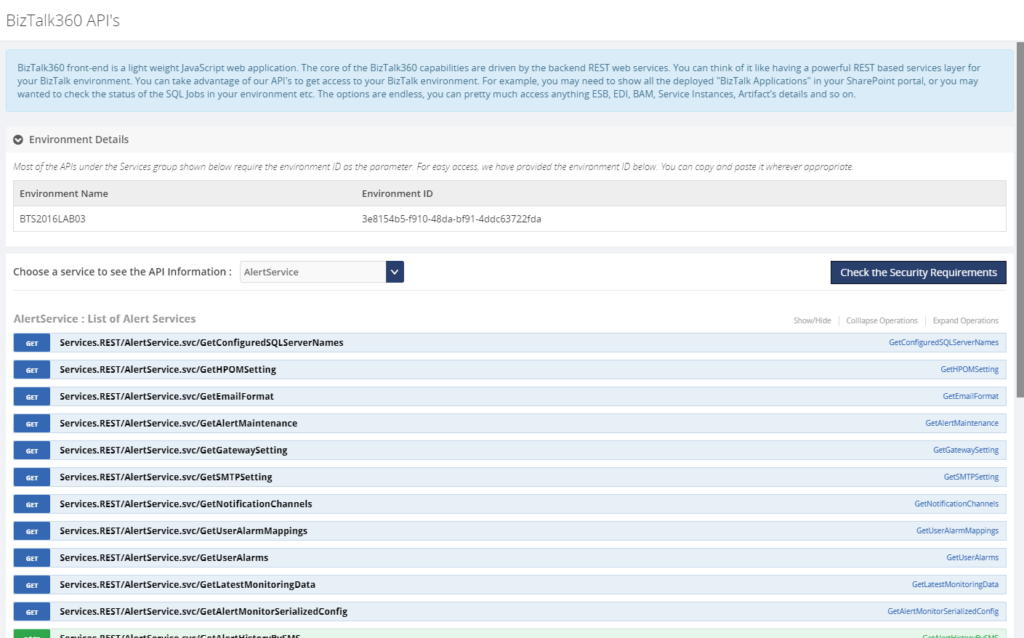
The API service layer consists of over 400 REST API operations. The user interface of BizTalk360 uses these extremely rich API’s to perform all the tasks to manage the BizTalk environment.
A couple of years ago, we thought, exposing our API’s will hugely help BizTalk Server Administrators to automate most of their routine activities we mentioned in the beginning. Hence we documented all the BizTalk360 API’s (which are of course the management and monitoring API’s for your BizTalk Environment) using swagger and live test within the BizTalk360 application.
The API currently contains 14 services with more than 400 API operations, covering a breath of management activities you can do on your BizTalk Environment. To give you a better understanding of the capabilities, these services are:
- ActivityMonitoringService – BAM related services
- BizTalkQueryService – Execute all kind of MessageBox and Tracking oriented queries
- AlertService – All kind of Monitoring related API’s
- BizTalkGroupService – BizTalk Platform oriented API’s
- SchedulerService – Data Monitoring Scheduler related API’s
- ESBManagementService – Exception Management related API’s
- AdvancedEventViewerService – API’s to query the Eventlog entries which are collected by the Advanced Event Viewer feature
- BizTalkApplicationService – Search for and action on BizTalk Application artifacts
- AdminService – Get and maintain all kind of settings within BizTalk360
- EDIManagementService – Get/Set EDI configuration and get EDI statistics
- EnvironmentMgmtService – API’s mainly for Knowledge Base and Dashboard management
- RulesEngineService – API’s for maintenance of Business Rules
- AnalyticsDataService – Analytics, Message Patterns and Throttling related API’s
- AzureService – Get/Operate on Logic Apps and get Integration Account artifacts
With the API you cannot just retrieve information from BizTalk via GET operations, but you can also action on BizTalk Server, BizTalk360 and even certain Azure services via POST operations.
Each API can be tried from the API documentation, which comes with a Swagger definition file, by using the Try it out! feature. This helps you testing with the required parameters. All you need to do is to choose the needed API, provide the needed parameters for the API, click the Try it out! button and view the results.
Let’s have a look at few examples of how you could make use of the API.
- Stop and start Host instances before and after deployment of BizTalk applications
- Disable/Enable Receive Locations and/or Stop/Start Orchestrations/Send Ports
- Get a list of currently deployed BizTalk Applications for Support purposes
- Get Event Log data of all the BizTalk servers in one go
- Get Throttling data from the BizTalk Hosts
- Get all kind of Performance metrics of your BizTalk system
- Test, Deploy, Undeploy and Publish Business Rules
- Disable/Enable BizTalk360 alarms during deployments
- Show data in an Operations Dashboard widget, for example, the state of your SQL jobs
- Automatically create BizTalk360 alarms during deployment of BizTalk applications
Conclusion
By using the BizTalk360 API and its documentation, the complexity from WMI and ExplorerOM is shielded from the user. Besides being able to act on BizTalk, the API also allows you to action on BizTalk360. You can even show the output of API calls in the Operations Dashboard!
Few examples of how the BizTalk360 API`s can be used in real-world scenarios: Automate Monitoring Alarm creation in BizTalk360
If you are using BTDF (BizTalk Deployment Framework) we have a wrapper console application called BT360Deploy that can be used to automate certain tasks like creating monitoring alerts during deployment. The project can be accessed here.
Get started with a Free Trial today
Why not give BizTalk360 a try. It takes about 10 minutes to install on your BizTalk environments and you can witness the benefits of auto-healing on your own BizTalk Environments. Get started with the free 30 days trial.
The post Why did we expose all of our BizTalk Operations and Management REST API’s? appeared first on BizTalk360.
by Gautam | Apr 1, 2018 | BizTalk Community Blogs via Syndication
Do you feel difficult to keep up to date on all the frequent updates and announcements in the Microsoft Integration platform?
Integration weekly update can be your solution. It’s a weekly update on the topics related to Integration – enterprise integration, robust & scalable messaging capabilities and Citizen Integration capabilities empowered by Microsoft platform to deliver value to the business.
If you want to receive these updates weekly, then don’t forget to Subscribe!
- Biztalk Developer InfoLogitech Inc Chicago, IL, US
- BizTalk Developer – Contract to Hire Sterling 5, Inc. Chicago, IL, US
- Biztalk Developer (Locals Only) ANR, the French National Research Agency Chicago, IL, US
- BizTalk Consultant with Technosoft Not Just a Job Search Nashville, TN, US
- Biztalk Developer | Nashville, TN with Pindi Solutions LLC Not Just a Job Search Nashville, TN, US
Feedback
Hope this would be helpful. Please feel free to reach out and let me know your feedback on this Integration weekly series.

by Dan Toomey | Mar 30, 2018 | BizTalk Community Blogs via Syndication
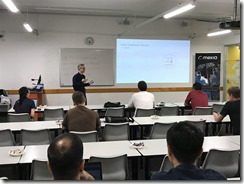 Last Saturday I had the great privilege of organising and hosting the 2nd annual Global Integration Bootcamp in Brisbane. This was a free event hosted by 15 communities around the globe, including four in Australia and one in New Zealand!
It’s a lot of work to put on these events, but it’s worth it when you see a whole bunch of dedicated professionals give up part of their weekend because they are enthusiastic to learn about Microsoft’s awesome integration capabilities.
The day’s agenda concentrated on Integration Platform as a Service (iPaaS) offerings in Microsoft Azure. It was a packed schedule with both presentations and hands-on labs:
It wasn’t all work… we had some delicious morning tea, lunch and afternoon tea catered by Artisan’s Café & Catering, and there was a bit of swag to give away as well thanks to Microsoft and also Mexia (who generously sponsored the event).
 Overall, feedback was good and most attendees were appreciative of what they learned. The slide decks for most of the presentations are available online and linked above, and the labs are available here if you would like to have a go.
I’d like to thank my colleagues Susie, Lee and Adam for stepping up into the speaker slots and giving me a couple of much needed breaks! I’d also like to thank Joern Staby for helping out with the lab proctoring and also writing an excellent post-event article.
Finally, I be remiss in not mentioning the global sponsors who were responsible for getting this world-wide event off of the ground and providing the lab materials:
- Martin Abbott
- Glenn Colpaert
- Steef-Jan Wiggers
- Tomasso Groenendijk
- Eldert Grootenboer
- Sven Van den brande
- Gijs in ‘t Veld
- Rob Fox
Really looking forward to next year’s event!
by Steef-Jan Wiggers | Mar 29, 2018 | BizTalk Community Blogs via Syndication
With technology changing fast and services in the cloud evolve more rapidly than their on-premise counterparts creating and updating content around those services becomes challenging. Microsoft Integration has expanded over the years from Grid their the on-premise offering BizTalk Server to multiple cloud services in Azure like Service Bus, Logic Apps, API Management, Azure Functions, Event Hubs, and Event.
Introduction
The server product BizTalk has numerous available content types like Microsoft Docs, Blog posts, online recordings, and presentations. Does this also apply to the mentioned Azure Services? Yes and no, because of the rapid change content is out-of-date fast and people creating the material have a hard time keeping up. At least for me, it’s a challenge to keep up and produce content.
The Questions
Do Integration minded people in the Microsoft ecosystem feel the same way as I feel? Or what’s there view about content? To find out I created in Google Docs. Furthermore, I sent out a few tweets and a LinkedIn post to encourage people to answer some Integration Content related questions. These questions are:
- What type of content do you value the most?
- What Integration Event has your preference?
- What online content in the integration space do you consume the most?
- What type integration focused content do you think is valuable for your work as integration professional?
- Have you attended Integrate London, a local user group meeting or the Global Integration Bootcamp?
- Does the Global Integration Bootcamp, Integrate London or the local integration focused user group provides value for you?
- Do have any comments or feedback on Microsoft Integration content?
With the questions above I hope to get a little glimpse into the expectations and thoughts people have with regards to integration content. That is what do they think about the existing content, what is do they appreciate, what content types and through what preferred channel.
The Outcome
The number of responses exceeded 50, which can be the representation of either one up to ten percent of the general population of people working in the integration space. At least that my assumption. However, assessing the actual representation, in the end, is hard. Anyways, let’s review the results of the questionnaire.
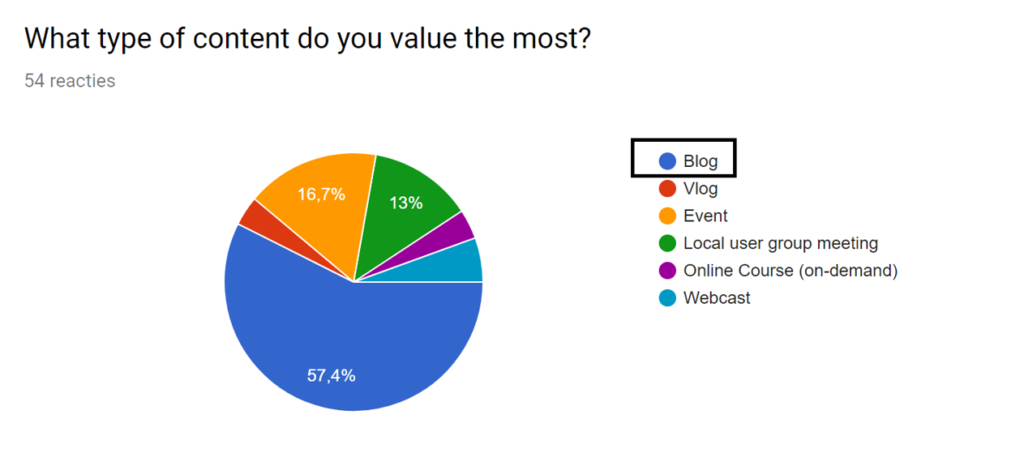
The first question was around what specific content type people value the most. And it appears that the majority of respondents still favors blogs, one of the older content types, before vlogs, webcasts, and video became more mainstream. Almost 60% favors blogs over any other content type.
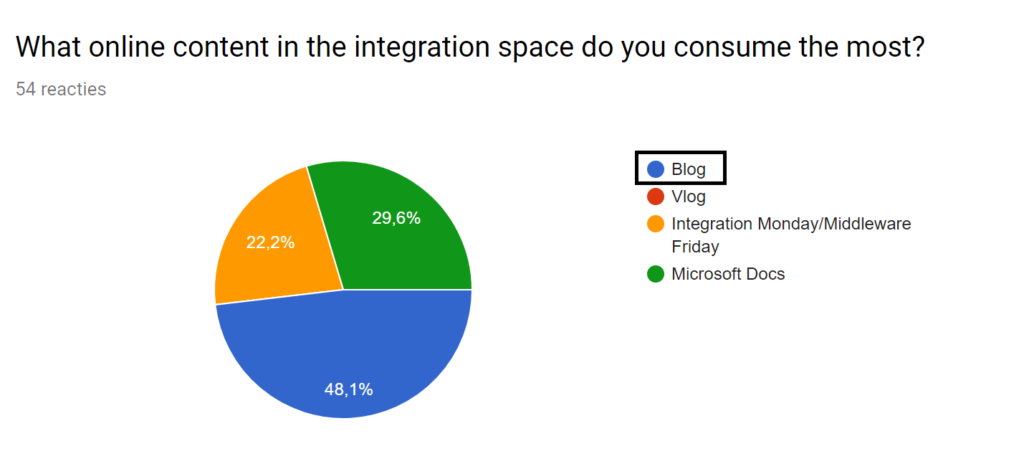
In line with the previous question is what content is consumed the most. The response correlates with what is valued. Moreover, static content is preferred over let’s say dynamic content like vlogs or on-line recordings like Integration Mondays or Middleware Fridays. I left out live Events and Channel 9 intentionally, to see how community content would be consumed. Note that Microsoft Docs is open for changes via GitHub, where the community contributes too. Thus this content type is partially maintained by the community.
With another question, I tried to see which event was preferred the most of the three we have available from an integration perspective. A global, centralized one like Integrate, a local user group, or a Global Integration Bootcamp on one day in various venues. Close to 50% favor Integrate London, while local user groups and the boot camp are around 25%.
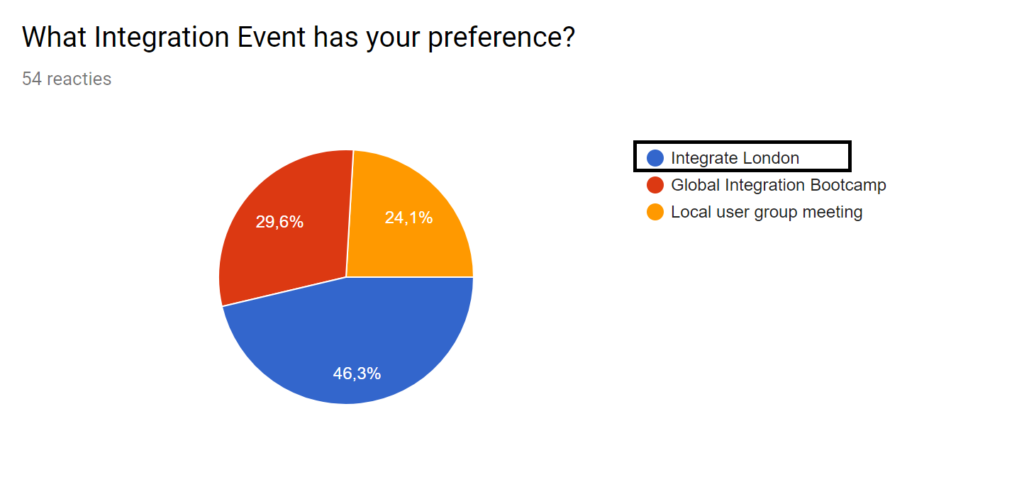
As a follow-up, I asked who attend any of these events or not. And most (>75%) respondents attended either a local user group, a Global Integration Boot camp or Integrate.
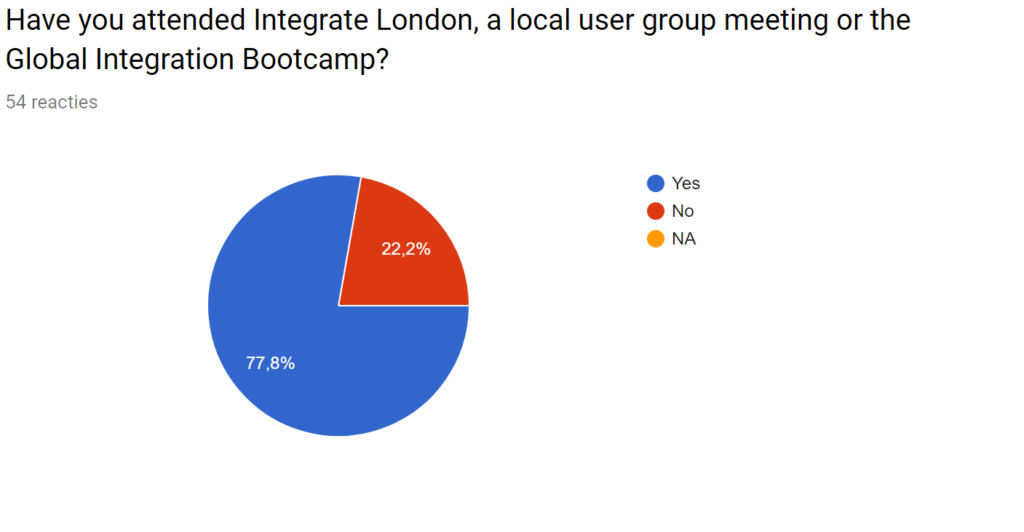
The other questions were open ones. Here, people could more specifically provide feedback on what content they value apart from the channel it is delivered through, and how much value an event is providing (if attended), and one more where people could provide more general feedback people about integration content.
Conclusions
Respondents have strong preferences for content around examples, use-cases (real-world), up-to-date content, architecture, design, and patterns. This feedback was expressed by many in the question “What type integration focused content do you think is valuable for your work as integration professional?”. Furthermore, the answers are reflected in the general feedback they could give about integration content. An example is in the following comments (feedback):
“I would like to see more of how companies are adopting the Azure platform. For instance, a medium to large enterprise integration employing Logic apps and service bus and they came up with the solution architecture, challenges faced, lessons learned.”
Or
“Docs are getting better and better, but finding the right content and keeping up with the release speed of Microsoft appears to be a challenge sometimes.”
With people attending events, the value lies in the opportunity for networking, see (new) content, and have interactions with peers in the fields, MVPs, and Microsoft. Generally, a local event, a boot camp, or a bigger event tend to be the right places to socialize, learn about new tech, and get a perspective on the integration ecosystem. This perceived view is reflected in the answers about the value of attending an event.
To conclude people have an overall satisfaction in content and how it is delivered. However, a clear demand for more up-to-date content online and practical guidance is requested by people for their day to day jobs as integrators.
Finally, I like to thank everyone for taking time to answer the questions.
Cheers,
Steef-Jan
Author: Steef-Jan Wiggers
Steef-Jan Wiggers is all in on Microsoft Azure, Integration, and Data Science. He has over 15 years’ experience in a wide variety of scenarios such as custom .NET solution development, overseeing large enterprise integrations, building web services, managing projects, designing web services, experimenting with data, SQL Server database administration, and consulting. Steef-Jan loves challenges in the Microsoft playing field combining it with his domain knowledge in energy, utility, banking, insurance, healthcare, agriculture, (local) government, bio-sciences, retail, travel, and logistics. He is very active in the community as a blogger, TechNet Wiki author, book author, and global public speaker. For these efforts, Microsoft has recognized him a Microsoft MVP for the past 8 years. View all posts by Steef-Jan Wiggers
by Howard Edidin | Mar 28, 2018 | BizTalk Community Blogs via Syndication
An Azure IoT Hub can store just about any type of data from a Device.
There is support for:
- Sending Device to Cloud messages.
- Invoking direct methods on a device
- Uploading files from a device
- Managing Device Identities
- Scheduling Jobs on single for multiple devices
The following is the List of of built-in endpoints
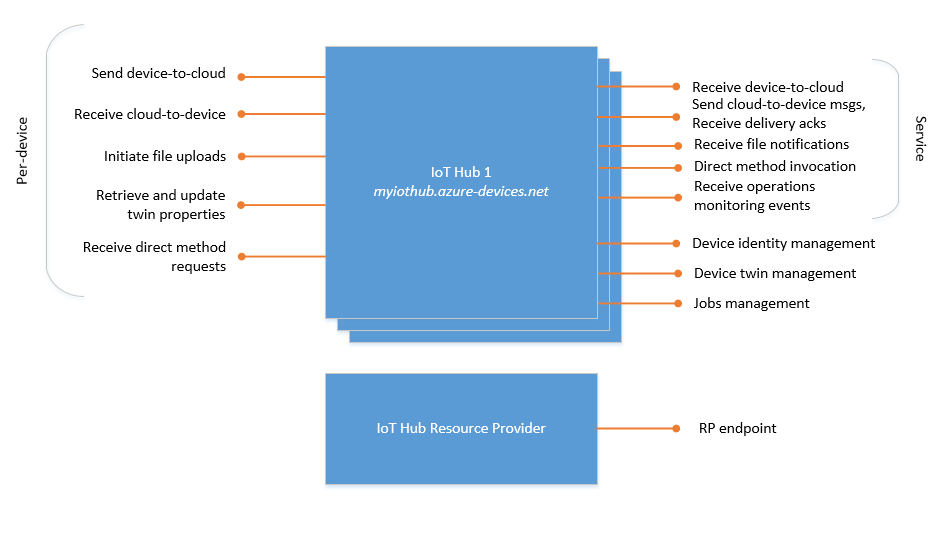
Custom Endpoints can also be created.
IoT Hub currently supports the following Azure services as additional endpoints:
- Azure Storage containers
- Event Hubs
- Service Bus Queues
- Service Bus Topics
Architecture
If we look through the documentation on the Azure Architecture Center, we can see a list of Architectural Styles.
If we were to design an IoT Solution, we would want to follow Best Practices. We can do this by using the Azure Architectural Style of Event Driven Architecture. Event-driven architectures are central to IoT solutions.
Merging Event Driven Architecture with Microservices can be used to separate the IoT Business Services.
These services include:
- Provisioning
- Management
- Software Updating
- Security
- Logging and Notifications
- Analytics
Creating our services
To create these services, we start by selecting our Compute Options.
App Services
The use of Azure Functions is becoming commonplace. They are an excellent replacement for API Applications. And they can be published to Azure Api Management.
We are able to create a Serverless API, or use Durable Functions that allow us to create workflows and maintain state in a serverless environment.
Logic Apps provide us with the capability of building automated scalable workflows.
Data Store
Having a single data store is usually not the best approach. Instead, it’s often better to store different types of data in different data stores, each focused towards a specific workload or usage pattern. These stores include Key/value stores, Document databases, Graph databases, Column-family databases, Data Analytics, Search Engine databases, Time Series databases, Object storage, and Shared files.
This may hold true for other Architectural Styles. In our Event-driven Architecture, it is ideal to store all data related to IoT Devices in the IoT Hub. This data includes results from all events within the Logic Apps, Function Apps, and Durable Functions.
Which brings us back to our topic… Considering Software as an IoT Device
Since Azure IoT supports the TransportType.Http1 protocol, we can use the Microsoft.Azure.Devices.ClientLibrary to send Event data to our IoT Hub from any type of software. We also have the capability of receiving configuration data from the IoT Hub.
The following is the source code for our SendEvent Function App.
SendEvent Function App
#region Information

//
//  MIT License
//
//  Copyright (c) 2018  Howard Edidin
//
//  Permission is hereby granted, free of charge, to any person obtaining a copy
//  of this software and associated documentation files (the "Software"), to deal
//  in the Software without restriction, including without limitation the rights
//  to use, copy, modify, merge, publish, distribute, sublicense, and/or sell
//  copies of the Software, and to permit persons to whom the Software is
//  furnished to do so, subject to the following conditions:
//
//  The above copyright notice and this permission notice shall be included in all
//  copies or substantial portions of the Software.
//
//  THE SOFTWARE IS PROVIDED "AS IS", WITHOUT WARRANTY OF ANY KIND, EXPRESS OR
//  IMPLIED, INCLUDING BUT NOT LIMITED TO THE WARRANTIES OF MERCHANTABILITY,
//  FITNESS FOR A PARTICULAR PURPOSE AND NONINFRINGEMENT. IN NO EVENT SHALL THE
//  AUTHORS OR COPYRIGHT HOLDERS BE LIABLE FOR ANY CLAIM, DAMAGES OR OTHER
//  LIABILITY, WHETHER IN AN ACTION OF CONTRACT, TORT OR OTHERWISE, ARISING FROM,
//  OUT OF OR IN CONNECTION WITH THE SOFTWARE OR THE USE OR OTHER DEALINGS IN THE
//  SOFTWARE.

#endregion

#region

using System;
using System.Collections.Generic;
using System.Configuration;
using System.Data.Services.Client;
using System.Net;
using System.Net.Http;
using System.Text;
using System.Threading.Tasks;
using Microsoft.Azure.Devices.Client;
using Microsoft.Azure.WebJobs;
using Microsoft.Azure.WebJobs.Extensions.Http;
using Microsoft.Azure.WebJobs.Host;
using Newtonsoft.Json;
using TransportType = Microsoft.Azure.Devices.Client.TransportType;

#endregion

namespace IoTHubClient
{
    public static class SendEvent
    {
        private static readonly string IotHubUri = ConfigurationManager.AppSettings["hubEndpoint"];

        [FunctionName("SendEventToHub")]
        public static async Task<HttpResponseMessage> Run(
            [HttpTrigger(AuthorizationLevel.Function, "post", Route = "device/{id}/{key:guid}")]
            HttpRequestMessage req, string id, Guid key, TraceWriter log)
        {
            log.Info("C# HTTP trigger function processed a request.");


            // Get request body
            dynamic data = await req.Content.ReadAsAsync<object>();

            var deviceId = id;
            var deviceKey = key.ToString();

            if (string.IsNullOrEmpty(deviceKey) || string.IsNullOrEmpty(deviceId))
                return req.CreateResponse(HttpStatusCode.BadRequest, "Please pass a deviceid and deviceKey in the Url");

            var telemetry = new Dictionary<Guid, object>();


            foreach (var item in data.telemetryData)
            {
                var telemetryData = new TelemetryData
                {
                    MetricId = item.metricId,
                    MetricValue = item.metricValue,
                    MericDateTime = item.metricDateTime,
                    MetricValueType = item.metricValueType
                };

                telemetry.Add(Guid.NewGuid(), telemetryData);
            }


            var deviceData = new DeviceData
            {
                DeviceId = deviceId,
                DeviceName = data.deviceName,
                DeviceVersion = data.deviceVersion,
                DeviceOperation = data.deviceOperation,
                DeviceType = data.deviceType,
                DeviceStatus = data.deviceStatus,
                DeviceLocation = data.deviceLocation,
                SubscriptionId = data.subcriptionId,
                ResourceGroup = data.resourceGroup,
                EffectiveDateTime = new DateTimeOffset(DateTime.Now),
                TelemetryData = telemetry
            };


            var json = JsonConvert.SerializeObject(deviceData);

            var message = new Message(Encoding.ASCII.GetBytes(json));


            try
            {
                var client = DeviceClient.Create(IotHubUri, new DeviceAuthenticationWithRegistrySymmetricKey(deviceId, deviceKey),
                    TransportType.Http1);

                await client.SendEventAsync(message);

                return req.CreateResponse(HttpStatusCode.OK);
            }
            catch (DataServiceClientException e)
            {
                var resp = new HttpResponseMessage
                {
                    StatusCode = (HttpStatusCode) e.StatusCode,
                    Content = new StringContent(e.Message)
                };
                return resp;
            }
        }
    }


    public class DeviceData
    {
        public string DeviceId { get; set; }

        public string DeviceName { get; set; }

        public string DeviceVersion { get; set; }

        public string DeviceType { get; set; }

        public string DeviceOperation { get; set; }

        public string DeviceStatus { get; set; }

        public DeviceLocation DeviceLocation { get; set; }

        public string AzureRegion { get; set; }

        public string ResourceGroup { get; set; }

        public string SubscriptionId { get; set; }

        public DateTimeOffset EffectiveDateTime { get; set; }

        public Dictionary<Guid, object> TelemetryData { get; set; }
    }

    public class TelemetryData
    {
        public string MetricId { get; set; }

        public string MetricValueType { get; set; }

        public string MetricValue { get; set; }

        public DateTime MericDateTime { get; set; }
    }

    public enum DeviceLocation
    {
        Cloud,
        Container,
        OnPremise
    }
}
Software Device Properties
The following values are required in the Url Path
Route = "device/{id}/{key:guid}")
| Name |
Description |
| id |
Device Id (String) |
| key |
Device Key (Guid) |
The following are the properties to be sent in the Post Body
| Name |
Description |
| deviceName |
Device Name |
| deviceVersion |
Device version number |
| deviceType |
Type of Device |
| deviceOperation |
Operation name or type |
| deviceStatus |
Default: Active |
| deviceLocation |
Cloud
Container
OnPremise |
| subscriptionId |
Azure Subscription Id |
| resourceGroup |
Azure Resource group |
| azureRegion |
Azure Region |
| telemetryData |
Array |
| telemetryData.metricId |
Array item id |
| telemetryData.metricValueType |
Array item valueType |
| telemetryData.metricValue |
Array item value |
| telemetryData.metricTimeStamp |
Array item TimeStamp |
Summary
- We can easily add the capability of sending messages and events to our Function and Logic Apps.
- Optionally, we can send the data to an Event Grid.
- We have a single data store for all our IoT events.
- We can identify performance issues within our services.
- Having a single data store makes it easier to perform Analytics.
- We can use a Azure Function App to Send Device to Cloud Messages. In this case our Function App will be also be taking the role of a Device.