by Gautam | Aug 20, 2018 | BizTalk Community Blogs via Syndication
Do you feel difficult to keep up to date on all the frequent updates and announcements in the Microsoft Integration platform?
Integration weekly update can be your solution. It’s a weekly update on the topics related to Integration – enterprise integration, robust & scalable messaging capabilities and Citizen Integration capabilities empowered by Microsoft platform to deliver value to the business.
If you want to receive these updates weekly, then don’t forget to Subscribe!
Feedback
Hope this would be helpful. Please feel free to reach out to me with your feedback and questions.
by Praveena Jayanarayanan | Aug 16, 2018 | BizTalk Community Blogs via Syndication
BizTalk360 is the One platform monitoring solution for BizTalk server. It only takes about 15 minutes to install the product and have it ready for use. The installation is very smooth and straightforward. During the installation, the web application, Monitoring and Analytics services and the database will be installed as per the selection of choice by the users.
One of the main advantage of the BizTalk360 installer is that you have the option to view the installer logs in case if there are any errors during the process. The installation log would contain the complete details of the installation steps, the service account details, the database connection string details etc. and of course the error details, if any.
Our BizTalk360 support team receive tickets from customers seeking assistance during the installation. In this blog, I would like to share an interesting case from a customer related to BizTalk360 installation.
The customer scenario
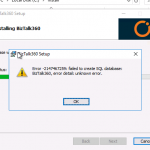
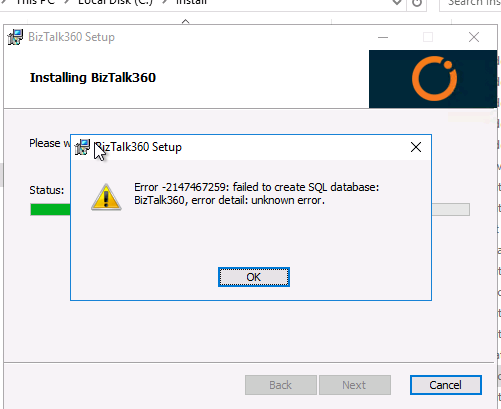
When the customer tried to install BizTalk360, they got below error in the creation of the BizTalk360 database step.
Here are the investigation steps
When the installer fails, our first step of investigation would be to check for the installation logs. In the logs, there was the following error message: Error 0x80004005: ‘failed to check if database exists’.
The next option would be to check for the permissions for the BizTalk360 service account in the SQL server hosting the BizTalk360 database. As a prerequisite for smooth installation of BizTalk360, the service account must be provided the db_owner permission for the BizTalk360 database. At the customer end, all the permissions were intact but still the error persisted. After a thorough analysis, we found the root cause to be with the TLS version installed in the servers.
Standards for securing communication
As database driven applications are increasing their hold on the systems market, the security of the retained information is also increasing. One way of mitigating a potential attack during a user’s session, would be to use a secure communication protocol to encrypt data in transit between the user and the server on which the sensitive information resides. Two of these communication protocols used are: Secure Sockets Layer (SSL) and Transport Layer Security (TLS).
SSL was first introduced by Netscape back in 1993-1994. The growth of the Internet was rising and so was the need for transport security. Today SSL/TLS is used in almost every conceivable online service. TLS is the protocol that allows digital devices (such as computers and phones) to communicate over the internet securely, without the transmission being vulnerable to an outside audience. The latest version of TLS is TLS1.2.
How did TLS hinder the installation of BizTalk360?
As per any organization’s security policy, they would be installing TLS protocol for more security. But do you think that this protocol would make the BizTalk360 installer to fail? How is that related to BizTalk360? Let’s move on to find the answer.
Let us consider the following setup for BizTalk360. Having a single BizTalk Server & standalone BizTalk360 environment, the setup will look like below.
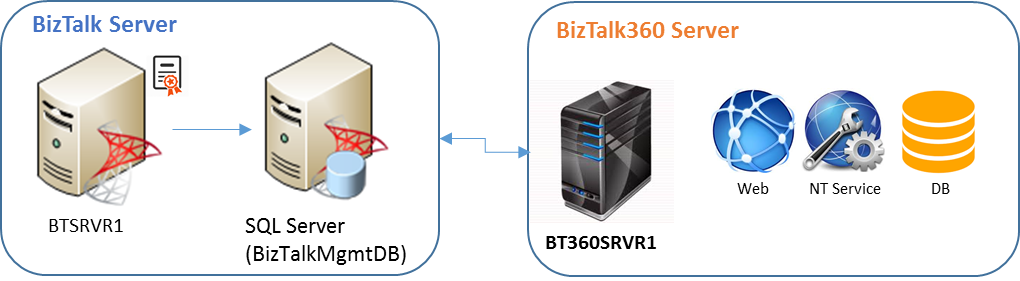
The BizTalk360 database may be hosted on a separate SQL Server as well. In that scenario, all the servers will have the TLS installed and they communicate with each other through the protocol. In some of the customers’ cases, where they disabled TLS 1.0 and enabled TLS 1.2, they had the difficulty in installing BizTalk360 as the database was not getting created. However, once TLS 1.0 was enabled and TLS1.2 disabled, the installation was successful with the database creation.
The different scenario of the customer
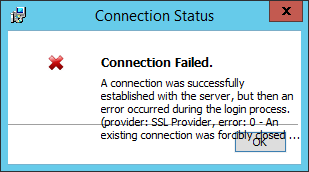
In another customer scenario, they were using the SQL Express Edition for hosting the BizTalk360 database. This is first time we have come across such a case with the SQL Server edition. At first, we suggested them to enable TLS1.0 and disable TLS1.2. But when TLS1.2 was disabled, they faced the error in connecting to the SQL Server as shown below.
We tried different options for enabling the TLS versions, but this did not solve the error at all. Let’s move ahead to know the real cause of the error and how we resolved it.
The WiX toolset and BizTalk360 installer
BizTalk360 installer uses the WiX toolset for the installation package and database creation. It seemed that there was no support for TLS 1.2 in the WiX toolset for the SQL Express edition. Hence it was not able to connect to the SQL Server for the database creation.
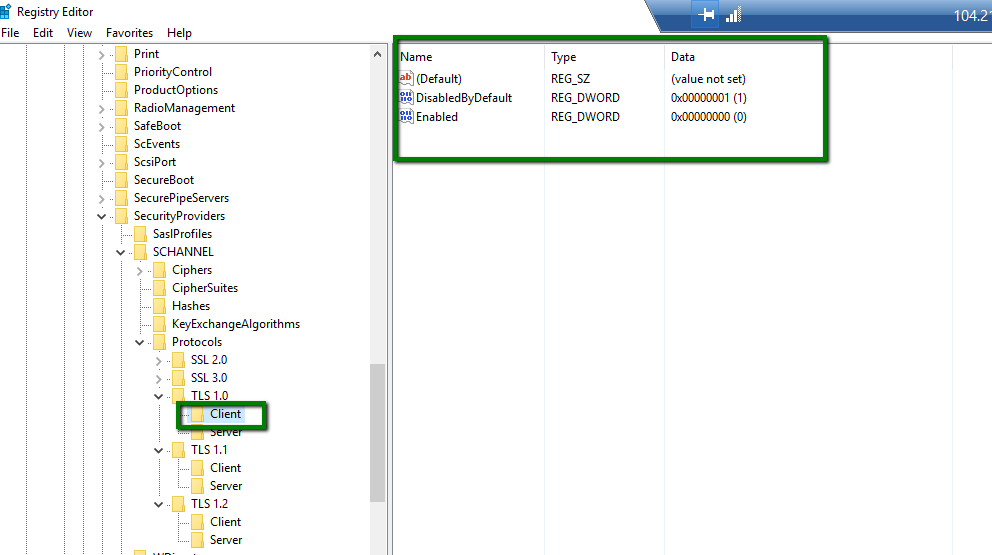
The BizTalk360 installer is so robust that each and every error will be displayed, and it won’t allow the installation to proceed in case if it encounters any problem. The installation logs are an added advantage to get the clear picture of the error message. The below picture shows the TLS settings at the customer end.
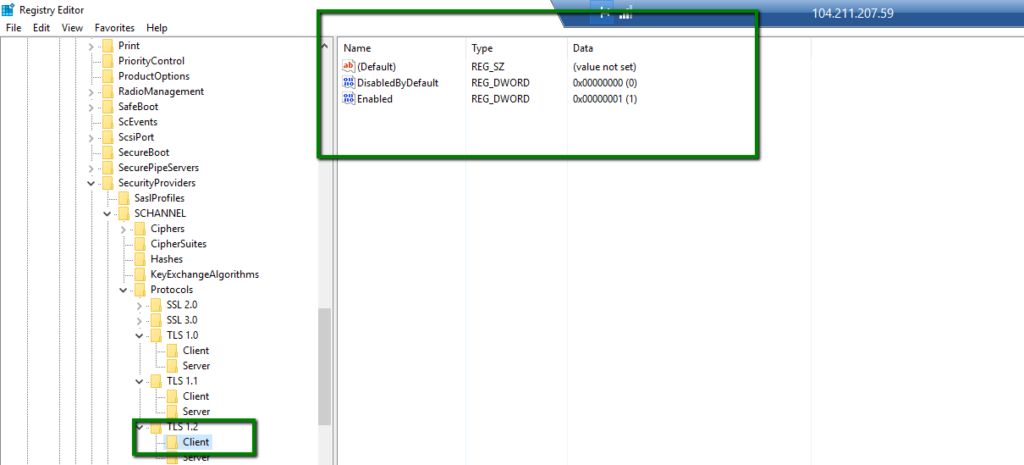
As a quick step for testing this case, we immediately provisioned a VM with the same configuration as the customer and we were able to reproduce the exact issue. After a complete analysis and research, we found the issue with the WiX toolset. Now that we had identified the issue with the WiX toolset, the update was available for it. With this updated version of the installer, the installation was successful, and the database was also created.
This was a different experience and of course a good learning for us. We, the support people, now had acquired the background knowledge of the installer as well as the TLS protocols.
Conclusion
New experiences lead to new learnings. As TLS 1.0 has been deprecated, many of our customers who have already moved to TLS 1.2 were not sure if BizTalk360 supports the latest version. Now the installer supports the latest TLS version, which is TLS1.2. This will be updated in our upcoming release version of BizTalk360 v8.9. When the customers upgrade to v8.9, they can have TLS 1.2 enabled which was not the case previously. When they had TLS1.0 disabled, they were not able to install BizTalk360. They had to enable TLS1.0, disable TLS1.2, install BizTalk360 and then once again disable TLS 1.0, which is a cumbersome job.
Now BizTalk360 supports TLS 1.2. Happy monitoring with BizTalk360!!! 😊.
Author: Praveena Jayanarayanan
I am working as Senior Support Engineer at BizTalk360. I always believe in team work leading to success because “We all cannot do everything or solve every issue. ‘It’s impossible’. However, if we each simply do our part, make our own contribution, regardless of how small we may think it is…. together it adds up and great things get accomplished.” View all posts by Praveena Jayanarayanan

by Sandro Pereira | Aug 15, 2018 | BizTalk Community Blogs via Syndication
One more year and one more BizTalk Server session delivered in London: “BizTalk Server: Lessons from the Road“. INTEGRATE 2018 was an amazing conference and for that, we once again need to thank you BizTalk360 team and Saravana Kumar for being able to assemble not only another great event but keeping improve it each year which is not an easy task.
About my session: “BizTalk Server: Lessons from the Road”
I was asked, once again, by the event’s organizers to deliver a session about BizTalk Server, I topic that I love and like to talk but I must confess that this time I was a bit afraid. Because of the huge success of my previous session that I presented last year, it would not be easy to keep me on the same level. But life is full of challenges that we should not be afraid, but rather face them with frontality and confidence, so I decide to deliver a session about “BizTalk Server: Lessons from the Road“.
Abstract: The session will cover small pieces of stories with practical real examples from the field to address certain scenarios/requirements. See real techniques been used is some of the most important features of BizTalk Server, some of them are out-of-the-box capabilities others are custom extensions been made in the platform. Topics include BizTalk migration strategy, content-based routing techniques, Mapping, JSON support, BizTalk administration tips, extending BizTalk out-of-the-box capabilities and many more.
You can download the PowerPoint presentation here: BizTalk Server: Lessons from the Road (slides)
And see the video session online here: BizTalk Server: Lessons from the Road (video)
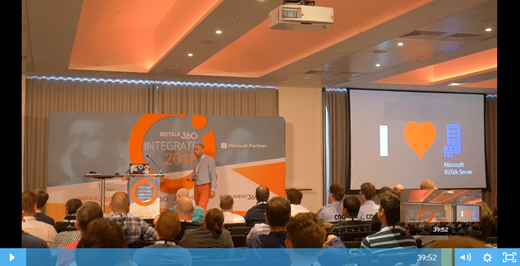
Hope you enjoy! But that is not all, you can also see the rest of the amazing sessions delivered by Microsoft Product group and Microsoft Most Valuable Professionals (MVP’s) at the event also online here: https://www.biztalk360.com/integrate-2018-resources/
Author: Sandro Pereira
Sandro Pereira lives in Portugal and works as a consultant at DevScope. In the past years, he has been working on implementing Integration scenarios both on-premises and cloud for various clients, each with different scenarios from a technical point of view, size, and criticality, using Microsoft Azure, Microsoft BizTalk Server and different technologies like AS2, EDI, RosettaNet, SAP, TIBCO etc. He is a regular blogger, international speaker, and technical reviewer of several BizTalk books all focused on Integration. He is also the author of the book “BizTalk Mapping Patterns & Best Practices”. He has been awarded MVP since 2011 for his contributions to the integration community. View all posts by Sandro Pereira
by Mekala Ramesh | Aug 14, 2018 | BizTalk Community Blogs via Syndication
In this blog post, I wanted to highlight the performance improvements of advanced event viewer collection logic in our upcoming version 8.9. This change will provide a fine-grained access to enable specific servers for the Event Log collection that are more important to you.
Windows Event Log Monitoring to detect the data breach
What would you do if you were faced with a critical issue in your BizTalk Environment in your enterprise? Think about this for a moment. Do you have an efficient process to respond to the problem? Are you equipped with the right set of tools to mitigate the problem in your environment? Sometimes, despite our best efforts, an issue may happen in unexpected ways and cause significant problems to the business.
In this situation, the Windows Event Log viewer is a handy tool for the BizTalk Administrators/support engineers to monitor their BizTalk environments and to detect any data breach or for any specific exception. At the same time, if the BizTalk servers are deployed in highly available setup and with clustered SQL server architecture, searching the Event Log from all of these servers together is like looking for a needle in a haystack.
Become the God of the Event Logs with BizTalk360 centralized Advanced Event Log viewer capability
Log data can be huge even in small integration business units. Many of the log entries might be routine messages about the BizTalk environment I.e. services and job status, that are mostly of no concern to you, but other messages like suspension of any service instances, system throttling state, state of host instances, etc., that is critical to your day to day business transactions.
However, to search for this logs in all the servers by logging into the physical server and correlate the Event Logs is a tedious process for the BizTalk support engineers /Administrators. This is where lots of their valuable time is wasted.
Who would not be happy if there is a capability to provide access to all the Event Logs across all the configured servers? Therefore, BizTalk360 provides you centralized access to all the Event Logs across all the servers in a rich web-based UI. To know more about the Advanced Event viewer, visit this blog “Why did we build Centralized Advanced Event Viewer for BizTalk Administration?”
No Fear! No Agent required. BizTalk360 provides agentless Event Log collection:
For Event Log collection, BizTalk360’s Advanced Event Viewer does not require a separate agent to be installed on each server. The BizTalk360 Monitoring service collects Event Log and is present as part of the BizTalk360 installation. In this way, BizTalk360 performs Event Log collection task without introducing any additional load to the servers.
Why this performance improvement required?
The Advanced Event Viewer is the most used feature in BizTalk360, where the administrators use this capability for their day to day business operations and monitoring with ease. To do so, there are some settings which need to be configured in BizTalk360. These settings are bound to the BizTalk environment level. In case of highly configured business architecture (Eg: 5 BizTalk Servers and 5 SQL Server with clustered setup), there may be millions of transactions which will happen on a regular basis.
From BizTalk360 V8.6 onwards, we have provided a new capability to monitor the Event Logs of the BizTalk & SQL servers. For this, we are calling the Windows Management Instrumentation service every minute. Because of the restriction with the environment level, all the servers will be polled every minute to collect the Event Log data.
We have received few support tickets where this specific logic is consuming a lot of memory and spikes the CPU performance of their BizTalk & SQL Servers. There are workarounds already suggested to our customers to make use of this capability in the best way, by configuring the sources which are required for them and remove the unnecessary sources. However, there are no options to enable the Event Log collection per individual server. Therefore, we have improved performance of the collection logic in our V8.9 version.
Comprehensive Event Logs collection using the newly introduced configuration method
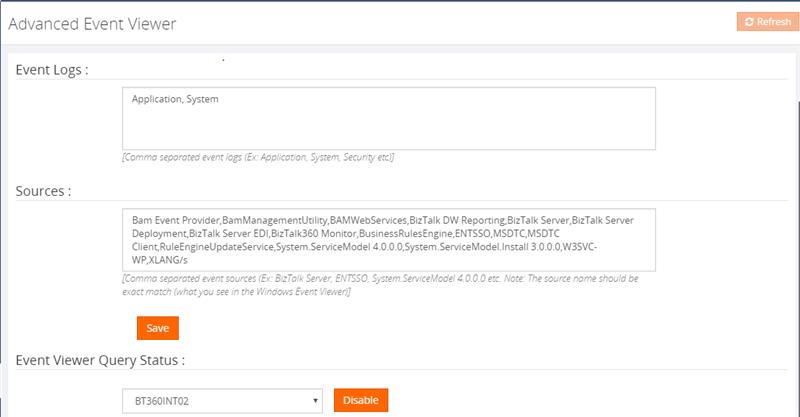
In our previous versions, up to V8.8, Event Log collection logic is not segregated based per server. To enable the Event Log collection, it is bound to the BizTalk environment and not on an individual server level. However, the user has control on configuring the sources based on the need.
Below screenshot represents our old screen in the Settings side to enable the Event Log viewer in order to view the logs in BizTalk360.
We have revisited the collection logic in our new version to improve the performance. Since the configuration is bound to the environment, the user doesn’t have control over the individual servers. In the new version of BizTalk360, users can control the Event Log collection according to individual servers. As an administrator, you know the value of each source which needs most considerations. So, there is an option as well in BizTalk360 to configure the BizTalk & SQL server sources separately.
Using these settings, you can customize and narrow down your Event Log search.
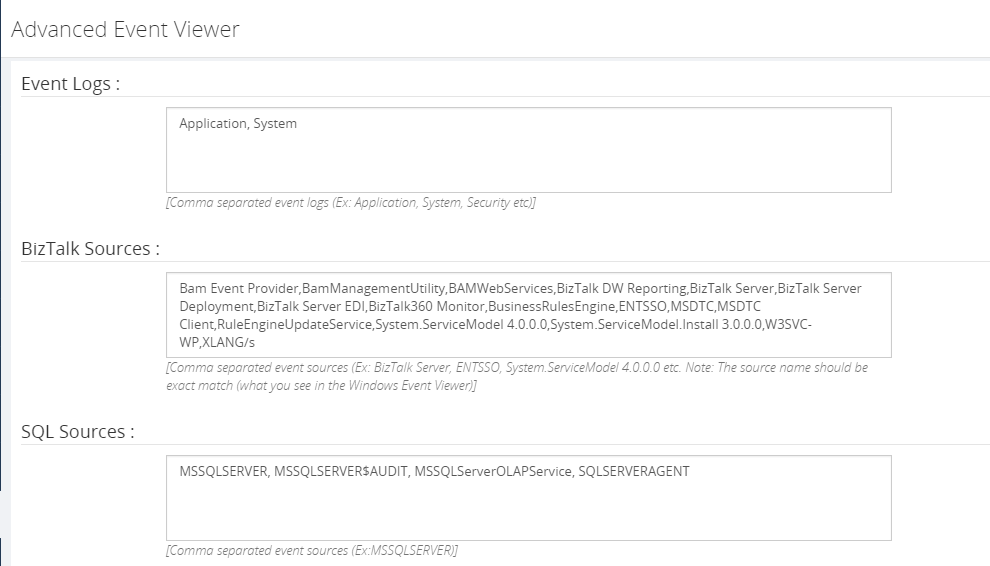
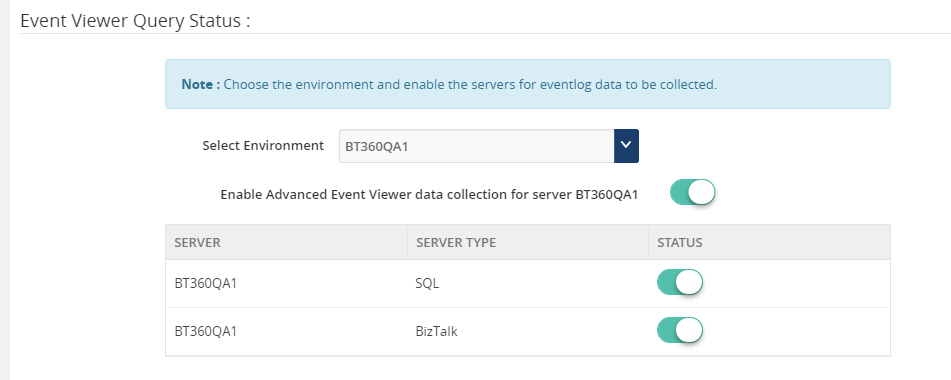
Improving the Archiving and Retrieving of Event Logs capability
Event Log retrieval is fairly a cumbersome task for the administrators from all the configured servers individually. BizTalk360 provides to download all the Event Log messages in a single place. Archived Event Logs give a lot of insight into the performance of your BizTalk environment unless all the Event Logs are archived in a central location. This way operators are able to access them at any time.
Changes in the Event Log Data Monitoring section
Monitoring BizTalk Servers in a connected environment is the prime requirement for organizations – large or small.
The first thing we wanted, was to show the common issues/problems in the blink of an eye when an administrator needs it. The Advanced Event Viewer, in the Operation section of BizTalk360, would show users instantly, details of any Event Log about their BizTalk Environment. To know more about operations of Advanced Event Viewer refer to this article.
The second thing was the exact opposite – if there are some issues that should never happen, but they did in your Biztalk Environment, we would want you to know about it as well – once again, instantly. This is why we have built advanced Data Monitoring for Event Logs.
Previously, irrespective of the server selection, all the configured sources are displayed in the sources drop-down list. Now, based on the server selection, the sources will be collected and listed. This would minimize the turnaround time of creating the data monitor by selecting the required sources easily. Below screenshot refers to the new changes done in our new version of BizTalk360. Using this Data Monitoring capability, BizTalk360 will continuously monitor without any manual intervention and attention.
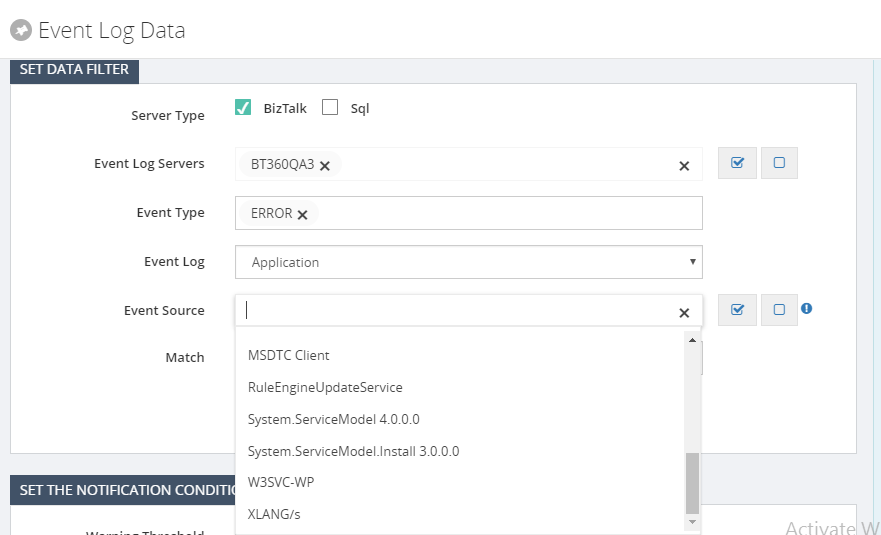
Conclusion
We are sure, this implementation will highly optimize the BizTalk360 Advanced Event Viewer collection logic. Happy migrating and try BizTalk360!!!
Get started with the free 30 days trial. For any queries/feedback please write to us [email protected].
Author: Mekala Ramesh
Test Lead at BizTalk360 – Software Testing Engineer having diverse exposure in various features and application testing with a comprehensive understanding of all aspects of SDLC. Strong knowledge to establish the testing process from the scratch. Love to test the software product to deliver it with good quality. Strongly believes on “Testing goes beyond just executing the test protocol”. View all posts by Mekala Ramesh
by Gautam | Aug 13, 2018 | BizTalk Community Blogs via Syndication
Do you feel difficult to keep up to date on all the frequent updates and announcements in the Microsoft Integration platform?
Integration weekly update can be your solution. It’s a weekly update on the topics related to Integration – enterprise integration, robust & scalable messaging capabilities and Citizen Integration capabilities empowered by Microsoft platform to deliver value to the business.
If you want to receive these updates weekly, then don’t forget to Subscribe!
Feedback
Hope this would be helpful. Please feel free to reach out to me with your feedback and questions.
by BizTalk Team | Aug 9, 2018 | BizTalk Community Blogs via Syndication
Microsoft customers and partners are asking what our cloud-hybrid integration roadmap is for BizTalk Server and beyond. BizTalk Server 2016 is our tenth release of a product that first shipped in December, 2000. Much has changed in the past 18 years, the rise of the Internet, the move to the cloud and the advent of Integration Platforms as a Service (iPaaS) being just a few. One thing has prevailed over these many years, existing enterprise customers running business critical workloads using BizTalk Server on-premises – and Microsoft’s continued commitment and support to these customers.
We want to confirm our commitment to BizTalk Server by providing clarity on our cloud-hybrid integration roadmap, of which BizTalk Server is a key part. Shortly after we released BizTalk Server 2016, we introduced the concept of Feature Packs – incremental product improvements and additions that facilitated a much faster ship cycle than was before possible. We believe, and have also heard from customers, that this approach is advantageous for a number of reasons: quicker time to get requested features or improvements; fewer costly upgrade cycles; continuous product investments. Yet, we understand that this model does not suit every customer, especially those that require more notice, planning and preparation for consuming both new platforms and new functionality.
Therefore, we are pleased to announce that we have begun work on BizTalk Server “vNext”, the next major release of BizTalk Server. BizTalk Server “vNext” will contain all previously released feature packs, platform support for the latest versions of Windows Server, SQL Server and Visual Studio, as well as a supported upgrade path from BizTalk Server 2013 R2 and 2016. The new release of BizTalk Server will be accompanied by a vNext of the Adapter Pack and Host Integration Server as well. We are in the early stages of planning this next release and more details will follow in due course, but we expect to make it generally available within roughly 9 months of the general availability of Windows Server 2019.
Alongside BizTalk Server, we will also continue to expand the capabilities of our iPaaS offering providing additional hosting options for Azure Integration Services, which includes Logic Apps, starting with the ability to run on-premises. We expect to deliver these capabilities during calendar year 2019.
With two offerings, BizTalk Server and Logic Apps, both capable of running on-premises and in Azure, many customers will be evaluating migration from BizTalk Server to Logic Apps. We understand this and are planning guidance on migration to assist customers’ decision-making and investments to enable this move. We know there are functional gaps between BizTalk Server and Logic Apps, and we are hard at work closing them. Our Azure Integration Services vision is to enable all customers to move to a modern, holistic and rich iPaaS platform that can meet the challenges of all their integration workloads, both today and in the future wherever they reside.
Jon Fancey, Azure Integration Services PM Lead

by Sandro Pereira | Aug 9, 2018 | BizTalk Community Blogs via Syndication
We all know that the WCF-SQL adapter enables BizTalk Server to perform composite operations on any SQL Server database. A composite operation can include any number of the following operations, and in any order:
- The Insert, Update and Delete operations on the tables and views
- Stored procedures that are surfaced as operations in the adapter
It can also execute Transact-SQL and CLR:
- Stored procedures in an SQL Server database
- Scalar and table-valued functions in an SQL Server database
- And so on
In resume operations at the Tables, Views, Procedures, Scalar Functions, and Table-Valued Functions, levels will be supported.
Stored Procedure permissions
I personally like to use Stored Procedures instead of directly accessing the tables which are available in the database.
Regarding the required access permission in SQL Server for BizTalk Server, to connect to a particular database to extract or store data, or in this case, be able to call stored procedures, what teams normally do is creating:
- A new SQL user with “db_owner” privileges
- Or they give “db_owner” privileges to the service account that is running the BizTalk Server host instance, for example, “BTSHostSrvs” (BizTalk Host Instance Account)
Why? Because this is simple and quick, and they don’t need to worry about lack of permissions or the proper permissions.
GDPR considerations
But sometimes these tables contain sensitive data or personal data, and nowadays with General Data Protection Regulation (GDPR) in the European Union (EU), this sometimes can be a backdoor for other possible problems. Teams need to start thinking in concepts like “Privacy by Design” and “Privacy by Default” for their solutions:
- “Privacy by Designs” holds that organizations need to consider privacy at the initial design stages and throughout the complete development process of new products, processes or services that involve processing personal data
- “Privacy by default” means that when a system or service includes choices for the individual on how much personal data he/she shares with others, the default settings should be the most privacy-friendly ones
So, companies should be more careful and more strict in:
- Who has access to what?
- Limit the number of persons that can access that information to the strictly essential persons
- Define a better access granularity and restrict access, once again, to the essential tasks
- A service account that consumes or store new data shouldn’t be a database owner or a sysadmin.
Secure Stored Procedure permissions
Of course, giving “sysadmin” or “db_owner” would solve all our problems but it goes against security best practices.
One way, or -personally- the best way, for you to properly define a better access granularity and restrict access to the essential tasks or in other words, the essential stored procedures, is to create a new server role, for that particular database, in SQL Server. Follow below steps to create such a server role:
- Open SQL Server Management Studio and connect to your SQL server
- In the Object Explorer, access to your database and expand it
- Expand the Security folder
- Right-click the “Database Roles” folder and select “New Database Role…”
- In the “New Database Role” window
- On the “Role name” property, on the General page, enter a name for the new database role, for example, “db_spexecution”
- At the Securables page, under Securables, click the “Search” button
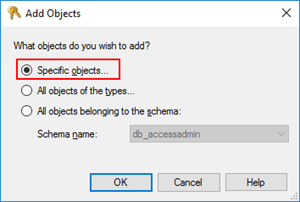
- On “Add Objects” window, select “Specific objects…” and click “OK”
-
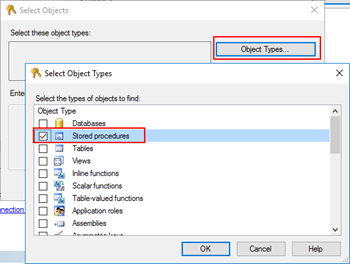
- On “Select Objects” windows, click “Object Types…” and then select “Stored Procedures”
-
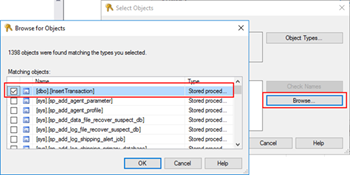
- After selecting the object type, click “Browse…” and from the “Browser for Objects” window, select the stored procedures you want to invoke(only the one that you need)
-
- Click “Ok” and again “OK” to return to the main “New Database Role” window
- The last step, on the Securables page, is to give Execute permissions “Grant” and “Grant with”
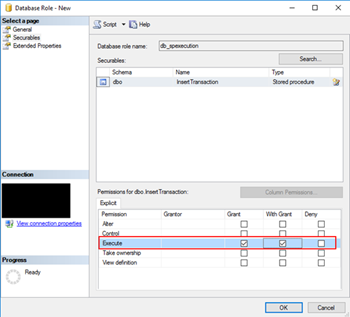
- Finally, on the General tab, add the service account that is running the host instance to the Role Members for that role
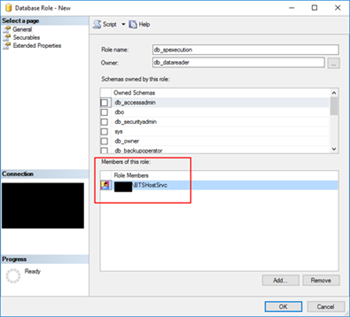
It gives you more work, that is for sure, but now you will have a properly access granularity defined, with the minimum rights defined for the actually necessary tasks. Nothing more, nothing less… as things should be.
Author: Sandro Pereira
Sandro Pereira is an Azure MVP and works as an Integration consultant at DevScope. In the past years, he has been working on implementing Integration scenarios both on-premises and cloud for various clients, each with different scenarios from a technical point of view, size, and criticality, using Microsoft Azure, Microsoft BizTalk Server and different technologies like AS2, EDI, RosettaNet, SAP, TIBCO etc. View all posts by Sandro Pereira
by Raja Sreenivasan | Aug 7, 2018 | BizTalk Community Blogs via Syndication
Recently Microsoft rolled out the July 2018 .NET Framework Security Updates. These Security Updates caused series of errors in the BizTalk Server Administration Console, SharePoint, Internet Information Server (IIS) with classic ASP and .NET applications which use impersonation.
Related to BizTalk Server, the issue is that BizTalk server relies on a COM component, that runs with restricted permissions. This COM component may fail to start after installing the July 2018 Security Updates.
For BizTalk360 to monitor the BizTalk server, it needs that the BizTalk Server Administrator components are installed in the server. But when the BizTalk360 server is also updated with the security patches, the same errors will occur while accessing the BizTalk applications and their artifacts. Many of our customers raised support tickets to BizTalk360 support channel, as they were not aware of these issues due to the windows security patch.
How the errors occur in BizTalk360 and in BizTalk Server
The com exception will occur in BizTalk360 only after the July 2018 security patch update is installed on the servers. The issue will pop up on many occasions as mentioned below.
While accessing,
- BizTalk360 application
- BizTalk Applications and their artifacts
- Hosts and Host Instances
Following screenshot refers, how the exception appears in BizTalk360.

When launching BizTalk Server, a series of errors appear from Hosts and Host Instances.
Here are the errors that occurred in the BizTalk Admin console, When trying to access the host instance
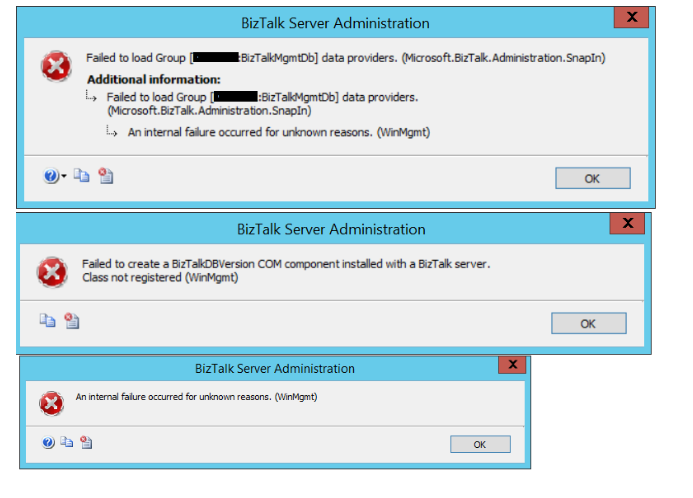
Root Cause of the problem
Let ’s have a look at the root cause of these issues in detail. The Microsoft .NET Framework runtime uses the process token to determine whether the process is running within an elevated security context. These system calls can fail if the required process inspection permissions are not present. This causes an “access denied” error. However, these errors might reveal themselves with other error messages, as we have seen from the screen prints earlier in this article.
A temporary workaround is discussed in this MSDN thread. The simplest workaround is to uninstall the security patch and everything will be back to normal.
Resolution
The latest patch was re-released by Microsoft on July 30, 2018. This update helps to resolve this issue. This patch has different versions applicable to your operating system and .NET Framework installed.
- 4346877Update for Windows 10, version 1607 and Windows Server 2016: July 30, 2018
- 4346406Update for .NET Framework 4.6, 4.6.1, 4.6.2, 4.7, 4.7.1 and 4.7.2 on Windows 8.1, RT 8.1 and Server 2012 R2 (KB 4346406): July 30, 2018
- 4346405Update for .NET Framework 4.6, 4.6.1, 4.6.2, 4.7, 4.7.1 and 4.7.2 on Windows Server 2012 (KB 4346405): July 30, 2018
- 4346407Update for .NET Framework 4.6, 4.6.1, 4.6.2, 4.7, 4.7.1 and 4.7.2 on Windows 7 SP1 and Server 2008 R2 SP1 and .NET Framework 4.6 on Server 2008 SP2 (KB 4346407): July 30, 2018
- 4346408Update for .NET Framework 4.5.2 on Windows 8.1, RT 8.1 and Server 2012 R2 (KB 4346408): July 30, 2018
For detailed information about latest patch release, please click this link. Microsoft had also suggested a workaround for the issue but with the following warning message:
Warning: The workarounds may make a computer or a network more vulnerable to attack by malicious users or by malicious software such as viruses. We do not recommend these workarounds. However, we are providing this information so that you can implement the workarounds at your own discretion. Use these workarounds at your own risk.
Customer Feedback
We have received quite a few support tickets on this specific cases from our customers who have recently update the security patches. Because, the problem lies with BizTalk Server, It has affected the BizTalk360 as well while accessing the applications. We informed the customers about the reason for the error. The new patches are uninstalled, BizTalk360 and BizTalk Server will be back to normal. Here is a happy feedback from our most valued customers.

by Gautam | Aug 6, 2018 | BizTalk Community Blogs via Syndication
Do you feel difficult to keep up to date on all the frequent updates and announcements in the Microsoft Integration platform?
Integration weekly update can be your solution. It’s a weekly update on the topics related to Integration – enterprise integration, robust & scalable messaging capabilities and Citizen Integration capabilities empowered by Microsoft platform to deliver value to the business.
If you want to receive these updates weekly, then don’t forget to Subscribe!
Feedback
Hope this would be helpful. Please feel free to reach out to me with your feedback and questions.
by Bill Chesnut | Aug 5, 2018 | BizTalk Community Blogs via Syndication
By Bill Chesnut
This is the second post in a multi part series on the features of Azure API Management.
As with the previous post where I demonstrated publishing a SOAP Services with pass-through, this time I am going to demonstrate publishing the same SOAP Service as REST, using the SOAP to REST feature of API Management, I consider this feature very important to APIM, in the past many of my clients have built intermediate services using either BizTalk or .Net.
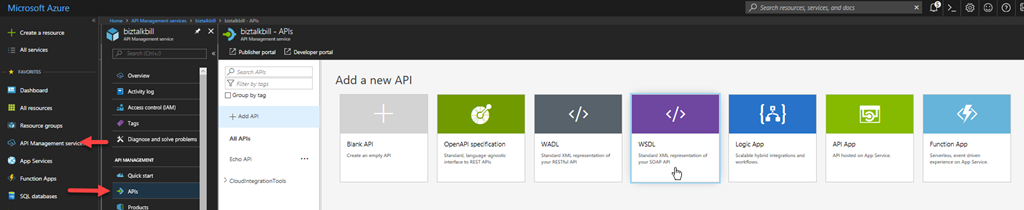
For this blog post I am going to demonstrate how you publish a BizTalk SOAP service as REST in APIM. With APIM you can publish SOAP services by importing the WSDL (this can be either via the URL or by uploading the WSDL file), In APIM Click the “API” menu item on the left, then Click “WSDL”
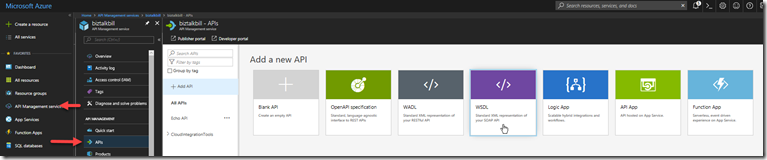
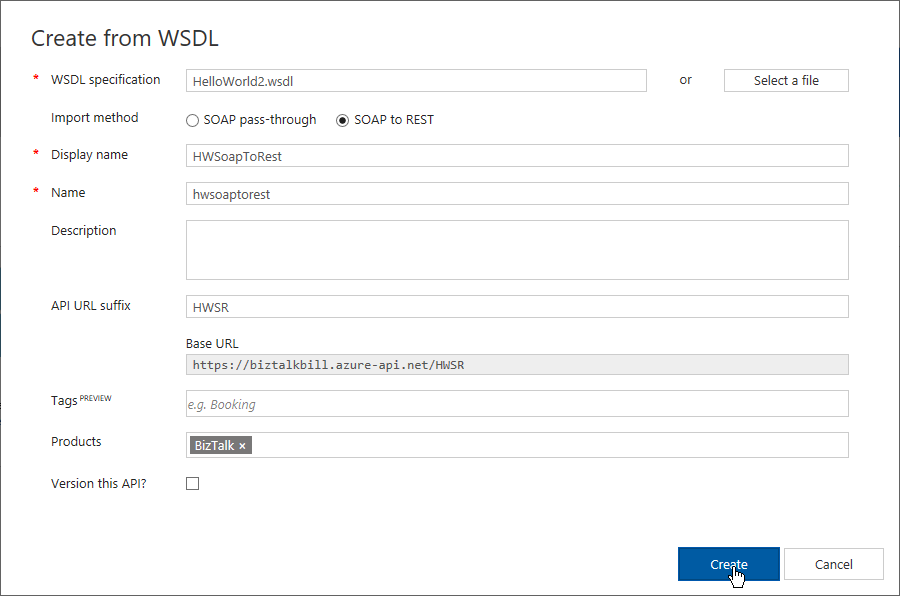
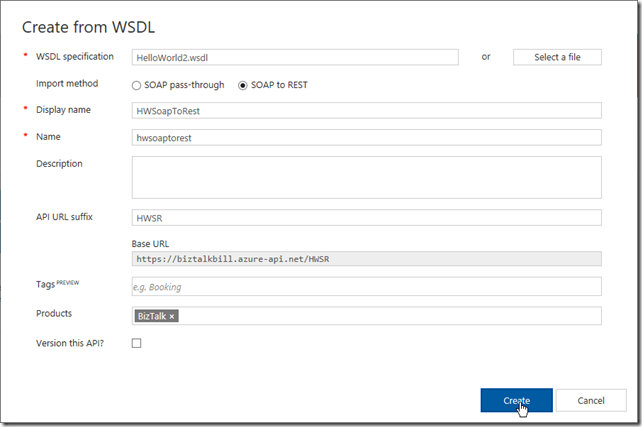
In this demonstration I am going to use an uploaded file, this is the WSDL from a BizTalk orchestration exposed as a WCF Request/Response Service, it only has a single operation ‘submit”. I am using an uploaded file because the BizTalk server is hosted in an Azure Virtual Machine and I have changed the URL to reflect the DNS name of the Virtual Machine. I could have also changed the name in APIM after the WSDL was imported. Select “SOAP to REST” and configure as shown and click “Create”
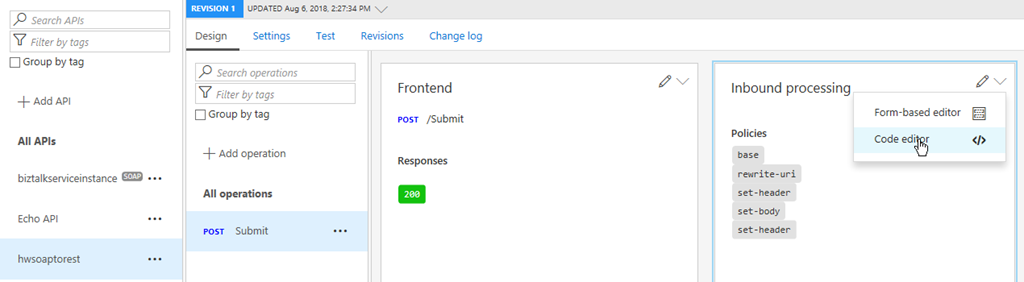
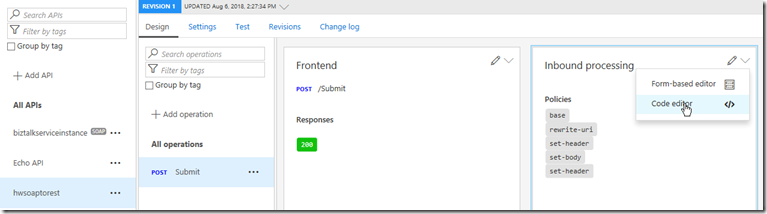
Once the WSDL import is complete, we can now see the API and it’s operations, now let click settings to look at the API settings, this is where we can change the URL to the BizTalk Server hosting our SOAP Service. Click the “submit” operation, then click the “policy editor”
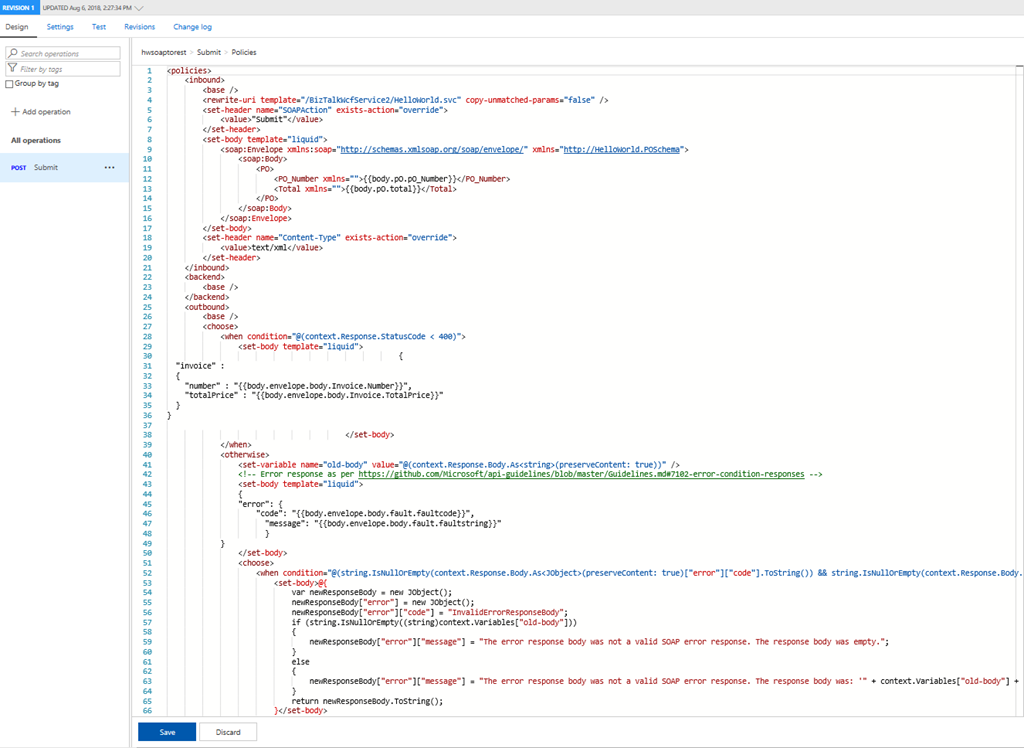
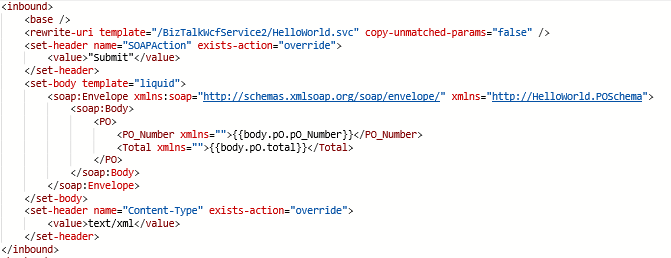
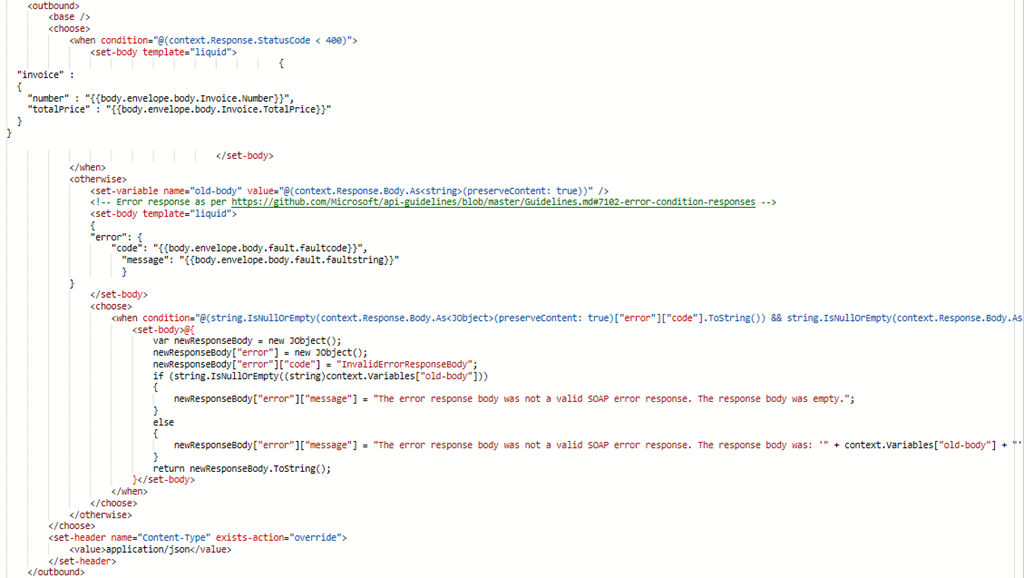
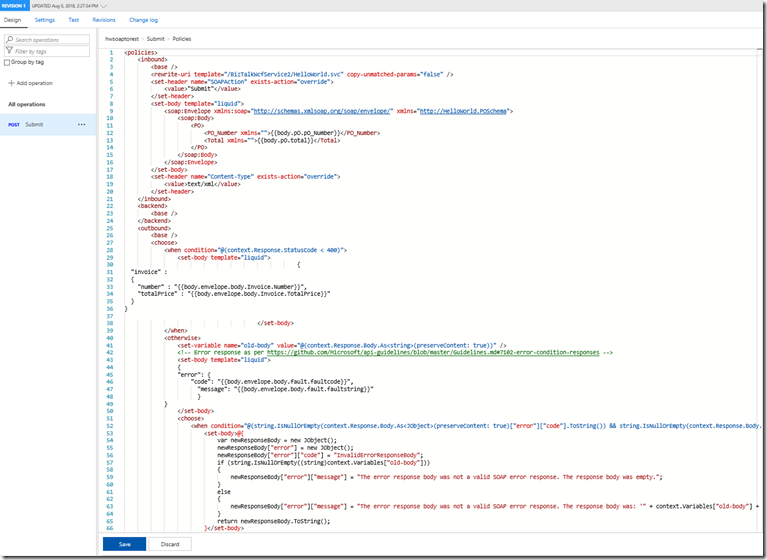
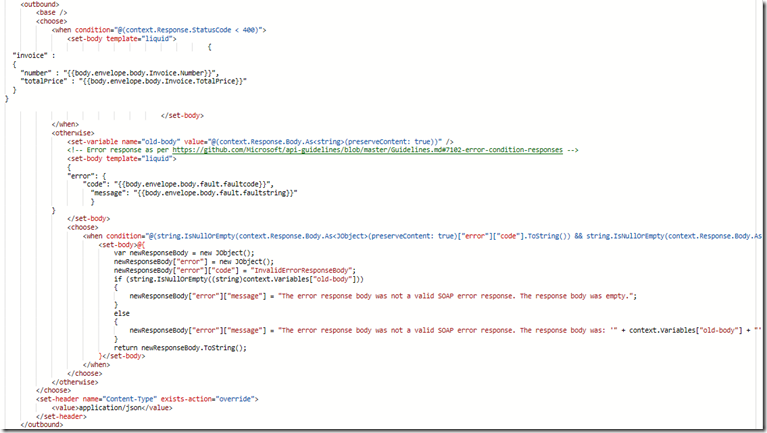
Now look at the policy that does the transformation from REST/JSON to SOAP/XML.
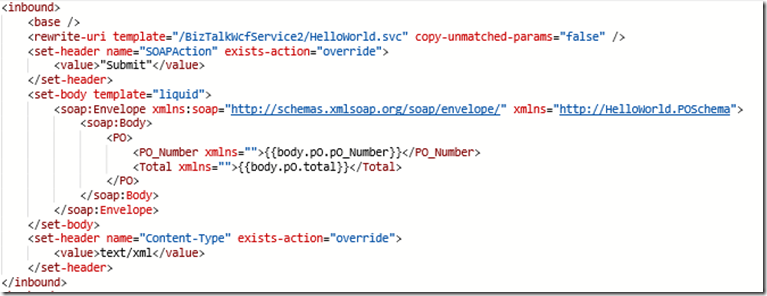
Inbound
Outbound
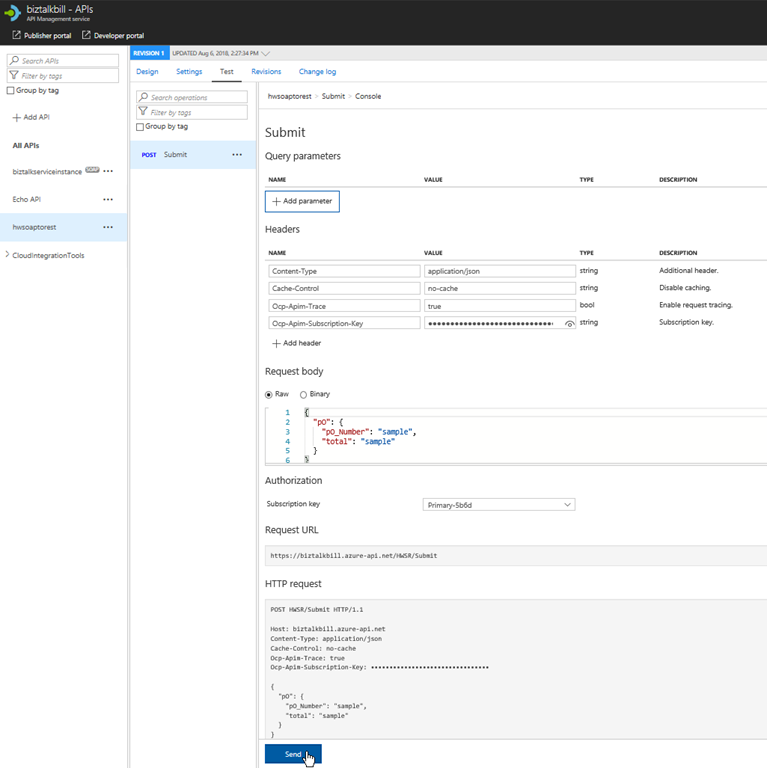
Now lets click the “Test” menu, this is where we can test our API Operation, before we release them to our consumers
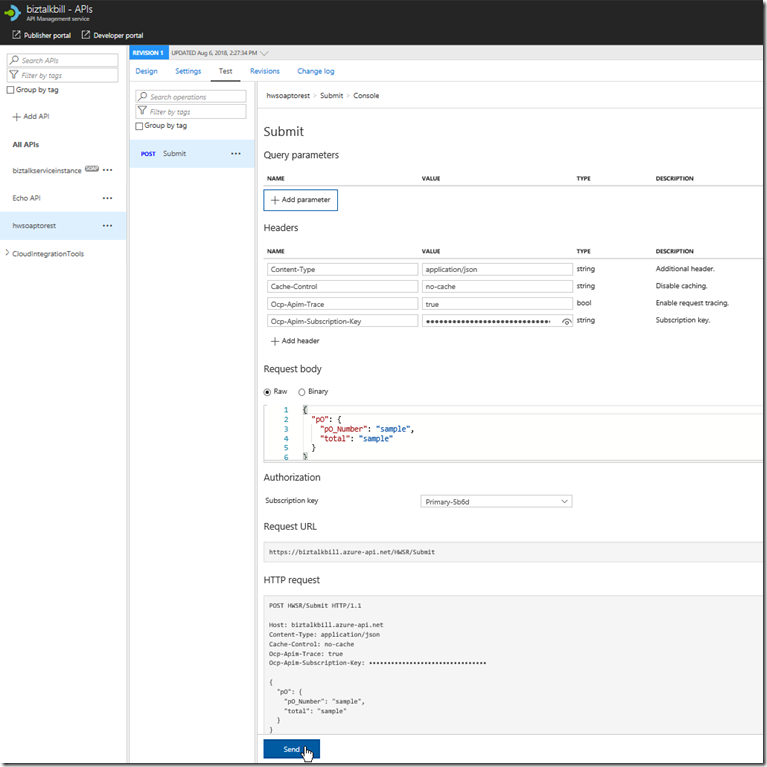
APIM fills in all the details to test the API, notice that the payload for the API is JSON, this is because we chose SOAP to REST, SOAP services are XML based, but the above policy we looked at does the conversion from JSON to XML. Click “try it”
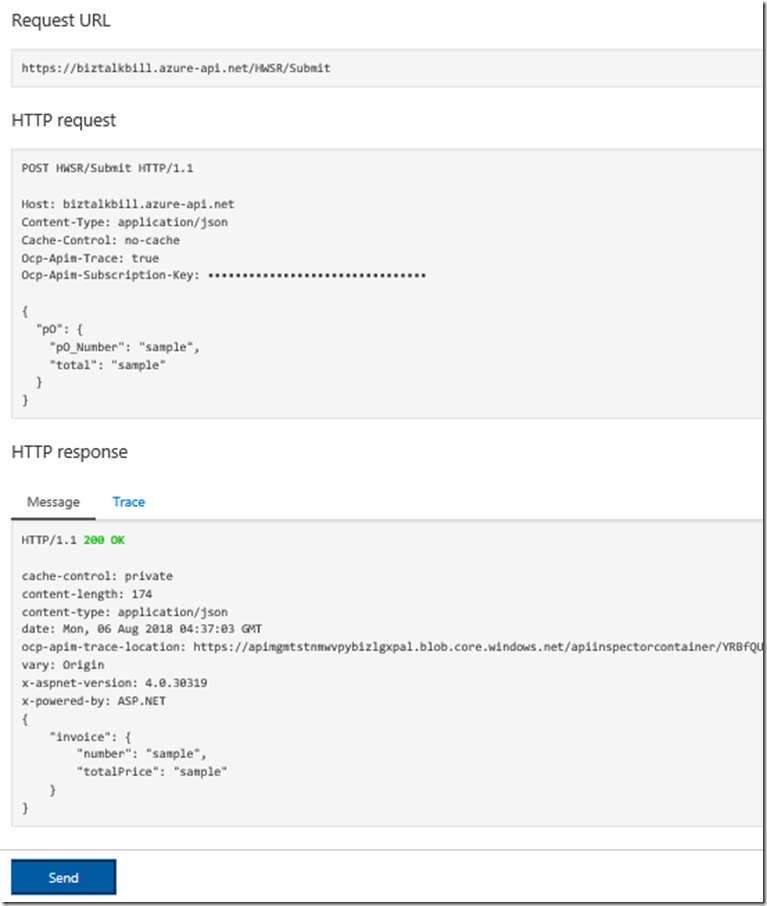
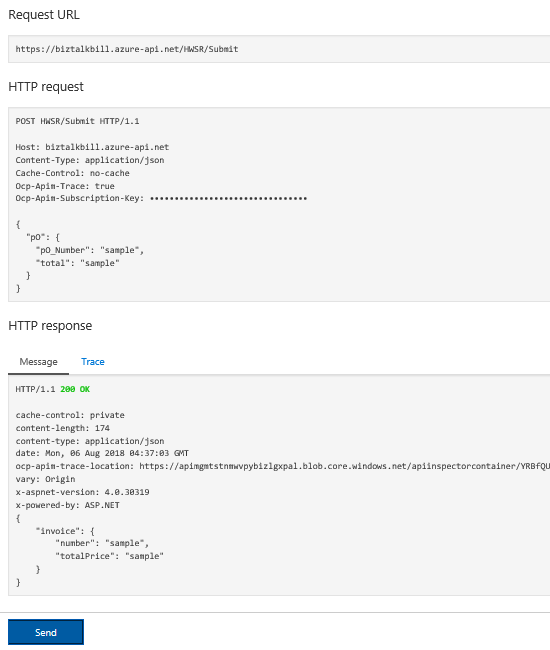
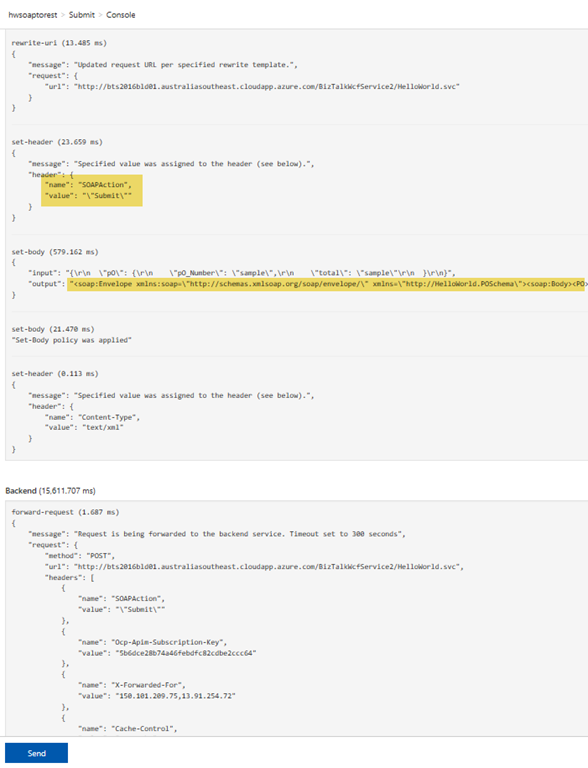
You can now see the results of our call to the BizTalk hosted SOAP Service, the results are in JSON again the policy is doing the conversion, now lets click the “trace” tab, this will give us everything that has taken place in APIM as part of our call to the BizTalk SOAP service. You can notice that the policy has set the SOAPAction and converted the JSON body to XML
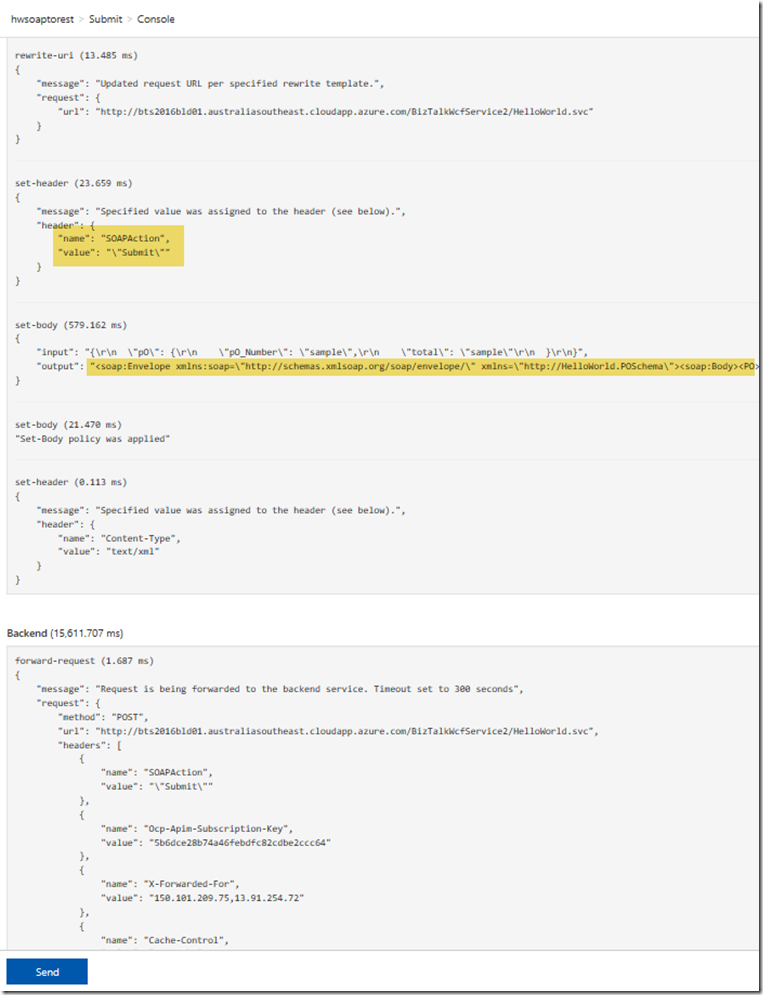
The Policy for the SOAP to REST feature is using Liquid Template Language to do the JSON to XML and XML to JSON transforms, these templates can be use to transform from JSON to XML, XML to JSON, XML to XML and JSON to JSON, this allow not only the scenario for SOAP to REST, but the ability to manipulate both inbound and outbound payload for maximum flexibility.
Hopefully this has given you a quick demonstration on how to expose your SOAP Services as REST with APIM.
Cross Posted on http://www.sixpivot.com.au