by community-syndication | Feb 27, 2013 | BizTalk Community Blogs via Syndication
Authentication on an SFTP location can be done with simple username/password credentials However another way to authenticate the sender is by using a Key Authentication file. But how can this last authentication method be used inside the BizTalk SFTP adapter?
the BizTalk SFTP adapter we used to achieve this is the freely available SFTP adapter on Codeplex. Just download the adapter and install it. And don’t forget to add the adapter in the BizTalk admin console of course.
Now then let’s set up the port in BizTalk. In my example I ’ve configured a receive location, but obviously the same goes for the send port configuration.
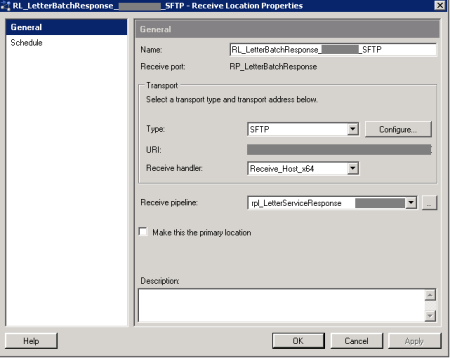
First of all choose the created adapter in the biztalk admin console, as shown below.
To set up the proper configuration for the SFTP port, just press the ’Configure’-button.
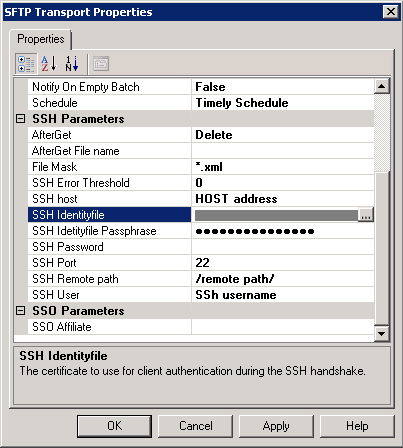
These parameters need to be set:
- Schedule: define a timely schedule how often you want to poll the SFTP location (receive location only)
- File Mask: set the correct file mask
- SSH Host: the host address of the SFTP location
- SSH Identyfile: Select the Key authentication file on disk
- SSH Identyfile Passphrase: the password of the selected key authentication file
- SSH Remote Path: the path on on the SFTP location
- SSH User: the user name to authenticate on the SFTP location
Seems pretty straight forward, doesn’t it?
Well there are some things you ’ll need to take into account to make sure the connection can be made
Make sure the identyfile type is supported
You’ll need to make sure the identyfile type is supported by the library. The supported versions can be found here. As this is the library which is used by the bizTalk SFTP adapter.
Make sure the identyfile can be recognized
In my case for example, I got an *.ppk file as authentication file. But as it turned out, this wasn’t recognized.
The error message you git is this:
invalid privatekey: D:\tempkey.ppk
Which in the end seemed a bit misleading, as the problem wasn’t the private key for the authentication file. It was just the *.ppk file that wasn’t supported.
To make the key authentication file working, I had to convert the file to an OpenSSH key file. This can be done by using PuttyGen for example, and exporting the authentication file as an OpenSSH key file.
Don’t use both password parameters
Also make sure you only use the intended parameter SSH Identyfile Passphrase, and leave the SSH password blank.
In case both password fields are filled, the SFTP adapter will try to authenticate by the username/password credentials stated. So it won’t offer the specified identyfile to authenticate.
I orignally posted this on my companies blog: http://blog.cnext.eu/2013/02/19/using-key-file-authentication-with-the-biztalk-sftp-adapter/

by community-syndication | Feb 27, 2013 | BizTalk Community Blogs via Syndication
Whipping up a BizUnit test step using the BizUnit 4.0 libraries is a piece of cake, but chances are that any test step you write is going to be used multiple times throughout the life of a project and in ways you can’t predict and you will want to spend the extra effort when developing […]
Blog Post by: Johann
by community-syndication | Feb 26, 2013 | BizTalk Community Blogs via Syndication
Many of my fellow Integration MVP’s are active within the BizTalk community. This also accounts for some of my colleagues at motion10. There are more companies in the world that have a number of their professionals active within communities. The beginning of this year I interviewed Mark Brimble from Datacom. He is not the only Datacom professional that is active within the BizTalk community. His

by community-syndication | Feb 25, 2013 | BizTalk Community Blogs via Syndication
Overview The following is a “brain-dump” of my experiences configuring ESB Toolkit 2.2 on a Windows Azure VM using the BizTalk Server 2013 beta (February 15th 2013 revision) on Windows Server 2012. What’s New There have been some enhancements made to the ESB Configuration Tool. Default Configuration The ability to apply a default configuration, similar […]
Blog Post by: Colin Meade
by community-syndication | Feb 25, 2013 | BizTalk Community Blogs via Syndication
March 14th I’ll be in Oporto during the Oporto BizTalk Innovation Day in Portugal. The event is organized by Sandro Pereira and Devscope. Sandro and I will be joined on stage by Microsoft Integration MVP’s Tord Nordahl, Saravana Kumar and Nino Crudele. We as a team (BizTalkCrew) will provide all the presentations of the day and will be answering questions at the end of the event during a Q&A
by community-syndication | Feb 23, 2013 | BizTalk Community Blogs via Syndication
If you still think BizTalk is dead I command you to stop thinking this, after the MVP Summit a total of around 10 Integration MVPs (The BizTalk part) Had lots of talks with Microsoft marketing and the product group of BizTalk, and we the clients/users are in for a win! So for everyone working within […]
Blog Post by: Tord Glad Nordahl
by community-syndication | Feb 21, 2013 | BizTalk Community Blogs via Syndication
In a previous post I explained how we had a need to use the WS-Addressing To header to send a non-http prefixed URI, such as urn:company/path/subpath/Service1, and how that was supported, after a fashion, out of the box in BizTalk Server. It did however come with the limitation of not being able to edit the WCF config in the BizTalk Server Administration Console GUI once you loaded it from a binding file. I don’t like limitations.
In this post I’ll show you how you can create a very simple WCF behavior to help you to set a RemoteAddress EndpointAddress Uri to be able to accomplish the same thing, while still being able to continue to edit the port configuration.
WCF behaviors allows you to intercept and inspect or alter messages or metadata, or in other ways modify the runtime behavior or processing of the same as they are sent or received. In this case we are creating a client behavior.
The behavior is in essence very very simple, it’s only purpose is to alter the endpoint address at runtime. The place where I choose to implement this is in the ApplyClientBehavior method of the IEndpointBehavior interface.
void IEndpointBehavior.ApplyClientBehavior(ServiceEndpoint serviceEndpoint, ClientRuntime behavior)
{
    serviceEndpoint.Address = new System.ServiceModel.EndpointAddress(this.Uri);
}
Incidently, I borrowed this implementation with pride from the ClientVia behavior that comes with the .NET Framework. Apart from the fact that that behaviors sets the ClientRuntime.Via property and this sets the ServiceEndpoint.Address property the implementation is very close to exactly the same.
This allows you to configure BizTalk in the following manner.
The “Address (URI)” property can be set to anything (as long as it is http or https prefixed), since it will later be overridden.
In the behaviors section we now have two behaviors, clientVia:
and the new one I created, which I called remoteAddress:
clientVia is configured as the actual URI of the service we need to call, while the remoteAddress behaviors is configured with the value we want to have in the To header.
The solution contain three files of interest.
The App.config file holds a snippet of configuration that needs to be placed in machine.config or in the BizTalk WCF-Custom WCF extension part of the Send Handler of the host that handles the WCF calls being made. It exists to make the behavior available to the BizTalk process and looks like this:
<extensions>
  <behaviorExtensions>
    <add name="remoteAddress" type="bLogical.BizTalk.WSAHelper.RemoteAddressElement, bLogical.BizTalk.WSAHelper, Version=1.0.0.0, Culture=neutral, PublicKeyToken=3672865486d21857"/>
  </behaviorExtensions>
</extensions>
It points to the RemoteAddressElement class, whose responsibility it is to point out the type of the behavior and create new instances.
The RemoteAddressBehavior then in turn does the already above explained logic.
The project and code is available here.
I suppose a custom pipeline component setting the Address, or a Dynamic Send port for easier cases of configuration might also do the trick.
Blog Post by: Johan Hedberg
by community-syndication | Feb 21, 2013 | BizTalk Community Blogs via Syndication
Through WS-Addressing services can require a certain value in the ws-addressing <wsa:to> SOAP header. WCF has full support for this. This support is inherited by the WCF-Adapters. When using WS-addressing in a BizTalk Server Send Port what you enter in the “Address (URI)” of the WCF adapters configuration will also be the value that ends up in the <to> header.
Like so:
This will produce the following. Other headers and body removed for clarity.
<s:Envelope xmlns:s="http://www.w3.org/2003/05/soap-envelope" xmlns:a="http://www.w3.org/2005/08/addressing">
  <s:Header>
    <a:To s:mustUnderstand="1">http://localhost:8990/Service1</a:To>
  </s:Header>
  <s:Body>
    ...
  </s:Body>
</s:Envelope>
If you need to have a different value in the <to> header than the actual address that the service is hosted at it becomes a little bit trickier. You need to use the WCF-Custom adapter and add the ClientVia behavior. The value configured as the “Address (URI)” will still end up as the value in the <to> header, but the actual URI that the call will be made to will be the value you configure in the ClientVia’s viaUri property.
Like so:
This will produce the following (again cleaned for clarity):
<s:Envelope xmlns:s="http://www.w3.org/2003/05/soap-envelope" xmlns:a="http://www.w3.org/2005/08/addressing">
  <s:Header>
    <a:To s:mustUnderstand="1">http://somedummyvalue/</a:To>
  </s:Header>
  <s:Body>
    ...
  </s:Body>
</s:Envelope>
Now, as long as the value that you want in the <to> header is http or https (depending on the bindings security settings) then you are fine. However, if you end up needing to have a value in your <to> header that looks for example like this: urn:company/path/subpath/Service1, then you’re in trouble.
You will get an error dialog saying that The specified address is invalid. Invalid address scheme; expecting “http” scheme.
Why? Because BizTalk Server in its diligence to help you configure things correctly will force you to enter an URI that is prefixed with either http or https (again, depending on the security setting of the binding). There is no way for you to configure a non-http prefixed port in the adapter GUI (that I know of).
A colleague of mine, Gustav Granlund, experienced this issue and found a solution: you can coup it in through a binding file, and the runtime will accept it. Doing this you can enter a “Address (URI)” like so:
And you are then able to send a message that looks like this (to an address of http://localhost:8990/Service1):
<s:Envelope xmlns:s="http://www.w3.org/2003/05/soap-envelope" xmlns:a="http://www.w3.org/2005/08/addressing">
  <s:Header>
    <a:To s:mustUnderstand="1">urn:company/path/subpath/Service1</a:To>
  </s:Header>
  <s:Body>
    ...
  </s:Body>
</s:Envelope>
The caveat is that after having done this you cannot open and change WCF adapter settings in the port through the administration console GUI and keep the urn:company/path/subpath/service1 style URI. But, as mentioned, BizTalk will happily run with it. In a follow up post I examine another option.
HTH,
/Johan
Blog Post by: Johan Hedberg

by community-syndication | Feb 21, 2013 | BizTalk Community Blogs via Syndication
This space is to describe my experience working with BAM on BizTalk 2013 using SQL Server 2012. Business Activity Monitoring (BAM) provides real-time business intelligence by capturing data as it flows through a business system. By using BAM, we monitor a business process in real time and generate alerts when the business process needs human […]
Blog Post by: shadabanwer
by community-syndication | Feb 20, 2013 | BizTalk Community Blogs via Syndication
When I went to the Microsoft Partner Portal – Boom!
https://mspartner.microsoft.com/en/au/Pages/index.aspx
Blog Post by: Mick Badran


