Sandboxing – Declarative Object Provisioning and Threads
So you say you can’t populate a list declaratively in SharePoint 2010 Sandboxed solutions?
Blog Post by: Duke

So you say you can’t populate a list declaratively in SharePoint 2010 Sandboxed solutions?
Blog Post by: Duke
Normally I don’t advocate for trying to style form controls in web browsers, but Windows 8 apps have some really offensive colors by default. Figuring out just how to overwrite some of the defaults of ui-light.css and ui-dark.css is quite frustrating, so I’ll explain how to fix the colors of your select boxes.
Here’s the first […]
Blog Post by: Karissa Wingate
During a recent project I kept coming up against strange issues with layout. It was in a windows 8 store app, and therefore using some advanced CSS3 techniques, so I assumed I was just having issues with those. The DOM explorer is quite different from the web developer tools I am used to. I came […]
Blog Post by: Karissa Wingate

Environment The environment configuration covered under this checklist is as follows: 1 x 64-bit Windows Server 2008 R2 Enterprise Edition BizTalk Server 2010 Developer Edition SQL Server 2008 R2 Developer Edition ESB Toolkit 2.1 All programs are installed on a drive isolated from the OS, an E drive in this case Checklist Install the BizTalk […]
Blog Post by: Colin Meade

Due to lot of work and a presentations mainly on BizTalk Innovation day events, I still had not managed to create new articles on TechNet Wiki this year, despite having lots of ideas and ongoing projects. Unfortunately, with the weather not inviting outdoor activities in Portugal, a lot of rain, I got some free time […]
Blog Post by: Sandro Pereira
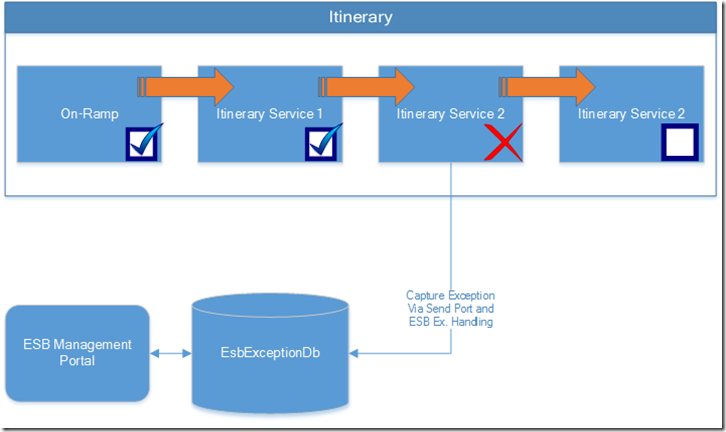
In my experience, the two most commonly used components of the ESB Toolkit are the Management Portal and Itineraries. First thing I must remind everyone of is that the Management Portal is a SAMPLE application. This means it is not production readybut you do have all of the source code. If you want the functionality the portal provides, I recommend you extract the code into your organization’s source control system, and own the solution going forward. I’ll cover my list of “things you must do to make the portal production ready” in another post.
Now to the main event. When using Itinerary-based processing for your BizTalk solutions, you get some great features out of the box, with little to no effort. One of these is the ability to continue processing an instance of an itinerary from the step at which it failed. First, you must have the ESB Exception Management solution deployed. This provides the EsbExceptionDb repository for storing exception and instance data of failed messages, as well as an out-of-the-box Send Port for populating the database when failures occur. Second, you must both enable Failed Message Routing on all itinerary-used Send and Receive Ports and use the prescribed ESB exception handling in all itinerary-used orchestrations.

Once these steps are completed, you will see failed itinerary instances in the ESB Management Portal, along with the Itinerary XML in the message context.

At this point, enough information is available to submit the failed message to the out-of-the-box ESB On-Rampsyou just have to make a small tweak to the ESB Management Portal source code. The following is a snippet of code from the out-of-box MessageViewer.ascx.cs file, located in the ESB.Portal\Faults folder. The ResubmitMessage method is where all the magic happens.
MessageViewer.ascx.cs (Original)

As you can see, depending on what the user does, the message could be resubmitted via a SOAP or WCF endpoint. Both use a helper library called MessageResubmitter. Looking at that library, you can see that both resubmission options do not include the Itinerary in the service request, even though it is available!
MessageResubmitter.cs (Original)

These services can each handle the itinerary being includedwe just have to add it to this client proxy code. here is what it looks like post-modification:
MessageViewer.ascx.cs (Modified)

MessageResubmitter.cs (Modified)

What is great is to understand that this will automatically start processing the itinerary from the point at which it failed. Looking at an example Itinerary XML attached to a failed instance, you can see that the next step in the itinerary is already set, since the Itinerary engine manages this as it processes. The <ServiceInstance> tag identifies the next itinerary step to be executed, and you can see the state of both the step and the overall Itinerary are both “Pending”.

Once submitted, the remaining steps of the itinerary are executed, while any steps that executed successfully the previous time are not re-executed.

Such a simple change, but adds compelling exception handling capabilities. The solution described above is a Manual Intervention scenario. If you needed an automated mechanism for resubmission, simply adding a component, such as an orchestration, which processes exception messages before they reach the ALL.Exceptions Send Port, would allow you to configure automated resume with whatever retries, delays you needed.
Nextleveraging out of the box Itinerary BAM tracking with out of the box ESB exception information to produce a full view into itinerary processing
Ciao,
Dan
Small post on troubleshooting the error “Party ‘PartyName’ enlisted under role ‘Provider(Codit.MyRoleLinkType)’ has not bound all the operations of role link port types”. It seems you need to remove the assembly and thus also the binding to get rid of this error.
I’ve used other blogs in the past and was never real good at blogging consistently. I’m now on a mission to get some posts up here on a consistent basis.
Coming soon will be a little series of ESB Toolkit How To’s, consisting of concepts and solutions I’ve used on real BizTalk Server projects for customers. Please let me know if you have any particular requests and I’ll get them queued up.
Ciao,
Dan

I know that in the past I already wrote about this article but I just love it The “List of BizTalk Errors and Warnings, Causes and Solutions” article is intended to be a knowledge base of all Errors and Warnings, Causes and Solutions documented in all stages/components of BizTalk: different stages of development, deployment, adapters, […]
Blog Post by: Sandro Pereira

I had developed a simple Rule Policy in the Business Rule Composer, and was attempting to include it in an Orchestration using the Call Rules shape. The Policy was correctly Published and Deployed, and was available in the ‘Select the business policy’ drop-down, however, I was unable to specify any parameters to pass to the […]
Blog Post by: Brett