by community-syndication | May 11, 2013 | BizTalk Community Blogs via Syndication
SAP supports a few different architectures when it comes to scaling out. In some environments, mainly smaller environments, the components that facilitate sending and receiving messages (such as IDOCs, BAPIs or RFCs) may be co-hosted on an Application Server. In some larger environments a dedicated Messaging Server(s) may be provided. We can also use a named destination that we define in our saprfc.ini file.
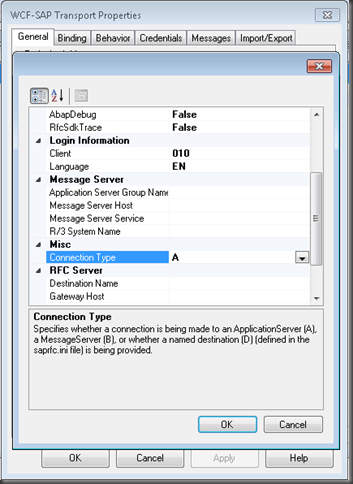
Up until this point all of my experience integrating with SAP has occurred through an Application Server. This is the default Connection Type that is populated in the Send Port configuration of a WCF-SAP send port.
Recently I ran into a situation where the SAP environment was not using Application Servers. Instead a Messaging Server was being used. The end result was that I received the following error
A message sent to adapter “WCF-SAP” on send port “SendGetSAPEquipment” with URI “sap://CLIENT=010;LANG=EN;@b/*SAPSERVER*/*ENV*?RfcSdkTrace=False&AbapDebug=False” is suspended.
Error details: Microsoft.ServiceModel.Channels.Common.ConnectionException: Details: ErrorCode=RFC_OK. ErrorGroup=RFC_ERROR_COMMUNICATION. SapErrorMessage=Connect to message server failed
Connect_PM MSHOST=*MSHOSTValue*, R3NAME=*ENV*, GROUP=PUBLIC
LOCATION CPIC (TCP/IP) on local host with Unicode
ERROR service *SAPSERVER* unknown
TIME Tue Apr 23 09:38:18 201
RELEASE 700
COMPONENT NI (network interface)
VERSION 38
RC -3
MODULE nixxhsl.cpp
LINE 776
DETAIL NiHsLGetServNo: service name cached as unknown
COUNTER 1. AdapterErrorMessage=. —> Microsoft.Adapters.SAP.RFCException: Details: ErrorCode=RFC_OK. ErrorGroup=RFC_ERROR_COMMUNICATION. SapErrorMessage=Connect to message server failed
Connect_PM MSHOST=*MSHOSTValue*, R3NAME=*ENV*, GROUP=PUBLIC
Microsoft.ServiceModel.Channels.Common.ConnectionException: Details:
ErrorCode=RFC_OK. ErrorGroup=RFC_ERROR_COMMUNICATION.
SapErrorMessage=Connect to message server
ailed
Connect_PM MSHOST=*MSHOSTValue*, R3NAME=*ENV*, GROUP=*MyOrganization*
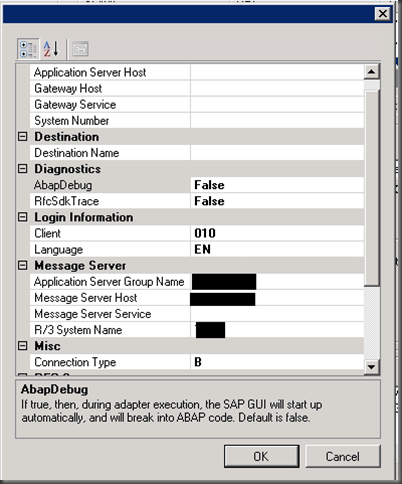
Since the SAP environment was actually using Messaging Server(s), In order to successfully make a connection to SAP, here is the correct configuration that I needed to provide:
- Application Server Group Name
- Message Server Host
- R/3 System Name
- Connection Type B
These properties will be specific to your environment and therefore I have blacked them out. You will need to get this information from your BASIS admin.
However, this is not enough and this is where I got hung up. You also need to specify TCP port where SAP will be looking for these connections. This property is not exposed through the BizTalk GUI. In order to specify this TCP port you need to modify the following file:
C:\Windows\System32\drivers\etc\services
Within this file you will want to add an entry like:
MSHOST 1234/tcp # SAP ENV System Message Server Port
Once again these values will be specific to your environment. I have added fictitious values here. You may see something like SAPMS<ENV> but once again your mileage may vary. In all likelihood your TCP Port will not be 1234 (that I made up). It will likely be 4 digits though.
The most important thing to recognize is that the value in this file (that I have called MSHOST) must match the value that we see in the error message below. This value will not match any values within your Send Port.
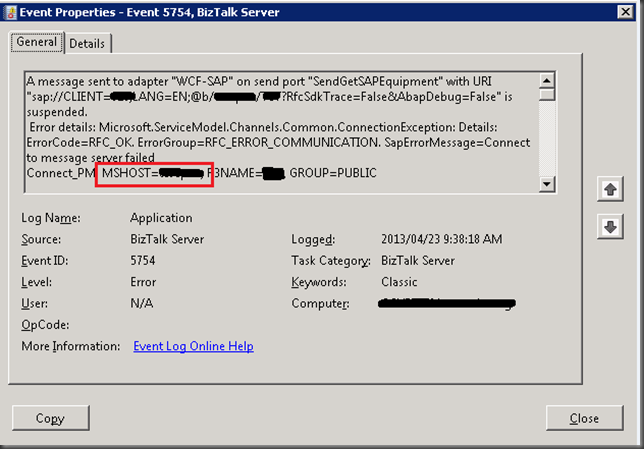
It isn’t only BizTalk that will use these values. Your SAPGUI will also use these same values when connecting to SAP systems. So if you are stuck, my recommendation is to find a machine that is running the SAPGUI and then copy over those values to the file that exists on your BizTalk Server(s). I have no idea how this MSHOST value is looked up as the BizTalk Send Port has no knowledge of it. My guess is that at runtime the R3Name in combination of the Message Server Host is somehow used to lookup this MSHOST from this file.
Conclusion
Hopefully this blog post will save you some time. I know that I had a tough time finding information that clearly painted the picture for me…especially in the area of the port# that is found in our services file.

by community-syndication | May 10, 2013 | BizTalk Community Blogs via Syndication
This is a continuation from two other blog posts about upgrading from BizTalk 2010 to BizTalk 2013. Mike who I mentioned previously has given the following tip if you are having trouble getting the Alerting service in the Exception Management Service working in BizTalk 2013. “.make sure: 1) BizTalk ESB Exception Notification.exe has updated assembly […]
Blog Post by: mbrimble

by community-syndication | May 9, 2013 | BizTalk Community Blogs via Syndication
Again in the previous step “Enable Internet Information Services” I mentioned that we should install the SMTP Server feature, why? If you wish to configure BAM Alerts, you must have configured SQL Server Database Mail feature (we will see how to accomplish that afterwards) and I will intend to configure this features using your local […]
Blog Post by: Sandro Pereira
by community-syndication | May 9, 2013 | BizTalk Community Blogs via Syndication
With the latest release of a BizTalk administration white paper by Tord G. Nordahl the story of running and maintaining BizTalk is complete. Through BizTalk360 site you can obtain the white paper: Proactively keep an eye on health of your Microsoft BizTalk Server Environments. This paper will you learn how to pro-actively avoid some of the scenarios like unplanned downtime, data loss or crippled
by community-syndication | May 8, 2013 | BizTalk Community Blogs via Syndication
In the past week I have had the opportunity to speak at two events. On May 1st I spoke at the Phoenix Connected Systems User Group and on May 6th I gave two presentations at the BizTalk Bootcamp in Charlotte.
It was a lot of fun putting these demos together and I received a lot of good feedback so hopefully you will also benefit from them. You can find the slide deck here: http://sdrv.ms/12fBU53
Note: Some of the Service Bus slides were borrowed from Clemens Vasters’ deck which he has made freely available here.

by community-syndication | May 8, 2013 | BizTalk Community Blogs via Syndication
In the previous step “Enable Internet Information Services” I mentioned that we should install the Windows Identity Foundation 3.5 feature, why? If we plan to use/configure SharePoint Services adapter or SharePoint Online when used with SharePoint Services Client Side Object Model (CSOM), then Windows Identity Foundation (WIF) feature is required. WIF is required if you […]
Blog Post by: Sandro Pereira

by community-syndication | May 8, 2013 | BizTalk Community Blogs via Syndication
Our BizTalk team have been trying to complete a in place upgrade from BizTalk 2010 to BizTalk 2013. The first part of this story can be found here. We completed the upgrade as described in that post but we struck this error and were stuck on it for awhile; This error occurred whenever we browsed […]
Blog Post by: mbrimble
by community-syndication | May 8, 2013 | BizTalk Community Blogs via Syndication
While working with EDI messages in Orchestrations you might get the following error message.
Identifier ’EDI’ doesn’t exist in ’Orchestration’; are you missing an assembly reference?
This happens when you try to access the EDI properties of a message in an orchestration like EDI.ISA06
To resolve this issue ensure the Orchestration Project has a reference to the assembly Microsoft.BizTalk.Edi.BaseArtifacts.dll
It is located in the folder you installed BizTalk Server ( C:\Program Files (x86)\Microsoft BizTalk Server 2010\ )
Blog Post by: Shinva
by community-syndication | May 7, 2013 | BizTalk Community Blogs via Syndication
Last week, the first public beta of the Microsoft.Diagnostics.Runtime library was released. This is a very cool library that can be used to write automated dump analysis of processes hosting the CLR. One of the first things you will need in order to use ClrMD is get a hold of the DAC library for the […]
Blog Post by: Tomas Restrepo

by community-syndication | May 7, 2013 | BizTalk Community Blogs via Syndication
Microsoft Internet Information Services (IIS) provides a Web application infrastructure for many BizTalk Server features. BizTalk Server requires IIS for the following features: HTTP adapter SOAP adapter Windows SharePoint Services adapter Secure Sockets Layer (SSL) encryption BAM Portal To install IIS 8, use the following steps: Open “Server Manager”. Under “Manage” menu, select “Add Roles […]
Blog Post by: Sandro Pereira



