by community-syndication | Mar 7, 2012 | BizTalk Community Blogs via Syndication
Solutions for consuming REST services from BizTalk has been around for a while, and Jon Flanders has an excellent post about it. However, very little has been told about exposing REST endpoints, and even less using JSON. If you don’t know about JSON, it’s a lightweight data format, commonly used by JavaScript and JQuery. Part from being less verbose then XML, it can be parsed to a object on the client which makes it easier to navigate (as oppose to using XPath). This can come to good rescue for UI devs who apparently don’t understand XPath 😉
I haven’t yet been in a situation where I’ve had to expose REST/JSON endpoints from BizTalk, but as Kent Weare was being hackled by Bil Simser (MS Word MVP), I was eager to help out.
I begun by creating a custom WCF MessageInspector. My plan was to parse the incoming JSON message to an XML message, and also to change the HTTP verb from GET to POST if the client sent a GET request (BizTalk requires POST). As it turns out, the HTTP verb/Method, can not be changed in the IDispatchMessageInspector. If it was to be changed it would have to be earlier in the channel stack.
Prior to the MessageInspector is the OperationSelector, so I went on creating one implementing the IDispatchOperationSelector interface. After moving the logic from the inspector to the SelectOperation method in the OperationSelector, I ran into a new problem. The method was never called. It seems BizTalk is adding it’s own OperationSelector through its HostFactory. As I wanted to host the Receive Location in a In-Process host (no IIS), making my own HosFactorythis wouldn’t work either
I was forced to dig even deeper in the WCF channel stack. Next step was a custom Encoder. Luckily I found a sample in the SDK which was pretty easy to use. The only problem was I couldn’t access the HTTP verb. However after all this, I was willing to accept this trade-off.
Next up was the serialization and deserialization of JSON. Bil Simser pointed me to the JSON.Net project on codeplex, which made it very easy:
XmlDocument doc = new XmlDocument();
doc.LoadXml(xmlString);

string jsonString = JsonConvert.SerializeXmlNode(doc, Newtonsoft.Json.Formatting.None, true);
How to use the sample:
- Download the sample here
- Either run the bLogical.JsonXmlMessageEncoder.Setup.msi or build and add the bLogical.JsonXmlMessageEncoder to the global assembly cache (GAC).
- Open BizTalk Administration Console. Browse to Adapters and right-click the WCF-Custom Receive Handler. Select Properties.
- Click the Import button, and select the WcfExtensions.config file found in the project.
- Deploy the FortisAlberta project to BizTalk.
- Import the FortisAlberta.BindingInfo.xml to the FortisAlberta Application
- Start the FortisAlberta Application.
- Run the WebApplication1 project, and submit an OutageReport.
How to configure a Receive Location manually
- Add a Request/Response Receive Port and Location.
- Set the transport to WCF-Custom (no need to host it in IIS).
- Set the binding to customBinding, and remove the existing binding elements.
- Add the "jsonXmlMessageEncoder" and the "http transport" extensions.
- Enable the port.
- You can use the XmlToJSONConverter that comes with the project to generate the expected JSON format from an XML instance, or use any of the online conversion sites like this one.
How to call the service
<script type="text/javascript">

    jQuery.support.cors = true;
    var jsonRequest = '{"Tweet":{"Author":"wmmihaa","Text":"BizTalk Rock!"}}';

    function ReportOutage() {
        $.ajax({
            type: 'POST',
            url: http://yourdomain.com/submitTweet,
            data: jsonRequest,
            contentType: "application/json; charset=utf-8",
            dataType: "json",
            success: function (msg) {
                alert(msg);
            },
            error: function (xhr, ajaxOptions, thrownError) {
                alert('error: ' + thrownError);
            }
        });
    }
</script>
Please not the JSON above:
“{"Tweet":{"Author":"wmmihaa","Text":"XML Rocks!"}}”. This is going to be translated to:
<Tweet><Author>wmmihaa</Author><Text>XML Rocks!</Text></Tweet>
As there are no namespace, you’d need to add one in the receive pipeline. Alternatively, you could add the namespace in JSON:
{"ns0:Tweet":{"@xmlns:ns0":"http://yourns.Tweet","Author":"wmmihaa","Text":"XML Rocks!"}}
Which would come out as:
<ns0:Tweet xmlns:ns0="http://yourns.Tweet">
  <Author>wmmihaa</Author>
  <Text>XML Rocks!</Text>
</ns0:Tweet>
How to call the service without using parameters
function ReportOutage() {
    $.ajax({
        type: 'POST',
        url: "http://yourdomain.com/submitTweet",
        data: '{}', // empty parameter
        contentType: "application/json; charset=utf-8",
        dataType: "json",
        success: function (msg) {
            alert(msg);
        },
        error: function (xhr, ajaxOptions, thrownError) {
            alert('error: ' + thrownError);
        }
    });
Empty parameters are casted to a message that looks like this: <EmptyJsonMessage/>. As you won’t have an equivalent schema in BizTalk, you can’t parse it using an XmlReceive pipeline. If you want to process the message in an orchestration, you’d need to set the message type of the incoming message to System.Xml.XmlDocument.
Restrictions
- Does not support HTTP GET.
- Does not support Uri parameters, Eg. http://server/Customers?id=16.
- The encoder supports both XML and JSON, but not both. It will be restricted to the media type set on the encoder.
- In this sample the response can not be handled in a streaming manner. If the size of the response message is bigger then what is read from the client, this is likely to cause a problem. I haven’t experienced this myself, but if you get into this problem, contact me and I’ll look into it.
HTH
Blog Post by: wmmihaa
by community-syndication | Mar 6, 2012 | BizTalk Community Blogs via Syndication
If you have been following this blog you have most likely encountered a few blog posts related to SAP integration. I also wrote two chapters related to SAP integration in a BizTalk book last year. In all of the journeys that I have taken with SAP, not once have I encountered a situation were I needed to receive a request from SAP that required a synchronous response. All of my previous experience required asynchronous messaging with SAP when receiving data from SAP. We now have a scenario that requires SAP to send BizTalk a “fetch” request and BizTalk needs to provide this information in near real-time. What was very interesting about this scenario many people within our organization didn’t think, or know it was possible. I guess it was tough for some to wrap their head around the concept of SAP actually needing information from another system since it tends to be a System of Record.
SAPRFC.INI HUH???
A good starting point for this scenario is in the MSDN documentation. Initially I thought it would be pretty straight forward and would resemble a situation where BizTalk receives an IDOC. That was until I received an error similar to the one below indicating that an saprfc.ini file could not be found when enabling the SAP Receive Location.
Log Name: Application
Source: BizTalk Server
Date: 3/6/2012 7:12:53 PM
Event ID: 5644
Task Category: BizTalk Server
Level: Error
Keywords: Classic
User: N/A
Computer: SERVER
Description:
The Messaging Engine failed to add a receive location "Receive Location2" with URL "sap://CLIENT=010;LANG=EN;@a/SAPSERVER/00?ListenerDest=ZRFCADD&ListenerGwServ=sapgw00&ListenerGwHost=SAPHOST&ListenerProgramId=Biztalk_Z_Add&RfcSdkTrace=False&AbapDebug=False" to the adapter "WCF-SAP". Reason: "Microsoft.Adapters.SAP.RFCException: Details: ErrorCode=RFC_OK. ErrorGroup=RFC_ERROR_SYSTEM_FAILURE. SapErrorMessage=Open file ‘C:\SAPINI\saprfc.ini’ failed: ‘No such file or directory’. AdapterErrorMessage=Error accepting incoming connection. RfcAccept returned RFC_HANDLE_NULL..
This really confused me since I could successfully connect to SAP and receive IDOCs. After some digging, I discovered the following webpage that indicated: “The RFC library will read the saprfc.ini file to find out the connection type and all RFC-specific parameters needed to connect to an SAP system, or to register an RFC server program at an SAP gateway and wait for RFC calls from any SAP system.”
So how do we solve this?
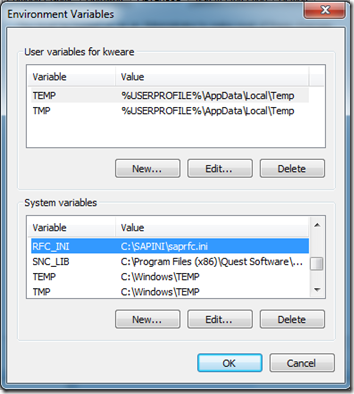
- The first thing that we need to do is to create a System Variable called RFC_INI. We then need to provide a path and a filename. For the purpose of my example I used C:\SAPINI\saprfc.ini.
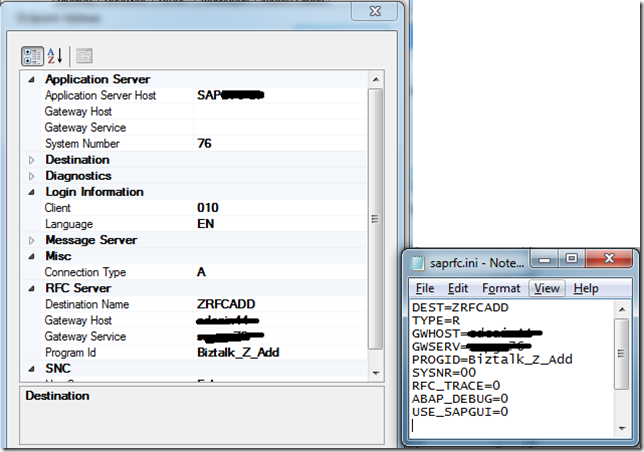
- Next we need to add the contents to our saprfc.ini file. The values that I needed to provide include:
| Field name |
Value |
|
| DEST |
ZRFCADD |
In this case, this is the name of the RFC Destination that our BASIS team created for us from SM59. More details here. |
| TYPE |
R |
Type R is for RFC server programs or for a client program working with another external program as RFC server program which is already registered at an SAP gateway. |
| GWHOST |
SAP_HOST_NAME |
In my case, this is the name of the physical server that his hosting the SAP Gateway. |
| GWSERVER |
SAP_GATEWAY_NAME |
The name of the SAP Gateway. A standard naming convention is: SAPGW## where ## is the system number for the SAP instance that you are working on. |
| PROGID |
Biztalk_Z_Add |
This is the name of the Program ID that has also been provided by BASIS. |
So if we compare the details between our Receive Location and our saprfc.ini we will see symmetry between the two. However, the values in the ini file take precedence.
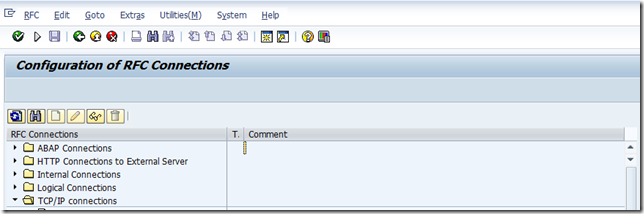
- Now that we have have our SAPRFC.ini file and SAP Receive location in order we can run a connected client test using SM59. To perform this test, launch the SM59 transaction and then expand the TCP/IP Connections node.
- Scroll through the list to find your RFC Destination. In my case, I am looking for ZRFCADD. Double click on this value.

- Click on the Connection Test button to execute the test.
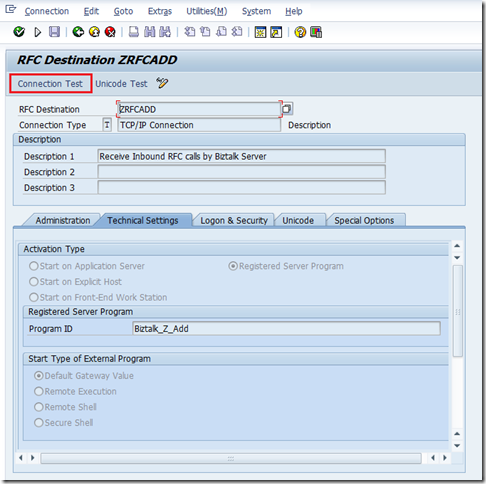
- You should see a successful Connection Test. If not, there is no point trying to call your RFC from SAP until you get this connection issue resolved. If SAP can’t perform this “ping test” it won’t be able to actually send you data. To troubleshoot this you will need to ensure that the values that you have in your receive location/ini file match the values that are defined in SM59. In most cases you will need to rely upon your BASIS Buddy to help you out. As I mentioned in my book, I do have a good BASIS buddy so this troubleshooting usually goes smoothly.
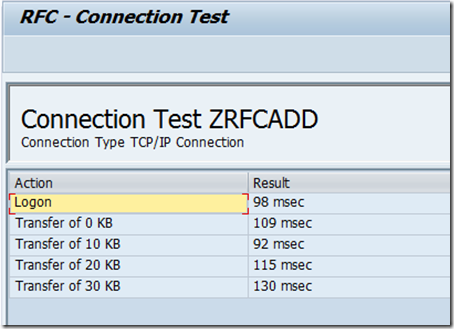
- With our connectivity issues out of the way, we can browse for our desired schemas using the BizTalk Consume Adapter Service Wizard and then add them to our solution.
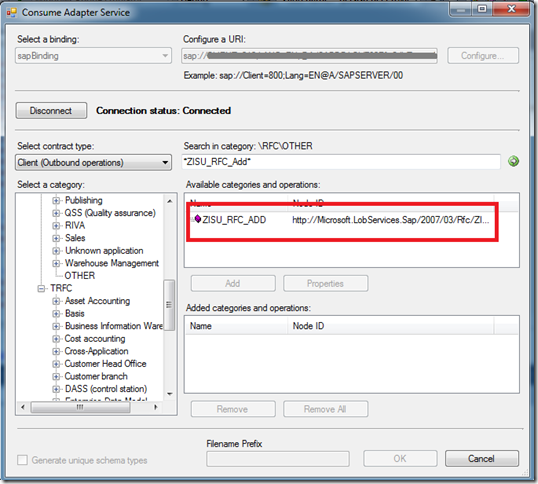
- We can now build out the rest of our application. In my case I have a very simple map that will add two values that occur in the request message and provide the sum in the response message.
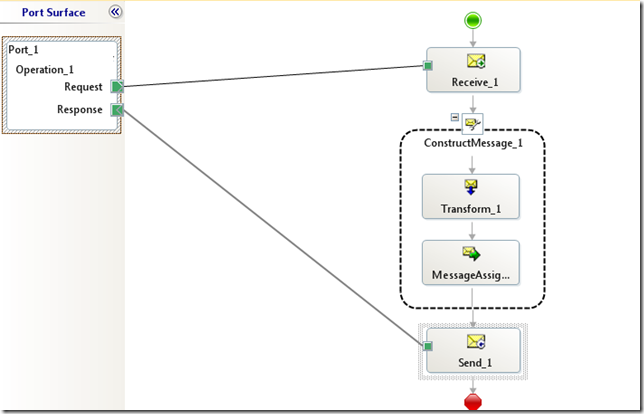
- The only special consideration that we need to take care of is to set the WCF.Action in the Response message. We can do this inside a Message Assignment shape. If you don’t take care of this, you will receive a run time error.
sapResponse(WCF.Action) = "http://Microsoft.LobServices.Sap/2007/03/Rfc/ZISU_RFC_ADD/response";
We now are in a position to deploy our application and start receiving requests from SAP.
Conclusion
Overall the process was pretty similar to receiving IDOCs with the exception of the INI file and the WCF Action property requiring being populated. Performance is similar to receiving or sending IDOCs so you won’t take any additional performance hits.
by community-syndication | Mar 6, 2012 | BizTalk Community Blogs via Syndication
| In a previous post, I talked about analyzing 1 TB of IIS logs with JavaScript thru Hadoop Map/Reduce. In this post, let’s see how to copy and use the result of these jobs to SQL Azure. |
Dans un billet précédent, il a été question de l’analyse d’1 To de logs IIS avec JavaScript dans Hadoop Map/Reduce. Dans ce billet, regardons comment copier et exploiter le résultat dans SQL Azure. |
| First of all, from 1 TB of IIS logs, we had a result of less than 100 GB for the headers and details, so having this data in SQL Azure (or SQL Server) will be more efficient than keeping it in Hadoop: Hadoop Map/Reduce is a world of batches that can handle bigger and bigger amounts of data linearly while SQL Azure is interactive (but requires SQL Azure federations to scale linearly). |
Tout d’abord, à partir du To de logs initial, le résultat a été de moins de 100 Go pour les en-têtes et les détails, et donc avoir ces données résultats dans SQL Azure (ou SQL Server) sera plus efficace que de les laisser dans Hadoop: Hadoop Map/Reduce correspond à un monde de traitements par lots qui peut gérer des données toujours plus grosses avec des performances linéaires alors que SQL Azure est interactif (mais nécessite les fédérations SQL Azure pour une montée en charge linéaire). |
The steps are the following:
– create a SQL Azure database
– create HIVE metadata
– open ODBC port
– install ODBC driver
– create SSIS package
– Run SSIS package
– Create and run a SQL Azure Report on top of database |
Les étapes sont les suivantes:
– créer une base SQL Azure
– créer des métadonnées HIVE
– ouvrir le port ODBC
– installer le pilote ODBC
– créer le package SSIS
– exécuter le package SSIS
– créer et exécuter un rapport SQL Azure Reporting au dessus de cette base |
| Create a SQL Azure database |
créer une base SQL Azure |
| A SQL Azure database can be created as explained here. |
On peut créer une base SQL Azure comme expliqué ici. |
| Note that if one already has a SQL Azure database, he can reuse it but he might have to change its size. For instance to let a SQL Azure database grow from 1 GB to 150 GB, the following statement should be issued against the master database in the same SQL Azure server: |
A noter que si on dispose déjà d’une base SQL Azure, il est possible de la réutiliser après éventuellement avoir changé sa taille. Par exemple, pour faire en sorte qu’une base SQL Azure puisse grossir non plus jusqu’à 1 Go mais jusqu’à 150 Go, la requête suivante peut être exécutée sur la base master du serveur SQL Azure: |
ALTER DATABASE demo MODIFY (MAXSIZE = 150 GB, EDITION=’business’)
| Create HIVE metadata |
créer des métadonnées HIVE |
| HIVE can store its data in HDFS with a variety of format. It can also reference existing data without directly managing it. This king of storage is called external tables. In our case, we want to expose the iislogsH and iislogsD HDFS folders as HIVE tables. Here how the folders look in HDFS: |
HIVE peut stocker ses données dans HDFS sous diverses formes. Il est aussi capable de référencer des données existantes sans les gérer directement. Ce type de stockage correspond aux tables externes. Dans notre cas, on veut exposer les dossiers HDFS iislogsH et iislogsD sous forme de tables HIVE. Voici à quoi ressemblent les dossiers HDFS en question: |
(…)
(…)
js> #tail iislogsH/part-m-00998
731g2x183 2012-01-25 19:01:05 2012-01-25 19:22:11 16
872410056 a34175aac900ed11ea95205e6c600d461adafbac test1833g4x659 2012-01-27 13:23:31 2012-01-27 13:39:28 4
872410676 a34182f009cea37ad87eb07e5024b825b0057fff test1651hGx209 2012-01-28 18:05:45 2012-01-28 18:41:37 7
872411200 a341afd002814dcf39f9837558ada25410a96669 test2250g4x61 2012-01-27 01:04:45 2012-01-27 01:23:19 5
872412076 a341b71e15a5ba5776ed77a924ddaf49d89bab54 test4458gAx34 2012-02-02 19:00:07 2012-02-02 19:09:12 10
872412288 a341c30edf95dfd0c43a591046eea9eebf35106e test2486g4x352 2012-01-27 17:05:52 2012-01-27 17:27:54 2
872412715 a341cb284b21e10e60d895b360de9b570bee9444 test3126g2x205 2012-01-25 13:07:47 2012-01-25 13:49:20 4
872413239 a341cc54e95d23240c4dfc4455f6c8af2a621008 test0765g7x99 2012-01-30 00:08:04 2012-01-30 00:43:17 5
872414168 a341d37eb48ae06c66169076f48860b1a3628d49 test0885g4x227 2012-01-27 18:02:40 2012-01-27 18:11:12 11
872414800 a341d8762f0d7e1e70ced16ce10786ea50ef3ca7 test2471hHx165 2012-01-29 20:00:58 2012-01-29 20:40:24 6
js> #tail iislogsD/part-m-00998
9 a341d8762f0d7e1e70ced16ce10786ea50ef3ca7 20:40:24 /
872414323 a341d8762f0d7e1e70ced16ce10786ea50ef3ca7 20:07:49 /cuisine-francaise/huitres
872414402 a341d8762f0d7e1e70ced16ce10786ea50ef3ca7 20:00:58 /cuisine-francaise/gateau-au-chocolat-et-aux-framboises
872414510 a341d8762f0d7e1e70ced16ce10786ea50ef3ca7 20:29:52 /cuisine-francaise/gateau-au-chocolat-et-aux-framboises
872414618 a341d8762f0d7e1e70ced16ce10786ea50ef3ca7 20:39:51 /Users/Account/LogOff
872414692 a341d8762f0d7e1e70ced16ce10786ea50ef3ca7 20:09:52 /cuisine-francaise/gateau-au-chocolat-et-aux-framboises
872414900 a341db58e7be1b37828ed5591ba17c251c96a16a 03:00:23 /Modules/Orchard.Localization/Styles/orchard-localization-base.css
872415019 a341db58e7be1b37828ed5591ba17c251c96a16a 03:00:57 /Users/Account/LogOff
872415093 a341db58e7be1b37828ed5591ba17c251c96a16a 03:00:12 /Themes/Classic/Styles/Site.css
872415177 a341db58e7be1b37828ed5591ba17c251c96a16a 03:00:56 /
872415231 a341db58e7be1b37828ed5591ba17c251c96a16a 03:00:44 /Core/Shapes/scripts/html5.js
| The following statements will expose the folders as HIVE external tables: |
Les requêtes suivantes vont exposer les dossiers sous forme de tables externes: |
CREATE EXTERNAL TABLE iisLogsHeader (rowID STRING, sessionID STRING, username STRING, startDateTime STRING, endDateTime STRING, nbUrls INT)
ROW FORMAT DELIMITED
FIELDS TERMINATED BY ‘\t’
LINES TERMINATED BY ‘\n’
STORED AS TEXTFILE
LOCATION ‘/user/cornac/iislogsH’
CREATE EXTERNAL TABLE iisLogsDetail (rowID STRING, sessionID STRING, HitTime STRING, Url STRING)
ROW FORMAT DELIMITED
FIELDS TERMINATED BY ‘\t’
LINES TERMINATED BY ‘\n’
STORED AS TEXTFILE
LOCATION ‘/user/cornac/iislogsD’
| It is possible to check that data is exposed thru HIVE by issuing this kind of statement. Note that using SELECT * will not generate a map/reduce job because there is no need to change data before returning it. |
Il est possible de vérifier que les données sont exposées en exécutant ce type de requête. A noter que l’utilisation de SELECT * ne génère pas de job map/reduce puisqu’aucun traitement préalable des données n’est nécessaire. |
SELECT * FROM iislogsheader LIMIT 20
SELECT * FROM iislogsdetail LIMIT 20
| Open ODBC port |
ouvrir le port ODBC |
| From HadoopOnAzure portal, go to the Open Ports tile and make sure ODBC port 10000 is open |
Depuis le portail HadoopOnAzure, aller à la tuile “Open Ports” et s’assurer que le port 10000 ODBC est ouvert |
| Install ODBC driver |
installer le pilote ODBC |
| On the server where SSIS will run, there must be the HIVE ODBC driver installed. |
Sur le serveur ou SSIS s’exécutera, il faut avoir le pilote ODBC pour HIVE installé. |
| It can be installed from the HadoopOnAzure portal, by clicking the “Downloads” tile and choosing the right MSI: |
Il peut s’installer depuis le portail HadoopOnAzure, en cliquant sur la tuile “Downloads” et en choisissant le MSI adapté à sa machine: |
| create an SSIS Package |
créer le package SSIS |
| A general guidance on how to create an SSIS package to fill SQL Azure is available here. |
Des instructions générales pour créer un package SSIS à destination de SQL Azure est dsiponible là. |
| The user DSN (ODBC entry) can be created from Windows Control Panel. |
Le DSN (entrée ODBC) utilisateur peut être créé depuis le panneau de configuration de Windows. |
| In order to connect to HIVE thru ODBC, one should usein SSIS ODBC driver for ADO.NET |
De façon à se connecter à HIVE via ODBC, on passe dans SSIS par le pilote ODBC pour ADO.NET |
By default, the number of allowed errors is 1. You may want to change this value, by selecting the data flow, then the control flow and changing its MaximumErrorCount property.
One could also change timeouts. |
Par défaut, le nombre d’erreurs autorisées est 1. Il peut être nécessaire de changer cette valeur, en sélectionnant le “data flow”, puis le “control flow” et en changeant la propriété MaximumErrorCount.
On pourra aussi augmenter certains délais d’attente. |
While creating the package, you will get a chance to have the destination tables created automatically. Here are the resulting tables schemas in SQL Azure (as screenshots).
As Hadoop map/reduce may generate rowid duplicates in our case, the constraint on rowid will be removed by droping and recreating the tables with the code provided here (change is underlined). The principle is to leave original rowid on Hadoop cluster and create new ones in SQL. |
Lors de la création du package, il sera proposé de créer les tables de destination automatiquement. Voici (sous forme de copies d’écrans) les schémas ainsi générés dans SQL Azure.
Comme Hadoop map/reduce peut avoir généré des doublons dans notre cas, les contraintes sur rowid vont être supprimées en supprimant et recréant les tables avec le code fourni ici (le changement est souligné). Le principe est de laisser les rowid sur le cluster Hadoop et d’en regénérer d’autres dans SQL. |
DROP TABLE [dbo].[iislogsheader]
GO
CREATE TABLE [dbo].[iislogsheader](
[rowid] bigint IDENTITY(1,1) NOT NULL,
[sessionid] [nvarchar](334) NULL,
[username] [nvarchar](334) NULL,
[startdatetime] [nvarchar](334) NULL,
[enddatetime] [nvarchar](334) NULL,
[nburls] [int] NULL,
PRIMARY KEY CLUSTERED
(
[rowid] ASC
)
)
DROP TABLE [dbo].[iislogsdetail]
GO
CREATE TABLE [dbo].[iislogsdetail](
[rowid] bigint IDENTITY(1,1) NOT NULL,
[sessionid] [nvarchar](334) NULL,
[hittime] [nvarchar](334) NULL,
[url] [nvarchar](334) NULL,
PRIMARY KEY CLUSTERED
(
[rowid] ASC
)
)
| It will also be necessary to remove the link between source and destination rowid columns as they are independant. |
Il sera aussi nécessiare de supprimer les liens entre les colonnes rowid source et destinations, maintenant qu’elles sont indépendantes. |
| Run SSIS Package |
exécuter le package SSIS |
| The SSIS package can be depoyed and run. In this sample, it is run from the debugger (F5 in Visual Studio). |
Le package SSIS peut être déployé et exécuté. Dans cet exemple, on le lance depuis le débogueur (F5 dans Visual Studio). |
| Create and run a SQL Azure Report |
Créer et exécuter un rapport SQL Azure Reporting au dessus de cette base |
| A report can be built on top of this SQL Azure database as explained here. |
Un rapport peut ensuite être créé au dessus de la base SQL Azure comme expliqué ici. |
| For instance the report designer looks like this |
Par exemple, le report designer peut ressembler à cela |
| and the report looks like this |
et le rapport à cela |
Related link | Lien connexe: Partager vos données via SQL Azure
Benjamin
Blog Post by: Benjamin GUINEBERTIERE
by community-syndication | Mar 6, 2012 | BizTalk Community Blogs via Syndication
| In order to create a SQL Azure database from the Windows Azure Portal, one first needs to create a SQL Azure Server as explained here. |
Pour créer une base SQL Azure depuis le portail Windows Azure, on doit d’abord créer un serveur SQL Azure comme expliqué ici. |
| Then, one has to choose the name and the max size of the database. For the size, it is a good idea to check SQL Azure pricing one the official pricing page (detailed pricing is here). |
Il faut ensuite choisir le nom et la taille maximale de la base de données. Pour la taille, il peut être intéressant de consulter les prix de SQL Azure sur la page officielle des tarifs (le détail est ici). |
| Once those parameters are known, go to the Windows Azure Portal, select database, and the SQL Azure Server, then click on Create: |
Une fois qu’on connaît ces paramètres, on peut aller sur le portail Windows Azure, sélectionner “database”, et “SQL Azure Server”, puis cliquer sur “Create”: |
| Choose the name of the database |
Choisir le nom de la base |
| Choose the edition and the size of the database. The only difference between the two editions for now is the available max size. web edition is for small databases, business edition is for bigger database. |
Choisir l’édidition et la taille de la base. La seule différence entre les deux éditions est la taille maximale disponible. L’édition “web” est pour les petites bases, l’édition “business” est pour les bases plus grosses. |
| Click OK |
Cliquer sur “OK” |
| The database is ready. |
La base de données est prête. |
Related link | Lien connexe: Partager vos données via SQL Azure
Benjamin
Blog Post by: Benjamin GUINEBERTIERE

by community-syndication | Mar 6, 2012 | BizTalk Community Blogs via Syndication
The recent Azure outage once again highlighted the value in being able to run an application in multiple clouds so that a failure in one place doesn’t completely cripple you. While you may not run an application in multiple clouds simultaneously, it can be helpful to have a standby ready to go. That standby could […]
Blog Post by: Richard Seroter

by community-syndication | Mar 5, 2012 | BizTalk Community Blogs via Syndication
Today I found out that the latest book that I have been contributing to is now available for pre-order. I got involved with this project right around the time that my last book was published. Our editor on that book offered us the opportunity to work on this book. Johan Hedberg, the lead author, was also extended this opportunity. So after a moment of weakness, and perhaps a few beers on a boat ride in Stockholm, I agreed to get involved in this book as well. Joining us on this adventure is Morten la Cour who lives in Denmark and also has a vast amount of BizTalk experience.
The book is a preparation guide for the latest BizTalk Server 2010 Certification. In this book you will be provided with practical examples of the skills that will be measured on this exam. In our book we do cover each of the areas that will be tested including:
- Configuring a Messaging Architecture
- Developing BizTalk Artifacts
- Debugging and Exception Handling
- Integrating Web Services and Windows Communication Foundation (WCF) Services
- Implementing Extended Capabilities
- Deploying, Tracking, and Supporting a BizTalk Solution
We also include valuable sample questions at the end of each chapter and also include an entire chapter at the end of the book that should provide you with a good gauge as to whether or not you are ready to write the test. This book is not a brain dump. If you are looking for any easy way out you won’t find it here. But if you already have a good base of BizTalk knowledge and are willing to put in the effort to really understand the content in this book, I am confident that you will do well on the exam.
I would also like to extend thanks to the technical reviewers that have spent hours reviewing our content which without a doubt has increased the quality of the book. Our reviewers include:
- Steef-Jan Wiggers
- Mikael Hakansson
- Jan Eliasen
- Genuine Basil
The anticipated publish date is in May, 2012. In the mean time, you can read more about our book on the Packt website : http://www.packtpub.com/mcts-microsoft-biztalk-server-2010-certification-guide/book
by community-syndication | Mar 1, 2012 | BizTalk Community Blogs via Syndication
I’ve just added PDF and CHM versions of “Windows Azure Service Bus Developer Guide”, you can get them here.
The HTML browsable version is here.
I have the first delivery of my 2-day course “SOA, Connectivity and Integration using the Windows Azure Service Bus” scheduled for 3-4 May in Stockholm. Feel free to contact me via my blog if you have any questions about the course, or would be interested in an on-site delivery. Details of the course are here.
by community-syndication | Mar 1, 2012 | BizTalk Community Blogs via Syndication
It’s time to rock the enterprise mobility world. Next week we will be hosting a webinar to talk about a new, modern, fresh and super cool approach to enterprise mobility. Tellago’s enterprise mobility lead Chris Love will showcasing (that’s right not…(read more)
Blog Post by: gsusx
by community-syndication | Mar 1, 2012 | BizTalk Community Blogs via Syndication
As of yesterday, BizTalk 2010 has a fourth cumulative update available already!
This CU includes 8 product updates based on customer escalations.
Download & info: Cumulative update package 4 for BizTalk Server 2010



