by community-syndication | Jun 28, 2011 | BizTalk Community Blogs via Syndication
Recently, we ran into some issues in which the MQSC adapter was not displayed as an option in the BizTalk Administration console, even after the adapter was properly installed on a BizTalk 2009 / Windows 2008 SP1 server. Before outlining the problem and the solution, let’s discuss the MQSC adapter basics first.
MQSC Adapter Basics
The MQSC adapter is only supported running in 32-bit mode on BizTalk 2006 R2, regardless of the operating system being used. On BizTalk 2009 and 2010, the MQSC adapter is supported on Windows 32-bit and Windows 64-bit configurations. In BizTalk 2009, the ability to run in a 64-bit host depends on the version of the IBM Websphere client installed, specifically MQ Client (7.x) or greater. If the goal is to run 64-bit hosts then the 64-bit version of the IBM Websphere client must be installed onto a supported Windows operating system running on a 64-bit processor. For
more information, please follow the installation documentation for the IBM Websphere client and/or the installation documentation for the version of Biztalk being installed.
939202 Update
This update forces the MQSC adapter to run in 32-bit hosts in BizTalk 2006 R2 regardless if the operating system is 32-bit or 64-bit. When 939202 is installed onto any other version of BizTalk (except BizTalk 2006 R2), you may get the “Exception: is not a valid Win32 application. (Exception from HRESULT: 0x800700C1)” exception when running the adapter in 64-bit hosts. Uninstall the 939202 update. If a problems persists, call Microsoft customer support.
MQSC Adapter WMI Installation May Fail
When the MQSC adapter is installed onto BizTalk 2009 / Windows 2008 SP1 (or later SP) or BizTalk 2010 / Windows 2008 R2, it is possible that the WMI install will fail to write the proper registry entries when loading the “Microsoft.BizTalk.Adapter.MQSCAdmin.dll”. The BizTalk MMC console runs as 32-bit MMC.exe process. When the MQSC adapter installation fails, it does not write the correct information to the registry keys used by the MQSC adapter.
To resolve this, add the “MQSC Adapter Class” class information manually into the Wow6432Node node in the registry and then do a repair of the MQSC adapter (again, it is part of the HIS installation). The outline for correcting this problem is as follows:
- Install MQ 7.x or greater and all of the appropriate updates (64-bit version).
- Install BizTalk Host Adapters 2.0 from the HIS 2009/2010 Server media onto the target BizTalk 2009/2010 server.
- Copy the registry information below into a registry file (.reg file) and import it into the HKEY_LOCAL_MACHINE\SOFTWARE\Classes\Wow6432Node\CLSID key.
- Run the repair for the BizTalk Host Adapters 2.0 from the HIS 2009/2010 Server media (do not skip this step).
- The MQSC adapter should show up in the BizTalk Administration console.
NOTE: Please refer to the appropriate HIS and IBM Websphere client documentation for the most current installation procedures.
REGISTRY ENTRY
“Using Registry Editor incorrectly can cause serious, system-wide problems that may require you to re-install Windows to correct them. Microsoft cannot guarantee that any problems resulting from the use of Registry Editor can be solved. Use this tool at your own risk.”
|
REGISTRY ENTRY
=============
Windows Registry Editor Version 5.00
[HKEY_LOCAL_MACHINE\SOFTWARE\Classes\Wow6432Node\CLSID\{CF8B4D15-5D2B-4c62-90DB-16804D2454B9}]
@=”MQSC Adapter Class”
“AppID”=”{401D2C40-DAA9-4a63-8D42-9BF98B04F616}”
[HKEY_LOCAL_MACHINE\SOFTWARE\Classes\Wow6432Node\CLSID\{CF8B4D15-5D2B-4c62-90DB-16804D2454B9}\BizTalk]
@=”BizTalk”
“TransportType”=”MQSC”
“Constraints”=dword:00003d0b
“ReceiveLocation_PageProv”=”{2DE93EE6-CB01-4007-93E9-C3D71689A280}”
“TransmitLocation_PageProv”=”{2DE93EE6-CB01-4007-93E9-C3D71689A282}”
“OutboundProtocol_PageProv”=”{2DE93EE6-CB01-4007-93E9-C3D71689A283}”
“OutboundEngineCLSID”=”{6811E17F-A4C2-44BB-B4D5-D69962E58E87}”
“InboundEngineCLSID”=”{538F8B3D-EE7B-4459-A123-45CD5C3B671B}”
“InboundTypeName”=”Microsoft.BizTalk.Adapter.Mqsc.MqscReceiver, Microsoft.BizTalk.Adapter.MQSC, Version=7.0.2300.0, Culture=neutral,
PublicKeyToken=31bf3856ad364e35, Custom=null”
“InboundAssemblyPath”=””
“OutboundTypeName”=”Microsoft.BizTalk.Adapter.Mqsc.MqscTransmitter, Microsoft.BizTalk.Adapter.MQSC, Version=7.0.2300.0, Culture=neutral,
PublicKeyToken=31bf3856ad364e35, Custom=null”
“OutboundAssemblyPath”=””
“PropertyNameSpace”=”http://schemas.microsoft.com/BizTalk/2003/mqs-properties“
“ProtocolAlias”=”mqsc://”
“ReceiveHandlerPropertiesXML”=”<CustomProps><AdapterConfig vt=\”8\”/></CustomProps>”
“SendHandlerPropertiesXML”=”<CustomProps><AdapterConfig vt=\”8\”/></CustomProps>”
“ReceiveLocationPropertiesXML”=”<CustomProps><AdapterConfig vt=\”8\”/></CustomProps>”
“SendLocationPropertiesXML”=”<CustomProps><AdapterConfig vt=\”8\”/></CustomProps>”
“AliasesXML”=”<AdapterAliasList><AdapterAlias>mqsc://</AdapterAlias></AdapterAliasList>”
“AdapterMgmtTypeName”=”Microsoft.BizTalk.Adapter.Mqsc.MqscAdapterManagement”
“AdapterMgmtAssemblyPath”=”C:\\Program Files (x86)\\Microsoft BizTalk Adapters for Host Systems 2.0\\system\\Microsoft.BizTalk.Adapter.MQSCAdmin.dll”
[HKEY_LOCAL_MACHINE\SOFTWARE\Classes\Wow6432Node\CLSID\{CF8B4D15-5D2B-4c62-90DB-16804D2454B9}\Implemented Categories]
[HKEY_LOCAL_MACHINE\SOFTWARE\Classes\Wow6432Node\CLSID\{CF8B4D15-5D2B-4c62-90DB-16804D2454B9}\Implemented Categories\{80D39129-B68D-4f85-98EF-
151A4E1627F7}]
@=””
|
NOTE: Confirm that the “AdapterMgmtAssemblyPath” is proper for your installation.
Blog Post by: Dwaine D Gilmer
by community-syndication | Jun 27, 2011 | BizTalk Community Blogs via Syndication
This is an open invitation for all of you to access/manage one of our test BizTalk environment, running in our premise protected by NAT/Firewall.
http://demo.biztalk360.com
Note: The first time loading will take sometime, once the SilverLight application is downloaded, it will be quick.
Why do we need AppFabric Service Bus integration for BizTalk 360?
Even before shipping the V1.0 of BizTalk360, we started on some of the cool features requested by potential customers (coming in V2.0). Ability to manage their BizTalk environment remotely, securely, and with less investment in infrastructure changes.
There are various scenarios why a company may want to do this. One of the main reason is outsourcing your Microsoft BizTalk Server support/operations to some third party companies. Previously providing something like this required heavy investment on infrastructure like setting up VPN connections, Citrix/RDP access to your production environment etc. But thanks to BizTalk360, which by default comes with lot of features targeted for production support, things like fine grained authorization, complete governance/auditing, ability to give read only access etc. Now with the support for AppFabric service bus, it’s possible to allow third party companies to securely manage your BizTalk environment. It’s important to mention, you’ll be able to audit/govern who did what!!.
Technology behind the scene
Majority of the hard work here is taken by Microsoft Azure AppFabric Service Bus (SB from now) infrastructure. Basically AppFabric SB takes care of all the challenges around establishing the connection with the on-premise infrastructure crossing through NAT/Firewall securely. This was possible also because of the BizTalk360 architecture. The front SilverLight application merely displays the data provided by the back end 8+ WCF services. We simply introduced AppFabric Service Bus layer in-between the SilverLight front end and the WCF backend as shown in the above figure. All of our recent blog posts were related to this. There were few challenges, but once we understood the challenges and how the whole thing works, everything went very smooth.
- Azure AppFabric Service bus, Silverlight Integration – End-to-End (walkthrough) – Part 1
- Azure AppFabric Service bus, Silverlight Integration – End-to-End (walkthrough) – Part 2
- AppFabric Service Bus : net:pipe needs to be specified error
- Understand Azure AppFabric Service Bus Pricing
As you can see from the picture above, the original BizTalk Environment is running in one of our internal environments. The front end is hosted on Windows Azure as a web role. The Azure AppFabric service bus puts the plumbing in-between and takes care of all the communication.
There is also a CNAME mapping, which maps http://demo.biztalk360.com to the actual Windows Azure Webrole application http://biztalk360.cloudapp.net
All the communication from the Azure Web role to the on premise BizTalk environment is fully encrypted using "https" traffic.
User simply come and hit the URL http://demo.biztalk360.com without knowing what’s going on behind the scene.
Nandri
Saravana Kumar
by community-syndication | Jun 25, 2011 | BizTalk Community Blogs via Syndication
Recently Microsoft has released another Azure AppFabric CTP. This particular one focuses on Azure “AppFabric Applications” or otherwise known as “Composite Applications”. The goal of Azure AppFabric Applications(as I see it) is to build, deploy and manage multi-tier applications as a single logical entity in Windows Azure.
Coming from the BizTalk world I am very familiar with distributed applications. Some of the challenges in developing and maintaining these types of applications is understanding all of the moving parts that are involved in these solutions. AppFabric Applications is a step in the right direction as it provides a holistic view of our “stuff” that makes up a distributed application including Web Applications, Custom and 3rd party Services, Service Bus capabilities (Relay/Queues), Workflow and Storage(DB/Blob/Table).
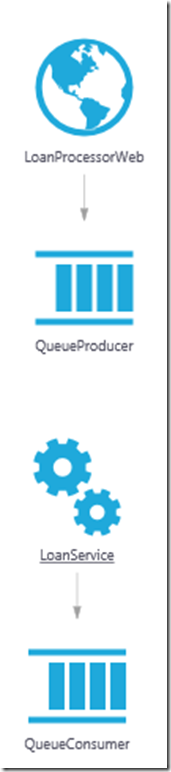
Managing, and understanding, different application/solution tiers independently can be a bit of a nightmare. One of the features of AppFabric Applications the ability to automatically generate a diagram that describes all of the core components of our distributed application and the related dependencies.
If we take a look at a diagram that describes one of the sample solutions we can quickly discover what our solution is made up of. In this case we have a Web Application that will push data to an AppFabric Queue. In turn we have a service that pull this data off of the queue.
So at this point you may be thinking “whoopee” I can draw that in Visio in 2 minutes. Well Visio will not be able to deploy this entire solution to the cloud in the matter of a few mouse clicks. Once this application is in the cloud we then have the ability to provision our various tiers by “turning a knob” or in this case pulling down a menu to select the amount of instances we require.
Another nice benefit is that we can trace and instrument our entire solution from once place. This is another pain point of distributed systems. There is usually logs all over the place that have to be aggregated to get a sense of the performance and health of an entire application. This is another benefit of using Azure AppFabric Composite apps.
Unfortunately my experience with this technology is only in the Local Development fabric as I am currently waiting to get access to the “Labs” environment in Azure. But if you check out some of the resources that I have outlined below you can see some demos of the Management features available in the Cloud.
Summary
Benefits:
- Ease of deployment
- Greater developer productivity
- Effortless scale
- Centralized managed and monitoring
CTP includes
- AppFabric Developer Tools
- AppFabric Application Manager
- Composition Model
- Support for running Custom Code, WCF and WF
What you need
Windows Azure AppFabric CTP SDK and Windows Azure AppFabric Tools for Visual Studio
Resources:
Before you start, I recommend watching the following videos:
- Channel 9 announcement video
- Alan Smith’s webcast
- TechEd 2011 North America video
I also suggest you take a look at the Tutorials and Samples.
The Samples that are available include introductory apps like a StockQuote app that has a Web Front end and then consumes a back end service to a Contoso Pizza application that includes a Web Front End that consumes a back end service which leverages some WF workflow.
Closing
This new CTP has me really intrigued. I plan to investigate further and will blog more about my findings.

by community-syndication | Jun 23, 2011 | BizTalk Community Blogs via Syndication
Note: This is not a definitive guide, this is just my understanding based on the research I’ve done and based on response I received from the Microsoft Azure support centre for some of my queries.
If you are planning to use AppFabric Service Bus, there are 3 different charges you need to be aware of
- AppFabric Service Bus connections (of individual and pack types)
- AppFabric Access Control transactions
- Data transfer (in gigabytes)
In this article we’ll try to address in detail about the AppFabric Service Bus charges, some of the terminologies used and slightly touch on Access Control and Data transfer charges.
Pricing:
Let’s start with the advertised pricing for AppFabric Service Bus
- $3.99 per connection on a "pay-as-you-go" basis
- Pack of 5 connections $9.95
- Pack of 25 connections $49.75
- Pack of 100 connections $199.00
- Pack of 500 connections $995.00
You can see Service bus pricing comes in 2 flavours, you can either opt in for a "pay as you go" model or you can buy a set of pre-bundled packs (5, 25, 100, and 500). Like any retail pricing model, you get almost 50% discounts for agreeing to prepay a bulk pack. For all the packs the pricing works out $1.99 per connection. The discount doesn’t increase in line with bigger pack.

What is a connection?
This is the most complicated question; you need to find the answer for when it comes to Service Bus.
AppFabric Service Bus runs directly on Azure compute instances; hence it depends on the following resources from the Azure Cloud
- Compute instance resources,
- Storage resources, and
- Networking resources.
The pricing model for the AppFabric Service Bus is like compute and storage pricing. That is, you pay for resources as long as you are using them. "Using them" is the keyword when it comes to cloud pricing model, you pay per usage. For compute/storage nodes, it easy to calculate the usage, as soon as you fire an Azure instance your compute meter will start, as soon as you stored some data in the storage your storage meter will start. But it’s tricky to calculate the usage for Service Bus, since the connection is transient.
At end of the day, the connectivity usage should somehow relate to the usage of underlying infrastructure, i.e compute and storage in the cloud. To keep the pricing model simple, Microsoft consolidated all the underlying resource usage (compute, storage, and network) and come with term called "Connection" to represent a billable unit.
So for service bus, the usage (billing) is calculated on simultaneous concurrent active connection you hold with service bus.
When will a connection be established and charged?
A typical service bus implementation is shown below. To setup an infrastructure like this will go through series of steps like registering your service with service bus, client opening a client channel to connect to the service and accessing the endpoint (ex: http://mysb.servicebus.windows.net/service/adminsvc )
So doing any of the following tasks will result in a connection.
- Opens a service on a AppFabric Service Bus endpoint
- Opens a client channel that connects to such a service
- Makes an HTTP request to any service opened on an AppFabric Service Bus endpoint
There are other scenarios as well like Message buffer, queues and topics released as part of CTP2 which are not considered for this article.
Concurrent (Simultaneous) Connections:
As I mentioned earlier, for AppFabric service bus you only pay for the maximum number of connections that were in simultaneous use on any given day during the billing period. So, it’s important to understand what that simultaneous connection means.
Let’s take this scenario, you decided to try out the Echo sample that comes with the SDK. You setup everything according to the documentation and you got 2 console windows open. One showing the server side messages, and in another console window you are going to type some message and press enter, which is going to get transmitted to your server console, get displayed. The server then responds back the same message which will eventually get displayed on the client console.
In this scenario you open 2 concurrent connections, one from client to AFSB and another from AFSB to server. The important thing to note here is the whole round trip would have taken only few milliseconds, once the message is echoed back on the client, you are not holding any connections to AFSB. Let’s assume you are on 5 connection pack package, and in this scenario you are well within you limit. You can keep executing the sample again and again and again, still you will consume only 2 connections, since your operation is sequential.
Next, let assume you have asked 4 of your friends to open the EchoClient application in their desktops and try out the demo.
When all of you are trying the demo, for majority of the times the connection will be in and out quickly (since our response times are in milliseconds) without overlapping and you may be well within the original 2 connections scenario. But there is lot of possibility you might end up in more than 2 concurrent connections as 4 people are trying to access the end points. In the above picture, you can see there are 2 active concurrent connections on both directions, which will result in 4 connections.
Connection charges are per month, but calculated daily on prorate basis.
Identifying the daily connection charge:
The maximum number of open connections is used to calculate your daily charges. For the purposes of billing, a day is defined as the period from midnight to midnight, Coordinated Universal Time (UTC).Each day is divided into 5-minute intervals and for each interval the time-weighted average number of open connections is calculated. The daily maximum of these 5-minute averages is then used to calculate your daily connection charge.
All the above mentioned connection charges (ex: $3.99 for pay-as-you-go and $9.99 for 5 pack are per connection/month charges). It’s interesting how it’s been calculated.
Your time weighted average connections for 5 mins will look something like this. Every second there is "n" number of simultaneous connections.
And TWA (time weighted average) is calculated as
TWA = ((C1*T1)+…+ (Cn*Tn))/(T1+?+Tn)
Or
TWA = ((C1*T1)+….+ (Cn*Tn))/45150
45150 is derived by adding 1+2+3+…300
C ? Connection, T ? Time in seconds during 5 min interval for which connection is active. "n" will be 300 (5 minutes * 60 seconds)
If you want to take a practical example, let’s assume your simultaneous connection range from 0 to 25 during any 5 minute window, using this little program will give you something like 575976 based on the random numbers generated.
int total = 0;
for (int t = 1; t <= 300; t++)
{
Random r = new Random();
int connection = r.Next(1, 25);
total = total + (connection * t);
}
So, your TWA for the above case will be 575976/45150 = 12.75 active connections. This 5 minute interval simultaneous connection will be recorded from midnight to midnight (UTC).
Next step is to calculate the daily prorate charge, which is based on the formula
Cost = (max (TWA1, TWA2,…., TWAn)* Connection Charge)/no.of days in month
Let’s assume 12.75 is the maximum active connection you received in the day, for the month of June (30 days) and you are on a pay-as-you go tariff. Then your bill will be
(12.75 * 3.99)/30 = $1.69 per day
As you can see in this case you it’s cheaper to go on pay-as-you go price rather than paying $1.99/day opting for a 25 connection pack. See Which model is better for me? For another example.
What does "0 Connections" mean?
When you setup a new namespace for Service Bus, you will be provided with the option as shown below to select the "Connection Pack Size"
The list provides an option called "0 Connection". What it means is, you are going for pay-as-you-go model, which is charged at $3.99/month. Please bear in mind, you need to wait for 7 days in order to make the switch from one pack to another (or other words, pay-as-you-go to pack model).
Service Bus Quotas:
There are capped quotas for the number of namespaces you can create and maximum connection allowed per namespace. The details are taken from http://msdn.microsoft.com/en-us/library/ee732538.aspx. These are very generic numbers, should be sufficient to support even big enterprise requirements safely.
1. The maximum number of service namespaces allowed per Windows Azure AppFabric account is 50.
2. The maximum number of connections allowed per service namespace is 2000.
What will happen if you exceed your pack limit?
I’ve raised support ticket to understand this question; so far this is my understanding.
There is NO explicit cap on the connections. If you got a pack of 5, and your usage crosses the limit, you will automatically be billed for rest of the connection on pay-as-you go rate ($3.99 per connection). This is something customers need to be aware of and watch out for the bills at least for the few initial days.
Which model is better for me?
Whether to go with the pay-as-you go model or connection pack model will depend on your scenario. A classic example: Your business may not have any traffic during certain days (example: weekends). In this case, if you are on a pay-as-you got model you don’t incur any charges for those days. On the other hand if you are on a connection pack, you will be charged on daily prorate rate.
Here is a detailed example:
Let’s assume you expect a daily peak of 15 connections. Without a pack you would get charged at the individual rate: 15 * $3.99 / 30 = $1.995 per day (in a 30 day month). If you use less on a given day (i.e. weekends) you would get charged proportionally less on those days.
Now, if you choose a 25 connection pack, your charge would be 25 * $1.99 / 30 = $1.66 per day (substantially less), but you would get charged this amount even on days where you use less connections or no connections at all. On the upside, if you used more than 15 (but less than 25) connections on some days, your charge would still be $1.66
Data Transfer Charges
Remember the charge we have discussed so far are related to connections. Once the connection is made you are going to transfer some data from A to B (Example in EchoSample: a piece of text you transmit from client to server is data), which will incur the Azure Data transfer charges. The below picture shows at high level where your $ meter will start.
Any data transfer throughout a given Windows Azure platform sub-region is provided at no charge. In the above diagram if all of your communication happens within Azure Data Center #1, then there is no charge.
Any data transfer outside a sub-region is subject to ingress (inbound) or egress (outbound) charges at the Windows Azure platform rates.
In the above diagram, if you use the AppFabric Service Bus to communicate between two Windows Azure applications in the same sub-region, you will not incur data transfer charges. However, if you use the AppFabric Service Bus to communicate between regions or sub-regions; for example, to send data from one Windows Azure application in the North Central sub-region (#1) to another Windows Azure application in the South Central sub-region(#2), you will incur egress charges at North Central rates and ingress charges at South Central rates.
If you use the AppFabric Service Bus to send and not receive data from a Windows Azure application to an application in your own datacenter, you will incur egress charges for your Windows Azure platform usage.
Windows Azure Access Control Charges
We are not going to see in detail about the Access control charges, but this is something you need to be aware of. Normally Azure Service bus endpoints will be protected by access control services. ACS acts like a gate keeper for the end points exposed by the Azure Service bus. So every time you try to communicate with an endpoint, it needs to go through ACS, which will incur separate charges.
Summary
I’ll reiterate here, the above article is based on my own understanding of how AppFabric Service Bus pricing model works. There are lot of confusions around, and still some areas are not clear. Examples:
- Will having multiple end points with different bindings (netTcpRelayBinding, basicHttpRelayBinding) incur additional charges?
- Will the connection on the server side AFSB to Server kept alive all the time in active state?
Etc. I’m happy to constantly update this article if people got better feedback, or if I’ve made any mistakes.
Nandri
Saravana Kumar