Polling Oracle 11g XE with OracleDbBinding
In this blog post, BizTalk MVP Steef-Jan Wiggers demonstrates polling in Oracle 11g XE. To do so, he uses the Polling an Oracle Database sample from the BizTalk Server 2010 Adapter Pack.

In this blog post, BizTalk MVP Steef-Jan Wiggers demonstrates polling in Oracle 11g XE. To do so, he uses the Polling an Oracle Database sample from the BizTalk Server 2010 Adapter Pack.

StreamInsight is Microsoft’s (complex) event processing engine which takes in data and does in-memory pattern matching with the goal of uncovering real-time insight into information. The StreamInsight team at Microsoft recently announced their upcoming capability (code named “Austin”) to deploy StreamInsight applications to the Windows Azure cloud. I got my hands on the early bits […]
Blog Post by: Richard Seroter
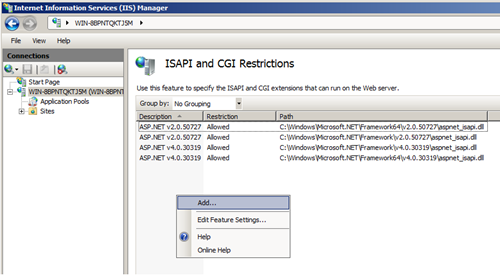
I have a VM with BTS 2010 installed on a Windows Server 2008 R2 x64. In this environment I wanted to find out how to work with HTTP Adapter. Fortunately there two samples found in <install folder>:\Program Files(x86)\BizTalk Server 2010\SDK\Samples\AdapterUsage\HTTPRequestResponse or HTTPSolicitResponse (you will find them if you have selected the SDK feature during BizTalk Installation). Before running the example you will need to follow these steps if working in x64 environment (i.e. my VM):
On a 64 bit machine add: C:\Program Files (x86)\Microsoft BizTalk Server 2010\HttpReceive64\BTSHTTPReceive.dll
2. Check allowed extension path or execute.
For sample for instance RequestResponse, you will need to click setup in HTTPRequestResponse folder. After refreshing IIS you will see HTTPRequestResponseSample.
Now you will have to perform the following steps:
- Click “HTTPRequestResponseSample” on left panel, then click “Handler Mapping” on middle panel, then click “Add script mapping” with the following setting:
Request path:BTSHTTPReceive.dll
Executable:
On 64 bit machine add: C:\Program Files (x86)\Microsoft BizTalk Server 2010\HttpReceive64\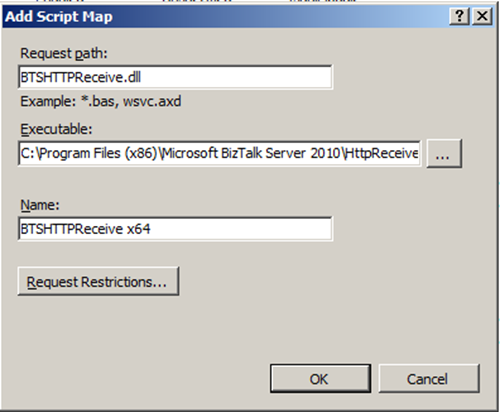
- Click Request Restriction
Click OK and click YES if ask to add this ISAPI extension.
From sample text on MSDN I understand I had to configure the virtual directory for this sample to run under the context of a user in the BizTalk Isolated Host Users and IIS_IURS user groups, So I had to configure the virtual directory to run in a new IIS application pool by completing the following steps (these differ from original text as I have IIS 7.0):
To test if this is working I browsed to web application belonging to this sample.
I entered 1000 in Estimated Price and clicked Place Order.
I got the above as result. I check in BizTalk Administration Console if any error occurred, but I could find any. So I can conclude from that this sample work in my x64 environment. I hope this little exploration of HTTP Adapter in 64-bits environment will help others when configuring their HTTP configuration.
Technorati: biztalk server 2010
I’ve posted the first installment of my What’s New in ASP.NET MVC3 screencast series (version 2.0)
I created a version 2.0 of this series, as I had started it a while back and enough had changed since my initial screencasts that it warranted a fresh start.
Part 1 explores the following topics:
MVC Tooling in Visual Studio (specifically […]
Blog Post by: Michael Gerety
Today Tellago is very happy to announce the open source release of Hermes , a new publish-subscribe messaging technology based on MongoDB and RESTful Services. Publish-subscribe messaging mechanisms are a fundamental component of distributed systems….(read more)
Blog Post by: gsusx

By default the SOAP, HTTP, and HTTP-based WCF adapters (and .NET in general) open only two concurrent HTTP connections from each BizTalk server to any specific destination server. For example, if you have a SOAP send port sending messages to http://www.contoso.com/SomeWebService.asmx, then by default each BizTalk server will open only two concurrent HTTP connections to […]
Blog Post by: Sandro Pereira
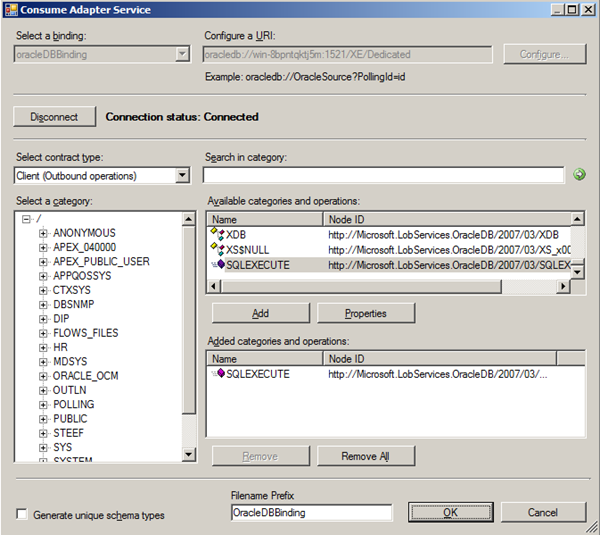
In previous post I detailed polling an Oracle 11g XE (Express) database using OracleDbBinding in WCF-Custom Adapter. Now I like to share how I can perform SQL statements through SQLExecute operation. You can run parameterized SQL statement on an Oracle database through WCF-Custom with OracleDbBinding. This binding supports the SQLExecute operation, which acts on an input parameter block comprised of parameter sets that enable execution of the same SQL statement once for each set. The operation will in the end return the results of the SQL statement in a generic record set.
The SQLEXECUTE operation is surfaced under the root node (/) in the Select a category pane in the Consume Adapter Service BizTalk Project Add-in. To be able to use this operation through orchestration or messaging in BizTalk you need to create a schema. The following steps will lead to creation of this specific schema:


I created a BizTalk project, generated the SQLExecute schema’s and then provided the project with a name. I signed the project with strong name and deployed it. I imported the generated binding into the new BizTalk application and reviewed the configuration of Send Port that was created.

It is important that credentials for accessing Oracle 11g XE are present. If not you will be confronted with error depicted below.

You add credentials with sufficient authorization in credentials tab (I have used system).

Last but not least in Binding tab change the useAmbientTransaction property from True to False, otherwise you will run into a exception, see my last post.
I added a filter expression to the send port as I want to SQLExecute Operation in BizTalk completely message based; filter expression is:
BTS.MessageType == http://Microsoft.LobServices.OracleDB/2007/03/SQLEXECUTE#SQLEXECUTE
Next a receive port and location is created. Latter is configured using FILE Adapter to pickup message with SQLEXECUTE statement. Finally a send port is created to sent response of SQLEXECUTE to file. This port has a filter on response message (type); filter expression is:
BTS.MessageType == http://Microsoft.LobServices.OracleDB/2007/03/SQLEXECUTE#SQLEXECUTEResponse
Messaging based SQLExecute application in BizTalk is now configured and will be started. Next I copy message below to in folder, where it will be picked up and routed to send port. Message will arrive at Oracle 11g and SQLStatement will be executed the resulted will be returned to send port and routed to other send port that has subscription on response message. Response message is depicted below also.
SQLEXECSTATEMENT

SQLEXECSTATEMENTResponse

I hope this little detail of my experience with SQLExecute operation using BizTalk 2010 and its 2010 Adapter Pack can be helpful in your exploration of this operation in Oracle 11g. I have based my detail here on sample (Invoking SQL Statements Using SQLEXECUTE) you can download from BizTalk Adapter Pack 2010 samples. I did not use orchestration example provided nor the schema’s.
Folks,
Finally cracked it!!! ohh how long has this been bugging me.
Basically when I connected my wp7 omnia 7 phone old Zune would complain with
CONNECTION ERROR
Can’t connect to your phone. Disconnect it, restart it, then try connecting again.
I tried a whole series of options from download new wp7 drivers, changing usb ports,
trying everything.
An interesting piece was that my Windows 7 PC detected the device, it was just Zune
complaining.
After checking the EventLogs, I noticed crypto errors everytime I connected my phone.
The Fix:
1. Close Zune
2. Go into Certificate manager and delete the ’Zune-tuner’ (named) certificate(s).
3. Re-Open Zune
4. Connect phone.
Finally
Blog Post by: Mick Badran
Just recently, I finished reading the book BizTalk 2010 Recipes: A Problem-Solution Approach – by Mark Beckner, published by Apress. Overall, I think the read was worthwhile since it helped me fill in some knowledge gaps in BizTalk and introduced me to some of the new features in BizTalk 2010. I am looking at this […]
Blog Post by: Max Weber
For all those up and coming BizTalk developers I will be teaching a BizTalk Server 2010 Developer course in Melbourne in August. So if you have been waiting for BizTalk training this is your chance. The new course material follows closely to the previous Microsoft training for 2006, but has been update to 2010 and has modules for WCF send and receive adapter and a new BizTalk Patterns module. We have a discounted early bird registration through the 20th of July.
For details and registration please go to: https://register.eventarc.com/event/view/4089/tickets/biztalk-2010-developer-training-melbourne.
For any additional information or question please contact me.


